Web Development and Design
Digital assets like websites are at the
heart of successful digital marketing.

Customers and potential customers
interact with them.

Lay solid foundations and create
assets for the best possible user
experience.
Consider:

Accessibility – are there potential barriers?
Usability – is it easy to use?


                  Searchability – can it be found via
                       search?
                  Discoverability –shareable and
                       discoverable?
Technical barriers may be browser
compatibility.
User’s ability barriers could be
language or sight problems.
To address usability use standard
conventions:

•Highlight or make bold key phrases and
words
•Use bulleted lists
•Use paragraphs to break up information
•Use descriptive and distinct headings
Never!

•Resize windows or launch the site in a
pop-up
•Use splash pages
Never!

•Build a site entirely in Flash – most
search engine spiders cannot even
crawl Flash sites
•Distractusers with “Christmas Trees”
(blinking images, flashing lights, etc.)
Make sure your site is visible to search
engines:

Traffic is vital to a website.

Index it fully and consider relevance
for its chosen keywords.
Things must be labelled correctly:
URLs, Alt Tags, Title Tags and Meta Data.
URLs:

Brief and descriptive
http://www.quirk.biz/emarketingtextbook/buy
details.q
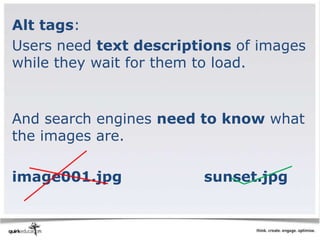
Alt tags:
Users need text descriptions of images
while they wait for them to load.


And search engines need to know what
the images are.

image001.jpg            sunset.jpg
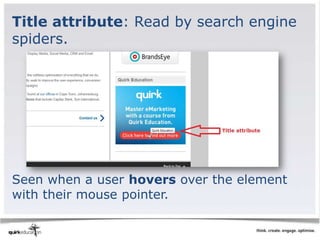
Title attribute: Read by search engine
spiders.


Seen when a user hovers over the element
with their mouse pointer.
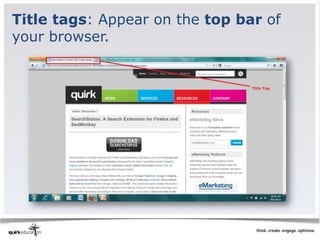
Title tags: Appear on the top bar of
your browser.
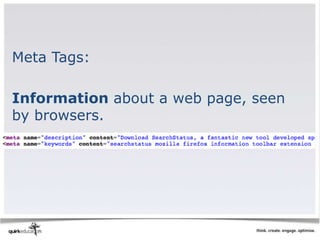
Meta Tags:

Information about a web page, seen
by browsers.
Search engine optimised copy
If the search engine cannot see the
text on the page, they cannot spider
and index that page.
Search engines cannot index text:

•Embedded in a Java Application or a
Macromedia Flash File
•In an image file – use descriptive alt
tags and title attributes
•Only accessible after submitting a
form, logging in, etc.
Create visual identity and design for
persuasion.
Design is not just about aesthetics,
although looks are very important.
Visual identity = how users know
it’s you.

Use logo and corporate identity to inform
the colour palette, fonts, menu buttons
etc.
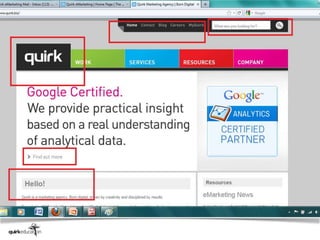
Navigation – show users:

•Where they are
•How they got there
•Where they can go next
•How they get home
Layout = how content is structured
and displayed.

•Apply the fundamentals of good design
•Balance in important
•They should be easy to read
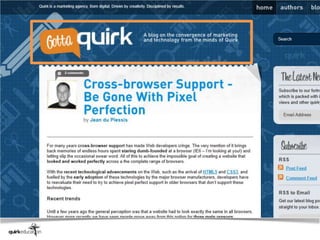
Headers = the usually consistent top
part of a web page. Must be prominent
but simple.
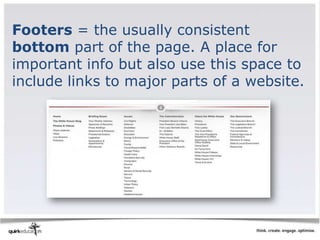
Footers = the usually consistent
bottom part of the page. A place for
important info but also use this space to
include links to major parts of a website.
Credibility = telling users that you are
who you say you are. Make sure your
site:

Looks good; is informative; displays
testimonials, logos and awards; links
to credible third-party references; is
fresh and updated; is error free.
Technology gives it life
When building a site consider:

•Content management
•Interactive interfaces
•Search and usability
Manage content using a Content
Management System (CMS).
Some widely used CMS:

•Wordpress (www.wordpress.com)
•Joomla (www.joomla.org)
•Drupal (www.drupal.com)
•Expression Engine
(www.expressionengine.com)
A range of technologies are available for
interactive interfaces:

•Adobe Flash
•Microsoft Silverlight
•HTML5, with CSS3 and JavaScript
HTML 5 is the
latest evolution of
Hyper Text Markup
Language (HTML 5)
But remember technology is an
enabler, not a site’s main focus.
Consider SEO and usability.
Test it fully then take it live!
Testing should take place throughout
the entire process of planning,
designing and building.
Web development and design can be
seen as the thread that holds digital
marketing together.
Remember - Lay strong foundations
and understand your users needs!
Mobile Development
Mobile phones are changing the way we
access the Internet and communicate.
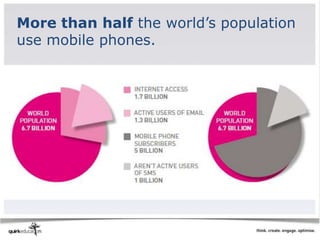
More than half the world’s population
use mobile phones.
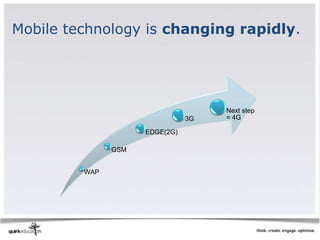
Mobile technology is changing rapidly.


                                     Next step
                                3G   = 4G

                     EDGE(2G)

               GSM


         WAP
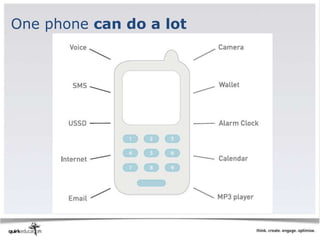
One phone can do a lot
Why use the mobile phone for
marketing?
1. Personal
2. Always carried
3. Always on
4. Built-in payment system
5. Available at the point of creative
inspiration
6. Accurate audience measurements
7. Captures social context of media
consumption
Why mobile web development?
Provides both opportunities and
challenges.
Opportunities:

•Mobile websites – access to your
brand from anywhere!
•Mobile applications – connect with
the customer
Challenges:

•Small screens
•Navigation limitations
•File formats
•Connections and bandwidth
Mobile websites can reach a large
audience.

Mobile applications are more for
targeted niche audiences.
When designing, know that it will
almost never display across multiple
handsets...
But stick to web standards
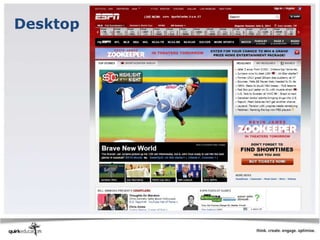
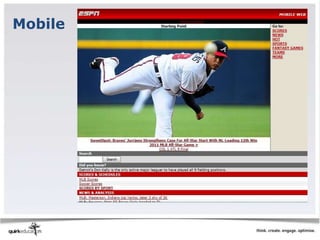
Should it be a pared down version of
the original site?
Desktop
Mobile
Ask yourself why someone is visiting
your mobile site.

•Bored and browsing?
•Task driven and looking for information?
•Performing a repeated action (checking
the weather etc.)?
Do not use pop-ups, and keep scrolling
to one direction.

(http://www.w3.org/TR/mobile-
bp/#SCROLLING)
Don’t use Flash
Use emulators and recruit actual
contacts to test the content display
Some emulators:

•DotMobi -
http://mtld.mobi/emulator.php
•Test iPhone -
http://www.testiphone.com/
•Blackberry -
http://www.blackberry.com/developers/
downloads/simulators/
Develop a branded application
•Your brand can win a dedicated spot
and repeated attention from a targeted
consumer
•You can also extend brand identity by
offering utility or entertainment

MKT 460 Week 3