Principles
of Effective
Web Design
    Multimedia Design
Instructional Goals
•   Understand basic principles of
    effective web design

•   Apply the principles of effective web
    design in designing/developing
    websites
How do users think?
Basically, users’ habits on the Web aren’t that different from customers’
habits in a store. Visitors glance at each new page, scan some of the text,
and click on the first link that catches their interest. In fact, there are large
parts of the page they don’t even look at.


Most users search for something interesting (or useful) and clickable;
as soon as some promising candidates are found, users click. If the new
page doesn’t meet users’ expectations, the Back button is clicked and the
search process is continued.
Users appreciate quality and credibility.
If a page provides users with high-quality content, they are willing to
compromise the content with advertisements and the design of the site.
Content is more important than the design which supports it.

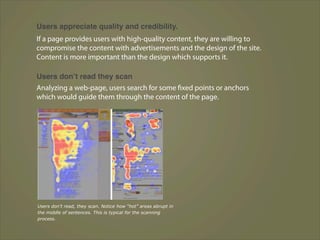
Users donʼt read they scan
Analyzing a web-page, users search for some fixed points or anchors
which would guide them through the content of the page.


Users don’t read, they scan. Notice how “hot” areas abrupt in
the middle of sentences. This is typical for the scanning
process.
Web users are impatient and insist on instant
gratification

Very simple principle:
If a web-site isn’t able to meet users’ expectations, then designer failed to
get his job done properly and the company loses money. The higher is
the cognitive load and the less intuitive is the navigation, the more willing
are users to leave the web-site and search for alternatives.


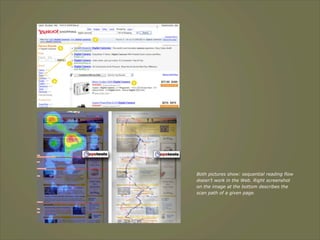
Users donʼt make optimal choices.
Users don’t search for the quickest way to find the information they’re
looking for. Neither do they scan web-page in a linear fashion, going
sequentially from one site section to another one.
Both pictures show: sequential reading flow
doesn’t work in the Web. Right screenshot
on the image at the bottom describes the
scan path of a given page.
Users follow their intuition
In most cases users muddle through instead of reading the information a
designer has provided. “If we find something that works, we stick to it. It
doesn’t matter to us if we understand how things work, as long as we can
use them.

If your audience is going to act like you’re designing billboard, then
design great billboards.”

Users want to have control

Users want to be able to control their browser and rely on the consistent
data presentation throughout the site.
E.g. they don’t want new windows popping up unexpectedly and they
want to be able to get back with a “Back”-button to the site they’ve been
before: therefore it’s a good practice to never open links in new browser
windows.
1. Don’t make users think
According to Krug’s first law of usability, the web-page should be obvious
and self-explanatory. When you’re creating a site, your job is to get rid of
the question marks — the decisions users need to make consciously,
considering pros, cons and alternatives.

If the navigation and site architecture aren’t intuitive, the number of
question marks grows and makes it harder for users to comprehend how
the system works and how to get from point A to point B. A clear structure,
moderate visual clues and easily recognizable links can help users to find
their path to their aim.
Example 1


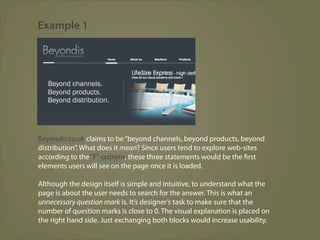
Beyondis.co.uk claims to be “beyond channels, beyond products, beyond
distribution”. What does it mean? Since users tend to explore web-sites
according to the “F”-pattern, these three statements would be the first
elements users will see on the page once it is loaded.

Although the design itself is simple and intuitive, to understand what the
page is about the user needs to search for the answer. This is what an
unnecessary question mark is. It’s designer’s task to make sure that the
number of question marks is close to 0. The visual explanation is placed on
the right hand side. Just exchanging both blocks would increase usability.
Example 2


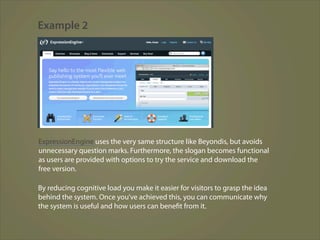
ExpressionEngine uses the very same structure like Beyondis, but avoids
unnecessary question marks. Furthermore, the slogan becomes functional
as users are provided with options to try the service and download the
free version.

By reducing cognitive load you make it easier for visitors to grasp the idea
behind the system. Once you’ve achieved this, you can communicate why
the system is useful and how users can benefit from it.
2. Don’t squander users’ patience
When you are going to offer your visitors some service or tool, try to keep
your user requirements minimal. The less action is required from users
to test a service.
First-time visitors are willing to play with the service, not filling long web
forms for an account they might never use in the future. Let users explore
the site and discover your services without forcing them into sharing
private data.

Users would probably be eager to provide an email address if they were
asked for it after they’d seen the feature work.
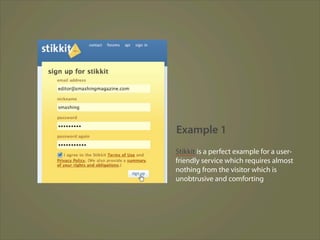
Example 1
Stikkit is a perfect example for a user-
friendly service which requires almost
nothing from the visitor which is
unobtrusive and comforting
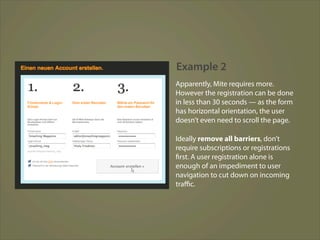
Example 2
Apparently, Mite requires more.
However the registration can be done
in less than 30 seconds — as the form
has horizontal orientation, the user
doesn’t even need to scroll the page.

Ideally remove all barriers, don’t
require subscriptions or registrations
first. A user registration alone is
enough of an impediment to user
navigation to cut down on incoming
traffic.
3. Manage to focus users’ attention
Obviously, images are more eye-catching than the text — just as the
sentences marked as bold are more attractive than plain text.

The human eye is a highly non-linear device, and web-users can instantly
recognize edges, patterns and motions. This is why video-based
advertisements are extremely annoying and distracting, but from the
marketing perspective they perfectly do the job of capturing users’
attention.
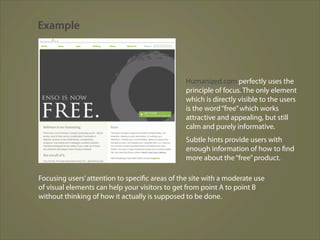
Example


                                                Humanized.com perfectly uses the
                                                principle of focus. The only element
                                                which is directly visible to the users
                                                is the word “free” which works
                                                attractive and appealing, but still
                                                calm and purely informative.
                                                Subtle hints provide users with
                                                enough information of how to find
                                                more about the “free” product.

Focusing users’ attention to specific areas of the site with a moderate use
of visual elements can help your visitors to get from point A to point B
without thinking of how it actually is supposed to be done.
4. Strive for feature exposure
Modern web designs are usually criticized due to their approach of
guiding users with visually appealing 1-2-3-done-steps, large buttons
with visual effects etc.
But from the design perspective these elements actually aren’t a bad
thing. On the contrary, such guidelines are extremely effective as
they lead the visitors through the site content in a very simple and
user-friendly way.
Example


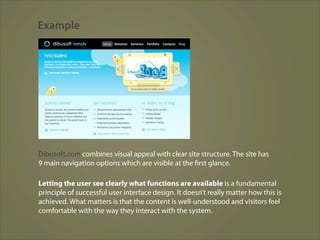
Dibusoft.com combines visual appeal with clear site structure. The site has
9 main navigation options which are visible at the first glance.

Letting the user see clearly what functions are available is a fundamental
principle of successful user interface design. It doesn’t really matter how this is
achieved. What matters is that the content is well-understood and visitors feel
comfortable with the way they interact with the system.
5. Make use of effective writing
As the Web is different from print, it’s necessary to adjust the writing style
to users’ preferences and browsing habits. Promotional writing won’t be
read. Long text blocks without images and keywords marked in bold or
italics will be skipped. Exaggerated language will be ignored.

Talk business. Avoid cute or clever names, marketing-induced names,
company-specific names, and unfamiliar technical names. For instance, if
you describe a service and want users to create an account, “sign up” is
better than “start now!” which is again better than “explore our services”.
Example


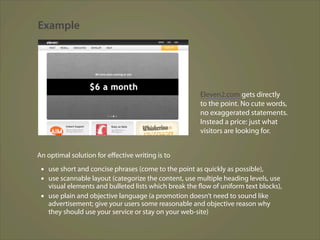
                                                       Eleven2.com gets directly
                                                       to the point. No cute words,
                                                       no exaggerated statements.
                                                       Instead a price: just what
                                                       visitors are looking for.


An optimal solution for effective writing is to
 ▪ use short and concise phrases (come to the point as quickly as possible),
 ▪ use scannable layout (categorize the content, use multiple heading levels, use
   visual elements and bulleted lists which break the flow of uniform text blocks),
 ▪ use plain and objective language (a promotion doesn’t need to sound like
   advertisement; give your users some reasonable and objective reason why
   they should use your service or stay on your web-site)
6. Strive for simplicity
The “keep it simple”-principle (KIS) should be the primary goal of site
design. Users are rarely on a site to enjoy the design; furthermore, in most
cases they are looking for the information despite the design. Strive for
simplicity instead of complexity.
Example 1

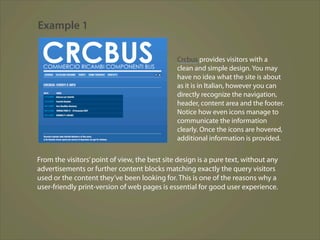
                                               Crcbus provides visitors with a
                                               clean and simple design. You may
                                               have no idea what the site is about
                                               as it is in Italian, however you can
                                               directly recognize the navigation,
                                               header, content area and the footer.
                                               Notice how even icons manage to
                                               communicate the information
                                               clearly. Once the icons are hovered,
                                               additional information is provided.


From the visitors’ point of view, the best site design is a pure text, without any
advertisements or further content blocks matching exactly the query visitors
used or the content they’ve been looking for. This is one of the reasons why a
user-friendly print-version of web pages is essential for good user experience.
Example 2


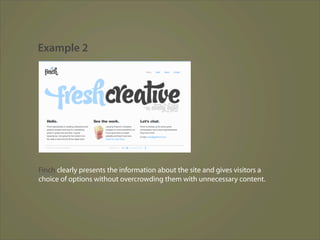
Finch clearly presents the information about the site and gives visitors a
choice of options without overcrowding them with unnecessary content.
7. Don’t be affraid with white space
White space not only help to reduce the cognitive load for the visitors,
but it makes it possible to perceive the information presented on the
screen. When a new visitor approaches a design layout, the first thing he/
she tries to do is to scan the page and divide the content area into
digestible pieces of information.

If you have the choice between separating two design segments by a
visible line or by some whitespace, it’s usually better to use the whitespace
solution. Hierarchical structures reduce complexity (Simon’s Law): the
better you manage to provide users with a sense of visual hierarchy, the
easier your content will be to perceive.
Example


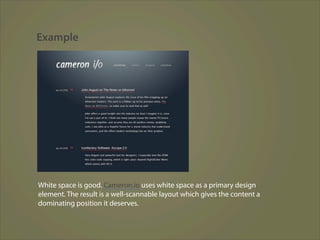
White space is good. Cameron.io uses white space as a primary design
element. The result is a well-scannable layout which gives the content a
dominating position it deserves.
8. Communicate effectively with a
“visible language”
Aaron Marcus states three fundamental principles involved in the use of
the so-called “visible language” — the content users see on a screen.

 ▪ Organize: provide the user with a clear and consistent conceptual structure. Consistency,
   screen layout, relationships and navigability are important concepts of organization. The same
   conventions and rules should be applied to all elements.

 ▪ Economize: do the most with the least amount of cues and visual elements. Four major points
   to be considered: simplicity, clarity, distinctiveness, and emphasis. Simplicity includes only the
   elements that are most important for communication. Clarity: all components should be
   designed so their meaning is not ambiguous. Distinctiveness: the important properties of the
   necessary elements should be distinguishable. Emphasis: the most important elements should
   be easily perceived.

 ▪ Communicate: match the presentation to the capabilities of the user. The user interface must
   keep in balance legibility, readability, typography, symbolism, multiple views, and color or
   texture in order to communicate successfully. Use max. 3 typefaces in a maximum of 3 point
   sizes — a maximum of 18 words or 50-80 characters per line of text.
9. Conventions are our friends
Conventions are very useful as they reduce the learning curve, the need
to figure out how things work. With conventions you can gain users’
confidence, trust, reliability and prove your credibility. Follow users’
expectations — understand what they’re expecting from a site navigation,
text structure, search placement etc.

Steve Krug suggests that it’s better to innovate only when you know
you really have a better idea, but take advantages of conventions when
you don’t.
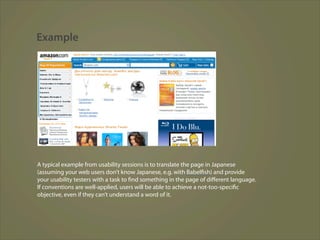
Example


A typical example from usability sessions is to translate the page in Japanese
(assuming your web users don’t know Japanese, e.g. with Babelfish) and provide
your usability testers with a task to find something in the page of different language.
If conventions are well-applied, users will be able to achieve a not-too-specific
objective, even if they can’t understand a word of it.
10. Test early, test often
This principle should be applied to every web design project as usability
tests.

 ▪ Testing one user is 100% better than testing none and testing one user early in the
   project is better than testing 50 near the end.

 ▪ Testing is an iterative process. That means that you design something, test it, fix it
   and then test it again. There might be problems which haven’t been found during the
   first round as users were practically blocked by other problems.

 ▪ Usability tests always produce useful results. Either you’ll be pointed to the
   problems you have or you’ll be pointed to the absence of major design flaws which is
   in both cases a useful insight for your project.

 ▪ A developer is unsuited to test his or her code. This holds for designers as well.
   After you’ve worked on a site for few weeks, you can’t observe it from a fresh
   perspective anymore. You know how it is built and therefore you know exactly how it
   works — you have the wisdom independent testers and visitors of your site wouldn’t
   have.
Reference:
Some sort of usability and accessibility principles:
http://www.smashingmagazine.com/2008/01/31/10-principlesof-effective-web-design/

10 principles of effective web design

  • 1.
  • 2.
    Instructional Goals • Understand basic principles of effective web design • Apply the principles of effective web design in designing/developing websites
  • 3.
    How do usersthink? Basically, users’ habits on the Web aren’t that different from customers’ habits in a store. Visitors glance at each new page, scan some of the text, and click on the first link that catches their interest. In fact, there are large parts of the page they don’t even look at. Most users search for something interesting (or useful) and clickable; as soon as some promising candidates are found, users click. If the new page doesn’t meet users’ expectations, the Back button is clicked and the search process is continued.
  • 4.
    Users appreciate qualityand credibility. If a page provides users with high-quality content, they are willing to compromise the content with advertisements and the design of the site. Content is more important than the design which supports it. Users donʼt read they scan Analyzing a web-page, users search for some fixed points or anchors which would guide them through the content of the page. Users don’t read, they scan. Notice how “hot” areas abrupt in the middle of sentences. This is typical for the scanning process.
  • 5.
    Web users areimpatient and insist on instant gratification Very simple principle: If a web-site isn’t able to meet users’ expectations, then designer failed to get his job done properly and the company loses money. The higher is the cognitive load and the less intuitive is the navigation, the more willing are users to leave the web-site and search for alternatives. Users donʼt make optimal choices. Users don’t search for the quickest way to find the information they’re looking for. Neither do they scan web-page in a linear fashion, going sequentially from one site section to another one.
  • 6.
    Both pictures show:sequential reading flow doesn’t work in the Web. Right screenshot on the image at the bottom describes the scan path of a given page.
  • 7.
    Users follow theirintuition In most cases users muddle through instead of reading the information a designer has provided. “If we find something that works, we stick to it. It doesn’t matter to us if we understand how things work, as long as we can use them. If your audience is going to act like you’re designing billboard, then design great billboards.” Users want to have control Users want to be able to control their browser and rely on the consistent data presentation throughout the site. E.g. they don’t want new windows popping up unexpectedly and they want to be able to get back with a “Back”-button to the site they’ve been before: therefore it’s a good practice to never open links in new browser windows.
  • 8.
    1. Don’t makeusers think According to Krug’s first law of usability, the web-page should be obvious and self-explanatory. When you’re creating a site, your job is to get rid of the question marks — the decisions users need to make consciously, considering pros, cons and alternatives. If the navigation and site architecture aren’t intuitive, the number of question marks grows and makes it harder for users to comprehend how the system works and how to get from point A to point B. A clear structure, moderate visual clues and easily recognizable links can help users to find their path to their aim.
  • 9.
    Example 1 Beyondis.co.uk claimsto be “beyond channels, beyond products, beyond distribution”. What does it mean? Since users tend to explore web-sites according to the “F”-pattern, these three statements would be the first elements users will see on the page once it is loaded. Although the design itself is simple and intuitive, to understand what the page is about the user needs to search for the answer. This is what an unnecessary question mark is. It’s designer’s task to make sure that the number of question marks is close to 0. The visual explanation is placed on the right hand side. Just exchanging both blocks would increase usability.
  • 10.
    Example 2 ExpressionEngine usesthe very same structure like Beyondis, but avoids unnecessary question marks. Furthermore, the slogan becomes functional as users are provided with options to try the service and download the free version. By reducing cognitive load you make it easier for visitors to grasp the idea behind the system. Once you’ve achieved this, you can communicate why the system is useful and how users can benefit from it.
  • 11.
    2. Don’t squanderusers’ patience When you are going to offer your visitors some service or tool, try to keep your user requirements minimal. The less action is required from users to test a service. First-time visitors are willing to play with the service, not filling long web forms for an account they might never use in the future. Let users explore the site and discover your services without forcing them into sharing private data. Users would probably be eager to provide an email address if they were asked for it after they’d seen the feature work.
  • 12.
    Example 1 Stikkit isa perfect example for a user- friendly service which requires almost nothing from the visitor which is unobtrusive and comforting
  • 13.
    Example 2 Apparently, Miterequires more. However the registration can be done in less than 30 seconds — as the form has horizontal orientation, the user doesn’t even need to scroll the page. Ideally remove all barriers, don’t require subscriptions or registrations first. A user registration alone is enough of an impediment to user navigation to cut down on incoming traffic.
  • 14.
    3. Manage tofocus users’ attention Obviously, images are more eye-catching than the text — just as the sentences marked as bold are more attractive than plain text. The human eye is a highly non-linear device, and web-users can instantly recognize edges, patterns and motions. This is why video-based advertisements are extremely annoying and distracting, but from the marketing perspective they perfectly do the job of capturing users’ attention.
  • 15.
    Example Humanized.com perfectly uses the principle of focus. The only element which is directly visible to the users is the word “free” which works attractive and appealing, but still calm and purely informative. Subtle hints provide users with enough information of how to find more about the “free” product. Focusing users’ attention to specific areas of the site with a moderate use of visual elements can help your visitors to get from point A to point B without thinking of how it actually is supposed to be done.
  • 16.
    4. Strive forfeature exposure Modern web designs are usually criticized due to their approach of guiding users with visually appealing 1-2-3-done-steps, large buttons with visual effects etc. But from the design perspective these elements actually aren’t a bad thing. On the contrary, such guidelines are extremely effective as they lead the visitors through the site content in a very simple and user-friendly way.
  • 17.
    Example Dibusoft.com combines visualappeal with clear site structure. The site has 9 main navigation options which are visible at the first glance. Letting the user see clearly what functions are available is a fundamental principle of successful user interface design. It doesn’t really matter how this is achieved. What matters is that the content is well-understood and visitors feel comfortable with the way they interact with the system.
  • 18.
    5. Make useof effective writing As the Web is different from print, it’s necessary to adjust the writing style to users’ preferences and browsing habits. Promotional writing won’t be read. Long text blocks without images and keywords marked in bold or italics will be skipped. Exaggerated language will be ignored. Talk business. Avoid cute or clever names, marketing-induced names, company-specific names, and unfamiliar technical names. For instance, if you describe a service and want users to create an account, “sign up” is better than “start now!” which is again better than “explore our services”.
  • 19.
    Example Eleven2.com gets directly to the point. No cute words, no exaggerated statements. Instead a price: just what visitors are looking for. An optimal solution for effective writing is to ▪ use short and concise phrases (come to the point as quickly as possible), ▪ use scannable layout (categorize the content, use multiple heading levels, use visual elements and bulleted lists which break the flow of uniform text blocks), ▪ use plain and objective language (a promotion doesn’t need to sound like advertisement; give your users some reasonable and objective reason why they should use your service or stay on your web-site)
  • 20.
    6. Strive forsimplicity The “keep it simple”-principle (KIS) should be the primary goal of site design. Users are rarely on a site to enjoy the design; furthermore, in most cases they are looking for the information despite the design. Strive for simplicity instead of complexity.
  • 21.
    Example 1 Crcbus provides visitors with a clean and simple design. You may have no idea what the site is about as it is in Italian, however you can directly recognize the navigation, header, content area and the footer. Notice how even icons manage to communicate the information clearly. Once the icons are hovered, additional information is provided. From the visitors’ point of view, the best site design is a pure text, without any advertisements or further content blocks matching exactly the query visitors used or the content they’ve been looking for. This is one of the reasons why a user-friendly print-version of web pages is essential for good user experience.
  • 22.
    Example 2 Finch clearlypresents the information about the site and gives visitors a choice of options without overcrowding them with unnecessary content.
  • 23.
    7. Don’t beaffraid with white space White space not only help to reduce the cognitive load for the visitors, but it makes it possible to perceive the information presented on the screen. When a new visitor approaches a design layout, the first thing he/ she tries to do is to scan the page and divide the content area into digestible pieces of information. If you have the choice between separating two design segments by a visible line or by some whitespace, it’s usually better to use the whitespace solution. Hierarchical structures reduce complexity (Simon’s Law): the better you manage to provide users with a sense of visual hierarchy, the easier your content will be to perceive.
  • 24.
    Example White space isgood. Cameron.io uses white space as a primary design element. The result is a well-scannable layout which gives the content a dominating position it deserves.
  • 25.
    8. Communicate effectivelywith a “visible language” Aaron Marcus states three fundamental principles involved in the use of the so-called “visible language” — the content users see on a screen. ▪ Organize: provide the user with a clear and consistent conceptual structure. Consistency, screen layout, relationships and navigability are important concepts of organization. The same conventions and rules should be applied to all elements. ▪ Economize: do the most with the least amount of cues and visual elements. Four major points to be considered: simplicity, clarity, distinctiveness, and emphasis. Simplicity includes only the elements that are most important for communication. Clarity: all components should be designed so their meaning is not ambiguous. Distinctiveness: the important properties of the necessary elements should be distinguishable. Emphasis: the most important elements should be easily perceived. ▪ Communicate: match the presentation to the capabilities of the user. The user interface must keep in balance legibility, readability, typography, symbolism, multiple views, and color or texture in order to communicate successfully. Use max. 3 typefaces in a maximum of 3 point sizes — a maximum of 18 words or 50-80 characters per line of text.
  • 26.
    9. Conventions areour friends Conventions are very useful as they reduce the learning curve, the need to figure out how things work. With conventions you can gain users’ confidence, trust, reliability and prove your credibility. Follow users’ expectations — understand what they’re expecting from a site navigation, text structure, search placement etc. Steve Krug suggests that it’s better to innovate only when you know you really have a better idea, but take advantages of conventions when you don’t.
  • 27.
    Example A typical examplefrom usability sessions is to translate the page in Japanese (assuming your web users don’t know Japanese, e.g. with Babelfish) and provide your usability testers with a task to find something in the page of different language. If conventions are well-applied, users will be able to achieve a not-too-specific objective, even if they can’t understand a word of it.
  • 28.
    10. Test early,test often This principle should be applied to every web design project as usability tests. ▪ Testing one user is 100% better than testing none and testing one user early in the project is better than testing 50 near the end. ▪ Testing is an iterative process. That means that you design something, test it, fix it and then test it again. There might be problems which haven’t been found during the first round as users were practically blocked by other problems. ▪ Usability tests always produce useful results. Either you’ll be pointed to the problems you have or you’ll be pointed to the absence of major design flaws which is in both cases a useful insight for your project. ▪ A developer is unsuited to test his or her code. This holds for designers as well. After you’ve worked on a site for few weeks, you can’t observe it from a fresh perspective anymore. You know how it is built and therefore you know exactly how it works — you have the wisdom independent testers and visitors of your site wouldn’t have.
  • 29.
    Reference: Some sort ofusability and accessibility principles: http://www.smashingmagazine.com/2008/01/31/10-principlesof-effective-web-design/