



Digital Marketing 101
12th November 2014
Ground Rules
• The microphone is muted. I shall not be able to hear you.
• If you have a question, please type it in the chat box
• Please mention your name & city when you type your message
• We will take up questions after the webinar is over
• A recording of this webinar will be made available to you for
later viewing.
Agenda
• Overview of Digital Marketing
• Online Presence
• Search Engine Optimization
• Advertising
• Social Media
• Email Marketing
• Q&A session
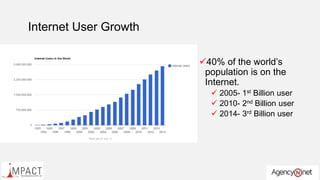
Internet User Growth
40% of the world’s
population is on the
Internet.
 2005- 1st Billion user
 2010- 2nd Billion user
 2014- 3rd Billion user
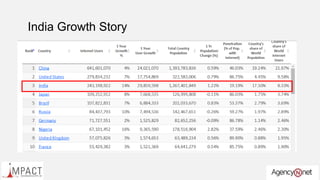
India Growth Story
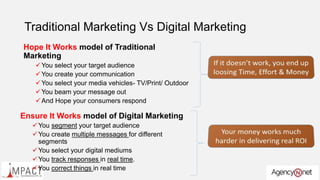
Traditional Marketing Vs Digital Marketing
Hope It Works model of Traditional
Marketing
You select your target audience
You create your communication
You select your media vehicles- TV/Print/ Outdoor
You beam your message out
And Hope your consumers respond
Ensure It Works model of Digital Marketing
You segment your target audience
You create multiple messages for different
segments
You select your digital mediums
You track responses in real time.
You correct things in real time
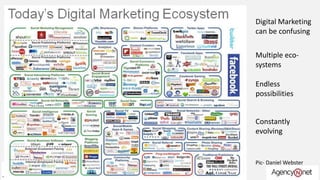
Digital Marketing
can be confusing
Multiple eco-
systems
Endless
possibilities
Constantly
evolving
Pic- Daniel Webster
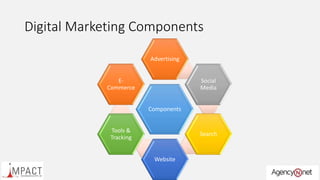
Digital Marketing Components
Components
Advertising
Social
Media
Search
Website
Tools &
Tracking
E-
Commerce
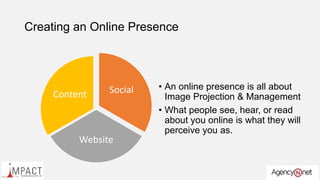
Online Presence
Creating an Online Presence
Social
Website
Content
• An online presence is all about
Image Projection & Management
• What people see, hear, or read
about you online is what they will
perceive you as.
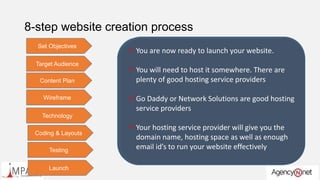
8-step website creation process
Target Audience
 Who is the Target Audience for your website?
 What are the demographics of your target
audience?
 Males? Women? Young adults? Children ?
 What are the psychographic profile of your target
audience?
 Early adopters? Opinion leaders? Late
Laggards?
 Give 5 key reasons for your target audience to
visit your website?
 Your content plan & layout will be influenced
by these reasons
Set Objectives  The website is fundamentally your most important business
development representative
 He works 24 x 7, 365 days.
 You don’t have to pay him anything
 Why do you think users will primarily come to the website ?
 For Information? For Help? To buy ?
 When I meet my customer face to face am I sharing some
additional information that is not going to be on my site?
 Am I selling a product or a service? What aspect of my product or
service carries most weight to my customer?
 What do I hope to achieve by creating a website?
 Sales?
 Leads?
 Support ?
 Information?
Content Plan
 Define the content that will go into your website ?
 The content is to be planned basis what you want your website to
primarily achieve
 Is the content available in-house? Or would you need it to be
created?
 Will the content change over time? How frequently will it
change? What will change in your content?
 Answers to this will define your content requirements for your
site as well as your monthly maintaience costs .
Wireframe
 Wire framing is the process by which the overall
layout of the site is defined before one gets into
expensive designing and lay outing.
 It helps both programmers, designers and clients
to understand the overall flow of the website and
the content requirements
 Wire framing also helps designers and coders to
work independent of each other thereby cutting
down time considerably.
 There are several tools that help in creating
wireframes easily.
Technology
 Define the Technology that would be used for
the website.
 Would you be using a CMS system? Ideally you
should unless you do not intend to do any
changes on your site!
 Would you be creating and storing information ?
You would need to integrate a database within
your website in this case.
 Dot Net is the most common & widely used
technology in creating websites.Coding & Layouts
 Once you’re Wire Frame is approved, you can
move into the actual programming and Coding of
the website.
 If you are creating a simple website, it’s best to
use ready-to-use tools like Word Press through
which you could quickly and easily create your
own website.
 If your website is complex , ensure that there is a
project manager who straddles the programming
team and design team.
Testing
 Never launch a website without first testing it.
 Ensure that you have a backend website analytics
tool integrated with your site. Google Analytics is
free and will serve the purpose most times.
 Test your site for:
 Link testing
 Algorithm testing
 Auto-responder testing
 User Flow testing
 It’s human to have errors – hence test , test &
test.
Launch
 You are now ready to launch your website.
 You will need to host it somewhere. There are
plenty of good hosting service providers
 Go Daddy or Network Solutions are good hosting
service providers
 Your hosting service provider will give you the
domain name, hosting space as well as enough
email id’s to run your website effectively
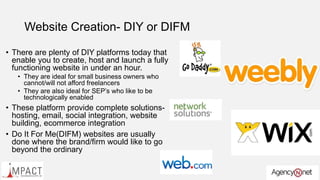
Website Creation- DIY or DIFM
• There are plenty of DIY platforms today that
enable you to create, host and launch a fully
functioning website in under an hour.
• They are ideal for small business owners who
cannot/will not afford freelancers
• They are also ideal for SEP’s who like to be
technologically enabled
• These platform provide complete solutions-
hosting, email, social integration, website
building, ecommerce integration
• Do It For Me(DIFM) websites are usually
done where the brand/firm would like to go
beyond the ordinary
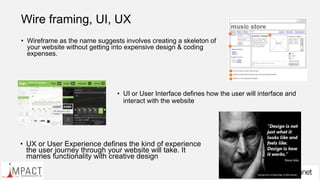
Wire framing, UI, UX
• Wireframe as the name suggests involves creating a skeleton of
your website without getting into expensive design & coding
expenses.
• UI or User Interface defines how the user will interface and
interact with the website
• UX or User Experience defines the kind of experience
the user journey through your website will take. It
marries functionality with creative design
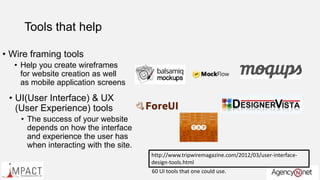
Tools that help
• Wire framing tools
• Help you create wireframes
for website creation as well
as mobile application screens
• UI(User Interface) & UX
(User Experience) tools
• The success of your website
depends on how the interface
and experience the user has
when interacting with the site.
http://www.tripwiremagazine.com/2012/03/user-interface-
design-tools.html
60 UI tools that one could use.
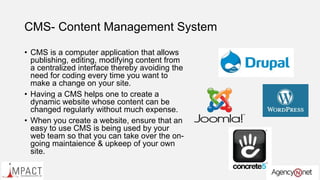
CMS- Content Management System
• CMS is a computer application that allows
publishing, editing, modifying content from
a centralized interface thereby avoiding the
need for coding every time you want to
make a change on your site.
• Having a CMS helps one to create a
dynamic website whose content can be
changed regularly without much expense.
• When you create a website, ensure that an
easy to use CMS is being used by your
web team so that you can take over the on-
going maintaience & upkeep of your own
site.
Website analytics
• Website analytics help you to understand
your website traffic better so that you can
modify and fine tune your site accordingly.
• Who is visiting
• From where he came
• What he did on your site
• How long he was there
• New visitor or returning visitor?
• Analytics can also be integrated with your
advertising so that you can track the
impact your advertising has had on site
visitors and conversions
Search Engine Optimization
SEO
SEO & its importance
• SEO is the process of affecting the visibility of a website in a search
engine’s natural search results
• Through SEO, a website’s natural rank is increased through which
the site begins to rank on the 1st page of the search results.
• There is a direct correlation between the rank of a website on the
page search results and the natural traffic that a site draws.
• Firms therefore spend thousands of dollars in ensuring that the
website appears on key search results on page 1.
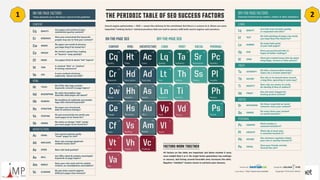
• Almost all SEO work is done keeping Google Search algorithm in
mind
1 2
SEO analytics
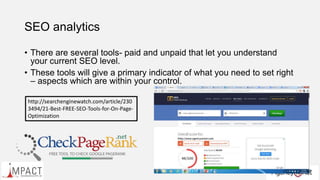
• There are several tools- paid and unpaid that let you understand
your current SEO level.
• These tools will give a primary indicator of what you need to set right
– aspects which are within your control.
http://searchenginewatch.com/article/230
3494/21-Best-FREE-SEO-Tools-for-On-Page-
Optimization
Advertising
The Pie is growing
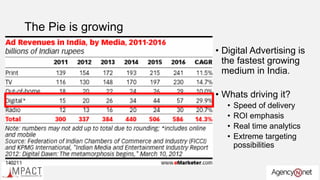
• Digital Advertising is
the fastest growing
medium in India.
• Whats driving it?
• Speed of delivery
• ROI emphasis
• Real time analytics
• Extreme targeting
possibilities
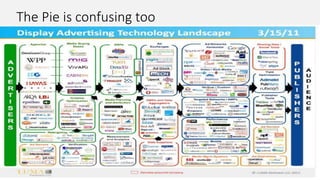
The Pie is confusing too
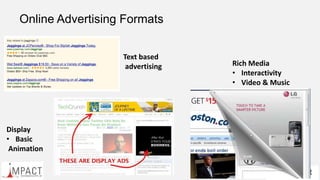
Online Advertising Formats
Text based
advertising Rich Media
• Interactivity
• Video & Music
Display
• Basic
Animation
Delivery Mechanisms
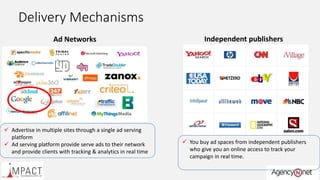
Ad Networks
 Advertise in multiple sites through a single ad serving
platform
 Ad serving platform provide serve ads to their network
and provide clients with tracking & analytics in real time
Independent publishers
 You buy ad spaces from independent publishers
who give you an online access to track your
campaign in real time.
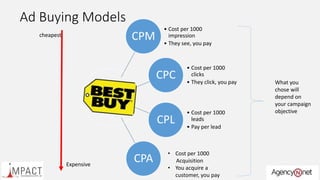
Ad Buying Models
CPM
• Cost per 1000
impression
• They see, you pay
CPC
• Cost per 1000
clicks
• They click, you pay
CPL
• Cost per 1000
leads
• Pay per lead
CPA
• Cost per 1000
Acquisition
• You acquire a
customer, you pay
What you
chose will
depend on
your campaign
objective
cheapest
Expensive
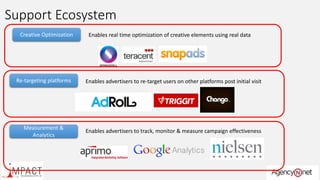
Support Ecosystem
Creative Optimization Enables real time optimization of creative elements using real data
Re-targeting platforms Enables advertisers to re-target users on other platforms post initial visit
Measurement &
Analytics
Enables advertisers to track, monitor & measure campaign effectiveness
Social Media
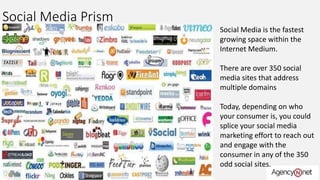
Social Media Prism
Social Media is the fastest
growing space within the
Internet Medium.
There are over 350 social
media sites that address
multiple domains
Today, depending on who
your consumer is, you could
splice your social media
marketing effort to reach out
and engage with the
consumer in any of the 350
odd social sites.
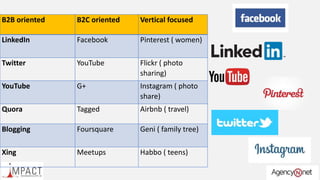
B2B oriented B2C oriented Vertical focused
LinkedIn Facebook Pinterest ( women)
Twitter YouTube Flickr ( photo
sharing)
YouTube G+ Instagram ( photo
share)
Quora Tagged Airbnb ( travel)
Blogging Foursquare Geni ( family tree)
Xing Meetups Habbo ( teens)
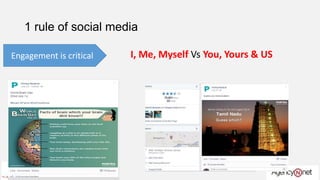
1 rule of social media
Engagement is critical I, Me, Myself Vs You, Yours & US
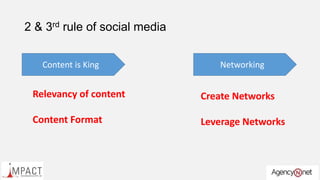
2 & 3rd rule of social media
Content is King
Relevancy of content
Content Format
Networking
Create Networks
Leverage Networks
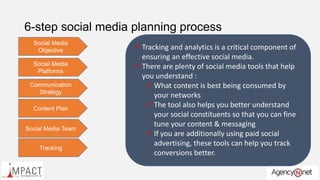
6-step social media planning process
Social Media
Objective  What do you want to achieve from your social
media presence?
 Build a community?
 Drive engagement with the community?
 Sell to the community?
 Build thought leadership?
 Not having a social media goal is like shooting a
ball aimlessly and hoping its headed towards the
goal post!
Social Media
Platforms
 Select your social media platform basis your
business.
 Are you a B2B or a B2C company?
 It’s better to be strong in 1-2 key social media
platforms than be weak in several ones.
 Choose your primary 2 platforms with care. The
secondary ones could be less important
platforms.
 Select your platforms based on what they deliver
and basis what kind of content you can come up
with. For example there is no use of selecting
Youtube if you cannot come up with video
content
Communication
Strategy
 This defines what you will want to say and the
manner in which you will communicate to your
social network.
 Remember your social network is not just limited
to those who are connected to you but also
encompasses others
 Would you using blogging sites to spread the
message?
 In what format will you communicate your
messaging?
 Text? User Driven content?
 Visual? Infographic?
 Video ?
Content Plan
 Create a well defined content plan for your social
engagement.
 Content plan details out :
 What will be communicated?
 Frequency? Periodicity
 Format
 Calenderize your content weekly
 Use 3rd party content sources if you cannot
create your own content.
 Look at content that will aid virality of your
message.
Social Media Team
 In-house execution or out-sourced execution?
 A good social media executive should have some
basic social skills
 Good command over English
 Creative, out of the box thinker
 How active is the person on social media
 Ability to spot social trends
 Ensure that you have an effective social media
communication tool to handle the social media
work
Tracking
 Tracking and analytics is a critical component of
ensuring an effective social media.
 There are plenty of social media tools that help
you understand :
 What content is best being consumed by
your networks
 The tool also helps you better understand
your social constituents so that you can fine
tune your content & messaging
 If you are additionally using paid social
advertising, these tools can help you track
conversions better.
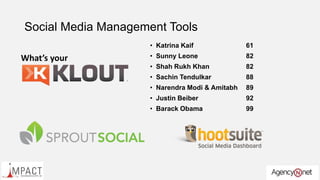
Social Media Management Tools
• Katrina Kaif 61
• Sunny Leone 82
• Shah Rukh Khan 82
• Sachin Tendulkar 88
• Narendra Modi & Amitabh 89
• Justin Beiber 92
• Barack Obama 99
What’s your
Email Marketing
Email Marketing
• 144 Billion Emails are sent out everyday!
• The most used and the most abused marketing technique.
• It is cheap & economical
• It is Fast
• It works
• You cannot afford to ignore email marketing if you are in the digital
marketing business. It has to be integral to your marketing mix.
6 steps to running an email marketing campaign
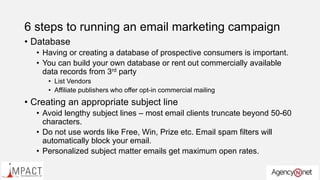
• Database
• Having or creating a database of prospective consumers is important.
• You can build your own database or rent out commercially available
data records from 3rd party
• List Vendors
• Affiliate publishers who offer opt-in commercial mailing
• Creating an appropriate subject line
• Avoid lengthy subject lines – most email clients truncate beyond 50-60
characters.
• Do not use words like Free, Win, Prize etc. Email spam filters will
automatically block your email.
• Personalized subject matter emails get maximum open rates.
6 steps to running an email marketing campaign
• A/B Testing
• Test out your email with different subject
lines & copy to see which one gets a better
open rate and click through rate.
• Test out the best times your email gets
highest open rates. Is it early morning? Mid
morning? Late evening? A lot will depend on
the audience type you’re sending the email
out too.
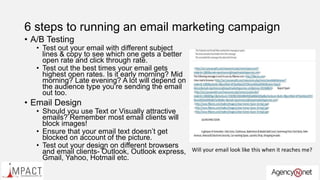
• Email Design
• Should you use Text or Visually attractive
emails? Remember most email clients will
block images!
• Ensure that your email text doesn’t get
blocked on account of the picture.
• Test out your design on different browsers
and email clients- Outlook, Outlook express,
Gmail, Yahoo, Hotmail etc.
Will your email look like this when it reaches me?
6 steps to running an email marketing campaign
• Call to Action
• Ensure that your call to action is loud
and clear in your email – What do you
want the prospect to do next?
• Tracking
• Invest in a email campaign management
tool that allows you to broadcast as well
as track your email campaign
• Who opened?
• On what device?
• On what client?
• On what browser?
• Who clicked? How many ?
• What did they click on?
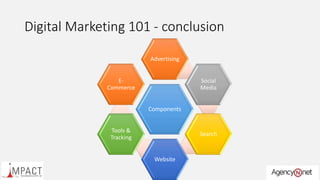
Digital Marketing 101 - conclusion
Components
Advertising
Social
Media
Search
Website
Tools &
Tracking
E-
Commerce
Thank you
Questions Please

Digital marketing 101 v1.0

  • 1.
  • 2.
    Ground Rules • Themicrophone is muted. I shall not be able to hear you. • If you have a question, please type it in the chat box • Please mention your name & city when you type your message • We will take up questions after the webinar is over • A recording of this webinar will be made available to you for later viewing.
  • 3.
    Agenda • Overview ofDigital Marketing • Online Presence • Search Engine Optimization • Advertising • Social Media • Email Marketing • Q&A session
  • 4.
    Internet User Growth 40%of the world’s population is on the Internet.  2005- 1st Billion user  2010- 2nd Billion user  2014- 3rd Billion user
  • 5.
  • 6.
    Traditional Marketing VsDigital Marketing Hope It Works model of Traditional Marketing You select your target audience You create your communication You select your media vehicles- TV/Print/ Outdoor You beam your message out And Hope your consumers respond Ensure It Works model of Digital Marketing You segment your target audience You create multiple messages for different segments You select your digital mediums You track responses in real time. You correct things in real time
  • 7.
    Digital Marketing can beconfusing Multiple eco- systems Endless possibilities Constantly evolving Pic- Daniel Webster
  • 8.
  • 9.
  • 10.
    Creating an OnlinePresence Social Website Content • An online presence is all about Image Projection & Management • What people see, hear, or read about you online is what they will perceive you as.
  • 11.
    8-step website creationprocess Target Audience  Who is the Target Audience for your website?  What are the demographics of your target audience?  Males? Women? Young adults? Children ?  What are the psychographic profile of your target audience?  Early adopters? Opinion leaders? Late Laggards?  Give 5 key reasons for your target audience to visit your website?  Your content plan & layout will be influenced by these reasons Set Objectives  The website is fundamentally your most important business development representative  He works 24 x 7, 365 days.  You don’t have to pay him anything  Why do you think users will primarily come to the website ?  For Information? For Help? To buy ?  When I meet my customer face to face am I sharing some additional information that is not going to be on my site?  Am I selling a product or a service? What aspect of my product or service carries most weight to my customer?  What do I hope to achieve by creating a website?  Sales?  Leads?  Support ?  Information? Content Plan  Define the content that will go into your website ?  The content is to be planned basis what you want your website to primarily achieve  Is the content available in-house? Or would you need it to be created?  Will the content change over time? How frequently will it change? What will change in your content?  Answers to this will define your content requirements for your site as well as your monthly maintaience costs . Wireframe  Wire framing is the process by which the overall layout of the site is defined before one gets into expensive designing and lay outing.  It helps both programmers, designers and clients to understand the overall flow of the website and the content requirements  Wire framing also helps designers and coders to work independent of each other thereby cutting down time considerably.  There are several tools that help in creating wireframes easily. Technology  Define the Technology that would be used for the website.  Would you be using a CMS system? Ideally you should unless you do not intend to do any changes on your site!  Would you be creating and storing information ? You would need to integrate a database within your website in this case.  Dot Net is the most common & widely used technology in creating websites.Coding & Layouts  Once you’re Wire Frame is approved, you can move into the actual programming and Coding of the website.  If you are creating a simple website, it’s best to use ready-to-use tools like Word Press through which you could quickly and easily create your own website.  If your website is complex , ensure that there is a project manager who straddles the programming team and design team. Testing  Never launch a website without first testing it.  Ensure that you have a backend website analytics tool integrated with your site. Google Analytics is free and will serve the purpose most times.  Test your site for:  Link testing  Algorithm testing  Auto-responder testing  User Flow testing  It’s human to have errors – hence test , test & test. Launch  You are now ready to launch your website.  You will need to host it somewhere. There are plenty of good hosting service providers  Go Daddy or Network Solutions are good hosting service providers  Your hosting service provider will give you the domain name, hosting space as well as enough email id’s to run your website effectively
  • 12.
    Website Creation- DIYor DIFM • There are plenty of DIY platforms today that enable you to create, host and launch a fully functioning website in under an hour. • They are ideal for small business owners who cannot/will not afford freelancers • They are also ideal for SEP’s who like to be technologically enabled • These platform provide complete solutions- hosting, email, social integration, website building, ecommerce integration • Do It For Me(DIFM) websites are usually done where the brand/firm would like to go beyond the ordinary
  • 13.
    Wire framing, UI,UX • Wireframe as the name suggests involves creating a skeleton of your website without getting into expensive design & coding expenses. • UI or User Interface defines how the user will interface and interact with the website • UX or User Experience defines the kind of experience the user journey through your website will take. It marries functionality with creative design
  • 14.
    Tools that help •Wire framing tools • Help you create wireframes for website creation as well as mobile application screens • UI(User Interface) & UX (User Experience) tools • The success of your website depends on how the interface and experience the user has when interacting with the site. http://www.tripwiremagazine.com/2012/03/user-interface- design-tools.html 60 UI tools that one could use.
  • 15.
    CMS- Content ManagementSystem • CMS is a computer application that allows publishing, editing, modifying content from a centralized interface thereby avoiding the need for coding every time you want to make a change on your site. • Having a CMS helps one to create a dynamic website whose content can be changed regularly without much expense. • When you create a website, ensure that an easy to use CMS is being used by your web team so that you can take over the on- going maintaience & upkeep of your own site.
  • 16.
    Website analytics • Websiteanalytics help you to understand your website traffic better so that you can modify and fine tune your site accordingly. • Who is visiting • From where he came • What he did on your site • How long he was there • New visitor or returning visitor? • Analytics can also be integrated with your advertising so that you can track the impact your advertising has had on site visitors and conversions
  • 17.
  • 18.
    SEO & itsimportance • SEO is the process of affecting the visibility of a website in a search engine’s natural search results • Through SEO, a website’s natural rank is increased through which the site begins to rank on the 1st page of the search results. • There is a direct correlation between the rank of a website on the page search results and the natural traffic that a site draws. • Firms therefore spend thousands of dollars in ensuring that the website appears on key search results on page 1. • Almost all SEO work is done keeping Google Search algorithm in mind
  • 19.
  • 20.
    SEO analytics • Thereare several tools- paid and unpaid that let you understand your current SEO level. • These tools will give a primary indicator of what you need to set right – aspects which are within your control. http://searchenginewatch.com/article/230 3494/21-Best-FREE-SEO-Tools-for-On-Page- Optimization
  • 21.
  • 22.
    The Pie isgrowing • Digital Advertising is the fastest growing medium in India. • Whats driving it? • Speed of delivery • ROI emphasis • Real time analytics • Extreme targeting possibilities
  • 23.
    The Pie isconfusing too
  • 24.
    Online Advertising Formats Textbased advertising Rich Media • Interactivity • Video & Music Display • Basic Animation
  • 25.
    Delivery Mechanisms Ad Networks Advertise in multiple sites through a single ad serving platform  Ad serving platform provide serve ads to their network and provide clients with tracking & analytics in real time Independent publishers  You buy ad spaces from independent publishers who give you an online access to track your campaign in real time.
  • 26.
    Ad Buying Models CPM •Cost per 1000 impression • They see, you pay CPC • Cost per 1000 clicks • They click, you pay CPL • Cost per 1000 leads • Pay per lead CPA • Cost per 1000 Acquisition • You acquire a customer, you pay What you chose will depend on your campaign objective cheapest Expensive
  • 27.
    Support Ecosystem Creative OptimizationEnables real time optimization of creative elements using real data Re-targeting platforms Enables advertisers to re-target users on other platforms post initial visit Measurement & Analytics Enables advertisers to track, monitor & measure campaign effectiveness
  • 28.
  • 29.
    Social Media Prism SocialMedia is the fastest growing space within the Internet Medium. There are over 350 social media sites that address multiple domains Today, depending on who your consumer is, you could splice your social media marketing effort to reach out and engage with the consumer in any of the 350 odd social sites.
  • 30.
    B2B oriented B2Coriented Vertical focused LinkedIn Facebook Pinterest ( women) Twitter YouTube Flickr ( photo sharing) YouTube G+ Instagram ( photo share) Quora Tagged Airbnb ( travel) Blogging Foursquare Geni ( family tree) Xing Meetups Habbo ( teens)
  • 31.
    1 rule ofsocial media Engagement is critical I, Me, Myself Vs You, Yours & US
  • 32.
    2 & 3rdrule of social media Content is King Relevancy of content Content Format Networking Create Networks Leverage Networks
  • 33.
    6-step social mediaplanning process Social Media Objective  What do you want to achieve from your social media presence?  Build a community?  Drive engagement with the community?  Sell to the community?  Build thought leadership?  Not having a social media goal is like shooting a ball aimlessly and hoping its headed towards the goal post! Social Media Platforms  Select your social media platform basis your business.  Are you a B2B or a B2C company?  It’s better to be strong in 1-2 key social media platforms than be weak in several ones.  Choose your primary 2 platforms with care. The secondary ones could be less important platforms.  Select your platforms based on what they deliver and basis what kind of content you can come up with. For example there is no use of selecting Youtube if you cannot come up with video content Communication Strategy  This defines what you will want to say and the manner in which you will communicate to your social network.  Remember your social network is not just limited to those who are connected to you but also encompasses others  Would you using blogging sites to spread the message?  In what format will you communicate your messaging?  Text? User Driven content?  Visual? Infographic?  Video ? Content Plan  Create a well defined content plan for your social engagement.  Content plan details out :  What will be communicated?  Frequency? Periodicity  Format  Calenderize your content weekly  Use 3rd party content sources if you cannot create your own content.  Look at content that will aid virality of your message. Social Media Team  In-house execution or out-sourced execution?  A good social media executive should have some basic social skills  Good command over English  Creative, out of the box thinker  How active is the person on social media  Ability to spot social trends  Ensure that you have an effective social media communication tool to handle the social media work Tracking  Tracking and analytics is a critical component of ensuring an effective social media.  There are plenty of social media tools that help you understand :  What content is best being consumed by your networks  The tool also helps you better understand your social constituents so that you can fine tune your content & messaging  If you are additionally using paid social advertising, these tools can help you track conversions better.
  • 34.
    Social Media ManagementTools • Katrina Kaif 61 • Sunny Leone 82 • Shah Rukh Khan 82 • Sachin Tendulkar 88 • Narendra Modi & Amitabh 89 • Justin Beiber 92 • Barack Obama 99 What’s your
  • 35.
  • 36.
    Email Marketing • 144Billion Emails are sent out everyday! • The most used and the most abused marketing technique. • It is cheap & economical • It is Fast • It works • You cannot afford to ignore email marketing if you are in the digital marketing business. It has to be integral to your marketing mix.
  • 37.
    6 steps torunning an email marketing campaign • Database • Having or creating a database of prospective consumers is important. • You can build your own database or rent out commercially available data records from 3rd party • List Vendors • Affiliate publishers who offer opt-in commercial mailing • Creating an appropriate subject line • Avoid lengthy subject lines – most email clients truncate beyond 50-60 characters. • Do not use words like Free, Win, Prize etc. Email spam filters will automatically block your email. • Personalized subject matter emails get maximum open rates.
  • 38.
    6 steps torunning an email marketing campaign • A/B Testing • Test out your email with different subject lines & copy to see which one gets a better open rate and click through rate. • Test out the best times your email gets highest open rates. Is it early morning? Mid morning? Late evening? A lot will depend on the audience type you’re sending the email out too. • Email Design • Should you use Text or Visually attractive emails? Remember most email clients will block images! • Ensure that your email text doesn’t get blocked on account of the picture. • Test out your design on different browsers and email clients- Outlook, Outlook express, Gmail, Yahoo, Hotmail etc. Will your email look like this when it reaches me?
  • 39.
    6 steps torunning an email marketing campaign • Call to Action • Ensure that your call to action is loud and clear in your email – What do you want the prospect to do next? • Tracking • Invest in a email campaign management tool that allows you to broadcast as well as track your email campaign • Who opened? • On what device? • On what client? • On what browser? • Who clicked? How many ? • What did they click on?
  • 40.
    Digital Marketing 101- conclusion Components Advertising Social Media Search Website Tools & Tracking E- Commerce
  • 41.

Editor's Notes