
8086/ 8088 soft architecture
Presentation By sania Gul 2
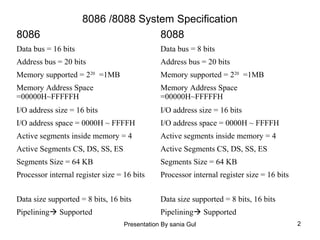
8086 /8088 System Specification
8086 8088
Data bus = 16 bits Data bus = 8 bits
Address bus = 20 bits Address bus = 20 bits
Memory supported = 220
=1MB Memory supported = 220
=1MB
Memory Address Space
=00000H~FFFFFH
Memory Address Space
=00000H~FFFFFH
I/O address size = 16 bits I/O address size = 16 bits
I/O address space = 0000H ~ FFFFH I/O address space = 0000H ~ FFFFH
Active segments inside memory = 4 Active segments inside memory = 4
Active Segments CS, DS, SS, ES Active Segments CS, DS, SS, ES
Segments Size = 64 KB Segments Size = 64 KB
Processor internal register size = 16 bits Processor internal register size = 16 bits
Data size supported = 8 bits, 16 bits Data size supported = 8 bits, 16 bits
Pipelining Supported Pipelining Supported
Presentation By sania Gul 3
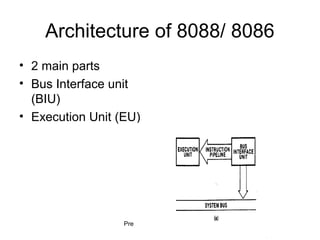
Architecture of 8088/ 8086
• 2 main parts
• Bus Interface unit
(BIU)
• Execution Unit (EU)
Presentation By sania Gul 4
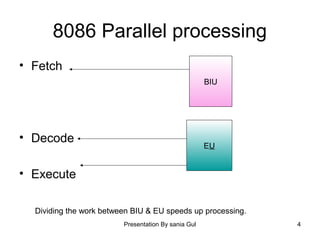
8086 Parallel processing
• Fetch
• Decode
• Execute
BIU
EU
Dividing the work between BIU & EU speeds up processing.
Presentation By sania Gul 5
Function of BIU
BIU connects the 8086/ 8088 to the outside
world. Its functions are:
1. Sends out addresses for memory
locations.
2. Fetch instruction from the memory.
3. Reads/ writes data to memory
4. Sends out addresses to I/O ports.
5. Reads/ writes data to I/O ports
Presentation By sania Gul 6
Function of EU
The function of EU is
1. Tells BIU the addresses from where to
fetch data & instructions.
2. Decode & execute the instruction.
7
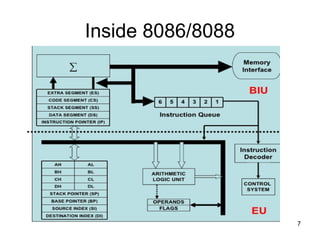
Inside 8086/8088
Presentation By sania Gul 8
Main parts of EU
• Main components of EU are
1. Arithmetic Logic Unit (ALU)
2. Status & control flags
3. General purpose registers & temporary
Operand registers
Presentation By sania Gul 9
Arithmetic Logic Unit (ALU)
• The ALU performs the arithmetic, logic &
shift operations required by an instruction.
Presentation By sania Gul 10
FLAGS
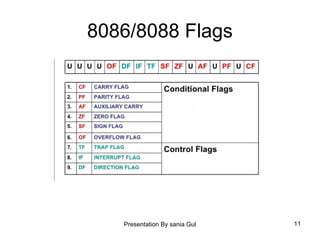
• 8086 has 16 bit flag register.
• Contains 9 active flags.
There are two types of flags in 8086
1. Conditional flags  6 flags, set or reset
by EU on the basis of results of some
arithmetic operation.
2. Control flags  3 flags, used to control
certain operation of the processor.
Presentation By sania Gul 11
8086/8088 Flags
12
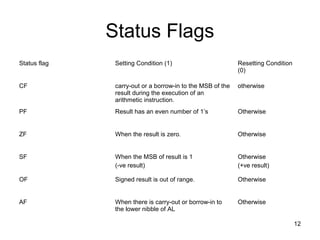
Status Flags
Status flag Setting Condition (1) Resetting Condition
(0)
CF carry-out or a borrow-in to the MSB of the
result during the execution of an
arithmetic instruction.
otherwise
PF Result has an even number of 1’s Otherwise
ZF When the result is zero. Otherwise
SF When the MSB of result is 1
(-ve result)
Otherwise
(+ve result)
OF Signed result is out of range. Otherwise
AF When there is carry-out or borrow-in to
the lower nibble of AL
Otherwise
Presentation By sania Gul 13
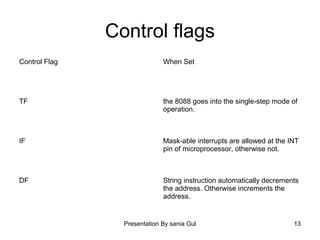
Control flags
Control Flag When Set
TF the 8088 goes into the single-step mode of
operation.
IF Mask-able interrupts are allowed at the INT
pin of microprocessor, otherwise not.
DF String instruction automatically decrements
the address. Otherwise increments the
address.
Presentation By sania Gul 14
Main Components of BIU
1. Instruction Queue
2. Segment Register
3. Instruction pointer
4. Address generation and Bus control
Presentation By sania Gul 15
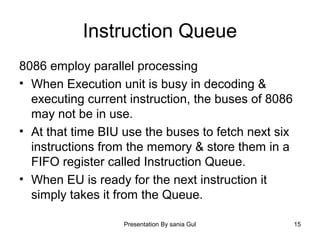
Instruction Queue
8086 employ parallel processing
• When Execution unit is busy in decoding &
executing current instruction, the buses of 8086
may not be in use.
• At that time BIU use the buses to fetch next six
instructions from the memory & store them in a
FIFO register called Instruction Queue.
• When EU is ready for the next instruction it
simply takes it from the Queue.
Presentation By sania Gul 16
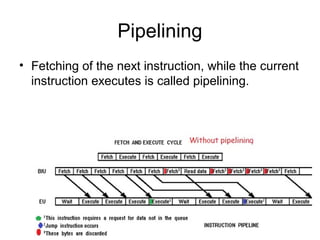
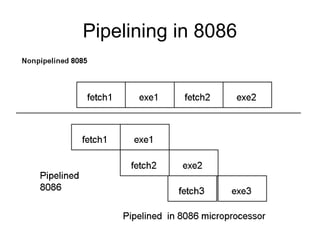
Pipelining
• Fetching of the next instruction, while the current
instruction executes is called pipelining.
Presentation By sania Gul 17
Pipelining in 8086
Presentation By sania Gul 18
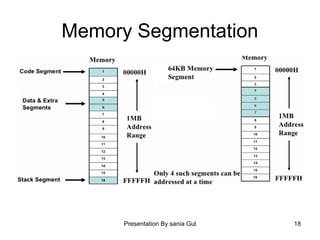
Memory Segmentation
Presentation By sania Gul 19
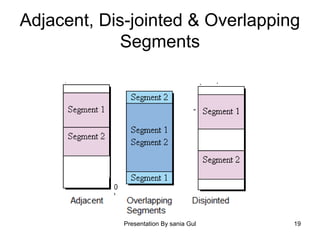
Adjacent, Dis-jointed & Overlapping
Segments
Presentation By sania Gul 20
Segment Registers
There are 4 sixteen bit segment registers in
8086/8088
1. CS
2. DS
3. SS
4. ES
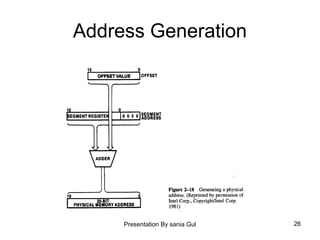
Holds the upper sixteen bits of the starting address
for each of the active segments. The complete
physical memory address is 20 bits & is
obtained by appending four 0 bits= 0H with this
starting 16 bits of address.
Presentation By sania Gul 21
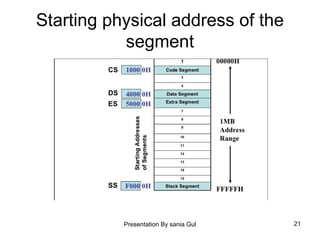
Starting physical address of the
segment
Presentation By sania Gul 22
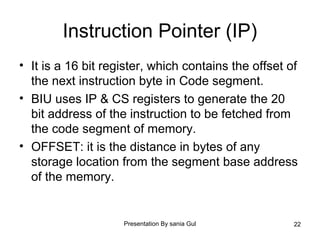
Instruction Pointer (IP)
• It is a 16 bit register, which contains the offset of
the next instruction byte in Code segment.
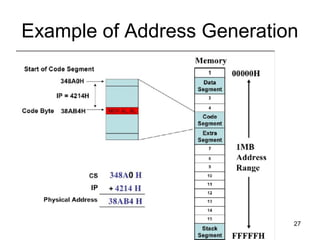
• BIU uses IP & CS registers to generate the 20
bit address of the instruction to be fetched from
the code segment of memory.
• OFFSET: it is the distance in bytes of any
storage location from the segment base address
of the memory.
Presentation By sania Gul 23
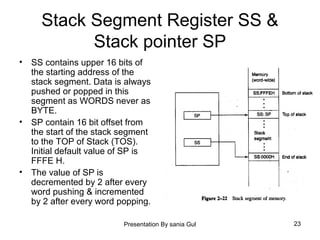
Stack Segment Register SS &
Stack pointer SP
• SS contains upper 16 bits of
the starting address of the
stack segment. Data is always
pushed or popped in this
segment as WORDS never as
BYTE.
• SP contain 16 bit offset from
the start of the stack segment
to the TOP of Stack (TOS).
Initial default value of SP is
FFFE H.
• The value of SP is
decremented by 2 after every
word pushing & incremented
by 2 after every word popping.
Presentation By sania Gul 24
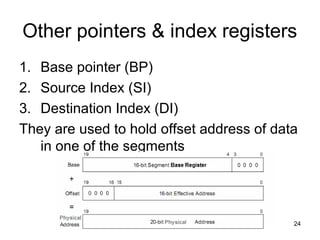
Other pointers & index registers
1. Base pointer (BP)
2. Source Index (SI)
3. Destination Index (DI)
They are used to hold offset address of data
in one of the segments
Presentation By sania Gul 25
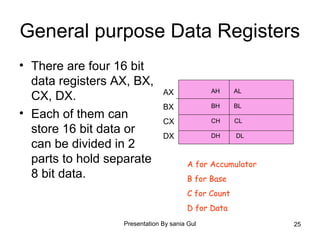
General purpose Data Registers
• There are four 16 bit
data registers AX, BX,
CX, DX.
• Each of them can
store 16 bit data or
can be divided in 2
parts to hold separate
8 bit data.
AX
BX
CX
DX
AH AL
BH BL
CH CL
DH DL
A for Accumulator
B for Base
C for Count
D for Data
Presentation By sania Gul 26
Address Generation
Presentation By sania Gul 27
Example of Address Generation
Presentation By sania Gul 28
Default Segment & OFFSET pairs
• The physical address of
Data or instruction is
calculated by using the
combination of default
pairs. If [BX] is given in
the instruction, physical
address of data is
automatically calculated
as
PA = DS : BX = DS0 H + BX
OFFSET Default Segment
Register
IP CS
SP SS
BP SS
DI DS
SI DS
BX DS
Presentation By sania Gul 29
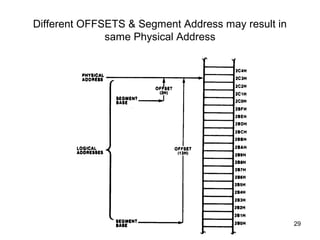
Different OFFSETS & Segment Address may result in
same Physical Address
30
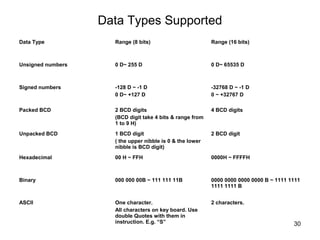
Data Types Supported
Data Type Range (8 bits) Range (16 bits)
Unsigned numbers 0 D~ 255 D 0 D~ 65535 D
Signed numbers -128 D ~ -1 D
0 D~ +127 D
-32768 D ~ -1 D
0 ~ +32767 D
Packed BCD 2 BCD digits
(BCD digit take 4 bits & range from
1 to 9 H)
4 BCD digits
Unpacked BCD 1 BCD digit
( the upper nibble is 0 & the lower
nibble is BCD digit)
2 BCD digit
Hexadecimal 00 H ~ FFH 0000H ~ FFFFH
Binary 000 000 00B ~ 111 111 11B 0000 0000 0000 0000 B ~ 1111 1111
1111 1111 B
ASCII One character.
All characters on key board. Use
double Quotes with them in
instruction. E.g. “S”
2 characters.
Presentation By sania Gul 31
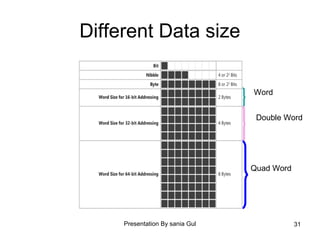
Different Data size
Word
Double Word
Quad Word
Presentation By sania Gul 32
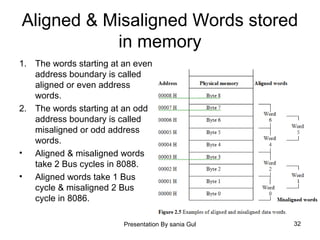
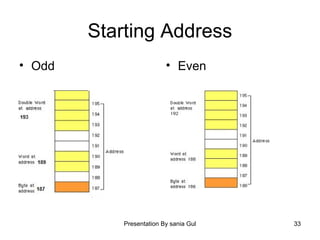
Aligned & Misaligned Words stored
in memory
1. The words starting at an even
address boundary is called
aligned or even address
words.
2. The words starting at an odd
address boundary is called
misaligned or odd address
words.
• Aligned & misaligned words
take 2 Bus cycles in 8088.
• Aligned words take 1 Bus
cycle & misaligned 2 Bus
cycle in 8086.
Presentation By sania Gul 33
Starting Address
• Odd • Even
Presentation By sania Gul 34
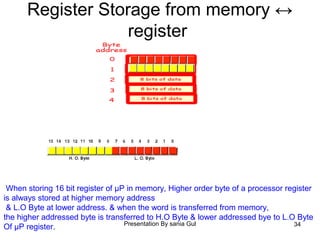
Register Storage from memory ↔
register
When storing 16 bit register of µP in memory, Higher order byte of a processor register
is always stored at higher memory address
& L.O Byte at lower address. & when the word is transferred from memory,
the higher addressed byte is transferred to H.O Byte & lower addressed bye to L.O Byte
Of µP register.
Presentation By sania Gul 35
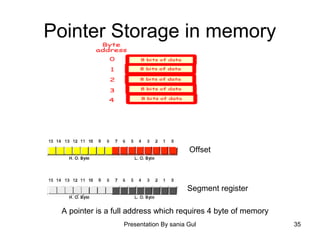
Pointer Storage in memory
Offset
Segment register
A pointer is a full address which requires 4 byte of memory
Presentation By sania Gul 36
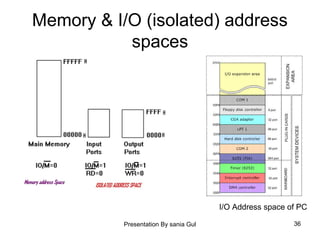
Memory & I/O (isolated) address
spaces
I/O Address space of PC

microprocessor Lec 02 mic

  • 1.
    8086/ 8088 softarchitecture
  • 2.
    Presentation By saniaGul 2 8086 /8088 System Specification 8086 8088 Data bus = 16 bits Data bus = 8 bits Address bus = 20 bits Address bus = 20 bits Memory supported = 220 =1MB Memory supported = 220 =1MB Memory Address Space =00000H~FFFFFH Memory Address Space =00000H~FFFFFH I/O address size = 16 bits I/O address size = 16 bits I/O address space = 0000H ~ FFFFH I/O address space = 0000H ~ FFFFH Active segments inside memory = 4 Active segments inside memory = 4 Active Segments CS, DS, SS, ES Active Segments CS, DS, SS, ES Segments Size = 64 KB Segments Size = 64 KB Processor internal register size = 16 bits Processor internal register size = 16 bits Data size supported = 8 bits, 16 bits Data size supported = 8 bits, 16 bits Pipelining Supported Pipelining Supported
  • 3.
    Presentation By saniaGul 3 Architecture of 8088/ 8086 • 2 main parts • Bus Interface unit (BIU) • Execution Unit (EU)
  • 4.
    Presentation By saniaGul 4 8086 Parallel processing • Fetch • Decode • Execute BIU EU Dividing the work between BIU & EU speeds up processing.
  • 5.
    Presentation By saniaGul 5 Function of BIU BIU connects the 8086/ 8088 to the outside world. Its functions are: 1. Sends out addresses for memory locations. 2. Fetch instruction from the memory. 3. Reads/ writes data to memory 4. Sends out addresses to I/O ports. 5. Reads/ writes data to I/O ports
  • 6.
    Presentation By saniaGul 6 Function of EU The function of EU is 1. Tells BIU the addresses from where to fetch data & instructions. 2. Decode & execute the instruction.
  • 7.
  • 8.
    Presentation By saniaGul 8 Main parts of EU • Main components of EU are 1. Arithmetic Logic Unit (ALU) 2. Status & control flags 3. General purpose registers & temporary Operand registers
  • 9.
    Presentation By saniaGul 9 Arithmetic Logic Unit (ALU) • The ALU performs the arithmetic, logic & shift operations required by an instruction.
  • 10.
    Presentation By saniaGul 10 FLAGS • 8086 has 16 bit flag register. • Contains 9 active flags. There are two types of flags in 8086 1. Conditional flags  6 flags, set or reset by EU on the basis of results of some arithmetic operation. 2. Control flags  3 flags, used to control certain operation of the processor.
  • 11.
    Presentation By saniaGul 11 8086/8088 Flags
  • 12.
    12 Status Flags Status flagSetting Condition (1) Resetting Condition (0) CF carry-out or a borrow-in to the MSB of the result during the execution of an arithmetic instruction. otherwise PF Result has an even number of 1’s Otherwise ZF When the result is zero. Otherwise SF When the MSB of result is 1 (-ve result) Otherwise (+ve result) OF Signed result is out of range. Otherwise AF When there is carry-out or borrow-in to the lower nibble of AL Otherwise
  • 13.
    Presentation By saniaGul 13 Control flags Control Flag When Set TF the 8088 goes into the single-step mode of operation. IF Mask-able interrupts are allowed at the INT pin of microprocessor, otherwise not. DF String instruction automatically decrements the address. Otherwise increments the address.
  • 14.
    Presentation By saniaGul 14 Main Components of BIU 1. Instruction Queue 2. Segment Register 3. Instruction pointer 4. Address generation and Bus control
  • 15.
    Presentation By saniaGul 15 Instruction Queue 8086 employ parallel processing • When Execution unit is busy in decoding & executing current instruction, the buses of 8086 may not be in use. • At that time BIU use the buses to fetch next six instructions from the memory & store them in a FIFO register called Instruction Queue. • When EU is ready for the next instruction it simply takes it from the Queue.
  • 16.
    Presentation By saniaGul 16 Pipelining • Fetching of the next instruction, while the current instruction executes is called pipelining.
  • 17.
    Presentation By saniaGul 17 Pipelining in 8086
  • 18.
    Presentation By saniaGul 18 Memory Segmentation
  • 19.
    Presentation By saniaGul 19 Adjacent, Dis-jointed & Overlapping Segments
  • 20.
    Presentation By saniaGul 20 Segment Registers There are 4 sixteen bit segment registers in 8086/8088 1. CS 2. DS 3. SS 4. ES Holds the upper sixteen bits of the starting address for each of the active segments. The complete physical memory address is 20 bits & is obtained by appending four 0 bits= 0H with this starting 16 bits of address.
  • 21.
    Presentation By saniaGul 21 Starting physical address of the segment
  • 22.
    Presentation By saniaGul 22 Instruction Pointer (IP) • It is a 16 bit register, which contains the offset of the next instruction byte in Code segment. • BIU uses IP & CS registers to generate the 20 bit address of the instruction to be fetched from the code segment of memory. • OFFSET: it is the distance in bytes of any storage location from the segment base address of the memory.
  • 23.
    Presentation By saniaGul 23 Stack Segment Register SS & Stack pointer SP • SS contains upper 16 bits of the starting address of the stack segment. Data is always pushed or popped in this segment as WORDS never as BYTE. • SP contain 16 bit offset from the start of the stack segment to the TOP of Stack (TOS). Initial default value of SP is FFFE H. • The value of SP is decremented by 2 after every word pushing & incremented by 2 after every word popping.
  • 24.
    Presentation By saniaGul 24 Other pointers & index registers 1. Base pointer (BP) 2. Source Index (SI) 3. Destination Index (DI) They are used to hold offset address of data in one of the segments
  • 25.
    Presentation By saniaGul 25 General purpose Data Registers • There are four 16 bit data registers AX, BX, CX, DX. • Each of them can store 16 bit data or can be divided in 2 parts to hold separate 8 bit data. AX BX CX DX AH AL BH BL CH CL DH DL A for Accumulator B for Base C for Count D for Data
  • 26.
    Presentation By saniaGul 26 Address Generation
  • 27.
    Presentation By saniaGul 27 Example of Address Generation
  • 28.
    Presentation By saniaGul 28 Default Segment & OFFSET pairs • The physical address of Data or instruction is calculated by using the combination of default pairs. If [BX] is given in the instruction, physical address of data is automatically calculated as PA = DS : BX = DS0 H + BX OFFSET Default Segment Register IP CS SP SS BP SS DI DS SI DS BX DS
  • 29.
    Presentation By saniaGul 29 Different OFFSETS & Segment Address may result in same Physical Address
  • 30.
    30 Data Types Supported DataType Range (8 bits) Range (16 bits) Unsigned numbers 0 D~ 255 D 0 D~ 65535 D Signed numbers -128 D ~ -1 D 0 D~ +127 D -32768 D ~ -1 D 0 ~ +32767 D Packed BCD 2 BCD digits (BCD digit take 4 bits & range from 1 to 9 H) 4 BCD digits Unpacked BCD 1 BCD digit ( the upper nibble is 0 & the lower nibble is BCD digit) 2 BCD digit Hexadecimal 00 H ~ FFH 0000H ~ FFFFH Binary 000 000 00B ~ 111 111 11B 0000 0000 0000 0000 B ~ 1111 1111 1111 1111 B ASCII One character. All characters on key board. Use double Quotes with them in instruction. E.g. “S” 2 characters.
  • 31.
    Presentation By saniaGul 31 Different Data size Word Double Word Quad Word
  • 32.
    Presentation By saniaGul 32 Aligned & Misaligned Words stored in memory 1. The words starting at an even address boundary is called aligned or even address words. 2. The words starting at an odd address boundary is called misaligned or odd address words. • Aligned & misaligned words take 2 Bus cycles in 8088. • Aligned words take 1 Bus cycle & misaligned 2 Bus cycle in 8086.
  • 33.
    Presentation By saniaGul 33 Starting Address • Odd • Even
  • 34.
    Presentation By saniaGul 34 Register Storage from memory ↔ register When storing 16 bit register of µP in memory, Higher order byte of a processor register is always stored at higher memory address & L.O Byte at lower address. & when the word is transferred from memory, the higher addressed byte is transferred to H.O Byte & lower addressed bye to L.O Byte Of µP register.
  • 35.
    Presentation By saniaGul 35 Pointer Storage in memory Offset Segment register A pointer is a full address which requires 4 byte of memory
  • 36.
    Presentation By saniaGul 36 Memory & I/O (isolated) address spaces I/O Address space of PC