Register Transfer and Micro operations
Computer Organization 1
2
• Register Transfer Language
• Register Transfer
• Bus and Memory Transfers
• Arithmetic Microoperations
• Logic Microoperations
• Shift Microoperations
• Arithmetic Logic Shift Unit
 Digital System: An interconnection of
hardware modules that do a certain task on
the information.
 Registers + Operations performed on the
data stored in them = Digital Module
 Modules are interconnected with common
data and control paths to form a digital
computer system
Computer Organization 3
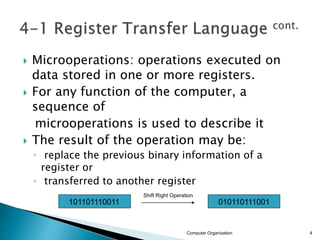
 Microoperations: operations executed on
data stored in one or more registers.
 For any function of the computer, a
sequence of
microoperations is used to describe it
 The result of the operation may be:
◦ replace the previous binary information of a
register or
◦ transferred to another register
Computer Organization 4
101101110011 010110111001
Shift Right Operation
 The internal hardware organization of a
digital computer is defined by specifying:
 The set of registers it contains and their function
 The sequence of microoperations performed on the
binary information stored in the registers
 The control that initiates the sequence of
microoperations
 Registers + Microoperations Hardware +
Control Functions = Digital Computer
Computer Organization 5
 Register Transfer Language (RTL) : a
symbolic notation to describe the
microoperation transfers among registers
Next steps:
◦ Define symbols for various types of
microoperations,
◦ Describe the hardware that implements these
microoperations
Computer Organization 6
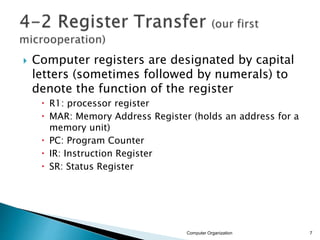
 Computer registers are designated by capital
letters (sometimes followed by numerals) to
denote the function of the register
 R1: processor register
 MAR: Memory Address Register (holds an address for a
memory unit)
 PC: Program Counter
 IR: Instruction Register
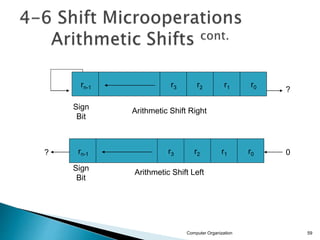
 SR: Status Register
Computer Organization 7
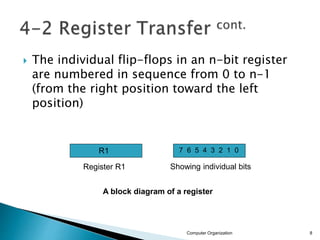
 The individual flip-flops in an n-bit register
are numbered in sequence from 0 to n-1
(from the right position toward the left
position)
Computer Organization 8
R1 7 6 5 4 3 2 1 0
A block diagram of a register
Register R1 Showing individual bits
Computer Organization 9
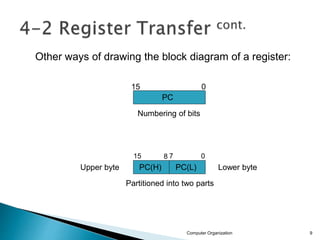
PC
Numbering of bits
Partitioned into two parts
15 0
PC(H) PC(L)
0
7
8
15
Lower byte
Upper byte
Other ways of drawing the block diagram of a register:
 Information transfer from one register to another is
described by a replacement operator: R2 ← R1
 This statement denotes a transfer of the content of
register R1 into register R2
 The transfer happens in one clock cycle
 The content of the R1 (source) does not change
 The content of the R2 (destination) will be lost and
replaced by the new data transferred from R1
 We are assuming that the circuits are available
from the outputs of the source register to the
inputs of the destination register, and that the
destination register has a parallel load capability
Computer Organization 10
 Conditional transfer occurs only under a
control condition
 Representation of a (conditional) transfer
P: R2 ← R1
 A binary condition (P equals to 0 or 1)
determines when the transfer occurs
 The content of R1 is transferred into R2 only
if P is 1
Computer Organization 11
Computer Organization 12
n
Clock
R1
R2
Control
Circuit
Load
t t+1
Clock
Load
Transfer occurs here
Synchronized
with the clock
P
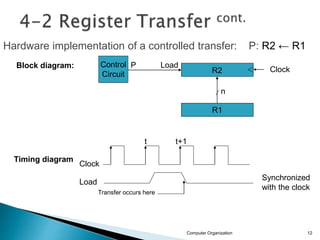
Hardware implementation of a controlled transfer: P: R2 ← R1
Block diagram:
Timing diagram
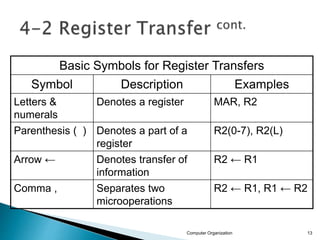
Basic Symbols for Register Transfers
Symbol Description Examples
Letters &
numerals
Denotes a register MAR, R2
Parenthesis ( ) Denotes a part of a
register
R2(0-7), R2(L)
Arrow ← Denotes transfer of
information
R2 ← R1
Comma , Separates two
microoperations
R2 ← R1, R1 ← R2
Computer Organization 13
 Paths must be provided to transfer
information from one register to another
 A Common Bus System is a scheme for
transferring information between registers
in a multiple-register configuration
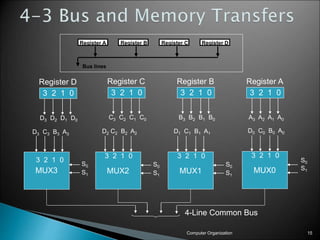
 A bus: set of common lines, one for each bit
of a register, through which binary
information is transferred one at a time
 Control signals determine which register is
selected by the bus during each particular
register transfer
Computer Organization 14
Computer Organization 15
3 2 1 0
Register D
D3 D2 D1 D0
3 2 1 0
Register C
C3 C2 C1 C0
3 2 1 0
Register B
B3 B2 B1 B0
3 2 1 0
Register A
A3 A2 A1 A0
D3 C3 B3 A3
S0
S1
MUX3
3 2 1 0
D2 C2 B2 A2
S0
S1
MUX2
3 2 1 0
D1 C1 B1 A1
S0
S1
MUX1
3 2 1 0
D0 C0 B0 A0
S0
S1
MUX0
3 2 1 0
4-Line Common Bus
Register A Register B Register C Register D
Bus lines
 The transfer of information from a bus into
one of many destination registers is done:
◦ By connecting the bus lines to the inputs of all
destination registers and then:
◦ activating the load control of the particular
destination register selected
 We write: R2 ← C to symbolize that the
content of register C is loaded into the
register R2 using the common system bus
 It is equivalent to: BUS ←C, (select C)
R2 ←BUS (Load R2)
Computer Organization 16
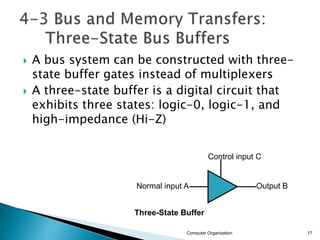
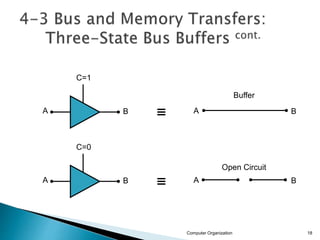
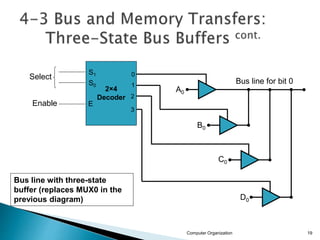
 A bus system can be constructed with three-
state buffer gates instead of multiplexers
 A three-state buffer is a digital circuit that
exhibits three states: logic-0, logic-1, and
high-impedance (Hi-Z)
Computer Organization 17
Normal input A
Control input C
Three-State Buffer
Output B
Computer Organization 18
A
C=1
B A B
A
C=0
B A B
Buffer
Open Circuit
Computer Organization 19
2×4
Decoder
Select
Enable
0
1
2
3
S1
S0
E
Bus line for bit 0
A0
B0
C0
D0
Bus line with three-state
buffer (replaces MUX0 in the
previous diagram)
 Memory read : Transfer from memory
 Memory write : Transfer to memory
 Data being read or wrote is called a memory
word (called M)- (refer to section 2-7)
 It is necessary to specify the address of M
when writing /reading memory
 This is done by enclosing the address in
square brackets following the letter M
 Example: M[0016] : the memory contents at
address 0x0016
Computer Organization 20
 Assume that the address of a memory unit is
stored in a register called the Address
Register AR
 Lets represent a Data Register with DR, then:
 Read: DR ← M[AR]
 Write: M[AR] ← DR
Computer Organization 21
Computer Organization 22
AR
x12
x0C
x0E
x10
x12
x14
x16
x18
19
34
45
66
0
13
22
R1←M[AR]
R1
100
R1
66
RAM
R1
100
 The microoperations most often encountered
in digital computers are classified into four
categories:
◦ Register transfer microoperations
◦ Arithmetic microoperations (on numeric data stored
in the registers)
◦ Logic microoperations (bit manipulations on non-
numeric data)
◦ Shift microoperations
Computer Organization 23
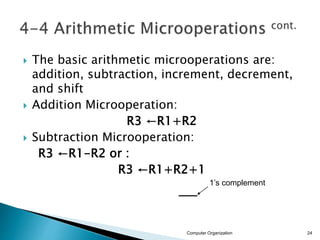
 The basic arithmetic microoperations are:
addition, subtraction, increment, decrement,
and shift
 Addition Microoperation:
R3 ←R1+R2
 Subtraction Microoperation:
R3 ←R1-R2 or :
R3 ←R1+R2+1
Computer Organization 24
1’s complement
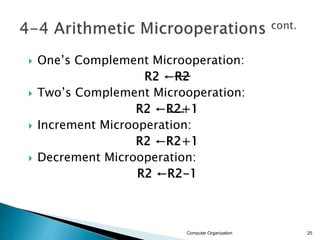
 One’s Complement Microoperation:
R2 ←R2
 Two’s Complement Microoperation:
R2 ←R2+1
 Increment Microoperation:
R2 ←R2+1
 Decrement Microoperation:
R2 ←R2-1
Computer Organization 25
Computer Organization 26
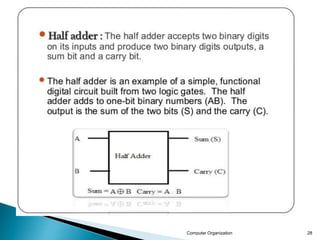
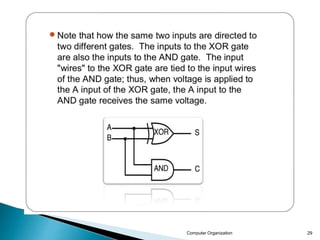
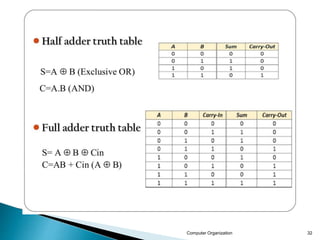
Half Adder
0 0 0 0 0
0 0 1 0 1
0 1 0 0 1
0 1 1 1 0
1 0 0 0 1
1 0 1 1 0
1 1 0 1 0
1 1 1 1 1
cn = xy + xcn-1+ ycn-1
= xy + (x  y)cn-1
s = x’y’cn-1+x’yc’n-1+xy’c’n-1+xycn-1
= x  y  cn-1 = (x  y)  cn-1
x
y
cn-1
x
y
cn-1
cn s
c = xy s = xy’ + x’y
= x  y
x
y c
s
x
y
cn-1
S
cn
Full Adder
0 0 0 0
0 1 0 1
1 0 0 1
1 1 1 0
x y c s
x y cn-1 cn s
0
0
1
0
0
1
1
1
0
1
0
1
1
0
1
0
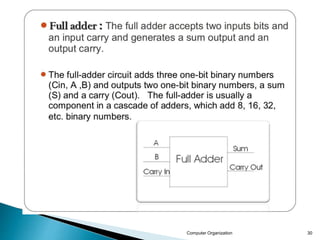
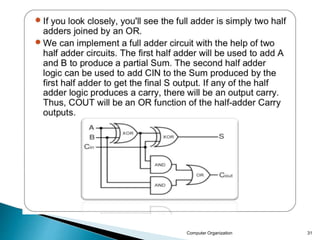
 Adder : In electronics an adder is digital
circuit that perform addition of numbers. In
modern computer adder reside in the
arithmetic logic unit (ALU).
 Adders : Adders are important not only in the
computer but also in many types of digital
systems in which the numeric data are
processed. Types of adder:
 Types of adder: 1. Half adder 2. Full adder
Computer Organization 27
Computer Organization 28
Computer Organization 29
Computer Organization 30
Computer Organization 31
Computer Organization 32
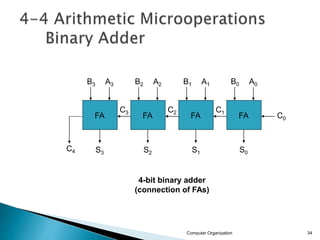
Computer Organization 34
FA
FA
FA
FA C0
A0
B0
S0
A1
B1
S1
A2
B2
S2
A3
B3
S3
C1
C2
C3
C4
4-bit binary adder
(connection of FAs)
Computer Organization 35
FA
FA
FA
FA
C0
A0
B0
S0
A1
B1
S1
A2
B2
S2
A3
B3
S3
C1
C2
C3
C4
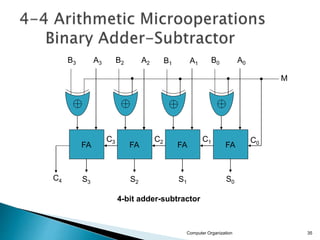
4-bit adder-subtractor
M
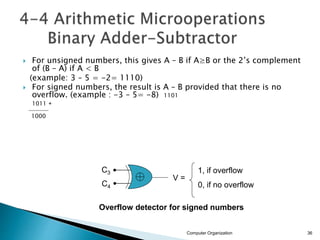
 For unsigned numbers, this gives A – B if A≥B or the 2’s complement
of (B – A) if A < B
(example: 3 – 5 = -2= 1110)
 For signed numbers, the result is A – B provided that there is no
overflow. (example : -3 – 5= -8) 1101
1011 +
‫ـــــــــــــــــــــــــــ‬
1000
Computer Organization 36
C3
C4
V =
1, if overflow
0, if no overflow
Overflow detector for signed numbers
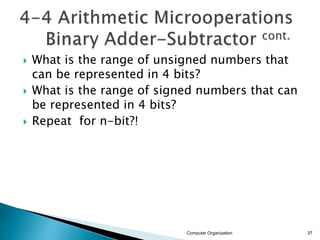
 What is the range of unsigned numbers that
can be represented in 4 bits?
 What is the range of signed numbers that can
be represented in 4 bits?
 Repeat for n-bit?!
Computer Organization 37
Computer Organization 38
C S
x y
HA
C S
x y
HA
C S
x y
HA
C S
x y
HA
S0
S1
S2
S3
C4
1
A0
A1
A2
A3
4-bit Binary Incrementer
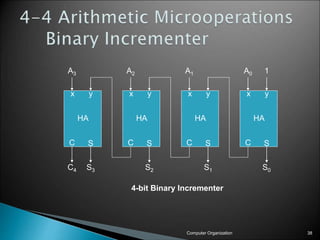
 Binary Incrementer can also be implemented
using a counter
 A binary decrementer can be implemented by
adding 1111 to the desired register each
time!
Computer Organization 39
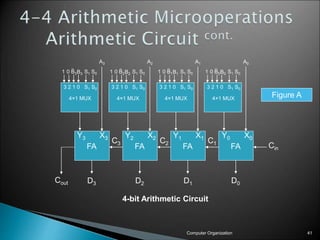
 This circuit performs seven distinct arithmetic
operations and the basic component of it is
the parallel adder
 The output of the binary adder is calculated
from the following arithmetic sum:
 D = A + Y + Cin
Computer Organization 40
Computer Organization 41
B0
3 2 1 0 S1 S0
4×1 MUX
FA
FA
FA
FA Cin
D0
D1
D2
D3
C1
C2
C3
Cout
B0
1 0 S1 S0
B1
3 2 1 0 S1 S0
4×1 MUX
B1
1 0 S1 S0
B2
3 2 1 0 S1 S0
4×1 MUX
B2
1 0 S1 S0
B3
3 2 1 0 S1 S0
4×1 MUX
B3
1 0 S1 S0
A0
A1
A2
A3
4-bit Arithmetic Circuit
X0
Y0
X1
Y1
X2
Y2
X3
Y3
Figure A
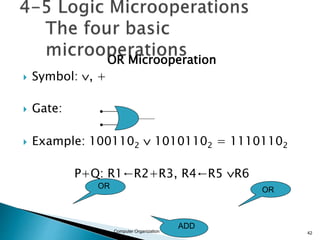
OR Microoperation
 Symbol: , +
 Gate:
 Example: 1001102  10101102 = 11101102
P+Q: R1←R2+R3, R4←R5 R6
Computer Organization 42
OR OR
ADD
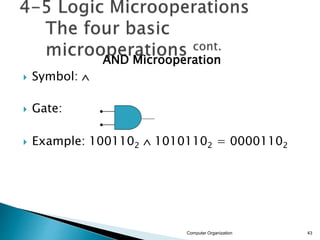
AND Microoperation
 Symbol: 
 Gate:
 Example: 1001102  10101102 = 00001102
Computer Organization 43
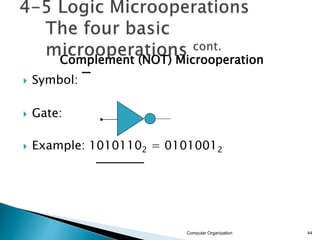
Complement (NOT) Microoperation
 Symbol:

 Gate:
 Example: 10101102 = 01010012
Computer Organization 44
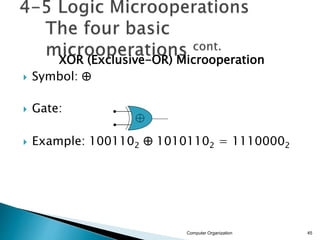
XOR (Exclusive-OR) Microoperation
 Symbol: 
 Gate:
 Example: 1001102  10101102 = 11100002
Computer Organization 45
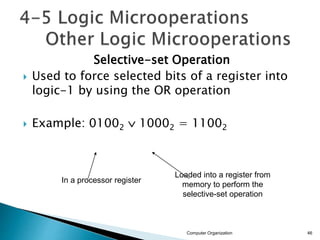
Selective-set Operation
 Used to force selected bits of a register into
logic-1 by using the OR operation
 Example: 01002  10002 = 11002
Computer Organization 46
In a processor register
Loaded into a register from
memory to perform the
selective-set operation
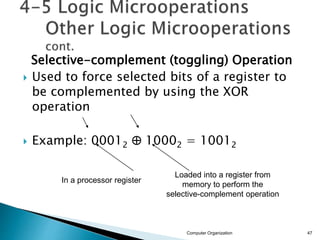
Selective-complement (toggling) Operation
 Used to force selected bits of a register to
be complemented by using the XOR
operation
 Example: 00012  10002 = 10012
Computer Organization 47
In a processor register
Loaded into a register from
memory to perform the
selective-complement operation
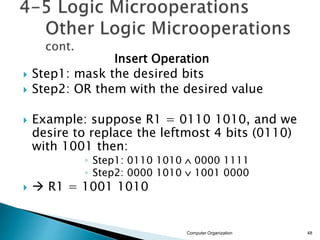
Insert Operation
 Step1: mask the desired bits
 Step2: OR them with the desired value
 Example: suppose R1 = 0110 1010, and we
desire to replace the leftmost 4 bits (0110)
with 1001 then:
◦ Step1: 0110 1010  0000 1111
◦ Step2: 0000 1010  1001 0000
  R1 = 1001 1010
Computer Organization 48
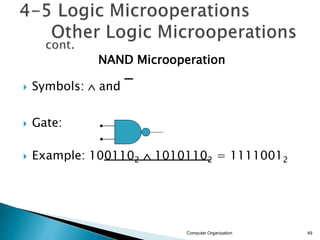
NAND Microoperation
 Symbols:  and

 Gate:
 Example: 1001102  10101102 = 11110012
Computer Organization 49
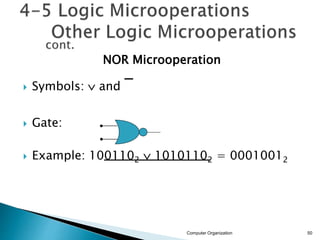
NOR Microoperation
 Symbols:  and

 Gate:
 Example: 1001102  10101102 = 00010012
Computer Organization 50
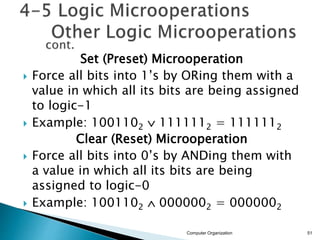
Set (Preset) Microoperation
 Force all bits into 1’s by ORing them with a
value in which all its bits are being assigned
to logic-1
 Example: 1001102  1111112 = 1111112
Clear (Reset) Microoperation
 Force all bits into 0’s by ANDing them with
a value in which all its bits are being
assigned to logic-0
 Example: 1001102  0000002 = 0000002
Computer Organization 51
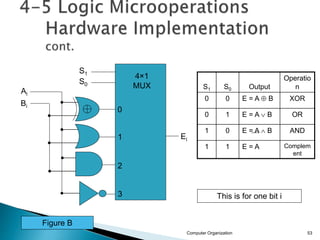
 The hardware implementation of logic
microoperations requires that logic gates be
inserted for each bit or pair of bits in the
registers to perform the required logic
function
 Most computers use only four (AND, OR, XOR,
and NOT) from which all others can be
derived.
Computer Organization 52
S1 S0 Output
Operatio
n
0 0 E = A  B XOR
0 1 E = A  B OR
1 0 E = A  B AND
1 1 E = A Complem
ent
Computer Organization 53
S1
S0
0
1
2
3
4×1
MUX
Ei
Ai
Bi
This is for one bit i
Figure B
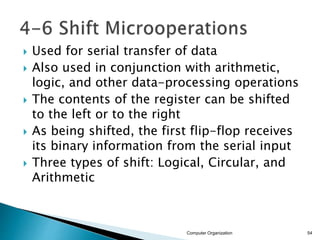
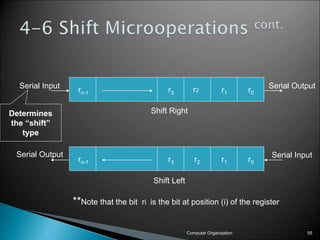
 Used for serial transfer of data
 Also used in conjunction with arithmetic,
logic, and other data-processing operations
 The contents of the register can be shifted
to the left or to the right
 As being shifted, the first flip-flop receives
its binary information from the serial input
 Three types of shift: Logical, Circular, and
Arithmetic
Computer Organization 54
Computer Organization 55
r0
r1
r3
rn-1
r0
r1
r2
r3
rn-1
Shift Right
Shift Left
Serial Input Serial Output
Serial Output Serial Input
Determines
the “shift”
type
r2
**Note that the bit ri is the bit at position (i) of the register
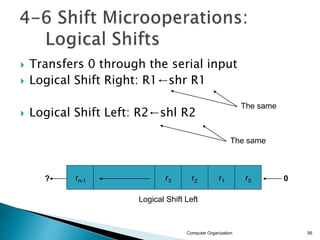
 Transfers 0 through the serial input
 Logical Shift Right: R1←shr R1
 Logical Shift Left: R2←shl R2
Computer Organization 56
The same
The same
Logical Shift Left
? 0
r0
r1
r2
r3
rn-1
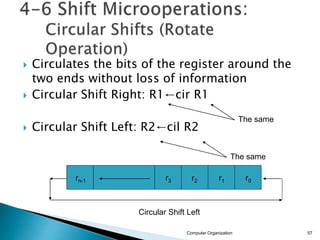
 Circulates the bits of the register around the
two ends without loss of information
 Circular Shift Right: R1←cir R1
 Circular Shift Left: R2←cil R2
Computer Organization 57
The same
The same
Circular Shift Left
r0
r1
r2
r3
rn-1
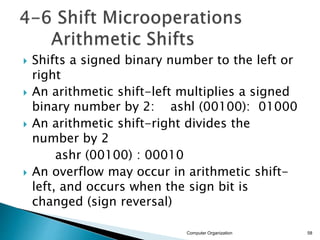
 Shifts a signed binary number to the left or
right
 An arithmetic shift-left multiplies a signed
binary number by 2: ashl (00100): 01000
 An arithmetic shift-right divides the
number by 2
ashr (00100) : 00010
 An overflow may occur in arithmetic shift-
left, and occurs when the sign bit is
changed (sign reversal)
Computer Organization 58
Computer Organization 59
Arithmetic Shift Right
Sign
Bit
Arithmetic Shift Left
Sign
Bit
?
0
?
r0
r1
r2
r3
rn-1
r0
r1
r2
r3
rn-1
 An overflow flip-flop Vs can be used to detect
an arithmetic shift-left overflow
Vs = Rn-1  Rn-2
Computer Organization 60
Rn-2
Vs=
Rn-1 1  overflow
0  no overflow
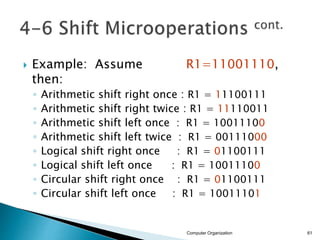
 Example: Assume R1=11001110,
then:
◦ Arithmetic shift right once : R1 = 11100111
◦ Arithmetic shift right twice : R1 = 11110011
◦ Arithmetic shift left once : R1 = 10011100
◦ Arithmetic shift left twice : R1 = 00111000
◦ Logical shift right once : R1 = 01100111
◦ Logical shift left once : R1 = 10011100
◦ Circular shift right once : R1 = 01100111
◦ Circular shift left once : R1 = 10011101
Computer Organization 61
 A possible choice for a shift unit would be a
bidirectional shift register with parallel load
(refer to Fig 2-9). Has drawbacks:
◦ Needs two pulses (the clock and the shift signal
pulse)
◦ Not efficient in a processor unit where multiple
number of registers share a common bus
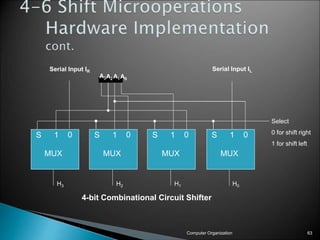
 It is more efficient to implement the shift
operation with a combinational circuit
Computer Organization 62
Computer Organization 63
S 1 0 S 1 0 S 1 0 S 1 0
A3A2A1A0
Serial Input IR Serial Input IL
Select
0 for shift right
1 for shift left
H3 H2 H1 H0
MUX MUX MUX MUX
4-bit Combinational Circuit Shifter
 Instead of having individual registers
performing the microoperations directly,
computer systems employ a number of
storage registers connected to a common
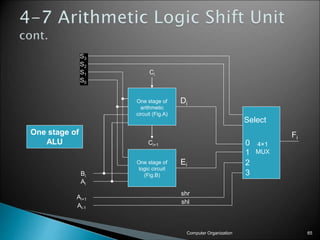
operational unit called an Arithmetic Logic
Unit (ALU)
Computer Organization 64
Computer Organization 65
0
1
2
3
S3
S2
S1
S0
Bi
Ai
Ai+1
Ai-1
Select
4×1
MUX
Ci
Ci+1
One stage of
arithmetic
circuit (Fig.A)
One stage of
logic circuit
(Fig.B)
Di
Ei
Fi
shr
shl
One stage of
ALU

Micro operations

  • 1.
    Register Transfer andMicro operations Computer Organization 1
  • 2.
    2 • Register TransferLanguage • Register Transfer • Bus and Memory Transfers • Arithmetic Microoperations • Logic Microoperations • Shift Microoperations • Arithmetic Logic Shift Unit
  • 3.
     Digital System:An interconnection of hardware modules that do a certain task on the information.  Registers + Operations performed on the data stored in them = Digital Module  Modules are interconnected with common data and control paths to form a digital computer system Computer Organization 3
  • 4.
     Microoperations: operationsexecuted on data stored in one or more registers.  For any function of the computer, a sequence of microoperations is used to describe it  The result of the operation may be: ◦ replace the previous binary information of a register or ◦ transferred to another register Computer Organization 4 101101110011 010110111001 Shift Right Operation
  • 5.
     The internalhardware organization of a digital computer is defined by specifying:  The set of registers it contains and their function  The sequence of microoperations performed on the binary information stored in the registers  The control that initiates the sequence of microoperations  Registers + Microoperations Hardware + Control Functions = Digital Computer Computer Organization 5
  • 6.
     Register TransferLanguage (RTL) : a symbolic notation to describe the microoperation transfers among registers Next steps: ◦ Define symbols for various types of microoperations, ◦ Describe the hardware that implements these microoperations Computer Organization 6
  • 7.
     Computer registersare designated by capital letters (sometimes followed by numerals) to denote the function of the register  R1: processor register  MAR: Memory Address Register (holds an address for a memory unit)  PC: Program Counter  IR: Instruction Register  SR: Status Register Computer Organization 7
  • 8.
     The individualflip-flops in an n-bit register are numbered in sequence from 0 to n-1 (from the right position toward the left position) Computer Organization 8 R1 7 6 5 4 3 2 1 0 A block diagram of a register Register R1 Showing individual bits
  • 9.
    Computer Organization 9 PC Numberingof bits Partitioned into two parts 15 0 PC(H) PC(L) 0 7 8 15 Lower byte Upper byte Other ways of drawing the block diagram of a register:
  • 10.
     Information transferfrom one register to another is described by a replacement operator: R2 ← R1  This statement denotes a transfer of the content of register R1 into register R2  The transfer happens in one clock cycle  The content of the R1 (source) does not change  The content of the R2 (destination) will be lost and replaced by the new data transferred from R1  We are assuming that the circuits are available from the outputs of the source register to the inputs of the destination register, and that the destination register has a parallel load capability Computer Organization 10
  • 11.
     Conditional transferoccurs only under a control condition  Representation of a (conditional) transfer P: R2 ← R1  A binary condition (P equals to 0 or 1) determines when the transfer occurs  The content of R1 is transferred into R2 only if P is 1 Computer Organization 11
  • 12.
    Computer Organization 12 n Clock R1 R2 Control Circuit Load tt+1 Clock Load Transfer occurs here Synchronized with the clock P Hardware implementation of a controlled transfer: P: R2 ← R1 Block diagram: Timing diagram
  • 13.
    Basic Symbols forRegister Transfers Symbol Description Examples Letters & numerals Denotes a register MAR, R2 Parenthesis ( ) Denotes a part of a register R2(0-7), R2(L) Arrow ← Denotes transfer of information R2 ← R1 Comma , Separates two microoperations R2 ← R1, R1 ← R2 Computer Organization 13
  • 14.
     Paths mustbe provided to transfer information from one register to another  A Common Bus System is a scheme for transferring information between registers in a multiple-register configuration  A bus: set of common lines, one for each bit of a register, through which binary information is transferred one at a time  Control signals determine which register is selected by the bus during each particular register transfer Computer Organization 14
  • 15.
    Computer Organization 15 32 1 0 Register D D3 D2 D1 D0 3 2 1 0 Register C C3 C2 C1 C0 3 2 1 0 Register B B3 B2 B1 B0 3 2 1 0 Register A A3 A2 A1 A0 D3 C3 B3 A3 S0 S1 MUX3 3 2 1 0 D2 C2 B2 A2 S0 S1 MUX2 3 2 1 0 D1 C1 B1 A1 S0 S1 MUX1 3 2 1 0 D0 C0 B0 A0 S0 S1 MUX0 3 2 1 0 4-Line Common Bus Register A Register B Register C Register D Bus lines
  • 16.
     The transferof information from a bus into one of many destination registers is done: ◦ By connecting the bus lines to the inputs of all destination registers and then: ◦ activating the load control of the particular destination register selected  We write: R2 ← C to symbolize that the content of register C is loaded into the register R2 using the common system bus  It is equivalent to: BUS ←C, (select C) R2 ←BUS (Load R2) Computer Organization 16
  • 17.
     A bussystem can be constructed with three- state buffer gates instead of multiplexers  A three-state buffer is a digital circuit that exhibits three states: logic-0, logic-1, and high-impedance (Hi-Z) Computer Organization 17 Normal input A Control input C Three-State Buffer Output B
  • 18.
    Computer Organization 18 A C=1 BA B A C=0 B A B Buffer Open Circuit
  • 19.
    Computer Organization 19 2×4 Decoder Select Enable 0 1 2 3 S1 S0 E Busline for bit 0 A0 B0 C0 D0 Bus line with three-state buffer (replaces MUX0 in the previous diagram)
  • 20.
     Memory read: Transfer from memory  Memory write : Transfer to memory  Data being read or wrote is called a memory word (called M)- (refer to section 2-7)  It is necessary to specify the address of M when writing /reading memory  This is done by enclosing the address in square brackets following the letter M  Example: M[0016] : the memory contents at address 0x0016 Computer Organization 20
  • 21.
     Assume thatthe address of a memory unit is stored in a register called the Address Register AR  Lets represent a Data Register with DR, then:  Read: DR ← M[AR]  Write: M[AR] ← DR Computer Organization 21
  • 22.
  • 23.
     The microoperationsmost often encountered in digital computers are classified into four categories: ◦ Register transfer microoperations ◦ Arithmetic microoperations (on numeric data stored in the registers) ◦ Logic microoperations (bit manipulations on non- numeric data) ◦ Shift microoperations Computer Organization 23
  • 24.
     The basicarithmetic microoperations are: addition, subtraction, increment, decrement, and shift  Addition Microoperation: R3 ←R1+R2  Subtraction Microoperation: R3 ←R1-R2 or : R3 ←R1+R2+1 Computer Organization 24 1’s complement
  • 25.
     One’s ComplementMicrooperation: R2 ←R2  Two’s Complement Microoperation: R2 ←R2+1  Increment Microoperation: R2 ←R2+1  Decrement Microoperation: R2 ←R2-1 Computer Organization 25
  • 26.
    Computer Organization 26 HalfAdder 0 0 0 0 0 0 0 1 0 1 0 1 0 0 1 0 1 1 1 0 1 0 0 0 1 1 0 1 1 0 1 1 0 1 0 1 1 1 1 1 cn = xy + xcn-1+ ycn-1 = xy + (x  y)cn-1 s = x’y’cn-1+x’yc’n-1+xy’c’n-1+xycn-1 = x  y  cn-1 = (x  y)  cn-1 x y cn-1 x y cn-1 cn s c = xy s = xy’ + x’y = x  y x y c s x y cn-1 S cn Full Adder 0 0 0 0 0 1 0 1 1 0 0 1 1 1 1 0 x y c s x y cn-1 cn s 0 0 1 0 0 1 1 1 0 1 0 1 1 0 1 0
  • 27.
     Adder :In electronics an adder is digital circuit that perform addition of numbers. In modern computer adder reside in the arithmetic logic unit (ALU).  Adders : Adders are important not only in the computer but also in many types of digital systems in which the numeric data are processed. Types of adder:  Types of adder: 1. Half adder 2. Full adder Computer Organization 27
  • 28.
  • 29.
  • 30.
  • 31.
  • 32.
  • 34.
    Computer Organization 34 FA FA FA FAC0 A0 B0 S0 A1 B1 S1 A2 B2 S2 A3 B3 S3 C1 C2 C3 C4 4-bit binary adder (connection of FAs)
  • 35.
  • 36.
     For unsignednumbers, this gives A – B if A≥B or the 2’s complement of (B – A) if A < B (example: 3 – 5 = -2= 1110)  For signed numbers, the result is A – B provided that there is no overflow. (example : -3 – 5= -8) 1101 1011 + ‫ـــــــــــــــــــــــــــ‬ 1000 Computer Organization 36 C3 C4 V = 1, if overflow 0, if no overflow Overflow detector for signed numbers
  • 37.
     What isthe range of unsigned numbers that can be represented in 4 bits?  What is the range of signed numbers that can be represented in 4 bits?  Repeat for n-bit?! Computer Organization 37
  • 38.
    Computer Organization 38 CS x y HA C S x y HA C S x y HA C S x y HA S0 S1 S2 S3 C4 1 A0 A1 A2 A3 4-bit Binary Incrementer
  • 39.
     Binary Incrementercan also be implemented using a counter  A binary decrementer can be implemented by adding 1111 to the desired register each time! Computer Organization 39
  • 40.
     This circuitperforms seven distinct arithmetic operations and the basic component of it is the parallel adder  The output of the binary adder is calculated from the following arithmetic sum:  D = A + Y + Cin Computer Organization 40
  • 41.
    Computer Organization 41 B0 32 1 0 S1 S0 4×1 MUX FA FA FA FA Cin D0 D1 D2 D3 C1 C2 C3 Cout B0 1 0 S1 S0 B1 3 2 1 0 S1 S0 4×1 MUX B1 1 0 S1 S0 B2 3 2 1 0 S1 S0 4×1 MUX B2 1 0 S1 S0 B3 3 2 1 0 S1 S0 4×1 MUX B3 1 0 S1 S0 A0 A1 A2 A3 4-bit Arithmetic Circuit X0 Y0 X1 Y1 X2 Y2 X3 Y3 Figure A
  • 42.
    OR Microoperation  Symbol:, +  Gate:  Example: 1001102  10101102 = 11101102 P+Q: R1←R2+R3, R4←R5 R6 Computer Organization 42 OR OR ADD
  • 43.
    AND Microoperation  Symbol:  Gate:  Example: 1001102  10101102 = 00001102 Computer Organization 43
  • 44.
    Complement (NOT) Microoperation Symbol:   Gate:  Example: 10101102 = 01010012 Computer Organization 44
  • 45.
    XOR (Exclusive-OR) Microoperation Symbol:   Gate:  Example: 1001102  10101102 = 11100002 Computer Organization 45
  • 46.
    Selective-set Operation  Usedto force selected bits of a register into logic-1 by using the OR operation  Example: 01002  10002 = 11002 Computer Organization 46 In a processor register Loaded into a register from memory to perform the selective-set operation
  • 47.
    Selective-complement (toggling) Operation Used to force selected bits of a register to be complemented by using the XOR operation  Example: 00012  10002 = 10012 Computer Organization 47 In a processor register Loaded into a register from memory to perform the selective-complement operation
  • 48.
    Insert Operation  Step1:mask the desired bits  Step2: OR them with the desired value  Example: suppose R1 = 0110 1010, and we desire to replace the leftmost 4 bits (0110) with 1001 then: ◦ Step1: 0110 1010  0000 1111 ◦ Step2: 0000 1010  1001 0000   R1 = 1001 1010 Computer Organization 48
  • 49.
    NAND Microoperation  Symbols: and   Gate:  Example: 1001102  10101102 = 11110012 Computer Organization 49
  • 50.
    NOR Microoperation  Symbols: and   Gate:  Example: 1001102  10101102 = 00010012 Computer Organization 50
  • 51.
    Set (Preset) Microoperation Force all bits into 1’s by ORing them with a value in which all its bits are being assigned to logic-1  Example: 1001102  1111112 = 1111112 Clear (Reset) Microoperation  Force all bits into 0’s by ANDing them with a value in which all its bits are being assigned to logic-0  Example: 1001102  0000002 = 0000002 Computer Organization 51
  • 52.
     The hardwareimplementation of logic microoperations requires that logic gates be inserted for each bit or pair of bits in the registers to perform the required logic function  Most computers use only four (AND, OR, XOR, and NOT) from which all others can be derived. Computer Organization 52
  • 53.
    S1 S0 Output Operatio n 00 E = A  B XOR 0 1 E = A  B OR 1 0 E = A  B AND 1 1 E = A Complem ent Computer Organization 53 S1 S0 0 1 2 3 4×1 MUX Ei Ai Bi This is for one bit i Figure B
  • 54.
     Used forserial transfer of data  Also used in conjunction with arithmetic, logic, and other data-processing operations  The contents of the register can be shifted to the left or to the right  As being shifted, the first flip-flop receives its binary information from the serial input  Three types of shift: Logical, Circular, and Arithmetic Computer Organization 54
  • 55.
    Computer Organization 55 r0 r1 r3 rn-1 r0 r1 r2 r3 rn-1 ShiftRight Shift Left Serial Input Serial Output Serial Output Serial Input Determines the “shift” type r2 **Note that the bit ri is the bit at position (i) of the register
  • 56.
     Transfers 0through the serial input  Logical Shift Right: R1←shr R1  Logical Shift Left: R2←shl R2 Computer Organization 56 The same The same Logical Shift Left ? 0 r0 r1 r2 r3 rn-1
  • 57.
     Circulates thebits of the register around the two ends without loss of information  Circular Shift Right: R1←cir R1  Circular Shift Left: R2←cil R2 Computer Organization 57 The same The same Circular Shift Left r0 r1 r2 r3 rn-1
  • 58.
     Shifts asigned binary number to the left or right  An arithmetic shift-left multiplies a signed binary number by 2: ashl (00100): 01000  An arithmetic shift-right divides the number by 2 ashr (00100) : 00010  An overflow may occur in arithmetic shift- left, and occurs when the sign bit is changed (sign reversal) Computer Organization 58
  • 59.
    Computer Organization 59 ArithmeticShift Right Sign Bit Arithmetic Shift Left Sign Bit ? 0 ? r0 r1 r2 r3 rn-1 r0 r1 r2 r3 rn-1
  • 60.
     An overflowflip-flop Vs can be used to detect an arithmetic shift-left overflow Vs = Rn-1  Rn-2 Computer Organization 60 Rn-2 Vs= Rn-1 1  overflow 0  no overflow
  • 61.
     Example: AssumeR1=11001110, then: ◦ Arithmetic shift right once : R1 = 11100111 ◦ Arithmetic shift right twice : R1 = 11110011 ◦ Arithmetic shift left once : R1 = 10011100 ◦ Arithmetic shift left twice : R1 = 00111000 ◦ Logical shift right once : R1 = 01100111 ◦ Logical shift left once : R1 = 10011100 ◦ Circular shift right once : R1 = 01100111 ◦ Circular shift left once : R1 = 10011101 Computer Organization 61
  • 62.
     A possiblechoice for a shift unit would be a bidirectional shift register with parallel load (refer to Fig 2-9). Has drawbacks: ◦ Needs two pulses (the clock and the shift signal pulse) ◦ Not efficient in a processor unit where multiple number of registers share a common bus  It is more efficient to implement the shift operation with a combinational circuit Computer Organization 62
  • 63.
    Computer Organization 63 S1 0 S 1 0 S 1 0 S 1 0 A3A2A1A0 Serial Input IR Serial Input IL Select 0 for shift right 1 for shift left H3 H2 H1 H0 MUX MUX MUX MUX 4-bit Combinational Circuit Shifter
  • 64.
     Instead ofhaving individual registers performing the microoperations directly, computer systems employ a number of storage registers connected to a common operational unit called an Arithmetic Logic Unit (ALU) Computer Organization 64
  • 65.
    Computer Organization 65 0 1 2 3 S3 S2 S1 S0 Bi Ai Ai+1 Ai-1 Select 4×1 MUX Ci Ci+1 Onestage of arithmetic circuit (Fig.A) One stage of logic circuit (Fig.B) Di Ei Fi shr shl One stage of ALU