Register Transfer and
Micro operation
Register Transfer and Micro operations
• Register Transfer Language
• Register Transfer
• Arithmetic Micro-operations
• Logic Micro-operations
• Shift Micro-operations
• Register Transfer
• Bus and Memory Transfers
Register transfer language
• A specific notation used to specify the digital system iscalled
register transfer language.
• For any function of the computer, the register transfer
language can be used to describe the (sequence of)
micro-operations
• Register transfer language
– A symbolic language
– A convenient tool for describing the internal organization ofdigital
computers
– Can also be used to facilitate the design process of digitalsystems
Micro-operations
• Simple digital systems are frequently characterized in terms of
– the registers they contain, and
– the operations that they perform.
• The operations on the data in registers are called micro-
operations.
• The functions built into registers are examples of micro-
operations
– Shift
– Load
– Clear
– Increment ...etc.
Micro-operations
• Computer system micro-operations are of four types:
- Register transfer micro-operations
- Arithmetic micro-operations
- Logic micro-operations
- Shift micro-operations
Register Transfer
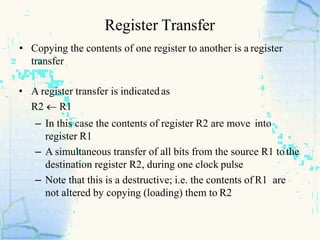
• Copying the contents of one register to another is a register
transfer
• A register transfer is indicatedas
R2  R1
– In this case the contents of register R2 are move into
register R1
– A simultaneous transfer of all bits from the source R1 tothe
destination register R2, during one clock pulse
– Note that this is a destructive; i.e. the contents of R1 are
not altered by copying (loading) them to R2
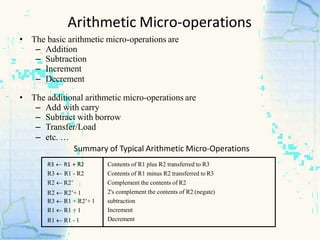
R3  R1 + R2
R3  R1 - R2
R2  R2’
R2  R2’+ 1
R3  R1 + R2’+ 1
R1  R1 + 1
R1  R1 - 1
Contents of R1 plus R2 transferred to R3
Contents of R1 minus R2 transferred to R3
Complement the contents of R2
2's complement the contents of R2 (negate)
subtraction
Increment
Decrement
• The basic arithmetic micro-operations are
– Addition
– Subtraction
– Increment
– Decrement
• The additional arithmetic micro-operations are
– Add with carry
– Subtract with borrow
– Transfer/Load
– etc. …
Summary of Typical Arithmetic Micro-Operations
Arithmetic Micro-operations
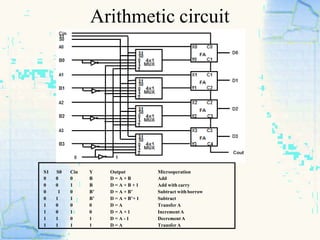
Arithmetic circuit
S1 S0 Cin Y Output Microoperation
0 0 0 B D = A + B Add
0 0 1 B D = A + B + 1 Add with carry
0 1 0 B’ D = A + B’ Subtract with borrow
0 1 1 B’ D = A + B’+ 1 Subtract
1 0 0 0 D = A Transfer A
1 0 1 0 D = A + 1 Increment A
1 1 0 1 D = A - 1 Decrement A
1 1 1 1 D = A Transfer A
Logical micro-operations
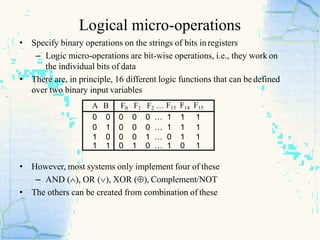
• Specify binary operations on the strings of bits inregisters
– Logic micro-operations are bit-wise operations, i.e., they work on
the individual bits of data
• There are, in principle, 16 different logic functions that can bedefined
over two binary input variables
• However, most systems only implement four of these
– AND (), OR (), XOR (), Complement/NOT
• The others can be created from combination of these
A B F0 F1 F2 … F13 F14 F15
0 0 0 0 0 … 1 1 1
0 1 0 0 0 … 1 1 1
1 0 0 0 1 … 0 1 1
1 1 0 1 0 … 1 0 1
Logical Micro-operation
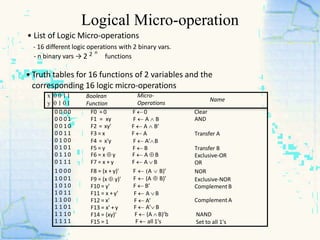
• List of Logic Micro-operations
- 16 different logic operations with 2 binary vars.
functions
• Truth tables for 16 functions of 2 variables and the
corresponding 16 logic micro-operations
x
y
0 0 1 1
0 1 0 1
Boolean
Function
Micro-
Operations
Name
0 0 00
0 0 01
0 0 10
0 0 11
0 1 00
0 1 01
0 1 10
0 1 11
1 0 00
1 0 01
1 0 10
1 0 11
1 1 00
1 1 01
1 1 10
1 1 11
F0 = 0
F1 = xy
F2 = xy'
F3 = x
F4 = x'y
F5 = y
F6 = x  y
F7 = x + y
F8 = (x + y)'
F9 = (x  y)'
F10 = y'
F11 = x + y'
F12 = x'
F13 = x' + y
F14 = (xy)'
F15 = 1
F 0
F  A  B
F  A  B’
F  A
F  A’B
F  B
F  A  B
F  A  B
F  A  B)’
F  (A  B)’
F  B’
F  A B
F  A’
F  A’ B
F  (A  B)’b
F  all 1's
Clear
AND
Transfer A
Transfer B
Exclusive-OR
OR
NOR
Exclusive-NOR
Complement B
Complement A
NAND
Set to all 1's
- n binary vars → 2 2 n
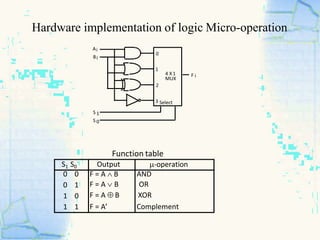
Hardware implementation of logic Micro-operation
Function table
S 1
S 0
F i
Ai
Bi
0
1
4 X 1
MUX
2
3 Select
S1 S0 Output -operation
0 0
0 1
1 0
1 1
F = A  B
F = A  B
F = A  B
F = A’
AND
OR
XOR
Complement
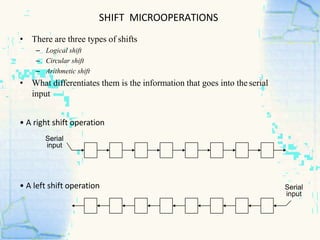
SHIFT MICROOPERATIONS
• There are three types of shifts
– Logical shift
– Circular shift
– Arithmetic shift
• What differentiates them is the information that goes into the serial
input
• A right shift operation
Serial
input
• A left shift operation Serial
input
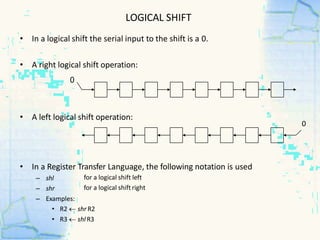
LOGICAL SHIFT
• In a Register Transfer Language, the following notation is used
for a logical shift left
for a logical shift right
– shl
– shr
– Examples:
• R2  shr R2
• R3  shl R3
• In a logical shift the serial input to the shift is a 0.
• A right logical shift operation:
0
• A left logical shift operation:
0
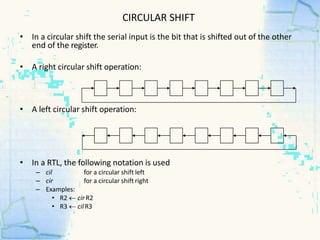
CIRCULAR SHIFT
• In a circular shift the serial input is the bit that is shifted out of the other
end of the register.
• A right circular shift operation:
• A left circular shift operation:
• In a RTL, the following notation is used
for a circular shift left
for a circular shift right
– cil
– cir
– Examples:
• R2  cir R2
• R3  cilR3
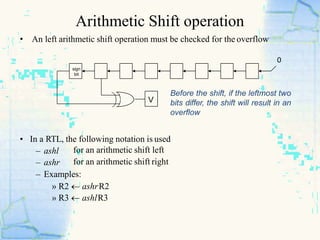
Arithmetic Shift operation
• An left arithmetic shift operation must be checked for the overflow
0
V
Before the shift, if the leftmost two
bits differ, the shift will result in an
overflow
• In a RTL, the following notation is used
– ashl
– ashr
for an arithmetic shift left
for an arithmetic shift right
– Examples:
» R2  ashrR2
» R3  ashlR3
sign
bit
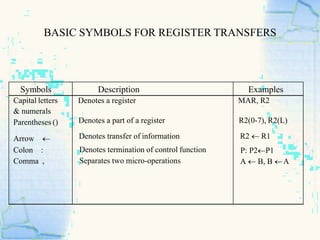
BASIC SYMBOLS FOR REGISTER TRANSFERS
Symbols Description Examples
Capital letters
& numerals
Parentheses ()
Arrow 
Colon :
Comma ,
Denotes a register
Denotes a part of a register
Denotes transfer of information
Denotes termination of control function
Separates two micro-operations
MAR, R2
R2(0-7), R2(L)
R2  R1
P: P2R1
A  B, B A
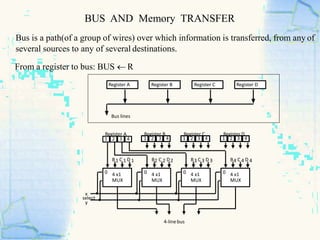
BUS AND Memory TRANSFER
Bus is a path(of a group of wires) over which information is transferred, from any of
several sources to any of several destinations.
From a register to bus: BUS  R
1 2 3 4 1 2 3 4 1 2 3 4 1 2 3 4
Register A Register B Register C Register D
B1 C 1 D 1 B2 C 2 D2 B3 C 3 D 3 B4 C 4 D 4
4-linebus
x
y
select
0 4 x1
MUX
0 4 x1
MUX
0 4 x1
MUX
0 4 x1
MUX
Register A Register B Register C Register D
Bus lines
Transfer from Bus to destination register
Three-State Bus Buffers
Bus line with three-state buffers
Reg. R0 Reg. R1 Reg. R2 Reg. R3
Bus lines
Load
D 0 D1 D2 D 3
2 x 4
Decoder
z
w
Select E (enable)
Output Y=A if C=1
High-impedence if C=0
Normal input A
Control input C
Select
Enable
0
1
2
3
S0
S1
A0
B0
C0
D0
Bus line for bit 0
Bus transfer in RTL
• Depending on whether the bus is to be mentioned explicitly or
not, register transfer can be indicated as either
R2  R1
or
BUS  R1, R2  BUS
• In the former case the bus is implicit, but in the latter, it is
explicitly indicated
Presented By : Lakshya Sharma

Register transfer language & its micro operations

  • 1.
  • 2.
    Register Transfer andMicro operations • Register Transfer Language • Register Transfer • Arithmetic Micro-operations • Logic Micro-operations • Shift Micro-operations • Register Transfer • Bus and Memory Transfers
  • 3.
    Register transfer language •A specific notation used to specify the digital system iscalled register transfer language. • For any function of the computer, the register transfer language can be used to describe the (sequence of) micro-operations • Register transfer language – A symbolic language – A convenient tool for describing the internal organization ofdigital computers – Can also be used to facilitate the design process of digitalsystems
  • 4.
    Micro-operations • Simple digitalsystems are frequently characterized in terms of – the registers they contain, and – the operations that they perform. • The operations on the data in registers are called micro- operations. • The functions built into registers are examples of micro- operations – Shift – Load – Clear – Increment ...etc.
  • 5.
    Micro-operations • Computer systemmicro-operations are of four types: - Register transfer micro-operations - Arithmetic micro-operations - Logic micro-operations - Shift micro-operations
  • 6.
    Register Transfer • Copyingthe contents of one register to another is a register transfer • A register transfer is indicatedas R2  R1 – In this case the contents of register R2 are move into register R1 – A simultaneous transfer of all bits from the source R1 tothe destination register R2, during one clock pulse – Note that this is a destructive; i.e. the contents of R1 are not altered by copying (loading) them to R2
  • 7.
    R3  R1+ R2 R3  R1 - R2 R2  R2’ R2  R2’+ 1 R3  R1 + R2’+ 1 R1  R1 + 1 R1  R1 - 1 Contents of R1 plus R2 transferred to R3 Contents of R1 minus R2 transferred to R3 Complement the contents of R2 2's complement the contents of R2 (negate) subtraction Increment Decrement • The basic arithmetic micro-operations are – Addition – Subtraction – Increment – Decrement • The additional arithmetic micro-operations are – Add with carry – Subtract with borrow – Transfer/Load – etc. … Summary of Typical Arithmetic Micro-Operations Arithmetic Micro-operations
  • 8.
    Arithmetic circuit S1 S0Cin Y Output Microoperation 0 0 0 B D = A + B Add 0 0 1 B D = A + B + 1 Add with carry 0 1 0 B’ D = A + B’ Subtract with borrow 0 1 1 B’ D = A + B’+ 1 Subtract 1 0 0 0 D = A Transfer A 1 0 1 0 D = A + 1 Increment A 1 1 0 1 D = A - 1 Decrement A 1 1 1 1 D = A Transfer A
  • 9.
    Logical micro-operations • Specifybinary operations on the strings of bits inregisters – Logic micro-operations are bit-wise operations, i.e., they work on the individual bits of data • There are, in principle, 16 different logic functions that can bedefined over two binary input variables • However, most systems only implement four of these – AND (), OR (), XOR (), Complement/NOT • The others can be created from combination of these A B F0 F1 F2 … F13 F14 F15 0 0 0 0 0 … 1 1 1 0 1 0 0 0 … 1 1 1 1 0 0 0 1 … 0 1 1 1 1 0 1 0 … 1 0 1
  • 10.
    Logical Micro-operation • Listof Logic Micro-operations - 16 different logic operations with 2 binary vars. functions • Truth tables for 16 functions of 2 variables and the corresponding 16 logic micro-operations x y 0 0 1 1 0 1 0 1 Boolean Function Micro- Operations Name 0 0 00 0 0 01 0 0 10 0 0 11 0 1 00 0 1 01 0 1 10 0 1 11 1 0 00 1 0 01 1 0 10 1 0 11 1 1 00 1 1 01 1 1 10 1 1 11 F0 = 0 F1 = xy F2 = xy' F3 = x F4 = x'y F5 = y F6 = x  y F7 = x + y F8 = (x + y)' F9 = (x  y)' F10 = y' F11 = x + y' F12 = x' F13 = x' + y F14 = (xy)' F15 = 1 F 0 F  A  B F  A  B’ F  A F  A’B F  B F  A  B F  A  B F  A  B)’ F  (A  B)’ F  B’ F  A B F  A’ F  A’ B F  (A  B)’b F  all 1's Clear AND Transfer A Transfer B Exclusive-OR OR NOR Exclusive-NOR Complement B Complement A NAND Set to all 1's - n binary vars → 2 2 n
  • 11.
    Hardware implementation oflogic Micro-operation Function table S 1 S 0 F i Ai Bi 0 1 4 X 1 MUX 2 3 Select S1 S0 Output -operation 0 0 0 1 1 0 1 1 F = A  B F = A  B F = A  B F = A’ AND OR XOR Complement
  • 12.
    SHIFT MICROOPERATIONS • Thereare three types of shifts – Logical shift – Circular shift – Arithmetic shift • What differentiates them is the information that goes into the serial input • A right shift operation Serial input • A left shift operation Serial input
  • 13.
    LOGICAL SHIFT • Ina Register Transfer Language, the following notation is used for a logical shift left for a logical shift right – shl – shr – Examples: • R2  shr R2 • R3  shl R3 • In a logical shift the serial input to the shift is a 0. • A right logical shift operation: 0 • A left logical shift operation: 0
  • 14.
    CIRCULAR SHIFT • Ina circular shift the serial input is the bit that is shifted out of the other end of the register. • A right circular shift operation: • A left circular shift operation: • In a RTL, the following notation is used for a circular shift left for a circular shift right – cil – cir – Examples: • R2  cir R2 • R3  cilR3
  • 15.
    Arithmetic Shift operation •An left arithmetic shift operation must be checked for the overflow 0 V Before the shift, if the leftmost two bits differ, the shift will result in an overflow • In a RTL, the following notation is used – ashl – ashr for an arithmetic shift left for an arithmetic shift right – Examples: » R2  ashrR2 » R3  ashlR3 sign bit
  • 16.
    BASIC SYMBOLS FORREGISTER TRANSFERS Symbols Description Examples Capital letters & numerals Parentheses () Arrow  Colon : Comma , Denotes a register Denotes a part of a register Denotes transfer of information Denotes termination of control function Separates two micro-operations MAR, R2 R2(0-7), R2(L) R2  R1 P: P2R1 A  B, B A
  • 17.
    BUS AND MemoryTRANSFER Bus is a path(of a group of wires) over which information is transferred, from any of several sources to any of several destinations. From a register to bus: BUS  R 1 2 3 4 1 2 3 4 1 2 3 4 1 2 3 4 Register A Register B Register C Register D B1 C 1 D 1 B2 C 2 D2 B3 C 3 D 3 B4 C 4 D 4 4-linebus x y select 0 4 x1 MUX 0 4 x1 MUX 0 4 x1 MUX 0 4 x1 MUX Register A Register B Register C Register D Bus lines
  • 18.
    Transfer from Busto destination register Three-State Bus Buffers Bus line with three-state buffers Reg. R0 Reg. R1 Reg. R2 Reg. R3 Bus lines Load D 0 D1 D2 D 3 2 x 4 Decoder z w Select E (enable) Output Y=A if C=1 High-impedence if C=0 Normal input A Control input C Select Enable 0 1 2 3 S0 S1 A0 B0 C0 D0 Bus line for bit 0
  • 19.
    Bus transfer inRTL • Depending on whether the bus is to be mentioned explicitly or not, register transfer can be indicated as either R2  R1 or BUS  R1, R2  BUS • In the former case the bus is implicit, but in the latter, it is explicitly indicated
  • 20.
    Presented By :Lakshya Sharma