Imranul Hasan
Greenwich University, UK
Memory System
What is Memory?
 Memory is internal storage areas in the computer.
 The term memory identifies data storage that comes in the form
of chips, and the word storage is used for memory that exists on
tapes or disks.
 Moreover, the term memory is usually used as shorthand for
physical memory, which refers to the actual chips capable of
holding data.
 Some computers also use virtual memory, which expands
physical memory onto a hard disk.
 Chip is a small piece of semi-conductor material (usually silicon)
on which an integrated circuit is embedded. A typical chip is less
than ¼-square inches and can contain millions of electronic
components (transistors).
Classification of Memory
 There are many ways in which types of memory or storage can be
categorized.
 Based on the technology (magnetic vs. electrical, etc.):
 Volatile Memory (Electrical storage)
 Nonvolatile Memory (Magnetic Storage)
 Based on primary access from the CPU (i.e., based primarily on speed of
access to the memory):
 Primary Memory – RAM (Main Memory) (fast access)
 Secondary Memory – Hard Disk (Auxiliary Memory) (slower access)
 Again based on technology of read-write method:
 ROM (Read-Only Memory) or WORM (Write Once, Read Many)
 RW (read-write) Memory
 Based on the mechanism of reading the memory:
 Random-Access
 Sequential-Access
 Based on media categories i.e., mainly disk-based, rather than memory
based:
 Semiconductor storage
 optical storage
 Magnetic storage etc.
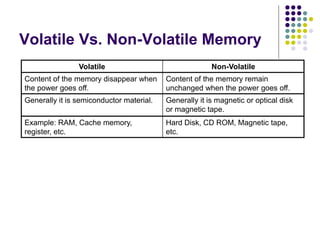
Volatile Vs. Non-Volatile Memory
Volatile Non-Volatile
Content of the memory disappear when
the power goes off.
Content of the memory remain
unchanged when the power goes off.
Generally it is semiconductor material. Generally it is magnetic or optical disk
or magnetic tape.
Example: RAM, Cache memory,
register, etc.
Hard Disk, CD ROM, Magnetic tape,
etc.
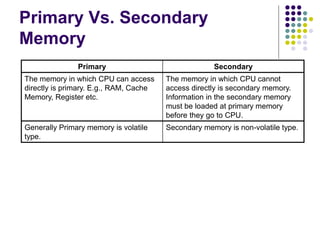
Primary Vs. Secondary
Memory
Primary Secondary
The memory in which CPU can access
directly is primary. E.g., RAM, Cache
Memory, Register etc.
The memory in which CPU cannot
access directly is secondary memory.
Information in the secondary memory
must be loaded at primary memory
before they go to CPU.
Generally Primary memory is volatile
type.
Secondary memory is non-volatile type.
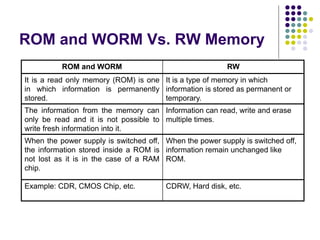
ROM and WORM Vs. RW Memory
ROM and WORM RW
It is a read only memory (ROM) is one
in which information is permanently
stored.
It is a type of memory in which
information is stored as permanent or
temporary.
The information from the memory can
only be read and it is not possible to
write fresh information into it.
Information can read, write and erase
multiple times.
When the power supply is switched off,
the information stored inside a ROM is
not lost as it is in the case of a RAM
chip.
When the power supply is switched off,
information remain unchanged like
ROM.
Example: CDR, CMOS Chip, etc. CDRW, Hard disk, etc.
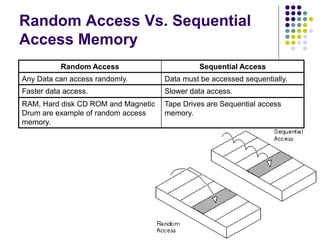
Random Access Vs. Sequential
Access Memory
Random Access Sequential Access
Any Data can access randomly. Data must be accessed sequentially.
Faster data access. Slower data access.
RAM, Hard disk CD ROM and Magnetic
Drum are example of random access
memory.
Tape Drives are Sequential access
memory.
Classification: Based on Media
type of memory
 Semiconductor storage:
 Generally they are created by semiconductor material.
CMOS chip, RAM Chip are the example of semiconductor
material.
 Optical storage:
 The CD ROM uses Laser Ray to read write or erase their
data. CD ROM is made of a type of crystal. Digital data is
written as a sequence of hole or plain surface in the crystal
material. CD ROM Drive read data by reflected light come
from CD ROM.
 Magnetic storage:
 Hard Disk and Tape drive use a thin layer of magnetic
material on the surface of Disk or Tape.
RAM (Random Access Memory)
 It is a type of computer memory that can be accessed randomly;
 RAM is the most common type of memory found in computers and
other devices such as printer.
 Every computer comes with a certain amount of physical memory RAM
 Usually RAM is referred to as Main Memory.
 CPU can access RAM directly.
 There are two basic type of RAM:
 Dynamic RAM:
 The term dynamic indicates that the memory must be constantly refreshed
or it will lose its contents. RAM is sometimes referred to as DRAM. DRAM is
used in most personal computers.
 Refresh means recharging a device with power or information. For example, dynamic
RAM needs to be refreshed thousands of times per second or it will lose the data stored
in it. Similarly, display monitors must be refreshed many times (60 to 105 times) per
second.
 Static RAM:
 Short for Static Random Access Memory. The term static is derived from the
fact that it doesn't need to be refreshed like DRAM. SRAM is a type of
memory that is faster and more reliable than the more common DRAM
(dynamic RAM).
 DRAM supports access times of about 60 nanoseconds, SRAM can give
access times as low as 10 nanoseconds.
ROM (Read-Only Memory)
 It is the memory on which data has been
prerecorded. Once data has been written onto a
ROM chip, it cannot be removed and can only be
read.
 Unlike main memory (RAM), ROM retains its
contents even when the computer is turned off.
ROM is referred to as being nonvolatile, whereas
RAM is volatile.
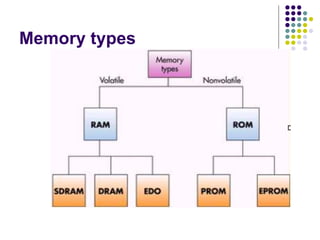
 PROM, EPROM, EEPROM are variation of ROM.
PROM (Programmable Read Only Memory
 PROM is a memory chip on which data can be written only once.
 Once a program has been written onto a PROM, it remains there
forever.
 Unlike RAM, PROMs retain their contents when the computer is
turned off.
 The difference between a PROM and a ROM (read-only
memory) is that a PROM is manufactured as blank memory,
whereas a ROM is programmed during the manufacturing
process.
 The process of programming a PROM is sometimes called
burning the PROM.
EPROM
(Erasable Programmable Read Only Memory)
 EPROM is a special type of memory that retains its contents until
it is exposed to ultraviolet light. The ultraviolet light clears its
contents, making it possible to reprogram the memory.
 To write to and erase an EPROM, you need a special device
called a PROM programmer or PROM burner.
 An EPROM differs from a PROM in that a PROM can be written
to only once and cannot be erased.
 EPROMs are used widely in personal computers because they
enable the manufacturer to change the contents of the PROM
before the computer is actually shipped. This means that bugs
can be removed and new versions installed shortly before
delivery.
EEPROM
(Electrically Erasable Programmable Read-Only Memory)
 EEPROM is a special type of PROM that can be erased by
exposing it to an electrical charge. EEROM requires data to be
written or erased one byte at a time.
 Like other types of PROM, EEPROM retains its contents even
when the power is turned off.
 Also like other types of ROM, EEPROM is not as fast as RAM.
 Pronounced as double-ee-prom or e-e-prom
Flash memory
 A special type of EEPROM that can be erased and reprogrammed in
blocks instead of one byte at a time.
 Many modern PCs have their BIOS stored on a flash memory
chip so that it can easily be updated if necessary. Such a BIOS is
sometimes called a flash BIOS.
 It is a technology that is primarily used in memory cards, and
USB flash drives (memory stick, flash stick) for general storage
and transfer of data between computers and other digital
products.
NVRAM
 Abbreviation of Non-Volatile Random Access
Memory, a type of memory that retains its contents
when power is turned off.
 One type of NVRAM is SRAM that is made non-volatile by
connecting it to a constant power source such as a battery.
 Another type of NVRAM uses EEPROM chips to save its
contents when power is turned off. In this case, NVRAM is
composed of a combination of SRAM and EEPROM
chips.
 The best-known form of NVRAM memory today is
flash memory.
Memory types
Cache Memory
 A special very high speed memory is sometimes used to increase the
speed of processing by making current programs and data available
to the CPU at a rapid rate.
 CPU speeds are quite high compared to the access time of main
memory. In many situations the performance of the processors are
limited due to the slow speed of the main memory.
 It is used to store segments of programs currently being executed
and/or temporary data frequency needed in the present calculations.
 By making active programs and data available at a rapid rate, it is
possible to increase the performance rate of the CPU.
 Cache memory makes main memory appear to be faster and larger
than it really is.
 It is very expensive as compared to the main memory.
Cache Memory
 A special high-speed storage mechanism. It can be
either a reserved section of main memory or an
independent high-speed storage device.
 Two types of caching are commonly used in
personal computers:
 Memory Cache and
 Disk Cache
Cache Memory (Memory Cache)
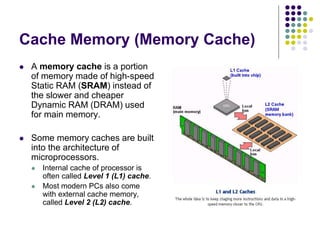
 A memory cache is a portion
of memory made of high-speed
Static RAM (SRAM) instead of
the slower and cheaper
Dynamic RAM (DRAM) used
for main memory.
 Some memory caches are built
into the architecture of
microprocessors.
 Internal cache of processor is
often called Level 1 (L1) cache.
 Most modern PCs also come
with external cache memory,
called Level 2 (L2) cache.
Cache Memory
 L1 cache
 Short for Level 1 cache, a memory cache built into the microprocessor. The L1
cache is also called the primary cache.
 L2 cache
 Short for Level 2 cache, cache memory that is external to the microprocessor.
 In general, L2 cache memory, also called the secondary cache, resides on a
separate chip from the microprocessor chip.
 Recently, more and more microprocessors are including L2 caches into their
internal architectures.
 L3 cache
 As more and more processors begin to include L2 cache into their
architectures, Level 3 cache is now the name for the extra cache built into
motherboards between the microprocessor and the main memory.
 Quite simply, what was once L2 cache on motherboards now becomes L3
cache when used with microprocessors containing built-in L2 caches.
Cache Memory (Disk Cache)
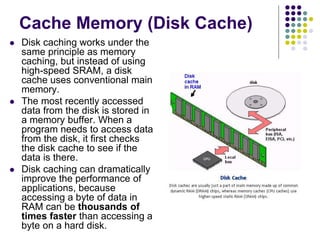
 Disk caching works under the
same principle as memory
caching, but instead of using
high-speed SRAM, a disk
cache uses conventional main
memory.
 The most recently accessed
data from the disk is stored in
a memory buffer. When a
program needs to access data
from the disk, it first checks
the disk cache to see if the
data is there.
 Disk caching can dramatically
improve the performance of
applications, because
accessing a byte of data in
RAM can be thousands of
times faster than accessing a
byte on a hard disk.
The levels of memory in a computer:
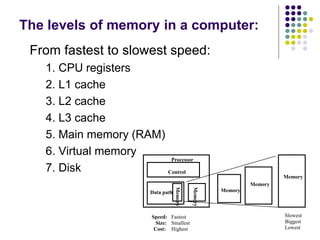
From fastest to slowest speed:
1. CPU registers
2. L1 cache
3. L2 cache
4. L3 cache
5. Main memory (RAM)
6. Virtual memory
7. Disk Control
Data path
Memory
Processor
Memory
Memory
MemoryMemory
Fastest Slowest
Smallest Biggest
Highest Lowest
Speed:
Size:
Cost:
?
 What will be happened if the amount of
memory required for running an operation is
larger than the memory exist physically?
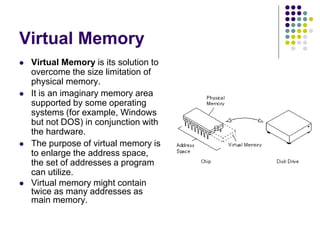
Virtual Memory
 Virtual Memory is its solution to
overcome the size limitation of
physical memory.
 It is an imaginary memory area
supported by some operating
systems (for example, Windows
but not DOS) in conjunction with
the hardware.
 The purpose of virtual memory is
to enlarge the address space,
the set of addresses a program
can utilize.
 Virtual memory might contain
twice as many addresses as
main memory.
Virtual Memory (Paging/Swapping)
 To facilitate copying virtual memory into real
memory, the operating system divides virtual
memory into pages (a page is a fixed number of
bytes recognized by the operating system), each of
which contains a fixed number of addresses.
 Each page is stored on a disk until it is needed.
When the page is needed, the operating system
copies it from disk to main memory, translating the
virtual addresses into real addresses.
 The process of translating virtual addresses into real
addresses is called mapping. The copying of virtual
pages from disk to main memory is known as
paging or swapping.
Memory Chip Packages
 Chip: A small piece of semi-conducting material (usually silicon) on which an
integrated circuit is embedded. A typical chip is less than ¼-square inches
and can contain millions of electronic components (transistors). Computers
consist of many chips placed on electronic boards called printed circuit
boards (PCB).
 There are different types of chips. For example, CPU chips (also called
microprocessors) contain an entire processing unit, whereas memory chips
contain blank memory.
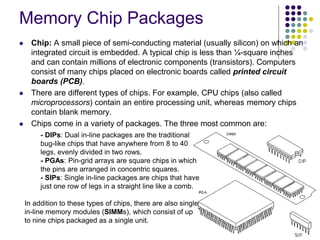
 Chips come in a variety of packages. The three most common are:
- DIPs: Dual in-line packages are the traditional
bug-like chips that have anywhere from 8 to 40
legs, evenly divided in two rows.
- PGAs: Pin-grid arrays are square chips in which
the pins are arranged in concentric squares.
- SIPs: Single in-line packages are chips that have
just one row of legs in a straight line like a comb.
In addition to these types of chips, there are also single
in-line memory modules (SIMMs), which consist of up
to nine chips packaged as a single unit.
Memory Chip Packages (SIMM)
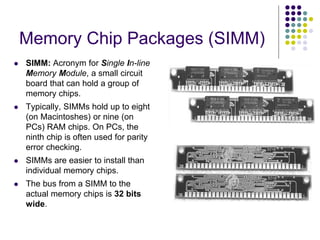
 SIMM: Acronym for Single In-line
Memory Module, a small circuit
board that can hold a group of
memory chips.
 Typically, SIMMs hold up to eight
(on Macintoshes) or nine (on
PCs) RAM chips. On PCs, the
ninth chip is often used for parity
error checking.
 SIMMs are easier to install than
individual memory chips.
 The bus from a SIMM to the
actual memory chips is 32 bits
wide.
Memory Chip Packages (DIMM)
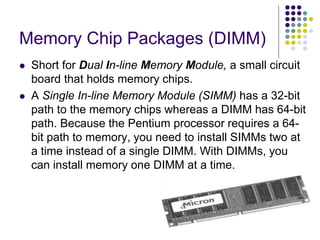
 Short for Dual In-line Memory Module, a small circuit
board that holds memory chips.
 A Single In-line Memory Module (SIMM) has a 32-bit
path to the memory chips whereas a DIMM has 64-bit
path. Because the Pentium processor requires a 64-
bit path to memory, you need to install SIMMs two at
a time instead of a single DIMM. With DIMMs, you
can install memory one DIMM at a time.
SDRAM
 Short for Synchronous DRAM, a type of DRAM that can run at much
higher clock speeds than conventional memory.
 SDRAM actually synchronizes itself with the CPU's bus and is capable
of running at 133 MHz, about three times faster than conventional FPM
RAM[1], and about twice as fast EDO DRAM[2] and BEDO DRAM[3].
SDRAM is replacing EDO DRAM in many newer computers.
 [1] FPMRAM: Short for Fast Page Mode RAM, a type of Dynamic RAM
(DRAM) that allows faster access to data in the same row or page.
 [2] EDO DRAM: Short for Extended Data Out Dynamic Random Access
Memory, a type of DRAM that is faster than conventional DRAM.
 [3] BEDO DRAM: Short for Burst EDO DRAM, a new type of EDO DRAM
that can process four memory addresses in one burst.
DDR-SDRAM
 Short for Double Data Rate-Synchronous DRAM, a type of
SDRAM that supports data transfers on both edges of each
clock cycle (the rising and falling edges), effectively doubling
the memory chip's data throughput.
 DDR-SDRAM also consumes less power, which makes it
well-suited to notebook computers. DDR-SDRAM is also
called SDRAM II. and DDRAM.
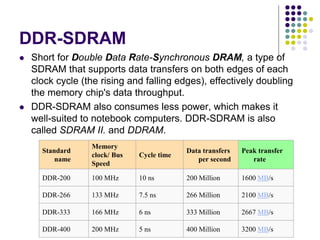
Standard
name
Memory
clock/ Bus
Speed
Cycle time
Data transfers
per second
Peak transfer
rate
DDR-200 100 MHz 10 ns 200 Million 1600 MB/s
DDR-266 133 MHz 7.5 ns 266 Million 2100 MB/s
DDR-333 166 MHz 6 ns 333 Million 2667 MB/s
DDR-400 200 MHz 5 ns 400 Million 3200 MB/s
DDR2-SDRAM
 DDR2-SDRAM is high-performance main memory. Over its
predecessor, DDR-SDRAM, DDR2-SDRAM offers greater bandwidth
and density in a smaller package along with a reduction in power
consumption. In addition, DDR2-SDRAM offers new features and
functions that enable higher a clock rate and data rate operations of
400 MHz, 533 MHz, 667 MHz, and above. DDR2 transfers 64 bits of
data twice every clock cycle. DDR2-SDRAM memory is not compatible
with current DDR-SDRAM memory slots.
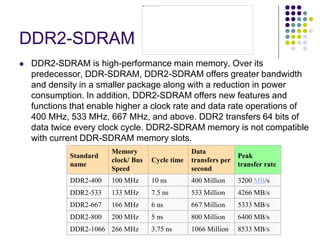
Standard
name
Memory
clock/ Bus
Speed
Cycle time
Data
transfers per
second
Peak
transfer rate
DDR2-400 100 MHz 10 ns 400 Million 3200 MB/s
DDR2-533 133 MHz 7.5 ns 533 Million 4266 MB/s
DDR2-667 166 MHz 6 ns 667 Million 5333 MB/s
DDR2-800 200 MHz 5 ns 800 Million 6400 MB/s
DDR2-1066 266 MHz 3.75 ns 1066 Million 8533 MB/s
Thank You!!

Memory System

  • 1.
  • 2.
    What is Memory? Memory is internal storage areas in the computer.  The term memory identifies data storage that comes in the form of chips, and the word storage is used for memory that exists on tapes or disks.  Moreover, the term memory is usually used as shorthand for physical memory, which refers to the actual chips capable of holding data.  Some computers also use virtual memory, which expands physical memory onto a hard disk.  Chip is a small piece of semi-conductor material (usually silicon) on which an integrated circuit is embedded. A typical chip is less than ¼-square inches and can contain millions of electronic components (transistors).
  • 3.
    Classification of Memory There are many ways in which types of memory or storage can be categorized.  Based on the technology (magnetic vs. electrical, etc.):  Volatile Memory (Electrical storage)  Nonvolatile Memory (Magnetic Storage)  Based on primary access from the CPU (i.e., based primarily on speed of access to the memory):  Primary Memory – RAM (Main Memory) (fast access)  Secondary Memory – Hard Disk (Auxiliary Memory) (slower access)  Again based on technology of read-write method:  ROM (Read-Only Memory) or WORM (Write Once, Read Many)  RW (read-write) Memory  Based on the mechanism of reading the memory:  Random-Access  Sequential-Access  Based on media categories i.e., mainly disk-based, rather than memory based:  Semiconductor storage  optical storage  Magnetic storage etc.
  • 4.
    Volatile Vs. Non-VolatileMemory Volatile Non-Volatile Content of the memory disappear when the power goes off. Content of the memory remain unchanged when the power goes off. Generally it is semiconductor material. Generally it is magnetic or optical disk or magnetic tape. Example: RAM, Cache memory, register, etc. Hard Disk, CD ROM, Magnetic tape, etc.
  • 5.
    Primary Vs. Secondary Memory PrimarySecondary The memory in which CPU can access directly is primary. E.g., RAM, Cache Memory, Register etc. The memory in which CPU cannot access directly is secondary memory. Information in the secondary memory must be loaded at primary memory before they go to CPU. Generally Primary memory is volatile type. Secondary memory is non-volatile type.
  • 6.
    ROM and WORMVs. RW Memory ROM and WORM RW It is a read only memory (ROM) is one in which information is permanently stored. It is a type of memory in which information is stored as permanent or temporary. The information from the memory can only be read and it is not possible to write fresh information into it. Information can read, write and erase multiple times. When the power supply is switched off, the information stored inside a ROM is not lost as it is in the case of a RAM chip. When the power supply is switched off, information remain unchanged like ROM. Example: CDR, CMOS Chip, etc. CDRW, Hard disk, etc.
  • 7.
    Random Access Vs.Sequential Access Memory Random Access Sequential Access Any Data can access randomly. Data must be accessed sequentially. Faster data access. Slower data access. RAM, Hard disk CD ROM and Magnetic Drum are example of random access memory. Tape Drives are Sequential access memory.
  • 8.
    Classification: Based onMedia type of memory  Semiconductor storage:  Generally they are created by semiconductor material. CMOS chip, RAM Chip are the example of semiconductor material.  Optical storage:  The CD ROM uses Laser Ray to read write or erase their data. CD ROM is made of a type of crystal. Digital data is written as a sequence of hole or plain surface in the crystal material. CD ROM Drive read data by reflected light come from CD ROM.  Magnetic storage:  Hard Disk and Tape drive use a thin layer of magnetic material on the surface of Disk or Tape.
  • 9.
    RAM (Random AccessMemory)  It is a type of computer memory that can be accessed randomly;  RAM is the most common type of memory found in computers and other devices such as printer.  Every computer comes with a certain amount of physical memory RAM  Usually RAM is referred to as Main Memory.  CPU can access RAM directly.  There are two basic type of RAM:  Dynamic RAM:  The term dynamic indicates that the memory must be constantly refreshed or it will lose its contents. RAM is sometimes referred to as DRAM. DRAM is used in most personal computers.  Refresh means recharging a device with power or information. For example, dynamic RAM needs to be refreshed thousands of times per second or it will lose the data stored in it. Similarly, display monitors must be refreshed many times (60 to 105 times) per second.  Static RAM:  Short for Static Random Access Memory. The term static is derived from the fact that it doesn't need to be refreshed like DRAM. SRAM is a type of memory that is faster and more reliable than the more common DRAM (dynamic RAM).  DRAM supports access times of about 60 nanoseconds, SRAM can give access times as low as 10 nanoseconds.
  • 10.
    ROM (Read-Only Memory) It is the memory on which data has been prerecorded. Once data has been written onto a ROM chip, it cannot be removed and can only be read.  Unlike main memory (RAM), ROM retains its contents even when the computer is turned off. ROM is referred to as being nonvolatile, whereas RAM is volatile.  PROM, EPROM, EEPROM are variation of ROM.
  • 11.
    PROM (Programmable ReadOnly Memory  PROM is a memory chip on which data can be written only once.  Once a program has been written onto a PROM, it remains there forever.  Unlike RAM, PROMs retain their contents when the computer is turned off.  The difference between a PROM and a ROM (read-only memory) is that a PROM is manufactured as blank memory, whereas a ROM is programmed during the manufacturing process.  The process of programming a PROM is sometimes called burning the PROM.
  • 12.
    EPROM (Erasable Programmable ReadOnly Memory)  EPROM is a special type of memory that retains its contents until it is exposed to ultraviolet light. The ultraviolet light clears its contents, making it possible to reprogram the memory.  To write to and erase an EPROM, you need a special device called a PROM programmer or PROM burner.  An EPROM differs from a PROM in that a PROM can be written to only once and cannot be erased.  EPROMs are used widely in personal computers because they enable the manufacturer to change the contents of the PROM before the computer is actually shipped. This means that bugs can be removed and new versions installed shortly before delivery.
  • 13.
    EEPROM (Electrically Erasable ProgrammableRead-Only Memory)  EEPROM is a special type of PROM that can be erased by exposing it to an electrical charge. EEROM requires data to be written or erased one byte at a time.  Like other types of PROM, EEPROM retains its contents even when the power is turned off.  Also like other types of ROM, EEPROM is not as fast as RAM.  Pronounced as double-ee-prom or e-e-prom
  • 14.
    Flash memory  Aspecial type of EEPROM that can be erased and reprogrammed in blocks instead of one byte at a time.  Many modern PCs have their BIOS stored on a flash memory chip so that it can easily be updated if necessary. Such a BIOS is sometimes called a flash BIOS.  It is a technology that is primarily used in memory cards, and USB flash drives (memory stick, flash stick) for general storage and transfer of data between computers and other digital products.
  • 15.
    NVRAM  Abbreviation ofNon-Volatile Random Access Memory, a type of memory that retains its contents when power is turned off.  One type of NVRAM is SRAM that is made non-volatile by connecting it to a constant power source such as a battery.  Another type of NVRAM uses EEPROM chips to save its contents when power is turned off. In this case, NVRAM is composed of a combination of SRAM and EEPROM chips.  The best-known form of NVRAM memory today is flash memory.
  • 16.
  • 17.
    Cache Memory  Aspecial very high speed memory is sometimes used to increase the speed of processing by making current programs and data available to the CPU at a rapid rate.  CPU speeds are quite high compared to the access time of main memory. In many situations the performance of the processors are limited due to the slow speed of the main memory.  It is used to store segments of programs currently being executed and/or temporary data frequency needed in the present calculations.  By making active programs and data available at a rapid rate, it is possible to increase the performance rate of the CPU.  Cache memory makes main memory appear to be faster and larger than it really is.  It is very expensive as compared to the main memory.
  • 18.
    Cache Memory  Aspecial high-speed storage mechanism. It can be either a reserved section of main memory or an independent high-speed storage device.  Two types of caching are commonly used in personal computers:  Memory Cache and  Disk Cache
  • 19.
    Cache Memory (MemoryCache)  A memory cache is a portion of memory made of high-speed Static RAM (SRAM) instead of the slower and cheaper Dynamic RAM (DRAM) used for main memory.  Some memory caches are built into the architecture of microprocessors.  Internal cache of processor is often called Level 1 (L1) cache.  Most modern PCs also come with external cache memory, called Level 2 (L2) cache.
  • 20.
    Cache Memory  L1cache  Short for Level 1 cache, a memory cache built into the microprocessor. The L1 cache is also called the primary cache.  L2 cache  Short for Level 2 cache, cache memory that is external to the microprocessor.  In general, L2 cache memory, also called the secondary cache, resides on a separate chip from the microprocessor chip.  Recently, more and more microprocessors are including L2 caches into their internal architectures.  L3 cache  As more and more processors begin to include L2 cache into their architectures, Level 3 cache is now the name for the extra cache built into motherboards between the microprocessor and the main memory.  Quite simply, what was once L2 cache on motherboards now becomes L3 cache when used with microprocessors containing built-in L2 caches.
  • 21.
    Cache Memory (DiskCache)  Disk caching works under the same principle as memory caching, but instead of using high-speed SRAM, a disk cache uses conventional main memory.  The most recently accessed data from the disk is stored in a memory buffer. When a program needs to access data from the disk, it first checks the disk cache to see if the data is there.  Disk caching can dramatically improve the performance of applications, because accessing a byte of data in RAM can be thousands of times faster than accessing a byte on a hard disk.
  • 22.
    The levels ofmemory in a computer: From fastest to slowest speed: 1. CPU registers 2. L1 cache 3. L2 cache 4. L3 cache 5. Main memory (RAM) 6. Virtual memory 7. Disk Control Data path Memory Processor Memory Memory MemoryMemory Fastest Slowest Smallest Biggest Highest Lowest Speed: Size: Cost:
  • 23.
    ?  What willbe happened if the amount of memory required for running an operation is larger than the memory exist physically?
  • 24.
    Virtual Memory  VirtualMemory is its solution to overcome the size limitation of physical memory.  It is an imaginary memory area supported by some operating systems (for example, Windows but not DOS) in conjunction with the hardware.  The purpose of virtual memory is to enlarge the address space, the set of addresses a program can utilize.  Virtual memory might contain twice as many addresses as main memory.
  • 25.
    Virtual Memory (Paging/Swapping) To facilitate copying virtual memory into real memory, the operating system divides virtual memory into pages (a page is a fixed number of bytes recognized by the operating system), each of which contains a fixed number of addresses.  Each page is stored on a disk until it is needed. When the page is needed, the operating system copies it from disk to main memory, translating the virtual addresses into real addresses.  The process of translating virtual addresses into real addresses is called mapping. The copying of virtual pages from disk to main memory is known as paging or swapping.
  • 26.
    Memory Chip Packages Chip: A small piece of semi-conducting material (usually silicon) on which an integrated circuit is embedded. A typical chip is less than ¼-square inches and can contain millions of electronic components (transistors). Computers consist of many chips placed on electronic boards called printed circuit boards (PCB).  There are different types of chips. For example, CPU chips (also called microprocessors) contain an entire processing unit, whereas memory chips contain blank memory.  Chips come in a variety of packages. The three most common are: - DIPs: Dual in-line packages are the traditional bug-like chips that have anywhere from 8 to 40 legs, evenly divided in two rows. - PGAs: Pin-grid arrays are square chips in which the pins are arranged in concentric squares. - SIPs: Single in-line packages are chips that have just one row of legs in a straight line like a comb. In addition to these types of chips, there are also single in-line memory modules (SIMMs), which consist of up to nine chips packaged as a single unit.
  • 27.
    Memory Chip Packages(SIMM)  SIMM: Acronym for Single In-line Memory Module, a small circuit board that can hold a group of memory chips.  Typically, SIMMs hold up to eight (on Macintoshes) or nine (on PCs) RAM chips. On PCs, the ninth chip is often used for parity error checking.  SIMMs are easier to install than individual memory chips.  The bus from a SIMM to the actual memory chips is 32 bits wide.
  • 28.
    Memory Chip Packages(DIMM)  Short for Dual In-line Memory Module, a small circuit board that holds memory chips.  A Single In-line Memory Module (SIMM) has a 32-bit path to the memory chips whereas a DIMM has 64-bit path. Because the Pentium processor requires a 64- bit path to memory, you need to install SIMMs two at a time instead of a single DIMM. With DIMMs, you can install memory one DIMM at a time.
  • 29.
    SDRAM  Short forSynchronous DRAM, a type of DRAM that can run at much higher clock speeds than conventional memory.  SDRAM actually synchronizes itself with the CPU's bus and is capable of running at 133 MHz, about three times faster than conventional FPM RAM[1], and about twice as fast EDO DRAM[2] and BEDO DRAM[3]. SDRAM is replacing EDO DRAM in many newer computers.  [1] FPMRAM: Short for Fast Page Mode RAM, a type of Dynamic RAM (DRAM) that allows faster access to data in the same row or page.  [2] EDO DRAM: Short for Extended Data Out Dynamic Random Access Memory, a type of DRAM that is faster than conventional DRAM.  [3] BEDO DRAM: Short for Burst EDO DRAM, a new type of EDO DRAM that can process four memory addresses in one burst.
  • 30.
    DDR-SDRAM  Short forDouble Data Rate-Synchronous DRAM, a type of SDRAM that supports data transfers on both edges of each clock cycle (the rising and falling edges), effectively doubling the memory chip's data throughput.  DDR-SDRAM also consumes less power, which makes it well-suited to notebook computers. DDR-SDRAM is also called SDRAM II. and DDRAM. Standard name Memory clock/ Bus Speed Cycle time Data transfers per second Peak transfer rate DDR-200 100 MHz 10 ns 200 Million 1600 MB/s DDR-266 133 MHz 7.5 ns 266 Million 2100 MB/s DDR-333 166 MHz 6 ns 333 Million 2667 MB/s DDR-400 200 MHz 5 ns 400 Million 3200 MB/s
  • 31.
    DDR2-SDRAM  DDR2-SDRAM ishigh-performance main memory. Over its predecessor, DDR-SDRAM, DDR2-SDRAM offers greater bandwidth and density in a smaller package along with a reduction in power consumption. In addition, DDR2-SDRAM offers new features and functions that enable higher a clock rate and data rate operations of 400 MHz, 533 MHz, 667 MHz, and above. DDR2 transfers 64 bits of data twice every clock cycle. DDR2-SDRAM memory is not compatible with current DDR-SDRAM memory slots. Standard name Memory clock/ Bus Speed Cycle time Data transfers per second Peak transfer rate DDR2-400 100 MHz 10 ns 400 Million 3200 MB/s DDR2-533 133 MHz 7.5 ns 533 Million 4266 MB/s DDR2-667 166 MHz 6 ns 667 Million 5333 MB/s DDR2-800 200 MHz 5 ns 800 Million 6400 MB/s DDR2-1066 266 MHz 3.75 ns 1066 Million 8533 MB/s
  • 32.