Primary Memory
RANDOM ACCESS MEMORY (RAM)
A PRESENTATION BY DIVYANSHU DORSE
Table of Content
S.No Topic
1 What Is RAM ?
2 RAM : “Heart Of Computer”
3 Types Of RAM
4 Classification of Ram according to various Generation
5 Physical Classification Of RAM
6 Installing RAM on Your PC
7 Pros and Cons Of RAM
8 Conclusion
What Is RAM ?
 RAM(Random Access Memory) is a part of
computer’s Main Memory which is directly accessible
by CPU
 Used to Read and Write data into it which is accessed
by CPU randomly.
 RAM is volatile in nature, it means if the power goes
off, the stored information is lost.
History Of RAM
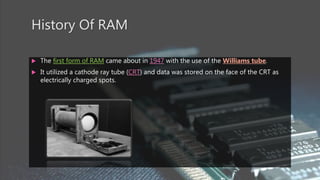
 The first form of RAM came about in 1947 with the use of the Williams tube.
 It utilized a cathode ray tube (CRT) and data was stored on the face of the CRT as
electrically charged spots.
Earlier..
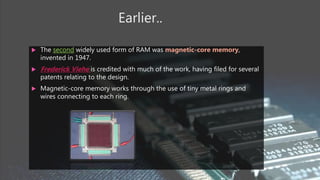
 The second widely used form of RAM was magnetic-core memory,
invented in 1947.
 Frederick Viehe is credited with much of the work, having filed for several
patents relating to the design.
 Magnetic-core memory works through the use of tiny metal rings and
wires connecting to each ring.
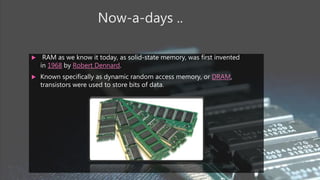
Now-a-days ..
 RAM as we know it today, as solid-state memory, was first invented
in 1968 by Robert Dennard.
 Known specifically as dynamic random access memory, or DRAM,
transistors were used to store bits of data.
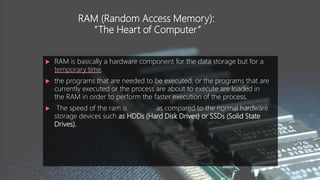
RAM (Random Access Memory):
“The Heart of Computer”
 RAM is basically a hardware component for the data storage but for a
temporary time.
 the programs that are needed to be executed, or the programs that are
currently executed or the process are about to execute are loaded in
the RAM in order to perform the faster execution of the process.
 The speed of the ram is very fast as compared to the normal hardware
storage devices such as HDDs (Hard Disk Drives) or SSDs (Solid State
Drives).
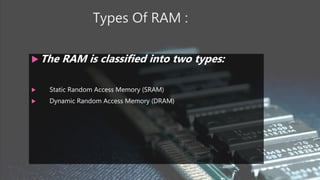
Types Of RAM :
 The RAM is classified into two types:
 Static Random Access Memory (SRAM)
 Dynamic Random Access Memory (DRAM)
Static Random Access Memory
(SRAM)
 Static RAM are made up of transistor, invertors.
 These RAM are not needed to be refreshed hundreds of times in a
second. As the feedback is generated by the invertors which can be used
to provide the input to the transistors.
 Main purpose is to decrease the processing time, this is due to the faster
speed of the RAM.
 Due to its speed they are also used as cache.
 They are very expensive and the power consumed is very high whereas
they are very bulky.
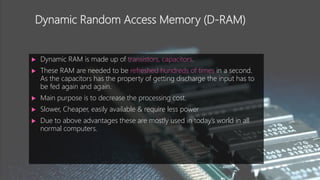
Dynamic Random Access Memory (D-RAM)
 Dynamic RAM is made up of transistors, capacitors.
 These RAM are needed to be refreshed hundreds of times in a second.
As the capacitors has the property of getting discharge the input has to
be fed again and again.
 Main purpose is to decrease the processing cost.
 Slower, Cheaper, easily available & require less power
 Due to above advantages these are mostly used in today’s world in all
normal computers.
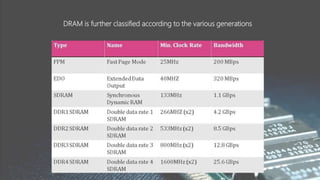
DRAM is further classified according to the various generations
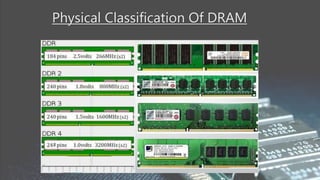
Physical Classification Of DRAM
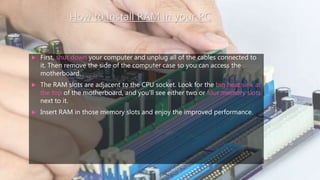
How to install RAM in your PC
 First, shut down your computer and unplug all of the cables connected to
it. Then remove the side of the computer case so you can access the
motherboard.
 The RAM slots are adjacent to the CPU socket. Look for the big heat sink at
the top of the motherboard, and you'll see either two or four memory slots
next to it.
 Insert RAM in those memory slots and enjoy the improved performance.
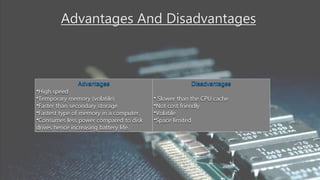
Advantages And Disadvantages
Advantages
•High speed
•Temporary memory (volatile)
•Faster than secondary storage
•Fastest type of memory in a computer.
•Consumes less power compared to disk
drives hence increasing battery life.
Disadvantages
• Slower than the CPU cache
•Not cost friendly
•Volatile
•Space limited
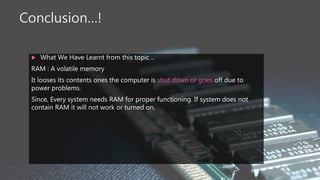
Conclusion…!
 What We Have Learnt from this topic ..
RAM : A volatile memory
It looses its contents ones the computer is shut down or goes off due to
power problems.
Since, Every system needs RAM for proper functioning. If system does not
contain RAM it will not work or turned on.
THANK YOU

RAM :A primary Memory

  • 1.
    Primary Memory RANDOM ACCESSMEMORY (RAM) A PRESENTATION BY DIVYANSHU DORSE
  • 2.
    Table of Content S.NoTopic 1 What Is RAM ? 2 RAM : “Heart Of Computer” 3 Types Of RAM 4 Classification of Ram according to various Generation 5 Physical Classification Of RAM 6 Installing RAM on Your PC 7 Pros and Cons Of RAM 8 Conclusion
  • 3.
    What Is RAM?  RAM(Random Access Memory) is a part of computer’s Main Memory which is directly accessible by CPU  Used to Read and Write data into it which is accessed by CPU randomly.  RAM is volatile in nature, it means if the power goes off, the stored information is lost.
  • 4.
    History Of RAM The first form of RAM came about in 1947 with the use of the Williams tube.  It utilized a cathode ray tube (CRT) and data was stored on the face of the CRT as electrically charged spots.
  • 5.
    Earlier..  The secondwidely used form of RAM was magnetic-core memory, invented in 1947.  Frederick Viehe is credited with much of the work, having filed for several patents relating to the design.  Magnetic-core memory works through the use of tiny metal rings and wires connecting to each ring.
  • 6.
    Now-a-days ..  RAMas we know it today, as solid-state memory, was first invented in 1968 by Robert Dennard.  Known specifically as dynamic random access memory, or DRAM, transistors were used to store bits of data.
  • 7.
    RAM (Random AccessMemory): “The Heart of Computer”  RAM is basically a hardware component for the data storage but for a temporary time.  the programs that are needed to be executed, or the programs that are currently executed or the process are about to execute are loaded in the RAM in order to perform the faster execution of the process.  The speed of the ram is very fast as compared to the normal hardware storage devices such as HDDs (Hard Disk Drives) or SSDs (Solid State Drives).
  • 8.
    Types Of RAM:  The RAM is classified into two types:  Static Random Access Memory (SRAM)  Dynamic Random Access Memory (DRAM)
  • 9.
    Static Random AccessMemory (SRAM)  Static RAM are made up of transistor, invertors.  These RAM are not needed to be refreshed hundreds of times in a second. As the feedback is generated by the invertors which can be used to provide the input to the transistors.  Main purpose is to decrease the processing time, this is due to the faster speed of the RAM.  Due to its speed they are also used as cache.  They are very expensive and the power consumed is very high whereas they are very bulky.
  • 10.
    Dynamic Random AccessMemory (D-RAM)  Dynamic RAM is made up of transistors, capacitors.  These RAM are needed to be refreshed hundreds of times in a second. As the capacitors has the property of getting discharge the input has to be fed again and again.  Main purpose is to decrease the processing cost.  Slower, Cheaper, easily available & require less power  Due to above advantages these are mostly used in today’s world in all normal computers.
  • 11.
    DRAM is furtherclassified according to the various generations
  • 12.
  • 13.
    How to installRAM in your PC  First, shut down your computer and unplug all of the cables connected to it. Then remove the side of the computer case so you can access the motherboard.  The RAM slots are adjacent to the CPU socket. Look for the big heat sink at the top of the motherboard, and you'll see either two or four memory slots next to it.  Insert RAM in those memory slots and enjoy the improved performance.
  • 14.
    Advantages And Disadvantages Advantages •Highspeed •Temporary memory (volatile) •Faster than secondary storage •Fastest type of memory in a computer. •Consumes less power compared to disk drives hence increasing battery life. Disadvantages • Slower than the CPU cache •Not cost friendly •Volatile •Space limited
  • 15.
    Conclusion…!  What WeHave Learnt from this topic .. RAM : A volatile memory It looses its contents ones the computer is shut down or goes off due to power problems. Since, Every system needs RAM for proper functioning. If system does not contain RAM it will not work or turned on.
  • 16.