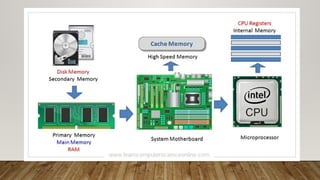
WHAT IS COMPUTERMEMORY?
• Computer memory is just like the human brain. It is used to store data/information and
instructions. It is a data storage unit or a data storage device where data is to be
processed and instructions required for processing are stored. It can store both the input
and output can be stored here.
• Characteristics of Computer Memory
• It is faster computer memory as compared to secondary memory.
• It is semiconductor memories.
• It is usually a volatile memory, and main memory of the computer.
• A computer system cannot run without primary memory.
3.
TYPES OF COMPUTERMEMORY
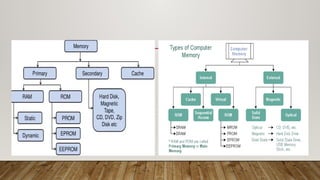
In general, computer memory is of three types:
• Primary memory
• Secondary memory
• caches memory
5.
1. PRIMARY MEMORY
•Primary storage or memory is also known as the main memory, which is the part of the
computer that stores current data, programs, and instructions. Primary storage is stored
in the motherboard which results in the data from and to primary storage can be read
and written at a very good pace
• It is also known as the main memory of the computer system. It is used to store data and
programs or instructions during computer operations. It uses semiconductor technology
and hence is commonly called semiconductor memory. Primary memory is of two types:
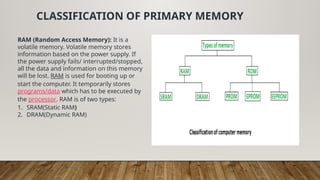
Primary memory can be broadly classified into two parts:
1.Read-Only Memory (ROM)
2.Random Access Memory (RAM)
6.
CLASSIFICATION OF PRIMARYMEMORY
RAM (Random Access Memory): It is a
volatile memory. Volatile memory stores
information based on the power supply. If
the power supply fails/ interrupted/stopped,
all the data and information on this memory
will be lost. RAM is used for booting up or
start the computer. It temporarily stores
programs/data which has to be executed by
the processor. RAM is of two types:
1. SRAM(Static RAM)
2. DRAM(Dynamic RAM)
7.
RAM IS OFTWO TYPES:
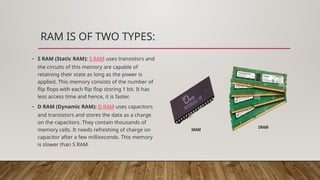
• S RAM (Static RAM): S RAM uses transistors and
the circuits of this memory are capable of
retaining their state as long as the power is
applied. This memory consists of the number of
flip flops with each flip flop storing 1 bit. It has
less access time and hence, it is faster.
• D RAM (Dynamic RAM): D RAM uses capacitors
and transistors and stores the data as a charge
on the capacitors. They contain thousands of
memory cells. It needs refreshing of charge on
capacitor after a few milliseconds. This memory
is slower than S RAM.
8.
READ ONLY MEMORY
ROM(Read Only Memory): It is a non-
volatile memory.Non-volatile memory
stores information even when there is a
power supply failed/
interrupted/stopped. As its name refers
to read-only memory, we can only read
the programs and data that is stored on
it. The information stored in the ROM in
binary format. It is also known as
permanent memory.
9.
ROM IS OFFOUR TYPES:
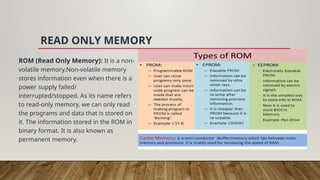
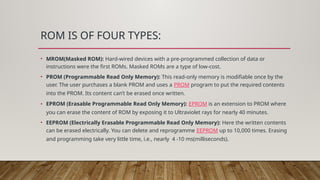
• MROM(Masked ROM): Hard-wired devices with a pre-programmed collection of data or
instructions were the first ROMs. Masked ROMs are a type of low-cost.
• PROM (Programmable Read Only Memory): This read-only memory is modifiable once by the
user. The user purchases a blank PROM and uses a PROM program to put the required contents
into the PROM. Its content can’t be erased once written.
• EPROM (Erasable Programmable Read Only Memory): EPROM is an extension to PROM where
you can erase the content of ROM by exposing it to Ultraviolet rays for nearly 40 minutes.
• EEPROM (Electrically Erasable Programmable Read Only Memory): Here the written contents
can be erased electrically. You can delete and reprogramme EEPROM up to 10,000 times. Erasing
and programming take very little time, i.e., nearly 4 -10 ms(milliseconds).
10.
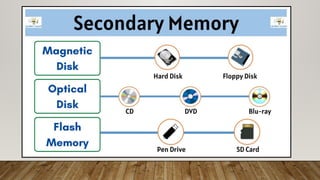
2. SECONDARY MEMORY
•It is also known as auxiliary memory and backup memory. It is a non-volatile memory and used to store
a large amount of data or information. The data or information stored in secondary memory is
permanent, and it is slower than primary memory. A CPU cannot access secondary memory directly.
The data/information from the auxiliary memory is first transferred to the main memory, and then the
CPU can access it
Use of Secondary memory
• Permanent storage: As we know that primary memory stores data only when the power supply is on, it
loses data when the power is off. So we need a secondary memory to stores data permanently even if
the power supply is off.
• Large Storage: Secondary memory provides large storage space so that we can store large data like
videos, images, audios, files, etc permanently.
• Portable: Some secondary devices are removable. So, we can easily store or transfer data from one
computer or device to another.
11.
CHARACTERISTICS OF SECONDARYMEMORY
• It is a slow memory but reusable.
• It is a reliable and non-volatile memory.
• It is cheaper than primary memory.
• The storage capacity of secondary memory is
large.
• A computer system can run without secondary
memory.
• In secondary memory, data is stored
permanently even when the power is off.
12.
TYPES OF SECONDARYMEMORY
• 1. Magnetic Tapes: In magnetic tape
only one side of the ribbon is used for
storing data. It is sequential memory
which contains thin plastic ribbon to
store data and coated by magnetic
oxide.Each track has one read/write
head, which allows data to be recorded
and read as a sequence of characters.
It can be stopped, started moving
forward or backward, or rewound.
1.These are inexpensive, i.e., low cost
memories.
2.It provides backup or archival storage.
3.It can be used for large files.
4.It can be used for copying from disk
files.
5.It is a reusable memory.
6.It is compact and easy to store on racks.
14.
• 2.magnetic Diskis a type of
secondary memory that is a flat
disc covered with a magnetic
coating to hold information. It is
used to store various programs
and files. The polarized
information in one direction is
represented by 1, and vice versa.
The direction is indicated by 0.
• These are economical memory
Easy and direct access to data is
possible.
• It can store large amounts of data.
• It has a better data transfer rate
than magnetic tapes.
• It has less prone to corruption of
data as compared to tapes.
16.
TYPES OF OPTICALDISKS
• CD – ROM
• It’s called compact disk. Only read from memory.
• Information is written to the disc by using a controlled
laser beam to burn pits on the disc surface.
• It has a highly reflecting surface, which is usually
aluminium.
• The diameter of the disc is 5.25 inches.
• 16000 tracks per inch is the track density.
• The capacity of a CD-ROM is 600 MB, with each sector
storing 2048 bytes of data.
• The data transfer rate is about 4800KB/sec. & the new
access time is around 80 milliseconds.
• WORM-(WRITE ONCE READ MANY)
• A user can only write data once.
• The information is written on the disc using a laser beam.
• It is possible to read the written data as many times as
desired.
• They keep lasting records of information but access time
is high.
• It is possible to rewrite updated or new data to another
part of the disc.
• Data that has already been written cannot be changed.
• Usual size – 5.25 inch or 3.5 inch diameter.
• The usual capacity of 5.25 inch disk is 650 MB,5.2GB etc.
17.
3. CACHE MEMORY
•It is a type of high-speed semiconductor
memory that can help the CPU run faster.
Between the CPU and the main memory, it
serves as a buffer. It is used to store the
data and programs that the CPU uses the
most frequently.
• Advantages of Cache Memory
• It is faster than the main memory.
• When compared to the main memory, it
takes less time to access it.
• It keeps the programs that can be
run in a short amount of time.
• It stores data in temporary use.
• Disadvantages of Cache Memory
• Because of the semiconductors
used, it is very expensive.
• The size of the cache (amount of
data it can store) is usually small.