Memory
Memory
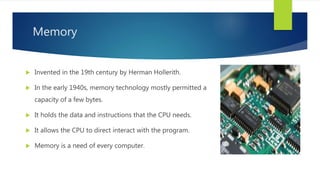
 Invented in the 19th century by Herman Hollerith.
 In the early 1940s, memory technology mostly permitted a
capacity of a few bytes.
 It holds the data and instructions that the CPU needs.
 It allows the CPU to direct interact with the program.
 Memory is a need of every computer.
Input
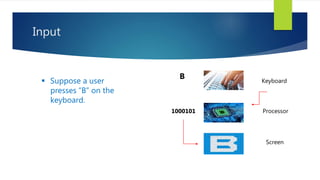
B Keyboard
Processor
Screen
1000101
 Suppose a user
presses “B” on the
keyboard.
CPU and Memory contact
 Memory consists of cells where the data is
stored i.e. numbers, instruction etc.
 The CPU accesses each location in memory by
using a unique number, called a memory
address
 Index [3] is 11
100
101
110
10
11
101
110
10
7
6
5
4
3
2
1
0
Address => Data
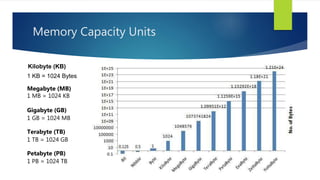
Memory Capacity Units
Kilobyte (KB)
1 KB = 1024 Bytes
Megabyte (MB)
1 MB = 1024 KB
Gigabyte (GB)
1 GB = 1024 MB
Terabyte (TB)
1 TB = 1024 GB
Petabyte (PB)
1 PB = 1024 TB
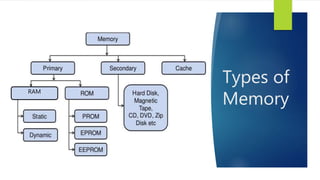
Types of
Memory
RAM
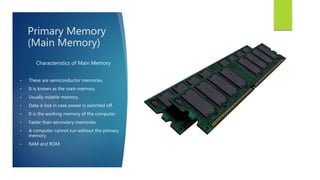
Primary Memory
(Main Memory)
Characteristics of Main Memory
 These are semiconductor memories.
 It is known as the main memory.
 Usually volatile memory.
 Data is lost in case power is switched off.
 It is the working memory of the computer.
 Faster than secondary memories.
 A computer cannot run without the primary
memory.
 RAM and ROM
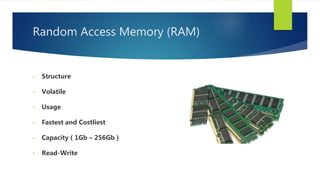
Random Access Memory (RAM)
• Structure
• Volatile
• Usage
• Fastest and Costliest
• Capacity ( 1Gb – 256Gb )
• Read-Write
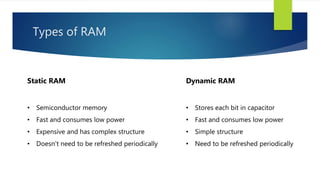
Types of RAM
Dynamic RAM
• Stores each bit in capacitor
• Fast and consumes low power
• Simple structure
• Need to be refreshed periodically
Static RAM
• Semiconductor memory
• Fast and consumes low power
• Expensive and has complex structure
• Doesn’t need to be refreshed periodically
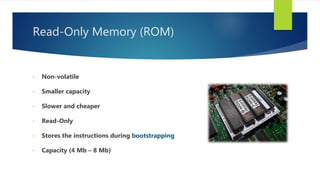
Read-Only Memory (ROM)
• Non-volatile
• Smaller capacity
• Slower and cheaper
• Read-Only
• Stores the instructions during bootstrapping
• Capacity (4 Mb – 8 Mb)
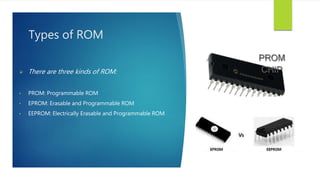
Types of ROM
 There are three kinds of ROM:
• PROM: Programmable ROM
• EPROM: Erasable and Programmable ROM
• EEPROM: Electrically Erasable and Programmable ROM
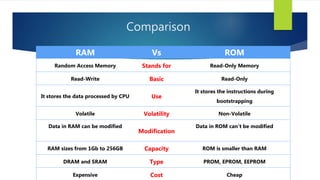
Comparison
RAM Vs ROM
Random Access Memory Stands for Read-Only Memory
Read-Write Basic Read-Only
It stores the data processed by CPU Use
It stores the instructions during
bootstrapping
Volatile Volatility Non-Volatile
Data in RAM can be modified
Modification
Data in ROM can’t be modified
RAM sizes from 1Gb to 256GB Capacity ROM is smaller than RAM
DRAM and SRAM Type PROM, EPROM, EEPROM
Expensive Cost Cheap
Secondary
Memory
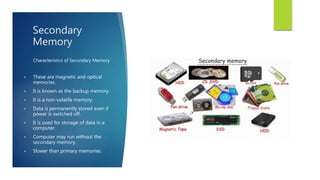
Characteristics of Secondary Memory
 These are magnetic and optical
memories.
 It is known as the backup memory.
 It is a non-volatile memory.
 Data is permanently stored even if
power is switched off.
 It is used for storage of data in a
computer.
 Computer may run without the
secondary memory.
 Slower than primary memories.
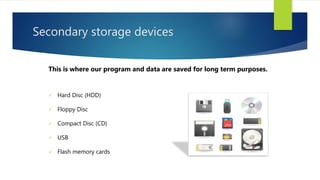
Secondary storage devices
 Hard Disc (HDD)
 Floppy Disc
 Compact Disc (CD)
 USB
 Flash memory cards
This is where our program and data are saved for long term purposes.
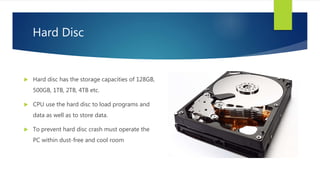
Hard Disc
 Hard disc has the storage capacities of 128GB,
500GB, 1TB, 2TB, 4TB etc.
 CPU use the hard disc to load programs and
data as well as to store data.
 To prevent hard disc crash must operate the
PC within dust-free and cool room
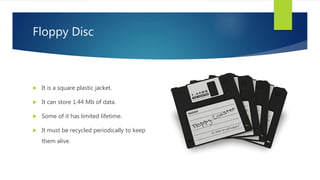
Floppy Disc
 It is a square plastic jacket.
 It can store 1.44 Mb of data.
 Some of it has limited lifetime.
 It must be recycled periodically to keep
them alive.
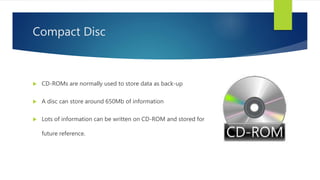
Compact Disc
 CD-ROMs are normally used to store data as back-up
 A disc can store around 650Mb of information
 Lots of information can be written on CD-ROM and stored for
future reference.
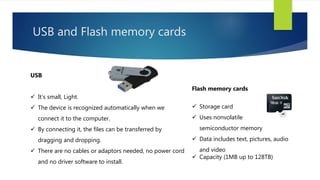
USB and Flash memory cards
Flash memory cards
 Storage card
 Uses nonvolatile
semiconductor memory
 Data includes text, pictures, audio
and video
 Capacity (1MB up to 128TB)
USB
 It’s small, Light.
 The device is recognized automatically when we
connect it to the computer.
 By connecting it, the files can be transferred by
dragging and dropping.
 There are no cables or adaptors needed, no power cord
and no driver software to install.
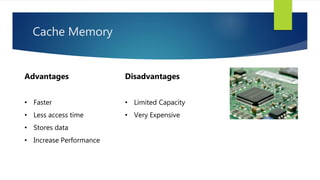
Cache Memory
Advantages
• Faster
• Less access time
• Stores data
• Increase Performance
Disadvantages
• Limited Capacity
• Very Expensive
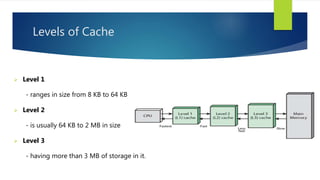
Levels of Cache
 Level 1
- ranges in size from 8 KB to 64 KB
 Level 2
- is usually 64 KB to 2 MB in size
 Level 3
- having more than 3 MB of storage in it.
Conclusion
- In conclusion, the computer has components that help to
store digital data and record media used for computation.
Thanks for your
attention !
Any Questions ?
PREPARED BY:
JASUR AHMADOV
LECTURE:
COMPUTER
ORGANIZATION
INSTRUCTOR:
SADIQ ALI BEHZAD

Complete Computer Memory Information

  • 1.
  • 2.
    Memory  Invented inthe 19th century by Herman Hollerith.  In the early 1940s, memory technology mostly permitted a capacity of a few bytes.  It holds the data and instructions that the CPU needs.  It allows the CPU to direct interact with the program.  Memory is a need of every computer.
  • 3.
    Input B Keyboard Processor Screen 1000101  Supposea user presses “B” on the keyboard.
  • 4.
    CPU and Memorycontact  Memory consists of cells where the data is stored i.e. numbers, instruction etc.  The CPU accesses each location in memory by using a unique number, called a memory address  Index [3] is 11 100 101 110 10 11 101 110 10 7 6 5 4 3 2 1 0 Address => Data
  • 5.
    Memory Capacity Units Kilobyte(KB) 1 KB = 1024 Bytes Megabyte (MB) 1 MB = 1024 KB Gigabyte (GB) 1 GB = 1024 MB Terabyte (TB) 1 TB = 1024 GB Petabyte (PB) 1 PB = 1024 TB
  • 6.
  • 7.
    Primary Memory (Main Memory) Characteristicsof Main Memory  These are semiconductor memories.  It is known as the main memory.  Usually volatile memory.  Data is lost in case power is switched off.  It is the working memory of the computer.  Faster than secondary memories.  A computer cannot run without the primary memory.  RAM and ROM
  • 8.
    Random Access Memory(RAM) • Structure • Volatile • Usage • Fastest and Costliest • Capacity ( 1Gb – 256Gb ) • Read-Write
  • 9.
    Types of RAM DynamicRAM • Stores each bit in capacitor • Fast and consumes low power • Simple structure • Need to be refreshed periodically Static RAM • Semiconductor memory • Fast and consumes low power • Expensive and has complex structure • Doesn’t need to be refreshed periodically
  • 10.
    Read-Only Memory (ROM) •Non-volatile • Smaller capacity • Slower and cheaper • Read-Only • Stores the instructions during bootstrapping • Capacity (4 Mb – 8 Mb)
  • 11.
    Types of ROM There are three kinds of ROM: • PROM: Programmable ROM • EPROM: Erasable and Programmable ROM • EEPROM: Electrically Erasable and Programmable ROM
  • 12.
    Comparison RAM Vs ROM RandomAccess Memory Stands for Read-Only Memory Read-Write Basic Read-Only It stores the data processed by CPU Use It stores the instructions during bootstrapping Volatile Volatility Non-Volatile Data in RAM can be modified Modification Data in ROM can’t be modified RAM sizes from 1Gb to 256GB Capacity ROM is smaller than RAM DRAM and SRAM Type PROM, EPROM, EEPROM Expensive Cost Cheap
  • 13.
    Secondary Memory Characteristics of SecondaryMemory  These are magnetic and optical memories.  It is known as the backup memory.  It is a non-volatile memory.  Data is permanently stored even if power is switched off.  It is used for storage of data in a computer.  Computer may run without the secondary memory.  Slower than primary memories.
  • 14.
    Secondary storage devices Hard Disc (HDD)  Floppy Disc  Compact Disc (CD)  USB  Flash memory cards This is where our program and data are saved for long term purposes.
  • 15.
    Hard Disc  Harddisc has the storage capacities of 128GB, 500GB, 1TB, 2TB, 4TB etc.  CPU use the hard disc to load programs and data as well as to store data.  To prevent hard disc crash must operate the PC within dust-free and cool room
  • 16.
    Floppy Disc  Itis a square plastic jacket.  It can store 1.44 Mb of data.  Some of it has limited lifetime.  It must be recycled periodically to keep them alive.
  • 17.
    Compact Disc  CD-ROMsare normally used to store data as back-up  A disc can store around 650Mb of information  Lots of information can be written on CD-ROM and stored for future reference.
  • 18.
    USB and Flashmemory cards Flash memory cards  Storage card  Uses nonvolatile semiconductor memory  Data includes text, pictures, audio and video  Capacity (1MB up to 128TB) USB  It’s small, Light.  The device is recognized automatically when we connect it to the computer.  By connecting it, the files can be transferred by dragging and dropping.  There are no cables or adaptors needed, no power cord and no driver software to install.
  • 19.
    Cache Memory Advantages • Faster •Less access time • Stores data • Increase Performance Disadvantages • Limited Capacity • Very Expensive
  • 20.
    Levels of Cache Level 1 - ranges in size from 8 KB to 64 KB  Level 2 - is usually 64 KB to 2 MB in size  Level 3 - having more than 3 MB of storage in it.
  • 21.
    Conclusion - In conclusion,the computer has components that help to store digital data and record media used for computation.
  • 22.
    Thanks for your attention! Any Questions ? PREPARED BY: JASUR AHMADOV LECTURE: COMPUTER ORGANIZATION INSTRUCTOR: SADIQ ALI BEHZAD