Introduction: MATLAB
Kenya Alfaro
Jairo Maldonado
Overview
› Introduction - What is MATLAB?
› How Does It Look?
› Important MATLAB Terms
› Getting the MATLAB Software
› Arithmetic Operations and Mathematical
Functions
› Conditions
› Creating Arrays Matrices
› Array Operators
› Data Manipulation
› Math Function
› Plotting
› If-elseif-else statements
› FOR Loops
› WHILE Loops
› Functions
› Relevance
› Problem
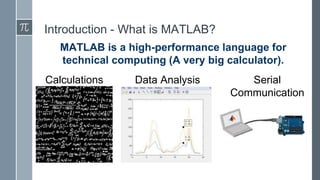
Introduction - What is MATLAB?
MATLAB is a high-performance language for
technical computing (A very big calculator).
Data Analysis Serial
Communication
Calculations
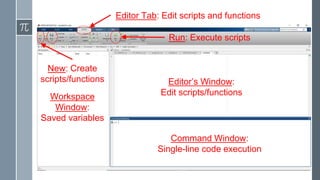
Command Window:
Single-line code execution
Editor’s Window:
Edit scripts/functionsWorkspace
Window:
Saved variables
Editor Tab: Edit scripts and functions
Run: Execute scripts
New: Create
scripts/functions
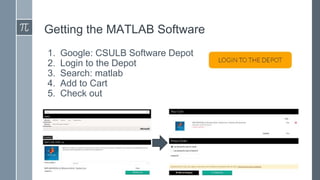
Getting the MATLAB Software
1. Google: CSULB Software Depot
2. Login to the Depot
3. Search: matlab
4. Add to Cart
5. Check out
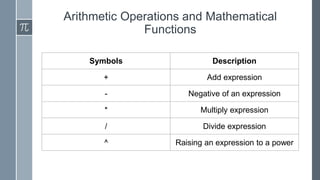
Arithmetic Operations and Mathematical
Functions
Symbols Description
+ Add expression
- Negative of an expression
* Multiply expression
/ Divide expression
^ Raising an expression to a power
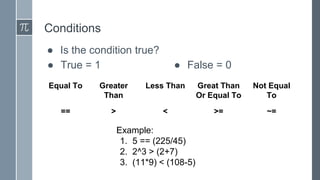
Conditions
● Is the condition true?
● True = 1 ● False = 0
Equal To Greater
Than
Less Than Great Than
Or Equal To
Not Equal
To
== > < >= ~=
Example:
1. 5 == (225/45)
2. 2^3 > (2+7)
3. (11*9) < (108-5)
Creating Arrays
● 3 ways to create an array in row
○ [ _ _ _ ];
○ Start : Increment : End;
○ Linspace(Start, End, Amount of Points);
● Convert to Column
○ [ _ _ _]’;
○ transpose(array);
Matrices
● Semicolon creates a new row
● A = [ _ _ _ ; _ _ _ ; _ _ _];
● Ex:
B =
1 2 3
0 5 0
7 0 9
● Join matrices
○ [ B A] horizontally
○ [ B;A] vertically
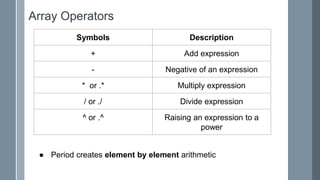
Array Operators
Symbols Description
+ Add expression
- Negative of an expression
* or .* Multiply expression
/ or ./ Divide expression
^ or .^ Raising an expression to a
power
● Period creates element by element arithmetic
Data Manipulation
● Find data in a matrix using rows and columns
○ data = variable(row, column)
● Use find( ) to manipulate data in an array or matrix
○ [row,column] = find(data, indices returned)
○ [row,column] = find(use conditional statement)
● Use both
Ex:
1. [r,c] = find(B)
2. B(2,3)
3. B(find(B))
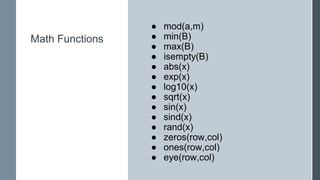
Math Functions
● mod(a,m)
● min(B)
● max(B)
● isempty(B)
● abs(x)
● exp(x)
● log10(x)
● sqrt(x)
● sin(x)
● sind(x)
● rand(x)
● zeros(row,col)
● ones(row,col)
● eye(row,col)
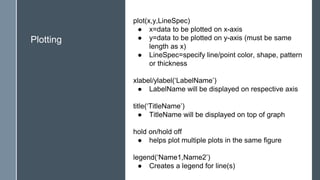
Plotting
plot(x,y,LineSpec)
● x=data to be plotted on x-axis
● y=data to be plotted on y-axis (must be same
length as x)
● LineSpec=specify line/point color, shape, pattern
or thickness
xlabel/ylabel(‘LabelName’)
● LabelName will be displayed on respective axis
title(‘TitleName’)
● TitleName will be displayed on top of graph
hold on/hold off
● helps plot multiple plots in the same figure
legend(‘Name1,Name2’)
● Creates a legend for line(s)
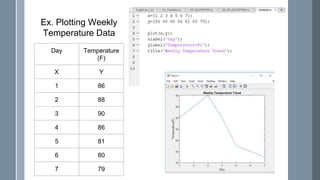
Day Temperature
(F)
X Y
1 86
2 88
3 90
4 86
5 81
6 80
7 79
Ex. Plotting Weekly
Temperature Data
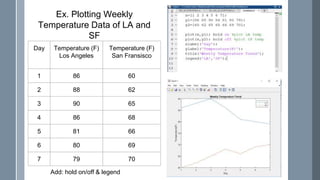
Ex. Plotting Weekly
Temperature Data of LA and
SF
Day Temperature (F)
Los Angeles
Temperature (F)
San Fransisco
1 86 60
2 88 62
3 90 65
4 86 68
5 81 66
6 80 69
7 79 70
Add: hold on/off & legend
“if-elseif-else” Statements
Example:
A = ones(2,3);
B = rand(3,4);
If (isequal(size(A),size(B)))
C = [A,B];
else
disp(‘A and B are not the same
size.’)
C = [ ];
end
if (expression)
statements
elseif (expression)
statements
else
statements
end
Loops
There are 2 types of loops:
● FOR loops
● WHILE loops
Loops must also be closed with and END
Loops can be broken using BREAK
FOR Loops
Example:
x=[5,4,8,7,10]
z=[];
for i=1:5 % amount of iterations
z(i)=x(i)*2 %do something
end % always end
RESULT:
z=[10,8,16,14,100]
FOR Loops and Conditional Statements
Example:
x=[5,4,8,7,0,10]
z=[];
for i=1:6
If x(i)==0 % can add if-else in
loop
Break; % stops the code
else
z(i)=x(i)*2
end
end
RESULTS:
z=[10,8,16,14]
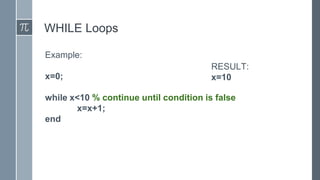
WHILE Loops
Example:
x=0;
while x<10 % continue until condition is false
x=x+1;
end
RESULT:
x=10
Functions
● Function: Functions, written in
scripts, are used to simplify entire
scripts into one function with
inputs and outputs
○ A function behave like: y = mx +b,
where y=output & x=input
● In script:
function [output] = name[input]
do something
end
● In command window
out = name(in);
Relevance
For Electrical Engineers
● Computational biology
● Image and video
processing
● Optimization
● Partial Differential
Equations
● Signal Processing and
Communications
● Statistical and Data
Analysis
● Etc
For Mechanical Engineering
● Statics and Dynamics
● Mechanical Vibrations
● Numerical Methods
● Finite Element Analysis
Problems

Matlab Workshop Presentation

  • 1.
  • 2.
    Overview › Introduction -What is MATLAB? › How Does It Look? › Important MATLAB Terms › Getting the MATLAB Software › Arithmetic Operations and Mathematical Functions › Conditions › Creating Arrays Matrices › Array Operators › Data Manipulation › Math Function › Plotting › If-elseif-else statements › FOR Loops › WHILE Loops › Functions › Relevance › Problem
  • 3.
    Introduction - Whatis MATLAB? MATLAB is a high-performance language for technical computing (A very big calculator). Data Analysis Serial Communication Calculations
  • 4.
    Command Window: Single-line codeexecution Editor’s Window: Edit scripts/functionsWorkspace Window: Saved variables Editor Tab: Edit scripts and functions Run: Execute scripts New: Create scripts/functions
  • 5.
    Getting the MATLABSoftware 1. Google: CSULB Software Depot 2. Login to the Depot 3. Search: matlab 4. Add to Cart 5. Check out
  • 6.
    Arithmetic Operations andMathematical Functions Symbols Description + Add expression - Negative of an expression * Multiply expression / Divide expression ^ Raising an expression to a power
  • 7.
    Conditions ● Is thecondition true? ● True = 1 ● False = 0 Equal To Greater Than Less Than Great Than Or Equal To Not Equal To == > < >= ~= Example: 1. 5 == (225/45) 2. 2^3 > (2+7) 3. (11*9) < (108-5)
  • 8.
    Creating Arrays ● 3ways to create an array in row ○ [ _ _ _ ]; ○ Start : Increment : End; ○ Linspace(Start, End, Amount of Points); ● Convert to Column ○ [ _ _ _]’; ○ transpose(array);
  • 9.
    Matrices ● Semicolon createsa new row ● A = [ _ _ _ ; _ _ _ ; _ _ _]; ● Ex: B = 1 2 3 0 5 0 7 0 9 ● Join matrices ○ [ B A] horizontally ○ [ B;A] vertically
  • 10.
    Array Operators Symbols Description +Add expression - Negative of an expression * or .* Multiply expression / or ./ Divide expression ^ or .^ Raising an expression to a power ● Period creates element by element arithmetic
  • 11.
    Data Manipulation ● Finddata in a matrix using rows and columns ○ data = variable(row, column) ● Use find( ) to manipulate data in an array or matrix ○ [row,column] = find(data, indices returned) ○ [row,column] = find(use conditional statement) ● Use both Ex: 1. [r,c] = find(B) 2. B(2,3) 3. B(find(B))
  • 12.
    Math Functions ● mod(a,m) ●min(B) ● max(B) ● isempty(B) ● abs(x) ● exp(x) ● log10(x) ● sqrt(x) ● sin(x) ● sind(x) ● rand(x) ● zeros(row,col) ● ones(row,col) ● eye(row,col)
  • 13.
    Plotting plot(x,y,LineSpec) ● x=data tobe plotted on x-axis ● y=data to be plotted on y-axis (must be same length as x) ● LineSpec=specify line/point color, shape, pattern or thickness xlabel/ylabel(‘LabelName’) ● LabelName will be displayed on respective axis title(‘TitleName’) ● TitleName will be displayed on top of graph hold on/hold off ● helps plot multiple plots in the same figure legend(‘Name1,Name2’) ● Creates a legend for line(s)
  • 14.
    Day Temperature (F) X Y 186 2 88 3 90 4 86 5 81 6 80 7 79 Ex. Plotting Weekly Temperature Data
  • 15.
    Ex. Plotting Weekly TemperatureData of LA and SF Day Temperature (F) Los Angeles Temperature (F) San Fransisco 1 86 60 2 88 62 3 90 65 4 86 68 5 81 66 6 80 69 7 79 70 Add: hold on/off & legend
  • 16.
    “if-elseif-else” Statements Example: A =ones(2,3); B = rand(3,4); If (isequal(size(A),size(B))) C = [A,B]; else disp(‘A and B are not the same size.’) C = [ ]; end if (expression) statements elseif (expression) statements else statements end
  • 17.
    Loops There are 2types of loops: ● FOR loops ● WHILE loops Loops must also be closed with and END Loops can be broken using BREAK
  • 18.
    FOR Loops Example: x=[5,4,8,7,10] z=[]; for i=1:5% amount of iterations z(i)=x(i)*2 %do something end % always end RESULT: z=[10,8,16,14,100]
  • 19.
    FOR Loops andConditional Statements Example: x=[5,4,8,7,0,10] z=[]; for i=1:6 If x(i)==0 % can add if-else in loop Break; % stops the code else z(i)=x(i)*2 end end RESULTS: z=[10,8,16,14]
  • 20.
    WHILE Loops Example: x=0; while x<10% continue until condition is false x=x+1; end RESULT: x=10
  • 21.
    Functions ● Function: Functions,written in scripts, are used to simplify entire scripts into one function with inputs and outputs ○ A function behave like: y = mx +b, where y=output & x=input ● In script: function [output] = name[input] do something end ● In command window out = name(in);
  • 22.
    Relevance For Electrical Engineers ●Computational biology ● Image and video processing ● Optimization ● Partial Differential Equations ● Signal Processing and Communications ● Statistical and Data Analysis ● Etc For Mechanical Engineering ● Statics and Dynamics ● Mechanical Vibrations ● Numerical Methods ● Finite Element Analysis
  • 23.