Lecture 1
Introduction to MATLAB
1
Eng. Mohamed Awni
Electrical & Computer Engineering
Dept.
Agenda
2
 What is Matlab & history?
 why use Matlab?
 Matlab Structure.
 Main Matlab Window.
 Matlab as calculator.
3
What is Matlab & its history
• Stands for MATrix LABoratory.
• MATLAB is a numerical computing environment
and programming language.
• High level language for technical computing
• Created by The MathWorks 1984
• American mathematician and computer
programmer specializing in numerical analysis
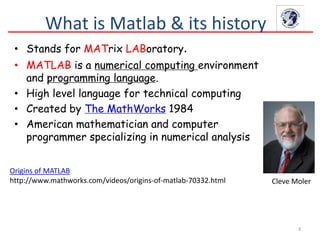
Cleve Moler
Origins of MATLAB
http://www.mathworks.com/videos/origins-of-matlab-70332.html
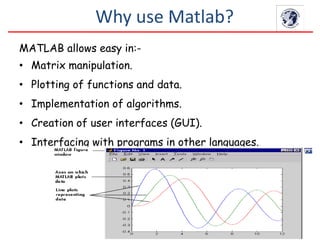
MATLAB allows easy in:-
• Matrix manipulation.
• Plotting of functions and data.
• Implementation of algorithms.
• Creation of user interfaces (GUI).
• Interfacing with programs in other languages.
Why use Matlab?
5
Matlab Structure
Matlab
Command Line
(Interactive Mode)
m-files
(Batch Mode
functions
mat-files
Command execution
like DOS command
window
Series of Matlab
commands
Data
storage/
loading
6
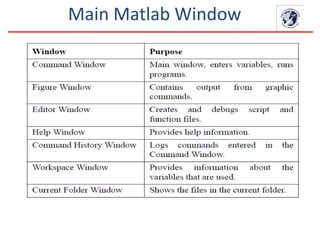
Main Matlab Window
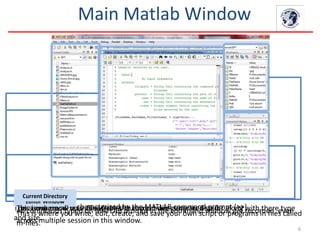
This sub window lists all variables that you have generated so far along with there type
and size.
Workspace
All commands typed on MATLAB prompt in the command window get recorded, even
across multiple session in this window.
Command History
The main window characterized by the MATLAB command prompt (>>)
Command Window
This is where you write, edit, create, and save your own script or programs in files called
m-files.
Editor Window
This is where all your files from the current directory are listed.
Current Directory
Main Matlab Window
8
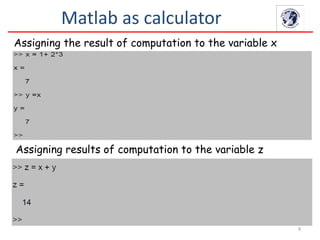
Matlab as calculator
• As an example of a simple interactive calculation, just
type the following expression 1 + 2 × 3 at the prompt
command >>
• Press Enter.
• The last calculation overwrites the previous calculation in
ans.
9
Assigning the result of computation to the variable x
Matlab as calculator
Assigning results of computation to the variable z
10
Exercises

Matlab introduction lecture 1

  • 1.
    Lecture 1 Introduction toMATLAB 1 Eng. Mohamed Awni Electrical & Computer Engineering Dept.
  • 2.
    Agenda 2  What isMatlab & history?  why use Matlab?  Matlab Structure.  Main Matlab Window.  Matlab as calculator.
  • 3.
    3 What is Matlab& its history • Stands for MATrix LABoratory. • MATLAB is a numerical computing environment and programming language. • High level language for technical computing • Created by The MathWorks 1984 • American mathematician and computer programmer specializing in numerical analysis Cleve Moler Origins of MATLAB http://www.mathworks.com/videos/origins-of-matlab-70332.html
  • 4.
    MATLAB allows easyin:- • Matrix manipulation. • Plotting of functions and data. • Implementation of algorithms. • Creation of user interfaces (GUI). • Interfacing with programs in other languages. Why use Matlab?
  • 5.
    5 Matlab Structure Matlab Command Line (InteractiveMode) m-files (Batch Mode functions mat-files Command execution like DOS command window Series of Matlab commands Data storage/ loading
  • 6.
    6 Main Matlab Window Thissub window lists all variables that you have generated so far along with there type and size. Workspace All commands typed on MATLAB prompt in the command window get recorded, even across multiple session in this window. Command History The main window characterized by the MATLAB command prompt (>>) Command Window This is where you write, edit, create, and save your own script or programs in files called m-files. Editor Window This is where all your files from the current directory are listed. Current Directory
  • 7.
  • 8.
    8 Matlab as calculator •As an example of a simple interactive calculation, just type the following expression 1 + 2 × 3 at the prompt command >> • Press Enter. • The last calculation overwrites the previous calculation in ans.
  • 9.
    9 Assigning the resultof computation to the variable x Matlab as calculator Assigning results of computation to the variable z
  • 10.