Introduction to MATLAB
Programming
www.opencadd.com.br
Copyright  1984 - 1998 by The MathWorks, Inc.
Programming - 2
Introduction to MATLAB
Section Outline
• Script Files
• Flow Control & Array Operations
• EVAL Command
• Functions
• Structural Syntax
• Variables & Workspaces
• Subfunctions and Private Functions
• Visual Debugging
Copyright  1984 - 1998 by The MathWorks, Inc.
Programming - 3
Introduction to MATLAB
The MATLAB Path
• MATLAB Path:
• List of directories searched by MATLAB.
(Includes toolbox directories)
• Path Cache:
• List of toolbox files & locations.
• Created at startup to increase speed.
• Only updated when PATH command is called.
• Working with the Path:
• Path Browser (PATHTOOL)
• PATH, ADDPATH, RMPATH
Copyright  1984 - 1998 by The MathWorks, Inc.
Programming - 4
Introduction to MATLAB
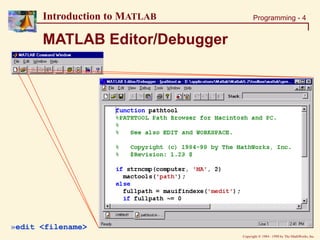
MATLAB Editor/Debugger
»edit <filename>
Copyright  1984 - 1998 by The MathWorks, Inc.
Programming - 5
Introduction to MATLAB
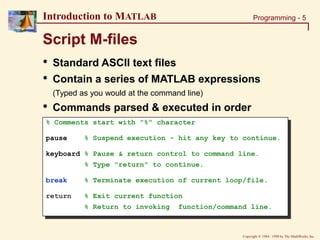
Script M-files
• Standard ASCII text files
• Contain a series of MATLAB expressions
(Typed as you would at the command line)
• Commands parsed & executed in order
% Comments start with "%" character
pause % Suspend execution - hit any key to continue.
keyboard % Pause & return control to command line.
% Type "return" to continue.
break % Terminate execution of current loop/file.
return % Exit current function
% Return to invoking function/command line.
Copyright  1984 - 1998 by The MathWorks, Inc.
Programming - 6
Introduction to MATLAB
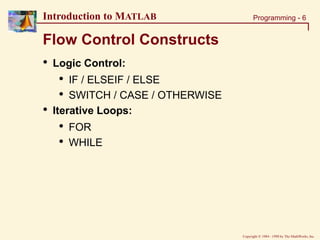
Flow Control Constructs
• Logic Control:
• IF / ELSEIF / ELSE
• SWITCH / CASE / OTHERWISE
• Iterative Loops:
• FOR
• WHILE
Copyright  1984 - 1998 by The MathWorks, Inc.
Programming - 7
Introduction to MATLAB
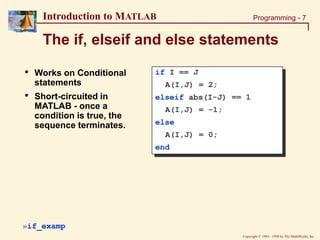
The if, elseif and else statements
if I == J
A(I,J) = 2;
elseif abs(I-J) == 1
A(I,J) = -1;
else
A(I,J) = 0;
end
»if_examp
• Works on Conditional
statements
• Short-circuited in
MATLAB - once a
condition is true, the
sequence terminates.
Copyright  1984 - 1998 by The MathWorks, Inc.
Programming - 8
Introduction to MATLAB
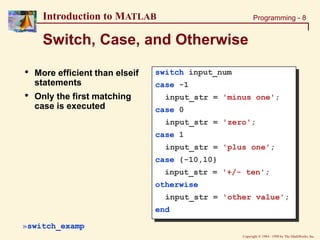
Switch, Case, and Otherwise
switch input_num
case -1
input_str = 'minus one';
case 0
input_str = 'zero';
case 1
input_str = 'plus one';
case {-10,10}
input_str = '+/- ten';
otherwise
input_str = 'other value';
end
• More efficient than elseif
statements
• Only the first matching
case is executed
»switch_examp
Copyright  1984 - 1998 by The MathWorks, Inc.
Programming - 9
Introduction to MATLAB
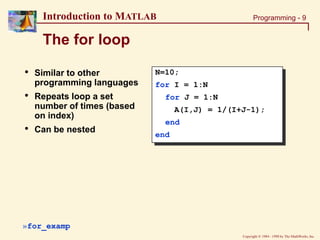
• Similar to other
programming languages
• Repeats loop a set
number of times (based
on index)
• Can be nested
The for loop
N=10;
for I = 1:N
for J = 1:N
A(I,J) = 1/(I+J-1);
end
end
»for_examp
Copyright  1984 - 1998 by The MathWorks, Inc.
Programming - 10
Introduction to MATLAB
The while loop
I=1; N=10;
while I<=N
J=1;
while J<=N
A(I,J)=1/(I+J-1);
J=J+1;
end
I=I+1;
end
»while_examp
• Similar to other
programming languages
• Repeats loop until logical
condition returns FALSE.
• Can be nested.
Copyright  1984 - 1998 by The MathWorks, Inc.
Programming - 11
Introduction to MATLAB
Recall: Array Operations
• Using Array Operations:
• Using Loops:
[rows, cols] = size(M);
for I = 1:rows
for J = 1:cols
Density(I,J) = M(I,J)/(L(I,J)*W(I,J)*H(I,J));
end
end
Density = Mass(I,J)/(Length.*Width.*Height);
»array_vs_loops
Copyright  1984 - 1998 by The MathWorks, Inc.
Programming - 12
Introduction to MATLAB
EVAL Command
% This file creates the first N magic matrices.
% Each matrix is saved as a variable: "magic#".
N = 10;
for I = 1:N
eval(['magic', num2str(I), ' = magic(I)']);
end
»eval_examp
• Evaluates the MATLAB expression specified by
the input string.
• Very useful for inserting indices into strings.
Copyright  1984 - 1998 by The MathWorks, Inc.
Programming - 13
Introduction to MATLAB
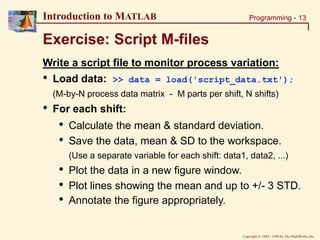
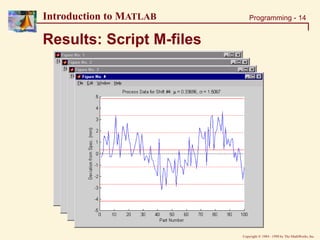
Exercise: Script M-files
Write a script file to monitor process variation:
• Load data: >> data = load('script_data.txt');
(M-by-N process data matrix - M parts per shift, N shifts)
• For each shift:
• Calculate the mean & standard deviation.
• Save the data, mean & SD to the workspace.
(Use a separate variable for each shift: data1, data2, ...)
• Plot the data in a new figure window.
• Plot lines showing the mean and up to +/- 3 STD.
• Annotate the figure appropriately.
Copyright  1984 - 1998 by The MathWorks, Inc.
Programming - 14
Introduction to MATLAB
Results: Script M-files
Copyright  1984 - 1998 by The MathWorks, Inc.
Programming - 15
Introduction to MATLAB
Solution: Script M-files
[parts, shifts]=size(data);
for I=1:shifts
DATA = data(:,I);
MEAN = mean(DATA); % Calculating mean & Std. deviation
STDEV = std(DATA);
figure(I); clf; hold on % Creating plots
plot(1:parts, DATA, 'b');
plot([0 parts], [0 0], 'k:',...
[0 parts], [1 1]*MEAN, 'r-.',...
[0 parts], [1 1]*(MEAN-STDEV), 'r:',...
[0 parts], [1 1]*(MEAN+STDEV), 'r:',...
); % .....etc.
% Writing variables to workspace
eval(['data', num2str(I), '=data(:,I);']);
eval(['mean', num2str(I), '=means(I);']);
eval(['stdev', num2str(I), '=stdev(I);']);
end
»script_soln (uses: script_data.txt)
Copyright  1984 - 1998 by The MathWorks, Inc.
Programming - 16
Introduction to MATLAB
Functions
• Core MATLAB (Built-in) Functions
• sin, abs, exp, ...
• MATLAB-supplied M-file Functions
• mean, stat, …
• User-created M-file Functions
• ?????
• Differences between Script & Function M-files:
• Structural Syntax
• Function Workspaces, Inputs & Outputs
Copyright  1984 - 1998 by The MathWorks, Inc.
Programming - 17
Introduction to MATLAB
function y = mean(x)
% MEAN Average or mean value.
% For vectors, MEAN(x) returns the mean value.
% For matrices, MEAN(x) is a row vector
% containing the mean value of each column.
[m,n] = size(x);
if m == 1
m = n;
end
y = sum(x)/m;
Structure of a Function M-file
Keyword: function Function Name (same as file name .m)
Output Argument(s) Input Argument(s)
Online Help
MATLAB
Code
»output_value = mean(input_value) Command Line Syntax
Copyright  1984 - 1998 by The MathWorks, Inc.
Programming - 18
Introduction to MATLAB
Multiple Input & Output Arguments
function r = ourrank(X,tol)
% OURRANK Rank of a matrix
s = svd(X);
if (nargin == 1)
tol = max(size(X))*s(1)*eps;
end
r = sum(s > tol); function [mean,stdev] = ourstat(x)
% OURSTAT Mean & std. deviation
[m,n] = size(x);
if m == 1
m = n;
end
mean = sum(x)/m;
stdev = sqrt(sum(x.^2)/m – mean.^2);
Multiple Input
Arguments ( , )
Multiple Output
Arguments [ , ]
»RANK = ourrank(rand(5),0.1);
»[MEAN,STDEV] = ourstat(1:99);
Copyright  1984 - 1998 by The MathWorks, Inc.
Programming - 19
Introduction to MATLAB
Workspaces in MATLAB
• MATLAB (or Base) Workspace:
For command line and script file variables.
• Function Workspaces:
Each function has its own workspace for local variables.
Communicate to Function Workspace via inputs & outputs.
(Promotes structured coding & prevents name conflicts.)
• Global Workspace:
Global variables can be shared by multiple workspaces.
(Must be initialized in all relevant workspaces.)
Copyright  1984 - 1998 by The MathWorks, Inc.
Programming - 20
Introduction to MATLAB
Global
Workspace
Function
Workspace
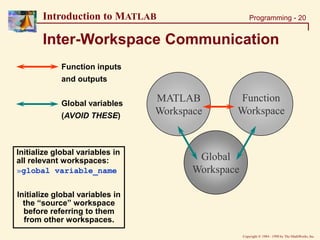
Inter-Workspace Communication
Function inputs
and outputs
Global variables
(AVOID THESE)
MATLAB
Workspace
Initialize global variables in
all relevant workspaces:
»global variable_name
Initialize global variables in
the “source” workspace
before referring to them
from other workspaces.
Copyright  1984 - 1998 by The MathWorks, Inc.
Programming - 21
Introduction to MATLAB
Tips for using Global Variables
• DON’T USE THEM
• If you absolutely must use them:
• Avoid name conflicts
• whos global
• clear global
• isglobal()
Copyright  1984 - 1998 by The MathWorks, Inc.
Programming - 22
Introduction to MATLAB
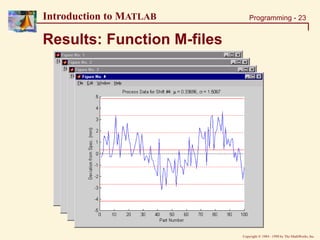
Exercise: Function M-files
Let’s go back to the process monitoring exercise:
• Start with your script file (or the given solution)
>> edit script_soln
• Create a function which replicates as much of the
code inside the for loop as possible.
(NOTE: It may not make sense to replace everything)
• Now modify your script file to call your function.
• Run your new script file and compare the results.
Copyright  1984 - 1998 by The MathWorks, Inc.
Programming - 23
Introduction to MATLAB
Results: Function M-files
Copyright  1984 - 1998 by The MathWorks, Inc.
Programming - 24
Introduction to MATLAB
Solution: Function M-files (1)
% Modified Script file
% ====================
% This solution sets the figure#, overwrites the title, &
% writes the workspace variables outside the function.
shifts=size(data,2);
for I=1:shifts
DATA = data(:,I);
figure(I)
% Function Call
[MEAN, STDEV] = func_plot(DATA);
% Writing variables to workspace
eval(['data', num2str(I), '=DATA;']);
eval(['mean', num2str(I), '=MEAN;']);
eval(['stdev', num2str(I), '=STDEV;']);
end
»func_soln (uses: func_plot & script_data.txt)
Copyright  1984 - 1998 by The MathWorks, Inc.
Programming - 25
Introduction to MATLAB
Solution: Function M-files (2)
function [MEAN, STDEV] = func_plot(data)
% FUNC_PLOT Calculates mean & std. deviation & plots data
DATA = data(:);
parts= length(DATA);
MEAN = mean(DATA); % Calculating mean & Std. deviation
STDEV = std(DATA);
clf; hold on % Creating plots
plot(1:parts, DATA, 'b');
plot([0 parts], [0 0], 'k:',...
[0 parts], [1 1]*MEAN, 'r-.',...
[0 parts], [1 1]*(MEAN-STDEV), 'r:',...
[0 parts], [1 1]*(MEAN+STDEV), 'r:',...
); % .....etc.
xlabel('Part Number');
ylabel('Deviation from Spec. (mm)');
»func_soln (uses: func_plot & script_data.txt)
Copyright  1984 - 1998 by The MathWorks, Inc.
Programming - 26
Introduction to MATLAB
Subfunctions
• Allows more than one function to be within the
same M-file (modularize code)
• M-file must have the name of the first (primary)
function
• Subfunctions can only be called from within the
same M-file
• Each subfunction has its own workspace
Copyright  1984 - 1998 by The MathWorks, Inc.
Programming - 27
Introduction to MATLAB
Example: Subfunctions
function [totalsum,average] = subfunc (input_vector)
% SUBFUNC Calculates cumulative total & average
totalsum = sum(input_vector);
average = ourmean(input_vector); %Call to subfunction
function y = ourmean(x)
% (OURMEAN) Calculates average
[m,n] = size(x);
if m == 1
m = n;
end
y = sum(x)/m;
»[SUM, MEAN] = subfunc(rand(1,50))
Primary
Function
Sub-
Function
Copyright  1984 - 1998 by The MathWorks, Inc.
Programming - 28
Introduction to MATLAB
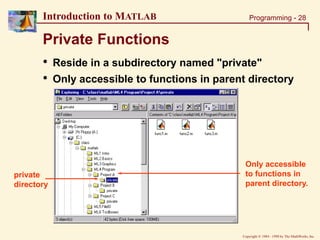
Private Functions
• Reside in a subdirectory named "private"
• Only accessible to functions in parent directory
Only accessible
to functions in
parent directory.
private
directory
Copyright  1984 - 1998 by The MathWorks, Inc.
Programming - 29
Introduction to MATLAB
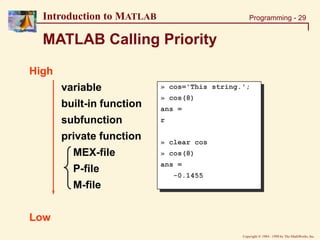
MATLAB Calling Priority
High
variable
built-in function
subfunction
private function
MEX-file
P-file
M-file
Low
» cos='This string.';
» cos(8)
ans =
r
» clear cos
» cos(8)
ans =
-0.1455
Copyright  1984 - 1998 by The MathWorks, Inc.
Programming - 30
Introduction to MATLAB
Visual Debugging
Set Breakpoint
Clear Breaks
Step In
Single Step
Continue
Quit Debugging
»[SUM, MEAN] = subfunc(rand(1,50))
Select
Workspace
Set Auto-
Breakpoints
Copyright  1984 - 1998 by The MathWorks, Inc.
Programming - 31
Introduction to MATLAB
Example: Visual Debugging
• Set up your debugger to stop if an error occurs
• Then run: »[SUM, MEAN] = subfunc_error(rand(1,50))
Copyright  1984 - 1998 by The MathWorks, Inc.
Programming - 32
Introduction to MATLAB
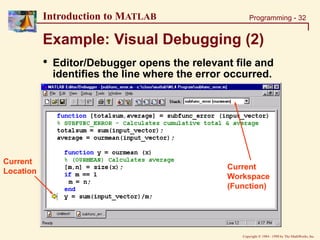
Example: Visual Debugging (2)
• Editor/Debugger opens the relevant file and
identifies the line where the error occurred.
Current
Location
Current
Workspace
(Function)
Copyright  1984 - 1998 by The MathWorks, Inc.
Programming - 33
Introduction to MATLAB
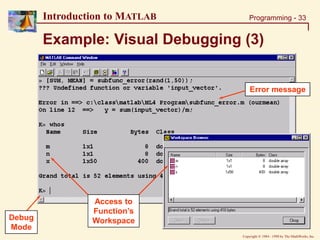
Example: Visual Debugging (3)
Error message
Access to
Function’s
Workspace
Debug
Mode
Copyright  1984 - 1998 by The MathWorks, Inc.
Programming - 34
Introduction to MATLAB
Section Summary
• Script Files
• Flow Control & Array Operations
• EVAL Command
• Functions
• Structural Syntax
• Variables & Workspaces
• Subfunctions and Private Functions
• Visual Debugging

Basic concept of MATLAB.ppt

  • 1.
  • 2.
    Copyright  1984- 1998 by The MathWorks, Inc. Programming - 2 Introduction to MATLAB Section Outline • Script Files • Flow Control & Array Operations • EVAL Command • Functions • Structural Syntax • Variables & Workspaces • Subfunctions and Private Functions • Visual Debugging
  • 3.
    Copyright  1984- 1998 by The MathWorks, Inc. Programming - 3 Introduction to MATLAB The MATLAB Path • MATLAB Path: • List of directories searched by MATLAB. (Includes toolbox directories) • Path Cache: • List of toolbox files & locations. • Created at startup to increase speed. • Only updated when PATH command is called. • Working with the Path: • Path Browser (PATHTOOL) • PATH, ADDPATH, RMPATH
  • 4.
    Copyright  1984- 1998 by The MathWorks, Inc. Programming - 4 Introduction to MATLAB MATLAB Editor/Debugger »edit <filename>
  • 5.
    Copyright  1984- 1998 by The MathWorks, Inc. Programming - 5 Introduction to MATLAB Script M-files • Standard ASCII text files • Contain a series of MATLAB expressions (Typed as you would at the command line) • Commands parsed & executed in order % Comments start with "%" character pause % Suspend execution - hit any key to continue. keyboard % Pause & return control to command line. % Type "return" to continue. break % Terminate execution of current loop/file. return % Exit current function % Return to invoking function/command line.
  • 6.
    Copyright  1984- 1998 by The MathWorks, Inc. Programming - 6 Introduction to MATLAB Flow Control Constructs • Logic Control: • IF / ELSEIF / ELSE • SWITCH / CASE / OTHERWISE • Iterative Loops: • FOR • WHILE
  • 7.
    Copyright  1984- 1998 by The MathWorks, Inc. Programming - 7 Introduction to MATLAB The if, elseif and else statements if I == J A(I,J) = 2; elseif abs(I-J) == 1 A(I,J) = -1; else A(I,J) = 0; end »if_examp • Works on Conditional statements • Short-circuited in MATLAB - once a condition is true, the sequence terminates.
  • 8.
    Copyright  1984- 1998 by The MathWorks, Inc. Programming - 8 Introduction to MATLAB Switch, Case, and Otherwise switch input_num case -1 input_str = 'minus one'; case 0 input_str = 'zero'; case 1 input_str = 'plus one'; case {-10,10} input_str = '+/- ten'; otherwise input_str = 'other value'; end • More efficient than elseif statements • Only the first matching case is executed »switch_examp
  • 9.
    Copyright  1984- 1998 by The MathWorks, Inc. Programming - 9 Introduction to MATLAB • Similar to other programming languages • Repeats loop a set number of times (based on index) • Can be nested The for loop N=10; for I = 1:N for J = 1:N A(I,J) = 1/(I+J-1); end end »for_examp
  • 10.
    Copyright  1984- 1998 by The MathWorks, Inc. Programming - 10 Introduction to MATLAB The while loop I=1; N=10; while I<=N J=1; while J<=N A(I,J)=1/(I+J-1); J=J+1; end I=I+1; end »while_examp • Similar to other programming languages • Repeats loop until logical condition returns FALSE. • Can be nested.
  • 11.
    Copyright  1984- 1998 by The MathWorks, Inc. Programming - 11 Introduction to MATLAB Recall: Array Operations • Using Array Operations: • Using Loops: [rows, cols] = size(M); for I = 1:rows for J = 1:cols Density(I,J) = M(I,J)/(L(I,J)*W(I,J)*H(I,J)); end end Density = Mass(I,J)/(Length.*Width.*Height); »array_vs_loops
  • 12.
    Copyright  1984- 1998 by The MathWorks, Inc. Programming - 12 Introduction to MATLAB EVAL Command % This file creates the first N magic matrices. % Each matrix is saved as a variable: "magic#". N = 10; for I = 1:N eval(['magic', num2str(I), ' = magic(I)']); end »eval_examp • Evaluates the MATLAB expression specified by the input string. • Very useful for inserting indices into strings.
  • 13.
    Copyright  1984- 1998 by The MathWorks, Inc. Programming - 13 Introduction to MATLAB Exercise: Script M-files Write a script file to monitor process variation: • Load data: >> data = load('script_data.txt'); (M-by-N process data matrix - M parts per shift, N shifts) • For each shift: • Calculate the mean & standard deviation. • Save the data, mean & SD to the workspace. (Use a separate variable for each shift: data1, data2, ...) • Plot the data in a new figure window. • Plot lines showing the mean and up to +/- 3 STD. • Annotate the figure appropriately.
  • 14.
    Copyright  1984- 1998 by The MathWorks, Inc. Programming - 14 Introduction to MATLAB Results: Script M-files
  • 15.
    Copyright  1984- 1998 by The MathWorks, Inc. Programming - 15 Introduction to MATLAB Solution: Script M-files [parts, shifts]=size(data); for I=1:shifts DATA = data(:,I); MEAN = mean(DATA); % Calculating mean & Std. deviation STDEV = std(DATA); figure(I); clf; hold on % Creating plots plot(1:parts, DATA, 'b'); plot([0 parts], [0 0], 'k:',... [0 parts], [1 1]*MEAN, 'r-.',... [0 parts], [1 1]*(MEAN-STDEV), 'r:',... [0 parts], [1 1]*(MEAN+STDEV), 'r:',... ); % .....etc. % Writing variables to workspace eval(['data', num2str(I), '=data(:,I);']); eval(['mean', num2str(I), '=means(I);']); eval(['stdev', num2str(I), '=stdev(I);']); end »script_soln (uses: script_data.txt)
  • 16.
    Copyright  1984- 1998 by The MathWorks, Inc. Programming - 16 Introduction to MATLAB Functions • Core MATLAB (Built-in) Functions • sin, abs, exp, ... • MATLAB-supplied M-file Functions • mean, stat, … • User-created M-file Functions • ????? • Differences between Script & Function M-files: • Structural Syntax • Function Workspaces, Inputs & Outputs
  • 17.
    Copyright  1984- 1998 by The MathWorks, Inc. Programming - 17 Introduction to MATLAB function y = mean(x) % MEAN Average or mean value. % For vectors, MEAN(x) returns the mean value. % For matrices, MEAN(x) is a row vector % containing the mean value of each column. [m,n] = size(x); if m == 1 m = n; end y = sum(x)/m; Structure of a Function M-file Keyword: function Function Name (same as file name .m) Output Argument(s) Input Argument(s) Online Help MATLAB Code »output_value = mean(input_value) Command Line Syntax
  • 18.
    Copyright  1984- 1998 by The MathWorks, Inc. Programming - 18 Introduction to MATLAB Multiple Input & Output Arguments function r = ourrank(X,tol) % OURRANK Rank of a matrix s = svd(X); if (nargin == 1) tol = max(size(X))*s(1)*eps; end r = sum(s > tol); function [mean,stdev] = ourstat(x) % OURSTAT Mean & std. deviation [m,n] = size(x); if m == 1 m = n; end mean = sum(x)/m; stdev = sqrt(sum(x.^2)/m – mean.^2); Multiple Input Arguments ( , ) Multiple Output Arguments [ , ] »RANK = ourrank(rand(5),0.1); »[MEAN,STDEV] = ourstat(1:99);
  • 19.
    Copyright  1984- 1998 by The MathWorks, Inc. Programming - 19 Introduction to MATLAB Workspaces in MATLAB • MATLAB (or Base) Workspace: For command line and script file variables. • Function Workspaces: Each function has its own workspace for local variables. Communicate to Function Workspace via inputs & outputs. (Promotes structured coding & prevents name conflicts.) • Global Workspace: Global variables can be shared by multiple workspaces. (Must be initialized in all relevant workspaces.)
  • 20.
    Copyright  1984- 1998 by The MathWorks, Inc. Programming - 20 Introduction to MATLAB Global Workspace Function Workspace Inter-Workspace Communication Function inputs and outputs Global variables (AVOID THESE) MATLAB Workspace Initialize global variables in all relevant workspaces: »global variable_name Initialize global variables in the “source” workspace before referring to them from other workspaces.
  • 21.
    Copyright  1984- 1998 by The MathWorks, Inc. Programming - 21 Introduction to MATLAB Tips for using Global Variables • DON’T USE THEM • If you absolutely must use them: • Avoid name conflicts • whos global • clear global • isglobal()
  • 22.
    Copyright  1984- 1998 by The MathWorks, Inc. Programming - 22 Introduction to MATLAB Exercise: Function M-files Let’s go back to the process monitoring exercise: • Start with your script file (or the given solution) >> edit script_soln • Create a function which replicates as much of the code inside the for loop as possible. (NOTE: It may not make sense to replace everything) • Now modify your script file to call your function. • Run your new script file and compare the results.
  • 23.
    Copyright  1984- 1998 by The MathWorks, Inc. Programming - 23 Introduction to MATLAB Results: Function M-files
  • 24.
    Copyright  1984- 1998 by The MathWorks, Inc. Programming - 24 Introduction to MATLAB Solution: Function M-files (1) % Modified Script file % ==================== % This solution sets the figure#, overwrites the title, & % writes the workspace variables outside the function. shifts=size(data,2); for I=1:shifts DATA = data(:,I); figure(I) % Function Call [MEAN, STDEV] = func_plot(DATA); % Writing variables to workspace eval(['data', num2str(I), '=DATA;']); eval(['mean', num2str(I), '=MEAN;']); eval(['stdev', num2str(I), '=STDEV;']); end »func_soln (uses: func_plot & script_data.txt)
  • 25.
    Copyright  1984- 1998 by The MathWorks, Inc. Programming - 25 Introduction to MATLAB Solution: Function M-files (2) function [MEAN, STDEV] = func_plot(data) % FUNC_PLOT Calculates mean & std. deviation & plots data DATA = data(:); parts= length(DATA); MEAN = mean(DATA); % Calculating mean & Std. deviation STDEV = std(DATA); clf; hold on % Creating plots plot(1:parts, DATA, 'b'); plot([0 parts], [0 0], 'k:',... [0 parts], [1 1]*MEAN, 'r-.',... [0 parts], [1 1]*(MEAN-STDEV), 'r:',... [0 parts], [1 1]*(MEAN+STDEV), 'r:',... ); % .....etc. xlabel('Part Number'); ylabel('Deviation from Spec. (mm)'); »func_soln (uses: func_plot & script_data.txt)
  • 26.
    Copyright  1984- 1998 by The MathWorks, Inc. Programming - 26 Introduction to MATLAB Subfunctions • Allows more than one function to be within the same M-file (modularize code) • M-file must have the name of the first (primary) function • Subfunctions can only be called from within the same M-file • Each subfunction has its own workspace
  • 27.
    Copyright  1984- 1998 by The MathWorks, Inc. Programming - 27 Introduction to MATLAB Example: Subfunctions function [totalsum,average] = subfunc (input_vector) % SUBFUNC Calculates cumulative total & average totalsum = sum(input_vector); average = ourmean(input_vector); %Call to subfunction function y = ourmean(x) % (OURMEAN) Calculates average [m,n] = size(x); if m == 1 m = n; end y = sum(x)/m; »[SUM, MEAN] = subfunc(rand(1,50)) Primary Function Sub- Function
  • 28.
    Copyright  1984- 1998 by The MathWorks, Inc. Programming - 28 Introduction to MATLAB Private Functions • Reside in a subdirectory named "private" • Only accessible to functions in parent directory Only accessible to functions in parent directory. private directory
  • 29.
    Copyright  1984- 1998 by The MathWorks, Inc. Programming - 29 Introduction to MATLAB MATLAB Calling Priority High variable built-in function subfunction private function MEX-file P-file M-file Low » cos='This string.'; » cos(8) ans = r » clear cos » cos(8) ans = -0.1455
  • 30.
    Copyright  1984- 1998 by The MathWorks, Inc. Programming - 30 Introduction to MATLAB Visual Debugging Set Breakpoint Clear Breaks Step In Single Step Continue Quit Debugging »[SUM, MEAN] = subfunc(rand(1,50)) Select Workspace Set Auto- Breakpoints
  • 31.
    Copyright  1984- 1998 by The MathWorks, Inc. Programming - 31 Introduction to MATLAB Example: Visual Debugging • Set up your debugger to stop if an error occurs • Then run: »[SUM, MEAN] = subfunc_error(rand(1,50))
  • 32.
    Copyright  1984- 1998 by The MathWorks, Inc. Programming - 32 Introduction to MATLAB Example: Visual Debugging (2) • Editor/Debugger opens the relevant file and identifies the line where the error occurred. Current Location Current Workspace (Function)
  • 33.
    Copyright  1984- 1998 by The MathWorks, Inc. Programming - 33 Introduction to MATLAB Example: Visual Debugging (3) Error message Access to Function’s Workspace Debug Mode
  • 34.
    Copyright  1984- 1998 by The MathWorks, Inc. Programming - 34 Introduction to MATLAB Section Summary • Script Files • Flow Control & Array Operations • EVAL Command • Functions • Structural Syntax • Variables & Workspaces • Subfunctions and Private Functions • Visual Debugging