A Presentation On
How Search Works With Taxonomies
Marjorie M. K Hlava, 505-998-0800
Chief Scientist, Chairman, President, Founder
Mhlava2accessinn.com
Description:
Have you ever wondered how search works while visiting an e-commerce site, internal
website, or searching through other types of online resources? Look no further than this
informative session on the ways that taxonomies help end-users navigate the internet! Hear
from taxonomists and other information professionals who have first-hand experience
creating and working with taxonomies that aid in navigation, search, and discovery across a
range of disciplines.
Who is speaking? Marjorie M.K. Hlava
• I am a lifetime member 45 years of SLA, joining in 1974.
• I have spent my career searching, building databases,
building taxonomies, First for NASA then for my own
company.
• Over 2000 engagements and 600 custom taxonomies
built by my team and me.
• Also active in the standards we use you will find my
name in the Dublin core (Z39.84), Controlled
vocabulary (Z39.19), Credit, DOI Syntax and other
infrastructure standards for the information industry.
• I am the founding chair of the SLA taxonomy division
• I have written four books and the Taxobook series is a
best seller on Amazon. I also have authored over 200
articles and any presentations
Content Without Access Is Nearly Worthless.
• Enterprise search is how an organization
• … helps people seek the information they need,
• … in any format,
• databases,
• document management systems
• paper.
• … from anywhere inside their company.
• We need to get the right information at the right time.
What’s the problem with search?
• Returns do not match the query – search question
• Need to know all the ways something can be labeled to find it, synonyms
• Colloquial use of terms to mean something else, homonyms
• Too many returns to look at easily
• Users only want to click 3 times to find an answer
• Too much time needed to set up good search system by IT
• Most orgs have 5 previous search systems on the shelf – trying a new one
• The problem was probably the data not the system.
Is All Search The Same?
• Key outcomes in a
comprehensive knowledge
management strategy.
• Discover “discoverability”
• Search
• Find “findability”
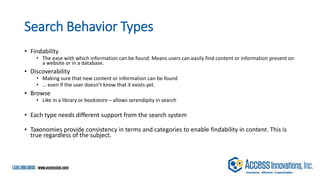
Search Behavior Types
• Findability
• The ease with which information can be found. Means users can easily find content or information present on
a website or in a database.
• Discoverability
• Making sure that new content or information can be found
• … even if the user doesn’t know that it exists yet.
• Browse
• Like in a library or bookstore – allows serendipity in search
• Each type needs different support from the search system
• Taxonomies provide consistency in terms and categories to enable findability in content. This is
true regardless of the subject.
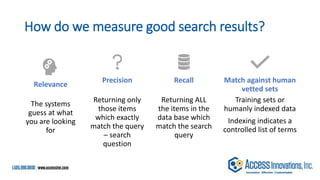
How do we measure good search results?
Relevance
The systems
guess at what
you are looking
for
Precision
Returning only
those items
which exactly
match the query
– search
question
Recall
Returning ALL
the items in the
data base which
match the search
query
Match against human
vetted sets
Training sets or
humanly indexed data
Indexing indicates a
controlled list of terms
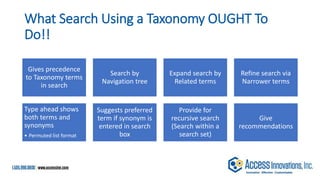
What Search Using a Taxonomy OUGHT To
Do!!
Gives precedence
to Taxonomy terms
in search
Search by
Navigation tree
Expand search by
Related terms
Refine search via

Narrower terms
Type ahead shows
both terms and
synonyms
• Permuted list format
Suggests preferred
term if synonym is
entered in search
box
Provide for
recursive search
(Search within a
search set)
Give
recommendations
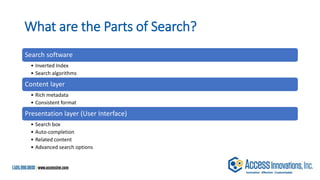
What are the Parts of Search?
Search software
• Inverted Index
• Search algorithms
Content layer
• Rich metadata
• Consistent format
Presentation layer (User Interface)
• Search box
• Auto-completion
• Related content
• Advanced search options
Search Software
Content Layer
Adding the Taxonomy
Presentation layer (User Interface)
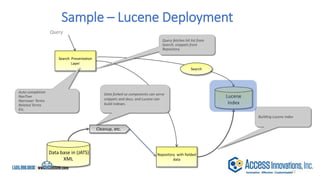
Sample – Lucene Deployment

Data base in (JATS)
XML
Query
Search Presentation
Layer
Repository with fielded
data
Cleanup, etc.
Data forked so components can serve
snippets and docs, and Lucene can
build indexes.
Query fetches hit list from
Search, snippets from
Repository.
Lucene
Index
Building Lucene index
Auto-completion
NavTree
Narrower Terms
Related Terms
Etc.
Search
12
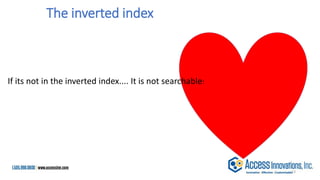
The inverted index is the heart
13
If its not in the inverted index.... It is not searchable!
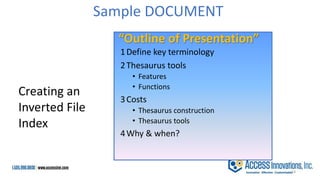
“Outline of Presentation”
1Define key terminology
2Thesaurus tools
• Features
• Functions
3Costs
• Thesaurus construction
• Thesaurus tools
4Why & when?
Creating an
Inverted File
Index
Sample DOCUMENT
14
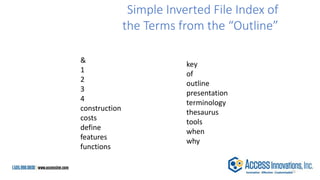
Simple Inverted File Index of
the Terms from the “Outline”
&
1
2
3
4
construction
costs
define
features
functions
key
of
outline
presentation
terminology
thesaurus
tools
when
why
15
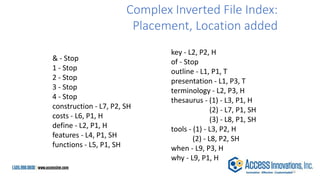
& - Stop
1 - Stop
2 - Stop
3 - Stop
4 - Stop
construction - L7, P2, SH
costs - L6, P1, H
define - L2, P1, H
features - L4, P1, SH
functions - L5, P1, SH
key - L2, P2, H
of - Stop
outline - L1, P1, T
presentation - L1, P3, T
terminology - L2, P3, H
thesaurus - (1) - L3, P1, H
(2) - L7, P1, SH
(3) - L8, P1, SH
tools - (1) - L3, P2, H
(2) - L8, P2, SH
when - L9, P3, H
why - L9, P1, H
Complex Inverted File Index:
Placement, Location added
16
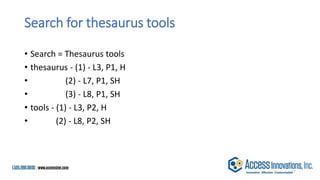
Search for thesaurus tools
• Search = Thesaurus tools
• thesaurus - (1) - L3, P1, H
• (2) - L7, P1, SH
• (3) - L8, P1, SH
• tools - (1) - L3, P2, H
• (2) - L8, P2, SH
17
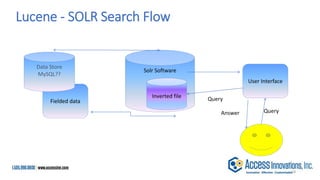
Solr Software
Fielded data
Data Store
MySQL??
User Interface
Inverted file
Query
Query
Answer
Lucene - SOLR Search Flow
18
Search Software
Content Layer
Adding the Taxonomy
Presentation layer (User Interface)
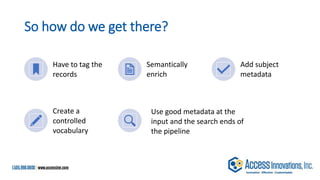
So how do we get there?
Have to tag the
records
Semantically
enrich
Add subject
metadata
Create a
controlled
vocabulary
Use good metadata at the
input and the search ends of
the pipeline
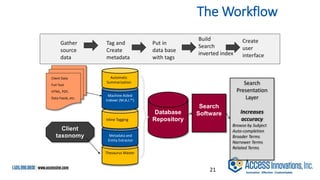
Thesaurus Master
Machine Aided
Indexer (M.A.I.™)
Database
Repository
Search
Presentation
Layer
Increases
accuracy
Browse by Subject
Auto-completion
Broader Terms
Narrower Terms
Related Terms
Client Taxonomy
Inline Tagging
Metadata and
Entity Extractor
Automatic
Summarization
Search
Software
Client Data
Full Text
HTML, PDF,
Data Feeds, etc.
Client
taxonomy
The Workflow
21
Tag and
Create
metadata
Put in
data base
with tags
Build
Search
inverted index
Create
user
interface
Gather
source
data
>>>>>>>>>>>>>>>>>>>>
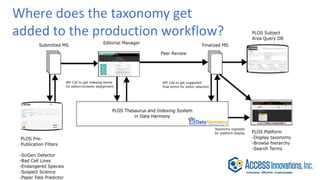
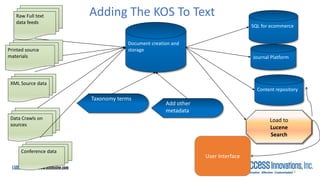
Where does the taxonomy get
added to the production workflow?
Raw Full text
data feeds
Document creation and
storage
Printed source
materials
Taxonomy terms
Load to
Lucene
Search
Adding The KOS To Text
Data Crawls on
sources
Add other
metadata
Content repository
SQL for ecommerce
Conference data
XML Source data
Journal Platform
User Interface
23
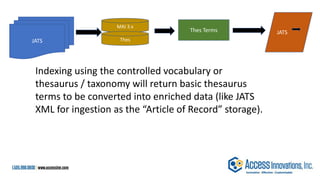
JATS
Thes Terms
JATS
MAI 3.x
Thes
Indexing using the controlled vocabulary or
thesaurus / taxonomy will return basic thesaurus
terms to be converted into enriched data (like JATS
XML for ingestion as the “Article of Record” storage).
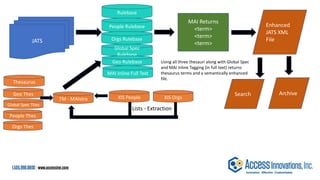
JATS
Rulebase
People Rulebase
Orgs Thes
Global Spec
Rulebase
MAI Inline Full Text
Global Spec Thes
XIS People XIS Orgs
TM - MAIstro
MAI Returns
<term>
<term>
<term>
Enhanced
JATS XML
File
Search
Lists - Extraction
Using all three thesauri along with Global Spec
and MAI Inline Tagging (in full text) returns
thesaurus terms and a semantically enhanced
file.
Geo Rulebase
People Thes
Orgs Rulebase
Geo Thes
Thesaurus
Archive
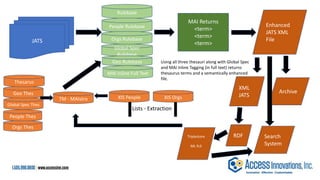
JATS
Rulebase
People Rulebase
Orgs Thes
Global Spec
Rulebase
MAI Inline Full Text
Global Spec Thes
XIS People XIS Orgs
TM - MAIstro
MAI Returns
<term>
<term>
<term>
Enhanced
JATS XML
File
XML
JATS
Lists - Extraction
RDF
Triplestore
ML 9.0
Archive
Using all three thesauri along with Global Spec
and MAI Inline Tagging (in full text) returns
thesaurus terms and a semantically enhanced
file.
Geo Rulebase
People Thes
Orgs Rulebase
Geo Thes
Thesarus
Search
System
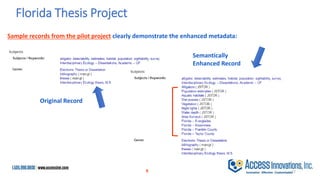
Sample records from the pilot project clearly demonstrate the enhanced metadata:
9
Florida Thesis Project
Original Record
Semantically
Enhanced Record
27
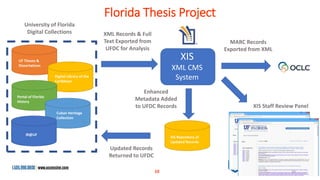
University of Florida
Digital Collections XML Records & Full
Text Exported from
UFDC for Analysis
XIS
XML CMS
System
MARC Records
Exported from XML
XIS Staff Review Panel
Enhanced
Metadata Added
to UFDC Records
Updated Records
Returned to UFDC
UF Theses &
Dissertations
Digital Library of the
Caribbean
Portal of Florida
History
Cuban Heritage
Collection
IR@UF
Florida Thesis Project
XIS Repository of
Updated Records
28
10
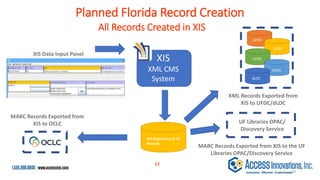
XML Records Exported from
XIS to UFDC/dLOC
All Records Created in XIS
XIS
XML CMS
System
MARC Records Exported from
XIS to OCLC
XIS Data Input Panel
Planned Florida Record Creation
XIS Repository of UF
Records
MARC Records Exported from XIS to the UF
Libraries OPAC/Discovery Service
UF Libraries OPAC/
Discovery Service
UFDC
UFDC
UFDC
dLOC
UFDC
29
17
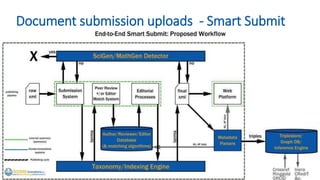
Document submission uploads - Smart Submit
Search Software
Content Layer
Adding the Taxonomy
Presentation layer (User Interface)
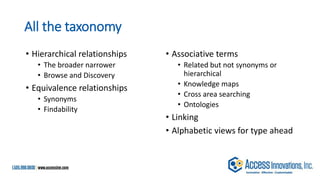
All the taxonomy
• Hierarchical relationships
• The broader narrower
• Browse and Discovery
• Equivalence relationships
• Synonyms
• Findability
• Associative terms
• Related but not synonyms or
hierarchical
• Knowledge maps
• Cross area searching
• Ontologies
• Linking
• Alphabetic views for type ahead
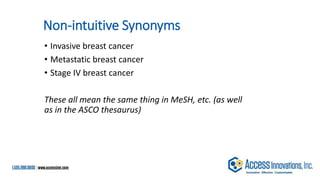
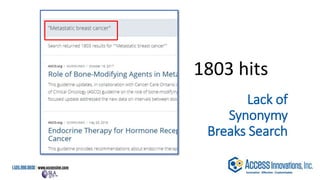
Non-intuitive Synonyms
• Invasive breast cancer
• Metastatic breast cancer
• Stage IV breast cancer
These all mean the same thing in MeSH, etc. (as well
as in the ASCO thesaurus)
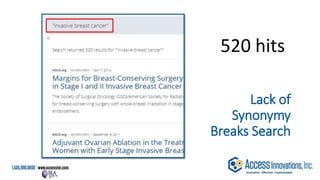
Lack of
Synonymy
Breaks Search
520 hits
Lack of
Synonymy
Breaks Search
1803 hits
Lack of
Synonymy
Breaks Search
73 hits
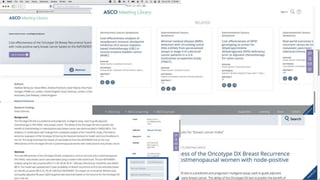
I would want my medical team to
see all 2,396 articles
Disambiguation
Bridge Structure
Bridge Dentistry
Bridge Game
Bridge Concept
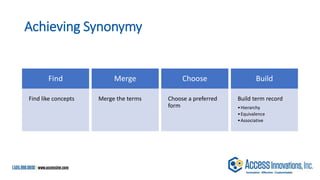
Achieving Synonymy
Find
Find like concepts
Merge
Merge the terms
Choose
Choose a preferred
form
Build
Build term record
•Hierarchy
•Equivalence
•Associative
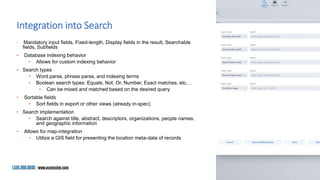
Integration into Search
• Mandatory input fields, Fixed-length, Display fields in the result, Searchable
fields, Subfields
• Database indexing behavior
• Allows for custom indexing behavior
• Search types
• Word parse, phrase parse, and indexing terms
• Boolean search types: Equals, Not, Or, Number, Exact matches, etc.…
• Can be mixed and matched based on the desired query
• Sortable fields
• Sort fields in export or other views (already in-spec)
• Search implementation
• Search against title, abstract, descriptors, organizations, people names,
and geographic information
• Allows for map-integration
• Utilize a GIS field for presenting the location meta-data of records
Content Management – More
Than Just Documents
• Content management is much more than acting as a document store
• Ability to upload and store additional data-types
• Videos
• Images
• Files
• Excel
• Word
• Etc.…
• Ability to serve the content along-side the document
• API’s to access and deliver the objects
• While AWS provides this, it is generally very complex
• XIS simplifies this process via understanding the target audience
• Challenges for libraries
• Systems are often designed for naïve implementations
• Storage of books and journals and the like
• XIS solves this by giving a use-case specific implementation of CMS
Search Software
Content Layer
Adding the Taxonomy
Presentation layer (User Interface)
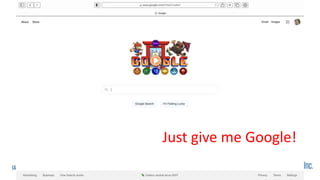
Just give me Google!
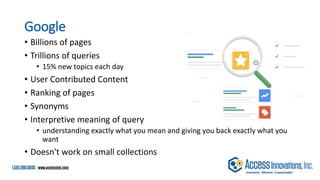
Google
• Billions of pages
• Trillions of queries
• 15% new topics each day
• User Contributed Content
• Ranking of pages
• Synonyms
• Interpretive meaning of query
• understanding exactly what you mean and giving you back exactly what you
want
• Doesn't work on small collections
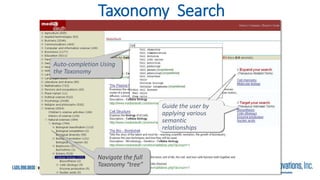
Taxonomy Search
Navigate the full
Taxonomy “tree”
Auto-completion Using
the Taxonomy
Guide the user by
applying various
semantic
relationships
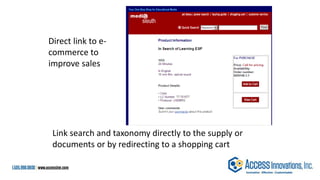
Link search and taxonomy directly to the supply or
documents or by redirecting to a shopping cart
Direct link to e-
commerce to
improve sales
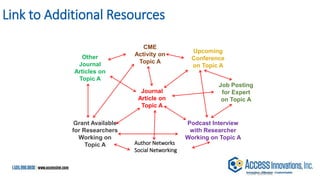
Link to Additional Resources
CONFIDENTIAL
Journal
Article on
Topic A
Other
Journal
Articles on
Topic A
Upcoming
Conference
on Topic A
Podcast Interview
with Researcher
Working on Topic A
Grant Available
for Researchers
Working on
Topic A
CME
Activity on
Topic A
Job Posting
for Expert
on Topic A
Author Networks
Social Networking
Cancer Epidemiology Biomarkers & Prevention
Vol. 12, 161-164,
February 2003
© 2003 American Association for Cancer Research
Short Communications
Alcohol, Folate, Methionine, and Risk of Incident Breast Cancer in the
American Cancer Society Cancer Prevention Study II Nutrition Cohort
Heather Spencer Feigelson1, Carolyn R. Jonas, Andreas S. Robertson,
Marjorie L. McCullough, Michael J. Thun and Eugenia E. Calle Department of
Epidemiology and Surveillance Research, American Cancer Society, National
Home Office, Atlanta, Georgia 30329-4251
Recent studies suggest that the increased risk of breast cancer associated with
alcohol consumption may be reduced by adequate folate intake. We examined
this question among 66,561 postmenopausal women in the American Cancer
Society Cancer Prevention Study II Nutrition Cohort.
Related Press Releases
•How What and How Much We Eat (And Drink) Affects Our
Risk of Cancer
•Novel COX-2 Combination Treatment May Reduce Colon
Cancer Risk Combination Regimen of COX-2 Inhibitor and
Fish Oil Causes Cell Death
•COX-2 Levels Are Elevated in Smokers
Related AACR Workshops and Conferences
•Frontiers in Cancer Prevention Research
•Continuing Medical Education (CME)
•Molecular Targets and Cancer Therapeutics
Related Meeting Abstracts
•Association between dietary folate intake, alcohol intake, and
methylenetetrahydrofolate reductase C677T and A1298C
polymorphisms and subsequent breast
•Folate, folate cofactor, and alcohol intakes and risk for
colorectal adenoma
•Dietary folate intake and risk of prostate cancer in a large
prospective cohort study
Related Working Groups
•Finance
•Charter
•Molecular Epidemiology
Related Education Book Content
Oral Contraceptives, Postmenopausal Hormones,
and Breast Cancer
Physical Activity and Cancer
Hormonal Interventions: From Adjuvant Therapy to
Breast Cancer Prevention
Related Awards
•AACR-GlaxoSmithKline Clinical Cancer Research
Scholar Awards
•ACS Award
•Weinstein Distinguished Lecture
Webcasts
Related Webcasts
Think Tank Report
Related Think Tank Report
Content
Sample Linked Page
Data Harmony Logo here
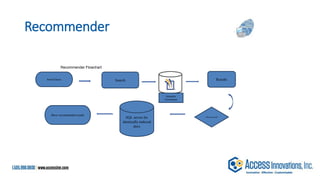
Recommender
Search Query Search
Choose record
Results
SQL server for
identically-indexed
docs
Show recommended results
Semantic
Enrichment
Recommender Flowchart
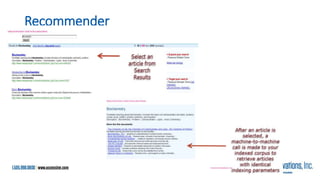
Recommender
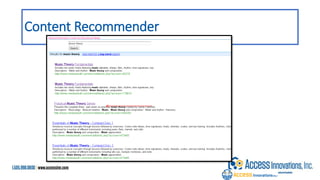
Content Recommender
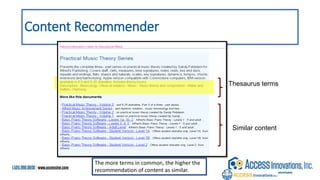
Content Recommender
Thesaurus terms
Similar content
The more terms in common, the higher the
recommendation of content as similar.
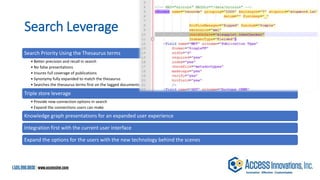
Search Leverage
Search Priority Using the Thesaurus terms
• Better precision and recall in search
• No false presentations
• Insures full coverage of publications
• Synonymy fully expanded to match the thesaurus
• Searches the thesaurus terms first on the tagged documents
Triple store leverage
• Provide new connection options in search
• Expand the connections users can make
Knowledge graph presentations for an expanded user experience
Integration first with the current user interface
Expand the options for the users with the new technology behind the scenes
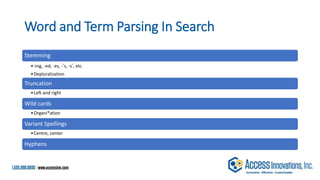
Word and Term Parsing In Search
Stemming
•-ing, -ed, -es, -’s, -s’, etc.
•Depluralization
Truncation
•Left and right
Wild cards
•Organi*ation
Variant Spellings
•Centre, center
Hyphens
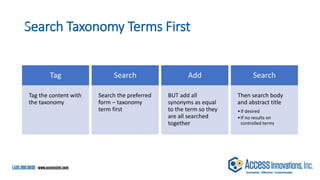
Search Taxonomy Terms First
Tag
Tag the content with
the taxonomy
Search
Search the preferred
form – taxonomy
term first
Add
BUT add all
synonyms as equal
to the term so they
are all searched
together
Search
Then search body
and abstract title
•If desired
•If no results on
controlled terms
54
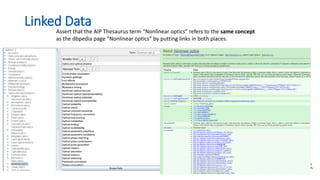
Linked Data
Assert that the AIP Thesaurus term “Nonlinear optics” refers to the same concept
as the dbpedia page “Nonlinear optics” by putting links in both places.
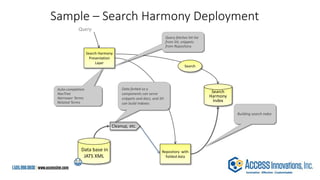
Sample – Search Harmony Deployment
Data base in
JATS XML
Query
Search Harmony
Presentation
Layer
Repository with
fielded data
Cleanup, etc.
Data forked so y
components can serve
snippets and docs, and SH
can build indexes.
Query fetches hit list
from SH, snippets
from Repository.
Search
Harmony
Index
Building search index
Auto-completion
NavTree
Narrower Terms
Related Terms
Search
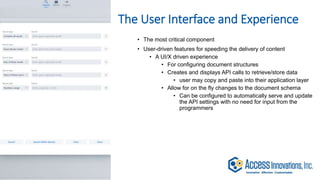
The User Interface and Experience
• The most critical component
• User-driven features for speeding the delivery of content
• A UI/X driven experience
• For configuring document structures
• Creates and displays API calls to retrieve/store data
• user may copy and paste into their application layer
• Allow for on the fly changes to the document schema
• Can be configured to automatically serve and update
the API settings with no need for input from the
programmers
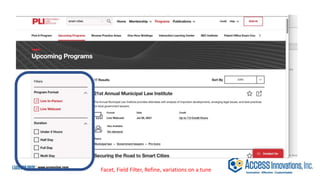
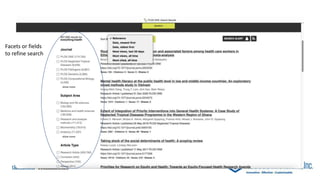
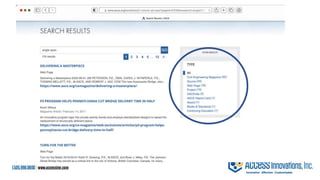
Facet, Field Filter, Refine, variations on a tune
Facets or fields
to refine search
User statistics and analytics
• Provide the end-user with a variety of analytics for how their data is
accessed
• Allow them to make enhancements/improvements to their schemas
• Demonstrate the robustness and capability of the platform
• Builds consumer trust
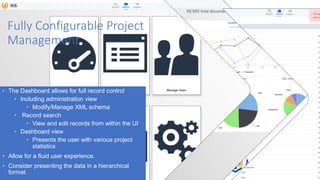
Fully Configurable Project
Management
• The Dashboard allows for full record control
• Including administration view
• Modify/Manage XML schema
• Record search
• View and edit records from within the UI
• Dashboard view
• Presents the user with various project
statistics
• Allow for a fluid user experience.
• Consider presenting the data in a hierarchical
format.
About Access Innovations
Access Innovations are experts in content creation, enrichment, and
conversion services. We provide services to semantically enrich and tag raw
text into highly structured data. We deliver clean, well-formed, metadata-
enriched content so our clients can reuse, repurpose, store, and find their
knowledge assets. We go beyond the standards to build taxonomies and
other data control structures as a solid foundation for your information.
Our services and software allow organizations to use and present their
information to both internal and external constituents by leveraging search,
presentation, and e-commerce. We change search to found!
Quick Facts
• Founded in 1978
• Headquartered in Albuquerque, NM
• Privately held
• Delivered more than 2000 engagements
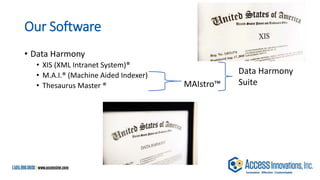
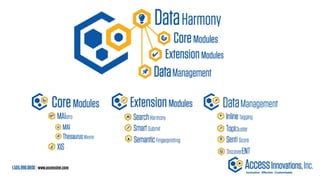
Our Software
• Data Harmony
• XIS (XML Intranet System)®
• M.A.I.® (Machine Aided Indexer)
• Thesaurus Master ® MAIstro™
Data Harmony
Suite
Marjorie Hlava, President
505-998-0800 x109
margie_hlava@accessinn.com
QUESTIONS??
This is an “On Demand” presentation so email to
Margie
Mhlava@accessinn.com
Or call
505-998-0800 x 109
I would love to chat

Eureka, I found it! - Special Libraries Association 2021 Presentation

  • 1.
    A Presentation On HowSearch Works With Taxonomies Marjorie M. K Hlava, 505-998-0800 Chief Scientist, Chairman, President, Founder Mhlava2accessinn.com
  • 2.
    Description: Have you everwondered how search works while visiting an e-commerce site, internal website, or searching through other types of online resources? Look no further than this informative session on the ways that taxonomies help end-users navigate the internet! Hear from taxonomists and other information professionals who have first-hand experience creating and working with taxonomies that aid in navigation, search, and discovery across a range of disciplines.
  • 3.
    Who is speaking?Marjorie M.K. Hlava • I am a lifetime member 45 years of SLA, joining in 1974. • I have spent my career searching, building databases, building taxonomies, First for NASA then for my own company. • Over 2000 engagements and 600 custom taxonomies built by my team and me. • Also active in the standards we use you will find my name in the Dublin core (Z39.84), Controlled vocabulary (Z39.19), Credit, DOI Syntax and other infrastructure standards for the information industry. • I am the founding chair of the SLA taxonomy division • I have written four books and the Taxobook series is a best seller on Amazon. I also have authored over 200 articles and any presentations
  • 4.
    Content Without AccessIs Nearly Worthless. • Enterprise search is how an organization • … helps people seek the information they need, • … in any format, • databases, • document management systems • paper. • … from anywhere inside their company. • We need to get the right information at the right time.
  • 5.
    What’s the problemwith search? • Returns do not match the query – search question • Need to know all the ways something can be labeled to find it, synonyms • Colloquial use of terms to mean something else, homonyms • Too many returns to look at easily • Users only want to click 3 times to find an answer • Too much time needed to set up good search system by IT • Most orgs have 5 previous search systems on the shelf – trying a new one • The problem was probably the data not the system.
  • 6.
    Is All SearchThe Same? • Key outcomes in a comprehensive knowledge management strategy. • Discover “discoverability” • Search • Find “findability”
  • 7.
    Search Behavior Types •Findability • The ease with which information can be found. Means users can easily find content or information present on a website or in a database. • Discoverability • Making sure that new content or information can be found • … even if the user doesn’t know that it exists yet. • Browse • Like in a library or bookstore – allows serendipity in search • Each type needs different support from the search system • Taxonomies provide consistency in terms and categories to enable findability in content. This is true regardless of the subject.
  • 8.
    How do wemeasure good search results? Relevance The systems guess at what you are looking for Precision Returning only those items which exactly match the query – search question Recall Returning ALL the items in the data base which match the search query Match against human vetted sets Training sets or humanly indexed data Indexing indicates a controlled list of terms
  • 9.
    What Search Usinga Taxonomy OUGHT To Do!! Gives precedence to Taxonomy terms in search Search by Navigation tree Expand search by Related terms Refine search via Narrower terms Type ahead shows both terms and synonyms • Permuted list format Suggests preferred term if synonym is entered in search box Provide for recursive search (Search within a search set) Give recommendations
  • 10.
    What are theParts of Search? Search software • Inverted Index • Search algorithms Content layer • Rich metadata • Consistent format Presentation layer (User Interface) • Search box • Auto-completion • Related content • Advanced search options
  • 11.
    Search Software Content Layer Addingthe Taxonomy Presentation layer (User Interface)
  • 12.
    Sample – LuceneDeployment Data base in (JATS) XML Query Search Presentation Layer Repository with fielded data Cleanup, etc. Data forked so components can serve snippets and docs, and Lucene can build indexes. Query fetches hit list from Search, snippets from Repository. Lucene Index Building Lucene index Auto-completion NavTree Narrower Terms Related Terms Etc. Search 12
  • 13.
    The inverted indexis the heart 13 If its not in the inverted index.... It is not searchable!
  • 14.
    “Outline of Presentation” 1Definekey terminology 2Thesaurus tools • Features • Functions 3Costs • Thesaurus construction • Thesaurus tools 4Why & when? Creating an Inverted File Index Sample DOCUMENT 14
  • 15.
    Simple Inverted FileIndex of the Terms from the “Outline” & 1 2 3 4 construction costs define features functions key of outline presentation terminology thesaurus tools when why 15
  • 16.
    & - Stop 1- Stop 2 - Stop 3 - Stop 4 - Stop construction - L7, P2, SH costs - L6, P1, H define - L2, P1, H features - L4, P1, SH functions - L5, P1, SH key - L2, P2, H of - Stop outline - L1, P1, T presentation - L1, P3, T terminology - L2, P3, H thesaurus - (1) - L3, P1, H (2) - L7, P1, SH (3) - L8, P1, SH tools - (1) - L3, P2, H (2) - L8, P2, SH when - L9, P3, H why - L9, P1, H Complex Inverted File Index: Placement, Location added 16
  • 17.
    Search for thesaurustools • Search = Thesaurus tools • thesaurus - (1) - L3, P1, H • (2) - L7, P1, SH • (3) - L8, P1, SH • tools - (1) - L3, P2, H • (2) - L8, P2, SH 17
  • 18.
    Solr Software Fielded data DataStore MySQL?? User Interface Inverted file Query Query Answer Lucene - SOLR Search Flow 18
  • 19.
    Search Software Content Layer Addingthe Taxonomy Presentation layer (User Interface)
  • 20.
    So how dowe get there? Have to tag the records Semantically enrich Add subject metadata Create a controlled vocabulary Use good metadata at the input and the search ends of the pipeline
  • 21.
    Thesaurus Master Machine Aided Indexer(M.A.I.™) Database Repository Search Presentation Layer Increases accuracy Browse by Subject Auto-completion Broader Terms Narrower Terms Related Terms Client Taxonomy Inline Tagging Metadata and Entity Extractor Automatic Summarization Search Software Client Data Full Text HTML, PDF, Data Feeds, etc. Client taxonomy The Workflow 21 Tag and Create metadata Put in data base with tags Build Search inverted index Create user interface Gather source data
  • 22.
    >>>>>>>>>>>>>>>>>>>> Where does thetaxonomy get added to the production workflow?
  • 23.
    Raw Full text datafeeds Document creation and storage Printed source materials Taxonomy terms Load to Lucene Search Adding The KOS To Text Data Crawls on sources Add other metadata Content repository SQL for ecommerce Conference data XML Source data Journal Platform User Interface 23
  • 24.
    JATS Thes Terms JATS MAI 3.x Thes Indexingusing the controlled vocabulary or thesaurus / taxonomy will return basic thesaurus terms to be converted into enriched data (like JATS XML for ingestion as the “Article of Record” storage).
  • 25.
    JATS Rulebase People Rulebase Orgs Thes GlobalSpec Rulebase MAI Inline Full Text Global Spec Thes XIS People XIS Orgs TM - MAIstro MAI Returns <term> <term> <term> Enhanced JATS XML File Search Lists - Extraction Using all three thesauri along with Global Spec and MAI Inline Tagging (in full text) returns thesaurus terms and a semantically enhanced file. Geo Rulebase People Thes Orgs Rulebase Geo Thes Thesaurus Archive
  • 26.
    JATS Rulebase People Rulebase Orgs Thes GlobalSpec Rulebase MAI Inline Full Text Global Spec Thes XIS People XIS Orgs TM - MAIstro MAI Returns <term> <term> <term> Enhanced JATS XML File XML JATS Lists - Extraction RDF Triplestore ML 9.0 Archive Using all three thesauri along with Global Spec and MAI Inline Tagging (in full text) returns thesaurus terms and a semantically enhanced file. Geo Rulebase People Thes Orgs Rulebase Geo Thes Thesarus Search System
  • 27.
    Sample records fromthe pilot project clearly demonstrate the enhanced metadata: 9 Florida Thesis Project Original Record Semantically Enhanced Record 27
  • 28.
    University of Florida DigitalCollections XML Records & Full Text Exported from UFDC for Analysis XIS XML CMS System MARC Records Exported from XML XIS Staff Review Panel Enhanced Metadata Added to UFDC Records Updated Records Returned to UFDC UF Theses & Dissertations Digital Library of the Caribbean Portal of Florida History Cuban Heritage Collection IR@UF Florida Thesis Project XIS Repository of Updated Records 28 10
  • 29.
    XML Records Exportedfrom XIS to UFDC/dLOC All Records Created in XIS XIS XML CMS System MARC Records Exported from XIS to OCLC XIS Data Input Panel Planned Florida Record Creation XIS Repository of UF Records MARC Records Exported from XIS to the UF Libraries OPAC/Discovery Service UF Libraries OPAC/ Discovery Service UFDC UFDC UFDC dLOC UFDC 29 17
  • 30.
  • 31.
    Search Software Content Layer Addingthe Taxonomy Presentation layer (User Interface)
  • 32.
    All the taxonomy •Hierarchical relationships • The broader narrower • Browse and Discovery • Equivalence relationships • Synonyms • Findability • Associative terms • Related but not synonyms or hierarchical • Knowledge maps • Cross area searching • Ontologies • Linking • Alphabetic views for type ahead
  • 33.
    Non-intuitive Synonyms • Invasivebreast cancer • Metastatic breast cancer • Stage IV breast cancer These all mean the same thing in MeSH, etc. (as well as in the ASCO thesaurus)
  • 34.
  • 35.
  • 36.
    Lack of Synonymy Breaks Search 73hits I would want my medical team to see all 2,396 articles
  • 37.
  • 38.
    Achieving Synonymy Find Find likeconcepts Merge Merge the terms Choose Choose a preferred form Build Build term record •Hierarchy •Equivalence •Associative
  • 39.
    Integration into Search •Mandatory input fields, Fixed-length, Display fields in the result, Searchable fields, Subfields • Database indexing behavior • Allows for custom indexing behavior • Search types • Word parse, phrase parse, and indexing terms • Boolean search types: Equals, Not, Or, Number, Exact matches, etc.… • Can be mixed and matched based on the desired query • Sortable fields • Sort fields in export or other views (already in-spec) • Search implementation • Search against title, abstract, descriptors, organizations, people names, and geographic information • Allows for map-integration • Utilize a GIS field for presenting the location meta-data of records
  • 40.
    Content Management –More Than Just Documents • Content management is much more than acting as a document store • Ability to upload and store additional data-types • Videos • Images • Files • Excel • Word • Etc.… • Ability to serve the content along-side the document • API’s to access and deliver the objects • While AWS provides this, it is generally very complex • XIS simplifies this process via understanding the target audience • Challenges for libraries • Systems are often designed for naïve implementations • Storage of books and journals and the like • XIS solves this by giving a use-case specific implementation of CMS
  • 41.
    Search Software Content Layer Addingthe Taxonomy Presentation layer (User Interface)
  • 42.
    Just give meGoogle!
  • 43.
    Google • Billions ofpages • Trillions of queries • 15% new topics each day • User Contributed Content • Ranking of pages • Synonyms • Interpretive meaning of query • understanding exactly what you mean and giving you back exactly what you want • Doesn't work on small collections
  • 44.
    Taxonomy Search Navigate thefull Taxonomy “tree” Auto-completion Using the Taxonomy Guide the user by applying various semantic relationships
  • 45.
    Link search andtaxonomy directly to the supply or documents or by redirecting to a shopping cart Direct link to e- commerce to improve sales
  • 46.
    Link to AdditionalResources CONFIDENTIAL Journal Article on Topic A Other Journal Articles on Topic A Upcoming Conference on Topic A Podcast Interview with Researcher Working on Topic A Grant Available for Researchers Working on Topic A CME Activity on Topic A Job Posting for Expert on Topic A Author Networks Social Networking
  • 47.
    Cancer Epidemiology Biomarkers& Prevention Vol. 12, 161-164, February 2003 © 2003 American Association for Cancer Research Short Communications Alcohol, Folate, Methionine, and Risk of Incident Breast Cancer in the American Cancer Society Cancer Prevention Study II Nutrition Cohort Heather Spencer Feigelson1, Carolyn R. Jonas, Andreas S. Robertson, Marjorie L. McCullough, Michael J. Thun and Eugenia E. Calle Department of Epidemiology and Surveillance Research, American Cancer Society, National Home Office, Atlanta, Georgia 30329-4251 Recent studies suggest that the increased risk of breast cancer associated with alcohol consumption may be reduced by adequate folate intake. We examined this question among 66,561 postmenopausal women in the American Cancer Society Cancer Prevention Study II Nutrition Cohort. Related Press Releases •How What and How Much We Eat (And Drink) Affects Our Risk of Cancer •Novel COX-2 Combination Treatment May Reduce Colon Cancer Risk Combination Regimen of COX-2 Inhibitor and Fish Oil Causes Cell Death •COX-2 Levels Are Elevated in Smokers Related AACR Workshops and Conferences •Frontiers in Cancer Prevention Research •Continuing Medical Education (CME) •Molecular Targets and Cancer Therapeutics Related Meeting Abstracts •Association between dietary folate intake, alcohol intake, and methylenetetrahydrofolate reductase C677T and A1298C polymorphisms and subsequent breast •Folate, folate cofactor, and alcohol intakes and risk for colorectal adenoma •Dietary folate intake and risk of prostate cancer in a large prospective cohort study Related Working Groups •Finance •Charter •Molecular Epidemiology Related Education Book Content Oral Contraceptives, Postmenopausal Hormones, and Breast Cancer Physical Activity and Cancer Hormonal Interventions: From Adjuvant Therapy to Breast Cancer Prevention Related Awards •AACR-GlaxoSmithKline Clinical Cancer Research Scholar Awards •ACS Award •Weinstein Distinguished Lecture Webcasts Related Webcasts Think Tank Report Related Think Tank Report Content Sample Linked Page Data Harmony Logo here
  • 48.
    Recommender Search Query Search Chooserecord Results SQL server for identically-indexed docs Show recommended results Semantic Enrichment Recommender Flowchart
  • 49.
  • 50.
  • 51.
    Content Recommender Thesaurus terms Similarcontent The more terms in common, the higher the recommendation of content as similar.
  • 52.
    Search Leverage Search PriorityUsing the Thesaurus terms • Better precision and recall in search • No false presentations • Insures full coverage of publications • Synonymy fully expanded to match the thesaurus • Searches the thesaurus terms first on the tagged documents Triple store leverage • Provide new connection options in search • Expand the connections users can make Knowledge graph presentations for an expanded user experience Integration first with the current user interface Expand the options for the users with the new technology behind the scenes
  • 53.
    Word and TermParsing In Search Stemming •-ing, -ed, -es, -’s, -s’, etc. •Depluralization Truncation •Left and right Wild cards •Organi*ation Variant Spellings •Centre, center Hyphens
  • 54.
    Search Taxonomy TermsFirst Tag Tag the content with the taxonomy Search Search the preferred form – taxonomy term first Add BUT add all synonyms as equal to the term so they are all searched together Search Then search body and abstract title •If desired •If no results on controlled terms 54
  • 55.
    Linked Data Assert thatthe AIP Thesaurus term “Nonlinear optics” refers to the same concept as the dbpedia page “Nonlinear optics” by putting links in both places.
  • 56.
    Sample – SearchHarmony Deployment Data base in JATS XML Query Search Harmony Presentation Layer Repository with fielded data Cleanup, etc. Data forked so y components can serve snippets and docs, and SH can build indexes. Query fetches hit list from SH, snippets from Repository. Search Harmony Index Building search index Auto-completion NavTree Narrower Terms Related Terms Search
  • 57.
    The User Interfaceand Experience • The most critical component • User-driven features for speeding the delivery of content • A UI/X driven experience • For configuring document structures • Creates and displays API calls to retrieve/store data • user may copy and paste into their application layer • Allow for on the fly changes to the document schema • Can be configured to automatically serve and update the API settings with no need for input from the programmers
  • 60.
    Facet, Field Filter,Refine, variations on a tune
  • 61.
    Facets or fields torefine search
  • 63.
    User statistics andanalytics • Provide the end-user with a variety of analytics for how their data is accessed • Allow them to make enhancements/improvements to their schemas • Demonstrate the robustness and capability of the platform • Builds consumer trust
  • 64.
    Fully Configurable Project Management •The Dashboard allows for full record control • Including administration view • Modify/Manage XML schema • Record search • View and edit records from within the UI • Dashboard view • Presents the user with various project statistics • Allow for a fluid user experience. • Consider presenting the data in a hierarchical format.
  • 65.
    About Access Innovations AccessInnovations are experts in content creation, enrichment, and conversion services. We provide services to semantically enrich and tag raw text into highly structured data. We deliver clean, well-formed, metadata- enriched content so our clients can reuse, repurpose, store, and find their knowledge assets. We go beyond the standards to build taxonomies and other data control structures as a solid foundation for your information. Our services and software allow organizations to use and present their information to both internal and external constituents by leveraging search, presentation, and e-commerce. We change search to found! Quick Facts • Founded in 1978 • Headquartered in Albuquerque, NM • Privately held • Delivered more than 2000 engagements
  • 66.
    Our Software • DataHarmony • XIS (XML Intranet System)® • M.A.I.® (Machine Aided Indexer) • Thesaurus Master ® MAIstro™ Data Harmony Suite
  • 68.
    Marjorie Hlava, President 505-998-0800x109 margie_hlava@accessinn.com
  • 69.
    QUESTIONS?? This is an“On Demand” presentation so email to Margie Mhlava@accessinn.com Or call 505-998-0800 x 109 I would love to chat