ISOM3260
Database Design & Administration
Dr. Muller Cheung (L1/L2)
Dr. James Thong (L3)
Office hour: By appointment
Email: mcheung@ust.hk; jthong@ust.hk
Spring 2014
2
Today’s Agenda
• Introduction to course
– ISOM3260 website: http://teaching.ust.hk/~isom3260
– Midterms and Final exam
– Group project
• Database Fundamentals (Chap. 1)
3
Conduct in Class
• Attend the lab you are enrolled in
• Attend the lecture you are enrolled in
• Be punctual for lab/lecture
• Turn off mobile phones
• Do not distract other students or instructor by
talking with your friends
4
How to study for ISOM3260
• Attend lectures
– Questions in exams will only include topics
covered in lectures
• Read the textbook for more information
• Review lecture notes/textbook after lecture
• Email questions to me or make appointment
5
What you will learn from this course
• Database fundamentals
– introduction to database concepts
• Database development process
– steps to develop a database
• Conceptual data modeling
– entity-relationship (ER) diagram; enhanced ER
• Logical database design
– transforming ER diagram into relations; normalization
• Physical database design
– technical specifications of the database
• Database implementation
– Structured Query Language (SQL), advanced SQL
• Advanced topic
– data warehousing; data and database administration
Lecture 1:
Database Fundamentals
ISOM3260, Spring 2014
7
Database Fundamentals
• Concepts
• Disadvantages of file processing systems
• The database approach
• Advantages of database approach
• Costs and risks of database approach
• Range of database applications
• Components of database environment
• Evolution of database systems
• Current development
8
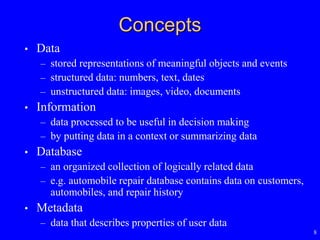
Concepts
• Data
– stored representations of meaningful objects and events
– structured data: numbers, text, dates
– unstructured data: images, video, documents
• Information
– data processed to be useful in decision making
– by putting data in a context or summarizing data
• Database
– an organized collection of logically related data
– e.g. automobile repair database contains data on customers,
automobiles, and repair history
• Metadata
– data that describes properties of user data
9
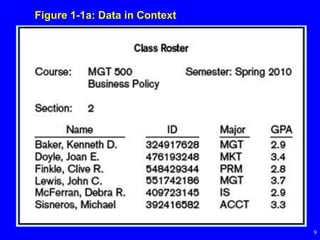
Figure 1-1a: Data in Context
10
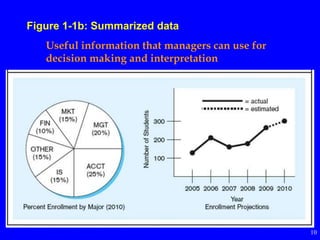
Figure 1-1b: Summarized data
Useful information that managers can use for
decision making and interpretation
11
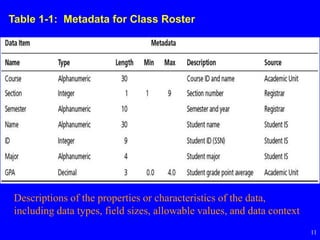
Table 1-1: Metadata for Class Roster
Descriptions of the properties or characteristics of the data,
including data types, field sizes, allowable values, and data context
12
Disadvantages of File Processing
• Program-data dependence
– all programs maintain metadata for each file they use
– change to file structure requires changes to all programs that
access the file
• Data redundancy (duplication of data)
– data changes in one file could cause inconsistencies,
compromising data integrity
• Limited data sharing
– no centralized control of data
• Lengthy development times
– programmers must design their own file formats
• Excessive program maintenance
– consume 80% of information systems budget
13
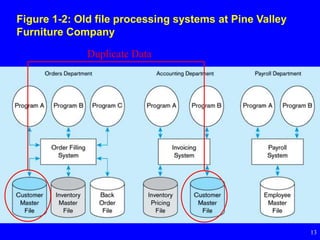
Figure 1-2: Old file processing systems at Pine Valley
Furniture Company
Duplicate Data
14
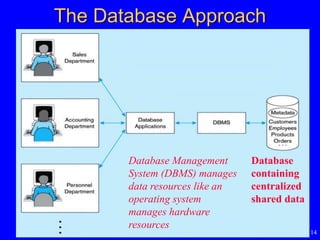
The Database Approach
Database Management
System (DBMS) manages
data resources like an
operating system
manages hardware
resources
Database
containing
centralized
shared data
15
Advantages of Database Approach
• Program-data independence
– metadata not stored in programs, so programs do not need to
worry about changes to data formats
– results in increased productivity of application development and
reduced program maintenance
• Minimal data redundancy
– avoid wasted storage space
– leads to increased data integrity/consistency
16
Advantages of Database Approach
• Improved data sharing
– different users get different views of the data
• Enforcement of standards
– naming conventions, data quality standards, and uniform
procedures for accessing, updating, and protecting data
• Improved data quality
– constraints are business rules that cannot be violated by
database users
– enforced by DBMS
• Improved data accessibility and responsiveness
– use of structured query language (SQL)
– end users without programming experience can easily retrieve
data
17
Costs and Risks of the
Database Approach
• Requires new, specialized personnel
• Installation and management cost and complexity
– requires new software and upgrades to hardware and data
communications
– substantial annual maintenance and support costs
• Conversion costs
– converting from legacy systems costs money and time
• Need for explicit backup and recovery
– shared corporate database must be accurate and available at all
times
• Organizational conflict
– agreement on data definitions and ownership, responsibilities
for accurate data maintenance
– need strong top management support to resolve
18
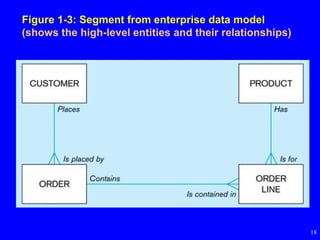
Figure 1-3: Segment from enterprise data model
(shows the high-level entities and their relationships)
19
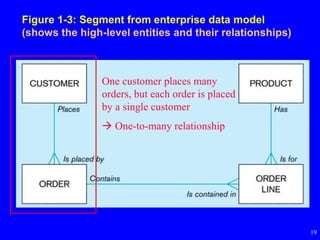
Figure 1-3: Segment from enterprise data model
(shows the high-level entities and their relationships)
One customer places many
orders, but each order is placed
by a single customer
 One-to-many relationship
20
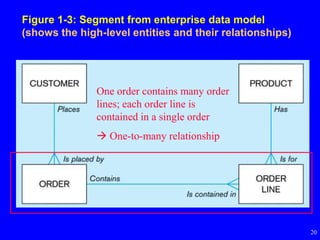
Figure 1-3: Segment from enterprise data model
(shows the high-level entities and their relationships)
One order contains many order
lines; each order line is
contained in a single order
 One-to-many relationship
21
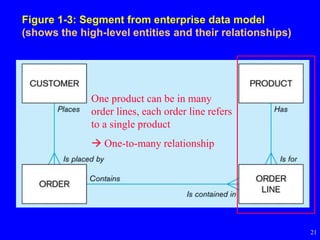
Figure 1-3: Segment from enterprise data model
(shows the high-level entities and their relationships)
One product can be in many
order lines, each order line refers
to a single product
 One-to-many relationship
22
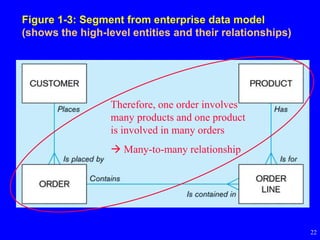
Figure 1-3: Segment from enterprise data model
(shows the high-level entities and their relationships)
Therefore, one order involves
many products and one product
is involved in many orders
 Many-to-many relationship
23
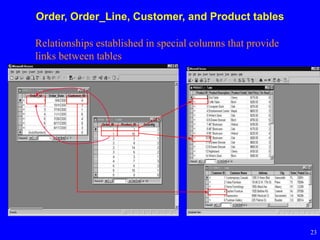
Order, Order_Line, Customer, and Product tables
Relationships established in special columns that provide
links between tables
24
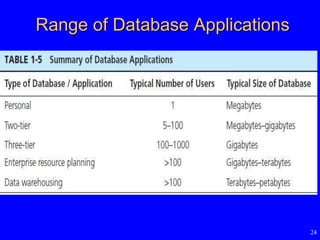
Range of Database Applications
25
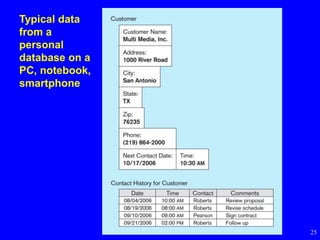
Typical data
from a
personal
database on a
PC, notebook,
smartphone
26
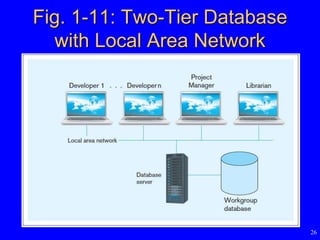
Fig. 1-11: Two-Tier Database
with Local Area Network
Enterprise Database Applications
• Enterprise Resource Planning (ERP)
– business management system that integrates all
enterprise functions (e.g., manufacturing,
finance, sales, marketing, inventory,
accounting, human resources)
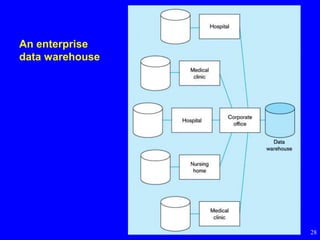
• Data Warehouse
– an integrated decision support system derived
from various operational databases
27
28
An enterprise
data warehouse
29
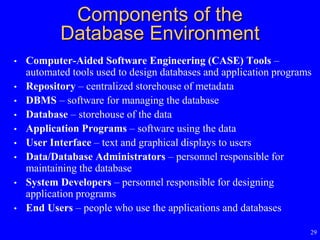
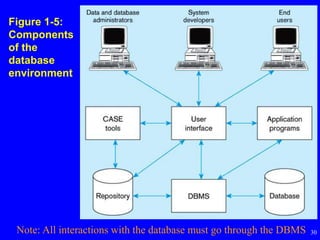
Components of the
Database Environment
• Computer-Aided Software Engineering (CASE) Tools –
automated tools used to design databases and application programs
• Repository – centralized storehouse of metadata
• DBMS – software for managing the database
• Database – storehouse of the data
• Application Programs – software using the data
• User Interface – text and graphical displays to users
• Data/Database Administrators – personnel responsible for
maintaining the database
• System Developers – personnel responsible for designing
application programs
• End Users – people who use the applications and databases
30
Figure 1-5:
Components
of the
database
environment
Note: All interactions with the database must go through the DBMS
31
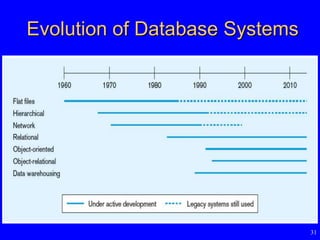
Evolution of Database Systems
32
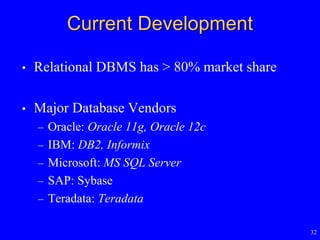
Current Development
• Relational DBMS has > 80% market share
• Major Database Vendors
– Oracle: Oracle 11g, Oracle 12c
– IBM: DB2, Informix
– Microsoft: MS SQL Server
– SAP: Sybase
– Teradata: Teradata
33
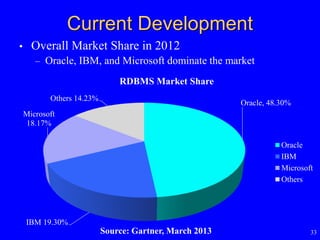
Current Development
• Overall Market Share in 2012
– Oracle, IBM, and Microsoft dominate the market
Source: Gartner, March 2013
Oracle, 48.30%
IBM 19.30%
Microsoft
18.17%
Others 14.23%
RDBMS Market Share
Oracle
IBM
Microsoft
Others
34
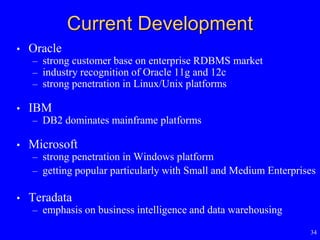
Current Development
• Oracle
– strong customer base on enterprise RDBMS market
– industry recognition of Oracle 11g and 12c
– strong penetration in Linux/Unix platforms
• IBM
– DB2 dominates mainframe platforms
• Microsoft
– strong penetration in Windows platform
– getting popular particularly with Small and Medium Enterprises
• Teradata
– emphasis on business intelligence and data warehousing
35
Review Questions
• Differences between data, database, information and
metadata
• What are the disadvantages of file processing?
• What is the database approach?
• What are the advantages of the database approach?
• What are the costs and risks of the database approach?
• What are the range of database applications?
• What are the components of the database environment?
• What are the popular databases?

Database fundamentals(database)

  • 1.
    ISOM3260 Database Design &Administration Dr. Muller Cheung (L1/L2) Dr. James Thong (L3) Office hour: By appointment Email: mcheung@ust.hk; jthong@ust.hk Spring 2014
  • 2.
    2 Today’s Agenda • Introductionto course – ISOM3260 website: http://teaching.ust.hk/~isom3260 – Midterms and Final exam – Group project • Database Fundamentals (Chap. 1)
  • 3.
    3 Conduct in Class •Attend the lab you are enrolled in • Attend the lecture you are enrolled in • Be punctual for lab/lecture • Turn off mobile phones • Do not distract other students or instructor by talking with your friends
  • 4.
    4 How to studyfor ISOM3260 • Attend lectures – Questions in exams will only include topics covered in lectures • Read the textbook for more information • Review lecture notes/textbook after lecture • Email questions to me or make appointment
  • 5.
    5 What you willlearn from this course • Database fundamentals – introduction to database concepts • Database development process – steps to develop a database • Conceptual data modeling – entity-relationship (ER) diagram; enhanced ER • Logical database design – transforming ER diagram into relations; normalization • Physical database design – technical specifications of the database • Database implementation – Structured Query Language (SQL), advanced SQL • Advanced topic – data warehousing; data and database administration
  • 6.
  • 7.
    7 Database Fundamentals • Concepts •Disadvantages of file processing systems • The database approach • Advantages of database approach • Costs and risks of database approach • Range of database applications • Components of database environment • Evolution of database systems • Current development
  • 8.
    8 Concepts • Data – storedrepresentations of meaningful objects and events – structured data: numbers, text, dates – unstructured data: images, video, documents • Information – data processed to be useful in decision making – by putting data in a context or summarizing data • Database – an organized collection of logically related data – e.g. automobile repair database contains data on customers, automobiles, and repair history • Metadata – data that describes properties of user data
  • 9.
  • 10.
    10 Figure 1-1b: Summarizeddata Useful information that managers can use for decision making and interpretation
  • 11.
    11 Table 1-1: Metadatafor Class Roster Descriptions of the properties or characteristics of the data, including data types, field sizes, allowable values, and data context
  • 12.
    12 Disadvantages of FileProcessing • Program-data dependence – all programs maintain metadata for each file they use – change to file structure requires changes to all programs that access the file • Data redundancy (duplication of data) – data changes in one file could cause inconsistencies, compromising data integrity • Limited data sharing – no centralized control of data • Lengthy development times – programmers must design their own file formats • Excessive program maintenance – consume 80% of information systems budget
  • 13.
    13 Figure 1-2: Oldfile processing systems at Pine Valley Furniture Company Duplicate Data
  • 14.
    14 The Database Approach DatabaseManagement System (DBMS) manages data resources like an operating system manages hardware resources Database containing centralized shared data
  • 15.
    15 Advantages of DatabaseApproach • Program-data independence – metadata not stored in programs, so programs do not need to worry about changes to data formats – results in increased productivity of application development and reduced program maintenance • Minimal data redundancy – avoid wasted storage space – leads to increased data integrity/consistency
  • 16.
    16 Advantages of DatabaseApproach • Improved data sharing – different users get different views of the data • Enforcement of standards – naming conventions, data quality standards, and uniform procedures for accessing, updating, and protecting data • Improved data quality – constraints are business rules that cannot be violated by database users – enforced by DBMS • Improved data accessibility and responsiveness – use of structured query language (SQL) – end users without programming experience can easily retrieve data
  • 17.
    17 Costs and Risksof the Database Approach • Requires new, specialized personnel • Installation and management cost and complexity – requires new software and upgrades to hardware and data communications – substantial annual maintenance and support costs • Conversion costs – converting from legacy systems costs money and time • Need for explicit backup and recovery – shared corporate database must be accurate and available at all times • Organizational conflict – agreement on data definitions and ownership, responsibilities for accurate data maintenance – need strong top management support to resolve
  • 18.
    18 Figure 1-3: Segmentfrom enterprise data model (shows the high-level entities and their relationships)
  • 19.
    19 Figure 1-3: Segmentfrom enterprise data model (shows the high-level entities and their relationships) One customer places many orders, but each order is placed by a single customer  One-to-many relationship
  • 20.
    20 Figure 1-3: Segmentfrom enterprise data model (shows the high-level entities and their relationships) One order contains many order lines; each order line is contained in a single order  One-to-many relationship
  • 21.
    21 Figure 1-3: Segmentfrom enterprise data model (shows the high-level entities and their relationships) One product can be in many order lines, each order line refers to a single product  One-to-many relationship
  • 22.
    22 Figure 1-3: Segmentfrom enterprise data model (shows the high-level entities and their relationships) Therefore, one order involves many products and one product is involved in many orders  Many-to-many relationship
  • 23.
    23 Order, Order_Line, Customer,and Product tables Relationships established in special columns that provide links between tables
  • 24.
  • 25.
    25 Typical data from a personal databaseon a PC, notebook, smartphone
  • 26.
    26 Fig. 1-11: Two-TierDatabase with Local Area Network
  • 27.
    Enterprise Database Applications •Enterprise Resource Planning (ERP) – business management system that integrates all enterprise functions (e.g., manufacturing, finance, sales, marketing, inventory, accounting, human resources) • Data Warehouse – an integrated decision support system derived from various operational databases 27
  • 28.
  • 29.
    29 Components of the DatabaseEnvironment • Computer-Aided Software Engineering (CASE) Tools – automated tools used to design databases and application programs • Repository – centralized storehouse of metadata • DBMS – software for managing the database • Database – storehouse of the data • Application Programs – software using the data • User Interface – text and graphical displays to users • Data/Database Administrators – personnel responsible for maintaining the database • System Developers – personnel responsible for designing application programs • End Users – people who use the applications and databases
  • 30.
    30 Figure 1-5: Components of the database environment Note:All interactions with the database must go through the DBMS
  • 31.
  • 32.
    32 Current Development • RelationalDBMS has > 80% market share • Major Database Vendors – Oracle: Oracle 11g, Oracle 12c – IBM: DB2, Informix – Microsoft: MS SQL Server – SAP: Sybase – Teradata: Teradata
  • 33.
    33 Current Development • OverallMarket Share in 2012 – Oracle, IBM, and Microsoft dominate the market Source: Gartner, March 2013 Oracle, 48.30% IBM 19.30% Microsoft 18.17% Others 14.23% RDBMS Market Share Oracle IBM Microsoft Others
  • 34.
    34 Current Development • Oracle –strong customer base on enterprise RDBMS market – industry recognition of Oracle 11g and 12c – strong penetration in Linux/Unix platforms • IBM – DB2 dominates mainframe platforms • Microsoft – strong penetration in Windows platform – getting popular particularly with Small and Medium Enterprises • Teradata – emphasis on business intelligence and data warehousing
  • 35.
    35 Review Questions • Differencesbetween data, database, information and metadata • What are the disadvantages of file processing? • What is the database approach? • What are the advantages of the database approach? • What are the costs and risks of the database approach? • What are the range of database applications? • What are the components of the database environment? • What are the popular databases?