Lecture 1
Introduction to Database System
1
Basic Definitions
■ Data:
■ Known facts that can be recorded and have an implicit meaning.
■ Database:
■ A collection of related data which is logically coherent and is built
for a specific purpose.
■ Mini-world:
■ Some part of the real world about which data is stored in a
database. For example, student grades and transcripts at a
university.
■ Database Management System (DBMS):
■ A software package/system to facilitate the creation and
maintenance of a computerized database.
■ Database system:
■ The DBMS software together with the data itself. Sometimes, the
applications are also included.
2
Example of a Simple Database
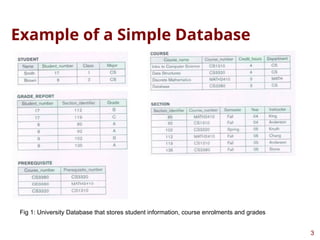
Fig 1: University Database that stores student information, course enrolments and grades
3
Types of Databases and Database
Applications
■ Traditional applications:
■ Numeric and textual databases
■ More recent applications:
■ Multimedia databases
■ Geographic Information Systems (GIS)
■ Biological and genome databases
■ Data warehouses
■ Mobile databases
■ Real-time and active databases
4
Managing Data
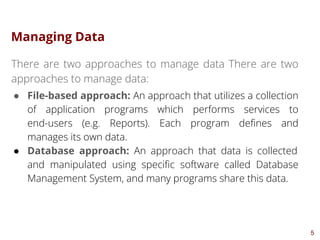
There are two approaches to manage data There are two
approaches to manage data:
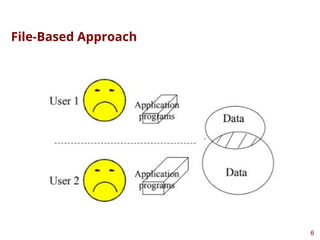
● File-based approach: An approach that utilizes a collection
of application programs which performs services to
end-users (e.g. Reports). Each program defines and
manages its own data.
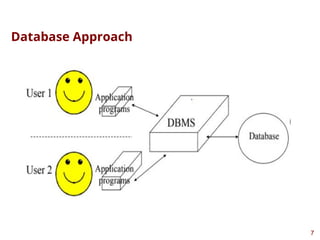
● Database approach: An approach that data is collected
and manipulated using specific software called Database
Management System, and many programs share this data.
5
File-Based Approach
6
Database Approach
7
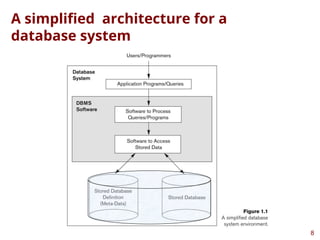
A simplified architecture for a
database system
8
What a DBMS Facilitates
■ Define a particular database in terms of its data types,
structures, and constraints
■ Construct or load the initial database contents on a
secondary storage medium
■ Manipulating the database:
■ Retrieval: Querying, generating reports
■ Modification: Insertions, deletions and updates to its
content
■ Accessing the database through Web applications
■ Processing and sharing by a set of concurrent users and
application programs – yet, keeping all data valid and
consistent
9
Other DBMS Functionalities
■ DBMS may additionally provide:
■ Protection or security measures to prevent
unauthorized access
■ “Active” processing to take internal actions on data
■ Presentation and visualization of data
■ Maintenance of the database and associated
programs over the lifetime of the database
application
10
Main Characteristics of the
Database Approach
■ Self-describing nature of a database system:
■ A DBMS catalog stores the description of a particular
database (e.g. data structures, types, and constraints)
■ The description is called meta-data.
■ This allows the DBMS software to work with different
database applications.
■ Insulation between programs and data:
■ Called program-data independence.
■ Allows changing data structures and storage organization
without having to change the DBMS access programs
11
Main Characteristics of the
Database Approach (continued)
■ Data abstraction:
■ A data model is used to hide storage details and
present the users with a conceptual view of the
database.
■ Support of multiple views of the data:
■ Each user may see a different view of the
database, which describes only the data of
interest to that user.
12
Main Characteristics of the
Database Approach (continued)
■ Sharing of data and multi-user transaction processing:
■ Allowing a set of concurrent users to retrieve from and to
update the database.
■ Concurrency control within the DBMS guarantees that each
transaction is correctly executed or aborted
■ Recovery subsystem ensures each completed transaction
has its effect permanently recorded in the database or if
transaction fails then the database rolls back to the last
valid state.
■ OLTP (Online Transaction Processing) is a major part of
database applications; allows hundreds of concurrent
transactions to execute per second.
13
Advantages of Using the
Database Approach
■ Controlling redundancy in data storage and in
development and maintenance efforts.
■ Sharing of data among multiple users.
■ Restricting unauthorized access to data. Only the
DBA staff uses privileged commands and
facilities.
■ Providing storage structures (e.g. indexes) for
efficient query processing.
14
Advantages of Using the
Database Approach (continued)
■ Providing optimization of queries for efficient
processing
■ Providing backup and recovery services
■ Providing multiple interfaces to different classes
of users
■ Representing complex relationships among data
■ Enforcing integrity constraints on the database
■ Drawing inferences and actions from the stored
data using deductive and active rules and
triggers
15
Database Users
■ Users may be divided into
■ Those who actually use and control the database
content, and those who design, develop and
maintain database applications (called “Actors on
the Scene”), and
■ Those who design and develop the DBMS
software and related tools, and the computer
systems operators (called “Workers Behind the
Scene”).
16
Database Users – Actors on the
Scene
■ Actors on the scene (4 types)
■ Database administrators
■ Responsible for authorizing access to the database, for
coordinating and monitoring its use, acquiring software and
hardware resources, controlling its use and monitoring
efficiency of operations.
■ Database designers
■ Responsible to define the content, the structure, the
constraints, and functions or transactions against the
database. They must communicate with the end-users and
understand their needs.
■ Software Engineers
■ Responsible for implementing the database and its associated
applications using a dbms and other programming languages
and tools.
17
Database End Users
■ Actors on the scene (continued)
■ End-users: They use the data for queries, reports and
some of them update the database content. End-users can
be categorized into:
■ Casual: access database occasionally when needed
■ Naïve or parametric: they make up a large section of the
end-user population, e.g mobile app and social media
users, constantly update and access the database.
■ Sophisticated: business analysts, scientists, engineers,
others thoroughly familiar with the system capabilities.
■ Stand-alone: Mostly maintain personal databases using
ready-to-use packaged applications.
18
When not to use a DBMS
■ Main inhibitors (costs) of using a DBMS:
■ High initial investment and possible need for additional
hardware
■ Overhead for providing generality, security, concurrency
control, recovery, and integrity functions
■ When a DBMS may be unnecessary:
■ If the database and applications are simple, well defined,
and not expected to change
■ If access to data by multiple users is not required
■ When a DBMS may be infeasible
■ In embedded systems where a general-purpose DBMS may
not fit in available storage
19
When not to use a DBMS
■ When no DBMS may suffice:
■ If there are stringent real-time requirements
that may not be met because of DBMS
overhead (e.g., telephone switching systems)
■ If the database system is not able to handle the
complexity of data because of modeling
limitations (e.g., in complex genome and protein
databases)
■ If the database users need special operations not
supported by the DBMS (e.g., GIS and
location-based services).
20
Data Models
A set of concepts to describe the structure of a database, the
operations for manipulating these structures, and certain
constraints that the database should obey.
21
Categories of Data Models
■ Conceptual (high-level, semantic) data models:
■ Provide concepts that are close to the way many users
perceive data.
■ (Also called entity-based or object-based data models.)
■ Physical (low-level, internal) data models:
■ Provide concepts that describe details of how data is stored
in the computer. These are usually specified in an ad-hoc
manner through DBMS design and administration manuals
■ Implementation (representational) data models:
■ Provide concepts that fall between the above two, used by
many commercial DBMS implementations (e.g. relational
data models used in many commercial systems).
■ Self-Describing Data Models:
■ Combine the description of data with the data values.
Examples include XML, key-value stores and some NOSQL
systems. 22
Database Schema versus Database
State
■ Database Schema:
■ The description of a database
■ Includes descriptions of the database structure,
data types, and the constraints on the database.
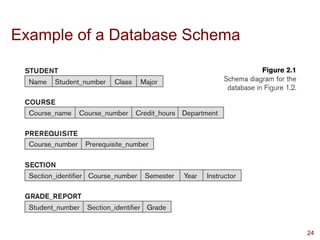
■ Schema Diagram:
■ An illustrative display of (most aspects of) a
database schema.
■ The database schema changes very infrequently
■ Schema is also called intension.
23
Example of a Database Schema
24
Database Schema versus Database
State
■ Database State:
■ The actual data stored in a database at a
particular moment in time. This includes the
collection of all the data in the database.
■ Also called database instance (or occurrence or
snapshot).
■ The database state changes every time the database is
updated.
■ State is also called extension.
25
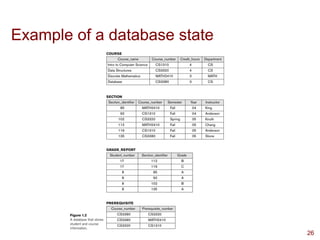
Example of a database state
26
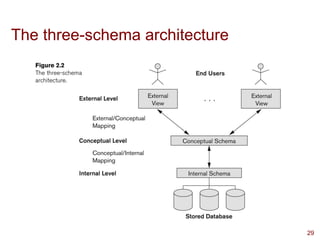
Three-Schema Architecture
■ Proposed to support DBMS characteristics of:
■ Program-data independence.
■ Support of multiple views of the data.
■ Not explicitly used in commercial DBMS products,
but has been useful in explaining database
system organization
27
Three-Schema Architecture
■ Defines DBMS schemas at three levels:
■ Internal schema at the internal level to describe physical
storage structures and access paths (e.g indexes).
■ Typically uses a physical data model.
■ Conceptual schema at the conceptual level to describe the
structure and constraints for the whole database for a
community of users.
■ Uses a conceptual or an implementation data model.
■ External schemas at the external level to describe the
various user views.
■ Usually uses the same data model as the conceptual schema.
28
The three-schema architecture
29
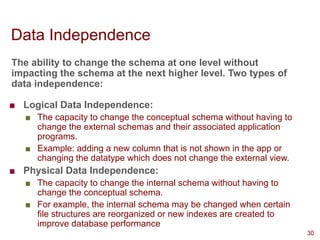
Data Independence
The ability to change the schema at one level without
impacting the schema at the next higher level. Two types of
data independence:
■ Logical Data Independence:
■ The capacity to change the conceptual schema without having to
change the external schemas and their associated application
programs.
■ Example: adding a new column that is not shown in the app or
changing the datatype which does not change the external view.
■ Physical Data Independence:
■ The capacity to change the internal schema without having to
change the conceptual schema.
■ For example, the internal schema may be changed when certain
file structures are reorganized or new indexes are created to
improve database performance
30
DBMS Languages
■ Data Definition Language (DDL): Used to define database
schemas. The ddl statement is used to identify the description
of a schema construct and store the schema description in the
DBMS catalog. Creating/Deleting a table, Adding columns,
Changing data types are examples that require DDL
statements.
■ Data Manipulation Language (DML): Used to manipulate
data by inserting, deleting, updating and retrieving data. DML
commands can be embedded in a general-purpose
programming language such as Java. Two types of DML:
high-level/non-procedural and low-level/procedural.
31
DBMS Interfaces
■ Stand-alone query language interfaces
■ Example: Entering SQL queries at the DBMS interactive
SQL interface (e.g. SQL*Plus in ORACLE)
■ Programmer interfaces for embedding DML in programming
languages
■ User-friendly interfaces
■ Menu-based, forms-based, graphics-based, natural
language interfaces, etc.
■ Mobile Interfaces:interfaces allowing users to perform
transactions using mobile apps
■ Parametric interfaces, e.g., bank tellers using function keys.
■ Interfaces for the DBA.
32

Database Systems - Introduction to Database Systems

  • 1.
    Lecture 1 Introduction toDatabase System 1
  • 2.
    Basic Definitions ■ Data: ■Known facts that can be recorded and have an implicit meaning. ■ Database: ■ A collection of related data which is logically coherent and is built for a specific purpose. ■ Mini-world: ■ Some part of the real world about which data is stored in a database. For example, student grades and transcripts at a university. ■ Database Management System (DBMS): ■ A software package/system to facilitate the creation and maintenance of a computerized database. ■ Database system: ■ The DBMS software together with the data itself. Sometimes, the applications are also included. 2
  • 3.
    Example of aSimple Database Fig 1: University Database that stores student information, course enrolments and grades 3
  • 4.
    Types of Databasesand Database Applications ■ Traditional applications: ■ Numeric and textual databases ■ More recent applications: ■ Multimedia databases ■ Geographic Information Systems (GIS) ■ Biological and genome databases ■ Data warehouses ■ Mobile databases ■ Real-time and active databases 4
  • 5.
    Managing Data There aretwo approaches to manage data There are two approaches to manage data: ● File-based approach: An approach that utilizes a collection of application programs which performs services to end-users (e.g. Reports). Each program defines and manages its own data. ● Database approach: An approach that data is collected and manipulated using specific software called Database Management System, and many programs share this data. 5
  • 6.
  • 7.
  • 8.
    A simplified architecturefor a database system 8
  • 9.
    What a DBMSFacilitates ■ Define a particular database in terms of its data types, structures, and constraints ■ Construct or load the initial database contents on a secondary storage medium ■ Manipulating the database: ■ Retrieval: Querying, generating reports ■ Modification: Insertions, deletions and updates to its content ■ Accessing the database through Web applications ■ Processing and sharing by a set of concurrent users and application programs – yet, keeping all data valid and consistent 9
  • 10.
    Other DBMS Functionalities ■DBMS may additionally provide: ■ Protection or security measures to prevent unauthorized access ■ “Active” processing to take internal actions on data ■ Presentation and visualization of data ■ Maintenance of the database and associated programs over the lifetime of the database application 10
  • 11.
    Main Characteristics ofthe Database Approach ■ Self-describing nature of a database system: ■ A DBMS catalog stores the description of a particular database (e.g. data structures, types, and constraints) ■ The description is called meta-data. ■ This allows the DBMS software to work with different database applications. ■ Insulation between programs and data: ■ Called program-data independence. ■ Allows changing data structures and storage organization without having to change the DBMS access programs 11
  • 12.
    Main Characteristics ofthe Database Approach (continued) ■ Data abstraction: ■ A data model is used to hide storage details and present the users with a conceptual view of the database. ■ Support of multiple views of the data: ■ Each user may see a different view of the database, which describes only the data of interest to that user. 12
  • 13.
    Main Characteristics ofthe Database Approach (continued) ■ Sharing of data and multi-user transaction processing: ■ Allowing a set of concurrent users to retrieve from and to update the database. ■ Concurrency control within the DBMS guarantees that each transaction is correctly executed or aborted ■ Recovery subsystem ensures each completed transaction has its effect permanently recorded in the database or if transaction fails then the database rolls back to the last valid state. ■ OLTP (Online Transaction Processing) is a major part of database applications; allows hundreds of concurrent transactions to execute per second. 13
  • 14.
    Advantages of Usingthe Database Approach ■ Controlling redundancy in data storage and in development and maintenance efforts. ■ Sharing of data among multiple users. ■ Restricting unauthorized access to data. Only the DBA staff uses privileged commands and facilities. ■ Providing storage structures (e.g. indexes) for efficient query processing. 14
  • 15.
    Advantages of Usingthe Database Approach (continued) ■ Providing optimization of queries for efficient processing ■ Providing backup and recovery services ■ Providing multiple interfaces to different classes of users ■ Representing complex relationships among data ■ Enforcing integrity constraints on the database ■ Drawing inferences and actions from the stored data using deductive and active rules and triggers 15
  • 16.
    Database Users ■ Usersmay be divided into ■ Those who actually use and control the database content, and those who design, develop and maintain database applications (called “Actors on the Scene”), and ■ Those who design and develop the DBMS software and related tools, and the computer systems operators (called “Workers Behind the Scene”). 16
  • 17.
    Database Users –Actors on the Scene ■ Actors on the scene (4 types) ■ Database administrators ■ Responsible for authorizing access to the database, for coordinating and monitoring its use, acquiring software and hardware resources, controlling its use and monitoring efficiency of operations. ■ Database designers ■ Responsible to define the content, the structure, the constraints, and functions or transactions against the database. They must communicate with the end-users and understand their needs. ■ Software Engineers ■ Responsible for implementing the database and its associated applications using a dbms and other programming languages and tools. 17
  • 18.
    Database End Users ■Actors on the scene (continued) ■ End-users: They use the data for queries, reports and some of them update the database content. End-users can be categorized into: ■ Casual: access database occasionally when needed ■ Naïve or parametric: they make up a large section of the end-user population, e.g mobile app and social media users, constantly update and access the database. ■ Sophisticated: business analysts, scientists, engineers, others thoroughly familiar with the system capabilities. ■ Stand-alone: Mostly maintain personal databases using ready-to-use packaged applications. 18
  • 19.
    When not touse a DBMS ■ Main inhibitors (costs) of using a DBMS: ■ High initial investment and possible need for additional hardware ■ Overhead for providing generality, security, concurrency control, recovery, and integrity functions ■ When a DBMS may be unnecessary: ■ If the database and applications are simple, well defined, and not expected to change ■ If access to data by multiple users is not required ■ When a DBMS may be infeasible ■ In embedded systems where a general-purpose DBMS may not fit in available storage 19
  • 20.
    When not touse a DBMS ■ When no DBMS may suffice: ■ If there are stringent real-time requirements that may not be met because of DBMS overhead (e.g., telephone switching systems) ■ If the database system is not able to handle the complexity of data because of modeling limitations (e.g., in complex genome and protein databases) ■ If the database users need special operations not supported by the DBMS (e.g., GIS and location-based services). 20
  • 21.
    Data Models A setof concepts to describe the structure of a database, the operations for manipulating these structures, and certain constraints that the database should obey. 21
  • 22.
    Categories of DataModels ■ Conceptual (high-level, semantic) data models: ■ Provide concepts that are close to the way many users perceive data. ■ (Also called entity-based or object-based data models.) ■ Physical (low-level, internal) data models: ■ Provide concepts that describe details of how data is stored in the computer. These are usually specified in an ad-hoc manner through DBMS design and administration manuals ■ Implementation (representational) data models: ■ Provide concepts that fall between the above two, used by many commercial DBMS implementations (e.g. relational data models used in many commercial systems). ■ Self-Describing Data Models: ■ Combine the description of data with the data values. Examples include XML, key-value stores and some NOSQL systems. 22
  • 23.
    Database Schema versusDatabase State ■ Database Schema: ■ The description of a database ■ Includes descriptions of the database structure, data types, and the constraints on the database. ■ Schema Diagram: ■ An illustrative display of (most aspects of) a database schema. ■ The database schema changes very infrequently ■ Schema is also called intension. 23
  • 24.
    Example of aDatabase Schema 24
  • 25.
    Database Schema versusDatabase State ■ Database State: ■ The actual data stored in a database at a particular moment in time. This includes the collection of all the data in the database. ■ Also called database instance (or occurrence or snapshot). ■ The database state changes every time the database is updated. ■ State is also called extension. 25
  • 26.
    Example of adatabase state 26
  • 27.
    Three-Schema Architecture ■ Proposedto support DBMS characteristics of: ■ Program-data independence. ■ Support of multiple views of the data. ■ Not explicitly used in commercial DBMS products, but has been useful in explaining database system organization 27
  • 28.
    Three-Schema Architecture ■ DefinesDBMS schemas at three levels: ■ Internal schema at the internal level to describe physical storage structures and access paths (e.g indexes). ■ Typically uses a physical data model. ■ Conceptual schema at the conceptual level to describe the structure and constraints for the whole database for a community of users. ■ Uses a conceptual or an implementation data model. ■ External schemas at the external level to describe the various user views. ■ Usually uses the same data model as the conceptual schema. 28
  • 29.
  • 30.
    Data Independence The abilityto change the schema at one level without impacting the schema at the next higher level. Two types of data independence: ■ Logical Data Independence: ■ The capacity to change the conceptual schema without having to change the external schemas and their associated application programs. ■ Example: adding a new column that is not shown in the app or changing the datatype which does not change the external view. ■ Physical Data Independence: ■ The capacity to change the internal schema without having to change the conceptual schema. ■ For example, the internal schema may be changed when certain file structures are reorganized or new indexes are created to improve database performance 30
  • 31.
    DBMS Languages ■ DataDefinition Language (DDL): Used to define database schemas. The ddl statement is used to identify the description of a schema construct and store the schema description in the DBMS catalog. Creating/Deleting a table, Adding columns, Changing data types are examples that require DDL statements. ■ Data Manipulation Language (DML): Used to manipulate data by inserting, deleting, updating and retrieving data. DML commands can be embedded in a general-purpose programming language such as Java. Two types of DML: high-level/non-procedural and low-level/procedural. 31
  • 32.
    DBMS Interfaces ■ Stand-alonequery language interfaces ■ Example: Entering SQL queries at the DBMS interactive SQL interface (e.g. SQL*Plus in ORACLE) ■ Programmer interfaces for embedding DML in programming languages ■ User-friendly interfaces ■ Menu-based, forms-based, graphics-based, natural language interfaces, etc. ■ Mobile Interfaces:interfaces allowing users to perform transactions using mobile apps ■ Parametric interfaces, e.g., bank tellers using function keys. ■ Interfaces for the DBA. 32