Database Management
Systems
Lecture # 01
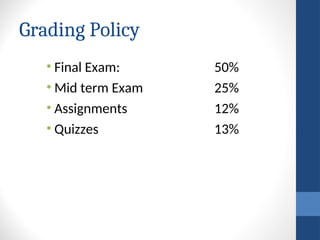
Grading Policy
• Final Exam: 50%
• Mid term Exam 25%
• Assignments 12%
• Quizzes 13%
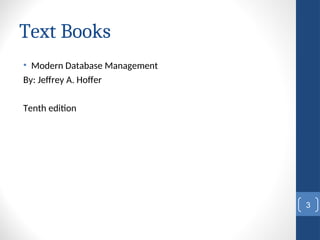
Text Books
• Modern Database Management
By: Jeffrey A. Hoffer
Tenth edition
3
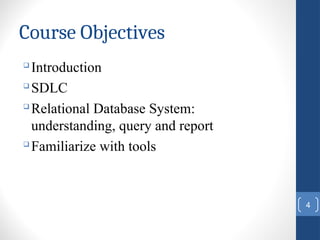
Course Objectives

Introduction

SDLC

Relational Database System:
understanding, query and report

Familiarize with tools
4
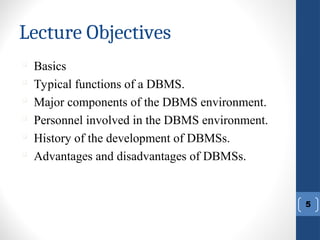
Lecture Objectives
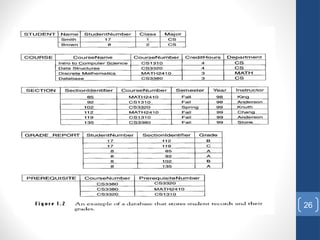
5

Basics

Typical functions of a DBMS.

Major components of the DBMS environment.

Personnel involved in the DBMS environment.

History of the development of DBMSs.

Advantages and disadvantages of DBMSs.
Introduction: What Is
Database?
• A very large, integrated collection of data.
• Database: An organized collection of logically related data.
• A database management system (DBMS) is a software system
designed to store, manage and facilitate access to the
database
6
7
Types of Databases and
Database Applications
 Numeric and Textual Databases
 Multimedia Databases
 Geographic Information Systems (GIS)
 Data Warehouses
Examples of Database
Applications

Purchases from the supermarket

Purchases using your credit card

Booking a holiday at the travel agents

Using the local library

Taking out insurance

Using the Internet

Studying at university
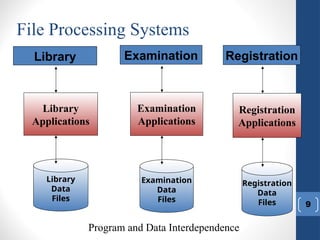
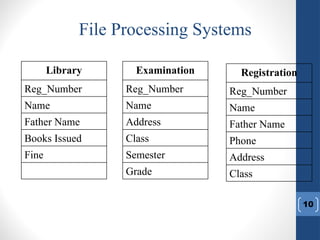
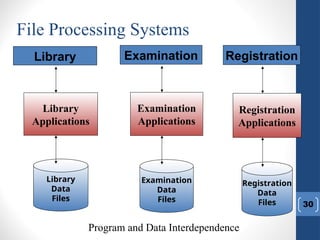
File Processing Systems
9
Registration
Applications
Registration
Data
Files
Registration
Examination
Applications
Examination
Data
Files
Examination
Library
Applications
Library
Data
Files
Library
Program and Data Interdependence
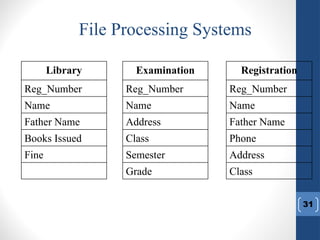
File Processing Systems
10
Fine
Books Issued
Father Name
Name
Reg_Number
Library
Grade
Semester
Class
Address
Name
Reg_Number
Examination
Class
Address
Phone
Father Name
Name
Reg_Number
Registration
11
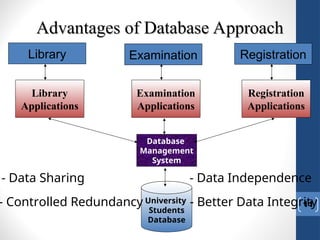
Advantages of Database Approach
Registration
Examination
Library
Applications
Library
Examination
Applications
Registration
Applications
Database
Management
System
University
Students
Database
- Data Sharing - Data Independence
- Controlled Redundancy - Better Data Integrity
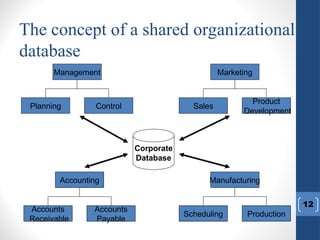
The concept of a shared organizational
database
12
Accounting
Accounts
Payable
Accounts
Receivable
Management
Control
Planning
Manufacturing
Production
Scheduling
Marketing
Product
Development
Sales
Corporate
Database
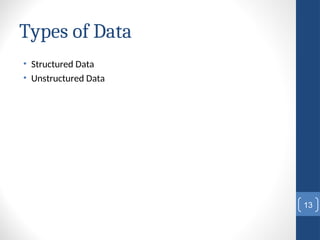
Types of Data
• Structured Data
• Unstructured Data
13
Definitions
• Data: Meaningful facts, text, graphics, images, sound, video
segments
• Information: Data processed to be useful in decision making
• Metadata: Data that describes data
14
15
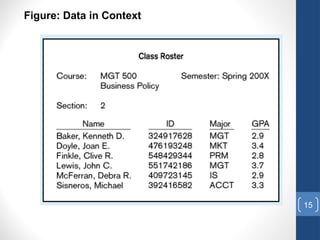
Figure: Data in Context
16
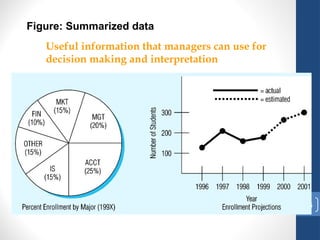
Figure: Summarized data
Useful information that managers can use for
decision making and interpretation
17
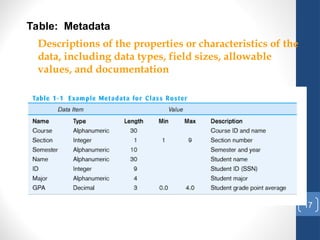
Table: Metadata
Descriptions of the properties or characteristics of the
data, including data types, field sizes, allowable
values, and documentation
What is DBMS
• A Database Management System (DBMS) is a software
package designed to store and manage databases.
• A DBMS is a data storage and retrieval system which permits
data to be stored non-redundantly while making it appear to
the user as if the data is well-integrated.
18
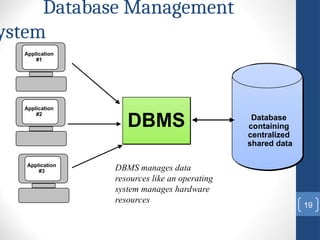
Database Management
ystem
19
DBMS manages data
resources like an operating
system manages hardware
resources
DBMS Database
containing
centralized
shared data
Application
#1
Application
#2
Application
#3
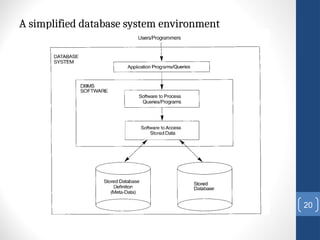
A simplified database system environment
20
21
Typical DBMS Functionality
 Define a database : in terms of data types,
structures and constraints
 Construct or Load the Database on a
secondary storage medium
 Manipulating the database : querying,
generating reports, insertions, deletions and
modifications to its content
 Concurrent Processing and Sharing by a set of
users and programs – yet, keeping all data valid
and consistent
22
Typical DBMS Functionality
Other features:
 Protection or Security measures to
prevent unauthorized access
 “Active” processing to take internal
actions on data
 Presentation and Visualization of data
Data Models
• Data model is collection of concepts for describing data.
• Graphical systems used to capture the nature and
relationships among data.
• Entity
• Relationships
23
Relational data Model
• Widely used model today
• Main concept: Relation, a table with rows and columns
24
Example
• Part of a UNIVERSITY environment.
• Some entities:
- STUDENTs
- COURSEs
- SECTIONs (of COURSEs)
- (academic) DEPARTMENTs
- INSTRUCTORs
• Some relationships:
- SECTIONs are of specific COURSEs
- COURSEs have prerequisite COURSEs
- INSTRUCTORs teach SECTIONs
- COURSEs are offered by DEPARTMENTs
- STUDENTs major in DEPARTMENTs
25
26
27
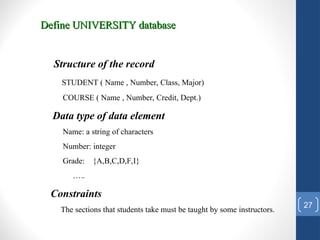
Define UNIVERSITY database
Structure of the record
STUDENT ( Name , Number, Class, Major)
COURSE ( Name , Number, Credit, Dept.)
Data type of data element
Name: a string of characters
Number: integer
Grade: {A,B,C,D,F,I}
…..
Constraints
The sections that students take must be taught by some instructors.
28
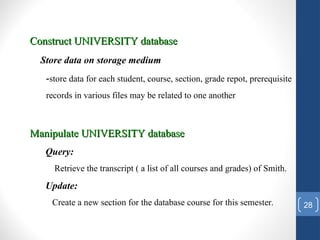
Construct UNIVERSITY database
Store data on storage medium
-store data for each student, course, section, grade repot, prerequisite
records in various files may be related to one another
Manipulate UNIVERSITY database
Query:
Retrieve the transcript ( a list of all courses and grades) of Smith.
Update:
Create a new section for the database course for this semester.
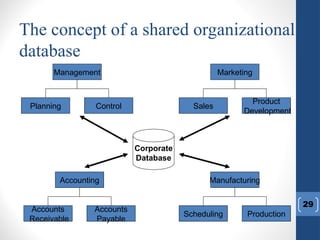
The concept of a shared organizational
database
29
Accounting
Accounts
Payable
Accounts
Receivable
Management
Control
Planning
Manufacturing
Production
Scheduling
Marketing
Product
Development
Sales
Corporate
Database
File Processing Systems
30
Registration
Applications
Registration
Data
Files
Registration
Examination
Applications
Examination
Data
Files
Examination
Library
Applications
Library
Data
Files
Library
Program and Data Interdependence
File Processing Systems
31
Fine
Books Issued
Father Name
Name
Reg_Number
Library
Grade
Semester
Class
Address
Name
Reg_Number
Examination
Class
Address
Phone
Father Name
Name
Reg_Number
Registration
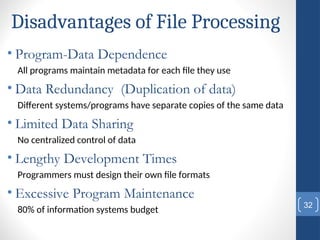
Disadvantages of File Processing
• Program-Data Dependence
All programs maintain metadata for each file they use
• Data Redundancy (Duplication of data)
Different systems/programs have separate copies of the same data
• Limited Data Sharing
No centralized control of data
• Lengthy Development Times
Programmers must design their own file formats
• Excessive Program Maintenance
80% of information systems budget
32
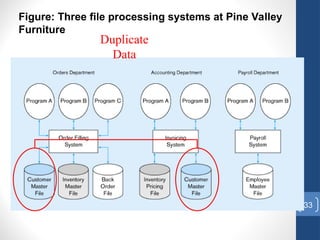
33
Figure: Three file processing systems at Pine Valley
Furniture
Duplicate
Data
Problems with Data Dependency
 Each application programmer must maintain their
own data
 Each application program needs to include code for
the metadata of each file
 Each application program must have its own
processing routines for reading, inserting, updating
and deleting data
 Lack of coordination and central control
 Non-standard file formats
34
Problems with Data
Redundancy
• Waste of space to have duplicate data
• Causes more maintenance headaches
• The biggest Problem:
• When data changes in one file, could cause
inconsistencies
• Compromises data integrity
35
SOLUTION:
The DATABASE Approach
• Central repository of shared data
• Data is managed by a controlling agent
• Stored in a standardized, convenient form
36
Requires a Database Management System (DBMS)
37
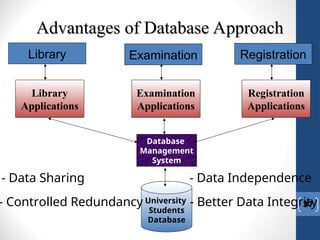
Advantages of Database Approach
Registration
Examination
Library
Applications
Library
Examination
Applications
Registration
Applications
Database
Management
System
University
Students
Database
- Data Sharing - Data Independence
- Controlled Redundancy - Better Data Integrity
Why use a DBMS
• Program-Data Independence
• Metadata stored in DBMS, so applications don’t need to worry about
data formats
• Data queries/updates managed by DBMS so programs don’t need to
process data access routines
• Results in: increased application development and maintenance
productivity
• Minimal Data Redundancy
• Leads to increased data integrity/consistency
38
Advantages of Database Approach
• Improved Data Sharing
• Different users get different views of the data
• Enforcement of Standards
• All data access is done in the same way
• Improved Data Quality
• Constraints, data validation rules
• Better Data Accessibility/ Responsiveness
• Use of standard data query language (SQL)
• Security, Backup/Recovery, Concurrency
• Disaster recovery is easier
39
Costs and Risks of the
Database Approach
• Up-front costs:
• Installation Management Cost and Complexity
• Conversion Costs
• Ongoing Costs
• Requires New, Specialized Personnel
• Need for Explicit Backup and Recovery
• Organizational Conflict
• Old habits die hard
40
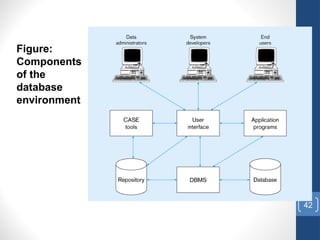
Components of database
environment
• CASE Tools – computer-aided software engineering
• Repository – centralized storehouse of metadata
• Database Management System (DBMS) – software for managing the
database
• Database – storehouse of the data
• Application Programs – software using the data
• User Interface – text and graphical displays to users
• Data Administrators – personnel responsible for maintaining the
database
• System Developers – personnel responsible for designing databases
and software
• End Users – people who use the applications and databases
41
42
Figure:
Components
of the
database
environment
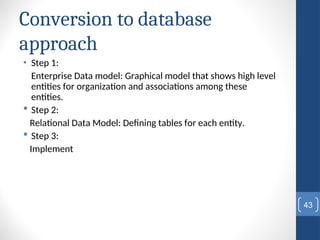
Conversion to database
approach
• Step 1:
Enterprise Data model: Graphical model that shows high level
entities for organization and associations among these
entities.
 Step 2:
Relational Data Model: Defining tables for each entity.
 Step 3:
Implement
43
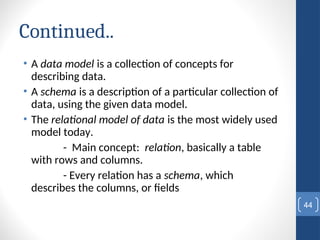
Continued..
• A data model is a collection of concepts for
describing data.
• A schema is a description of a particular collection of
data, using the given data model.
• The relational model of data is the most widely used
model today.
- Main concept: relation, basically a table
with rows and columns.
- Every relation has a schema, which
describes the columns, or fields
44
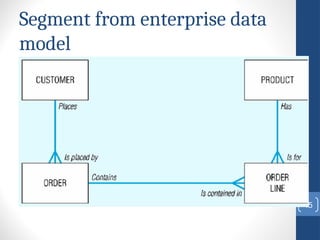
Segment from enterprise data
model
45
46
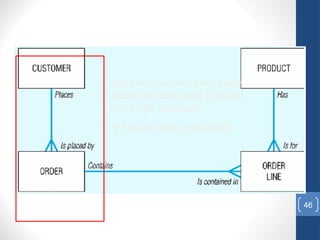
One customer may place many
orders, but each order is placed
by a single customer
 One-to-many relationship
47
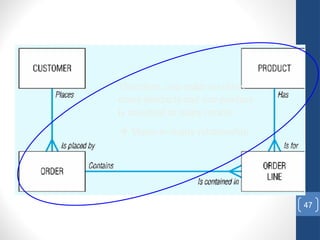
Therefore, one order involves
many products and one product
is involved in many orders
 Many-to-many relationship
48
Database Users
Users may be divided into those who
actually use and control the content (called
“Actors on the Scene”) and those who
enable the database to be developed and
the DBMS software to be designed and
implemented (called “Workers Behind the
Scene”).
49
Database Users
Actors on the scene
 Database administrators: responsible for authorizing
access to the database, for co-ordinating and monitoring
its use, acquiring software, and hardware resources,
controlling its use and monitoring efficiency of
operations.
 Database Designers: responsible to define the content,
the structure, the constraints, and functions or
transactions against the database. They must
communicate with the end-users and understand their
needs.
 End-users: they use the data for queries, reports and
some of them actually update the database content.
Categories of End users
• Sophisticated Users: these include business
analysts, scientists, engineers, others thoroughly
familiar with the system capabilities. Many use tools
in the form of software packages that work closely
with the stored database.
• Naive Users: They don’t need to know any details of
structure. They access the database by writing
simple commands or by choosing operations from
menus.
50
Workers behind the scene
Persons whose job involves design, development,
operation,and maintenance of the DBMS software and
system environment.
• DBMS designers and implementers: Design and implement
the DBMS software package itself.
• Tool developers: Design and implement tools that
facilitate the use of the DBMS software. Tools include
design tools, performance tools, special interfaces,etc.
• Operators and maintenance personnel: Work on running
and maintaining the hardware and software environment
for the database system.
51
52
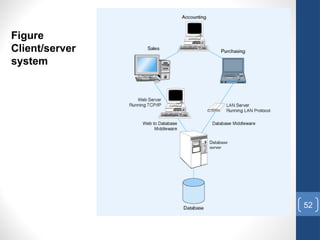
Figure
Client/server
system
The Range of
Database Applications
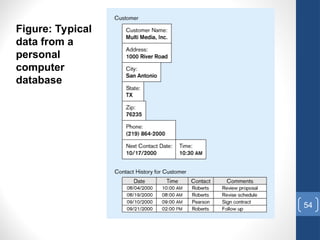
• Personal Database – standalone desktop database
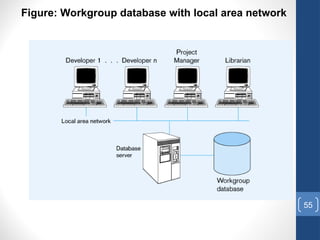
• Workgroup Database – local area network (<25 users)
• Department Database – local area network (25-100 users)
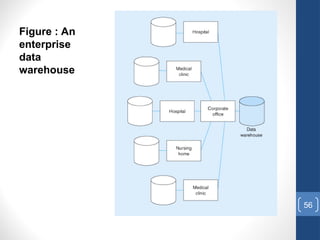
• Enterprise Database – wide-area network (hundreds or thousands
of users)
53
54
Figure: Typical
data from a
personal
computer
database
55
Figure: Workgroup database with local area network
56
Figure : An
enterprise
data
warehouse
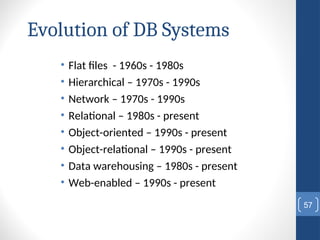
Evolution of DB Systems
• Flat files - 1960s - 1980s
• Hierarchical – 1970s - 1990s
• Network – 1970s - 1990s
• Relational – 1980s - present
• Object-oriented – 1990s - present
• Object-relational – 1990s - present
• Data warehousing – 1980s - present
• Web-enabled – 1990s - present
57
When not to use DBMS
Main costs of using a DBMS:
- High initial investment in hardware, software,training
and possible need for additional hardware.
- Overhead for providing generality, security, recovery, integrity,
and concurrency control.
- Generality that a DBMS provides for defining and processing
data.
When a DBMS may be unnecessary:
- If the database and applications are simple, well defined, and
not
expected to change.
- If there are stringent real-time requirements that may not be
met
because of DBMS overhead.
- If access to data by multiple users is not required.
58
Reference Reading
• Chapter 1
59
Q & A
SQL
• Data Definition Language (DDL)
• Create/alter/delete tables and their attributes
• Following lectures...
• Data Manipulation Language (DML)
• Query one or more tables – discussed next !
• Insert/delete/modify tuples in tables
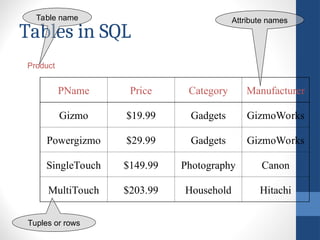
Tables in SQL
PName Price Category Manufacturer
Gizmo $19.99 Gadgets GizmoWorks
Powergizmo $29.99 Gadgets GizmoWorks
SingleTouch $149.99 Photography Canon
MultiTouch $203.99 Household Hitachi
Product
Attribute names
Table name
Tuples or rows
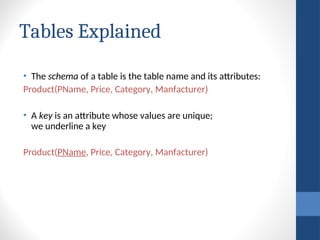
Tables Explained
• The schema of a table is the table name and its attributes:
Product(PName, Price, Category, Manfacturer)
• A key is an attribute whose values are unique;
we underline a key
Product(PName, Price, Category, Manfacturer)
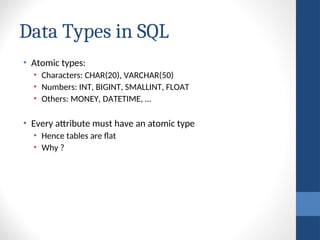
Data Types in SQL
• Atomic types:
• Characters: CHAR(20), VARCHAR(50)
• Numbers: INT, BIGINT, SMALLINT, FLOAT
• Others: MONEY, DATETIME, …
• Every attribute must have an atomic type
• Hence tables are flat
• Why ?
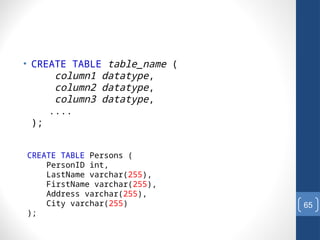
• CREATE TABLE table_name (
column1 datatype,
column2 datatype,
column3 datatype,
....
);
65
CREATE TABLE Persons (
PersonID int,
LastName varchar(255),
FirstName varchar(255),
Address varchar(255),
City varchar(255)
);
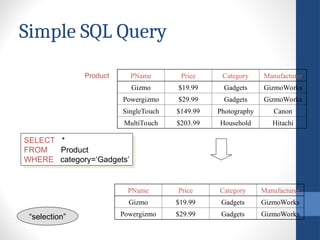
Simple SQL Query
PName Price Category Manufacturer
Gizmo $19.99 Gadgets GizmoWorks
Powergizmo $29.99 Gadgets GizmoWorks
SingleTouch $149.99 Photography Canon
MultiTouch $203.99 Household Hitachi
SELECT *
FROM Product
WHERE category=‘Gadgets’
Product
PName Price Category Manufacturer
Gizmo $19.99 Gadgets GizmoWorks
Powergizmo $29.99 Gadgets GizmoWorks
“selection”

lecture1_dbmsssssssssssssssssssssssss.ppt

  • 1.
  • 2.
    Grading Policy • FinalExam: 50% • Mid term Exam 25% • Assignments 12% • Quizzes 13%
  • 3.
    Text Books • ModernDatabase Management By: Jeffrey A. Hoffer Tenth edition 3
  • 4.
    Course Objectives  Introduction  SDLC  Relational DatabaseSystem: understanding, query and report  Familiarize with tools 4
  • 5.
    Lecture Objectives 5  Basics  Typical functionsof a DBMS.  Major components of the DBMS environment.  Personnel involved in the DBMS environment.  History of the development of DBMSs.  Advantages and disadvantages of DBMSs.
  • 6.
    Introduction: What Is Database? •A very large, integrated collection of data. • Database: An organized collection of logically related data. • A database management system (DBMS) is a software system designed to store, manage and facilitate access to the database 6
  • 7.
    7 Types of Databasesand Database Applications  Numeric and Textual Databases  Multimedia Databases  Geographic Information Systems (GIS)  Data Warehouses
  • 8.
    Examples of Database Applications  Purchasesfrom the supermarket  Purchases using your credit card  Booking a holiday at the travel agents  Using the local library  Taking out insurance  Using the Internet  Studying at university
  • 9.
  • 10.
    File Processing Systems 10 Fine BooksIssued Father Name Name Reg_Number Library Grade Semester Class Address Name Reg_Number Examination Class Address Phone Father Name Name Reg_Number Registration
  • 11.
    11 Advantages of DatabaseApproach Advantages of Database Approach Registration Examination Library Applications Library Examination Applications Registration Applications Database Management System University Students Database - Data Sharing - Data Independence - Controlled Redundancy - Better Data Integrity
  • 12.
    The concept ofa shared organizational database 12 Accounting Accounts Payable Accounts Receivable Management Control Planning Manufacturing Production Scheduling Marketing Product Development Sales Corporate Database
  • 13.
    Types of Data •Structured Data • Unstructured Data 13
  • 14.
    Definitions • Data: Meaningfulfacts, text, graphics, images, sound, video segments • Information: Data processed to be useful in decision making • Metadata: Data that describes data 14
  • 15.
  • 16.
    16 Figure: Summarized data Usefulinformation that managers can use for decision making and interpretation
  • 17.
    17 Table: Metadata Descriptions ofthe properties or characteristics of the data, including data types, field sizes, allowable values, and documentation
  • 18.
    What is DBMS •A Database Management System (DBMS) is a software package designed to store and manage databases. • A DBMS is a data storage and retrieval system which permits data to be stored non-redundantly while making it appear to the user as if the data is well-integrated. 18
  • 19.
    Database Management ystem 19 DBMS managesdata resources like an operating system manages hardware resources DBMS Database containing centralized shared data Application #1 Application #2 Application #3
  • 20.
    A simplified databasesystem environment 20
  • 21.
    21 Typical DBMS Functionality Define a database : in terms of data types, structures and constraints  Construct or Load the Database on a secondary storage medium  Manipulating the database : querying, generating reports, insertions, deletions and modifications to its content  Concurrent Processing and Sharing by a set of users and programs – yet, keeping all data valid and consistent
  • 22.
    22 Typical DBMS Functionality Otherfeatures:  Protection or Security measures to prevent unauthorized access  “Active” processing to take internal actions on data  Presentation and Visualization of data
  • 23.
    Data Models • Datamodel is collection of concepts for describing data. • Graphical systems used to capture the nature and relationships among data. • Entity • Relationships 23
  • 24.
    Relational data Model •Widely used model today • Main concept: Relation, a table with rows and columns 24
  • 25.
    Example • Part ofa UNIVERSITY environment. • Some entities: - STUDENTs - COURSEs - SECTIONs (of COURSEs) - (academic) DEPARTMENTs - INSTRUCTORs • Some relationships: - SECTIONs are of specific COURSEs - COURSEs have prerequisite COURSEs - INSTRUCTORs teach SECTIONs - COURSEs are offered by DEPARTMENTs - STUDENTs major in DEPARTMENTs 25
  • 26.
  • 27.
    27 Define UNIVERSITY database DefineUNIVERSITY database Structure of the record STUDENT ( Name , Number, Class, Major) COURSE ( Name , Number, Credit, Dept.) Data type of data element Name: a string of characters Number: integer Grade: {A,B,C,D,F,I} ….. Constraints The sections that students take must be taught by some instructors.
  • 28.
    28 Construct UNIVERSITY database ConstructUNIVERSITY database Store data on storage medium -store data for each student, course, section, grade repot, prerequisite records in various files may be related to one another Manipulate UNIVERSITY database Manipulate UNIVERSITY database Query: Retrieve the transcript ( a list of all courses and grades) of Smith. Update: Create a new section for the database course for this semester.
  • 29.
    The concept ofa shared organizational database 29 Accounting Accounts Payable Accounts Receivable Management Control Planning Manufacturing Production Scheduling Marketing Product Development Sales Corporate Database
  • 30.
  • 31.
    File Processing Systems 31 Fine BooksIssued Father Name Name Reg_Number Library Grade Semester Class Address Name Reg_Number Examination Class Address Phone Father Name Name Reg_Number Registration
  • 32.
    Disadvantages of FileProcessing • Program-Data Dependence All programs maintain metadata for each file they use • Data Redundancy (Duplication of data) Different systems/programs have separate copies of the same data • Limited Data Sharing No centralized control of data • Lengthy Development Times Programmers must design their own file formats • Excessive Program Maintenance 80% of information systems budget 32
  • 33.
    33 Figure: Three fileprocessing systems at Pine Valley Furniture Duplicate Data
  • 34.
    Problems with DataDependency  Each application programmer must maintain their own data  Each application program needs to include code for the metadata of each file  Each application program must have its own processing routines for reading, inserting, updating and deleting data  Lack of coordination and central control  Non-standard file formats 34
  • 35.
    Problems with Data Redundancy •Waste of space to have duplicate data • Causes more maintenance headaches • The biggest Problem: • When data changes in one file, could cause inconsistencies • Compromises data integrity 35
  • 36.
    SOLUTION: The DATABASE Approach •Central repository of shared data • Data is managed by a controlling agent • Stored in a standardized, convenient form 36 Requires a Database Management System (DBMS)
  • 37.
    37 Advantages of DatabaseApproach Advantages of Database Approach Registration Examination Library Applications Library Examination Applications Registration Applications Database Management System University Students Database - Data Sharing - Data Independence - Controlled Redundancy - Better Data Integrity
  • 38.
    Why use aDBMS • Program-Data Independence • Metadata stored in DBMS, so applications don’t need to worry about data formats • Data queries/updates managed by DBMS so programs don’t need to process data access routines • Results in: increased application development and maintenance productivity • Minimal Data Redundancy • Leads to increased data integrity/consistency 38
  • 39.
    Advantages of DatabaseApproach • Improved Data Sharing • Different users get different views of the data • Enforcement of Standards • All data access is done in the same way • Improved Data Quality • Constraints, data validation rules • Better Data Accessibility/ Responsiveness • Use of standard data query language (SQL) • Security, Backup/Recovery, Concurrency • Disaster recovery is easier 39
  • 40.
    Costs and Risksof the Database Approach • Up-front costs: • Installation Management Cost and Complexity • Conversion Costs • Ongoing Costs • Requires New, Specialized Personnel • Need for Explicit Backup and Recovery • Organizational Conflict • Old habits die hard 40
  • 41.
    Components of database environment •CASE Tools – computer-aided software engineering • Repository – centralized storehouse of metadata • Database Management System (DBMS) – software for managing the database • Database – storehouse of the data • Application Programs – software using the data • User Interface – text and graphical displays to users • Data Administrators – personnel responsible for maintaining the database • System Developers – personnel responsible for designing databases and software • End Users – people who use the applications and databases 41
  • 42.
  • 43.
    Conversion to database approach •Step 1: Enterprise Data model: Graphical model that shows high level entities for organization and associations among these entities.  Step 2: Relational Data Model: Defining tables for each entity.  Step 3: Implement 43
  • 44.
    Continued.. • A datamodel is a collection of concepts for describing data. • A schema is a description of a particular collection of data, using the given data model. • The relational model of data is the most widely used model today. - Main concept: relation, basically a table with rows and columns. - Every relation has a schema, which describes the columns, or fields 44
  • 45.
  • 46.
    46 One customer mayplace many orders, but each order is placed by a single customer  One-to-many relationship
  • 47.
    47 Therefore, one orderinvolves many products and one product is involved in many orders  Many-to-many relationship
  • 48.
    48 Database Users Users maybe divided into those who actually use and control the content (called “Actors on the Scene”) and those who enable the database to be developed and the DBMS software to be designed and implemented (called “Workers Behind the Scene”).
  • 49.
    49 Database Users Actors onthe scene  Database administrators: responsible for authorizing access to the database, for co-ordinating and monitoring its use, acquiring software, and hardware resources, controlling its use and monitoring efficiency of operations.  Database Designers: responsible to define the content, the structure, the constraints, and functions or transactions against the database. They must communicate with the end-users and understand their needs.  End-users: they use the data for queries, reports and some of them actually update the database content.
  • 50.
    Categories of Endusers • Sophisticated Users: these include business analysts, scientists, engineers, others thoroughly familiar with the system capabilities. Many use tools in the form of software packages that work closely with the stored database. • Naive Users: They don’t need to know any details of structure. They access the database by writing simple commands or by choosing operations from menus. 50
  • 51.
    Workers behind thescene Persons whose job involves design, development, operation,and maintenance of the DBMS software and system environment. • DBMS designers and implementers: Design and implement the DBMS software package itself. • Tool developers: Design and implement tools that facilitate the use of the DBMS software. Tools include design tools, performance tools, special interfaces,etc. • Operators and maintenance personnel: Work on running and maintaining the hardware and software environment for the database system. 51
  • 52.
  • 53.
    The Range of DatabaseApplications • Personal Database – standalone desktop database • Workgroup Database – local area network (<25 users) • Department Database – local area network (25-100 users) • Enterprise Database – wide-area network (hundreds or thousands of users) 53
  • 54.
    54 Figure: Typical data froma personal computer database
  • 55.
    55 Figure: Workgroup databasewith local area network
  • 56.
  • 57.
    Evolution of DBSystems • Flat files - 1960s - 1980s • Hierarchical – 1970s - 1990s • Network – 1970s - 1990s • Relational – 1980s - present • Object-oriented – 1990s - present • Object-relational – 1990s - present • Data warehousing – 1980s - present • Web-enabled – 1990s - present 57
  • 58.
    When not touse DBMS Main costs of using a DBMS: - High initial investment in hardware, software,training and possible need for additional hardware. - Overhead for providing generality, security, recovery, integrity, and concurrency control. - Generality that a DBMS provides for defining and processing data. When a DBMS may be unnecessary: - If the database and applications are simple, well defined, and not expected to change. - If there are stringent real-time requirements that may not be met because of DBMS overhead. - If access to data by multiple users is not required. 58
  • 59.
  • 60.
  • 61.
    SQL • Data DefinitionLanguage (DDL) • Create/alter/delete tables and their attributes • Following lectures... • Data Manipulation Language (DML) • Query one or more tables – discussed next ! • Insert/delete/modify tuples in tables
  • 62.
    Tables in SQL PNamePrice Category Manufacturer Gizmo $19.99 Gadgets GizmoWorks Powergizmo $29.99 Gadgets GizmoWorks SingleTouch $149.99 Photography Canon MultiTouch $203.99 Household Hitachi Product Attribute names Table name Tuples or rows
  • 63.
    Tables Explained • Theschema of a table is the table name and its attributes: Product(PName, Price, Category, Manfacturer) • A key is an attribute whose values are unique; we underline a key Product(PName, Price, Category, Manfacturer)
  • 64.
    Data Types inSQL • Atomic types: • Characters: CHAR(20), VARCHAR(50) • Numbers: INT, BIGINT, SMALLINT, FLOAT • Others: MONEY, DATETIME, … • Every attribute must have an atomic type • Hence tables are flat • Why ?
  • 65.
    • CREATE TABLEtable_name ( column1 datatype, column2 datatype, column3 datatype, .... ); 65 CREATE TABLE Persons ( PersonID int, LastName varchar(255), FirstName varchar(255), Address varchar(255), City varchar(255) );
  • 66.
    Simple SQL Query PNamePrice Category Manufacturer Gizmo $19.99 Gadgets GizmoWorks Powergizmo $29.99 Gadgets GizmoWorks SingleTouch $149.99 Photography Canon MultiTouch $203.99 Household Hitachi SELECT * FROM Product WHERE category=‘Gadgets’ Product PName Price Category Manufacturer Gizmo $19.99 Gadgets GizmoWorks Powergizmo $29.99 Gadgets GizmoWorks “selection”