Miss. Rupali Salunkhe
Presented by
Walchand Center For Biotechnology, Solapur
 The concept of database was introduced by IBM in 1960s.
 Database management system (DBMS) that is based on the relational
model invented by Edgar F. Codd at IBM in 1970.
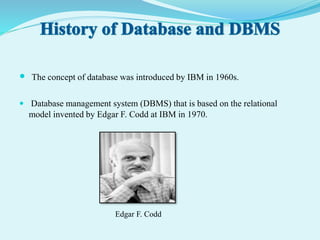
Edgar F. Codd
Data -
 Collection of meaningful information .
e.g.- Text, number, images, videos
Database -
 Systematic collection of data .
e.g.1. record of students stored in files
2. information stored over internet
Database Management System(DBMS)-
 The software which is used to manage database is called Database
Management System (DBMS).
e.g.1. MySQL
2.Microsoft Access
DBMS stands for Database Management System.
DBMS = Database + Management System.
A database management system stores data in such a way that it
becomes easier to retrieve, manipulate, and produce information.
Database is a collection of data and Management System is a set of
programs to store and retrieve those data.
Database systems are basically developed for large amount of
data.
When dealing with huge amount of data, there are two things
that require optimization:
 Storage of data and
 Retrieval of data.
Various levels of database implementation (concept of abstraction)
1. Internal Level (Physical Level):
 It describes how data are actually stored on the storage medium.
 It is closest to database programmer.
 Lowest level of database abstraction.
2. Conceptual Level (Logical Level):
 It describes what data are actually stored in database.
 It is closest to the database manager.
 It is an intermediate level of database abstraction.
3. External Level (View Level):
 It describes the way in which the data are viewed by individual user.
 It is the level closest to the users.
 It is the highest level of database abstraction.
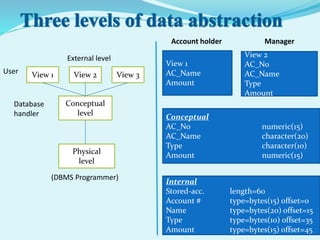
View 1 View 2 View 3
Conceptual
level
Physical
level
External level
Internal
Stored-acc. length=60
Account # type=bytes(15) offset=0
Name type=bytes(20) offset=15
Type type=bytes(10) offset=35
Amount type=bytes(15) offset=45
Conceptual
AC_No numeric(15)
AC_Name character(20)
Type character(10)
Amount numeric(15)
View 1
AC_Name
Amount
View 2
AC_No
AC_Name
Type
Amount
Account holder Manager
(DBMS Programmer)
Database
handler
User
A Data Model is a logical structure of Database
1. Relational Data Model:
 In relational data model, the data is stored in the form of tables (i.e. rows and
columns).
 These tables are called relations.
 Insert new tuples, delete tuples, and modify tuples.
2. Network Data Model :
 The network data model differs from the relational model.
 It represented by connection of records and relationships among data are
represented by links.
 Records are organized as graphs.
3. Hierarchical Data Model :
 Data is represented by collection of records and relationships among data by
links, similar to the network model.
 Records are organized as trees rather than graphs.
 Represents relationship among its records through parent child relationships.
Types of DBMS languages:
1. Data Definition Language (DDL):
 Used to classify the database structure.
 To create the database instance – CREATE, ALTER, DROP, RENAME.
2. Data Manipulation Language (DML):
 DML is used for accessing and manipulating data in a database.
 To read records from table – SELECT, INSERT, UPDATE, DELETE.
3. Data Control language (DCL):
 DCL is used for granting and revoking user access on a database –
 To grant access to user – GRANT
 To revoke access from user – REVOKE
 To store data
 To organize data
 To control access to data
 To protect data
 Create databases
 Modify database data (insert, update, delete)
 Maintain database structures
 Provide security
 Perform backup and recovery
 To develop software applications In less time
 Security and integrity of data
 Easy to understand and user friendly
 Data independence and efficient use of data
 Effective and efficient management of data
 Query processing and management
 Better Decision making
 Data sharing and storage
 Better access to accurate data
 Ensures error free information
 Minimize Data Redundancy- DBMS controls data redundancy
 Sharing Of Data- Data can be shared
 Data Consistency- Data consistency means if you want to update data in
any files then all the files should not be updated again.
 Data Integrity- Data integrity means unification of so many files into a
single file.
 Security- Data security means protecting your data from unauthorized
access.
 Privacy- Privacy means up to what extent a user can access the data
 Simplicity-Simplicity means to represent the overall logical view of data in
a simple and clear manner. DBMS is very simple for its users who use it.
 Costly
 Complexity
 Technical staff requirement
 Database Failure
 Extra Cost of Hardware
 Cost of Data Conversion
 Currency Maintenance
 Banking: For customer information, account, and loans, and transaction.
 Airline: For reservation and schedule information.
 Universities: For students information, course registration, and grades.
 Telecom: calls made, customer details, network usage
 Credits card transaction: For purchases on credits cards and generation of
monthly statements.
 Sales: For customer, product, and purchase information.
 Railway Reservation System
 Online Shopping etc.
To create a biological database
To retrieve data
Data mining
 Beynon-Davies, P. (2004). Database Systems. 3rd Edition.
Palgrave, Houndmills, Basingstoke.
 Connolly, Thomas and Carolyn Begg. Database Systems. New
York: Harlow, 2002.
 Date, C. J. (2003). An Introduction to Database Systems, Fifth
Edition. Addison Wesley. ISBN 0-201-51381-1.
 Gray, J. and Reuter, A. Transaction Processing: Concepts and
Techniques, 1st edition, Morgan Kaufmann Publishers, 1992.
 Kroenke, David M. and David J. Auer. Database Concepts. 3rd
ed. New York: Prentice, 2007.
THANK YOU

Dbms

  • 1.
    Miss. Rupali Salunkhe Presentedby Walchand Center For Biotechnology, Solapur
  • 3.
     The conceptof database was introduced by IBM in 1960s.  Database management system (DBMS) that is based on the relational model invented by Edgar F. Codd at IBM in 1970. Edgar F. Codd
  • 4.
    Data -  Collectionof meaningful information . e.g.- Text, number, images, videos Database -  Systematic collection of data . e.g.1. record of students stored in files 2. information stored over internet Database Management System(DBMS)-  The software which is used to manage database is called Database Management System (DBMS). e.g.1. MySQL 2.Microsoft Access
  • 5.
    DBMS stands forDatabase Management System. DBMS = Database + Management System. A database management system stores data in such a way that it becomes easier to retrieve, manipulate, and produce information. Database is a collection of data and Management System is a set of programs to store and retrieve those data.
  • 6.
    Database systems arebasically developed for large amount of data. When dealing with huge amount of data, there are two things that require optimization:  Storage of data and  Retrieval of data.
  • 7.
    Various levels ofdatabase implementation (concept of abstraction) 1. Internal Level (Physical Level):  It describes how data are actually stored on the storage medium.  It is closest to database programmer.  Lowest level of database abstraction. 2. Conceptual Level (Logical Level):  It describes what data are actually stored in database.  It is closest to the database manager.  It is an intermediate level of database abstraction. 3. External Level (View Level):  It describes the way in which the data are viewed by individual user.  It is the level closest to the users.  It is the highest level of database abstraction.
  • 8.
    View 1 View2 View 3 Conceptual level Physical level External level Internal Stored-acc. length=60 Account # type=bytes(15) offset=0 Name type=bytes(20) offset=15 Type type=bytes(10) offset=35 Amount type=bytes(15) offset=45 Conceptual AC_No numeric(15) AC_Name character(20) Type character(10) Amount numeric(15) View 1 AC_Name Amount View 2 AC_No AC_Name Type Amount Account holder Manager (DBMS Programmer) Database handler User
  • 9.
    A Data Modelis a logical structure of Database 1. Relational Data Model:  In relational data model, the data is stored in the form of tables (i.e. rows and columns).  These tables are called relations.  Insert new tuples, delete tuples, and modify tuples. 2. Network Data Model :  The network data model differs from the relational model.  It represented by connection of records and relationships among data are represented by links.  Records are organized as graphs. 3. Hierarchical Data Model :  Data is represented by collection of records and relationships among data by links, similar to the network model.  Records are organized as trees rather than graphs.  Represents relationship among its records through parent child relationships.
  • 10.
    Types of DBMSlanguages: 1. Data Definition Language (DDL):  Used to classify the database structure.  To create the database instance – CREATE, ALTER, DROP, RENAME. 2. Data Manipulation Language (DML):  DML is used for accessing and manipulating data in a database.  To read records from table – SELECT, INSERT, UPDATE, DELETE. 3. Data Control language (DCL):  DCL is used for granting and revoking user access on a database –  To grant access to user – GRANT  To revoke access from user – REVOKE
  • 11.
     To storedata  To organize data  To control access to data  To protect data  Create databases  Modify database data (insert, update, delete)  Maintain database structures  Provide security  Perform backup and recovery
  • 12.
     To developsoftware applications In less time  Security and integrity of data  Easy to understand and user friendly  Data independence and efficient use of data  Effective and efficient management of data  Query processing and management  Better Decision making  Data sharing and storage  Better access to accurate data  Ensures error free information
  • 13.
     Minimize DataRedundancy- DBMS controls data redundancy  Sharing Of Data- Data can be shared  Data Consistency- Data consistency means if you want to update data in any files then all the files should not be updated again.  Data Integrity- Data integrity means unification of so many files into a single file.  Security- Data security means protecting your data from unauthorized access.  Privacy- Privacy means up to what extent a user can access the data  Simplicity-Simplicity means to represent the overall logical view of data in a simple and clear manner. DBMS is very simple for its users who use it.
  • 14.
     Costly  Complexity Technical staff requirement  Database Failure  Extra Cost of Hardware  Cost of Data Conversion  Currency Maintenance
  • 15.
     Banking: Forcustomer information, account, and loans, and transaction.  Airline: For reservation and schedule information.  Universities: For students information, course registration, and grades.  Telecom: calls made, customer details, network usage  Credits card transaction: For purchases on credits cards and generation of monthly statements.  Sales: For customer, product, and purchase information.  Railway Reservation System  Online Shopping etc.
  • 16.
    To create abiological database To retrieve data Data mining
  • 17.
     Beynon-Davies, P.(2004). Database Systems. 3rd Edition. Palgrave, Houndmills, Basingstoke.  Connolly, Thomas and Carolyn Begg. Database Systems. New York: Harlow, 2002.  Date, C. J. (2003). An Introduction to Database Systems, Fifth Edition. Addison Wesley. ISBN 0-201-51381-1.  Gray, J. and Reuter, A. Transaction Processing: Concepts and Techniques, 1st edition, Morgan Kaufmann Publishers, 1992.  Kroenke, David M. and David J. Auer. Database Concepts. 3rd ed. New York: Prentice, 2007.
  • 18.