1


Chapter 9: Clients and
 Servers Interactions
2


   The Client Server Architecture
• Is a network architecture
   – Which separates a client (often an application that
     uses a GUI) from a server. Each instance of the client
     software can send requests to a server.


• Specific Types of servers include:
     • application servers
     • file servers
     • terminal servers
     • mail servers
3


   The Client Server Architecture
• Client/server is network architecture
   – Which separates a client (often an application that uses
     a GUI) from a server. Each instance of the client
     software can send requests to a server.
   –
   – Specific Types of servers include:
      • application servers
      • file servers
      • terminal servers
      • mail servers

   – Properties of a server:
      • Passive (Slave)
      • Waiting for requests
      • On requests serves them and send a reply
4


• Properties of a client:
  – Active (Master)
  – Sending requests
  – Waits until reply arrives
• A popular client in widespread use today is
  the web browser which communicates with
  web servers over the internet to fetch and
  display web page content.
5
                                                              5

       EXTENDING BROWSER
• The designer of a particular browser may not be able to
  sustain the development effort required to support all of the
  possible document formats that the browser might be used
  to view
• In the case of proprietary document formats (e.g., Adobe
  PDF, Real Audio and others), the owners of a format may
  not want to expose its encoding.
• To accommodate these requirements, browsers typically
  incorporate features that allow new functionality to be
  added to them without recompilation. We say that
  applications that can be extended in this manner are
  extensible
  (Helper Applications, Plug-ins and Java Applets)
6
                                                               6


       HELPER APPLICATIONS
• The response to a HTTP request contains MIME headers
  describing the type of document being fetched.
• We simulate the effect of getting the headers we would see
  when fetching the URL
  http://eftmk.kutkm.edu.my/bits2513/lectures/Lecture7.pdf
   – The Content-Type of the document is application/pdf
• A browser can use this type to index into a table and locate
  a helper application that can be used to display the
  contents of the document. This table can be configured by
  the user to associate helper applications with MIME types.
• This provides a simple mechanism that allows the browser
  functionality to be extended by allowing it to invoke external
  applications (Adobe Reader) to display documents.
7
                                                                      7


                         PLUGIN
• A plugin is a piece of code that can be loaded into same
  address space as the browser process.
• Because plugins run in the same address space as the
  browser, they have to be carefully constructed. A faulty
  plugin could corrupt some of the browser’s internal data
  structures. In general, writing plugins requires a great deal
  of care.
• To use plugins, the browser configured with:
   – The pathname of a directory that contains he available plugins
   – A table that describes which plugins to use with which MIME types.
8

   Understanding How Clients and
          Servers Interact
• Client/server is a computational architecture that involves
  client processes requesting service from server processes

• A server can be software application that provides a
  service to other software or the computer on which the
  server software is running.

• A server (software application) must be installed and
  managed by someone with the title of system
  administrator, network administrator or for Web servers-
  Webmaster.
9


               All-in-One Clients
• As the number of applications that use the Internet
  grows, the need for client software on computers to use
  these applications also arises.
• One solution to the growing number of Internet
  applications is an all-in-one client or universal client.
   – can handle several applications and adjust appropriately
   – changing buttons and functions to accommodate each
     application.
• Microsoft Internet Explorer is a good example of an all-
  in-one client.
10


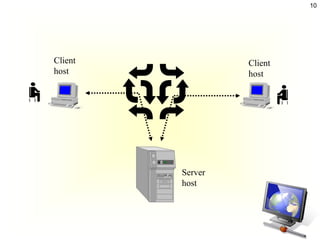
Client            Client
host              host


         Server
         host
11

   Client/Server Applications

Some of the most popular applications on the Internet
follow the client/server design:

– Email clients
– FTP (File transfer) clients
– Web browsers
12


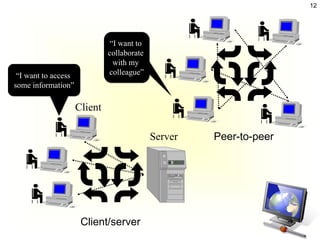
                              “I want to
                              collaborate
                               with my
 “I want to access            colleague”
some information”

                     Client

                                            Server   Peer-to-peer


                      Client/server
13

                  Distinctions

• Client-server
  – Asymmetric relationship
  – Client predominately makes requests, server
    makes replies
• Peer-to-peer
  – Symmetric relationship
14


        Client/Server Sessions
• As shown in Figure 7.1,
  TCP (Transmission
  Control Protocol)
  manages the three-way
  handshake that
  establishes a session to
  be used by application
  protocols, such as HTTP
  or FTP.
15


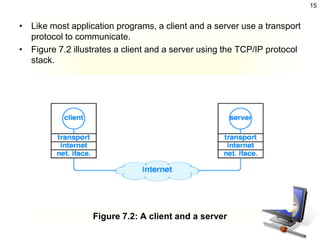
• Like most application programs, a client and a server use a transport
  protocol to communicate.
• Figure 7.2 illustrates a client and a server using the TCP/IP protocol
  stack.


                  Figure 7.2: A client and a server
16
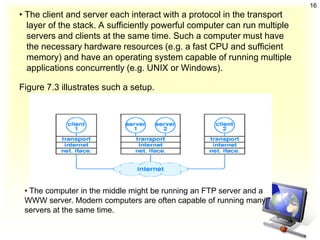
• The client and server each interact with a protocol in the transport
  layer of the stack. A sufficiently powerful computer can run multiple
  servers and clients at the same time. Such a computer must have
  the necessary hardware resources (e.g. a fast CPU and sufficient
  memory) and have an operating system capable of running multiple
  applications concurrently (e.g. UNIX or Windows).

Figure 7.3 illustrates such a setup.


 • The computer in the middle might be running an FTP server and a
 WWW server. Modern computers are often capable of running many
 servers at the same time.
17


            Tiered Architecture
• Two-tier architecture:
   – A generic Client/Server architecture has two types of
     nodes on the network: clients and servers.

• Problems with a two-tier system:
   – Because the relative power of clients has grown
     considerably, we could shift processing to the client,
     but then maintaining data integrity is difficult
18


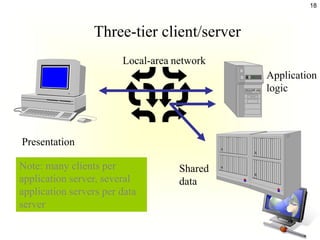
                 Three-tier client/server
                        Local-area network
                                             Application
                                             logic


Presentation

Note: many clients per              Shared
application server, several         data
application servers per data
server
19
                                       19


3-TIER ARCHITECTURE
   C lient tie r


   M id dle tier      App lic a tion


 Inform ation tie r
                      Da ta ba se
20


      3-TIER ARCHITECTURE
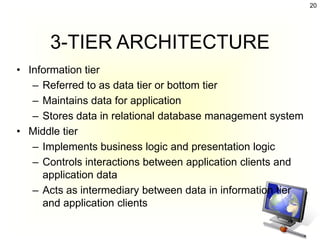
• Information tier
   – Referred to as data tier or bottom tier
   – Maintains data for application
   – Stores data in relational database management system
• Middle tier
   – Implements business logic and presentation logic
   – Controls interactions between application clients and
     application data
   – Acts as intermediary between data in information tier
     and application clients
21


       3-TIER ARCHITECTURE
• Client tier
   – Referred to as top tier
   – Application’s user interface
   – Users interact with application through user interface
   – Interacts with middle tier to make requests and to
     retrieve data from information tier
   – Displays data to user
22


                    Servers
•   Web Server
•   DNS Server
•   DHCP Server
•   WINS Server
•   RAS Server
•   Printer Server
•   Domain Controller Server
23

          Web Server (cont)
• Running program
• Stores set of Web documents
• Responds to request from browser by sending
  copy of document
24


      Basic Common Features
A Web server programs may differ in detail among them,
But they all share some basic common features:

• HTTP responses to HTTP requests:
   – every Web server program operates by accepting HTTP requests from
     the network and providing an HTTP response to the requester.
   – The HTTP response typically consists of an HTML document, but can
     also be a raw text file, an image, or some other type of document.
   – if something bad is found in client request or while trying to serve the
     request,
       • a Web server has to send an error response which may include some
         custom HTML or text messages to better explain the problem to end users.
• Logging:
   – usually Web servers have also the capability of logging some detailed
     information about client requests and server responses to log files.
   – this allows the Webmaster to collect statistics by running log analyzers
     on log files.
25


                               Extra features
•   Configurability of available features by configuration files or even by an external
    user interface.

•   Authentication - optional authorization request (request of user name and
    password) before allowing access to some or all kind of resources.

•   Handling of static content and dynamic content

•   Module support, in order to allow the extension of server capabilities by adding or
    modifying software modules which are linked to the server software or that are
    dynamically loaded (on demand) by the core server.

•   HTTPS - support (by SSL or TLS) in order to allow secure (encrypted) connections to
    the server on the standard port 443 instead of usual port 80.
•   Content compression (i.e. by gzip encoding) to reduce the size of the responses (to
    lower bandwidth usage, etc.).

•   Virtual Host to serve many web sites using one IP address

•   Large file support to be able to serve files whose size is greater than 2 GB on 32 bit
    OS

•   Bandwidth throttling - limit the speed of responses in order to not saturate the
    network and to be able to serve more clients.
26

    Exploring the Features and
    Functions of Web Servers
Some popular Web servers which it is free for download
include the following:

– Apache Web Server

– Microsoft Internet Information Services (IIS)

– Tomcat

– Netscape Enterprise Server (NES)
27

  Ability to Support Virtual Servers
           and Virtual Hosts
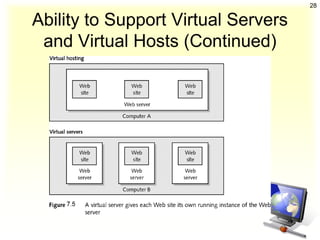
• A Web server should be able to support virtual servers
  and virtual hosting.

• Most virtual hosts handle multiple domain names on the
  same server by having the Uniform Resource Locator
  (URL) serve as a path to a file.

• Figure 7.5 illustrates the difference between virtual
  servers and virtual hosting.
28

Ability to Support Virtual Servers
 and Virtual Hosts (Continued)
29


          Access Control Method
Based on the user’s IP address or user ID
1.   access control allows the Web server to limit to which
     files a user can read or write. User Ids are associated
     with passwords to verify a user’s identity.
2.   It can changing the port at which a server is listening.
     –   Port 80 is the default port for Web servers.
     –   Apache Web Server controls access to its
         resources via a process known as authentication,
         which requires a user to enter a valid user ID and
         password to access a Web site.
30


Access Control (Continued)
31


          Encrypting Protocols
• A secure protocol used by Web servers is SSL (Secure
  Sockets Layer).


• When you see a URL with https: at the beginning instead
  of http:, you know that this Web server is using the SSL
  protocol for security.
32


           Database Interfaces
• Before selecting a Web server or a virtual hosting
  service, find out what databases the server supports and
  what tools can exchange information with the database.


• Popular databases are MS Access, MySQL, Oracle, and
  SQL Server.
33


  Ability to Monitor Performance
• Microsoft IIS uses Performance Monitor, a program that
  comes with Windows Server 2003 and Windows 2000
  Server, to monitor performance.


• Other utility programs are Microsoft Web Capacity
  Analysis Tool (WCAT) and Server Check Pro by
  NetMechanic.
34


         Web Server Protocols
• HTTP and TCP/IP are the two main protocols used with
  Web servers.

• HTTP methods used for browser requests are GET,
  POST, HEAD, PUT, and DELETE.

• The most frequently used method is GET, which
  requests files from the Web server.

• A dialog is a series of commands from the sender to the
  receiver and replies from the receiver to the sender.
35


COMMON HTTP REQUEST TYPES
• Also known as request methods
• Most popular are get and post
   – Retrieve and send client form data to Web server
   – get request
      • Sends form content as part of URL
      • Retrieves appropriate resource from Web server
      • Limits query to 1024 characters
   – post request
      • Updates contents of Web server (posting new messages to
        forum)
      • Has no limit for length of query
      • Not part of URL and cannot be seen by user
36


                       IIS
• Internet Information Services is a set of
  Internet-based services for servers using
  Microsoft Windows.

• It is the world's second most popular web server
  in terms of overall websites behind the Apache
  HTTP Server

• The servers currently include FTP, SMTP, NNTP
  and HTTP/HTTPS.

Lecture 11 client_server_interaction

  • 1.
    1 Chapter 9: Clientsand Servers Interactions
  • 2.
    2 The Client Server Architecture • Is a network architecture – Which separates a client (often an application that uses a GUI) from a server. Each instance of the client software can send requests to a server. • Specific Types of servers include: • application servers • file servers • terminal servers • mail servers
  • 3.
    3 The Client Server Architecture • Client/server is network architecture – Which separates a client (often an application that uses a GUI) from a server. Each instance of the client software can send requests to a server. – – Specific Types of servers include: • application servers • file servers • terminal servers • mail servers – Properties of a server: • Passive (Slave) • Waiting for requests • On requests serves them and send a reply
  • 4.
    4 • Properties ofa client: – Active (Master) – Sending requests – Waits until reply arrives • A popular client in widespread use today is the web browser which communicates with web servers over the internet to fetch and display web page content.
  • 5.
    5 5 EXTENDING BROWSER • The designer of a particular browser may not be able to sustain the development effort required to support all of the possible document formats that the browser might be used to view • In the case of proprietary document formats (e.g., Adobe PDF, Real Audio and others), the owners of a format may not want to expose its encoding. • To accommodate these requirements, browsers typically incorporate features that allow new functionality to be added to them without recompilation. We say that applications that can be extended in this manner are extensible (Helper Applications, Plug-ins and Java Applets)
  • 6.
    6 6 HELPER APPLICATIONS • The response to a HTTP request contains MIME headers describing the type of document being fetched. • We simulate the effect of getting the headers we would see when fetching the URL http://eftmk.kutkm.edu.my/bits2513/lectures/Lecture7.pdf – The Content-Type of the document is application/pdf • A browser can use this type to index into a table and locate a helper application that can be used to display the contents of the document. This table can be configured by the user to associate helper applications with MIME types. • This provides a simple mechanism that allows the browser functionality to be extended by allowing it to invoke external applications (Adobe Reader) to display documents.
  • 7.
    7 7 PLUGIN • A plugin is a piece of code that can be loaded into same address space as the browser process. • Because plugins run in the same address space as the browser, they have to be carefully constructed. A faulty plugin could corrupt some of the browser’s internal data structures. In general, writing plugins requires a great deal of care. • To use plugins, the browser configured with: – The pathname of a directory that contains he available plugins – A table that describes which plugins to use with which MIME types.
  • 8.
    8 Understanding How Clients and Servers Interact • Client/server is a computational architecture that involves client processes requesting service from server processes • A server can be software application that provides a service to other software or the computer on which the server software is running. • A server (software application) must be installed and managed by someone with the title of system administrator, network administrator or for Web servers- Webmaster.
  • 9.
    9 All-in-One Clients • As the number of applications that use the Internet grows, the need for client software on computers to use these applications also arises. • One solution to the growing number of Internet applications is an all-in-one client or universal client. – can handle several applications and adjust appropriately – changing buttons and functions to accommodate each application. • Microsoft Internet Explorer is a good example of an all- in-one client.
  • 10.
    10 Client Client host host Server host
  • 11.
    11 Client/Server Applications Some of the most popular applications on the Internet follow the client/server design: – Email clients – FTP (File transfer) clients – Web browsers
  • 12.
    12 “I want to collaborate with my “I want to access colleague” some information” Client Server Peer-to-peer Client/server
  • 13.
    13 Distinctions • Client-server – Asymmetric relationship – Client predominately makes requests, server makes replies • Peer-to-peer – Symmetric relationship
  • 14.
    14 Client/Server Sessions • As shown in Figure 7.1, TCP (Transmission Control Protocol) manages the three-way handshake that establishes a session to be used by application protocols, such as HTTP or FTP.
  • 15.
    15 • Like mostapplication programs, a client and a server use a transport protocol to communicate. • Figure 7.2 illustrates a client and a server using the TCP/IP protocol stack. Figure 7.2: A client and a server
  • 16.
    16 • The clientand server each interact with a protocol in the transport layer of the stack. A sufficiently powerful computer can run multiple servers and clients at the same time. Such a computer must have the necessary hardware resources (e.g. a fast CPU and sufficient memory) and have an operating system capable of running multiple applications concurrently (e.g. UNIX or Windows). Figure 7.3 illustrates such a setup. • The computer in the middle might be running an FTP server and a WWW server. Modern computers are often capable of running many servers at the same time.
  • 17.
    17 Tiered Architecture • Two-tier architecture: – A generic Client/Server architecture has two types of nodes on the network: clients and servers. • Problems with a two-tier system: – Because the relative power of clients has grown considerably, we could shift processing to the client, but then maintaining data integrity is difficult
  • 18.
    18 Three-tier client/server Local-area network Application logic Presentation Note: many clients per Shared application server, several data application servers per data server
  • 19.
    19 19 3-TIER ARCHITECTURE C lient tie r M id dle tier App lic a tion Inform ation tie r Da ta ba se
  • 20.
    20 3-TIER ARCHITECTURE • Information tier – Referred to as data tier or bottom tier – Maintains data for application – Stores data in relational database management system • Middle tier – Implements business logic and presentation logic – Controls interactions between application clients and application data – Acts as intermediary between data in information tier and application clients
  • 21.
    21 3-TIER ARCHITECTURE • Client tier – Referred to as top tier – Application’s user interface – Users interact with application through user interface – Interacts with middle tier to make requests and to retrieve data from information tier – Displays data to user
  • 22.
    22 Servers • Web Server • DNS Server • DHCP Server • WINS Server • RAS Server • Printer Server • Domain Controller Server
  • 23.
    23 Web Server (cont) • Running program • Stores set of Web documents • Responds to request from browser by sending copy of document
  • 24.
    24 Basic Common Features A Web server programs may differ in detail among them, But they all share some basic common features: • HTTP responses to HTTP requests: – every Web server program operates by accepting HTTP requests from the network and providing an HTTP response to the requester. – The HTTP response typically consists of an HTML document, but can also be a raw text file, an image, or some other type of document. – if something bad is found in client request or while trying to serve the request, • a Web server has to send an error response which may include some custom HTML or text messages to better explain the problem to end users. • Logging: – usually Web servers have also the capability of logging some detailed information about client requests and server responses to log files. – this allows the Webmaster to collect statistics by running log analyzers on log files.
  • 25.
    25 Extra features • Configurability of available features by configuration files or even by an external user interface. • Authentication - optional authorization request (request of user name and password) before allowing access to some or all kind of resources. • Handling of static content and dynamic content • Module support, in order to allow the extension of server capabilities by adding or modifying software modules which are linked to the server software or that are dynamically loaded (on demand) by the core server. • HTTPS - support (by SSL or TLS) in order to allow secure (encrypted) connections to the server on the standard port 443 instead of usual port 80. • Content compression (i.e. by gzip encoding) to reduce the size of the responses (to lower bandwidth usage, etc.). • Virtual Host to serve many web sites using one IP address • Large file support to be able to serve files whose size is greater than 2 GB on 32 bit OS • Bandwidth throttling - limit the speed of responses in order to not saturate the network and to be able to serve more clients.
  • 26.
    26 Exploring the Features and Functions of Web Servers Some popular Web servers which it is free for download include the following: – Apache Web Server – Microsoft Internet Information Services (IIS) – Tomcat – Netscape Enterprise Server (NES)
  • 27.
    27 Abilityto Support Virtual Servers and Virtual Hosts • A Web server should be able to support virtual servers and virtual hosting. • Most virtual hosts handle multiple domain names on the same server by having the Uniform Resource Locator (URL) serve as a path to a file. • Figure 7.5 illustrates the difference between virtual servers and virtual hosting.
  • 28.
    28 Ability to SupportVirtual Servers and Virtual Hosts (Continued)
  • 29.
    29 Access Control Method Based on the user’s IP address or user ID 1. access control allows the Web server to limit to which files a user can read or write. User Ids are associated with passwords to verify a user’s identity. 2. It can changing the port at which a server is listening. – Port 80 is the default port for Web servers. – Apache Web Server controls access to its resources via a process known as authentication, which requires a user to enter a valid user ID and password to access a Web site.
  • 30.
  • 31.
    31 Encrypting Protocols • A secure protocol used by Web servers is SSL (Secure Sockets Layer). • When you see a URL with https: at the beginning instead of http:, you know that this Web server is using the SSL protocol for security.
  • 32.
    32 Database Interfaces • Before selecting a Web server or a virtual hosting service, find out what databases the server supports and what tools can exchange information with the database. • Popular databases are MS Access, MySQL, Oracle, and SQL Server.
  • 33.
    33 Abilityto Monitor Performance • Microsoft IIS uses Performance Monitor, a program that comes with Windows Server 2003 and Windows 2000 Server, to monitor performance. • Other utility programs are Microsoft Web Capacity Analysis Tool (WCAT) and Server Check Pro by NetMechanic.
  • 34.
    34 Web Server Protocols • HTTP and TCP/IP are the two main protocols used with Web servers. • HTTP methods used for browser requests are GET, POST, HEAD, PUT, and DELETE. • The most frequently used method is GET, which requests files from the Web server. • A dialog is a series of commands from the sender to the receiver and replies from the receiver to the sender.
  • 35.
    35 COMMON HTTP REQUESTTYPES • Also known as request methods • Most popular are get and post – Retrieve and send client form data to Web server – get request • Sends form content as part of URL • Retrieves appropriate resource from Web server • Limits query to 1024 characters – post request • Updates contents of Web server (posting new messages to forum) • Has no limit for length of query • Not part of URL and cannot be seen by user
  • 36.
    36 IIS • Internet Information Services is a set of Internet-based services for servers using Microsoft Windows. • It is the world's second most popular web server in terms of overall websites behind the Apache HTTP Server • The servers currently include FTP, SMTP, NNTP and HTTP/HTTPS.