Electronic Mail
Mrs.G.Chandraprabha,M.Sc.,M.Phil.,
Assistant Professor,
Department of Information Technology,
V.V.Vanniaperumal College for Women,
Virudhunagar.
CONTENTS
 Introduction
 Architecture and services
The user agent
Message formats
Message Transfer
Final delivery
Web Mail
WHAT IS
EMAIL ?
Electronic mail or email has been around for over three decades.
Faster and cheaper than paper mail, email has been a popular
application since the early days of the internet.
It is widely used within industry for intracompany communication.
The first email systems simply consisted of the file transfer protocol, with
the convention that the first line of each message contained the recipient’s
address.
Introduction
ARCHITECTURE AND
SERVICES
The architecture of the email system consists of two
kinds of sub systems.
User agents – which allow people to read and send email.
Message transfer agents – which move the messages
from the source to destination. We will also refer to
message transfer agents informally as mail servers.
Architecture & Services
ARCHITECTURE AND
SERVICESThe user agent is a program that provides a graphical interface orsometimes a text
and command based interface that lets users interact with the email system.
It includes a means to compose messages and replies to messages, and
organize messages by filling, searching and discarding them.
 The act of sending new messages into the mail system for delivery iscalled
mail submission.
 The message transfer agents are typically system process. They run in the
background on mail server machines and are intended to be always available.
 Their jobs to automatically move email through the system from the originator
to the recipient with SMTP(Simple Mail Transfer Protocol).
Architecture & Services
ARCHITECTURE AND
SERVICES
 Message transfer agents also implement mailing list, in which anidentical
copy of a message is delivered to everyone on a list of email addresses.
Linking user agents and message transfer agents are concepts of mail boxes
and a standard format for email messages.
Mail boxes store the email that is received for a user. They are maintained by
mail servers. User agents simply present users with a view of the contents of
their mailboxes.
 The user agents send the mail servers commands to manipulate themail
boxes, inspecting their contents, deleting messages, and soon.
Architecture & Services
ARCHITECTURE AND
SERVICES
Mail is sent between message transfer agents in a standard format. The original format,
support forRFC 822, has been revised to the current RFC 5322 and extended with
multimedia content and international text.
 This scheme is called MIME.
 A key idea in the message format is the distinction between the envelope and its content.
 The envelope encapsulates the message.
 The message inside the envelope consists of two separate parts
HEADER –Theheader contains control information for the user agents.
BODY- The body is entirely for the human recipient.
Architecture & Services
THE USER
AGENT
A user agent is normally a program ( sometimes called a mail reader) that
accepts a variety of commands for composing ,receiving , and replying to
messages, as well as for manipulatingmailboxes.
Typical elements of a user agent interface are
When a user agent is started, it will usually present a summary ofthe
messages in the user’s mailbox.
It highlights key fields of the message that are extracted from the message
envelope or header.
User Agent
All the information is formatted in a user-friendly way rather than
displaying the literal contents of the message fields, but it is based on the
message fields.
Thus, people who fail to include a Subject field often discover that
responses to their emails tend not to get the highest priority.
 The most common is to order messages based on the time that they were
received , most recent first, with some indication as to whether the
message is new or has already been read by the user.
User agents must also be able to display incoming messages as needed
so that people can read theiremail.
After a message has been read , the user can decide
what to do with it .This is called message disposition..
User Agent
Most user agents can manage one mailbox for incoming mail with
multiple folders for saved mail.
 The folders allow the user to save message according to sender, topic,
or some other category.
Many ISPs and companies run software that labels mail as important or
spam so that the user agent can file it in the corresponding mailbox.
 Providers now routinely support mailboxes with up to 1 GB of stored
mail that details a user’s interactions over a long period of time.
Another useful feature is the ability to automatically respond to
messages in some way. one response is to forward incoming email to a
different addresses,
User Agent
Message that are sent into the mail system have a standard format that must
becreated from the information supplied to the user agent.
The most important part of the message for transfer is the envelope.
The most important part of the envelope is the destination address. This
address must be in a format that the message transfer agents can deal with.
The expected form of an address is user@dns-address. However, it is
worth nothing that other forms of addressing exist . In particular , x.400
addresses look radically different from DNS addresses.
x.400 is an ISO standard for message-handling systems that was at one time
a competitorto SMTP.
Message Formats
MESSAGE
FORMATS
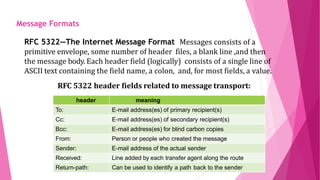
RFC 5322—The Internet Message Format Messages consists of a
primitive envelope, some number of header files, a blank line ,and then
the message body. Each header field (logically) consists of a single line of
ASCII text containing the field name, a colon, and, for most fields, a value.
RFC 5322 header fields related to message transport:
header meaning
To: E-mail address(es) of primary recipient(s)
Cc: E-mail address(es) of secondary recipient(s)
Bcc: E-mail address(es) for blind carbon copies
From: Person or people who created the message
Sender: E-mail address of the actual sender
Received: Line added by each transfer agent along the route
Return-path: Can be used to identify a path back to the sender
Message Formats
MIME- THE MULTIPURPOSE
INTERNET MAIL
EXTENSIONS RFC 5322 specified the headers but left the content entirely up to the
users. Nowadays ,on the worldwide internet, this approach is no
longer adequate. The problems include sending and receiving
 Messages in language with accents (e.g., French and German),
Messages in non-latin alphabets(e.g. Hebrew and Russian),
Messages in language without alphabets(e.g.,Chinease and Japanese)
Messages not containing text at all (e.g.., audio or images).
 A solution was proposed in RFC 1341 called MIME. (THE
MULTIPURPOSE INTERNET MAIL EXTENSIONS).
 MIME. (THE MULTIPURPOSE
Message Formats
MIME- THE MULTIPURPOSE
INTERNET MAIL
EXTENSIONS
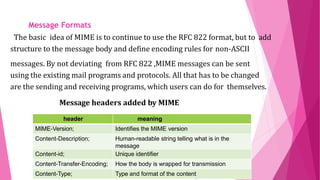
The basic idea of MIME is to continue to use the RFC 822 format, but to add
structure to the message body and define encoding rules for non-ASCII
messages. By not deviating from RFC 822 ,MIME messages can be sent
using the existing mail programs and protocols. All that has to be changed
are the sending and receiving programs, which users can do for themselves.
Message headers added by MIME
Message Formats
header meaning
MIME-Version; Identifies the MIME version
Content-Description; Human-readable string telling what is in the
message
Content-id; Unique identifier
Content-Transfer-Encoding; How the body is wrapped for transmission
Content-Type; Type and format of the content
MIME- THE MULTIPURPOSE
INTERNET MAIL
EXTENSIONS
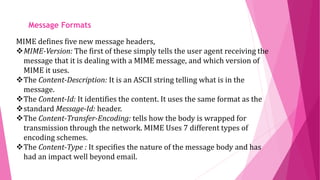
MIME defines five new message headers,
MIME-Version: The first of these simply tells the user agent receiving the
message that it is dealing with a MIME message, and which version of
MIME it uses.
The Content-Description: It is an ASCII string telling what is in the
message.
The Content-Id: It identifies the content. It uses the same format as the
standard Message-Id: header.
The Content-Transfer-Encoding: tells how the body is wrapped for
transmission through the network. MIME Uses 7 different types of
encoding schemes.
The Content-Type : It specifies the nature of the message body and has
had an impact well beyond email.
Message Formats
MIME- THE MULTIPURPOSE
INTERNET MAIL
EXTENSIONS
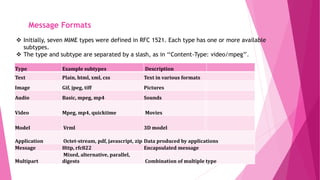
 Initially, seven MIME types were defined in RFC 1521. Each type has one or more available
subtypes.
 The type and subtype are separated by a slash, as in ‘‘Content-Type: video/mpeg’’.
Message Formats
Type Example subtypes Description
Text Plain, html, xml, css Text in various formats
Image Gif, jpeg, tiff Pictures
Audio Basic, mpeg, mp4 Sounds
Video Mpeg, mp4, quicktime Movies
Model Vrml 3D model
Application Octet-stream, pdf, javascript, zip Data produced by applications
Message Http, rfc822 Encapsulated message
Multipart
Mixed, alternative, parallel,
digests Combination of multiple type
Message Transfer
 The mail transfer is done with SMTP protocol.
 The simplest way to move messages by establishing a transport
connection from source to the destination machine and then
transfer the message.
 And then the first step is mail submission which means user
agents send messages into the mail system for delivery.
 The second step is to transfer messages between message
transfer agents.
 This sequence delivers mail all the way from the sending to the
receiving messages transfer agent in one hop.
 And the final delivery is accomplished with several protocols.
Simple Mail Transfer Protocol(SMTP)
 The Simple Mail Transfer Protocol(SMTP) is a
communication protocol for electronic mail transmission.
 As an Internet Standard, SMTP was defined in 1982by RFC 821its
extended is known as ESMTP(Extended SMTP).
 Mail servers and other message transfer agents use SMTP to send
and receive mail messages.
 SMTP servers commonly use the Transmission Control Protocol
on port number 25.
 SMTP is a connection-oriented, text-based protocol in which a mail
sender communicates with a mail receiver by issuing command
strings and supplying necessary data.
 An SMTP session consists of commands originated by an SMTP
client (sender or transmitter) and corresponding responses from
the SMTP server(the listening agent).
 An SMTP transaction consists of three command/reply sequences
namely MAIL command, RCPT command and DATAto signal .
Simple Mail Transfer Protocol(SMTP)
 A Message Submission Agent(MSA) or Mail Submission Agent is
a computer program or software agent that receives email messages
from a Mail User Agent(MUA) and cooperates with a Mail Transfer
Agent(MTA) for delivery of the mail.
 The MTA accepts a users incoming mail, while the MSA accepts a
users outgoing mail.
 Mail transfer agents run on ISP and company servers. They are
always connected to the internet.
 In addition, this kind of open mail relay attracts spammers because
it provides a way to launder the original sender and thus make the
message more difficult to identify as spam.
Mail submission
 SMTP is normally used for mail submission with AUTH
extension.This extension the server checks the credentials(user
name and password) of the client confirm that the server should be
providing mail service.
 There are several other difference in the way SMTP is used
for mail submission.
For Example, port 587 is used in preference to port 25 and the
SMTP server check and correct the format of the message sent by
the user agent.
Mail submission
 Once the sending mail transfer agent receives a message from
the user agent, it will deliver it to the receiving mail transfer agent
using SMTP.
 The sending mail transfer agent then makes a TCP connection on
port 25 to the IP address of the mail server to reach the receiving
mail transfer agent, and uses SMTPto relay the message.
 The receiving mail transfer agent will then place mail for the user
bob in the correct mailbox for BOB to read it at a later time.
 With this delivery process, mail travels from the initial to the final mail
transfer agent in a single hop.
 There are no intermediate servers in the message transfer stage.
Message Transfer
 With the advent of people who access the internet by calling their ISP
over a modern, it breaks down.
 One solution is to have a message transfer agent on an ISP
machine accepts email for its customers and store it in their
mailboxes on an ISP machine.
 Since this agent can beon-line all the time, email can be send to it
24 hours a day.
 SMTP is push-based protocol. It takes a messages and connects to a
remote server to transfer the message.
 Final delivery cannot be achieved in this manner both because the
mailbox must continue to be stored on the mail transfer agent .
 Because the user agent may not
be connected to the Internet at the moment that SMTP attempts
to relay messages.
Final Delivery
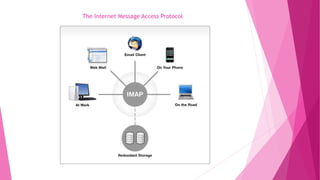
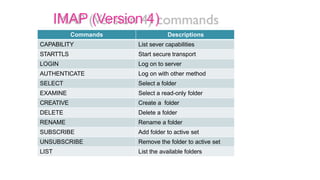
The Internet Message Access Protocol
IMAP (Version 4)
commandsCommands Descriptions
CAPABILITY List sever capabilities
STARTTLS Start secure transport
LOGIN Log on to server
AUTHENTICATE Log on with other method
SELECT Select a folder
EXAMINE Select a read-only folder
CREATIVE Create a folder
DELETE Delete a folder
RENAME Rename a folder
SUBSCRIBE Add folder to active set
UNSUBSCRIBE Remove the folder to active set
LIST List the available folders
 Web mail(or web based email) is an email service that can
be accessed using a standard web browser.
 It contrast with email service accessible through a specialised
email client software.
 Example of webmail providers are AOL Mail, Mailfence,
Outlook.com/Hotmail.com,Yahoo! Mail and IceWarp Mail
server.
 Webmail access is made possible through webmail software, such
as Roundcube or SquirrelMail, installed and running on the email
server.
Web Mail
Thank You

Email

  • 1.
    Electronic Mail Mrs.G.Chandraprabha,M.Sc.,M.Phil., Assistant Professor, Departmentof Information Technology, V.V.Vanniaperumal College for Women, Virudhunagar.
  • 2.
    CONTENTS  Introduction  Architectureand services The user agent Message formats Message Transfer Final delivery Web Mail
  • 3.
    WHAT IS EMAIL ? Electronicmail or email has been around for over three decades. Faster and cheaper than paper mail, email has been a popular application since the early days of the internet. It is widely used within industry for intracompany communication. The first email systems simply consisted of the file transfer protocol, with the convention that the first line of each message contained the recipient’s address. Introduction
  • 4.
    ARCHITECTURE AND SERVICES The architectureof the email system consists of two kinds of sub systems. User agents – which allow people to read and send email. Message transfer agents – which move the messages from the source to destination. We will also refer to message transfer agents informally as mail servers. Architecture & Services
  • 5.
    ARCHITECTURE AND SERVICESThe useragent is a program that provides a graphical interface orsometimes a text and command based interface that lets users interact with the email system. It includes a means to compose messages and replies to messages, and organize messages by filling, searching and discarding them.  The act of sending new messages into the mail system for delivery iscalled mail submission.  The message transfer agents are typically system process. They run in the background on mail server machines and are intended to be always available.  Their jobs to automatically move email through the system from the originator to the recipient with SMTP(Simple Mail Transfer Protocol). Architecture & Services
  • 6.
    ARCHITECTURE AND SERVICES  Messagetransfer agents also implement mailing list, in which anidentical copy of a message is delivered to everyone on a list of email addresses. Linking user agents and message transfer agents are concepts of mail boxes and a standard format for email messages. Mail boxes store the email that is received for a user. They are maintained by mail servers. User agents simply present users with a view of the contents of their mailboxes.  The user agents send the mail servers commands to manipulate themail boxes, inspecting their contents, deleting messages, and soon. Architecture & Services
  • 7.
    ARCHITECTURE AND SERVICES Mail issent between message transfer agents in a standard format. The original format, support forRFC 822, has been revised to the current RFC 5322 and extended with multimedia content and international text.  This scheme is called MIME.  A key idea in the message format is the distinction between the envelope and its content.  The envelope encapsulates the message.  The message inside the envelope consists of two separate parts HEADER –Theheader contains control information for the user agents. BODY- The body is entirely for the human recipient. Architecture & Services
  • 8.
    THE USER AGENT A useragent is normally a program ( sometimes called a mail reader) that accepts a variety of commands for composing ,receiving , and replying to messages, as well as for manipulatingmailboxes. Typical elements of a user agent interface are When a user agent is started, it will usually present a summary ofthe messages in the user’s mailbox. It highlights key fields of the message that are extracted from the message envelope or header. User Agent
  • 9.
    All the informationis formatted in a user-friendly way rather than displaying the literal contents of the message fields, but it is based on the message fields. Thus, people who fail to include a Subject field often discover that responses to their emails tend not to get the highest priority.  The most common is to order messages based on the time that they were received , most recent first, with some indication as to whether the message is new or has already been read by the user. User agents must also be able to display incoming messages as needed so that people can read theiremail. After a message has been read , the user can decide what to do with it .This is called message disposition.. User Agent
  • 10.
    Most user agentscan manage one mailbox for incoming mail with multiple folders for saved mail.  The folders allow the user to save message according to sender, topic, or some other category. Many ISPs and companies run software that labels mail as important or spam so that the user agent can file it in the corresponding mailbox.  Providers now routinely support mailboxes with up to 1 GB of stored mail that details a user’s interactions over a long period of time. Another useful feature is the ability to automatically respond to messages in some way. one response is to forward incoming email to a different addresses, User Agent
  • 11.
    Message that aresent into the mail system have a standard format that must becreated from the information supplied to the user agent. The most important part of the message for transfer is the envelope. The most important part of the envelope is the destination address. This address must be in a format that the message transfer agents can deal with. The expected form of an address is user@dns-address. However, it is worth nothing that other forms of addressing exist . In particular , x.400 addresses look radically different from DNS addresses. x.400 is an ISO standard for message-handling systems that was at one time a competitorto SMTP. Message Formats
  • 12.
    MESSAGE FORMATS RFC 5322—The InternetMessage Format Messages consists of a primitive envelope, some number of header files, a blank line ,and then the message body. Each header field (logically) consists of a single line of ASCII text containing the field name, a colon, and, for most fields, a value. RFC 5322 header fields related to message transport: header meaning To: E-mail address(es) of primary recipient(s) Cc: E-mail address(es) of secondary recipient(s) Bcc: E-mail address(es) for blind carbon copies From: Person or people who created the message Sender: E-mail address of the actual sender Received: Line added by each transfer agent along the route Return-path: Can be used to identify a path back to the sender Message Formats
  • 13.
    MIME- THE MULTIPURPOSE INTERNETMAIL EXTENSIONS RFC 5322 specified the headers but left the content entirely up to the users. Nowadays ,on the worldwide internet, this approach is no longer adequate. The problems include sending and receiving  Messages in language with accents (e.g., French and German), Messages in non-latin alphabets(e.g. Hebrew and Russian), Messages in language without alphabets(e.g.,Chinease and Japanese) Messages not containing text at all (e.g.., audio or images).  A solution was proposed in RFC 1341 called MIME. (THE MULTIPURPOSE INTERNET MAIL EXTENSIONS).  MIME. (THE MULTIPURPOSE Message Formats
  • 14.
    MIME- THE MULTIPURPOSE INTERNETMAIL EXTENSIONS The basic idea of MIME is to continue to use the RFC 822 format, but to add structure to the message body and define encoding rules for non-ASCII messages. By not deviating from RFC 822 ,MIME messages can be sent using the existing mail programs and protocols. All that has to be changed are the sending and receiving programs, which users can do for themselves. Message headers added by MIME Message Formats header meaning MIME-Version; Identifies the MIME version Content-Description; Human-readable string telling what is in the message Content-id; Unique identifier Content-Transfer-Encoding; How the body is wrapped for transmission Content-Type; Type and format of the content
  • 15.
    MIME- THE MULTIPURPOSE INTERNETMAIL EXTENSIONS MIME defines five new message headers, MIME-Version: The first of these simply tells the user agent receiving the message that it is dealing with a MIME message, and which version of MIME it uses. The Content-Description: It is an ASCII string telling what is in the message. The Content-Id: It identifies the content. It uses the same format as the standard Message-Id: header. The Content-Transfer-Encoding: tells how the body is wrapped for transmission through the network. MIME Uses 7 different types of encoding schemes. The Content-Type : It specifies the nature of the message body and has had an impact well beyond email. Message Formats
  • 16.
    MIME- THE MULTIPURPOSE INTERNETMAIL EXTENSIONS  Initially, seven MIME types were defined in RFC 1521. Each type has one or more available subtypes.  The type and subtype are separated by a slash, as in ‘‘Content-Type: video/mpeg’’. Message Formats Type Example subtypes Description Text Plain, html, xml, css Text in various formats Image Gif, jpeg, tiff Pictures Audio Basic, mpeg, mp4 Sounds Video Mpeg, mp4, quicktime Movies Model Vrml 3D model Application Octet-stream, pdf, javascript, zip Data produced by applications Message Http, rfc822 Encapsulated message Multipart Mixed, alternative, parallel, digests Combination of multiple type
  • 17.
    Message Transfer  Themail transfer is done with SMTP protocol.  The simplest way to move messages by establishing a transport connection from source to the destination machine and then transfer the message.  And then the first step is mail submission which means user agents send messages into the mail system for delivery.  The second step is to transfer messages between message transfer agents.  This sequence delivers mail all the way from the sending to the receiving messages transfer agent in one hop.  And the final delivery is accomplished with several protocols.
  • 18.
    Simple Mail TransferProtocol(SMTP)  The Simple Mail Transfer Protocol(SMTP) is a communication protocol for electronic mail transmission.  As an Internet Standard, SMTP was defined in 1982by RFC 821its extended is known as ESMTP(Extended SMTP).  Mail servers and other message transfer agents use SMTP to send and receive mail messages.  SMTP servers commonly use the Transmission Control Protocol on port number 25.
  • 19.
     SMTP isa connection-oriented, text-based protocol in which a mail sender communicates with a mail receiver by issuing command strings and supplying necessary data.  An SMTP session consists of commands originated by an SMTP client (sender or transmitter) and corresponding responses from the SMTP server(the listening agent).  An SMTP transaction consists of three command/reply sequences namely MAIL command, RCPT command and DATAto signal . Simple Mail Transfer Protocol(SMTP)
  • 20.
     A MessageSubmission Agent(MSA) or Mail Submission Agent is a computer program or software agent that receives email messages from a Mail User Agent(MUA) and cooperates with a Mail Transfer Agent(MTA) for delivery of the mail.  The MTA accepts a users incoming mail, while the MSA accepts a users outgoing mail.  Mail transfer agents run on ISP and company servers. They are always connected to the internet.  In addition, this kind of open mail relay attracts spammers because it provides a way to launder the original sender and thus make the message more difficult to identify as spam. Mail submission
  • 21.
     SMTP isnormally used for mail submission with AUTH extension.This extension the server checks the credentials(user name and password) of the client confirm that the server should be providing mail service.  There are several other difference in the way SMTP is used for mail submission. For Example, port 587 is used in preference to port 25 and the SMTP server check and correct the format of the message sent by the user agent. Mail submission
  • 22.
     Once thesending mail transfer agent receives a message from the user agent, it will deliver it to the receiving mail transfer agent using SMTP.  The sending mail transfer agent then makes a TCP connection on port 25 to the IP address of the mail server to reach the receiving mail transfer agent, and uses SMTPto relay the message.  The receiving mail transfer agent will then place mail for the user bob in the correct mailbox for BOB to read it at a later time.  With this delivery process, mail travels from the initial to the final mail transfer agent in a single hop.  There are no intermediate servers in the message transfer stage. Message Transfer
  • 23.
     With theadvent of people who access the internet by calling their ISP over a modern, it breaks down.  One solution is to have a message transfer agent on an ISP machine accepts email for its customers and store it in their mailboxes on an ISP machine.  Since this agent can beon-line all the time, email can be send to it 24 hours a day.  SMTP is push-based protocol. It takes a messages and connects to a remote server to transfer the message.  Final delivery cannot be achieved in this manner both because the mailbox must continue to be stored on the mail transfer agent .  Because the user agent may not be connected to the Internet at the moment that SMTP attempts to relay messages. Final Delivery
  • 24.
    The Internet MessageAccess Protocol
  • 25.
    IMAP (Version 4) commandsCommandsDescriptions CAPABILITY List sever capabilities STARTTLS Start secure transport LOGIN Log on to server AUTHENTICATE Log on with other method SELECT Select a folder EXAMINE Select a read-only folder CREATIVE Create a folder DELETE Delete a folder RENAME Rename a folder SUBSCRIBE Add folder to active set UNSUBSCRIBE Remove the folder to active set LIST List the available folders
  • 26.
     Web mail(orweb based email) is an email service that can be accessed using a standard web browser.  It contrast with email service accessible through a specialised email client software.  Example of webmail providers are AOL Mail, Mailfence, Outlook.com/Hotmail.com,Yahoo! Mail and IceWarp Mail server.  Webmail access is made possible through webmail software, such as Roundcube or SquirrelMail, installed and running on the email server. Web Mail
  • 27.