Operating System
Harshit Srivastava
Outline
•
•
•
•
•
•
•
•
•
•

What is operating system
How it helps
Types of operating system
The very first OS and the progressive ones
Why it was developed (Need of OS)
How needs increased
Working Of OS (basic)
Applications and Uses
Future OS
Conclusion
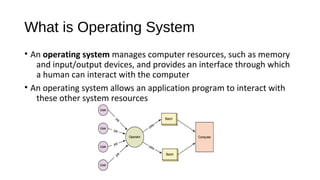
What is Operating System
• An operating system manages computer resources, such as memory
and input/output devices, and provides an interface through which
a human can interact with the computer
• An operating system allows an application program to interact with
these other system resources
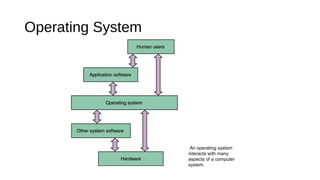
Operating System

An operating system
interacts with many
aspects of a computer
system.
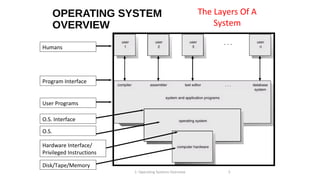
OPERATING SYSTEM
OVERVIEW

The Layers Of A
System

Humans

Program Interface
User Programs
O.S. Interface
O.S.
Hardware Interface/
Privileged Instructions
Disk/Tape/Memory
1: Operating Systems Overview

5
Why Was Operating System Developed
How it Helps
• The various roles of an operating system generally revolve around the
idea of “sharing nicely”
• An operating system manages resources, and these resources are
often shared in one way or another among programs that want to
use them
• Like

o Multiprogramming which deals in keeping multiple programsin main
memory at the same time these programs compete access to the CPU
so that they can execute.
o Memory Management which keeps track of what program are in memory
and where in memory they reside.
How it Helps
• Hiding the complexities of hardware from the user
• Managing between the hardware's resources which include the
processors, memory, data storage and I/O devices
• Handling "interrupts" generated by the I/O controllers
• Sharing of I/O between many programs using the CPU
• And in some cases providing user interface to work easily.
Is There More Than One Type Of OS?
• Generally, there are four types, based on the type of computer they
control and the sort of applications they support.

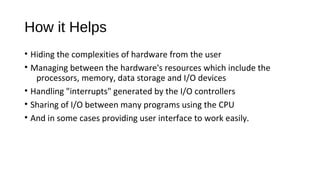
1.Single-user, single
task
This type manages the
computer so that one user can
effectively do one thing at a
time.
Types Of Operating System
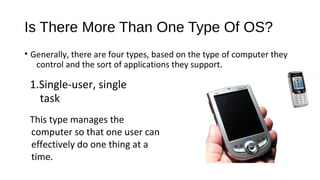
2. Multi-user, multi-task
•
Allows two or more users to run programs at the same
time. Some operating systems permit hundreds or even
thousands of concurrent users.

MAINFRAME
Types Of Operating System
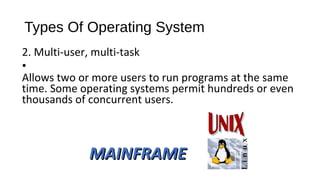
3. Real Time Operating Systems
RTOS are used to control machinery,
scientific instruments, and industrial
systems.
There is typically very little userinterface capability.
Resources are managed so that a
particular operation executes
precisely the same every time.
Types Of Operating System
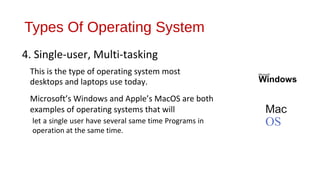
4. Single-user, Multi-tasking
This is the type of operating system most
desktops and laptops use today.
Microsoft’s Windows and Apple’s MacOS are both
examples of operating systems that will
let a single user have several same time Programs in
operation at the same time.

Microsoft"

Windows

Mac

OS
Operating System
• There are few more enduring manifestations of user interface
technology than that of the Graphical User Interface Desktop.
Pioneered by engineers at Xerox PARC, refined by Steve Jobs and
Apple and brought to masses and ingrained into our daily lives by
Microsoft Windows
Graphical User interface OS launched
• Apple company was the first
company which introduced the
graphical user interfaced
operating system as macintosh
• Microsoft which started a major
breakthrough by developing a
graphical user interfaced OS
known as Windows while
competing with apple
macintosh
Windows 1

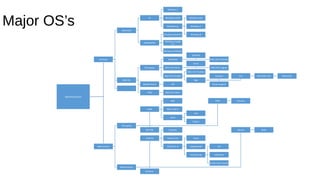
Major OS’s

PC

Windows ce/ne

Windows vista

Windows xp

Windows 7

Windows 6 and 6.5

Windows 8

Microsoft

Mobile/PDA

Windows mango
7.5
Windows 8 Mobile
Cheetah

licensed

Rhapsody

MAC OS X Cheetah
Puma

PC/Laptop

MAC OS X Hera

MAC OS X Jaguar
MAC OS X Panther

MAC OS X Kodiak
MAC OS

Leopard

Lion

Mountain Lion

Tiger
Mobile Phone

iOS

IPAD

Snow Leopard

MAC OS X Mini

Operating system
BSD
UNIX

RHEl

Chrome

Open Solaris
Susi
Linux
Fedora

PC/Laptop
MS DOS

Cupcake

Android

Donut (1.6)

Froyo

Éclair(2-2.1)

Gingerbread

ICS

HoneyComb

Jelly Bean

Open Source

Ubuntu

Kit Kat (near future)
Mobile Phone
Symbion

Bada

Mavericks
The very 1st Operating Sytem
The earliest computers were mainframes that lacked any form of operating system

EXEC was the very first operating system developed by UNIVAC who was
the first commercial computer manufacturer in 1970’s which was based on
Real Time basic to support large scale time sharing.
TOPS-10 and TOPS-20 was next few OS developed by Digital Equipment
Corporation which were time sharing systems for the 36-bit PDP-10 class
systems. Prior to the widespread use of UNIX, TOPS-10 was a particularly
popular system in universities, and in the early ARPANET community.
MS-DOS and UNIX were the major breakthrough in development of OS
which is said as written of Microsoft Corporation(Precisely) under IBM PC,
Intel 8088 CPU and Motorola 6899 CPU family.
Most famous Operating System
• UNIX is the most famous Operating System which is the current base
of the most working operating system now days.
• Basically UNIX was written in assembly language by Ken Thompson in
AT&T Bell laboratories and Unix rewritten in C, developed into a
large, complex family of inter-related operating systems which have
been influential in every modern operating system
• UNIX based OS are basically Servers, Workstation and Linux and BSD
based operating system.
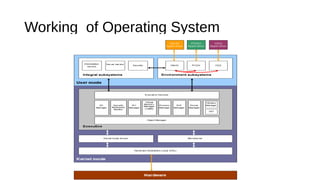
Working of Operating System
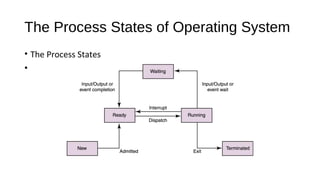
The Process States of Operating System
• The Process States
•
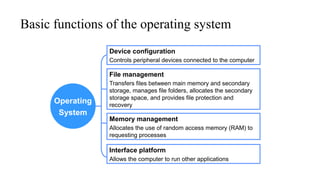
Basic functions of the operating system
Device configuration
Controls peripheral devices connected to the computer

File management

Operating
System

Transfers files between main memory and secondary
storage, manages file folders, allocates the secondary
storage space, and provides file protection and
recovery

Memory management
Allocates the use of random access memory (RAM) to
requesting processes

Interface platform
Allows the computer to run other applications
Operating System Design and
Implementation
• Design and Implementation of OS not “solvable”, but some
approaches have proven successful
• Internal structure of different Operating Systems can vary widely
• Start by defining goals and specifications
• Affected by choice of hardware, type of system
• User goals and System goals
• User goals – operating system should be convenient to use, easy to learn,
reliable, safe, and fast
• System goals – operating system should be easy to design, implement,
and maintain, as well as flexible, reliable, error-free, and efficient

•
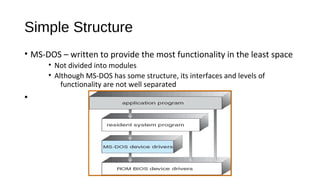
Simple Structure
• MS-DOS – written to provide the most functionality in the least space
• Not divided into modules
• Although MS-DOS has some structure, its interfaces and levels of
functionality are not well separated

•
Application And Uses
• Applications
• Providing a proper base to run programs of different kind like
•
•
•
•
•
•

Military use
Government use
Business purpose
Commercial Purpose
Education purpose
To develop new program with easy user interface.

• Uses
• The main use of an operating system is to ensure that a computer can be
used and do exactly what the user wants it to do.
•
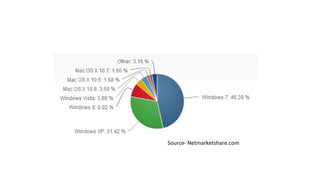
Source- Netmarketshare.com
Future Operating Systems
• The operating system - the baseline operating system: a typical desktop Linux can be
quite resource hungry. However, properly specified Linux also has a proven track
record of offering services within a restricted resource environment such as on
mobile phones or media players.
• An opportunity for RISC OS?
• RISC OS has in it's favour:
• It can work in a low memory, slow CPU environment. Current versions of RISCOS can boot to a
desktop with less than 512k of RAM. Even this could be improved upon with customisation.
• It's designed to be ROM loadable with only a few disk based resources. RISC OS doesn't need to be
tied to a hard disk as it doesn't need a swap file or masses of disk based configuration. If the OS
is installed it ROM, it can even boot without a hard disk.
• Fast start up and shutdown. On most RO workstations, there is a 'shutdown procedure' but this is
mainly to flush any disc buffers. It's not a protracted sequence.
• It's modular: it's designed to have features added to its core and to be tailored to a specific task.

•
Conclusion
• For person with a desktop machine, the OS gives interface to
the machine that fills some gaps in his digital life. As such a
user can connect the hardware and can control to his existing
network through OS interface easily, it could occupy a
conceptual space similar to that of Apple's new iTV device but
somewhat more computer than dedicated media.
•
References
• www.ted.com
• technology.blurtit.com
• Application of Operating System Concepts to Coordination in Pervasive Sensing and Computing
Systems by Jesse M. Davis, Joseph B. Evans Benjamin J. Ewy, Larry M. Sanders, 2006
• Netmarketshare.com
• Howstuffworks.com
• Wikipedia.com
Thank You

Operating Systems As a Product

  • 1.
  • 2.
    Outline • • • • • • • • • • What is operatingsystem How it helps Types of operating system The very first OS and the progressive ones Why it was developed (Need of OS) How needs increased Working Of OS (basic) Applications and Uses Future OS Conclusion
  • 3.
    What is OperatingSystem • An operating system manages computer resources, such as memory and input/output devices, and provides an interface through which a human can interact with the computer • An operating system allows an application program to interact with these other system resources
  • 4.
    Operating System An operatingsystem interacts with many aspects of a computer system.
  • 5.
    OPERATING SYSTEM OVERVIEW The LayersOf A System Humans Program Interface User Programs O.S. Interface O.S. Hardware Interface/ Privileged Instructions Disk/Tape/Memory 1: Operating Systems Overview 5
  • 6.
    Why Was OperatingSystem Developed
  • 7.
    How it Helps •The various roles of an operating system generally revolve around the idea of “sharing nicely” • An operating system manages resources, and these resources are often shared in one way or another among programs that want to use them • Like o Multiprogramming which deals in keeping multiple programsin main memory at the same time these programs compete access to the CPU so that they can execute. o Memory Management which keeps track of what program are in memory and where in memory they reside.
  • 8.
    How it Helps •Hiding the complexities of hardware from the user • Managing between the hardware's resources which include the processors, memory, data storage and I/O devices • Handling "interrupts" generated by the I/O controllers • Sharing of I/O between many programs using the CPU • And in some cases providing user interface to work easily.
  • 9.
    Is There MoreThan One Type Of OS? • Generally, there are four types, based on the type of computer they control and the sort of applications they support. 1.Single-user, single task This type manages the computer so that one user can effectively do one thing at a time.
  • 10.
    Types Of OperatingSystem 2. Multi-user, multi-task • Allows two or more users to run programs at the same time. Some operating systems permit hundreds or even thousands of concurrent users. MAINFRAME
  • 11.
    Types Of OperatingSystem 3. Real Time Operating Systems RTOS are used to control machinery, scientific instruments, and industrial systems. There is typically very little userinterface capability. Resources are managed so that a particular operation executes precisely the same every time.
  • 12.
    Types Of OperatingSystem 4. Single-user, Multi-tasking This is the type of operating system most desktops and laptops use today. Microsoft’s Windows and Apple’s MacOS are both examples of operating systems that will let a single user have several same time Programs in operation at the same time. Microsoft" Windows Mac OS
  • 13.
    Operating System • Thereare few more enduring manifestations of user interface technology than that of the Graphical User Interface Desktop. Pioneered by engineers at Xerox PARC, refined by Steve Jobs and Apple and brought to masses and ingrained into our daily lives by Microsoft Windows
  • 14.
    Graphical User interfaceOS launched • Apple company was the first company which introduced the graphical user interfaced operating system as macintosh • Microsoft which started a major breakthrough by developing a graphical user interfaced OS known as Windows while competing with apple macintosh
  • 15.
    Windows 1 Major OS’s PC Windowsce/ne Windows vista Windows xp Windows 7 Windows 6 and 6.5 Windows 8 Microsoft Mobile/PDA Windows mango 7.5 Windows 8 Mobile Cheetah licensed Rhapsody MAC OS X Cheetah Puma PC/Laptop MAC OS X Hera MAC OS X Jaguar MAC OS X Panther MAC OS X Kodiak MAC OS Leopard Lion Mountain Lion Tiger Mobile Phone iOS IPAD Snow Leopard MAC OS X Mini Operating system BSD UNIX RHEl Chrome Open Solaris Susi Linux Fedora PC/Laptop MS DOS Cupcake Android Donut (1.6) Froyo Éclair(2-2.1) Gingerbread ICS HoneyComb Jelly Bean Open Source Ubuntu Kit Kat (near future) Mobile Phone Symbion Bada Mavericks
  • 16.
    The very 1stOperating Sytem The earliest computers were mainframes that lacked any form of operating system EXEC was the very first operating system developed by UNIVAC who was the first commercial computer manufacturer in 1970’s which was based on Real Time basic to support large scale time sharing. TOPS-10 and TOPS-20 was next few OS developed by Digital Equipment Corporation which were time sharing systems for the 36-bit PDP-10 class systems. Prior to the widespread use of UNIX, TOPS-10 was a particularly popular system in universities, and in the early ARPANET community. MS-DOS and UNIX were the major breakthrough in development of OS which is said as written of Microsoft Corporation(Precisely) under IBM PC, Intel 8088 CPU and Motorola 6899 CPU family.
  • 17.
    Most famous OperatingSystem • UNIX is the most famous Operating System which is the current base of the most working operating system now days. • Basically UNIX was written in assembly language by Ken Thompson in AT&T Bell laboratories and Unix rewritten in C, developed into a large, complex family of inter-related operating systems which have been influential in every modern operating system • UNIX based OS are basically Servers, Workstation and Linux and BSD based operating system.
  • 18.
  • 19.
    The Process Statesof Operating System • The Process States •
  • 20.
    Basic functions ofthe operating system Device configuration Controls peripheral devices connected to the computer File management Operating System Transfers files between main memory and secondary storage, manages file folders, allocates the secondary storage space, and provides file protection and recovery Memory management Allocates the use of random access memory (RAM) to requesting processes Interface platform Allows the computer to run other applications
  • 21.
    Operating System Designand Implementation • Design and Implementation of OS not “solvable”, but some approaches have proven successful • Internal structure of different Operating Systems can vary widely • Start by defining goals and specifications • Affected by choice of hardware, type of system • User goals and System goals • User goals – operating system should be convenient to use, easy to learn, reliable, safe, and fast • System goals – operating system should be easy to design, implement, and maintain, as well as flexible, reliable, error-free, and efficient •
  • 22.
    Simple Structure • MS-DOS– written to provide the most functionality in the least space • Not divided into modules • Although MS-DOS has some structure, its interfaces and levels of functionality are not well separated •
  • 23.
    Application And Uses •Applications • Providing a proper base to run programs of different kind like • • • • • • Military use Government use Business purpose Commercial Purpose Education purpose To develop new program with easy user interface. • Uses • The main use of an operating system is to ensure that a computer can be used and do exactly what the user wants it to do. •
  • 24.
  • 25.
    Future Operating Systems •The operating system - the baseline operating system: a typical desktop Linux can be quite resource hungry. However, properly specified Linux also has a proven track record of offering services within a restricted resource environment such as on mobile phones or media players. • An opportunity for RISC OS? • RISC OS has in it's favour: • It can work in a low memory, slow CPU environment. Current versions of RISCOS can boot to a desktop with less than 512k of RAM. Even this could be improved upon with customisation. • It's designed to be ROM loadable with only a few disk based resources. RISC OS doesn't need to be tied to a hard disk as it doesn't need a swap file or masses of disk based configuration. If the OS is installed it ROM, it can even boot without a hard disk. • Fast start up and shutdown. On most RO workstations, there is a 'shutdown procedure' but this is mainly to flush any disc buffers. It's not a protracted sequence. • It's modular: it's designed to have features added to its core and to be tailored to a specific task. •
  • 26.
    Conclusion • For personwith a desktop machine, the OS gives interface to the machine that fills some gaps in his digital life. As such a user can connect the hardware and can control to his existing network through OS interface easily, it could occupy a conceptual space similar to that of Apple's new iTV device but somewhat more computer than dedicated media. •
  • 27.
    References • www.ted.com • technology.blurtit.com •Application of Operating System Concepts to Coordination in Pervasive Sensing and Computing Systems by Jesse M. Davis, Joseph B. Evans Benjamin J. Ewy, Larry M. Sanders, 2006 • Netmarketshare.com • Howstuffworks.com • Wikipedia.com
  • 28.