A computer is a programmable machine
designed to perform
arithmetic and logical operations
automatically and
sequentially on the input given by the user
and gives the
desired output after processing.
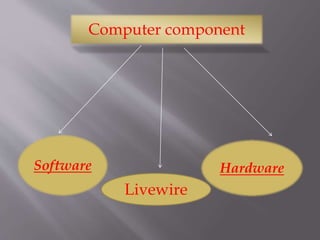
Computer component
Software Hardware
Livewire
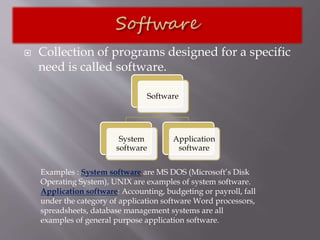
 Collection of programs designed for a specific
need is called software.
Software
System
software
Application
software
Examples : System software are MS DOS (Microsoft’s Disk
Operating System), UNIX are examples of system software.
Application software: Accounting, budgeting or payroll, fall
under the category of application software Word processors,
spreadsheets, database management systems are all
examples of general purpose application software.
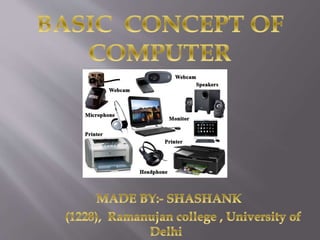
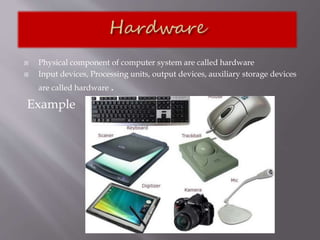
 Physical component of computer system are called hardware
 Input devices, Processing units, output devices, auxiliary storage devices
are called hardware .
Example
 It accepts data or instructions as input,
 It stores data and instruction
 It processes data as per the instructions,
 It controls all operations inside a computer, and
 It gives results in the form of output
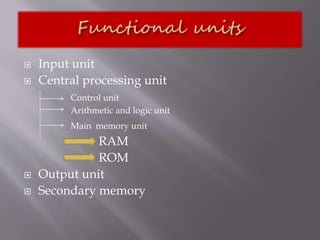
 Input unit
 Central processing unit
Control unit
Arithmetic and logic unit
Main memory unit
RAM
ROM
 Output unit
 Secondary memory
 This unit is used for entering data and
programs into the computer system by the user
for processing.
 Input device is a peripheral device whose
purpose is to allow users to enter data in to a
computer system e.g keyboard, mouse, joystick
,etc.
 The CPU is known to be heart or brain of computer
system as it follows the instructions of the software to
manipulate the data into information .
 The Central Processing Unit (CPU) take data and
instructions from the storage unit and makes all sorts
of calculations based on the instructions given and the
type of data provided. It is then sent back to the storage
unit. CPU includes Arithmetic logic unit (ALU) and
control unit (CU)
 Arithmetic Logic Unit: All calculations and
comparisons, based on the instructions provided,
are carried out within the ALU. It performs
arithmetic functions like addition, subtraction,
multiplication, division and also logical operations
like greater than, less than and equal to etc.
 Control Unit: Controlling of all operations like
input, processing and output are performed by
control unit. It takes care of step by step processing
of all operations inside the computer.
 The output unit is used for storing the result as
output produced by the computer after
processing or may be sent to screen or printer
 Computer’s memory can be classified into two
types;
 Primary memory and
 secondary memory
A. Primary Memory can be further classified as
1. RAM
2. ROM.
 RAM or Random Access Memory is the unit
in a computer system. It is the place in a
computer where the operating system,
application programs and the data in current
use are kept temporarily so that they can be
accessed by the computer’s processor. It is said
to be ‘volatile’ since its contents are accessible
only as long as the computer is on. The
contents of RAM are no more available once
the computer is turned off. It is also known as
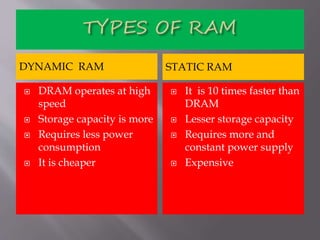
DYNAMIC RAM STATIC RAM
 DRAM operates at high
speed
 Storage capacity is more
 Requires less power
consumption
 It is cheaper
 It is 10 times faster than
DRAM
 Lesser storage capacity
 Requires more and
constant power supply
 Expensive
 ROM or Read Only Memory is a special type
of memory which can only be read and
contents of which are not lost even when the
computer is switched off. It typically contains
manufacturer’s instructions. Among other
things, ROM also stores an initial program
called the ‘bootstrap loader’ whose function is
to start the operation of computer system once
the power is turned on.
 Secondary/auxiliary memory is storage other
than the RAM. These include devices that are
peripheral and are connected and controlled by
the computer to enable permanent storage of
programs and data. Secondary storage devices
are of two types; magnetic and optical.
Magnetic devices include hard disks and
optical storage devices are CDs, DVDs, Pen
drive, Zip drive etc.
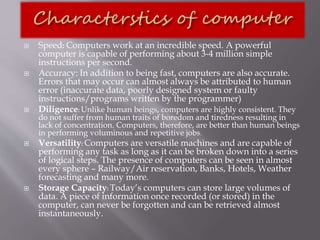
 Speed: Computers work at an incredible speed. A powerful
computer is capable of performing about 3-4 million simple
instructions per second.
 Accuracy: In addition to being fast, computers are also accurate.
Errors that may occur can almost always be attributed to human
error (inaccurate data, poorly designed system or faulty
instructions/programs written by the programmer)
 Diligence: Unlike human beings, computers are highly consistent. They
do not suffer from human traits of boredom and tiredness resulting in
lack of concentration. Computers, therefore, are better than human beings
in performing voluminous and repetitive jobs.
 Versatility: Computers are versatile machines and are capable of
performing any task as long as it can be broken down into a series
of logical steps. The presence of computers can be seen in almost
every sphere – Railway/Air reservation, Banks, Hotels, Weather
forecasting and many more.
 Storage Capacity: Today’s computers can store large volumes of
data. A piece of information once recorded (or stored) in the
computer, can never be forgotten and can be retrieved almost
instantaneously.
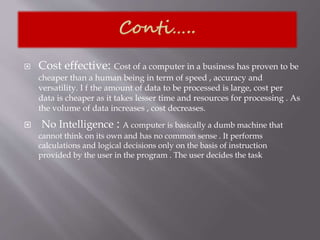
 Cost effective: Cost of a computer in a business has proven to be
cheaper than a human being in term of speed , accuracy and
versatility. I f the amount of data to be processed is large, cost per
data is cheaper as it takes lesser time and resources for processing . As
the volume of data increases , cost decreases.
 No Intelligence : A computer is basically a dumb machine that
cannot think on its own and has no common sense . It performs
calculations and logical decisions only on the basis of instruction
provided by the user in the program . The user decides the task
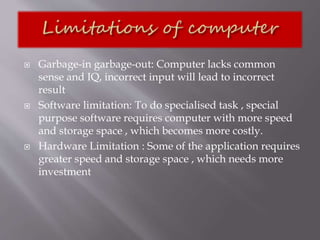
 Garbage-in garbage-out: Computer lacks common
sense and IQ, incorrect input will lead to incorrect
result
 Software limitation: To do specialised task , special
purpose software requires computer with more speed
and storage space , which becomes more costly.
 Hardware Limitation : Some of the application requires
greater speed and storage space , which needs more
investment
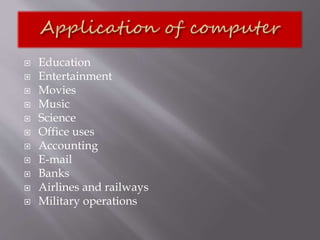
 Education
 Entertainment
 Movies
 Music
 Science
 Office uses
 Accounting
 E-mail
 Banks
 Airlines and railways
 Military operations
Computer application in business

Computer application in business

  • 2.
    A computer isa programmable machine designed to perform arithmetic and logical operations automatically and sequentially on the input given by the user and gives the desired output after processing.
  • 3.
  • 4.
     Collection ofprograms designed for a specific need is called software. Software System software Application software Examples : System software are MS DOS (Microsoft’s Disk Operating System), UNIX are examples of system software. Application software: Accounting, budgeting or payroll, fall under the category of application software Word processors, spreadsheets, database management systems are all examples of general purpose application software.
  • 5.
     Physical componentof computer system are called hardware  Input devices, Processing units, output devices, auxiliary storage devices are called hardware . Example
  • 6.
     It acceptsdata or instructions as input,  It stores data and instruction  It processes data as per the instructions,  It controls all operations inside a computer, and  It gives results in the form of output
  • 7.
     Input unit Central processing unit Control unit Arithmetic and logic unit Main memory unit RAM ROM  Output unit  Secondary memory
  • 8.
     This unitis used for entering data and programs into the computer system by the user for processing.  Input device is a peripheral device whose purpose is to allow users to enter data in to a computer system e.g keyboard, mouse, joystick ,etc.
  • 9.
     The CPUis known to be heart or brain of computer system as it follows the instructions of the software to manipulate the data into information .  The Central Processing Unit (CPU) take data and instructions from the storage unit and makes all sorts of calculations based on the instructions given and the type of data provided. It is then sent back to the storage unit. CPU includes Arithmetic logic unit (ALU) and control unit (CU)
  • 10.
     Arithmetic LogicUnit: All calculations and comparisons, based on the instructions provided, are carried out within the ALU. It performs arithmetic functions like addition, subtraction, multiplication, division and also logical operations like greater than, less than and equal to etc.  Control Unit: Controlling of all operations like input, processing and output are performed by control unit. It takes care of step by step processing of all operations inside the computer.
  • 11.
     The outputunit is used for storing the result as output produced by the computer after processing or may be sent to screen or printer
  • 12.
     Computer’s memorycan be classified into two types;  Primary memory and  secondary memory A. Primary Memory can be further classified as 1. RAM 2. ROM.
  • 13.
     RAM orRandom Access Memory is the unit in a computer system. It is the place in a computer where the operating system, application programs and the data in current use are kept temporarily so that they can be accessed by the computer’s processor. It is said to be ‘volatile’ since its contents are accessible only as long as the computer is on. The contents of RAM are no more available once the computer is turned off. It is also known as
  • 14.
    DYNAMIC RAM STATICRAM  DRAM operates at high speed  Storage capacity is more  Requires less power consumption  It is cheaper  It is 10 times faster than DRAM  Lesser storage capacity  Requires more and constant power supply  Expensive
  • 15.
     ROM orRead Only Memory is a special type of memory which can only be read and contents of which are not lost even when the computer is switched off. It typically contains manufacturer’s instructions. Among other things, ROM also stores an initial program called the ‘bootstrap loader’ whose function is to start the operation of computer system once the power is turned on.
  • 16.
     Secondary/auxiliary memoryis storage other than the RAM. These include devices that are peripheral and are connected and controlled by the computer to enable permanent storage of programs and data. Secondary storage devices are of two types; magnetic and optical. Magnetic devices include hard disks and optical storage devices are CDs, DVDs, Pen drive, Zip drive etc.
  • 17.
     Speed: Computerswork at an incredible speed. A powerful computer is capable of performing about 3-4 million simple instructions per second.  Accuracy: In addition to being fast, computers are also accurate. Errors that may occur can almost always be attributed to human error (inaccurate data, poorly designed system or faulty instructions/programs written by the programmer)  Diligence: Unlike human beings, computers are highly consistent. They do not suffer from human traits of boredom and tiredness resulting in lack of concentration. Computers, therefore, are better than human beings in performing voluminous and repetitive jobs.  Versatility: Computers are versatile machines and are capable of performing any task as long as it can be broken down into a series of logical steps. The presence of computers can be seen in almost every sphere – Railway/Air reservation, Banks, Hotels, Weather forecasting and many more.  Storage Capacity: Today’s computers can store large volumes of data. A piece of information once recorded (or stored) in the computer, can never be forgotten and can be retrieved almost instantaneously.
  • 18.
     Cost effective:Cost of a computer in a business has proven to be cheaper than a human being in term of speed , accuracy and versatility. I f the amount of data to be processed is large, cost per data is cheaper as it takes lesser time and resources for processing . As the volume of data increases , cost decreases.  No Intelligence : A computer is basically a dumb machine that cannot think on its own and has no common sense . It performs calculations and logical decisions only on the basis of instruction provided by the user in the program . The user decides the task
  • 19.
     Garbage-in garbage-out:Computer lacks common sense and IQ, incorrect input will lead to incorrect result  Software limitation: To do specialised task , special purpose software requires computer with more speed and storage space , which becomes more costly.  Hardware Limitation : Some of the application requires greater speed and storage space , which needs more investment
  • 20.
     Education  Entertainment Movies  Music  Science  Office uses  Accounting  E-mail  Banks  Airlines and railways  Military operations