BASIC CONCEPTS IN
COMPUTER SECURITY
ARZATH AREEFF
WHAT IS COMPUTER SECURITY?
•Computer security is refers to techniques for
ensuring that data stored in a computer cannot
be read or compromised by any individuals
without authorization.
•Most computer security measures involve data
encryption and passwords.
•The purpose of computer security is to device
ways to prevent the weaknesses from being
WHAT IS COMPUTER SECURITY?
•We are addressing three important aspects of
any computer-related system such as
confidentiality, integrity, and availability.
WHAT IS COMPUTER SECURITY?
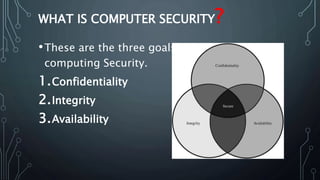
•These are the three goals in
computing Security.
1.Confidentiality
2.Integrity
3.Availability
THREE GOALS IN COMPUTING SECURITY
•Confidentiality: ensures that computer-related
assets are accessed only by authorized parties.
Confidentiality is sometimes
called secrecy or privacy.
•Integrity: it means that assets can be modified
only by authorized parties or only in authorized
ways.
•Availability: it means that assets are accessible
THREE GOALS IN COMPUTING SECURITY
•One of the challenges in building
a secure system is finding the right balance
among the goals, which often conflict.
VULNERABILITY
•Vulnerability is a weakness in the security
system.
•Weaknesses can appear in any element of a
computer, both in the hardware, operating
system, and the software.
The types of vulnerabilities we might find as
they apply to the assets of hardware, software,
and data.
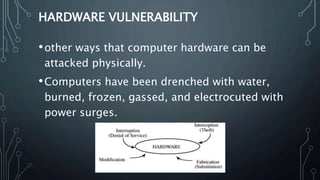
•These three assets and the connections among
HARDWARE VULNERABILITY
•Hardware is more visible than software, largely
because it is composed of physical objects.
•it is rather simple to attack by adding devices,
changing them, removing them, intercepting the
traffic to them, or flooding them with traffic
until they can no longer function.
HARDWARE VULNERABILITY
•other ways that computer hardware can be
attacked physically.
•Computers have been drenched with water,
burned, frozen, gassed, and electrocuted with
power surges.
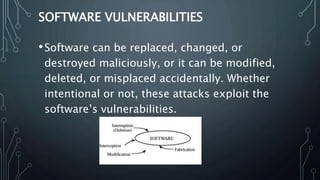
SOFTWARE VULNERABILITIES
•Software can be replaced, changed, or
destroyed maliciously, or it can be modified,
deleted, or misplaced accidentally. Whether
intentional or not, these attacks exploit the
software’s vulnerabilities.
SOFTWARE VULNERABILITIES
•Sometimes, the attacks are obvious, as when
the software no longer runs. More subtle are
attacks in which the software has been altered
but seems to run normally.
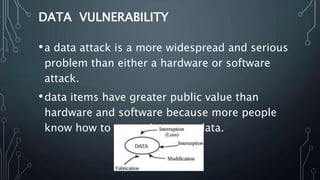
DATA VULNERABILITY
•a data attack is a more widespread and serious
problem than either a hardware or software
attack.
•data items have greater public value than
hardware and software because more people
know how to use or interpret data.
THREATS
•A threat to a computing system is a set of
circumstances that has the potential to cause
loss or harm.
•There are many threats to a computer system,
including human-initiated and computer-
initiated ones.
•A threat is blocked by control of a vulnerability.
•We can view any threat as being one of four
THREATS
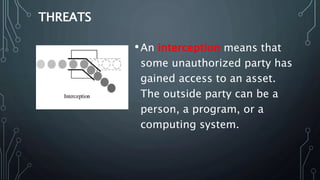
•An interception means that
some unauthorized party has
gained access to an asset.
The outside party can be a
person, a program, or a
computing system.
THREATS
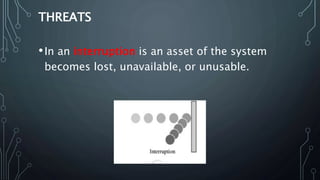
•In an interruption is an asset of the system
becomes lost, unavailable, or unusable.
THREATS
•If an unauthorized party not only accesses but
tampers with an asset, is called as
a modification.
THREATS
•An unauthorized party might create
a fabrication of counterfeit objects on a
computing system.
•The intruder may insert spurious transactions
to a network communication system or add
records to an existing database.
ATTACKS
•A human who exploits a vulnerability
perpetrates an attack on the system. An attack
can also be launched by another system, as
when one
•system sends an overwhelming set of messages
to another, virtually shutting down the second
system's ability to function.
ATTACKS
•Unfortunately, we have seen this type of attack
frequently, as denial-of-service attacks flood
servers with more messages than they can
handle.
CONTROL
•The control is an action, device, procedure or
technique that removes or reduces a
vulnerability.
•We use a control as a protective measure.
•There are so many ways to controle.
HOW TO SECURE THE COMPUTER
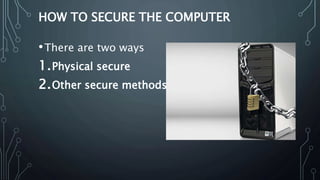
•There are two ways
1.Physical secure
2.Other secure methods
PHYSICALLY SECURE COMPUTERS
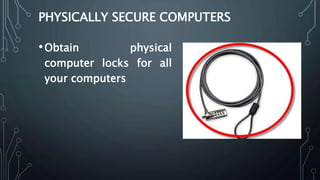
•Obtain physical
computer locks for all
your computers
PHYSICALLY SECURE COMPUTERS
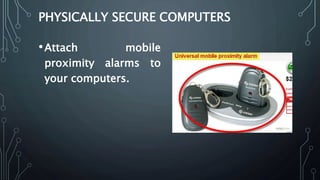
•Attach mobile
proximity alarms to
your computers.
PHYSICALLY SECURE COMPUTERS
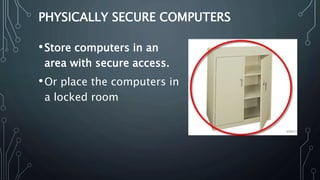
•Store computers in an
area with secure access.
•Or place the computers in
a locked room
PHYSICALLY SECURE COMPUTERS IN
YOUR COLLEGE
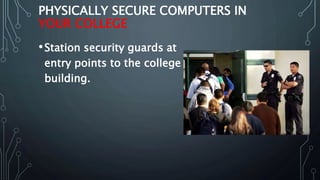
•Station security guards at
entry points to the college
building.
PHYSICALLY SECURE COMPUTERS IN
YOUR COLLEGE
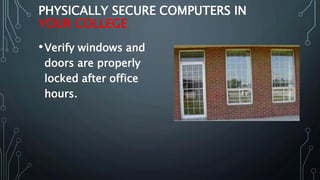
•Verify windows and
doors are properly
locked after office
hours.
SECURE THE COMPUTER
•Choose a good secured
operating system
SECURE THE COMPUTER
•Choose a web browser
based on its security and
vulnerabilities because
most malware will come
through via your web
browser
SECURE THE COMPUTER
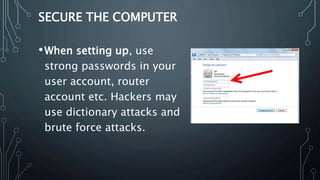
•When setting up, use
strong passwords in your
user account, router
account etc. Hackers may
use dictionary attacks and
brute force attacks.
SECURE THE COMPUTER
•When downloading
software (including
antivirus software), get it
from a trusted source
SECURE THE COMPUTER
•Install good antivirus
software because Antivirus
software is designed to
deal with modern malware
including viruses, Trojans,
key loggers, rootkits, and
worms.
SECURE THE COMPUTER
•Download and install a
firewall
SECURE THE COMPUTER
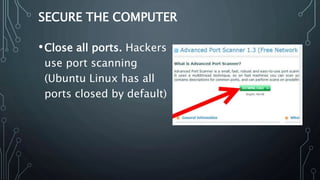
•Close all ports. Hackers
use port scanning
(Ubuntu Linux has all
ports closed by default)
SOURCES AND CITATIONS
• Security in Computing, Fourth EditionBy Charles P. Pfleeger
• http://lifehacker.com/5848296/how-do-i-keep-my-computer-secure-at-the-office
• http://it.ojp.gov/documents/asp/disciplines/section1-2.htm
• http://www.pcpro.co.uk/blogs/2011/01/21/how-to-physically-secure-your-business-
hardware/
• http://www.us-cert.gov/nav/nt01/
• http://blog.chromium.org/2008/10/new-approach-to-browser-security-google.html
• http://www.avast.com
• http://www.trendsecure.com
• http://www.lavasoft.com
• http://www.zonealarm.com
• http://www.personalfirewall.comodo.com/
• http://www.remote-exploit.org/backtrack.html
• http://www.grc.com/securitynow.htm
• http://www.hackerhighschool.org/
• http://www.symantec.com/norton/products/library/article.jsp?aid=internet_iq
THANK YOU
HAVE A SECURED
WORLD 

Basic concepts in computer security

  • 1.
    BASIC CONCEPTS IN COMPUTERSECURITY ARZATH AREEFF
  • 2.
    WHAT IS COMPUTERSECURITY? •Computer security is refers to techniques for ensuring that data stored in a computer cannot be read or compromised by any individuals without authorization. •Most computer security measures involve data encryption and passwords. •The purpose of computer security is to device ways to prevent the weaknesses from being
  • 3.
    WHAT IS COMPUTERSECURITY? •We are addressing three important aspects of any computer-related system such as confidentiality, integrity, and availability.
  • 4.
    WHAT IS COMPUTERSECURITY? •These are the three goals in computing Security. 1.Confidentiality 2.Integrity 3.Availability
  • 5.
    THREE GOALS INCOMPUTING SECURITY •Confidentiality: ensures that computer-related assets are accessed only by authorized parties. Confidentiality is sometimes called secrecy or privacy. •Integrity: it means that assets can be modified only by authorized parties or only in authorized ways. •Availability: it means that assets are accessible
  • 6.
    THREE GOALS INCOMPUTING SECURITY •One of the challenges in building a secure system is finding the right balance among the goals, which often conflict.
  • 7.
    VULNERABILITY •Vulnerability is aweakness in the security system. •Weaknesses can appear in any element of a computer, both in the hardware, operating system, and the software. The types of vulnerabilities we might find as they apply to the assets of hardware, software, and data. •These three assets and the connections among
  • 8.
    HARDWARE VULNERABILITY •Hardware ismore visible than software, largely because it is composed of physical objects. •it is rather simple to attack by adding devices, changing them, removing them, intercepting the traffic to them, or flooding them with traffic until they can no longer function.
  • 9.
    HARDWARE VULNERABILITY •other waysthat computer hardware can be attacked physically. •Computers have been drenched with water, burned, frozen, gassed, and electrocuted with power surges.
  • 10.
    SOFTWARE VULNERABILITIES •Software canbe replaced, changed, or destroyed maliciously, or it can be modified, deleted, or misplaced accidentally. Whether intentional or not, these attacks exploit the software’s vulnerabilities.
  • 11.
    SOFTWARE VULNERABILITIES •Sometimes, theattacks are obvious, as when the software no longer runs. More subtle are attacks in which the software has been altered but seems to run normally.
  • 12.
    DATA VULNERABILITY •a dataattack is a more widespread and serious problem than either a hardware or software attack. •data items have greater public value than hardware and software because more people know how to use or interpret data.
  • 13.
    THREATS •A threat toa computing system is a set of circumstances that has the potential to cause loss or harm. •There are many threats to a computer system, including human-initiated and computer- initiated ones. •A threat is blocked by control of a vulnerability. •We can view any threat as being one of four
  • 14.
    THREATS •An interception meansthat some unauthorized party has gained access to an asset. The outside party can be a person, a program, or a computing system.
  • 15.
    THREATS •In an interruptionis an asset of the system becomes lost, unavailable, or unusable.
  • 16.
    THREATS •If an unauthorizedparty not only accesses but tampers with an asset, is called as a modification.
  • 17.
    THREATS •An unauthorized partymight create a fabrication of counterfeit objects on a computing system. •The intruder may insert spurious transactions to a network communication system or add records to an existing database.
  • 18.
    ATTACKS •A human whoexploits a vulnerability perpetrates an attack on the system. An attack can also be launched by another system, as when one •system sends an overwhelming set of messages to another, virtually shutting down the second system's ability to function.
  • 19.
    ATTACKS •Unfortunately, we haveseen this type of attack frequently, as denial-of-service attacks flood servers with more messages than they can handle.
  • 20.
    CONTROL •The control isan action, device, procedure or technique that removes or reduces a vulnerability. •We use a control as a protective measure. •There are so many ways to controle.
  • 21.
    HOW TO SECURETHE COMPUTER •There are two ways 1.Physical secure 2.Other secure methods
  • 22.
    PHYSICALLY SECURE COMPUTERS •Obtainphysical computer locks for all your computers
  • 23.
    PHYSICALLY SECURE COMPUTERS •Attachmobile proximity alarms to your computers.
  • 24.
    PHYSICALLY SECURE COMPUTERS •Storecomputers in an area with secure access. •Or place the computers in a locked room
  • 25.
    PHYSICALLY SECURE COMPUTERSIN YOUR COLLEGE •Station security guards at entry points to the college building.
  • 26.
    PHYSICALLY SECURE COMPUTERSIN YOUR COLLEGE •Verify windows and doors are properly locked after office hours.
  • 27.
    SECURE THE COMPUTER •Choosea good secured operating system
  • 28.
    SECURE THE COMPUTER •Choosea web browser based on its security and vulnerabilities because most malware will come through via your web browser
  • 29.
    SECURE THE COMPUTER •Whensetting up, use strong passwords in your user account, router account etc. Hackers may use dictionary attacks and brute force attacks.
  • 30.
    SECURE THE COMPUTER •Whendownloading software (including antivirus software), get it from a trusted source
  • 31.
    SECURE THE COMPUTER •Installgood antivirus software because Antivirus software is designed to deal with modern malware including viruses, Trojans, key loggers, rootkits, and worms.
  • 32.
    SECURE THE COMPUTER •Downloadand install a firewall
  • 33.
    SECURE THE COMPUTER •Closeall ports. Hackers use port scanning (Ubuntu Linux has all ports closed by default)
  • 34.
    SOURCES AND CITATIONS •Security in Computing, Fourth EditionBy Charles P. Pfleeger • http://lifehacker.com/5848296/how-do-i-keep-my-computer-secure-at-the-office • http://it.ojp.gov/documents/asp/disciplines/section1-2.htm • http://www.pcpro.co.uk/blogs/2011/01/21/how-to-physically-secure-your-business- hardware/ • http://www.us-cert.gov/nav/nt01/ • http://blog.chromium.org/2008/10/new-approach-to-browser-security-google.html • http://www.avast.com • http://www.trendsecure.com • http://www.lavasoft.com • http://www.zonealarm.com • http://www.personalfirewall.comodo.com/ • http://www.remote-exploit.org/backtrack.html • http://www.grc.com/securitynow.htm • http://www.hackerhighschool.org/ • http://www.symantec.com/norton/products/library/article.jsp?aid=internet_iq
  • 35.
    THANK YOU HAVE ASECURED WORLD 

Editor's Notes

  • #23 keep laptop and desktop computers properly secured to desks.
  • #24 Proximity alarms will alert you when equipment is removed outside of a specific radius.
  • #25 This may prevent unauthorized persons or visitors from stealing computers and other equipment.
  • #26 Enforce a rule that requires all visitors to remain in the lobby or to sign a visitor log that requires them to provide identification.
  • #27 This can help prevent theft or burglary from occurring.