EngMahmoud Hussein
Introduction
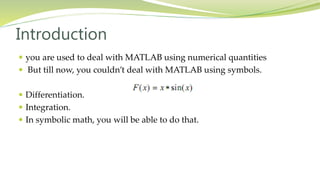
 you are used to deal with MATLAB using numerical quantities
 But till now, you couldn’t deal with MATLAB using symbols.
 Differentiation.
 Integration.
 In symbolic math, you will be able to do that.
Creating symbolic variables
 The sym command lets you construct symbolic variables and
expressions.
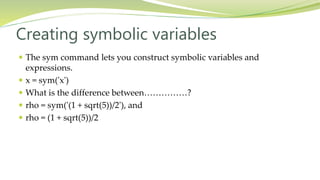
 x = sym('x')
 What is the difference between……………?
 rho = sym('(1 + sqrt(5))/2'), and
 rho = (1 + sqrt(5))/2
Creating Symbolic Expression
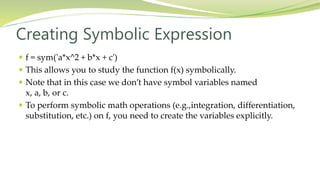
 f = sym('a*x^2 + b*x + c')
 This allows you to study the function f(x) symbolically.
 Note that in this case we don’t have symbol variables named
x, a, b, or c.
 To perform symbolic math operations (e.g.,integration, differentiation,
substitution, etc.) on f, you need to create the variables explicitly.
Creating Symbolic Expression
 To create the variables explicitly.
 a = sym('a')
 b = sym('b')
 c = sym('c')
 x = sym('x')
 Simply, syms a b c x
 Syms: requires less typing.
 Then enter: f = sym('a*x^2 + b*x + c')
 or simply: f = a*x^2 + b*x + c
Example
 syms a b
 f = a + b
 returns f = a+b
 If you then enter
 syms f
 Write: f
 MATLAB returns f = f
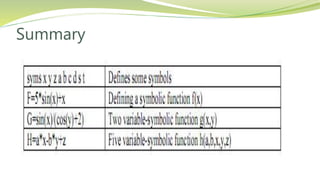
Summary
Operations on Symbolic Math
The findsym Command
 To determine what symbolic variables are present in an expression,
 Use the findsym command.
 Example:
 syms a b n t x z
 f = x^n;
 findsym(f)
The default symbolic variables
 The default variable for MATLAB is x.
 But if we don’t have a variable x, we can use the findsym command to
get the default variable.
 Example:
 syms s t
 g = s + t;
 findsym(g,1)
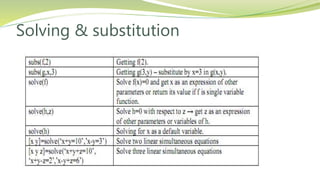
Solving & substitution
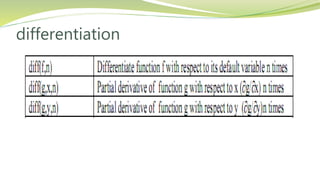
differentiation
Example
 Try this:
 syms x y
 f = sin(5*x)
 diff(f,2) ?
 g = exp(x)*cos(y)
 diff(g) ?
Solving Differential equation
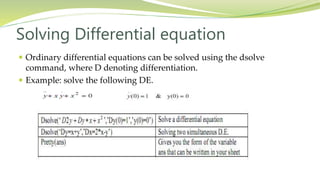
 Ordinary differential equations can be solved using the dsolve
command, where D denoting differentiation.
 Example: solve the following DE.
Exercise
 Solve the following DE:
 Dy = - a*y
 Where y(0) = 1
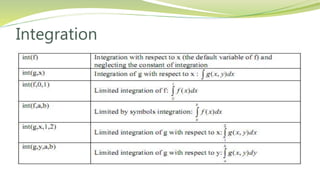
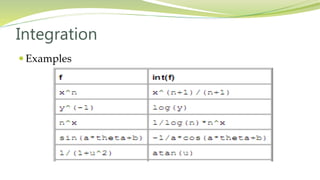
Integration
Integration
 Examples
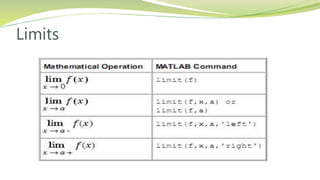
Limits
Limits
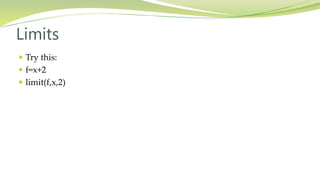
 Try this:
 f=x+2
 limit(f,x,2)
Limits
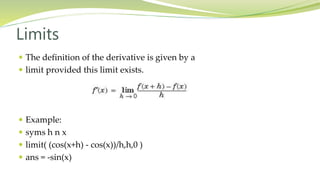
 The definition of the derivative is given by a
 limit provided this limit exists.
 Example:
 syms h n x
 limit( (cos(x+h) - cos(x))/h,h,0 )
 ans = -sin(x)
Symbolic summation
 You can compute symbolic summations,when they exist, by using the
symsum command.
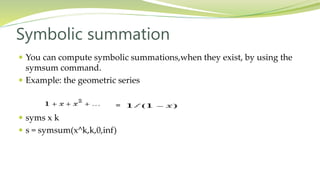
 Example: the geometric series
=
 syms x k
 s = symsum(x^k,k,0,inf)
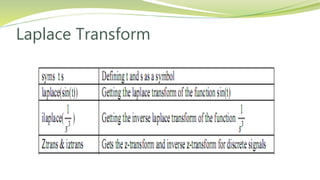
Laplace Transform
Plotting symbolic functions
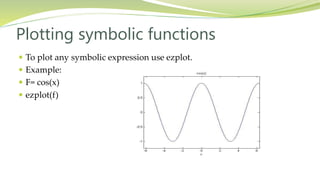
 To plot any symbolic expression use ezplot.
 Example:
 F= cos(x)
 ezplot(f)
Symbolic simplification
 Simplify
 Collect
 Expand
 Horner
 Factor
Simplify
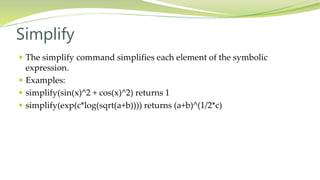
 The simplify command simplifies each element of the symbolic
expression.
 Examples:
 simplify(sin(x)^2 + cos(x)^2) returns 1
 simplify(exp(c*log(sqrt(a+b)))) returns (a+b)^(1/2*c)
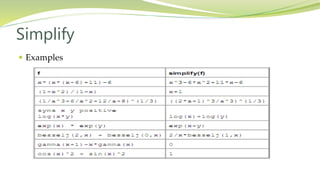
Simplify
 Examples
Collect
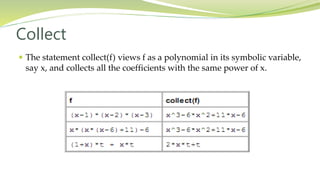
 The statement collect(f) views f as a polynomial in its symbolic variable,
say x, and collects all the coefficients with the same power of x.
Expand
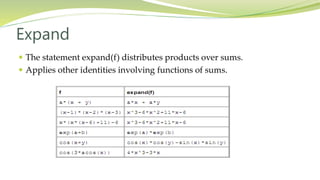
 The statement expand(f) distributes products over sums.
 Applies other identities involving functions of sums.
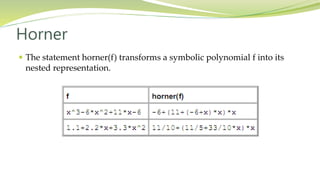
Horner
 The statement horner(f) transforms a symbolic polynomial f into its
nested representation.
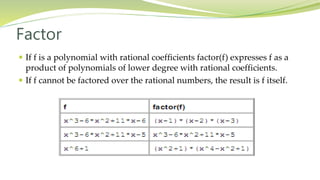
Factor
 If f is a polynomial with rational coefficients factor(f) expresses f as a
product of polynomials of lower degree with rational coefficients.
 If f cannot be factored over the rational numbers, the result is f itself.

Lectue five

  • 1.
  • 3.
    Introduction  you areused to deal with MATLAB using numerical quantities  But till now, you couldn’t deal with MATLAB using symbols.  Differentiation.  Integration.  In symbolic math, you will be able to do that.
  • 4.
    Creating symbolic variables The sym command lets you construct symbolic variables and expressions.  x = sym('x')  What is the difference between……………?  rho = sym('(1 + sqrt(5))/2'), and  rho = (1 + sqrt(5))/2
  • 5.
    Creating Symbolic Expression f = sym('a*x^2 + b*x + c')  This allows you to study the function f(x) symbolically.  Note that in this case we don’t have symbol variables named x, a, b, or c.  To perform symbolic math operations (e.g.,integration, differentiation, substitution, etc.) on f, you need to create the variables explicitly.
  • 6.
    Creating Symbolic Expression To create the variables explicitly.  a = sym('a')  b = sym('b')  c = sym('c')  x = sym('x')  Simply, syms a b c x  Syms: requires less typing.  Then enter: f = sym('a*x^2 + b*x + c')  or simply: f = a*x^2 + b*x + c
  • 7.
    Example  syms ab  f = a + b  returns f = a+b  If you then enter  syms f  Write: f  MATLAB returns f = f
  • 8.
  • 9.
  • 10.
    The findsym Command To determine what symbolic variables are present in an expression,  Use the findsym command.  Example:  syms a b n t x z  f = x^n;  findsym(f)
  • 11.
    The default symbolicvariables  The default variable for MATLAB is x.  But if we don’t have a variable x, we can use the findsym command to get the default variable.  Example:  syms s t  g = s + t;  findsym(g,1)
  • 12.
  • 13.
  • 14.
    Example  Try this: syms x y  f = sin(5*x)  diff(f,2) ?  g = exp(x)*cos(y)  diff(g) ?
  • 15.
    Solving Differential equation Ordinary differential equations can be solved using the dsolve command, where D denoting differentiation.  Example: solve the following DE.
  • 16.
    Exercise  Solve thefollowing DE:  Dy = - a*y  Where y(0) = 1
  • 17.
  • 18.
  • 19.
  • 20.
    Limits  Try this: f=x+2  limit(f,x,2)
  • 21.
    Limits  The definitionof the derivative is given by a  limit provided this limit exists.  Example:  syms h n x  limit( (cos(x+h) - cos(x))/h,h,0 )  ans = -sin(x)
  • 22.
    Symbolic summation  Youcan compute symbolic summations,when they exist, by using the symsum command.  Example: the geometric series =  syms x k  s = symsum(x^k,k,0,inf)
  • 23.
  • 24.
    Plotting symbolic functions To plot any symbolic expression use ezplot.  Example:  F= cos(x)  ezplot(f)
  • 25.
    Symbolic simplification  Simplify Collect  Expand  Horner  Factor
  • 26.
    Simplify  The simplifycommand simplifies each element of the symbolic expression.  Examples:  simplify(sin(x)^2 + cos(x)^2) returns 1  simplify(exp(c*log(sqrt(a+b)))) returns (a+b)^(1/2*c)
  • 27.
  • 28.
    Collect  The statementcollect(f) views f as a polynomial in its symbolic variable, say x, and collects all the coefficients with the same power of x.
  • 29.
    Expand  The statementexpand(f) distributes products over sums.  Applies other identities involving functions of sums.
  • 30.
    Horner  The statementhorner(f) transforms a symbolic polynomial f into its nested representation.
  • 31.
    Factor  If fis a polynomial with rational coefficients factor(f) expresses f as a product of polynomials of lower degree with rational coefficients.  If f cannot be factored over the rational numbers, the result is f itself.