SYMBOLIC MATH
Introduction
o Many applications in math, science, and engineering
require symbolic operations, which are mathematical
operations with expressions that contain symbolic variables
(variables that don’t have specific numerical values when
the operation is executed)
o Simple examples are solving an algebraic equation,
analytical differentiation or integration of mathematical
expressions
Cont. ..
o The starting point for symbolic operations is symbolic
objects
o Symbolic objects are made of variables and numbers that,
when used in mathematical expressions, tell MATLAB to
execute the expression symbolically
o Typically, the user first defines (creates) the symbolic
variables (objects) that are needed, and then uses them to
create symbolic expressions
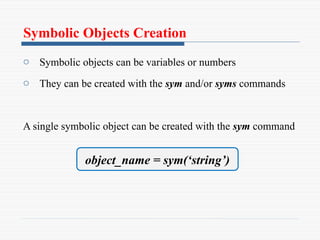
Symbolic Objects Creation
o Symbolic objects can be variables or numbers
o They can be created with the sym and/or syms commands
A single symbolic object can be created with the sym command
object_name = sym(‘string’)
Cont. ..
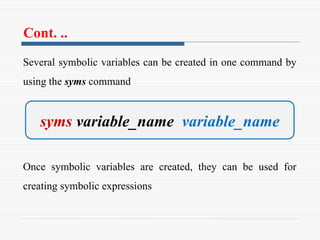
Several symbolic variables can be created in one command by
using the syms command
Once symbolic variables are created, they can be used for
creating symbolic expressions
syms variable_name variable_name
Creating Symbolic Expressions
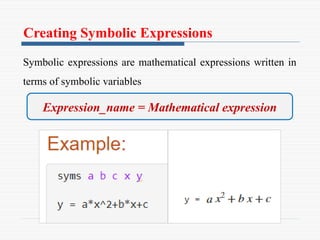
Symbolic expressions are mathematical expressions written in
terms of symbolic variables
Expression_name = Mathematical expression
Note !!
o Symbolic expressions can include numerical variables that
have been obtained from the execution of numerical
expressions
o When these variables are inserted in symbolic expressions
their exact value is used, even if the variable was displayed
before with an approximated value
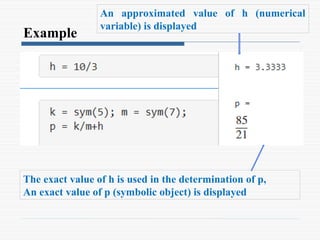
Example
An approximated value of h (numerical
variable) is displayed
The exact value of h is used in the determination of p,
An exact value of p (symbolic object) is displayed
Cont. ..
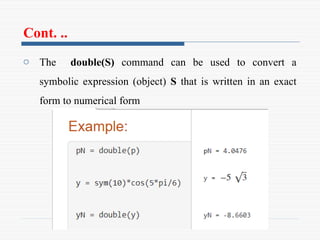
o The double(S) command can be used to convert a
symbolic expression (object) S that is written in an exact
form to numerical form
Cont. ..
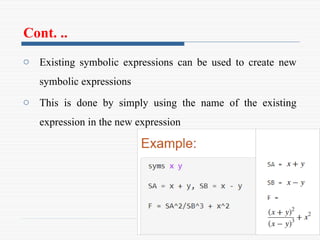
o Existing symbolic expressions can be used to create new
symbolic expressions
o This is done by simply using the name of the existing
expression in the new expression
CHANGING THE FORM OF AN
EXISTING SYMBOLIC EXPRESSION
o Symbolic expressions are either created by the user or by
MATLAB as the result of symbolic operations
o The expressions created by MATLAB might not be in the
simplest form or in a form that the user prefers
o The form of an existing symbolic expression can be
changed by collecting terms with the same power, by
expanding products, by factoring out common multipliers,
by using mathematical and trigonometric identities
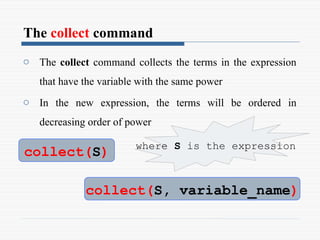
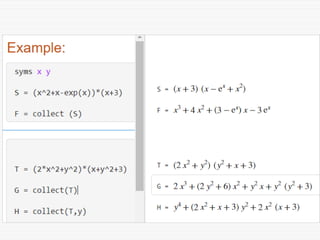
The collect command
o The collect command collects the terms in the expression
that have the variable with the same power
o In the new expression, the terms will be ordered in
decreasing order of power
collect(S)
collect(S, variable_name)
where S is the expression
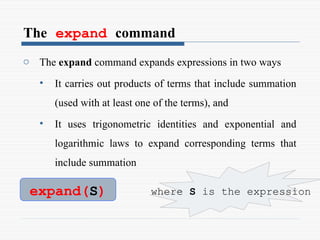
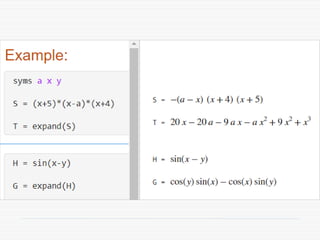
The expand command
o The expand command expands expressions in two ways
• It carries out products of terms that include summation
(used with at least one of the terms), and
• It uses trigonometric identities and exponential and
logarithmic laws to expand corresponding terms that
include summation
expand(S) where S is the expression
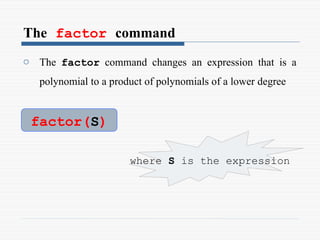
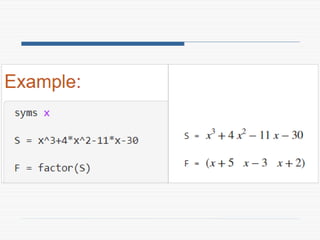
The factor command
o The factor command changes an expression that is a
polynomial to a product of polynomials of a lower degree
factor(S)
where S is the expression
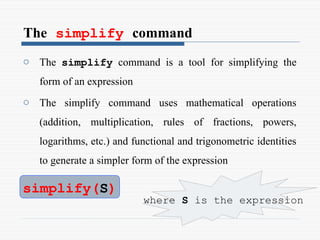
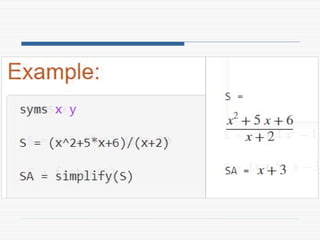
The simplify command
o The simplify command is a tool for simplifying the
form of an expression
o The simplify command uses mathematical operations
(addition, multiplication, rules of fractions, powers,
logarithms, etc.) and functional and trigonometric identities
to generate a simpler form of the expression
simplify(S)
where S is the expression
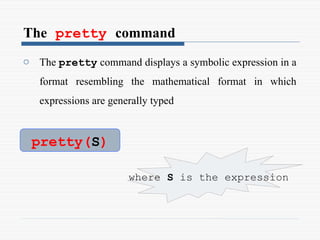
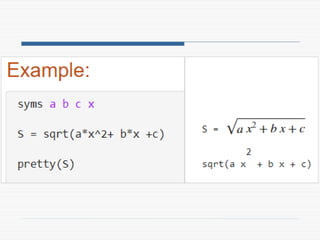
The pretty command
o The pretty command displays a symbolic expression in a
format resembling the mathematical format in which
expressions are generally typed
pretty(S)
where S is the expression
SOLVING ALGEBRAIC EQUATIONS
o A single algebraic equation can be solved for
• one variable, and
• a system of equations can be solved for several
variables with the solve function.
Solving a single equation
o An algebraic equation can have one or several symbolic
variables
• If the equation has one variable, the solution is
numerical
• If the equation has several symbolic variables, a
solution can be obtained for any of the variables in
terms of the others
o The solution is obtained by using the solve command
Cont. ..
o The argument eq can be the name of a previously created
symbolic expression, or an expression that is typed in
o When a previously created symbolic expression S is
entered for eq, or when an expression that does not contain
the = sign is typed in for eq, MATLAB solves the
equation eq = 0
h = solve(eq) h = solve(eq,var)
Cont. ..
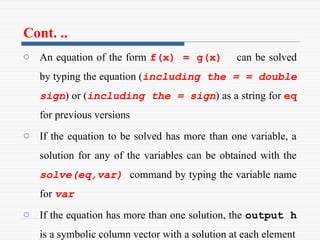
o An equation of the form f(x) = g(x) can be solved
by typing the equation (including the = = double
sign) or (including the = sign) as a string for eq
for previous versions
o If the equation to be solved has more than one variable, a
solution for any of the variables can be obtained with the
solve(eq,var) command by typing the variable name
for var
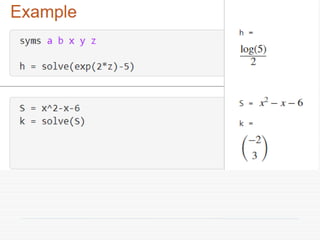
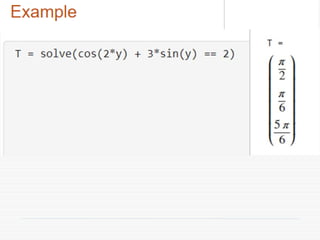
o If the equation has more than one solution, the output h
is a symbolic column vector with a solution at each element
Differentiation
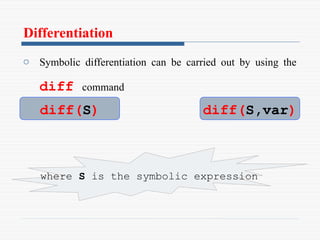
o Symbolic differentiation can be carried out by using the
diff command
diff(S)
where S is the symbolic expression
diff(S,var)
Cont. ..
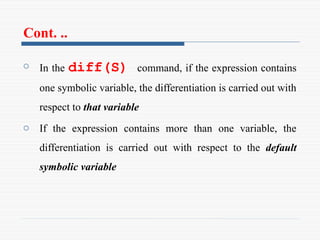
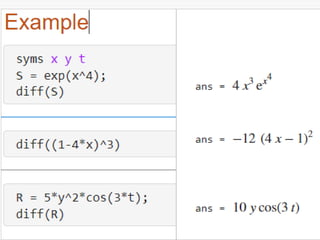
o In the diff(S) command, if the expression contains
one symbolic variable, the differentiation is carried out with
respect to that variable
o If the expression contains more than one variable, the
differentiation is carried out with respect to the default
symbolic variable
Cont. ..
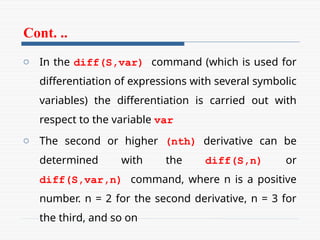
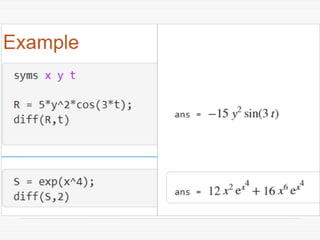
o In the diff(S,var) command (which is used for
differentiation of expressions with several symbolic
variables) the differentiation is carried out with
respect to the variable var
o The second or higher (nth) derivative can be
determined with the diff(S,n) or
diff(S,var,n) command, where n is a positive
number. n = 2 for the second derivative, n = 3 for
the third, and so on
Integration
o Symbolic integration can be carried out by using the int
command
o The com- mand can be used for determining
indefinite integrals (antiderivatives) and definite
integrals
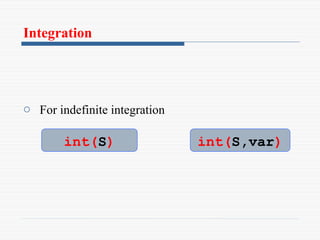
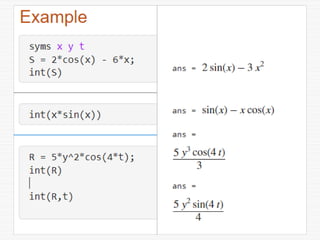
Integration
o For indefinite integration
int(S) int(S,var)
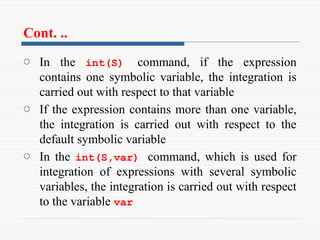
Cont. ..
o In the int(S) command, if the expression
contains one symbolic variable, the integration is
carried out with respect to that variable
o If the expression contains more than one variable,
the integration is carried out with respect to the
default symbolic variable
o In the int(S,var) command, which is used for
integration of expressions with several symbolic
variables, the integration is carried out with respect
to the variable var
Integration
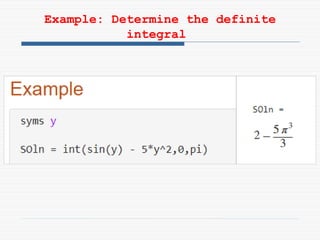
o For definite integration
 a and b are limits of integration
 The limits can be numbers of symbolic
variables
int(S,a,b) int(S,var,a,b)
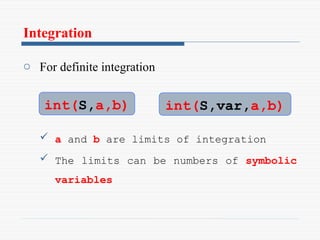
Example: Determine the definite
integral
Solving an Ordinary Differential Equation
o An ordinary differential equation (ODE) can be solved
symbolically with the dsolve command
o The command can be used to solve a single equation or a
system of equations
o Only single equations are addressed here
o The reader’s familiarity with the subject of differential
equations is assumed
Cont. ..
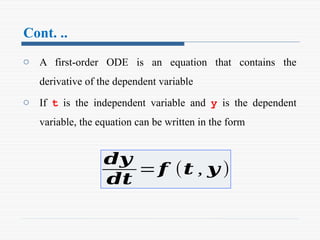
o A first-order ODE is an equation that contains the
derivative of the dependent variable
o If t is the independent variable and y is the dependent
variable, the equation can be written in the form
𝒅𝒚
𝒅𝒕
=𝒇 (𝒕 , 𝒚 )
Cont. ..
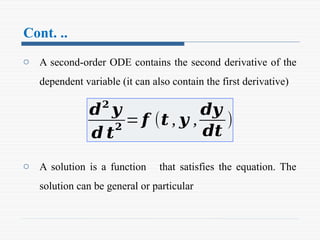
o A second-order ODE contains the second derivative of the
dependent variable (it can also contain the first derivative)
o A solution is a function that satisfies the equation. The
solution can be general or particular
𝒅𝟐
𝒚
𝒅 𝒕
𝟐
= 𝒇 (𝒕 , 𝒚 ,
𝒅𝒚
𝒅𝒕
)
Cont. ..
o A general solution contains constants
o In a particular solution the constants are determined to have
specific numerical values such that the solution satisfies
specific initial or boundary conditions
o The command dsolve can be used for obtaining a general
solution or, when the initial or boundary conditions are
specified, for obtaining a particular solution
Cont. ..
A general solution:
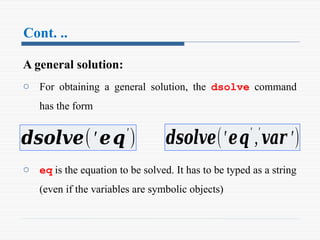
o For obtaining a general solution, the dsolve command
has the form
o eq is the equation to be solved. It has to be typed as a string
(even if the variables are symbolic objects)
𝒅𝒔𝒐𝒍𝒗𝒆(′𝒆𝒒′
) 𝒅𝒔𝒐𝒍𝒗𝒆(′𝒆𝒒′
,′
𝒗𝒂𝒓 ′)
Cont. ..
o The variables in the equation don’t have to first be created
as symbolic objects. (If they have not been created, then, in
the solution the variables will not be symbolic objects.)
o Any letter (lowercase or uppercase), except D can be used
for the dependent variable
o In the dsolve(‘eq’) command the independent
variable is assumed by MATLAB to be t (default)
Cont. ..
o In the dsolve(‘eq’,‘var’) command the user
defines the independent variable by typing it for var (as a
string)
o In specifying the equation the letter D denotes
differentiation
o If y is the dependent variable and t is the independent
variable Dy stands for
Cont. ..
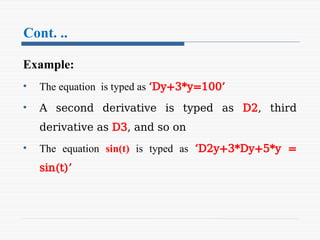
Example:
• The equation is typed as ‘Dy+3*y=100’
• A second derivative is typed as D2, third
derivative as D3, and so on
• The equation sin(t) is typed as ‘D2y+3*Dy+5*y =
sin(t)’
Cont. ..
o The variables in the ODE equation that is typed in the
dsolve command do not have to be previously created
symbolic variables
o In the solution MATLAB uses C1, C2, C3,
and so on, for the constants of integration
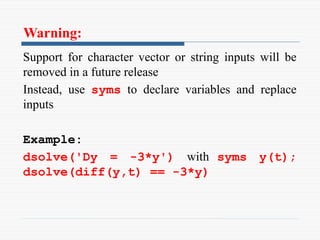
Warning:
Support for character vector or string inputs will be
removed in a future release
Instead, use syms to declare variables and replace
inputs
Example:
dsolve('Dy = -3*y') with syms y(t);
dsolve(diff(y,t) == -3*y)
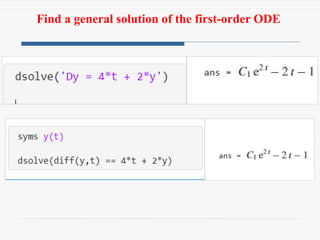
Find a general solution of the first-order ODE
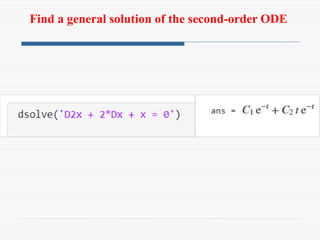
Find a general solution of the second-order ODE
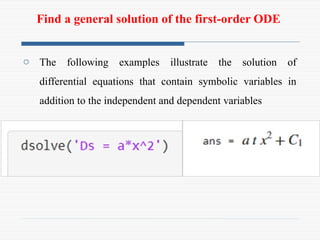
Find a general solution of the first-order ODE
o The following examples illustrate the solution of
differential equations that contain symbolic variables in
addition to the independent and dependent variables
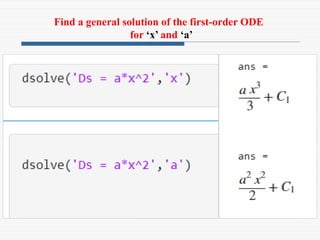
Find a general solution of the first-order ODE
for ‘x’ and ‘a’
Cont. ..
Particular solution:
o A particular solution of an ODE can be obtained if
boundary (or initial) conditions are specified
o A first-order equation requires one condition, a second-
order equation requires two conditions, and so on
Cont. ..
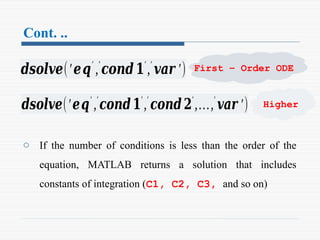
o If the number of conditions is less than the order of the
equation, MATLAB returns a solution that includes
constants of integration (C1, C2, C3, and so on)
𝒅𝒔𝒐𝒍𝒗𝒆(′𝒆𝒒′
,′
𝒄𝒐𝒏𝒅𝟏′
,′
𝒗𝒂𝒓 ′)
𝒅𝒔𝒐𝒍𝒗𝒆(′𝒆𝒒′
,′
𝒄𝒐𝒏𝒅𝟏′
,′
𝒄𝒐𝒏𝒅𝟐′
,…,′
𝒗𝒂𝒓 ′)
First – Order ODE
Higher
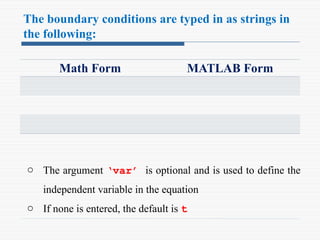
The boundary conditions are typed in as strings in
the following:
Math Form MATLAB Form
o The argument ‘var’ is optional and is used to define the
independent variable in the equation
o If none is entered, the default is t
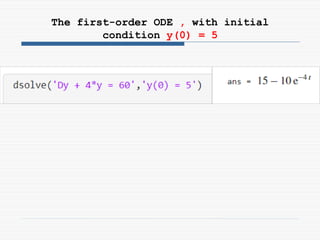
The first-order ODE , with initial
condition y(0) = 5
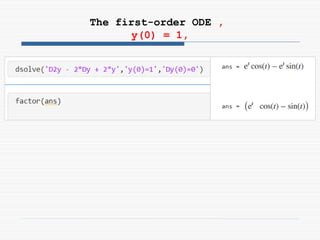
The first-order ODE ,
y(0) = 1,
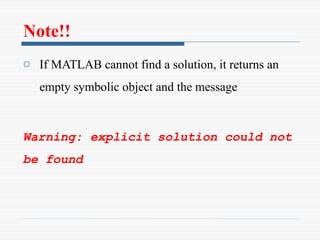
Note!!
o If MATLAB cannot find a solution, it returns an
empty symbolic object and the message
Warning: explicit solution could not
be found
PLOTTING SYMBOLIC EXPRESSIONS
Introduction
o In many cases, there is a need to plot a symbolic expression
o This can easily be done with the ezplot command
o For a symbolic expression S that contains one variable
var, MATLAB considers the expression to be a function
S(var) , and the command creates a plot of versus var
Cont. ..
o For a symbolic expression that contains two symbolic
variables var1 and var2
- MATLAB considers the expression to be a function in
the form S(var1,var2) = 0 , and the command
creates a plot of one variable versus the other
Cont. ..
o To plot a symbolic expression S that contains one or two
variables the ezplot command
ezplot(S)
ezplot(S,[min,max])
ezplot(S,[xmin,xmax,ymin.ymax])
Cont. ..
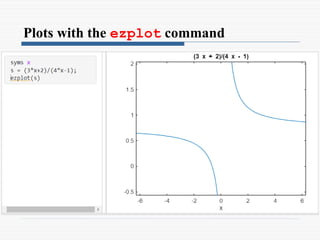
o In the ezplot(S) command, if S has one variable
S(var ), the plot is over the domain (default
domain) and the range is selected by MATLAB
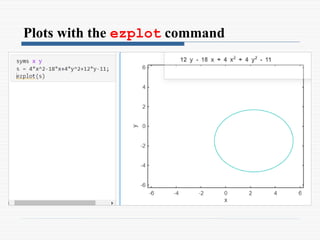
o If S has two variables S(var1,var2 ), the plot
is over and
Cont. ..
o In the ezplot(S) command, if S has one variable
S(var ), the plot is over the domain (default
domain) and the range is selected by MATLAB
o If S has two variables S(var1,var2 ), the plot
is over and
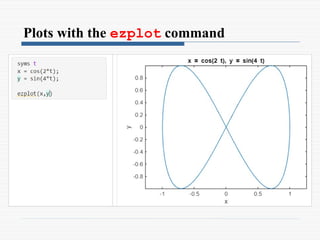
Plots with the ezplot command
Cont. ..
o The ezplot command can also be used to plot a function
that is given in a parametric form
o In this case two symbolic expressions, S1 and S2, are
involved, where each expression is written in terms of the
same symbolic variable (independent parameter)
ezplot(S1,S2)
ezplot(S1,S2,[min,max])
Cont. ..
o The ezplot command can also be used to plot a function
that is given in a parametric form
o In this case two symbolic expressions, S1 and S2, are
involved, where each expression is written in terms of the
same symbolic variable (independent parameter)
o In the ezplot(S1,S2) command the domain of the
independent variable is (default domain)
Plots with the ezplot command

9_Symbolic Math in MATLAB for Engineers.pptx

  • 1.
  • 2.
    Introduction o Many applicationsin math, science, and engineering require symbolic operations, which are mathematical operations with expressions that contain symbolic variables (variables that don’t have specific numerical values when the operation is executed) o Simple examples are solving an algebraic equation, analytical differentiation or integration of mathematical expressions
  • 3.
    Cont. .. o Thestarting point for symbolic operations is symbolic objects o Symbolic objects are made of variables and numbers that, when used in mathematical expressions, tell MATLAB to execute the expression symbolically o Typically, the user first defines (creates) the symbolic variables (objects) that are needed, and then uses them to create symbolic expressions
  • 4.
    Symbolic Objects Creation oSymbolic objects can be variables or numbers o They can be created with the sym and/or syms commands A single symbolic object can be created with the sym command object_name = sym(‘string’)
  • 5.
    Cont. .. Several symbolicvariables can be created in one command by using the syms command Once symbolic variables are created, they can be used for creating symbolic expressions syms variable_name variable_name
  • 6.
    Creating Symbolic Expressions Symbolicexpressions are mathematical expressions written in terms of symbolic variables Expression_name = Mathematical expression
  • 7.
    Note !! o Symbolicexpressions can include numerical variables that have been obtained from the execution of numerical expressions o When these variables are inserted in symbolic expressions their exact value is used, even if the variable was displayed before with an approximated value
  • 8.
    Example An approximated valueof h (numerical variable) is displayed The exact value of h is used in the determination of p, An exact value of p (symbolic object) is displayed
  • 9.
    Cont. .. o Thedouble(S) command can be used to convert a symbolic expression (object) S that is written in an exact form to numerical form
  • 10.
    Cont. .. o Existingsymbolic expressions can be used to create new symbolic expressions o This is done by simply using the name of the existing expression in the new expression
  • 11.
    CHANGING THE FORMOF AN EXISTING SYMBOLIC EXPRESSION o Symbolic expressions are either created by the user or by MATLAB as the result of symbolic operations o The expressions created by MATLAB might not be in the simplest form or in a form that the user prefers o The form of an existing symbolic expression can be changed by collecting terms with the same power, by expanding products, by factoring out common multipliers, by using mathematical and trigonometric identities
  • 12.
    The collect command oThe collect command collects the terms in the expression that have the variable with the same power o In the new expression, the terms will be ordered in decreasing order of power collect(S) collect(S, variable_name) where S is the expression
  • 14.
    The expand command oThe expand command expands expressions in two ways • It carries out products of terms that include summation (used with at least one of the terms), and • It uses trigonometric identities and exponential and logarithmic laws to expand corresponding terms that include summation expand(S) where S is the expression
  • 16.
    The factor command oThe factor command changes an expression that is a polynomial to a product of polynomials of a lower degree factor(S) where S is the expression
  • 18.
    The simplify command oThe simplify command is a tool for simplifying the form of an expression o The simplify command uses mathematical operations (addition, multiplication, rules of fractions, powers, logarithms, etc.) and functional and trigonometric identities to generate a simpler form of the expression simplify(S) where S is the expression
  • 20.
    The pretty command oThe pretty command displays a symbolic expression in a format resembling the mathematical format in which expressions are generally typed pretty(S) where S is the expression
  • 22.
    SOLVING ALGEBRAIC EQUATIONS oA single algebraic equation can be solved for • one variable, and • a system of equations can be solved for several variables with the solve function.
  • 23.
    Solving a singleequation o An algebraic equation can have one or several symbolic variables • If the equation has one variable, the solution is numerical • If the equation has several symbolic variables, a solution can be obtained for any of the variables in terms of the others o The solution is obtained by using the solve command
  • 24.
    Cont. .. o Theargument eq can be the name of a previously created symbolic expression, or an expression that is typed in o When a previously created symbolic expression S is entered for eq, or when an expression that does not contain the = sign is typed in for eq, MATLAB solves the equation eq = 0 h = solve(eq) h = solve(eq,var)
  • 25.
    Cont. .. o Anequation of the form f(x) = g(x) can be solved by typing the equation (including the = = double sign) or (including the = sign) as a string for eq for previous versions o If the equation to be solved has more than one variable, a solution for any of the variables can be obtained with the solve(eq,var) command by typing the variable name for var o If the equation has more than one solution, the output h is a symbolic column vector with a solution at each element
  • 28.
    Differentiation o Symbolic differentiationcan be carried out by using the diff command diff(S) where S is the symbolic expression diff(S,var)
  • 29.
    Cont. .. o Inthe diff(S) command, if the expression contains one symbolic variable, the differentiation is carried out with respect to that variable o If the expression contains more than one variable, the differentiation is carried out with respect to the default symbolic variable
  • 30.
    Cont. .. o Inthe diff(S,var) command (which is used for differentiation of expressions with several symbolic variables) the differentiation is carried out with respect to the variable var o The second or higher (nth) derivative can be determined with the diff(S,n) or diff(S,var,n) command, where n is a positive number. n = 2 for the second derivative, n = 3 for the third, and so on
  • 33.
    Integration o Symbolic integrationcan be carried out by using the int command o The com- mand can be used for determining indefinite integrals (antiderivatives) and definite integrals
  • 34.
    Integration o For indefiniteintegration int(S) int(S,var)
  • 35.
    Cont. .. o Inthe int(S) command, if the expression contains one symbolic variable, the integration is carried out with respect to that variable o If the expression contains more than one variable, the integration is carried out with respect to the default symbolic variable o In the int(S,var) command, which is used for integration of expressions with several symbolic variables, the integration is carried out with respect to the variable var
  • 37.
    Integration o For definiteintegration  a and b are limits of integration  The limits can be numbers of symbolic variables int(S,a,b) int(S,var,a,b)
  • 38.
    Example: Determine thedefinite integral
  • 39.
    Solving an OrdinaryDifferential Equation o An ordinary differential equation (ODE) can be solved symbolically with the dsolve command o The command can be used to solve a single equation or a system of equations o Only single equations are addressed here o The reader’s familiarity with the subject of differential equations is assumed
  • 40.
    Cont. .. o Afirst-order ODE is an equation that contains the derivative of the dependent variable o If t is the independent variable and y is the dependent variable, the equation can be written in the form 𝒅𝒚 𝒅𝒕 =𝒇 (𝒕 , 𝒚 )
  • 41.
    Cont. .. o Asecond-order ODE contains the second derivative of the dependent variable (it can also contain the first derivative) o A solution is a function that satisfies the equation. The solution can be general or particular 𝒅𝟐 𝒚 𝒅 𝒕 𝟐 = 𝒇 (𝒕 , 𝒚 , 𝒅𝒚 𝒅𝒕 )
  • 42.
    Cont. .. o Ageneral solution contains constants o In a particular solution the constants are determined to have specific numerical values such that the solution satisfies specific initial or boundary conditions o The command dsolve can be used for obtaining a general solution or, when the initial or boundary conditions are specified, for obtaining a particular solution
  • 43.
    Cont. .. A generalsolution: o For obtaining a general solution, the dsolve command has the form o eq is the equation to be solved. It has to be typed as a string (even if the variables are symbolic objects) 𝒅𝒔𝒐𝒍𝒗𝒆(′𝒆𝒒′ ) 𝒅𝒔𝒐𝒍𝒗𝒆(′𝒆𝒒′ ,′ 𝒗𝒂𝒓 ′)
  • 44.
    Cont. .. o Thevariables in the equation don’t have to first be created as symbolic objects. (If they have not been created, then, in the solution the variables will not be symbolic objects.) o Any letter (lowercase or uppercase), except D can be used for the dependent variable o In the dsolve(‘eq’) command the independent variable is assumed by MATLAB to be t (default)
  • 45.
    Cont. .. o Inthe dsolve(‘eq’,‘var’) command the user defines the independent variable by typing it for var (as a string) o In specifying the equation the letter D denotes differentiation o If y is the dependent variable and t is the independent variable Dy stands for
  • 46.
    Cont. .. Example: • Theequation is typed as ‘Dy+3*y=100’ • A second derivative is typed as D2, third derivative as D3, and so on • The equation sin(t) is typed as ‘D2y+3*Dy+5*y = sin(t)’
  • 47.
    Cont. .. o Thevariables in the ODE equation that is typed in the dsolve command do not have to be previously created symbolic variables o In the solution MATLAB uses C1, C2, C3, and so on, for the constants of integration
  • 48.
    Warning: Support for charactervector or string inputs will be removed in a future release Instead, use syms to declare variables and replace inputs Example: dsolve('Dy = -3*y') with syms y(t); dsolve(diff(y,t) == -3*y)
  • 49.
    Find a generalsolution of the first-order ODE
  • 50.
    Find a generalsolution of the second-order ODE
  • 51.
    Find a generalsolution of the first-order ODE o The following examples illustrate the solution of differential equations that contain symbolic variables in addition to the independent and dependent variables
  • 52.
    Find a generalsolution of the first-order ODE for ‘x’ and ‘a’
  • 53.
    Cont. .. Particular solution: oA particular solution of an ODE can be obtained if boundary (or initial) conditions are specified o A first-order equation requires one condition, a second- order equation requires two conditions, and so on
  • 54.
    Cont. .. o Ifthe number of conditions is less than the order of the equation, MATLAB returns a solution that includes constants of integration (C1, C2, C3, and so on) 𝒅𝒔𝒐𝒍𝒗𝒆(′𝒆𝒒′ ,′ 𝒄𝒐𝒏𝒅𝟏′ ,′ 𝒗𝒂𝒓 ′) 𝒅𝒔𝒐𝒍𝒗𝒆(′𝒆𝒒′ ,′ 𝒄𝒐𝒏𝒅𝟏′ ,′ 𝒄𝒐𝒏𝒅𝟐′ ,…,′ 𝒗𝒂𝒓 ′) First – Order ODE Higher
  • 55.
    The boundary conditionsare typed in as strings in the following: Math Form MATLAB Form o The argument ‘var’ is optional and is used to define the independent variable in the equation o If none is entered, the default is t
  • 56.
    The first-order ODE, with initial condition y(0) = 5
  • 57.
  • 58.
    Note!! o If MATLABcannot find a solution, it returns an empty symbolic object and the message Warning: explicit solution could not be found
  • 59.
  • 60.
    Introduction o In manycases, there is a need to plot a symbolic expression o This can easily be done with the ezplot command o For a symbolic expression S that contains one variable var, MATLAB considers the expression to be a function S(var) , and the command creates a plot of versus var
  • 61.
    Cont. .. o Fora symbolic expression that contains two symbolic variables var1 and var2 - MATLAB considers the expression to be a function in the form S(var1,var2) = 0 , and the command creates a plot of one variable versus the other
  • 62.
    Cont. .. o Toplot a symbolic expression S that contains one or two variables the ezplot command ezplot(S) ezplot(S,[min,max]) ezplot(S,[xmin,xmax,ymin.ymax])
  • 63.
    Cont. .. o Inthe ezplot(S) command, if S has one variable S(var ), the plot is over the domain (default domain) and the range is selected by MATLAB o If S has two variables S(var1,var2 ), the plot is over and
  • 64.
    Cont. .. o Inthe ezplot(S) command, if S has one variable S(var ), the plot is over the domain (default domain) and the range is selected by MATLAB o If S has two variables S(var1,var2 ), the plot is over and
  • 65.
    Plots with theezplot command
  • 66.
    Plots with theezplot command
  • 67.
    Cont. .. o Theezplot command can also be used to plot a function that is given in a parametric form o In this case two symbolic expressions, S1 and S2, are involved, where each expression is written in terms of the same symbolic variable (independent parameter) ezplot(S1,S2) ezplot(S1,S2,[min,max])
  • 68.
    Cont. .. o Theezplot command can also be used to plot a function that is given in a parametric form o In this case two symbolic expressions, S1 and S2, are involved, where each expression is written in terms of the same symbolic variable (independent parameter) o In the ezplot(S1,S2) command the domain of the independent variable is (default domain)
  • 69.
    Plots with theezplot command