LAN FundamentalsLAN Fundamentals
ETT 592
LAN Administration
Network ModelsNetwork Models
• Shared Processing
• Distributed Processing
– Peer to Peer
– Client Server
Shared ProcessingShared Processing
• Mainframe/Unix/Windows Terminal
Server environment
• All users share the same processor
• Users connect via “terminal emulation”
Peer to PeerPeer to Peer
• EASY!!!!
• CHEAP!!!!!
• Allows File and
Peripheral Sharing
• No centralized
control
• Generally insecure
• Unreliable
Client ServerClient Server
• Centralized
Management
• High Security
• Reduced client
management
• Easy backup
• Scalability
• Higher hardware
cost (dedicated
server)
• Server is failure
point
• More difficult to
manage
LAN ComponentsLAN Components
• File Server
• Application Software
• Workstations / Client OS
• NICs
• Shared Peripherals
• Data Files
• NOS
File ServerFile Server
• Central system
• Controls authentication
• Provides management of resources and
peripherals
• Often multi-processor
• Significant HD capacity
• BIG Box
• Becomes the weakest link
Application SoftwareApplication Software
• Programs that perform tasks
– Office Suites
– Database applications
WorkstationWorkstation
• Provide connection to network
• May or may not have HD
• May or may not be “dumb terminals”
• Can be running a variety of OS’s
depending on network capabilities
Workstation OSWorkstation OS
• Singletasking vs. Multitasking
– Cooperative (like kids sharing)
– Preemptive (like kids sharing with
supervision)
• Single User vs. Multi User
• Network protocol support
NICsNICs
• Network Interface Cards
• Allow physical connection between
network and the computer
• Manufactured by MANY companies.
– Buy from a major vendor
– Try to standardize
Data FilesData Files
• The most significant reason we network
today
• Provides shared, controlled access to
resources
• Provides centralized backup of
resources
Server StorageServer Storage
• HD capacity
• MTBF
• RAID 0, 1, 5
So What is RAID ???So What is RAID ???
• Redundant Array of Inexpensive Disks
• Can be done through OS or using
special SCSI controller cards
RAID 0RAID 0
• Disk Striping w/o parity
• Data written to multiple disks
• No increase in security
• Great Increase in I/O
RAID 1RAID 1
• Disk Mirroring / Duplexing
• Mirroring
– Two drives, single controller
– Redundancy, no I/O benefit
• Duplexing
– Two drives, two controllers
– Redundancy, I/O read benefit
• Storage capacity ½ of drive space
RAID 5RAID 5
• Disk Striping with Parity
• Data and parity blocks spread across all
drives
• Writes may be a bit slower
• Reads are faster
• Get redundancy
• Storage capacity is #drives-1
Shared PeripheralsShared Peripherals
• Printers
• Fax Servers
NOSNOS
• Network Operating Systems
• Windows NT
• Windows 2000
• Windows XP
• Unix / Linux
• Mac OS X
Hot SwapHot Swap
• Ability to replace parts while system is
running
– Power supplies
– HD
The weakest linkThe weakest link
• Server failure or downtime leads to
productivity loss
– Clustering prevents this
• Server failure leads to inability to authenticate
– PDC and BDC
• File retrieval is often slower
– Data files compared to application software
• Security Problems
The weakest link (cont)The weakest link (cont)
• Power Problems
– Redundant power supplies
– UPS
– Generators
How are networks builtHow are networks built
• Several components that must first be
considered.
Network TopologiesNetwork Topologies
• Bus
• Star
• Ring
• Mesh
Access TypesAccess Types
• Contention Based
– CSMA/CD
• Deterministic
– Token Passing
Cable TypesCable Types
• Coax
– RG58
• UTP
– CAT3
– CAT5
– CAT6e
• Fiber Optic
Network TypesNetwork Types
• Ethernet
– 10Base-2
– 10Base-T
– 100Base-T
• Token Ring
– Standard Token Ring
– FDDI
10Base-210Base-2
• Bus Configuration
• RG58 wire with 50ohm terminator
10Base-210Base-2
• Maximum Segment Distance 185m
(607 ft)
• Maximum network length 925m(3,035
ft)
10Base-T/ 10Base-10010Base-T/ 10Base-100
• Ethernet / Star configuration
• Category 3 UTP=10mbs
• Category 5 UTP=100mbs
10Base-T/ 10Base-10010Base-T/ 10Base-100
• Number of stations set by concentrator
• 1,024 stations per network
• 100 m to concentrator (328 ft)
Token RingToken Ring
• Token Passing Scheme
• Systems are connected to MAU
• Operate at 4 or 16mb
• Now use “Early Token Release”
• Tend to handle network load better
FDDI (Fiber DistributedFDDI (Fiber Distributed
Data Interface)Data Interface)
• Token passing scheme
• Dual counter rotating rings
• Fiber optic cable
• Class A connections are fault tolerant
• Class B connections are not fault
tolerant
How do the parts workHow do the parts work
togethertogether
• OSI Model is the theoretical basis
• No one adheres exactly to the model,
but everyone understands what it
means.
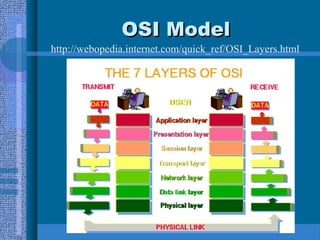
OSI ModelOSI Model
http://webopedia.internet.com/quick_ref/OSI_Layers.html
Physical LayerPhysical Layer
• Cabling, Topology
• Electrical Communications Stuff
• Cable and how it connects to the card
Data LinkData Link
• Organizes frames into structured data
packets
• 802.3 (CSMA/CD Ethernet)
• 802.5 (Token Ring)
• 802.11 (Wireless)
Network LayerNetwork Layer
• Responsible for routing data in
subnetted network
– If a transport protocol doesn’t support this
layer it is unroutable
• IP address converted to/from MAC
Address
Transport LayerTransport Layer
• Makes sure data gets from one point to
another
• Error Detection and recovery
Session LayerSession Layer
• Logical connection between network
devices
Presentation LayerPresentation Layer
• Translates data from application layer
to transmission format
• Encoding/Decoding
• ASCII, .DOC, .MPG, .JPG
Application LayerApplication Layer
• End User Software
• Email, File Transfer, Word,
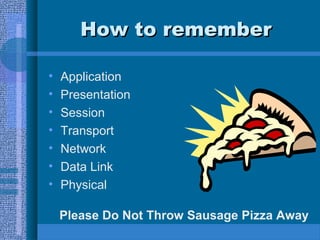
How to rememberHow to remember
• Application
• Presentation
• Session
• Transport
• Network
• Data Link
• Physical
Please Do Not Throw Sausage Pizza Away
Network GearNetwork Gear
• Hubs ( a splitter )
– OSI layer 1 (Physical)
• Switches ( an intelligent splitter )
– OSI layer 2 (Data Link)
• MAUs ( a hub for a token ring network )
– OSI layer 1 (Physical)
• Routers (moves data between networks and
subnets )
– OSI layer 3 (Network)
IP AddressingIP Addressing
• Address Classifications
• Subnetting
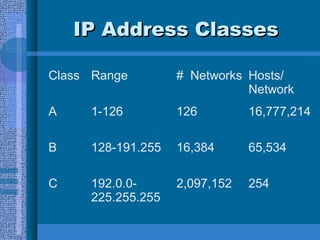
IP Address ClassesIP Address Classes
Class Range # Networks Hosts/
Network
A 1-126 126 16,777,214
B 128-191.255 16,384 65,534
C 192.0.0-
225.255.255
2,097,152 254
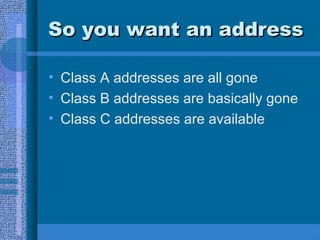
So you want an addressSo you want an address
• Class A addresses are all gone
• Class B addresses are basically gone
• Class C addresses are available
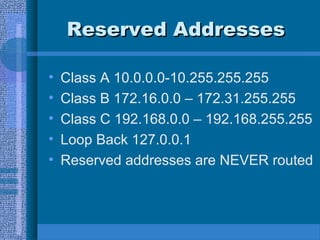
Reserved AddressesReserved Addresses
• Class A 10.0.0.0-10.255.255.255
• Class B 172.16.0.0 – 172.31.255.255
• Class C 192.168.0.0 – 192.168.255.255
• Loop Back 127.0.0.1
• Reserved addresses are NEVER routed
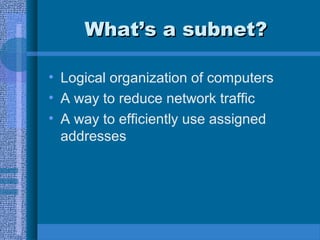
What’s a subnet?What’s a subnet?
• Logical organization of computers
• A way to reduce network traffic
• A way to efficiently use assigned
addresses
Getting an IP addressGetting an IP address
• Hard Coding
– Manual Entry of
• DNS Servers (Domain Name Services)
• Gateways (Routers)
• IP Address
• DHCP
– Dynamic Host Control Protocol
IP ConfigurationIP Configuration
ExampleExample

LAN Fundamentals

  • 1.
  • 2.
    Network ModelsNetwork Models •Shared Processing • Distributed Processing – Peer to Peer – Client Server
  • 3.
    Shared ProcessingShared Processing •Mainframe/Unix/Windows Terminal Server environment • All users share the same processor • Users connect via “terminal emulation”
  • 4.
    Peer to PeerPeerto Peer • EASY!!!! • CHEAP!!!!! • Allows File and Peripheral Sharing • No centralized control • Generally insecure • Unreliable
  • 5.
    Client ServerClient Server •Centralized Management • High Security • Reduced client management • Easy backup • Scalability • Higher hardware cost (dedicated server) • Server is failure point • More difficult to manage
  • 6.
    LAN ComponentsLAN Components •File Server • Application Software • Workstations / Client OS • NICs • Shared Peripherals • Data Files • NOS
  • 7.
    File ServerFile Server •Central system • Controls authentication • Provides management of resources and peripherals • Often multi-processor • Significant HD capacity • BIG Box • Becomes the weakest link
  • 8.
    Application SoftwareApplication Software •Programs that perform tasks – Office Suites – Database applications
  • 9.
    WorkstationWorkstation • Provide connectionto network • May or may not have HD • May or may not be “dumb terminals” • Can be running a variety of OS’s depending on network capabilities
  • 10.
    Workstation OSWorkstation OS •Singletasking vs. Multitasking – Cooperative (like kids sharing) – Preemptive (like kids sharing with supervision) • Single User vs. Multi User • Network protocol support
  • 11.
    NICsNICs • Network InterfaceCards • Allow physical connection between network and the computer • Manufactured by MANY companies. – Buy from a major vendor – Try to standardize
  • 12.
    Data FilesData Files •The most significant reason we network today • Provides shared, controlled access to resources • Provides centralized backup of resources
  • 13.
    Server StorageServer Storage •HD capacity • MTBF • RAID 0, 1, 5
  • 14.
    So What isRAID ???So What is RAID ??? • Redundant Array of Inexpensive Disks • Can be done through OS or using special SCSI controller cards
  • 15.
    RAID 0RAID 0 •Disk Striping w/o parity • Data written to multiple disks • No increase in security • Great Increase in I/O
  • 16.
    RAID 1RAID 1 •Disk Mirroring / Duplexing • Mirroring – Two drives, single controller – Redundancy, no I/O benefit • Duplexing – Two drives, two controllers – Redundancy, I/O read benefit • Storage capacity ½ of drive space
  • 17.
    RAID 5RAID 5 •Disk Striping with Parity • Data and parity blocks spread across all drives • Writes may be a bit slower • Reads are faster • Get redundancy • Storage capacity is #drives-1
  • 18.
  • 19.
    NOSNOS • Network OperatingSystems • Windows NT • Windows 2000 • Windows XP • Unix / Linux • Mac OS X
  • 20.
    Hot SwapHot Swap •Ability to replace parts while system is running – Power supplies – HD
  • 21.
    The weakest linkTheweakest link • Server failure or downtime leads to productivity loss – Clustering prevents this • Server failure leads to inability to authenticate – PDC and BDC • File retrieval is often slower – Data files compared to application software • Security Problems
  • 22.
    The weakest link(cont)The weakest link (cont) • Power Problems – Redundant power supplies – UPS – Generators
  • 23.
    How are networksbuiltHow are networks built • Several components that must first be considered.
  • 24.
    Network TopologiesNetwork Topologies •Bus • Star • Ring • Mesh
  • 25.
    Access TypesAccess Types •Contention Based – CSMA/CD • Deterministic – Token Passing
  • 26.
    Cable TypesCable Types •Coax – RG58 • UTP – CAT3 – CAT5 – CAT6e • Fiber Optic
  • 27.
    Network TypesNetwork Types •Ethernet – 10Base-2 – 10Base-T – 100Base-T • Token Ring – Standard Token Ring – FDDI
  • 28.
    10Base-210Base-2 • Bus Configuration •RG58 wire with 50ohm terminator
  • 29.
    10Base-210Base-2 • Maximum SegmentDistance 185m (607 ft) • Maximum network length 925m(3,035 ft)
  • 30.
    10Base-T/ 10Base-10010Base-T/ 10Base-100 •Ethernet / Star configuration • Category 3 UTP=10mbs • Category 5 UTP=100mbs
  • 31.
    10Base-T/ 10Base-10010Base-T/ 10Base-100 •Number of stations set by concentrator • 1,024 stations per network • 100 m to concentrator (328 ft)
  • 32.
    Token RingToken Ring •Token Passing Scheme • Systems are connected to MAU • Operate at 4 or 16mb • Now use “Early Token Release” • Tend to handle network load better
  • 33.
    FDDI (Fiber DistributedFDDI(Fiber Distributed Data Interface)Data Interface) • Token passing scheme • Dual counter rotating rings • Fiber optic cable • Class A connections are fault tolerant • Class B connections are not fault tolerant
  • 34.
    How do theparts workHow do the parts work togethertogether • OSI Model is the theoretical basis • No one adheres exactly to the model, but everyone understands what it means.
  • 35.
  • 36.
    Physical LayerPhysical Layer •Cabling, Topology • Electrical Communications Stuff • Cable and how it connects to the card
  • 37.
    Data LinkData Link •Organizes frames into structured data packets • 802.3 (CSMA/CD Ethernet) • 802.5 (Token Ring) • 802.11 (Wireless)
  • 38.
    Network LayerNetwork Layer •Responsible for routing data in subnetted network – If a transport protocol doesn’t support this layer it is unroutable • IP address converted to/from MAC Address
  • 39.
    Transport LayerTransport Layer •Makes sure data gets from one point to another • Error Detection and recovery
  • 40.
    Session LayerSession Layer •Logical connection between network devices
  • 41.
    Presentation LayerPresentation Layer •Translates data from application layer to transmission format • Encoding/Decoding • ASCII, .DOC, .MPG, .JPG
  • 42.
    Application LayerApplication Layer •End User Software • Email, File Transfer, Word,
  • 43.
    How to rememberHowto remember • Application • Presentation • Session • Transport • Network • Data Link • Physical Please Do Not Throw Sausage Pizza Away
  • 44.
    Network GearNetwork Gear •Hubs ( a splitter ) – OSI layer 1 (Physical) • Switches ( an intelligent splitter ) – OSI layer 2 (Data Link) • MAUs ( a hub for a token ring network ) – OSI layer 1 (Physical) • Routers (moves data between networks and subnets ) – OSI layer 3 (Network)
  • 45.
    IP AddressingIP Addressing •Address Classifications • Subnetting
  • 46.
    IP Address ClassesIPAddress Classes Class Range # Networks Hosts/ Network A 1-126 126 16,777,214 B 128-191.255 16,384 65,534 C 192.0.0- 225.255.255 2,097,152 254
  • 47.
    So you wantan addressSo you want an address • Class A addresses are all gone • Class B addresses are basically gone • Class C addresses are available
  • 48.
    Reserved AddressesReserved Addresses •Class A 10.0.0.0-10.255.255.255 • Class B 172.16.0.0 – 172.31.255.255 • Class C 192.168.0.0 – 192.168.255.255 • Loop Back 127.0.0.1 • Reserved addresses are NEVER routed
  • 49.
    What’s a subnet?What’sa subnet? • Logical organization of computers • A way to reduce network traffic • A way to efficiently use assigned addresses
  • 50.
    Getting an IPaddressGetting an IP address • Hard Coding – Manual Entry of • DNS Servers (Domain Name Services) • Gateways (Routers) • IP Address • DHCP – Dynamic Host Control Protocol
  • 51.