IPv6 Transition
Considerations for ISPs
Carlos	
  Mar)nez	
  
carlos	
  @	
  lacnic.net	
  
@carlosm3011	
  
Topics
•  Common network architectural patterns
– Core / backbone
– Last mile
– Border
•  Transition approaches
•  Transition technologies
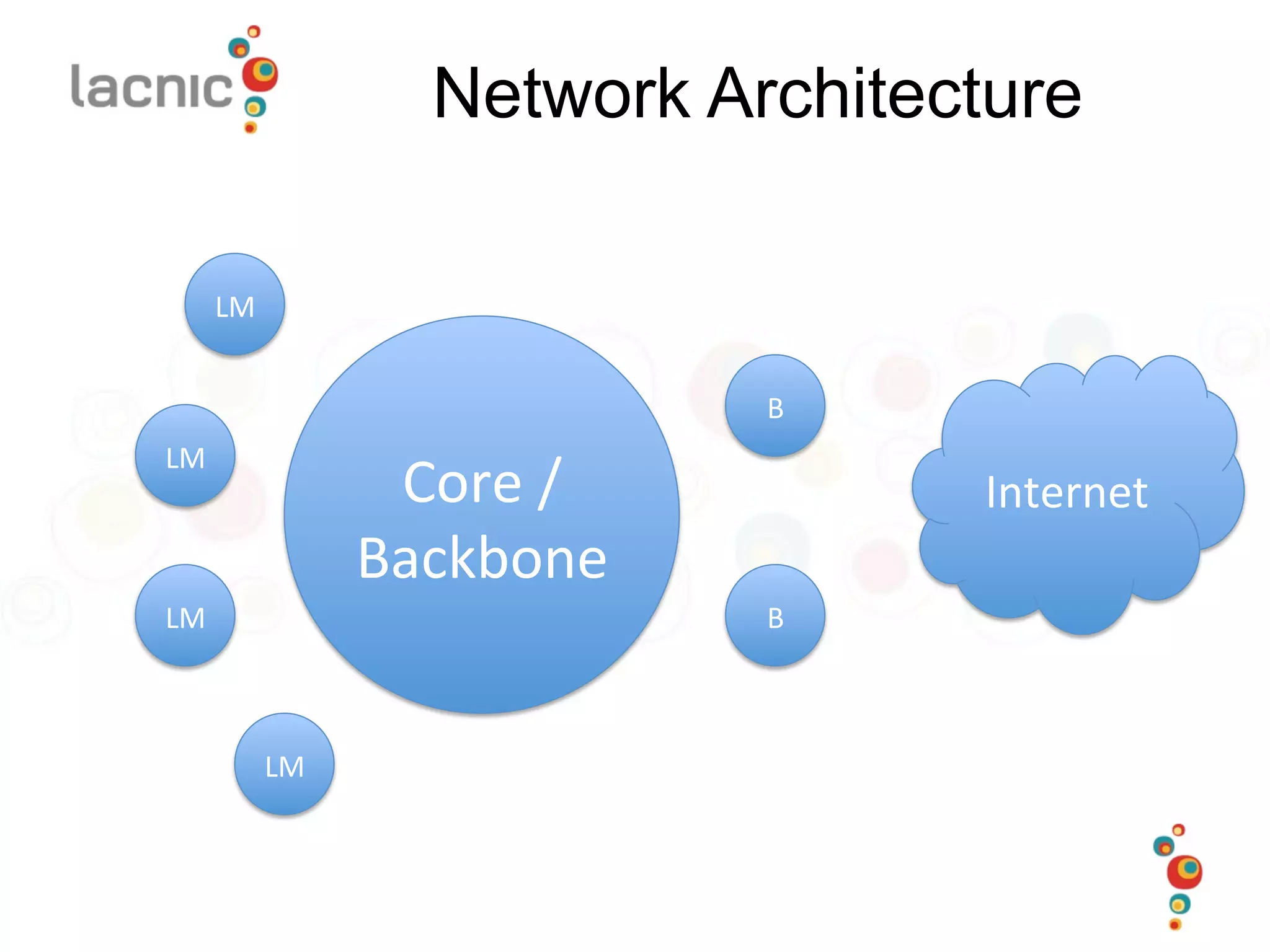
Network Architecture
Core	
  /	
  
Backbone	
  
LM	
  
LM	
  
LM	
  
LM	
  
Internet	
  
B	
  
B	
  
Transi)oning	
  to	
  IPv6	
  
•  Different	
  aspects	
  
– Human	
  /	
  Organiza)onal	
  
•  Awareness	
  of	
  the	
  problem	
  
•  Training	
  
•  Organiza)onal	
  adequa)on	
  
–  Sales	
  
–  Provisioning	
  procedures	
  
– Technical	
  
•  Obtaining	
  your	
  IPv6	
  prefix	
  
•  Equipment	
  needs	
  
•  Network	
  management	
  
Ini)al	
  Steps	
  
•  You	
  will	
  need	
  to	
  develop	
  a	
  plan	
  and	
  a	
  
schedule	
  
•  Get	
  familiar	
  with	
  the	
  “new”	
  protocol	
  
– No	
  need	
  for	
  formal	
  training	
  (at	
  least	
  yet)	
  
•  Know	
  your	
  network	
  
– Have	
  a	
  clear	
  picture	
  of	
  what	
  your	
  network	
  is	
  
running	
  
•  How	
  am	
  I	
  rou)ng	
  traffic	
  ?	
  	
  
•  Which	
  transport	
  /	
  backhaul	
  /	
  last	
  mile	
  technologies	
  do	
  
we	
  use	
  ?	
  
– Assess	
  your	
  equipment	
  (brands,	
  OS	
  versions)	
  
Developing	
  a	
  Plan	
  
•  Address	
  different	
  aspects	
  
– Do	
  we	
  need	
  formal	
  training	
  ?	
  Do	
  we	
  have	
  in-­‐
house	
  know-­‐how	
  ?	
  	
  
•  Consider	
  not	
  only	
  hard	
  core	
  engineering	
  but	
  sales	
  and	
  
support	
  staff	
  as	
  well	
  
– Do	
  we	
  need	
  equipment	
  and/or	
  so_ware	
  
upgrades	
  ?	
  
– Do	
  our	
  transit	
  /	
  peering	
  sessions	
  support	
  IPv6	
  ?	
  
•  Most	
  do,	
  but	
  you	
  have	
  to	
  ask	
  for	
  it	
  
Phase	
  1:	
  Planning	
  
•  (Source:	
  6Deploy	
  Training	
  Slides)	
  
•  Add	
  IPv6	
  capability	
  requirements	
  to	
  future	
  tenders	
  
–  Ensure	
  you	
  have	
  capability	
  to	
  deploy	
  
•  Obtain	
  IPv6	
  address	
  space	
  from	
  your	
  ISP/NREN	
  (LIR)	
  or	
  
from	
  your	
  RIR	
  if	
  you’re	
  a	
  ISP	
  
–  Typically	
  a	
  /48	
  size	
  prefix	
  (from	
  the	
  LIR)	
  
–  And	
  a	
  /32	
  size	
  prefix	
  (from	
  the	
  RIR)	
  
•  Arrange	
  IPv6	
  training	
  
•  Encourage	
  in-­‐house	
  experiments	
  by	
  systems	
  staff	
  
–  e.g.	
  using	
  Tunnel	
  Broker	
  services	
  
•  Review	
  IPv6	
  security	
  issues	
  
–  IPv6	
  is	
  o_en	
  enabled	
  by	
  default	
  -­‐	
  your	
  users	
  may	
  be	
  using	
  
IPv6	
  without	
  your	
  knowledge…	
  
Phase	
  2:	
  Testbed	
  /	
  Trials	
  
•  (Source:	
  6Deploy	
  Training	
  Slides)	
  
•  Deploy	
  IPv6	
  capable	
  router,	
  with	
  cau)ous	
  ACLs	
  applied	
  
•  Establish	
  connec)vity	
  (probably	
  a	
  tunnel)	
  to	
  your	
  ISP	
  
•  Set	
  up	
  an	
  internal	
  link	
  with	
  host(s),	
  on	
  a	
  /64	
  
–  Can	
  be	
  isolated	
  from	
  regular	
  IPv4	
  network	
  (e.g.	
  a	
  dual-­‐
stack	
  DMZ	
  running	
  IPv4	
  and	
  IPv6	
  together)	
  
•  Enable	
  IPv6	
  on	
  the	
  host	
  systems,	
  add	
  DNS	
  entries	
  if	
  
appropriate	
  
•  And	
  in	
  parallel	
  
–  Survey	
  systems	
  and	
  applica)ons	
  for	
  IPv6	
  capabili)es	
  	
  
–  Formulate	
  an	
  IPv6	
  site	
  addressing	
  plan	
  
–  Document	
  IPv6	
  policies	
  (e.g.	
  address	
  assignment	
  methods)	
  
Phase	
  3:	
  Produc)on	
  Rollout	
  
•  (Source	
  6Deploy	
  Training	
  Slides)	
  
•  Plan	
  ini)al	
  deployment	
  areas,	
  e.g.	
  your	
  exis)ng	
  IPv4	
  
DMZ	
  or	
  WLAN	
  may	
  be	
  good	
  first	
  steps	
  
–  Prudent	
  to	
  enable	
  IPv6	
  on	
  the	
  wire	
  first,	
  then	
  services	
  
•  Enable	
  external	
  IPv6	
  connec)vity	
  and	
  ACLs/filters	
  
•  Enable	
  IPv6	
  rou)ng	
  ‘on	
  the	
  wire’	
  on	
  selected	
  internal	
  
links	
  
•  Deploy	
  IPv6	
  support	
  in	
  management/monitoring	
  tools	
  
•  Then	
  enable	
  the	
  services	
  and	
  adver)se	
  via	
  DNS:	
  
–  Enable	
  IPv6	
  in	
  selected	
  services	
  (e.g.	
  web,	
  SMTP)	
  
–  Add	
  IPv6	
  addresses	
  to	
  DNS,	
  enable	
  IPv6	
  DNS	
  transport	
  
•  Remember	
  IPv6	
  security:	
  
–  e.g.	
  include	
  IPv6	
  transport	
  in	
  all	
  penetra)on	
  tests	
  
Transi)on	
  Approaches	
  
•  Dual-­‐Stack	
  
– Servers	
  and	
  routers	
  speak	
  both	
  protocols	
  
•  “Island”	
  Interconnec)on	
  (tunneling)	
  
– IPv6	
  “islands”	
  interconnected	
  using	
  tunnels	
  
•  Can	
  be	
  the	
  other	
  way	
  around,	
  too	
  
•  Transla)on	
  methods	
  
– Protocol	
  transla)on	
  (rewri)ng	
  IP	
  headers)	
  
– TCP	
  relays	
  /	
  Web	
  Proxies	
  
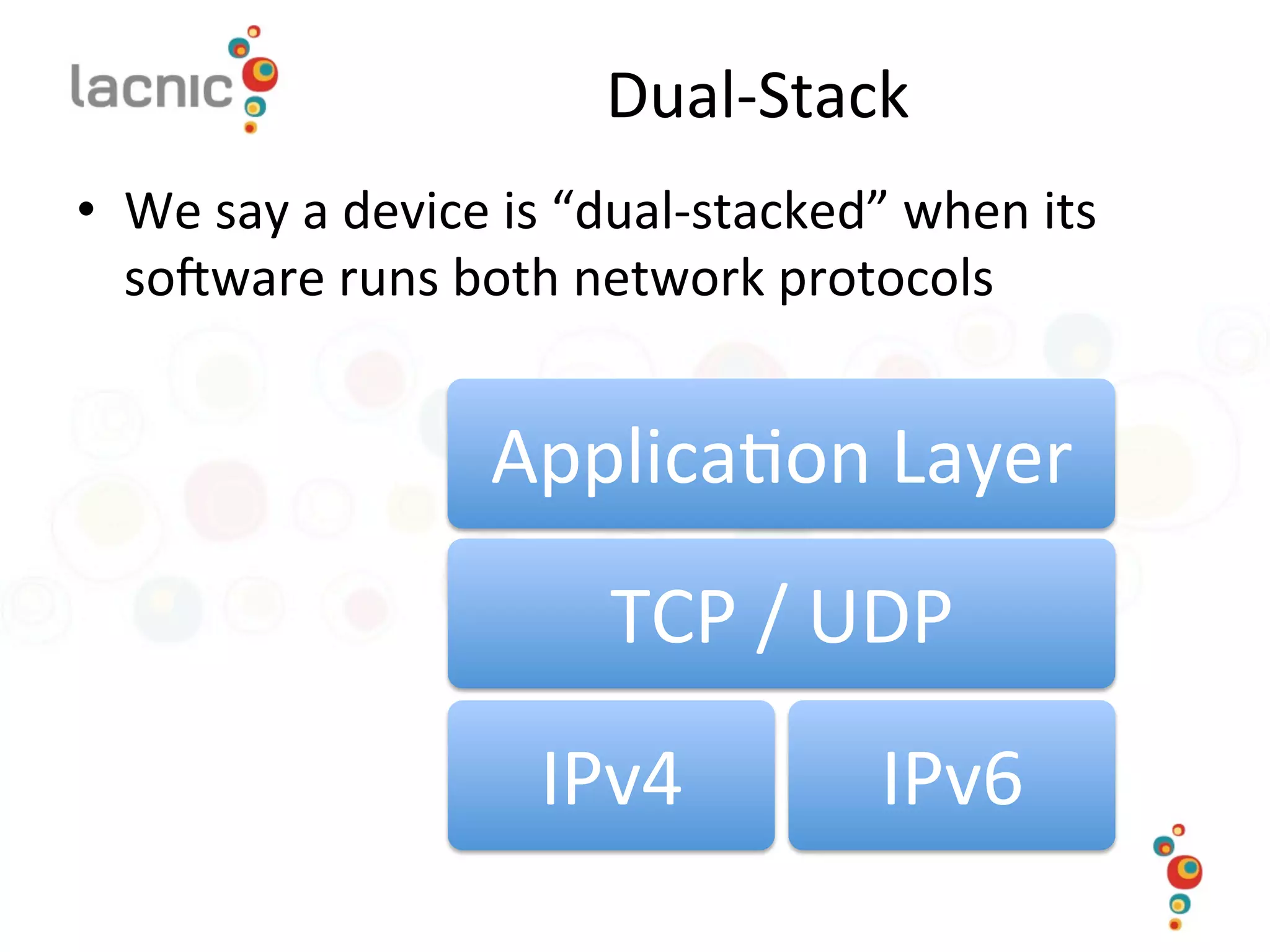
Dual-­‐Stack	
  
•  We	
  say	
  a	
  device	
  is	
  “dual-­‐stacked”	
  when	
  its	
  
so_ware	
  runs	
  both	
  network	
  protocols	
  
Applica)on	
  Layer	
  
TCP	
  /	
  UDP	
  
IPv4	
   IPv6	
  
Dual-­‐Stack	
  
•  How	
  does	
  the	
  device	
  “know”	
  which	
  path	
  to	
  
use	
  ?	
  The	
  key	
  is	
  in	
  the	
  DNS:	
  
– Use	
  appropriate	
  A	
  /	
  AAAA	
  records	
  to	
  signal	
  clients	
  
which	
  path	
  to	
  use	
  in	
  order	
  to	
  get	
  to	
  a	
  given	
  
service	
  
•  Both	
  paths	
  can	
  be	
  present	
  -­‐>	
  “Happy	
  Eyeballs”	
  
•  Issues	
  
– Hosts	
  with	
  broken	
  IPv6	
  connec)vity	
  
– Performance	
  /	
  failover	
  
Transi)oning	
  the	
  Core	
  
•  Usually	
  the	
  easiest	
  part	
  
•  Devices	
  
– Chances	
  are	
  your	
  core	
  equipment	
  already	
  
supports	
  IPv6	
  
•  Issues	
  
– Numbering	
  plan	
  
•  Now	
  is	
  the	
  )me	
  for	
  obtaining	
  your	
  IPv6	
  prefix	
  !	
  
– Plan	
  your	
  rou)ng	
  protocol	
  
•  iBGP	
  /	
  OSPF	
  v2	
  /	
  OSPF	
  v3	
  gotchas	
  
– Traffic	
  monitoring	
  
•  Nemlow	
  
IPv6	
  Numbering	
  Plans	
  
•  Numbering	
  plans	
  for	
  IPv6	
  are	
  based	
  on	
  a	
  
different	
  mindset	
  
•  Remember	
  
– One	
  subnet	
  /	
  VLAN	
  gets	
  a	
  /64	
  	
  
•  No	
  need	
  to	
  manage	
  scarcity	
  anymore	
  
– Host	
  count	
  per	
  subnet	
  (as	
  we	
  did	
  in	
  IPv4)	
  is	
  now	
  
meaningless	
  
– Subnet	
  count	
  is	
  what	
  maoers	
  
•  Allow	
  for	
  growth	
  
Transi)oning	
  the	
  Border	
  
•  Devices	
  
– Mostly	
  same	
  as	
  the	
  core	
  
•  Transit	
  /	
  Peering	
  
– You	
  need	
  to	
  ask	
  (some)mes	
  forcefully)	
  for	
  IPv6	
  
transit	
  
•  The	
  good	
  news	
  is	
  that	
  most	
  Tier	
  1	
  &	
  Tier	
  2	
  carriers	
  do	
  
support	
  IPv6	
  
•  BGP	
  issues	
  
– One	
  session	
  or	
  two	
  ?	
  	
  
•  Two	
  sessions	
  seems	
  to	
  be	
  the	
  norm	


Transi)oning	
  the	
  Border	
  
•  BGP	
  issues:	
  
– One	
  session	
  or	
  two	
  ?	
  	
  
•  BGP	
  can	
  transport	
  NLRI	
  data	
  for	
  IPv4	
  and	
  IPv6	
  
regardless	
  of	
  the	
  session’s	
  protocol	
  
–  It	
  impacts	
  nex-­‐hop	
  calcula)ons,	
  but	
  it’s	
  easily	
  solvable	
  
– ACLs	
  
•  Other	
  issues:	
  
– Traffic	
  monitoring	
  
•  SNMP	
  /	
  NetFlow	
  
– ACLs	
  
•  Mar)ans	
  /	
  bogons	
  
Transi)oning	
  the	
  Last	
  Mile	
  
•  Different	
  access	
  scenarios	
  
– Datacenter	
  	
  
•  Including	
  hos)ng	
  /	
  coloca)on	
  services	
  
– WAN	
  users	
  
•  Corporate	
  
•  Residen)al	
  
– Last	
  mile	
  technologies	
  
•  DSL	
  
•  Wireless	
  /	
  Mobile	
  
•  FTTH	
  /	
  PON	
  
Transi)oning	
  the	
  Datacenter	
  
•  Devices	
  
–  Routers	
  /	
  switches	
  and	
  servers	
  usually	
  do	
  not	
  present	
  
a	
  problem	
  
–  Firewalls,	
  your	
  mileage	
  may	
  vary	
  
•  Usually	
  support	
  is	
  good	
  enough	
  
•  Odd	
  pimalls	
  here	
  and	
  there	
  
•  Rou)ng	
  /	
  WAN:	
  same	
  as	
  border	
  /	
  core	
  
•  Recommenda)on	
  is	
  to	
  start	
  by	
  layers,	
  going	
  from	
  
the	
  outside	
  to	
  the	
  inside	
  
–  See	
  
hop://tools.iem.org/html/dra_-­‐lopez-­‐v6ops-­‐dc-­‐
ipv6-­‐04	


Corporate	
  Users	
  
•  Usually	
  more	
  sophis)cated	
  
•  May	
  have	
  in-­‐house	
  technical	
  exper)se	
  
•  May	
  even	
  request	
  IPv6!	
  
•  Higher-­‐end	
  CPE,	
  more	
  likely	
  to	
  support	
  IPv6	
  
•  Numbering	
  
– Remember:	
  one	
  VLAN	
  ==	
  one	
  /64	
  
– How	
  many	
  VLANs	
  per	
  customer	
  ?	
  	
  
•  /48	
  ~	
  65536	
  VLANs	
  
Residen)al	
  Customers	
  
•  CPEs	
  
–  Cut-­‐throat	
  race	
  to	
  the	
  booom	
  on	
  cost	
  
–  Usually	
  feature-­‐limited	
  	
  
•  Even	
  for	
  IPv4	
  
•  CPE	
  installed	
  base	
  is	
  definitely	
  a	
  roadblock	
  
•  Recommenda)on	
  
–  Add	
  IPv6	
  support	
  as	
  a	
  requirement	
  for	
  future	
  CPE	
  
purchases	
  
–  Deploy	
  alterna)ves	
  for	
  older	
  CPEs	
  
•  6RD	
  
•  Users	
  not	
  sophis)cated,	
  need	
  to	
  factor	
  in	
  
possible	
  support	
  calls	
  
Residen)al	
  Customers	
  
•  Numbering	
  
– Remember:	
  one	
  VLAN	
  ==	
  one	
  /64	
  
– How	
  many	
  VLANs	
  per	
  customer	
  ?	
  	
  
•  /48	
  ~	
  65536	
  VLANs	
  
•  /56	
  ~	
  256	
  VLANs	
  
•  /60	
  ~	
  16	
  VLANs	
  
•  DHCP	
  Prefix	
  Delega)on	
  
Other	
  Networks	
  
•  Enterprise	
  /	
  Corporate	
  
– Usually	
  use	
  proxies	
  and	
  other	
  layers	
  of	
  security	
  
devices	
  
– Two	
  different	
  problems,	
  to	
  be	
  addressed	
  
separately	
  
•  IPv6	
  access	
  to	
  the	
  Internet	
  for	
  internal	
  users	
  
•  IPv6-­‐enabling	
  company	
  services	
  
•  University	
  Campus	
  
– Usually	
  heavily	
  wireless-­‐based	
  
References	
  
•  RFC	
  6180:	
  “Guidelines	
  for	
  transi)on	
  
mechanism	
  usage	
  during	
  IPv6	
  deployment”	
  
– hop://tools.iem.org/html/rfc6180	
  	
  
•  “IPv6	
  Opera)onal	
  Considera)ons	
  for	
  
Datacenters”	
  
– hop://tools.iem.org/html/dra_-­‐lopez-­‐v6ops-­‐dc-­‐
ipv6-­‐04	
  	
  
THANK YOU !

IPv6 Transition Considerations for ISPs

  • 1.
    IPv6 Transition Considerations forISPs Carlos  Mar)nez   carlos  @  lacnic.net   @carlosm3011  
  • 2.
    Topics •  Common networkarchitectural patterns – Core / backbone – Last mile – Border •  Transition approaches •  Transition technologies
  • 3.
    Network Architecture Core  /   Backbone   LM   LM   LM   LM   Internet   B   B  
  • 4.
    Transi)oning  to  IPv6   •  Different  aspects   – Human  /  Organiza)onal   •  Awareness  of  the  problem   •  Training   •  Organiza)onal  adequa)on   –  Sales   –  Provisioning  procedures   – Technical   •  Obtaining  your  IPv6  prefix   •  Equipment  needs   •  Network  management  
  • 5.
    Ini)al  Steps   • You  will  need  to  develop  a  plan  and  a   schedule   •  Get  familiar  with  the  “new”  protocol   – No  need  for  formal  training  (at  least  yet)   •  Know  your  network   – Have  a  clear  picture  of  what  your  network  is   running   •  How  am  I  rou)ng  traffic  ?     •  Which  transport  /  backhaul  /  last  mile  technologies  do   we  use  ?   – Assess  your  equipment  (brands,  OS  versions)  
  • 6.
    Developing  a  Plan   •  Address  different  aspects   – Do  we  need  formal  training  ?  Do  we  have  in-­‐ house  know-­‐how  ?     •  Consider  not  only  hard  core  engineering  but  sales  and   support  staff  as  well   – Do  we  need  equipment  and/or  so_ware   upgrades  ?   – Do  our  transit  /  peering  sessions  support  IPv6  ?   •  Most  do,  but  you  have  to  ask  for  it  
  • 7.
    Phase  1:  Planning   •  (Source:  6Deploy  Training  Slides)   •  Add  IPv6  capability  requirements  to  future  tenders   –  Ensure  you  have  capability  to  deploy   •  Obtain  IPv6  address  space  from  your  ISP/NREN  (LIR)  or   from  your  RIR  if  you’re  a  ISP   –  Typically  a  /48  size  prefix  (from  the  LIR)   –  And  a  /32  size  prefix  (from  the  RIR)   •  Arrange  IPv6  training   •  Encourage  in-­‐house  experiments  by  systems  staff   –  e.g.  using  Tunnel  Broker  services   •  Review  IPv6  security  issues   –  IPv6  is  o_en  enabled  by  default  -­‐  your  users  may  be  using   IPv6  without  your  knowledge…  
  • 8.
    Phase  2:  Testbed  /  Trials   •  (Source:  6Deploy  Training  Slides)   •  Deploy  IPv6  capable  router,  with  cau)ous  ACLs  applied   •  Establish  connec)vity  (probably  a  tunnel)  to  your  ISP   •  Set  up  an  internal  link  with  host(s),  on  a  /64   –  Can  be  isolated  from  regular  IPv4  network  (e.g.  a  dual-­‐ stack  DMZ  running  IPv4  and  IPv6  together)   •  Enable  IPv6  on  the  host  systems,  add  DNS  entries  if   appropriate   •  And  in  parallel   –  Survey  systems  and  applica)ons  for  IPv6  capabili)es     –  Formulate  an  IPv6  site  addressing  plan   –  Document  IPv6  policies  (e.g.  address  assignment  methods)  
  • 9.
    Phase  3:  Produc)on  Rollout   •  (Source  6Deploy  Training  Slides)   •  Plan  ini)al  deployment  areas,  e.g.  your  exis)ng  IPv4   DMZ  or  WLAN  may  be  good  first  steps   –  Prudent  to  enable  IPv6  on  the  wire  first,  then  services   •  Enable  external  IPv6  connec)vity  and  ACLs/filters   •  Enable  IPv6  rou)ng  ‘on  the  wire’  on  selected  internal   links   •  Deploy  IPv6  support  in  management/monitoring  tools   •  Then  enable  the  services  and  adver)se  via  DNS:   –  Enable  IPv6  in  selected  services  (e.g.  web,  SMTP)   –  Add  IPv6  addresses  to  DNS,  enable  IPv6  DNS  transport   •  Remember  IPv6  security:   –  e.g.  include  IPv6  transport  in  all  penetra)on  tests  
  • 10.
    Transi)on  Approaches   • Dual-­‐Stack   – Servers  and  routers  speak  both  protocols   •  “Island”  Interconnec)on  (tunneling)   – IPv6  “islands”  interconnected  using  tunnels   •  Can  be  the  other  way  around,  too   •  Transla)on  methods   – Protocol  transla)on  (rewri)ng  IP  headers)   – TCP  relays  /  Web  Proxies  
  • 11.
    Dual-­‐Stack   •  We  say  a  device  is  “dual-­‐stacked”  when  its   so_ware  runs  both  network  protocols   Applica)on  Layer   TCP  /  UDP   IPv4   IPv6  
  • 12.
    Dual-­‐Stack   •  How  does  the  device  “know”  which  path  to   use  ?  The  key  is  in  the  DNS:   – Use  appropriate  A  /  AAAA  records  to  signal  clients   which  path  to  use  in  order  to  get  to  a  given   service   •  Both  paths  can  be  present  -­‐>  “Happy  Eyeballs”   •  Issues   – Hosts  with  broken  IPv6  connec)vity   – Performance  /  failover  
  • 13.
    Transi)oning  the  Core   •  Usually  the  easiest  part   •  Devices   – Chances  are  your  core  equipment  already   supports  IPv6   •  Issues   – Numbering  plan   •  Now  is  the  )me  for  obtaining  your  IPv6  prefix  !   – Plan  your  rou)ng  protocol   •  iBGP  /  OSPF  v2  /  OSPF  v3  gotchas   – Traffic  monitoring   •  Nemlow  
  • 14.
    IPv6  Numbering  Plans   •  Numbering  plans  for  IPv6  are  based  on  a   different  mindset   •  Remember   – One  subnet  /  VLAN  gets  a  /64     •  No  need  to  manage  scarcity  anymore   – Host  count  per  subnet  (as  we  did  in  IPv4)  is  now   meaningless   – Subnet  count  is  what  maoers   •  Allow  for  growth  
  • 15.
    Transi)oning  the  Border   •  Devices   – Mostly  same  as  the  core   •  Transit  /  Peering   – You  need  to  ask  (some)mes  forcefully)  for  IPv6   transit   •  The  good  news  is  that  most  Tier  1  &  Tier  2  carriers  do   support  IPv6   •  BGP  issues   – One  session  or  two  ?     •  Two  sessions  seems  to  be  the  norm    
  • 16.
    Transi)oning  the  Border   •  BGP  issues:   – One  session  or  two  ?     •  BGP  can  transport  NLRI  data  for  IPv4  and  IPv6   regardless  of  the  session’s  protocol   –  It  impacts  nex-­‐hop  calcula)ons,  but  it’s  easily  solvable   – ACLs   •  Other  issues:   – Traffic  monitoring   •  SNMP  /  NetFlow   – ACLs   •  Mar)ans  /  bogons  
  • 17.
    Transi)oning  the  Last  Mile   •  Different  access  scenarios   – Datacenter     •  Including  hos)ng  /  coloca)on  services   – WAN  users   •  Corporate   •  Residen)al   – Last  mile  technologies   •  DSL   •  Wireless  /  Mobile   •  FTTH  /  PON  
  • 18.
    Transi)oning  the  Datacenter   •  Devices   –  Routers  /  switches  and  servers  usually  do  not  present   a  problem   –  Firewalls,  your  mileage  may  vary   •  Usually  support  is  good  enough   •  Odd  pimalls  here  and  there   •  Rou)ng  /  WAN:  same  as  border  /  core   •  Recommenda)on  is  to  start  by  layers,  going  from   the  outside  to  the  inside   –  See   hop://tools.iem.org/html/dra_-­‐lopez-­‐v6ops-­‐dc-­‐ ipv6-­‐04      
  • 19.
    Corporate  Users   • Usually  more  sophis)cated   •  May  have  in-­‐house  technical  exper)se   •  May  even  request  IPv6!   •  Higher-­‐end  CPE,  more  likely  to  support  IPv6   •  Numbering   – Remember:  one  VLAN  ==  one  /64   – How  many  VLANs  per  customer  ?     •  /48  ~  65536  VLANs  
  • 20.
    Residen)al  Customers   • CPEs   –  Cut-­‐throat  race  to  the  booom  on  cost   –  Usually  feature-­‐limited     •  Even  for  IPv4   •  CPE  installed  base  is  definitely  a  roadblock   •  Recommenda)on   –  Add  IPv6  support  as  a  requirement  for  future  CPE   purchases   –  Deploy  alterna)ves  for  older  CPEs   •  6RD   •  Users  not  sophis)cated,  need  to  factor  in   possible  support  calls  
  • 21.
    Residen)al  Customers   • Numbering   – Remember:  one  VLAN  ==  one  /64   – How  many  VLANs  per  customer  ?     •  /48  ~  65536  VLANs   •  /56  ~  256  VLANs   •  /60  ~  16  VLANs   •  DHCP  Prefix  Delega)on  
  • 22.
    Other  Networks   • Enterprise  /  Corporate   – Usually  use  proxies  and  other  layers  of  security   devices   – Two  different  problems,  to  be  addressed   separately   •  IPv6  access  to  the  Internet  for  internal  users   •  IPv6-­‐enabling  company  services   •  University  Campus   – Usually  heavily  wireless-­‐based  
  • 23.
    References   •  RFC  6180:  “Guidelines  for  transi)on   mechanism  usage  during  IPv6  deployment”   – hop://tools.iem.org/html/rfc6180     •  “IPv6  Opera)onal  Considera)ons  for   Datacenters”   – hop://tools.iem.org/html/dra_-­‐lopez-­‐v6ops-­‐dc-­‐ ipv6-­‐04    
  • 24.