Painlessly Exposing IPv4-only Services on
the IPv6 Internet
Carlos Martinez Cagnazzo
LACNIC
carlos @ lacnic.net
@carlosm3011
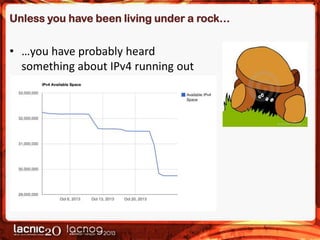
Unless you have been living under a rock…

• …you have probably heard
something about IPv4 running out
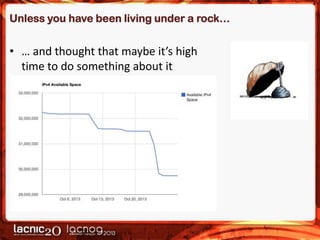
Unless you have been living under a rock…

• … and thought that maybe it’s high
time to do something about it
Exposing Services in IPv6

• This talk assumes that you control your DNS and can
create records within your domains
• When exposing services in IPv6, going to full dual stack
operation should always be the first choice
• But… sometimes this is not advisable or possible
– For example:
• If you lack direct IPv6 connectivity but a partner does
• If the servers cannot be modified or upgraded
• If the software licensing is tied to IP addressing
The Challenge

• How can I expose an IPv4-only service to the IPv6
Internet?
– Without reconfiguring the servers themselves at all
– Preferably using open source, readily available software
Two Approaches

• Application layer-based:
– HTTP reverse proxy

• Network layer-based:
– Address / Protocol translation
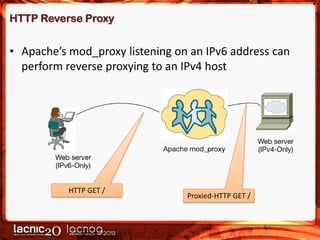
HTTP Reverse Proxy

• Apache’s mod_proxy listening on an IPv6 address can
perform reverse proxying to an IPv4 host

HTTP GET /

Proxied-HTTP GET /
HTTP Reverse Proxy

• Apache’s mod_proxy can listen on an IPv6 address and
perform reverse proxying to an IPv4 address:
<VirtualHost [2001:13c7:7001:4000::10]:80>
# Server names
ServerName www.mnav.gub.uy
ServerAlias www.mnav.gub.uy.prx64.labs.lacnic.net
# Logs
CustomLog
/home/v6v4Proxy/logs/mnav/access.log combined
ErrorLog
/home/v6v4Proxy/logs/mnav/error.log
ProxyPass
/ http://www.mnav.gub.uy/
ProxyPassReverse
/ http://www.mnav.gub.uy/
</VirtualHost>
HTTP Reverse Proxy

• Pros
– Simple to configure, just adapt the snippet from the previous
slide to your network setup and you are done
– Server and proxy do not need to be on the same network

• Cons
– HTTP-specific, other solutions would be needed for other
application protocols
– HTML-related issues
• Embedded IPv4-literals will fail
• Charset-related issues
– Proxy and web server must strictly agree on the charsets used
– HTML-entities should be preferred (&aacute; for ‘á’)
A Network-layer Approach

• Meet NAT64 !
– Connect IPv6-only clouds with IPv4-only clouds
– Translate protocol headers including addresses

• Destination IPv4 address is embedded / encoded in IPv6
destination address
• Source IPv4 address for translated packet:
– Multiplexed using TCP / UDP port numbers: Stateful NAT64
– One-to-one mapping: Stateless NAT64
NAT64 High Level Description

• Traffic flows started from an IPv6-only host are
translated into IPv4 and forwarded to IPv4-only hosts
• Protocol and address translation
– Protocol: IPv6 <-> IPv4 header mapping
– Address: IPv6 <-> IPv4 address mapping

• This mapping is obviously not one-to-one
• A v6 prefix is chosen per network which will be used to
map the IPv4 space
– A /96 is enough (32 bits), RFCs recommend using 64:ff9b::/96
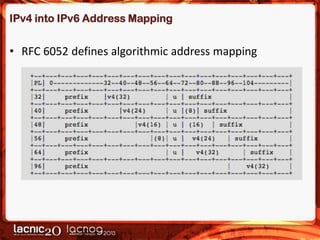
IPv4 into IPv6 Address Mapping

• RFC 6052 defines algorithmic address mapping
NAT64 (ii)

• Protocol translation
– For each IPv6 packet the NAT64 box receives it has to build an
IPv4 packet
• Header field mapping
• Address mapping IPv6 -> IPv4
– No one-to-one mapping is possible

– The NAT64 box needs at least one public IPv4 address for
outgoing packets
• It needs to keep a state table, just like any NAT implementation
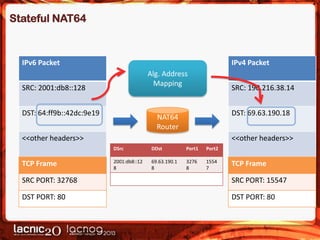
Stateful NAT64

IPv6 Packet

IPv4 Packet

Alg. Address
Mapping

SRC: 2001:db8::128
DST: 64:ff9b::42dc:9e19

SRC: 190.216.38.14
DST: 69.63.190.18

NAT64
Router

<<other headers>>

<<other headers>>
DSrc

TCP Frame

DDst

Port1

Port2

2001:db8::12
8

69.63.190.1
8

3276
8

1554
7

TCP Frame

SRC PORT: 32768

SRC PORT: 15547

DST PORT: 80

DST PORT: 80
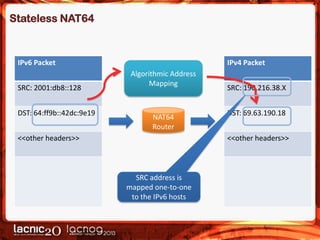
Stateless NAT64

IPv6 Packet
SRC: 2001:db8::128
DST: 64:ff9b::42dc:9e19

IPv4 Packet

Algorithmic Address
Mapping

NAT64
Router

<<other headers>>

SRC: 190.216.38.X
DST: 69.63.190.18
<<other headers>>

SRC address is
mapped one-to-one
to the IPv6 hosts
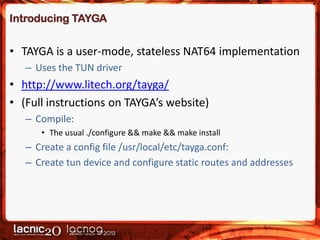
Introducing TAYGA

• TAYGA is a user-mode, stateless NAT64 implementation
– Uses the TUN driver

• http://www.litech.org/tayga/
• (Full instructions on TAYGA’s website)
– Compile:
• The usual ./configure && make && make install

– Create a config file /usr/local/etc/tayga.conf:
– Create tun device and configure static routes and addresses
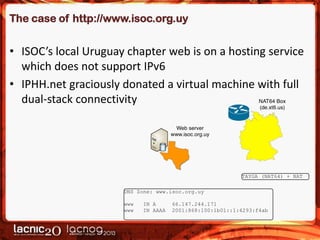
The case of http://www.isoc.org.uy

• ISOC’s local Uruguay chapter web is on a hosting service
which does not support IPv6
• IPHH.net graciously donated a virtual machine with full
dual-stack connectivity
Configuring TAYGA on the NAT64 box

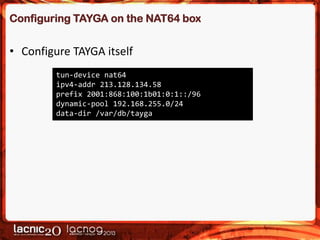
• Configure TAYGA itself
tun-device nat64
ipv4-addr 213.128.134.58
prefix 2001:868:100:1b01:0:1::/96
dynamic-pool 192.168.255.0/24
data-dir /var/db/tayga
Configuring TAYGA on the NAT64 box

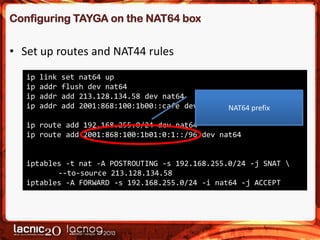
• Set up routes and NAT44 rules
ip
ip
ip
ip

link
addr
addr
addr

set nat64 up
flush dev nat64
add 213.128.134.58 dev nat64
add 2001:868:100:1b00::cafe dev nat64 NAT64 prefix

ip route add 192.168.255.0/24 dev nat64
ip route add 2001:868:100:1b01:0:1::/96 dev nat64

iptables -t nat -A POSTROUTING -s 192.168.255.0/24 -j SNAT 
--to-source 213.128.134.58
iptables -A FORWARD -s 192.168.255.0/24 -i nat64 -j ACCEPT
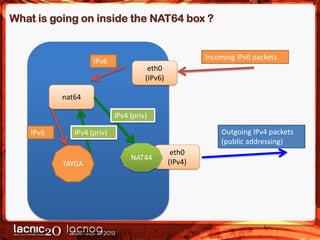
What is going on inside the NAT64 box ?

IPv6

Incoming IPv6 packets
eth0
(IPv6)

nat64

IPv4 (priv)
IPv6

Outgoing IPv4 packets
(public addressing)

IPv4 (priv)

TAYGA

NAT44

eth0
(IPv4)
Creating the DNS records

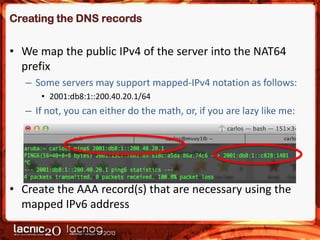
• We map the public IPv4 of the server into the NAT64
prefix
– Some servers may support mapped-IPv4 notation as follows:
• 2001:db8:1::200.40.20.1/64

– If not, you can either do the math, or, if you are lazy like me:

• Create the AAA record(s) that are necessary using the
mapped IPv6 address
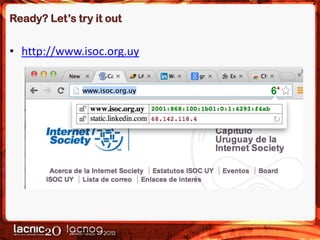
Ready? Let’s try it out

• http://www.isoc.org.uy
Want to try it out for your website?

• Drop me an email!
Thank you !

carlosm3011

Enabling IPv6 Services Transparently

  • 1.
    Painlessly Exposing IPv4-onlyServices on the IPv6 Internet Carlos Martinez Cagnazzo LACNIC carlos @ lacnic.net @carlosm3011
  • 2.
    Unless you havebeen living under a rock… • …you have probably heard something about IPv4 running out
  • 3.
    Unless you havebeen living under a rock… • … and thought that maybe it’s high time to do something about it
  • 4.
    Exposing Services inIPv6 • This talk assumes that you control your DNS and can create records within your domains • When exposing services in IPv6, going to full dual stack operation should always be the first choice • But… sometimes this is not advisable or possible – For example: • If you lack direct IPv6 connectivity but a partner does • If the servers cannot be modified or upgraded • If the software licensing is tied to IP addressing
  • 5.
    The Challenge • Howcan I expose an IPv4-only service to the IPv6 Internet? – Without reconfiguring the servers themselves at all – Preferably using open source, readily available software
  • 6.
    Two Approaches • Applicationlayer-based: – HTTP reverse proxy • Network layer-based: – Address / Protocol translation
  • 7.
    HTTP Reverse Proxy •Apache’s mod_proxy listening on an IPv6 address can perform reverse proxying to an IPv4 host HTTP GET / Proxied-HTTP GET /
  • 8.
    HTTP Reverse Proxy •Apache’s mod_proxy can listen on an IPv6 address and perform reverse proxying to an IPv4 address: <VirtualHost [2001:13c7:7001:4000::10]:80> # Server names ServerName www.mnav.gub.uy ServerAlias www.mnav.gub.uy.prx64.labs.lacnic.net # Logs CustomLog /home/v6v4Proxy/logs/mnav/access.log combined ErrorLog /home/v6v4Proxy/logs/mnav/error.log ProxyPass / http://www.mnav.gub.uy/ ProxyPassReverse / http://www.mnav.gub.uy/ </VirtualHost>
  • 9.
    HTTP Reverse Proxy •Pros – Simple to configure, just adapt the snippet from the previous slide to your network setup and you are done – Server and proxy do not need to be on the same network • Cons – HTTP-specific, other solutions would be needed for other application protocols – HTML-related issues • Embedded IPv4-literals will fail • Charset-related issues – Proxy and web server must strictly agree on the charsets used – HTML-entities should be preferred (&aacute; for ‘á’)
  • 10.
    A Network-layer Approach •Meet NAT64 ! – Connect IPv6-only clouds with IPv4-only clouds – Translate protocol headers including addresses • Destination IPv4 address is embedded / encoded in IPv6 destination address • Source IPv4 address for translated packet: – Multiplexed using TCP / UDP port numbers: Stateful NAT64 – One-to-one mapping: Stateless NAT64
  • 11.
    NAT64 High LevelDescription • Traffic flows started from an IPv6-only host are translated into IPv4 and forwarded to IPv4-only hosts • Protocol and address translation – Protocol: IPv6 <-> IPv4 header mapping – Address: IPv6 <-> IPv4 address mapping • This mapping is obviously not one-to-one • A v6 prefix is chosen per network which will be used to map the IPv4 space – A /96 is enough (32 bits), RFCs recommend using 64:ff9b::/96
  • 12.
    IPv4 into IPv6Address Mapping • RFC 6052 defines algorithmic address mapping
  • 13.
    NAT64 (ii) • Protocoltranslation – For each IPv6 packet the NAT64 box receives it has to build an IPv4 packet • Header field mapping • Address mapping IPv6 -> IPv4 – No one-to-one mapping is possible – The NAT64 box needs at least one public IPv4 address for outgoing packets • It needs to keep a state table, just like any NAT implementation
  • 14.
    Stateful NAT64 IPv6 Packet IPv4Packet Alg. Address Mapping SRC: 2001:db8::128 DST: 64:ff9b::42dc:9e19 SRC: 190.216.38.14 DST: 69.63.190.18 NAT64 Router <<other headers>> <<other headers>> DSrc TCP Frame DDst Port1 Port2 2001:db8::12 8 69.63.190.1 8 3276 8 1554 7 TCP Frame SRC PORT: 32768 SRC PORT: 15547 DST PORT: 80 DST PORT: 80
  • 15.
    Stateless NAT64 IPv6 Packet SRC:2001:db8::128 DST: 64:ff9b::42dc:9e19 IPv4 Packet Algorithmic Address Mapping NAT64 Router <<other headers>> SRC: 190.216.38.X DST: 69.63.190.18 <<other headers>> SRC address is mapped one-to-one to the IPv6 hosts
  • 16.
    Introducing TAYGA • TAYGAis a user-mode, stateless NAT64 implementation – Uses the TUN driver • http://www.litech.org/tayga/ • (Full instructions on TAYGA’s website) – Compile: • The usual ./configure && make && make install – Create a config file /usr/local/etc/tayga.conf: – Create tun device and configure static routes and addresses
  • 17.
    The case ofhttp://www.isoc.org.uy • ISOC’s local Uruguay chapter web is on a hosting service which does not support IPv6 • IPHH.net graciously donated a virtual machine with full dual-stack connectivity
  • 18.
    Configuring TAYGA onthe NAT64 box • Configure TAYGA itself tun-device nat64 ipv4-addr 213.128.134.58 prefix 2001:868:100:1b01:0:1::/96 dynamic-pool 192.168.255.0/24 data-dir /var/db/tayga
  • 19.
    Configuring TAYGA onthe NAT64 box • Set up routes and NAT44 rules ip ip ip ip link addr addr addr set nat64 up flush dev nat64 add 213.128.134.58 dev nat64 add 2001:868:100:1b00::cafe dev nat64 NAT64 prefix ip route add 192.168.255.0/24 dev nat64 ip route add 2001:868:100:1b01:0:1::/96 dev nat64 iptables -t nat -A POSTROUTING -s 192.168.255.0/24 -j SNAT --to-source 213.128.134.58 iptables -A FORWARD -s 192.168.255.0/24 -i nat64 -j ACCEPT
  • 20.
    What is goingon inside the NAT64 box ? IPv6 Incoming IPv6 packets eth0 (IPv6) nat64 IPv4 (priv) IPv6 Outgoing IPv4 packets (public addressing) IPv4 (priv) TAYGA NAT44 eth0 (IPv4)
  • 21.
    Creating the DNSrecords • We map the public IPv4 of the server into the NAT64 prefix – Some servers may support mapped-IPv4 notation as follows: • 2001:db8:1::200.40.20.1/64 – If not, you can either do the math, or, if you are lazy like me: • Create the AAA record(s) that are necessary using the mapped IPv6 address
  • 22.
    Ready? Let’s tryit out • http://www.isoc.org.uy
  • 23.
    Want to tryit out for your website? • Drop me an email!
  • 24.