Submitted by:
Ayush Goyal
Computer Science
Knowledge Management System
15
Introduction
Benefits
Features
Methodology
Literature Survey
Requirements
User Requirements
Implementation
Test plan
Diagrams And Snapshot
Scope
Findings
Future works
Contents
Introduction
Aim is to develop an online Knowledge management
system which will be helpful to college students and
faculty.
Students/faculty will be able to upload any type of
information/article.
Students/faculty logging in may also access/search any
information put up by others.
Students can view all the articles/information related to
their interest on top.
For College:
•Easy to manage all articles (Computer Science, Database etc.).
•All information/articles can be synchronized in one place.
•KMS is beneficial for both students/faculty.
•It is helpful to maintain the students record (admission no, roll
no, dob etc.)
•Easy to create any kind of article.
•Easy to query all related details of student.
•Easy to read and publish article uploaded by students.
Benefits
For Students:
Students will be aware to their interested fields
Students can get knowledge
Don’t have to search other places
Can manage their articles easily
Can get review about their article by likes/dislikes of other
students
Comments can help understanding other students
requirements
Admin control
Registration and login system for students
Sharing point of knowledge article of all fields
Providing knowledge among other students
Review system before upload
Notification after signup
Sorting by various ways like date of post, field, likes,
author name, etc
Password changing feature
Simple to use interface
Flexibility in features
Features
In order to develop an efficient Knowledge Management
System, we have to follow the following methodology:
Knowing the proper requirements of the users:
Asking users about the requirements they need in the
website.
Analyzing the requirements: After gathering all the
requirements, we have to analyze the requirements to sort
out which are feasible and which are not.
Selecting the proper model for developing the project:
From the various models available for developing the project,
we must select the best & efficient model, which best suites
our approach.
Methodology
Provides an interface which allows users to manage
(create, edit, delete) content on a platform (mostly
websites).
A tool that enables technical and non technical users to
create, edit, manage.
publish a variety of content whilst being constrained by a
centralised set of rules.
Literature Survey
Functional
User registration
Content management (articles, news.)
Non-functional
Performance requirements
Safety requirements
Security requirements
Software quality attributes
Requirements
Hardware configuration
Processor : Pentium IV or above
RAM : 256 MB or higher
Hard Disk Space : 5 GB or more
Software configuration
Operating system : Windows XP/7/8
Environment : Adobe Dreamweaver,
Xampp server
Language : HTML, PHP
Back-end : MySQL
User
Requirements
Login section for users
Sign-up facility for new users
Can upload articles
Filter articles by date, author, article rank and interest
Put query if facing any problem
Implementation
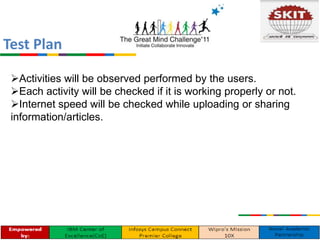
Activities will be observed performed by the users.
Each activity will be checked if it is working properly or not.
Internet speed will be checked while uploading or sharing
information/articles.
Test Plan
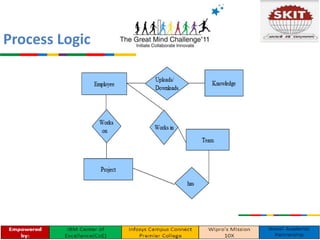
Process Logic
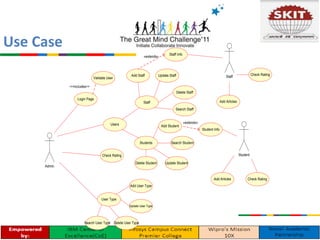
Use Case
Admin
Users
Check Rating
User Type
Search User Type
Update User Type
Login Page
Delete User Type
Validate User
-<<includes>>
Students
Staff
Delete Staff
Update Staff
Search Student
Search Staff
Delete Student Update Student
Add Student
Student
Add Staff
Add Articles
Staff
«extends»
Student Info
Staff Info
«extends»
Add Articles
Add User Type
Check Rating
Check Rating
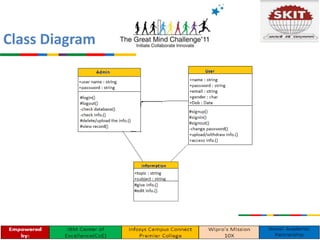
Class Diagram
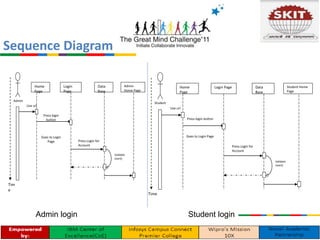
Sequence Diagram
Validate
User()
Tim
e
Admin
Home
Page
Login
Page
Data
Base
Use url
Press login
button
Goes to Login
Page Press Login for
Account
Admin
Home Page
Validate
User()
Time
Student
Home
Page
Login Page Data
Base
Use url
Press login button
Goes to Login Page
Press Login for
Account
Student Home
Page
Admin login Student login
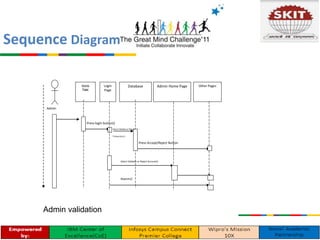
Sequence Diagram
Admin validation
Admin
Home
Page
Database Other Pages
Press login button()
Press Accept/Reject Button
Admin Home PageLogin
Page
Select Validate or Reject
Transaction ()
Select Validate or Reject Account()
Reports()
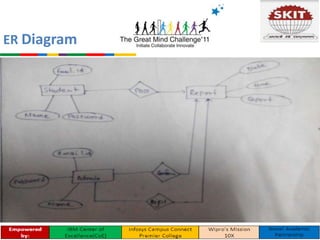
ER Diagram
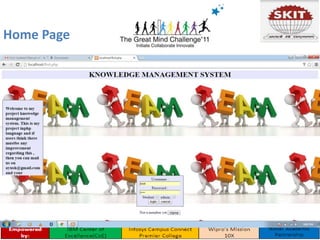
Home Page
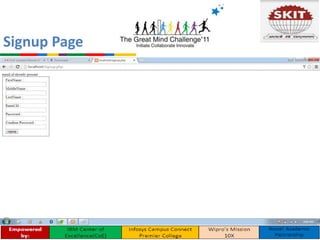
Signup Page
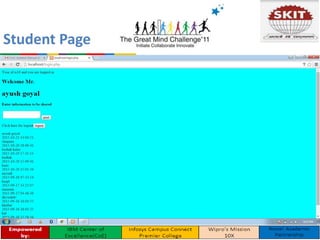
Student Page
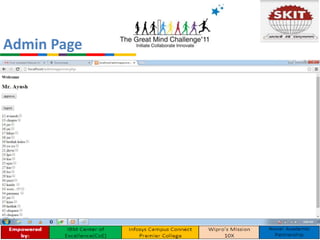
Admin Page
Easy to use if all information is at one place.
Helpful for students and faculty.
Solutions for student queries will be there.
scope
Findings
Improved Productivity- time saving because of easier and
quicker navigation to the features.
Improved Accessibility- Easily Accessible and easy to
browse.
Future Works
Add some more features to improve further
Android application can be made of the system
Knowledge Management System(KMS)

Knowledge Management System(KMS)

  • 1.
    Submitted by: Ayush Goyal ComputerScience Knowledge Management System 15
  • 2.
  • 3.
    Introduction Aim is todevelop an online Knowledge management system which will be helpful to college students and faculty. Students/faculty will be able to upload any type of information/article. Students/faculty logging in may also access/search any information put up by others. Students can view all the articles/information related to their interest on top.
  • 4.
    For College: •Easy tomanage all articles (Computer Science, Database etc.). •All information/articles can be synchronized in one place. •KMS is beneficial for both students/faculty. •It is helpful to maintain the students record (admission no, roll no, dob etc.) •Easy to create any kind of article. •Easy to query all related details of student. •Easy to read and publish article uploaded by students. Benefits
  • 5.
    For Students: Students willbe aware to their interested fields Students can get knowledge Don’t have to search other places Can manage their articles easily Can get review about their article by likes/dislikes of other students Comments can help understanding other students requirements
  • 6.
    Admin control Registration andlogin system for students Sharing point of knowledge article of all fields Providing knowledge among other students Review system before upload Notification after signup Sorting by various ways like date of post, field, likes, author name, etc Password changing feature Simple to use interface Flexibility in features Features
  • 7.
    In order todevelop an efficient Knowledge Management System, we have to follow the following methodology: Knowing the proper requirements of the users: Asking users about the requirements they need in the website. Analyzing the requirements: After gathering all the requirements, we have to analyze the requirements to sort out which are feasible and which are not. Selecting the proper model for developing the project: From the various models available for developing the project, we must select the best & efficient model, which best suites our approach. Methodology
  • 8.
    Provides an interfacewhich allows users to manage (create, edit, delete) content on a platform (mostly websites). A tool that enables technical and non technical users to create, edit, manage. publish a variety of content whilst being constrained by a centralised set of rules. Literature Survey
  • 9.
    Functional User registration Content management(articles, news.) Non-functional Performance requirements Safety requirements Security requirements Software quality attributes Requirements
  • 10.
    Hardware configuration Processor :Pentium IV or above RAM : 256 MB or higher Hard Disk Space : 5 GB or more Software configuration Operating system : Windows XP/7/8 Environment : Adobe Dreamweaver, Xampp server Language : HTML, PHP Back-end : MySQL User Requirements
  • 11.
    Login section forusers Sign-up facility for new users Can upload articles Filter articles by date, author, article rank and interest Put query if facing any problem Implementation
  • 12.
    Activities will beobserved performed by the users. Each activity will be checked if it is working properly or not. Internet speed will be checked while uploading or sharing information/articles. Test Plan
  • 13.
  • 14.
    Use Case Admin Users Check Rating UserType Search User Type Update User Type Login Page Delete User Type Validate User -<<includes>> Students Staff Delete Staff Update Staff Search Student Search Staff Delete Student Update Student Add Student Student Add Staff Add Articles Staff «extends» Student Info Staff Info «extends» Add Articles Add User Type Check Rating Check Rating
  • 15.
  • 16.
    Sequence Diagram Validate User() Tim e Admin Home Page Login Page Data Base Use url Presslogin button Goes to Login Page Press Login for Account Admin Home Page Validate User() Time Student Home Page Login Page Data Base Use url Press login button Goes to Login Page Press Login for Account Student Home Page Admin login Student login
  • 17.
    Sequence Diagram Admin validation Admin Home Page DatabaseOther Pages Press login button() Press Accept/Reject Button Admin Home PageLogin Page Select Validate or Reject Transaction () Select Validate or Reject Account() Reports()
  • 18.
  • 19.
  • 20.
  • 21.
  • 22.
  • 23.
    Easy to useif all information is at one place. Helpful for students and faculty. Solutions for student queries will be there. scope
  • 24.
    Findings Improved Productivity- timesaving because of easier and quicker navigation to the features. Improved Accessibility- Easily Accessible and easy to browse.
  • 25.
    Future Works Add somemore features to improve further Android application can be made of the system