The document discusses key considerations for implementing an IT service management (ITSM) tool set. It covers determining requirements and processes before selecting a tool, ensuring management commitment and dedicating resources, focusing initially on high priority processes like the service desk, developing effective communication plans, addressing technology and data integration needs, and providing customized training before going live.
Topics What comesfirst, the process or the tool Sample toolsets 10 lessons learned Conclusion
3.
Making the decisionto implement an ITSM software solution is the first step to ensuring … IT is aligned with the business IT delivers efficient and effective services IT measures and manages the services they deliver IT is perceived as a proactive and client-centric organization IT spending is managed / under control The stage is set for the rapid, incident free implementation of future business initiatives
So you wantto implement an ITSM solution, what comes first… Process / Tool? Two schools of thought Process First How can you buy a tool without knowing what you want it to do? Tool First Wouldn’t an ITSM tool have the processes pre-built? SCOTS Standards Based Commercial Off-the-Shelf Software
6.
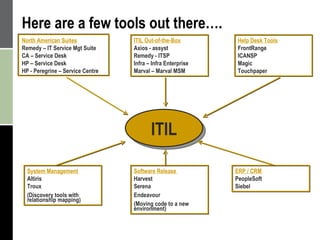
ITIL North AmericanSuites Remedy – IT Service Mgt Suite CA – Service Desk HP – Service Desk HP - Peregrine – Service Centre ITIL Out-of-the-Box Axios - assyst Remedy - ITSP Infra – Infra Enterprise Marval – Marval MSM Here are a few tools out there…. Help Desk Tools FrontRange ICANSP Magic Touchpaper System Management Altiris Troux (Discovery tools with relationship mapping) Software Release Harvest Serena Endeavour (Moving code to a new environment) ERP / CRM PeopleSoft Siebel
7.
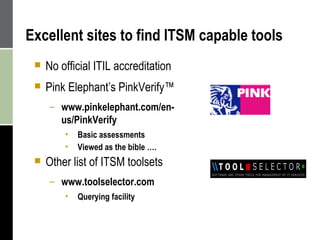
Excellent sites tofind ITSM capable tools No official ITIL accreditation Pink Elephant’s PinkVerify™ www.pinkelephant.com/en-us/PinkVerify Basic assessments Viewed as the bible …. Other list of ITSM toolsets www.toolselector.com Querying facility
8.
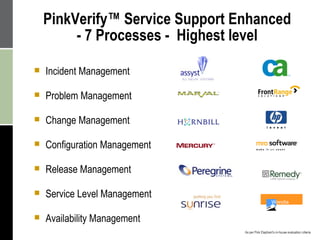
Incident Management ProblemManagement Change Management Configuration Management Release Management Service Level Management Availability Management PinkVerify™ Service Support Enhanced - 7 Processes - Highest level As per Pink Elephant’s in-house evaluation criteria
9.
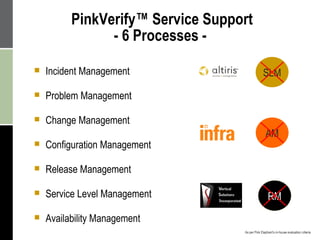
PinkVerify™ Service Support- 6 Processes - Incident Management Problem Management Change Management Configuration Management Release Management Service Level Management Availability Management - RM AM RM As per Pink Elephant’s in-house evaluation criteria SLM
10.
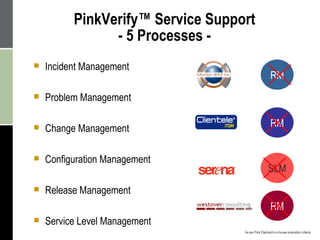
PinkVerify™ Service Support- 5 Processes - Incident Management Problem Management Change Management Configuration Management Release Management Service Level Management RM RM RM SLM As per Pink Elephant’s in-house evaluation criteria
11.
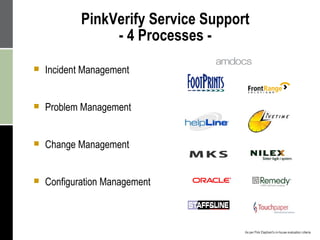
PinkVerify Service Support - 4 Processes - Incident Management Problem Management Change Management Configuration Management As per Pink Elephant’s in-house evaluation criteria
12.
Now that youknow that specialized tools do exists, what are our … 2. Requirements
13.
Before you start,you need to determine exactly what you want to achieve… Implement only a Service Desk tool? Which processes do you want to implement Some tools are sold modularly (by process) Licensing requirements (Production, Staging, Development, Training, etc.) Integrate with 3 rd party tools Migrate existing data to new solution Customize vs. Configure? Are you so different that you need your own rendition of an ITSM tool?
Implementing an ITSMtool is not just about implementing technology … It’s about implementing a new culture It’s about implementing organizational change It’s about implementing metrics!!!! It’s about implementing accountability It’s about implementing standards and a new way to deliver our services It’s about implementing a Continuous Service Improvement Program It’s all about implementing a solution!
16.
So now what?3. Well the next thing we need is Management Commitment!
17.
Management Commitment SeniorManagement within IT needs to: Demonstrate buy-in Champion the initiative in their area Understand their role in establishing the culture Prioritize staff / ITSM team’s daily activities Project Team Steering committee with senior management Project task force consisting of: Project Managers (internal and external) Process owners ITSM Tool administrator
18.
The next mostimportant aspect of a project are … 4. Resources
19.
Resource Availability Planningand definition phases is the most time consuming phases of the project Resources need to be dedicated to this initiative ITSM Tool Administrator especially! Workgroups need proper representation from all areas Think about the clients! Workgroups must include but not be limited to: Project Managers, Process owners, Process Specialist, Solution Architect Workgroups will define the CMDB data and ITSM tool data All must agree on the definitions, workflow, assignment routing, etc. Do not underestimate the effort required to define your data Identify the authoritative source for the data Rationalize / audit the data
20.
Use of ExternalSpecialists Take advantage of specialists – they have done it before! Specialists should be used as facilitators for workshops, provide direction and coaching for your staff Ensure the specialists have the necessary level of ITIL certification and process expertise (practical) Ensure your consulting team is represented with: PM with ITIL certification Process specialist Solution architect Implementation team members with ITIL certification
21.
Ok, now thatyou have the people in place, the next step is … 5. Processes
22.
Don’t Try toDo Everything all at Once Learn to walk before you run Start with your pain points, usually: Service Desk Incident Management / Request Management Configuration Management These are quick and measurable wins Ensure you communicate your successes Proceed with the other processes
23.
Process Definition Usethe approach that best fits your organization Processes need to stand on their own irrespective of the tool selected Processes will out-live the tool Ensure your processes are mature Define what you intend the process to do Perform a Gap Analysis Identify and prioritize your gaps, then implement Changing a process in the latter stages of its lifecycle is not trivial Document your processes and procedures once the tool has been configured Very time consuming but if not done, you will provide a reason for staff to not follow the process
24.
So know youknow how your processes will work but what about the … 6. End-State of the Service Desk
25.
Service Desk (Function) The most affected area in an IT organization The hub for the capture of ITSM data Define your structure (centralized, distributed, virtual) Define your support group structures (Tier 1, 2, 3, etc.) Create and implement a service delivery culture Ensure your Service Desk is properly staffed by client focused resources Compensate or provide incentives to high performers Define your service metrics Address the service desk agent vs. roaming technician perceptions
26.
In order foryour initiative to succeed you need to ensure timely and effective … 7. Communication
27.
Communication Plan Oneof the most important aspect of the initiative Build a formal Management of Change program Establish a communication plan that will keep all parties abreast of the initiative as it progresses You have a good story to tell; get the people excited
28.
Communication Objectives PromoteIT as a service provider Improve employee morale Enhance client awareness and satisfaction Align IT with the business Communicate the positives of ITSM Improved efficiency and effectiveness in the delivery of services Proactive service delivery culture Cost savings for technology and people Sets the stage for rapid implementation of future initiatives
29.
We keep talkingabout an ITSM tool so what do we need to take into consideration when dealing with …. 8. Technology
30.
Customization vs. PersonalizationCustomization Performing code changes within the tool Personalization / Configuration Changing the flow of the process through organization specific data Customization may be required, but the organization should try to minimize the customization effort Customization may cause issues when performing upgrades to the tool Each upgrade may (will) require a re-customization Vendor support might be jeopardized
31.
Architecture Do notaccept everything a vendor tells you. Test! Test! Test! Perform performance benchmarks within the building, the city and the country Identify performance issues before going live If required, adapt your infrastructure to support the performance requirements Dedicated servers Increase bandwidth Implement thin client access (if required) such as Citrix Metaframe Ensure you have in-house specialists for the database (i.e. Oracle, SQL, etc.) Will be required to optimize or fine tune the database Licensing Ensure you have the required number and type of licenses
32.
Technology Integration Majorityof ITSM tools have built-in integration with 3 rd party tools (telephony, monitoring, etc.) Discovery tools Configuring the integration requires a good attention to detail Need to develop tool specific scenarios (events, alarms, etc.) Need to configure the technology to pass only acceptable data to the tool Integrating 3 rd party technology to the tool is not seamless Significant effort may be required for the definition, loading and the upkeep of the data
33.
The most timeconsuming exercise is to define your …. 9. Data
34.
Base Data DefinitionShould be developed with the involvement of parties using the data Not unlike other tools; tables / templates / data will need to be created: Organization, Location, People Process templates / macros to automate the creation of records Assignment routing, escalation, etc. Generic Service Level targets (as a start) Service Catalogue (all the services delivered by IT) Product Catalogue (Configuration Items) Bilingual?? Must be completed in order to populate the tool with your base information
35.
You could havethe best solution in place but you will not achieve your goals unless you pay particular attention to the last step before going live … 10. Customized training
36.
Training Training programsmust address more than just the tool Training should be customized for your environment and with your data Training should include: The processes The operational procedures New service delivery model How to use the tool Do not assume staff will figure it out on their own Half day or one day high-level training will not make experts Majority of IT will be required to use the tool, majority of IT should be trained Ensure training is provided “Just-in-Time” Do not give anyone a reason not to use or buy-into the solution
37.
Conclusion Recommended high-levelapproach to implement an ITSM tool Get management buy-in and assign a Champion Assign the proper level of dedicated resources Define and organize your Service Delivery model / structure Define your data (could take months) Document and publish your processes and procedures Develop training program for your processes and procedures Address your First Priority Processes, but in a piecemeal fashion Minimize your requirements for tool customization Build a Continuous Service Improvement Program