Junit and Cactus

Dr. Himanshu Hora
SRMS College of Engineering & Technology
Bareilly (INDIA)
Table of Contents








Overview
Article Outline
Thesis
JUnit Background
Cactus Background
Pitfalls 1-6
Conclusion
Overview
 Junit and Cactus are popular tools for automating






testing of Java classes and web-based components
Automation accomplished using ANT (Java Make utility)
and often tested every time project built
These tools enable testers to “verify” the code is written
correctly – it was built right
Automated tests are very useful to show code works
correctly esp. after refactoring which is central to XP
I picked this article because deals with JUnit & Cactus,
offers a critique of the tools, and was practical, not just
theoretical
As this article describes, the tests themselves must be
built right in order to validate the code being tested
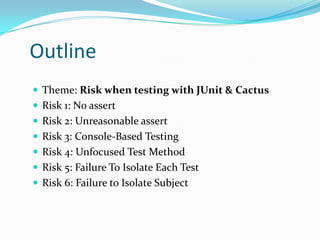
Outline
 Theme: Risk when testing with JUnit & Cactus
 Risk 1: No assert
 Risk 2: Unreasonable assert
 Risk 3: Console-Based Testing
 Risk 4: Unfocused Test Method
 Risk 5: Failure To Isolate Each Test
 Risk 6: Failure to Isolate Subject
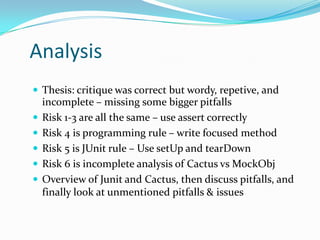
Analysis
 Thesis: critique was correct but wordy, repetive, and






incomplete – missing some bigger pitfalls
Risk 1-3 are all the same – use assert correctly
Risk 4 is programming rule – write focused method
Risk 5 is JUnit rule – Use setUp and tearDown
Risk 6 is incomplete analysis of Cactus vs MockObj
Overview of Junit and Cactus, then discuss pitfalls, and
finally look at unmentioned pitfalls & issues
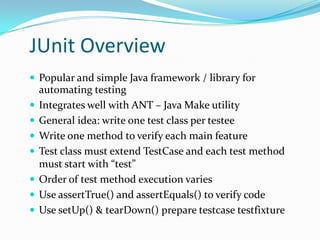
JUnit Overview
 Popular and simple Java framework / library for









automating testing
Integrates well with ANT – Java Make utility
General idea: write one test class per testee
Write one method to verify each main feature
Test class must extend TestCase and each test method
must start with “test”
Order of test method execution varies
Use assertTrue() and assertEquals() to verify code
Use setUp() & tearDown() prepare testcase testfixture
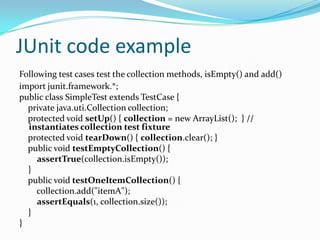
JUnit code example
Following test cases test the collection methods, isEmpty() and add()
import junit.framework.*;
public class SimpleTest extends TestCase {
private java.uti.Collection collection;
protected void setUp() { collection = new ArrayList(); } //
instantiates collection test fixture
protected void tearDown() { collection.clear(); }
public void testEmptyCollection() {
assertTrue(collection.isEmpty());
}
public void testOneItemCollection() {
collection.add("itemA");
assertEquals(1, collection.size());
}
}
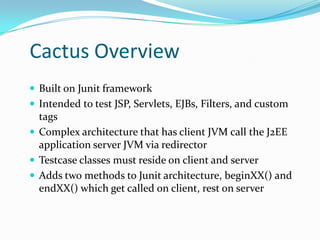
Cactus Overview
 Built on Junit framework
 Intended to test JSP, Servlets, EJBs, Filters, and custom

tags
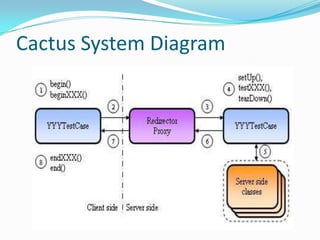
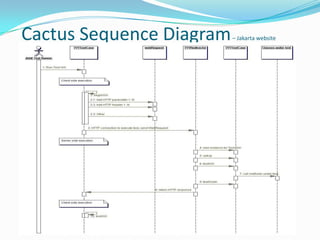
 Complex architecture that has client JVM call the J2EE
application server JVM via redirector
 Testcase classes must reside on client and server
 Adds two methods to Junit architecture, beginXX() and
endXX() which get called on client, rest on server
Cactus System Diagram
Cactus Sequence Diagram

– Jakarta website
Risk 1-3 – No assert, Unreasonable assert,
Console-Based Testing
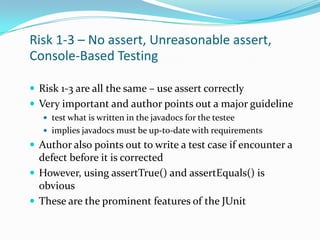
 Risk 1-3 are all the same – use assert correctly
 Very important and author points out a major guideline
 test what is written in the javadocs for the testee
 implies javadocs must be up-to-date with requirements

 Author also points out to write a test case if encounter a

defect before it is corrected
 However, using assertTrue() and assertEquals() is
obvious
 These are the prominent features of the JUnit
Risk 4 – Unfocused Test Methods
 Writing focused tests is really just writing good code
 General rule of programming to make methods succinct,

this applies equally to test methods
 Writing focused test methods is the whole point
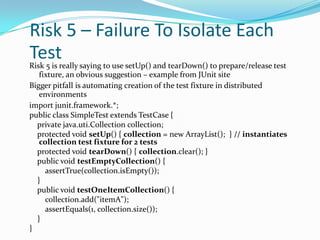
Risk 5 – Failure To Isolate Each
Test

Risk 5 is really saying to use setUp() and tearDown() to prepare/release test
fixture, an obvious suggestion – example from JUnit site
Bigger pitfall is automating creation of the test fixture in distributed
environments
import junit.framework.*;
public class SimpleTest extends TestCase {
private java.uti.Collection collection;
protected void setUp() { collection = new ArrayList(); } // instantiates
collection test fixture for 2 tests
protected void tearDown() { collection.clear(); }
public void testEmptyCollection() {
assertTrue(collection.isEmpty());
}
public void testOneItemCollection() {
collection.add("itemA");
assertEquals(1, collection.size());
}
}
Risk 6 – Failure to Isolate Subject
 Author points out one drawback of Cactus is that does

not isolate test case as MockObjects does
 MockObjects simulates the Servlet container
 Mock Object framework does isolate test but at big expense

 Massive amount of stubs needed, more code to maintain

 While Cactus may be better than MockObjects, it may

NOT be better than HttpUnit, why not compare these?
Alternative tools
 HttpUnit cleaner, simpler tool than Cactus
 HttpUnit is black box testing by calling webserver
 Test code resides ONLY on client JVM

 Various interfaces like JWebUnit (Java API) and





WebTest (XML) integrate well with ANT
Use Junit for unit tests and HttpUnit for functional
Features to analyze HTML, ie. table element tests
Features to input HTML form elements
http://www.junit.org/news/extension/index.htm
Conclusion
 Article lists some useful guidelines & pitfalls in an wordy fashion
 Many pitfalls were obvious and important ones not mentioned
 Important pitfalls not mentioned include







Cost, complexity, difficulty of distributed tests not mentioned
Performs white box tests, yet, JUnit already does this
Does not test HTTP interface (tests presentation layer poorly)
Test code must reside in same package as testee & both JVMs
Testers must be programmers
JWebUnit & WebTest better for web unit testing

 At times unclear when addressing Junit vs. Cactus and unnecessarily
complex coding examples
 However, automating testing can save time and money in the long run
 These tools, while not perfect, are major players for automated Java
testing and can verify functionality during development and refactoring
THANK YOU
Dr. Himanshu Hora
SRMS College of Engineering & Technology
Bareilly (INDIA)

Junit and cactus

  • 1.
    Junit and Cactus Dr.Himanshu Hora SRMS College of Engineering & Technology Bareilly (INDIA)
  • 2.
    Table of Contents        Overview ArticleOutline Thesis JUnit Background Cactus Background Pitfalls 1-6 Conclusion
  • 3.
    Overview  Junit andCactus are popular tools for automating      testing of Java classes and web-based components Automation accomplished using ANT (Java Make utility) and often tested every time project built These tools enable testers to “verify” the code is written correctly – it was built right Automated tests are very useful to show code works correctly esp. after refactoring which is central to XP I picked this article because deals with JUnit & Cactus, offers a critique of the tools, and was practical, not just theoretical As this article describes, the tests themselves must be built right in order to validate the code being tested
  • 4.
    Outline  Theme: Riskwhen testing with JUnit & Cactus  Risk 1: No assert  Risk 2: Unreasonable assert  Risk 3: Console-Based Testing  Risk 4: Unfocused Test Method  Risk 5: Failure To Isolate Each Test  Risk 6: Failure to Isolate Subject
  • 5.
    Analysis  Thesis: critiquewas correct but wordy, repetive, and      incomplete – missing some bigger pitfalls Risk 1-3 are all the same – use assert correctly Risk 4 is programming rule – write focused method Risk 5 is JUnit rule – Use setUp and tearDown Risk 6 is incomplete analysis of Cactus vs MockObj Overview of Junit and Cactus, then discuss pitfalls, and finally look at unmentioned pitfalls & issues
  • 6.
    JUnit Overview  Popularand simple Java framework / library for        automating testing Integrates well with ANT – Java Make utility General idea: write one test class per testee Write one method to verify each main feature Test class must extend TestCase and each test method must start with “test” Order of test method execution varies Use assertTrue() and assertEquals() to verify code Use setUp() & tearDown() prepare testcase testfixture
  • 7.
    JUnit code example Followingtest cases test the collection methods, isEmpty() and add() import junit.framework.*; public class SimpleTest extends TestCase { private java.uti.Collection collection; protected void setUp() { collection = new ArrayList(); } // instantiates collection test fixture protected void tearDown() { collection.clear(); } public void testEmptyCollection() { assertTrue(collection.isEmpty()); } public void testOneItemCollection() { collection.add("itemA"); assertEquals(1, collection.size()); } }
  • 8.
    Cactus Overview  Builton Junit framework  Intended to test JSP, Servlets, EJBs, Filters, and custom tags  Complex architecture that has client JVM call the J2EE application server JVM via redirector  Testcase classes must reside on client and server  Adds two methods to Junit architecture, beginXX() and endXX() which get called on client, rest on server
  • 9.
  • 10.
  • 11.
    Risk 1-3 –No assert, Unreasonable assert, Console-Based Testing  Risk 1-3 are all the same – use assert correctly  Very important and author points out a major guideline  test what is written in the javadocs for the testee  implies javadocs must be up-to-date with requirements  Author also points out to write a test case if encounter a defect before it is corrected  However, using assertTrue() and assertEquals() is obvious  These are the prominent features of the JUnit
  • 12.
    Risk 4 –Unfocused Test Methods  Writing focused tests is really just writing good code  General rule of programming to make methods succinct, this applies equally to test methods  Writing focused test methods is the whole point
  • 13.
    Risk 5 –Failure To Isolate Each Test Risk 5 is really saying to use setUp() and tearDown() to prepare/release test fixture, an obvious suggestion – example from JUnit site Bigger pitfall is automating creation of the test fixture in distributed environments import junit.framework.*; public class SimpleTest extends TestCase { private java.uti.Collection collection; protected void setUp() { collection = new ArrayList(); } // instantiates collection test fixture for 2 tests protected void tearDown() { collection.clear(); } public void testEmptyCollection() { assertTrue(collection.isEmpty()); } public void testOneItemCollection() { collection.add("itemA"); assertEquals(1, collection.size()); } }
  • 14.
    Risk 6 –Failure to Isolate Subject  Author points out one drawback of Cactus is that does not isolate test case as MockObjects does  MockObjects simulates the Servlet container  Mock Object framework does isolate test but at big expense  Massive amount of stubs needed, more code to maintain  While Cactus may be better than MockObjects, it may NOT be better than HttpUnit, why not compare these?
  • 15.
    Alternative tools  HttpUnitcleaner, simpler tool than Cactus  HttpUnit is black box testing by calling webserver  Test code resides ONLY on client JVM  Various interfaces like JWebUnit (Java API) and     WebTest (XML) integrate well with ANT Use Junit for unit tests and HttpUnit for functional Features to analyze HTML, ie. table element tests Features to input HTML form elements http://www.junit.org/news/extension/index.htm
  • 16.
    Conclusion  Article listssome useful guidelines & pitfalls in an wordy fashion  Many pitfalls were obvious and important ones not mentioned  Important pitfalls not mentioned include       Cost, complexity, difficulty of distributed tests not mentioned Performs white box tests, yet, JUnit already does this Does not test HTTP interface (tests presentation layer poorly) Test code must reside in same package as testee & both JVMs Testers must be programmers JWebUnit & WebTest better for web unit testing  At times unclear when addressing Junit vs. Cactus and unnecessarily complex coding examples  However, automating testing can save time and money in the long run  These tools, while not perfect, are major players for automated Java testing and can verify functionality during development and refactoring
  • 17.
    THANK YOU Dr. HimanshuHora SRMS College of Engineering & Technology Bareilly (INDIA)