
{
Introduction to unit
testing
What is unit testing,
and how we doing it.
Ahmed Gomaa
Ahmed.mgomaaa@gmail.com
Jul 16, 2013 (v 1.2)
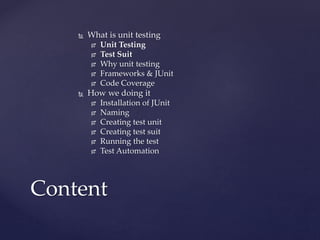
 What is unit testing
 Unit Testing
 Test Suit
 Why unit testing
 Frameworks & JUnit
 Code Coverage
 How we doing it
 Installation of JUnit
 Naming
 Creating test unit
 Creating test suit
 Running the test
 Test Automation
Content
What is unit testing
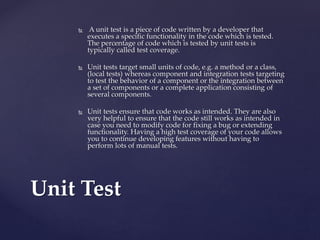
 A unit test is a piece of code written by a developer that
executes a specific functionality in the code which is tested.
The percentage of code which is tested by unit tests is
typically called test coverage.
 Unit tests target small units of code, e.g. a method or a class,
(local tests) whereas component and integration tests targeting
to test the behavior of a component or the integration between
a set of components or a complete application consisting of
several components.
 Unit tests ensure that code works as intended. They are also
very helpful to ensure that the code still works as intended in
case you need to modify code for fixing a bug or extending
functionality. Having a high test coverage of your code allows
you to continue developing features without having to
perform lots of manual tests.
Unit Test
 The test suit is a group of test cases combined
tests a certain functionality or module.
 The relation between test cases and test suit is
many to many, as one test case can be part of
multiple test suits.
Test Suite
 Faster Development
 Higher Quality
 More flexibility
 Easer Development (specially for newcomers)
 Test Driven Development
Why unit testing!
 Unit testing have a lot of frameworks that help
simplify the process of unit testing and help in
testing automation.
 JUnit is a simple framework to write repeatable
tests. It is an instance of the xUnit architecture for
unit testing frameworks.
 JUnit is open source project can easily be used and
automated, and it is also has plugins for most of
IDEs (like: eclipse and net beans).
 JUnit is the most used unit testing framework.
 Since JUnit 4, it is using the annotations to define the
unit tests and test suits.
Frameworks & JUnit
 Code Coverage represents the amount of the code
covered by unit testing.
 JaCoCo:
 JaCoCo is an open source toolkit for measuring and
reporting Java code coverage.
 JaCoCo is a java tool (command line) used to check
the code coverage.
 EclEmma:
 EclEmma is a free Java code coverage plugin for
Eclipse.
 EclEmma was originaly based on EMMA code
coverage tool, since v2.0 is based in JaCoCo.
Code Coverage
How we do it
 The only thing you need to do is to add 2 JARs:
 junit.jar
 hamcrest-core.jar
 > download: https://github.com/junit-
team/junit/wiki/Download-and-Install
Installation of JUnit
 Unit testes will be created inside the same project
with the same packages and classes naming, except:
1. It will be under a root package called “unitTest”.
2. Test unit will be suffixed with “TestUnit”.
3. Test suit will be suffixed with “TestSuit”.
 Example:
 Business Class (class will be tested):
net.tedata.webservices.getCustomerInfo.GetCustomerI
nfo
 Unit Test Class:
unitTest.net.tedata.webservices.getCustomerInfo.GetC
ustomerInfoTestUnit
Naming
 Unit test class is not required to inherit or
extend any other class or interface.
 Only the test methods need to be annotated
with “@Test” annotation.
 JUnit assumes that all test methods can be
executed in an arbitrary order. Therefore tests
should not depend on other tests.
 Adding test methods (fail, or asserts).
Creating test unit
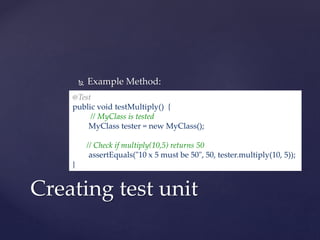
 Example Method:
Creating test unit
@Test
public void testMultiply() {
// MyClass is tested
MyClass tester = new MyClass();
// Check if multiply(10,5) returns 50
assertEquals("10 x 5 must be 50", 50, tester.multiply(10, 5));
}
 List of JUnit annotations:
1. @Test: The annotation @Test identifies that a method is
a test method.
2. @Test(expected = Exception.class): Fails, if the method
does not throw the named exception.
3. @Test(timeout=100): Fails, if the method does not
throw the named exception.
4. @Ignore: Ignores the test method. This is useful when
the underlying code has been changed and the test
case has not yet been adapted. Or if the execution time
of this test is too long to be included.
5. @Before, @After, @BeforeClass, @AfterClass: Before and
after will run before every test method run, and class
ones will run once before all the test cases run and this
method should be static.
Creating test unit
 Assert Statements (methods) list:
1. fail(String): Let the method fail. Might be used to check that a
certain part of the code is not reached. Or to have a failing test
before the test code is implemented.
2. assertTrue([message], boolean condition): Checks that the boolean
condition is true.
3. assertsEquals([String message], expected, actual): Tests that two
values are the same. Note: for arrays the reference is checked not
the content of the arrays.
4. assertsEquals([String message], expected, actual, tolerance): Test
that float or double values match. The tolerance is the number of
decimals which must be the same.
5. assertNull([message], object): Checks that the object is null.
6. assertNotNull([message], object): Checks that the object is not
null.
7. assertSame([String], expected, actual): Checks that both variables
refer to the same object.
8. assertNotSame([String], expected, actual): Checks that both
variables refer to different objects.
Creating test unit
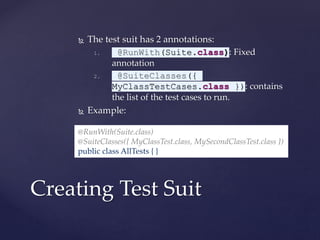
 The test suit has 2 annotations:
1. @RunWith(Suite.class): Fixed
annotation
2. @SuiteClasses({
MyClassTestCases.class }): contains
the list of the test cases to run.
 Example:
Creating Test Suit
@RunWith(Suite.class)
@SuiteClasses({ MyClassTest.class, MySecondClassTest.class })
public class AllTests { }
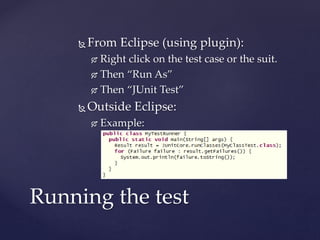
 From Eclipse (using plugin):
 Right click on the test case or the suit.
 Then “Run As”
 Then “JUnit Test”
 Outside Eclipse:
 Example:
Running the test
 JUnit testing already can be automated by both
Ant and Maven.
Test Automation
Questions!
 JUnit tutorial:
 http://www.vogella.com/articles/JUnit/article.html
 JUnit official web site:
 http://junit.org
 List of unit testing frameworks:
 http://en.wikipedia.org/wiki/List_of_unit_testing_frameworks
 Java Code Coverage Tools:
 https://en.wikipedia.org/wiki/Java_Code_Coverage_Tools
 EclEmma:
 http://www.eclemma.org/
 Eclipse Update Site: http://update.eclemma.org/
 It is also available on Eclipse market place.
 JaCoCo:
 Home: http://www.eclemma.org/jacoco/
 Git Hub: https://github.com/jacoco
References

Unit Testing in Java

  • 1.
    { Introduction to unit testing Whatis unit testing, and how we doing it. Ahmed Gomaa Ahmed.mgomaaa@gmail.com Jul 16, 2013 (v 1.2)
  • 2.
     What isunit testing  Unit Testing  Test Suit  Why unit testing  Frameworks & JUnit  Code Coverage  How we doing it  Installation of JUnit  Naming  Creating test unit  Creating test suit  Running the test  Test Automation Content
  • 3.
    What is unittesting
  • 4.
     A unittest is a piece of code written by a developer that executes a specific functionality in the code which is tested. The percentage of code which is tested by unit tests is typically called test coverage.  Unit tests target small units of code, e.g. a method or a class, (local tests) whereas component and integration tests targeting to test the behavior of a component or the integration between a set of components or a complete application consisting of several components.  Unit tests ensure that code works as intended. They are also very helpful to ensure that the code still works as intended in case you need to modify code for fixing a bug or extending functionality. Having a high test coverage of your code allows you to continue developing features without having to perform lots of manual tests. Unit Test
  • 5.
     The testsuit is a group of test cases combined tests a certain functionality or module.  The relation between test cases and test suit is many to many, as one test case can be part of multiple test suits. Test Suite
  • 6.
     Faster Development Higher Quality  More flexibility  Easer Development (specially for newcomers)  Test Driven Development Why unit testing!
  • 7.
     Unit testinghave a lot of frameworks that help simplify the process of unit testing and help in testing automation.  JUnit is a simple framework to write repeatable tests. It is an instance of the xUnit architecture for unit testing frameworks.  JUnit is open source project can easily be used and automated, and it is also has plugins for most of IDEs (like: eclipse and net beans).  JUnit is the most used unit testing framework.  Since JUnit 4, it is using the annotations to define the unit tests and test suits. Frameworks & JUnit
  • 8.
     Code Coveragerepresents the amount of the code covered by unit testing.  JaCoCo:  JaCoCo is an open source toolkit for measuring and reporting Java code coverage.  JaCoCo is a java tool (command line) used to check the code coverage.  EclEmma:  EclEmma is a free Java code coverage plugin for Eclipse.  EclEmma was originaly based on EMMA code coverage tool, since v2.0 is based in JaCoCo. Code Coverage
  • 9.
  • 10.
     The onlything you need to do is to add 2 JARs:  junit.jar  hamcrest-core.jar  > download: https://github.com/junit- team/junit/wiki/Download-and-Install Installation of JUnit
  • 11.
     Unit testeswill be created inside the same project with the same packages and classes naming, except: 1. It will be under a root package called “unitTest”. 2. Test unit will be suffixed with “TestUnit”. 3. Test suit will be suffixed with “TestSuit”.  Example:  Business Class (class will be tested): net.tedata.webservices.getCustomerInfo.GetCustomerI nfo  Unit Test Class: unitTest.net.tedata.webservices.getCustomerInfo.GetC ustomerInfoTestUnit Naming
  • 12.
     Unit testclass is not required to inherit or extend any other class or interface.  Only the test methods need to be annotated with “@Test” annotation.  JUnit assumes that all test methods can be executed in an arbitrary order. Therefore tests should not depend on other tests.  Adding test methods (fail, or asserts). Creating test unit
  • 13.
     Example Method: Creatingtest unit @Test public void testMultiply() { // MyClass is tested MyClass tester = new MyClass(); // Check if multiply(10,5) returns 50 assertEquals("10 x 5 must be 50", 50, tester.multiply(10, 5)); }
  • 14.
     List ofJUnit annotations: 1. @Test: The annotation @Test identifies that a method is a test method. 2. @Test(expected = Exception.class): Fails, if the method does not throw the named exception. 3. @Test(timeout=100): Fails, if the method does not throw the named exception. 4. @Ignore: Ignores the test method. This is useful when the underlying code has been changed and the test case has not yet been adapted. Or if the execution time of this test is too long to be included. 5. @Before, @After, @BeforeClass, @AfterClass: Before and after will run before every test method run, and class ones will run once before all the test cases run and this method should be static. Creating test unit
  • 15.
     Assert Statements(methods) list: 1. fail(String): Let the method fail. Might be used to check that a certain part of the code is not reached. Or to have a failing test before the test code is implemented. 2. assertTrue([message], boolean condition): Checks that the boolean condition is true. 3. assertsEquals([String message], expected, actual): Tests that two values are the same. Note: for arrays the reference is checked not the content of the arrays. 4. assertsEquals([String message], expected, actual, tolerance): Test that float or double values match. The tolerance is the number of decimals which must be the same. 5. assertNull([message], object): Checks that the object is null. 6. assertNotNull([message], object): Checks that the object is not null. 7. assertSame([String], expected, actual): Checks that both variables refer to the same object. 8. assertNotSame([String], expected, actual): Checks that both variables refer to different objects. Creating test unit
  • 16.
     The testsuit has 2 annotations: 1. @RunWith(Suite.class): Fixed annotation 2. @SuiteClasses({ MyClassTestCases.class }): contains the list of the test cases to run.  Example: Creating Test Suit @RunWith(Suite.class) @SuiteClasses({ MyClassTest.class, MySecondClassTest.class }) public class AllTests { }
  • 17.
     From Eclipse(using plugin):  Right click on the test case or the suit.  Then “Run As”  Then “JUnit Test”  Outside Eclipse:  Example: Running the test
  • 18.
     JUnit testingalready can be automated by both Ant and Maven. Test Automation
  • 19.
  • 20.
     JUnit tutorial: http://www.vogella.com/articles/JUnit/article.html  JUnit official web site:  http://junit.org  List of unit testing frameworks:  http://en.wikipedia.org/wiki/List_of_unit_testing_frameworks  Java Code Coverage Tools:  https://en.wikipedia.org/wiki/Java_Code_Coverage_Tools  EclEmma:  http://www.eclemma.org/  Eclipse Update Site: http://update.eclemma.org/  It is also available on Eclipse market place.  JaCoCo:  Home: http://www.eclemma.org/jacoco/  Git Hub: https://github.com/jacoco References