SOFTWARE RELIABILITY TOOLS
AND
COMMON SOFTWARE ERRORS

Dr. Himanshu Hora
SRMS College of Engineering & Technology
Bareilly (INDIA)
Software Reliability Tools
• CASRE
• SoftRel
• SMERFS
• SoRel
• SRMP
• ProConf

• Relex
• MEADEP (MEAsure and DEPendability)
SRE Tools: SMERFS /1
• Statistical Modeling and Estimation of Reliability Functions
for Software
• SMERFS is a public-domain software package designed and
implemented at the Naval Surface Warfare Center.
• SMERFS is a program for estimating and predicting the
reliability of software during the testing phase.
• It uses failure count information to make these predictions
SRE Tools: SMERFS /2
• It offers flexibility in data collection and provides multiple
time domain and interval domains. Therefore useful for multimodel debugging.
• SMERFS prompts the user for the name of the
– History file
– Plot file
– Input data file
– Output data file
SRE Tools: SMERFS /3
• History file is an output file created by SMERFS. It is a trace
file that contains all of the user input and SMERFS outputs for
a particular run so that the user can go back and look at the run
at a later time.

• Plot file contains the raw output data in plotting results
SRE Tools: SMERFS /4
• Input data file contains the failure history data on which
SMERFS will actually operate to produce the reliability
estimates and predictions.
• The user must also specify the type of data contained in the
input data.
• If the selected data type does not correspond to the type of data
actually in the input file, the estimates and predictions made by
SMERFS will not be valid.
SRE Tools: SMERFS /5
• Output data file is a file that the user can specify to which
SMERFS will write failure history data created or edited by
the user during the current SMERFS session.
• This is different from the history file, since the history file is a
trace file which records all user input and SMERFS responses.
• The output data file can be used in subsequent sessions as an
input data file.

• The output file is in SMERFS format, not ASCII format.
SRE Tools: SRMP /1
Statistical Modeling and Reliability Program
• The SRMP was developed by the Reliability and Statistical
Consultants, Limited of UK in 1988.
• SRMP is a command-line-oriented tool developed for an IBM
PC/AT and also UNIX based workstations.
• SRMP contains nine models.
• SRMP uses the maximum likelihood estimation technique to
compute the model parameters, and provides the following
reliability indicators:
reliability function, failure rate, mean time to failure,
median time to failure, and the model parameters for each
model.
SRE Tools: SRMP /2
• SRMP requires an ASCII data file as input.

• The file contains the name (or other identification) of the
project, the number of failures involved in the reliability
analysis, and the inter-failure times of all the failures.
• The input file also specifies the initial sample size used by
SRMP for the initial fitting of each reliability model to the data.
• The remaining failures are used by SRMP for assessing a
reliability model's prediction accuracy.
SRE Tools: SoftRel /1
• Characteristics of SoftRel
– Console-based application written in C (about 1300 lines of
code)
– Source code is available
– One input project file (formatted text)
– Generates one output file (CSV)
SRE Tools: SoftRel /2
• The fundamental difference is that SoftRel is a simulation tool,
rather than a reliability growth modeling tool, i.e., one can
simulate the interdependencies between components.
• Example: what will be the effect of producing more
documentation vs. more coding? (assuming requirementdesign-coding-test lifecycle)
• SoftRel uses Piecewise-Poisson Markov Process to simulate
project occurrences

• Limitations: SoftRel is limited to studying a project that has
the standard waterfall lifecycle.
SRE Tools: CASRE /1
Computer-Aided Software Reliability Estimation Tool
• CASRE is copyrighted by NASA.
• CASRE is a PC-based tool that was developed in 1993 by the
Jet Propulsion Laboratories to address the ease-of-use issues of
other tools.
• CASRE requires the WINDOWS operating environment.
• Four combined models are permanently available in CASRE.
• CASRE ver. 3.0 is available
SRE Tools: CASRE /2
• CASRE allows an analyst to invoke a text editor or other
application from within CASRE to create the ASCII input data
set. The input data set contains fields for the test interval
number, number of failures observed in the interval, length of
the test interval, fraction of the program tested, and severity of
the failure.
• Once the data is entered, CASRE automatically provides the
analyst with a raw data plot.

• CASRE provides the analyst with the ability to convert from
time-domain data to interval-domain data and vice versa.
SRE Tools: CASRE /3
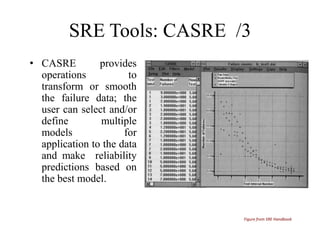
• CASRE
provides
operations
to
transform or smooth
the failure data; the
user can select and/or
define
multiple
models
for
application to the data
and make reliability
predictions based on
the best model.

Figure from SRE Handbook
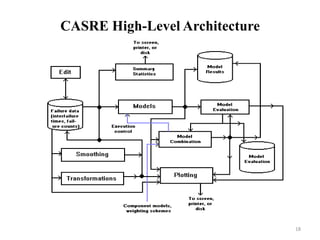
CASRE High-Level Architecture

18
COMMON SOFTWARE
ERRORS
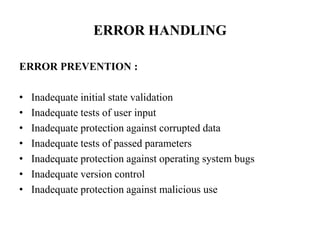
ERROR HANDLING
ERROR PREVENTION :
•
•
•
•
•
•
•

Inadequate initial state validation
Inadequate tests of user input
Inadequate protection against corrupted data
Inadequate tests of passed parameters
Inadequate protection against operating system bugs
Inadequate version control
Inadequate protection against malicious use
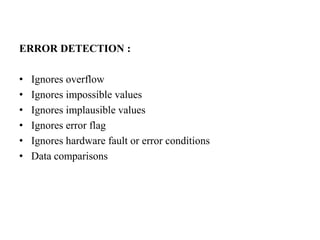
ERROR DETECTION :

•
•
•
•
•
•

Ignores overflow
Ignores impossible values
Ignores implausible values
Ignores error flag
Ignores hardware fault or error conditions
Data comparisons
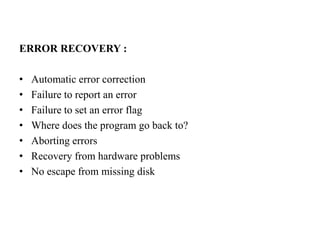
ERROR RECOVERY :

•
•
•
•
•
•
•

Automatic error correction
Failure to report an error
Failure to set an error flag
Where does the program go back to?
Aborting errors
Recovery from hardware problems
No escape from missing disk
BOUNDARY-RELATED ERRORS
•
•
•
•
•
•
•

Numeric Boundaries
Boundaries in Space
Boundaries in time
Boundaries in loops
Boundaries in memory
Boundaries within data structure
Hardware related boundaries
CALCULATION ERRORS
•
•
•
•
•
•

Impossible parentheses
Wrong order of operators
Overflow and underflow
Round off error
Wrong formula
Incorrect approximation
INITIAL AND LATER STATES
•
•
•
•
•
•

Failure to initialize a data item to zero
Failure to initialize a loop-control variable
Failure to initialize(or reinitialize) a pointer
Failure to clear a string
Failure to initialize(or reinitialize) registers
Failure to clear a flag
RACE CONDITIONS
• Assumption that one event or task has finished before another
begins
• Assumption that input won’t occur during a brief processing
interval
• Assumption that interrupts won’t occur during a brief interval
• Resource races: the resource has just become unavailable
LOAD CONDITIONS
•
•
•
•

Required resources not available
No available large memory areas
Input buffer or queue not deep enough
Lost messages
THANK YOU

Dr. Himanshu Hora
SRMS College of Engineering & Technology
Bareilly (INDIA)

Software reliability tools and common software errors

  • 1.
    SOFTWARE RELIABILITY TOOLS AND COMMONSOFTWARE ERRORS Dr. Himanshu Hora SRMS College of Engineering & Technology Bareilly (INDIA)
  • 2.
    Software Reliability Tools •CASRE • SoftRel • SMERFS • SoRel • SRMP • ProConf • Relex • MEADEP (MEAsure and DEPendability)
  • 3.
    SRE Tools: SMERFS/1 • Statistical Modeling and Estimation of Reliability Functions for Software • SMERFS is a public-domain software package designed and implemented at the Naval Surface Warfare Center. • SMERFS is a program for estimating and predicting the reliability of software during the testing phase. • It uses failure count information to make these predictions
  • 4.
    SRE Tools: SMERFS/2 • It offers flexibility in data collection and provides multiple time domain and interval domains. Therefore useful for multimodel debugging. • SMERFS prompts the user for the name of the – History file – Plot file – Input data file – Output data file
  • 5.
    SRE Tools: SMERFS/3 • History file is an output file created by SMERFS. It is a trace file that contains all of the user input and SMERFS outputs for a particular run so that the user can go back and look at the run at a later time. • Plot file contains the raw output data in plotting results
  • 6.
    SRE Tools: SMERFS/4 • Input data file contains the failure history data on which SMERFS will actually operate to produce the reliability estimates and predictions. • The user must also specify the type of data contained in the input data. • If the selected data type does not correspond to the type of data actually in the input file, the estimates and predictions made by SMERFS will not be valid.
  • 7.
    SRE Tools: SMERFS/5 • Output data file is a file that the user can specify to which SMERFS will write failure history data created or edited by the user during the current SMERFS session. • This is different from the history file, since the history file is a trace file which records all user input and SMERFS responses. • The output data file can be used in subsequent sessions as an input data file. • The output file is in SMERFS format, not ASCII format.
  • 8.
    SRE Tools: SRMP/1 Statistical Modeling and Reliability Program • The SRMP was developed by the Reliability and Statistical Consultants, Limited of UK in 1988. • SRMP is a command-line-oriented tool developed for an IBM PC/AT and also UNIX based workstations. • SRMP contains nine models. • SRMP uses the maximum likelihood estimation technique to compute the model parameters, and provides the following reliability indicators: reliability function, failure rate, mean time to failure, median time to failure, and the model parameters for each model.
  • 9.
    SRE Tools: SRMP/2 • SRMP requires an ASCII data file as input. • The file contains the name (or other identification) of the project, the number of failures involved in the reliability analysis, and the inter-failure times of all the failures. • The input file also specifies the initial sample size used by SRMP for the initial fitting of each reliability model to the data. • The remaining failures are used by SRMP for assessing a reliability model's prediction accuracy.
  • 10.
    SRE Tools: SoftRel/1 • Characteristics of SoftRel – Console-based application written in C (about 1300 lines of code) – Source code is available – One input project file (formatted text) – Generates one output file (CSV)
  • 11.
    SRE Tools: SoftRel/2 • The fundamental difference is that SoftRel is a simulation tool, rather than a reliability growth modeling tool, i.e., one can simulate the interdependencies between components. • Example: what will be the effect of producing more documentation vs. more coding? (assuming requirementdesign-coding-test lifecycle) • SoftRel uses Piecewise-Poisson Markov Process to simulate project occurrences • Limitations: SoftRel is limited to studying a project that has the standard waterfall lifecycle.
  • 12.
    SRE Tools: CASRE/1 Computer-Aided Software Reliability Estimation Tool • CASRE is copyrighted by NASA. • CASRE is a PC-based tool that was developed in 1993 by the Jet Propulsion Laboratories to address the ease-of-use issues of other tools. • CASRE requires the WINDOWS operating environment. • Four combined models are permanently available in CASRE. • CASRE ver. 3.0 is available
  • 13.
    SRE Tools: CASRE/2 • CASRE allows an analyst to invoke a text editor or other application from within CASRE to create the ASCII input data set. The input data set contains fields for the test interval number, number of failures observed in the interval, length of the test interval, fraction of the program tested, and severity of the failure. • Once the data is entered, CASRE automatically provides the analyst with a raw data plot. • CASRE provides the analyst with the ability to convert from time-domain data to interval-domain data and vice versa.
  • 14.
    SRE Tools: CASRE/3 • CASRE provides operations to transform or smooth the failure data; the user can select and/or define multiple models for application to the data and make reliability predictions based on the best model. Figure from SRE Handbook
  • 15.
  • 16.
  • 17.
    ERROR HANDLING ERROR PREVENTION: • • • • • • • Inadequate initial state validation Inadequate tests of user input Inadequate protection against corrupted data Inadequate tests of passed parameters Inadequate protection against operating system bugs Inadequate version control Inadequate protection against malicious use
  • 18.
    ERROR DETECTION : • • • • • • Ignoresoverflow Ignores impossible values Ignores implausible values Ignores error flag Ignores hardware fault or error conditions Data comparisons
  • 19.
    ERROR RECOVERY : • • • • • • • Automaticerror correction Failure to report an error Failure to set an error flag Where does the program go back to? Aborting errors Recovery from hardware problems No escape from missing disk
  • 20.
    BOUNDARY-RELATED ERRORS • • • • • • • Numeric Boundaries Boundariesin Space Boundaries in time Boundaries in loops Boundaries in memory Boundaries within data structure Hardware related boundaries
  • 21.
    CALCULATION ERRORS • • • • • • Impossible parentheses Wrongorder of operators Overflow and underflow Round off error Wrong formula Incorrect approximation
  • 22.
    INITIAL AND LATERSTATES • • • • • • Failure to initialize a data item to zero Failure to initialize a loop-control variable Failure to initialize(or reinitialize) a pointer Failure to clear a string Failure to initialize(or reinitialize) registers Failure to clear a flag
  • 23.
    RACE CONDITIONS • Assumptionthat one event or task has finished before another begins • Assumption that input won’t occur during a brief processing interval • Assumption that interrupts won’t occur during a brief interval • Resource races: the resource has just become unavailable
  • 24.
    LOAD CONDITIONS • • • • Required resourcesnot available No available large memory areas Input buffer or queue not deep enough Lost messages
  • 25.
    THANK YOU Dr. HimanshuHora SRMS College of Engineering & Technology Bareilly (INDIA)