Linux Traffic Control
SUSE Labs Taipei technology sharing day 2018
David Chang
Software Engineer
SUSE / dchang@suse.com
2
Overview
• What is Traffic Control
• Why use Traffic Control
• How it works
• Traffic Control elements
• Linux Traffic Control components
• Traffic Control with tc command
3
What is Traffic Control
• The sets of queuing systems and mechanisms by which packets are received
and transmitted on a router
– Deciding which packets to accept at what rate on the input of an interface
– Determining which packets to transmit in what order at what rate on the output of an
interface
• Quality of Service (QoS) is often used as a synonym for network traffic control
4
Why use Traffic Control
• Traffic control tools allow administrator to enqueue packets into the network
differently based on attributes of the packet
• Advantages
– Lead to more predictable usage of network resources and less volatile contention for
these resources
• Disadvantages
– Complexity
– Complexity
– Complexity
5
Common Traffic Control solutions
• Limit total bandwidth to a known rate
• Limit the bandwidth of a particular user, service or client
• Reserve bandwidth for a particular application or user
• Prefer latency sensitive traffic
• Managed oversubscribed bandwidth
• Allow equitable distribution of unreserved bandwidth
• Ensure that a particular type of traffic is dropped
6
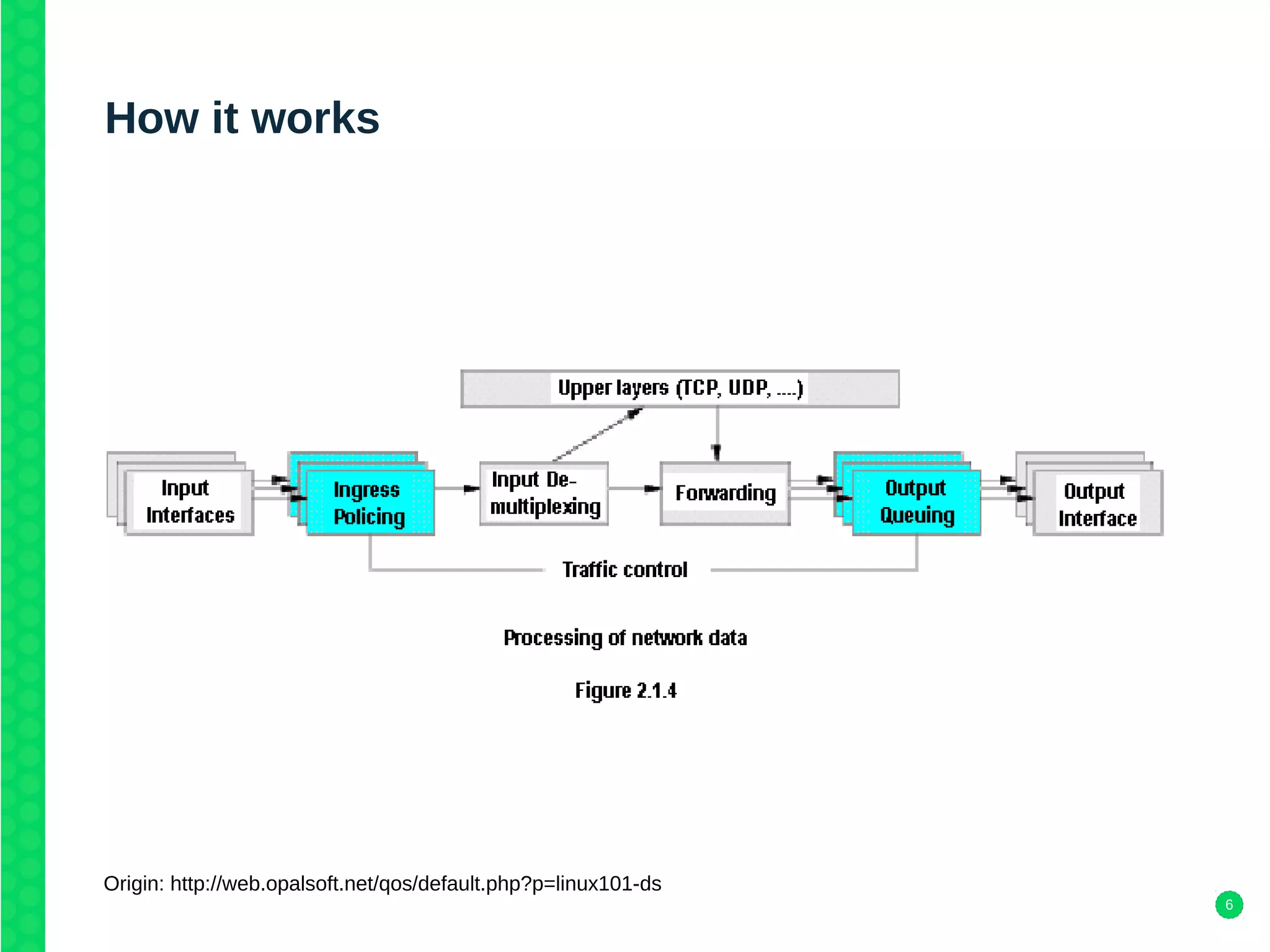
How it works
Origin: http://web.opalsoft.net/qos/default.php?p=linux101-ds
7
Source code
• Linux kernel source
– net/sched/sch_*.c (qdisc)
– net/sched/cls_*.c (filter)
– net/sched/act_*.c (action)
• iproute2 source
– tc/q_*.c (qdisc)
– tc/f_*.c (filter)
– tc/m_*.c (action)
8
Traffic Control elements
• Shaping - Shapers delay packets to meet a desired rate
• Scheduling - Schedulers arrange and/or rearrange packets for output
• Classifying - Classifiers sort or separate traffic into queues
• Policing - Policers measure and limit traffic in a particular queue
• Dropping - Dropping discards an entire packet, flow or classification
• Marking - Marking is a mechanism by which the packet is altered
9
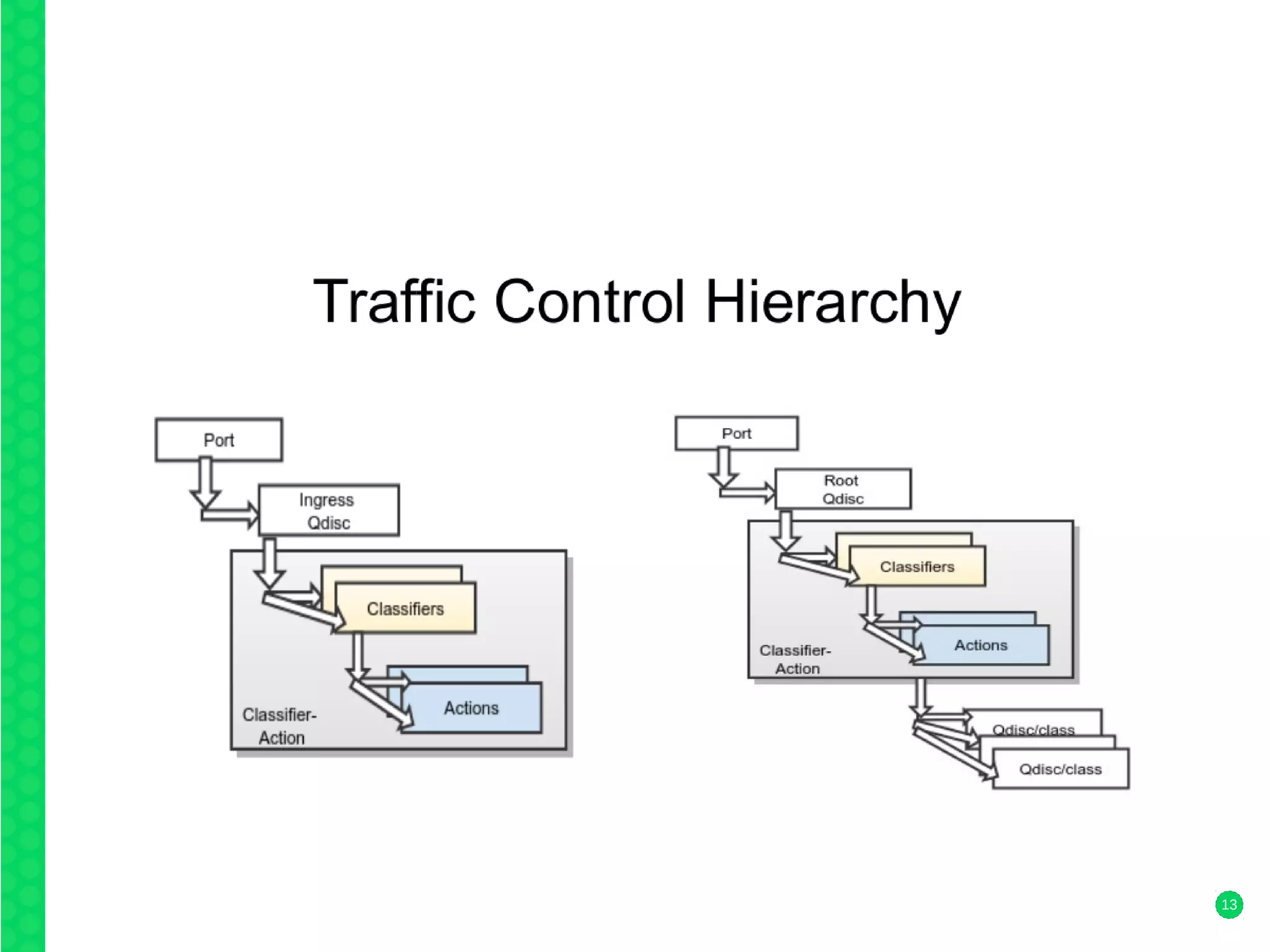
Linux Traffic Control components
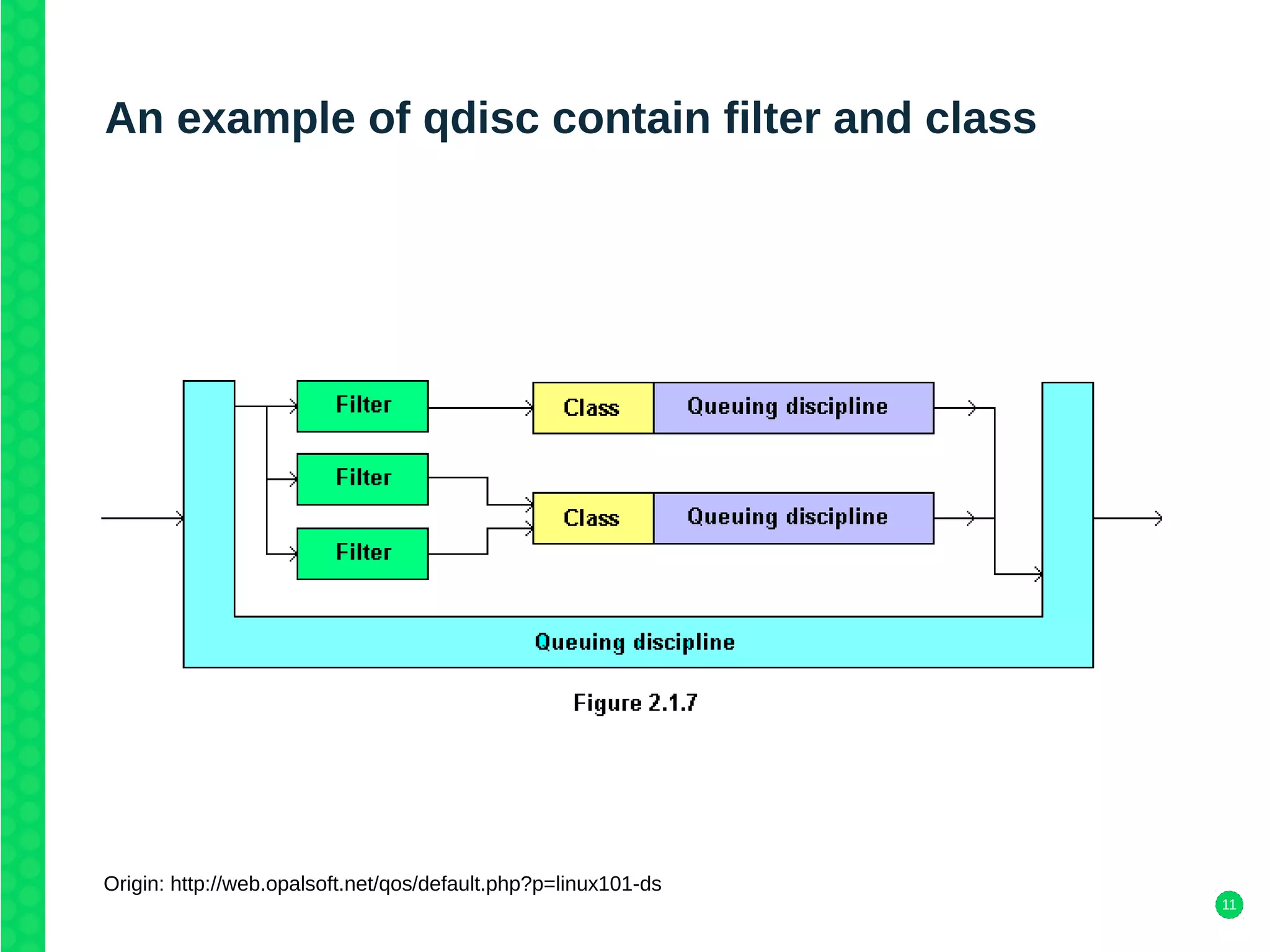
• qdisc (queuing discipline)
– A qdisc is a scheduler, attached to a network interface
– Classless qdiscs
• pfifo_fast qdisc - the default qdisc for all interfaces under Linux
• Stochastic Fairness Queueing (SFQ) - link is truly full share outgoing bandwidth
• Token Bucket Filter (TBF) - slows down outgoing traffic to the specified rate
– Classfull qdiscs
• Hierarchical Token Bucket (HTB) – fixed bandwidth divide for different purposes a guaranteed
bandwidth
• Class Based Queuing (CBQ)
– txqueuelen - current size of the transmission queue
• ifconfig eth0
• ip link show dev eth0
10
Linux Traffic Control components
• class
– A Class is a sub-qdisc. A class may contain another class.
• filter
– Filters are used for classification of packets
– Classifier (must)
• Filter objects, which can be manipulated using tc, can use several different classifying mechanisms
• To identify characteristics of a packet or a packet's metadata
• u32, fw, route, rsvp, basic, bpf
• u32 classifier which is used by filers for selecting packets based on packet attributes
– Policer
• A policer calls one action above and another action below the specified rate
• Only used in Linux traffic control as part of a filter
11
An example of qdisc contain filter and class
Origin: http://web.opalsoft.net/qos/default.php?p=linux101-ds
12
Linux Traffic Control components
• drop
– Any policer attached to any filter could have a drop action
– Only used in Linux traffic control as part of a policer
• handle
– Every class and classful qdisc requires a unique identifier within the traffic control
structure
– a handle and has two constituent members, a major number and a minor number
13
14
Traffic Control with tc command
linux-kyyb:/home/dchang # tc
Usage: tc [ OPTIONS ] OBJECT { COMMAND | help }
tc [-force] -batch filename
where OBJECT := { qdisc | class | filter | action | monitor | exec }
OPTIONS := { -s[tatistics] | -d[etails] | -r[aw] | -p[retty] | -b[atch] [filename] |
-n[etns] name | -nm | -nam[es] | { -cf | -conf } path }
linux-kyyb:/home/dchang # tc -s qdisc show dev eth1
qdisc pfifo_fast 0: root refcnt 2 bands 3 priomap 1 2 2 2 1 2 0 0 1 1 1 1 1 1 1 1
Sent 0 bytes 0 pkt (dropped 0, overlimits 0 requeues 0)
backlog 0b 0p requeues 0
15
tc qdisc
linux-kyyb:~ # tc qdisc help
Usage: tc qdisc [ add | del | replace | change | show ] dev STRING
[ handle QHANDLE ] [ root | ingress | parent CLASSID ]
[ estimator INTERVAL TIME_CONSTANT ]
[ stab [ help | STAB_OPTIONS] ]
[ [ QDISC_KIND ] [ help | OPTIONS ] ]
tc qdisc show [ dev STRING ] [ingress]
Where:
QDISC_KIND := { [p|b]fifo | tbf | prio | cbq | red | etc. }
OPTIONS := ... try tc qdisc add <desired QDISC_KIND> help
STAB_OPTIONS := ... try tc qdisc add stab help
16
Example of tc
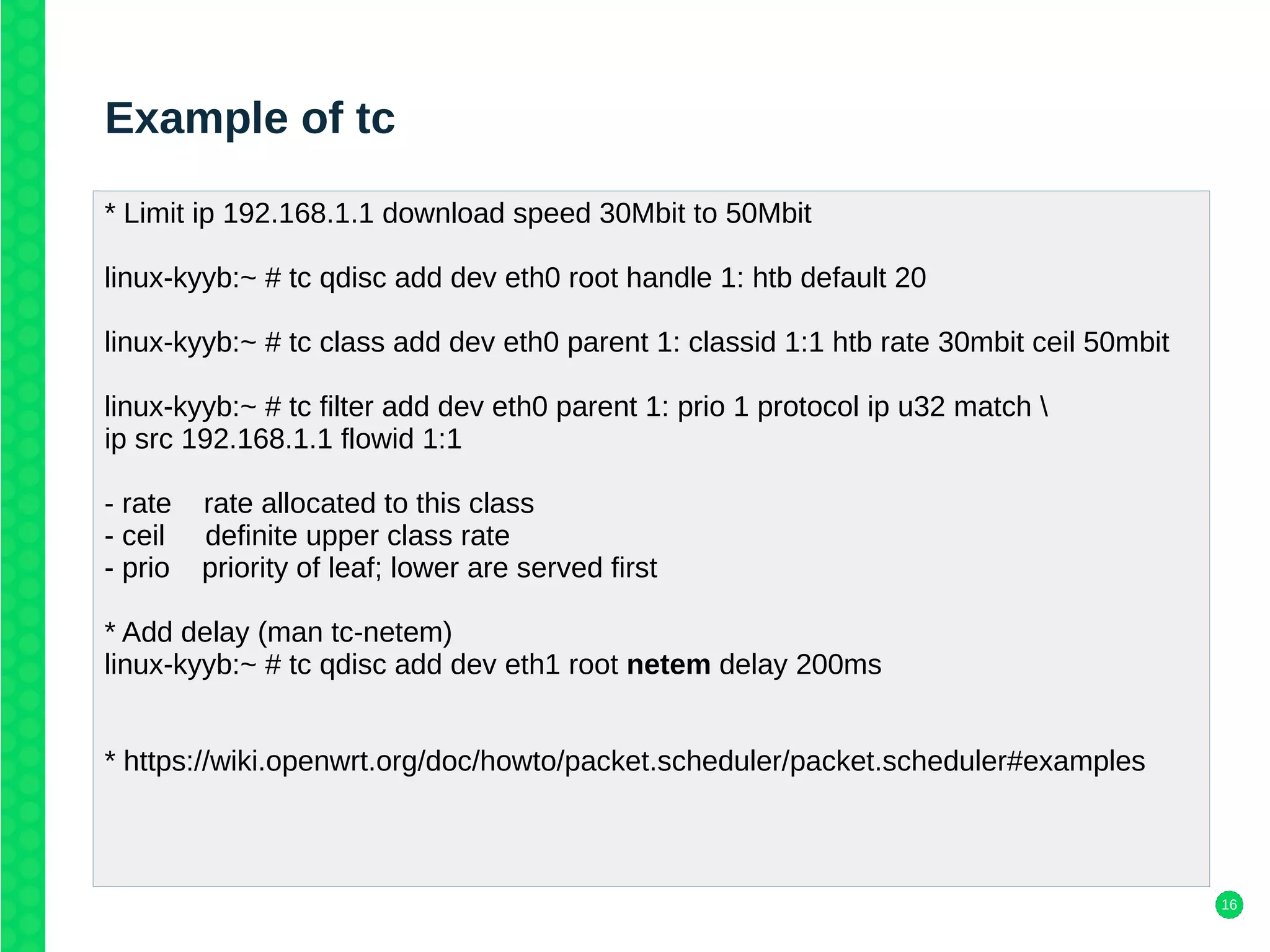
* Limit ip 192.168.1.1 download speed 30Mbit to 50Mbit
linux-kyyb:~ # tc qdisc add dev eth0 root handle 1: htb default 20
linux-kyyb:~ # tc class add dev eth0 parent 1: classid 1:1 htb rate 30mbit ceil 50mbit
linux-kyyb:~ # tc filter add dev eth0 parent 1: prio 1 protocol ip u32 match 
ip src 192.168.1.1 flowid 1:1
- rate rate allocated to this class
- ceil definite upper class rate
- prio priority of leaf; lower are served first
* Add delay (man tc-netem)
linux-kyyb:~ # tc qdisc add dev eth1 root netem delay 200ms
* https://wiki.openwrt.org/doc/howto/packet.scheduler/packet.scheduler#examples
17
Reference
• http://tldp.org/en/Traffic-Control-HOWTO/index.html
• http://www.lartc.org/lartc.html
• https://people.netfilter.org/pablo/netdev0.1/papers/Linux-Traffic-Control-Classifier-
Action-Subsystem-Architecture.pdf
19

Linux Linux Traffic Control

  • 1.
    Linux Traffic Control SUSELabs Taipei technology sharing day 2018 David Chang Software Engineer SUSE / dchang@suse.com
  • 2.
    2 Overview • What isTraffic Control • Why use Traffic Control • How it works • Traffic Control elements • Linux Traffic Control components • Traffic Control with tc command
  • 3.
    3 What is TrafficControl • The sets of queuing systems and mechanisms by which packets are received and transmitted on a router – Deciding which packets to accept at what rate on the input of an interface – Determining which packets to transmit in what order at what rate on the output of an interface • Quality of Service (QoS) is often used as a synonym for network traffic control
  • 4.
    4 Why use TrafficControl • Traffic control tools allow administrator to enqueue packets into the network differently based on attributes of the packet • Advantages – Lead to more predictable usage of network resources and less volatile contention for these resources • Disadvantages – Complexity – Complexity – Complexity
  • 5.
    5 Common Traffic Controlsolutions • Limit total bandwidth to a known rate • Limit the bandwidth of a particular user, service or client • Reserve bandwidth for a particular application or user • Prefer latency sensitive traffic • Managed oversubscribed bandwidth • Allow equitable distribution of unreserved bandwidth • Ensure that a particular type of traffic is dropped
  • 6.
    6 How it works Origin:http://web.opalsoft.net/qos/default.php?p=linux101-ds
  • 7.
    7 Source code • Linuxkernel source – net/sched/sch_*.c (qdisc) – net/sched/cls_*.c (filter) – net/sched/act_*.c (action) • iproute2 source – tc/q_*.c (qdisc) – tc/f_*.c (filter) – tc/m_*.c (action)
  • 8.
    8 Traffic Control elements •Shaping - Shapers delay packets to meet a desired rate • Scheduling - Schedulers arrange and/or rearrange packets for output • Classifying - Classifiers sort or separate traffic into queues • Policing - Policers measure and limit traffic in a particular queue • Dropping - Dropping discards an entire packet, flow or classification • Marking - Marking is a mechanism by which the packet is altered
  • 9.
    9 Linux Traffic Controlcomponents • qdisc (queuing discipline) – A qdisc is a scheduler, attached to a network interface – Classless qdiscs • pfifo_fast qdisc - the default qdisc for all interfaces under Linux • Stochastic Fairness Queueing (SFQ) - link is truly full share outgoing bandwidth • Token Bucket Filter (TBF) - slows down outgoing traffic to the specified rate – Classfull qdiscs • Hierarchical Token Bucket (HTB) – fixed bandwidth divide for different purposes a guaranteed bandwidth • Class Based Queuing (CBQ) – txqueuelen - current size of the transmission queue • ifconfig eth0 • ip link show dev eth0
  • 10.
    10 Linux Traffic Controlcomponents • class – A Class is a sub-qdisc. A class may contain another class. • filter – Filters are used for classification of packets – Classifier (must) • Filter objects, which can be manipulated using tc, can use several different classifying mechanisms • To identify characteristics of a packet or a packet's metadata • u32, fw, route, rsvp, basic, bpf • u32 classifier which is used by filers for selecting packets based on packet attributes – Policer • A policer calls one action above and another action below the specified rate • Only used in Linux traffic control as part of a filter
  • 11.
    11 An example ofqdisc contain filter and class Origin: http://web.opalsoft.net/qos/default.php?p=linux101-ds
  • 12.
    12 Linux Traffic Controlcomponents • drop – Any policer attached to any filter could have a drop action – Only used in Linux traffic control as part of a policer • handle – Every class and classful qdisc requires a unique identifier within the traffic control structure – a handle and has two constituent members, a major number and a minor number
  • 13.
  • 14.
    14 Traffic Control withtc command linux-kyyb:/home/dchang # tc Usage: tc [ OPTIONS ] OBJECT { COMMAND | help } tc [-force] -batch filename where OBJECT := { qdisc | class | filter | action | monitor | exec } OPTIONS := { -s[tatistics] | -d[etails] | -r[aw] | -p[retty] | -b[atch] [filename] | -n[etns] name | -nm | -nam[es] | { -cf | -conf } path } linux-kyyb:/home/dchang # tc -s qdisc show dev eth1 qdisc pfifo_fast 0: root refcnt 2 bands 3 priomap 1 2 2 2 1 2 0 0 1 1 1 1 1 1 1 1 Sent 0 bytes 0 pkt (dropped 0, overlimits 0 requeues 0) backlog 0b 0p requeues 0
  • 15.
    15 tc qdisc linux-kyyb:~ #tc qdisc help Usage: tc qdisc [ add | del | replace | change | show ] dev STRING [ handle QHANDLE ] [ root | ingress | parent CLASSID ] [ estimator INTERVAL TIME_CONSTANT ] [ stab [ help | STAB_OPTIONS] ] [ [ QDISC_KIND ] [ help | OPTIONS ] ] tc qdisc show [ dev STRING ] [ingress] Where: QDISC_KIND := { [p|b]fifo | tbf | prio | cbq | red | etc. } OPTIONS := ... try tc qdisc add <desired QDISC_KIND> help STAB_OPTIONS := ... try tc qdisc add stab help
  • 16.
    16 Example of tc *Limit ip 192.168.1.1 download speed 30Mbit to 50Mbit linux-kyyb:~ # tc qdisc add dev eth0 root handle 1: htb default 20 linux-kyyb:~ # tc class add dev eth0 parent 1: classid 1:1 htb rate 30mbit ceil 50mbit linux-kyyb:~ # tc filter add dev eth0 parent 1: prio 1 protocol ip u32 match ip src 192.168.1.1 flowid 1:1 - rate rate allocated to this class - ceil definite upper class rate - prio priority of leaf; lower are served first * Add delay (man tc-netem) linux-kyyb:~ # tc qdisc add dev eth1 root netem delay 200ms * https://wiki.openwrt.org/doc/howto/packet.scheduler/packet.scheduler#examples
  • 17.
    17 Reference • http://tldp.org/en/Traffic-Control-HOWTO/index.html • http://www.lartc.org/lartc.html •https://people.netfilter.org/pablo/netdev0.1/papers/Linux-Traffic-Control-Classifier- Action-Subsystem-Architecture.pdf
  • 19.