JUnit
A tool for test-driven developmen
Introduction
 Unit Testing tool for JAVA
 JUnit is an open source framework,
which is used for writing and running
tests. JUnit tests allow you to write
codes faster, which increases quality.
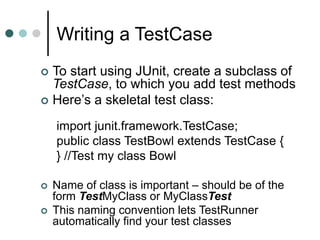
Writing a TestCase
 To start using JUnit, create a subclass of
TestCase, to which you add test methods
 Here’s a skeletal test class:
import junit.framework.TestCase;
public class TestBowl extends TestCase {
} //Test my class Bowl
 Name of class is important – should be of the
form TestMyClass or MyClassTest
 This naming convention lets TestRunner
automatically find your test classes
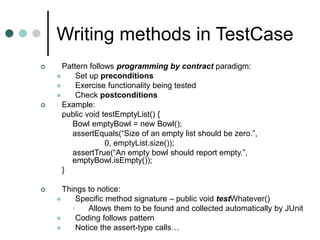
Writing methods in TestCase
 Pattern follows programming by contract paradigm:
 Set up preconditions
 Exercise functionality being tested
 Check postconditions
 Example:
public void testEmptyList() {
Bowl emptyBowl = new Bowl();
assertEquals(“Size of an empty list should be zero.”,
0, emptyList.size());
assertTrue(“An empty bowl should report empty.”,
emptyBowl.isEmpty());
}
 Things to notice:
 Specific method signature – public void testWhatever()
• Allows them to be found and collected automatically by JUnit
 Coding follows pattern
 Notice the assert-type calls…
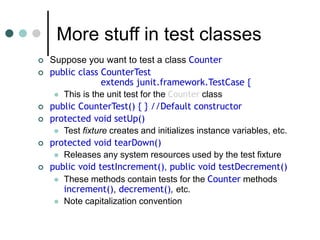
More stuff in test classes
 Suppose you want to test a class Counter
 public class CounterTest
extends junit.framework.TestCase {
 This is the unit test for the Counter class
 public CounterTest() { } //Default constructor
 protected void setUp()
 Test fixture creates and initializes instance variables, etc.
 protected void tearDown()
 Releases any system resources used by the test fixture
 public void testIncrement(), public void testDecrement()
 These methods contain tests for the Counter methods
increment(), decrement(), etc.
 Note capitalization convention
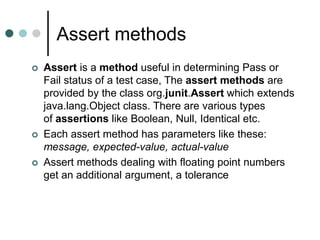
Assert methods
 Assert is a method useful in determining Pass or
Fail status of a test case, The assert methods are
provided by the class org.junit.Assert which extends
java.lang.Object class. There are various types
of assertions like Boolean, Null, Identical etc.
 Each assert method has parameters like these:
message, expected-value, actual-value
 Assert methods dealing with floating point numbers
get an additional argument, a tolerance
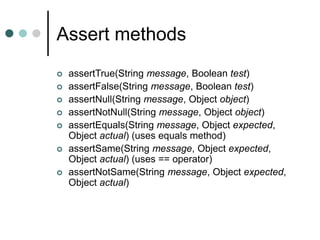
Assert methods
 assertTrue(String message, Boolean test)
 assertFalse(String message, Boolean test)
 assertNull(String message, Object object)
 assertNotNull(String message, Object object)
 assertEquals(String message, Object expected,
Object actual) (uses equals method)
 assertSame(String message, Object expected,
Object actual) (uses == operator)
 assertNotSame(String message, Object expected,
Object actual)
Fixtures
 A test fixture is a fixed state of a set of objects used as a
baseline for running tests.
The purpose of a test fixture is to ensure that there is a well
known and fixed environment in which tests are run so that
results are repeatable. Examples of fixtures:
 Preparation of input data and setup/creation of fake or
mock objects
 JUnit provides annotations so that test classes can have
fixture run before or after every test, or one time fixtures that
run before and after only once for all test methods in a class.
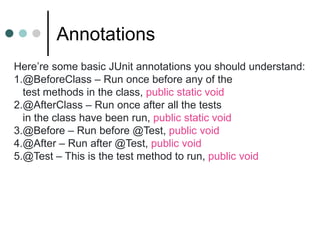
Annotations
Here’re some basic JUnit annotations you should understand:
1.@BeforeClass – Run once before any of the
test methods in the class, public static void
2.@AfterClass – Run once after all the tests
in the class have been run, public static void
3.@Before – Run before @Test, public void
4.@After – Run after @Test, public void
5.@Test – This is the test method to run, public void
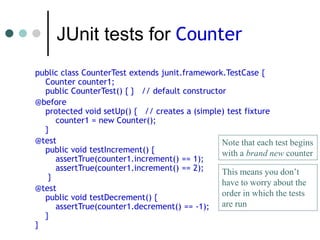
JUnit tests for Counter
public class CounterTest extends junit.framework.TestCase {
Counter counter1;
public CounterTest() { } // default constructor
@before
protected void setUp() { // creates a (simple) test fixture
counter1 = new Counter();
}
@test
public void testIncrement() {
assertTrue(counter1.increment() == 1);
assertTrue(counter1.increment() == 2);
}
@test
public void testDecrement() {
assertTrue(counter1.decrement() == -1);
}
}
Note that each test begins
with a brand new counter
This means you don’t
have to worry about the
order in which the tests
are run
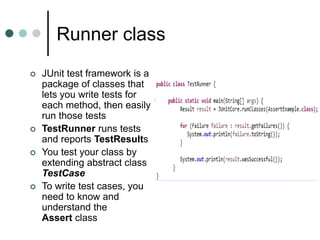
Runner class
 JUnit test framework is a
package of classes that
lets you write tests for
each method, then easily
run those tests
 TestRunner runs tests
and reports TestResults
 You test your class by
extending abstract class
TestCase
 To write test cases, you
need to know and
understand the
Assert class
TestSuites
 TestSuites collect a selection of tests to run them as a unit
 Collections automatically use TestSuites, however to specify the
order in which tests are run, write your own:
public static Test suite() {
suite.addTest(new TestBowl(“testBowl”));
suite.addTest(new TestBowl(“testAdding”));
return suite;
}
 Should seldom have to write your own TestSuites as each method
in your TestCase should be independent of all others
 Can create TestSuites that test a whole package:
public static Test suite() {
TestSuite suite = new TestSuite();
suite.addTestSuite(TestBowl.class);
suite.addTestSuite(TestFruit.class);
return suite;
}
Why create a test suite?
 Obviously you have to test your code—right?
 You can do ad hoc testing (running whatever tests occur to you
at the moment), or
 You can build a test suite (a thorough set of tests that can be
run at any time)
 Disadvantages of a test suite
 It’s a lot of extra programming
• True, but use of a good test framework can help quite a bit
 You don’t have time to do all that extra work
• False! Experiments repeatedly show that test suites reduce
debugging time more than the amount spent building the test suite
 Advantages of a test suite
 Reduces total number of bugs in delivered code
 Makes code much more maintainable and refactorable
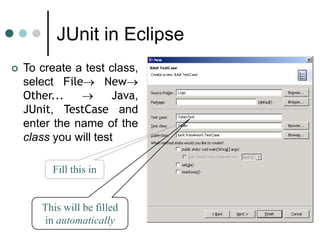
JUnit in Eclipse
 To create a test class,
select File New
Other...  Java,
JUnit, TestCase and
enter the name of the
class you will test
Fill this in
This will be filled
in automatically
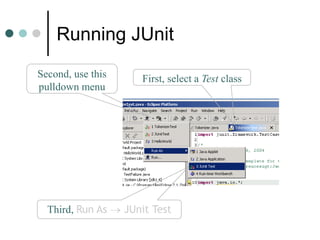
Running JUnit
First, select a Test classSecond, use this
pulldown menu
Third, Run As  JUnit Test
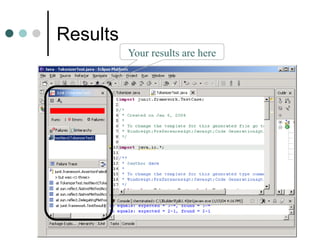
Results
Your results are here

Junit

  • 1.
    JUnit A tool fortest-driven developmen
  • 2.
    Introduction  Unit Testingtool for JAVA  JUnit is an open source framework, which is used for writing and running tests. JUnit tests allow you to write codes faster, which increases quality.
  • 3.
    Writing a TestCase To start using JUnit, create a subclass of TestCase, to which you add test methods  Here’s a skeletal test class: import junit.framework.TestCase; public class TestBowl extends TestCase { } //Test my class Bowl  Name of class is important – should be of the form TestMyClass or MyClassTest  This naming convention lets TestRunner automatically find your test classes
  • 4.
    Writing methods inTestCase  Pattern follows programming by contract paradigm:  Set up preconditions  Exercise functionality being tested  Check postconditions  Example: public void testEmptyList() { Bowl emptyBowl = new Bowl(); assertEquals(“Size of an empty list should be zero.”, 0, emptyList.size()); assertTrue(“An empty bowl should report empty.”, emptyBowl.isEmpty()); }  Things to notice:  Specific method signature – public void testWhatever() • Allows them to be found and collected automatically by JUnit  Coding follows pattern  Notice the assert-type calls…
  • 5.
    More stuff intest classes  Suppose you want to test a class Counter  public class CounterTest extends junit.framework.TestCase {  This is the unit test for the Counter class  public CounterTest() { } //Default constructor  protected void setUp()  Test fixture creates and initializes instance variables, etc.  protected void tearDown()  Releases any system resources used by the test fixture  public void testIncrement(), public void testDecrement()  These methods contain tests for the Counter methods increment(), decrement(), etc.  Note capitalization convention
  • 6.
    Assert methods  Assertis a method useful in determining Pass or Fail status of a test case, The assert methods are provided by the class org.junit.Assert which extends java.lang.Object class. There are various types of assertions like Boolean, Null, Identical etc.  Each assert method has parameters like these: message, expected-value, actual-value  Assert methods dealing with floating point numbers get an additional argument, a tolerance
  • 7.
    Assert methods  assertTrue(Stringmessage, Boolean test)  assertFalse(String message, Boolean test)  assertNull(String message, Object object)  assertNotNull(String message, Object object)  assertEquals(String message, Object expected, Object actual) (uses equals method)  assertSame(String message, Object expected, Object actual) (uses == operator)  assertNotSame(String message, Object expected, Object actual)
  • 8.
    Fixtures  A testfixture is a fixed state of a set of objects used as a baseline for running tests. The purpose of a test fixture is to ensure that there is a well known and fixed environment in which tests are run so that results are repeatable. Examples of fixtures:  Preparation of input data and setup/creation of fake or mock objects  JUnit provides annotations so that test classes can have fixture run before or after every test, or one time fixtures that run before and after only once for all test methods in a class.
  • 9.
    Annotations Here’re some basicJUnit annotations you should understand: 1.@BeforeClass – Run once before any of the test methods in the class, public static void 2.@AfterClass – Run once after all the tests in the class have been run, public static void 3.@Before – Run before @Test, public void 4.@After – Run after @Test, public void 5.@Test – This is the test method to run, public void
  • 10.
    JUnit tests forCounter public class CounterTest extends junit.framework.TestCase { Counter counter1; public CounterTest() { } // default constructor @before protected void setUp() { // creates a (simple) test fixture counter1 = new Counter(); } @test public void testIncrement() { assertTrue(counter1.increment() == 1); assertTrue(counter1.increment() == 2); } @test public void testDecrement() { assertTrue(counter1.decrement() == -1); } } Note that each test begins with a brand new counter This means you don’t have to worry about the order in which the tests are run
  • 11.
    Runner class  JUnittest framework is a package of classes that lets you write tests for each method, then easily run those tests  TestRunner runs tests and reports TestResults  You test your class by extending abstract class TestCase  To write test cases, you need to know and understand the Assert class
  • 12.
    TestSuites  TestSuites collecta selection of tests to run them as a unit  Collections automatically use TestSuites, however to specify the order in which tests are run, write your own: public static Test suite() { suite.addTest(new TestBowl(“testBowl”)); suite.addTest(new TestBowl(“testAdding”)); return suite; }  Should seldom have to write your own TestSuites as each method in your TestCase should be independent of all others  Can create TestSuites that test a whole package: public static Test suite() { TestSuite suite = new TestSuite(); suite.addTestSuite(TestBowl.class); suite.addTestSuite(TestFruit.class); return suite; }
  • 13.
    Why create atest suite?  Obviously you have to test your code—right?  You can do ad hoc testing (running whatever tests occur to you at the moment), or  You can build a test suite (a thorough set of tests that can be run at any time)  Disadvantages of a test suite  It’s a lot of extra programming • True, but use of a good test framework can help quite a bit  You don’t have time to do all that extra work • False! Experiments repeatedly show that test suites reduce debugging time more than the amount spent building the test suite  Advantages of a test suite  Reduces total number of bugs in delivered code  Makes code much more maintainable and refactorable
  • 14.
    JUnit in Eclipse To create a test class, select File New Other...  Java, JUnit, TestCase and enter the name of the class you will test Fill this in This will be filled in automatically
  • 15.
    Running JUnit First, selecta Test classSecond, use this pulldown menu Third, Run As  JUnit Test
  • 16.