A	
  Tutorial	
  Introduction	
  
to	
  DANE
Jan	
  Zorz /	
  ISOC
Carlos	
  Martinez	
  /	
  LACNIC
Mechanics	
  of	
  Web	
  Browsing
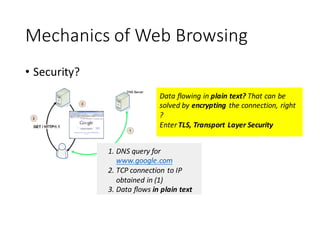
• Security?
1. DNS	
  query	
  for	
  
www.google.com
2. TCP	
  connection	
  to	
  IP	
  
obtained	
  in	
  (1)
3. Data	
  flows	
  in	
  plain	
  text
Data	
  flowing	
  in	
  plain	
  text?	
  That	
  can	
  be	
  
solved	
  by	
  encrypting	
  the	
  connection,	
  right	
  
?	
  
Enter	
  TLS,	
  Transport	
  Layer	
  Security
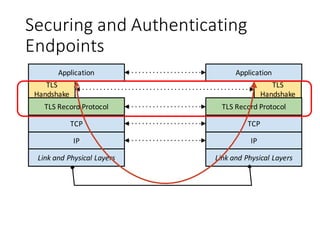
Securing	
  and	
  Authenticating	
  
Endpoints
Application
TLS	
  
Handshake
TLS	
  Record	
  Protocol
TCP
IP
Link	
  and	
  Physical	
  Layers
Application
TLS	
  
Handshake
TLS	
  Record	
  Protocol
TCP
IP
Link	
  and	
  Physical	
  Layers
TLS	
  Handshake
ClientHello
ServerHello
ServerCertificate
ServerKeyExchange
ServerHelloDone
[ClientCertificate]
ClientKeyExchange
ChangeCipherSpec
ChangeCipherSpec
Client Server
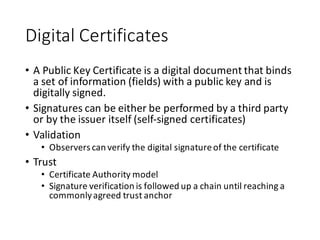
Digital	
  Certificates
• A	
  Public	
  Key	
  Certificate	
  is	
  a	
  digital	
  document	
  that	
  binds	
  
a	
  set	
  of	
  information	
  (fields)	
  with	
  a	
  public	
  key	
  and	
  is	
  
digitally	
  signed.
• Signatures	
  can	
  be	
  either	
  be	
  performed	
  by	
  a	
  third	
  party	
  
or	
  by	
  the	
  issuer	
  itself	
  (self-­‐signed	
  certificates)
• Validation
• Observers	
  can	
  verify	
  the	
  digital	
  signature	
  of	
  the	
  certificate
• Trust
• Certificate	
  Authority	
  model
• Signature	
  verification	
  is	
  followed	
  up	
  a	
  chain	
  until	
  reaching	
  a	
  
commonly	
  agreed	
  trust	
  anchor
Digital	
  Certificates	
  (2)
• Fields	
  and	
  flags	
  in	
  a	
  certificate	
  define	
  how,	
  where	
  and	
  
when	
  the	
  certificate	
  can	
  be	
  used	
  and	
  define	
  	
  is	
  valid	
  to	
  
be	
  used
• Valid-­‐from,	
  Valid-­‐until	
  times
• Express	
  constraints	
  on	
  usage
• Extensions
• Lists	
  of	
  [type-­‐value-­‐critical_flag]
• Examples
• Key	
  usage
• Extended	
  key	
  usage	
  (clientAuth,	
  serverAuth,	
  emailProtection,	
  
...	
  )
• RFC	
  3779	
  (Internet	
  number	
  resources)
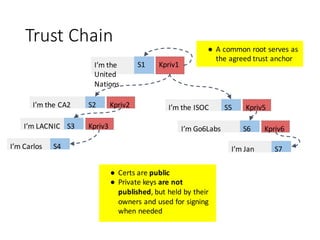
Trust	
  Chain
I’m	
  Carlos S4
I’m	
  LACNIC S3 Kpriv3
I’m	
  the	
  CA2 S2 Kpriv2
I’m	
  the	
  
United	
  
Nations
S1 Kpriv1
I’m	
  Jan S7
I’m	
  Go6Labs S6 Kpriv6
I’m	
  the	
  ISOC S5 Kpriv5
● Certs	
  are	
  public
● Private	
  keys	
  are	
  not	
  
published,	
  but	
  held	
  by	
  their	
  
owners	
  and	
  used	
  for	
  signing	
  
when	
  needed
● A	
  common	
  root	
  serves	
  as	
  
the	
  agreed	
  trust	
  anchor
Drawbacks	
  of	
  the	
  CA-­‐Based	
  Chain
• Trust	
  anchors	
  can	
  (and	
  have	
  been)	
  successfully	
  attacked	
  
• DigiNotar,	
  GlobalSign,	
  DigiCert Malaysia	
  are	
  just	
  some	
  examples
• The	
  process	
  that	
  CAs	
  use	
  to	
  validate	
  information	
  provided	
  
by	
  customers	
  can	
  be	
  subverted
• CAs	
  are	
  slow	
  to	
  react	
  when	
  a	
  certificate	
  is	
  compromised
• The	
  revocation	
  process	
  can	
  be	
  slow	
  and	
  is	
  based	
  on	
  the	
  
concept	
  of	
  CRLs	
  that	
  have	
  to	
  be	
  downloaded	
  and	
  are	
  re-­‐
created	
  every	
  few	
  hours
• [Check	
  https://tools.ietf.org/html/draft-­‐housley-­‐web-­‐pki-­‐
problems-­‐00 ]
The	
  DigiNotar Debacle
• [https://www.enisa.europa.eu/media/news-­‐
items/operation-­‐black-­‐tulip]	
  
Shortcomings	
  of	
  the	
  Traditional	
  CA	
  
Model
• The	
  attack	
  surface	
  is	
  huge	
  and	
  growing!
• A	
  CA	
  can	
  sign	
  for	
  ANY	
  domain,	
  and	
  for	
  the	
  browser	
  it’s	
  
enough	
  to	
  find	
  one	
  CA	
  vouching	
  for	
  a	
  given	
  combination	
  
of	
  domain	
  and	
  IP	
  	
  
This	
  is	
  the	
  list	
  of	
  TAs	
  
trusted	
  by	
  default by	
  the	
  
latest	
  version	
  of	
  Firefox.	
  
And	
  there	
  is	
  one	
  hole	
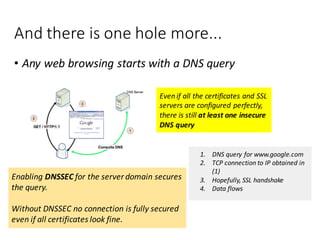
  more...
• Any web	
  browsing	
  starts	
  with	
  a	
  DNS	
  query
1. DNS	
  query	
  for	
  www.google.com
2. TCP	
  connection	
  to	
  IP	
  obtained	
  in	
  
(1)
3. Hopefully,	
  SSL	
  handshake
4. Data	
  flows
Even	
  if	
  all	
  the	
  certificates	
  and	
  SSL	
  
servers	
  are	
  configured	
  perfectly,	
  
there	
  is	
  still	
  at	
  least	
  one	
  insecure	
  
DNS	
  query
Enabling DNSSEC for	
  the	
  server	
  domain	
  secures	
  
the	
  query.
Without	
  DNSSEC	
  no	
  connection	
  is	
  fully	
  secured	
  
even	
  if	
  all	
  certificates	
  look	
  fine.
Enter	
  DANE
To	
  Keep	
  in	
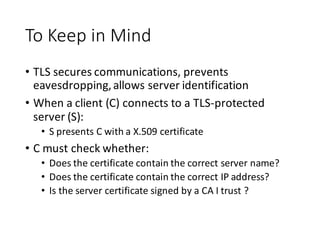
  Mind
• TLS	
  secures	
  communications,	
  prevents	
  
eavesdropping,	
  allows	
  server	
  identification
• When	
  a	
  client	
  (C)	
  connects	
  to	
  a	
  TLS-­‐protected	
  
server	
  (S):
• S	
  presents	
  C	
  with	
  a	
  X.509	
  certificate
• C	
  must	
  check	
  whether:
• Does	
  the	
  certificate	
  contain	
  the	
  correct	
  server	
  name?
• Does	
  the	
  certificate	
  contain	
  the	
  correct	
  IP	
  address?
• Is	
  the	
  server	
  certificate	
  signed	
  by	
  a	
  CA	
  I	
  trust	
  ?
DANE	
  – The	
  TLSA	
  DNS	
  Record
What	
  if…	
  I	
  could	
  publish	
  my	
  
digital	
  certificates	
  in	
  the	
  DNS	
  
itself	
  ?	
  
From	
  this	
  point	
  we	
  assume	
  
all	
  DNS	
  zones	
  are	
  DNSSEC-­‐
signed.	
  
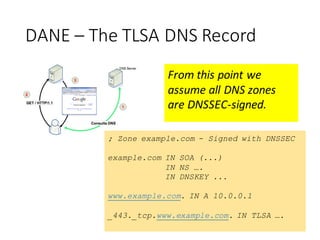
DANE	
  – The	
  TLSA	
  DNS	
  Record
; Zone example.com - Signed with DNSSEC
example.com IN SOA (...)
IN NS ….
IN DNSKEY ...
www.example.com. IN A 10.0.0.1
_443._tcp.www.example.com. IN TLSA ….
From	
  this	
  point	
  we	
  
assume	
  all	
  DNS	
  zones	
  
are	
  DNSSEC-­‐signed.	
  
TLSA	
  Record	
  Overview
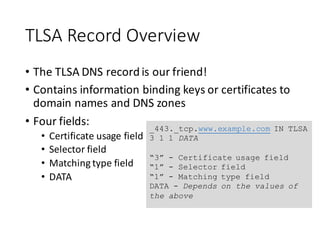
• The	
  TLSA	
  DNS	
  record	
  is	
  our	
  friend!
• Contains	
  information	
  binding	
  keys	
  or	
  certificates	
  to	
  
domain	
  names	
  and	
  DNS	
  zones
• Four	
  fields:
• Certificate	
  usage	
  field
• Selector	
  field
• Matching	
  type	
  field
• DATA
_443._tcp.www.example.com IN TLSA
3 1 1 DATA
“3” - Certificate usage field
“1” - Selector field
“1” - Matching type field
DATA - Depends on the values of
the above
DANE	
  Use	
  Cases
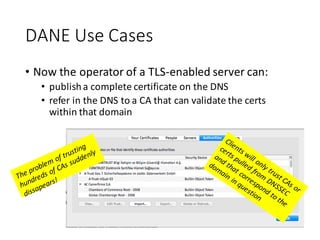
• Now	
  the	
  operator	
  of	
  a	
  TLS-­‐enabled	
  server	
  can:
• publish	
  a	
  complete	
  certificate	
  on	
  the	
  DNS
• refer	
  in	
  the	
  DNS	
  to	
  a	
  CA	
  that	
  can	
  validate	
  the	
  certs	
  
within	
  that	
  domain
1-­‐Slide	
  DANE	
  HOW-­‐TO
• Sign	
  your	
  zone	
  with	
  DNSSEC
• Configure	
  ‘HTTPS’	
  in	
  your	
  web	
  server
• Create	
  a	
  digital	
  certificate	
  yourself	
  using	
  OpenSSL
• Configure	
  Apache	
  or	
  your	
  web	
  server	
  of	
  choice
• Create	
  TLSA	
  records	
  using	
  ldns-­‐dane
• http://www.nlnetlabs.nl/projects/ldns/
• There	
  are	
  other	
  tools	
  out	
  there,	
  I	
  just	
  found	
  this	
  one	
  to	
  
be	
  easy	
  to	
  use
• Add	
  the	
  TLSA	
  records	
  to	
  your	
  DNS	
  zone	
  and	
  re-­‐sign
• Wait	
  for	
  TTLs	
  to	
  expire….	
  et	
  voilá!
Browser	
  Support	
  Via	
  Plugins
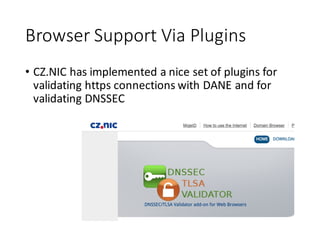
• CZ.NIC	
  has	
  implemented	
  a	
  nice	
  set	
  of	
  plugins	
  for	
  
validating	
  https	
  connections	
  with	
  DANE	
  and	
  for	
  
validating	
  DNSSEC
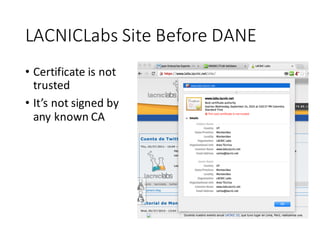
LACNICLabs Site	
  Before	
  DANE
• Certificate	
  is	
  not	
  
trusted
• It’s	
  not	
  signed	
  by	
  
any	
  known	
  CA
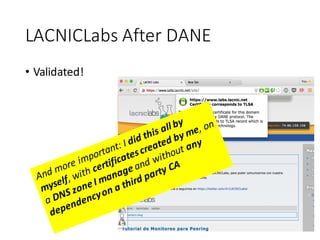
LACNICLabs After	
  DANE
• Validated!
Drawbacks	
  ?	
  Sure…
• There	
  is	
  a	
  bit	
  of	
  a	
  learning	
  curve
• Browser	
  support,	
  still	
  in	
  its	
  infancy
• Application	
  support	
  in	
  general
• Dependent	
  on	
  DNSSEC	
  adoption
Thanks!

An Introduction to DANE - Securing TLS using DNSSEC

  • 1.
    A  Tutorial  Introduction   to  DANE Jan  Zorz /  ISOC Carlos  Martinez  /  LACNIC
  • 2.
    Mechanics  of  Web  Browsing • Security? 1. DNS  query  for   www.google.com 2. TCP  connection  to  IP   obtained  in  (1) 3. Data  flows  in  plain  text Data  flowing  in  plain  text?  That  can  be   solved  by  encrypting  the  connection,  right   ?   Enter  TLS,  Transport  Layer  Security
  • 3.
    Securing  and  Authenticating   Endpoints Application TLS   Handshake TLS  Record  Protocol TCP IP Link  and  Physical  Layers Application TLS   Handshake TLS  Record  Protocol TCP IP Link  and  Physical  Layers
  • 4.
  • 5.
    Digital  Certificates • A  Public  Key  Certificate  is  a  digital  document  that  binds   a  set  of  information  (fields)  with  a  public  key  and  is   digitally  signed. • Signatures  can  be  either  be  performed  by  a  third  party   or  by  the  issuer  itself  (self-­‐signed  certificates) • Validation • Observers  can  verify  the  digital  signature  of  the  certificate • Trust • Certificate  Authority  model • Signature  verification  is  followed  up  a  chain  until  reaching  a   commonly  agreed  trust  anchor
  • 6.
    Digital  Certificates  (2) •Fields  and  flags  in  a  certificate  define  how,  where  and   when  the  certificate  can  be  used  and  define    is  valid  to   be  used • Valid-­‐from,  Valid-­‐until  times • Express  constraints  on  usage • Extensions • Lists  of  [type-­‐value-­‐critical_flag] • Examples • Key  usage • Extended  key  usage  (clientAuth,  serverAuth,  emailProtection,   ...  ) • RFC  3779  (Internet  number  resources)
  • 7.
    Trust  Chain I’m  CarlosS4 I’m  LACNIC S3 Kpriv3 I’m  the  CA2 S2 Kpriv2 I’m  the   United   Nations S1 Kpriv1 I’m  Jan S7 I’m  Go6Labs S6 Kpriv6 I’m  the  ISOC S5 Kpriv5 ● Certs  are  public ● Private  keys  are  not   published,  but  held  by  their   owners  and  used  for  signing   when  needed ● A  common  root  serves  as   the  agreed  trust  anchor
  • 8.
    Drawbacks  of  the  CA-­‐Based  Chain • Trust  anchors  can  (and  have  been)  successfully  attacked   • DigiNotar,  GlobalSign,  DigiCert Malaysia  are  just  some  examples • The  process  that  CAs  use  to  validate  information  provided   by  customers  can  be  subverted • CAs  are  slow  to  react  when  a  certificate  is  compromised • The  revocation  process  can  be  slow  and  is  based  on  the   concept  of  CRLs  that  have  to  be  downloaded  and  are  re-­‐ created  every  few  hours • [Check  https://tools.ietf.org/html/draft-­‐housley-­‐web-­‐pki-­‐ problems-­‐00 ]
  • 9.
    The  DigiNotar Debacle •[https://www.enisa.europa.eu/media/news-­‐ items/operation-­‐black-­‐tulip]  
  • 10.
    Shortcomings  of  the  Traditional  CA   Model • The  attack  surface  is  huge  and  growing! • A  CA  can  sign  for  ANY  domain,  and  for  the  browser  it’s   enough  to  find  one  CA  vouching  for  a  given  combination   of  domain  and  IP     This  is  the  list  of  TAs   trusted  by  default by  the   latest  version  of  Firefox.  
  • 11.
    And  there  is  one  hole  more... • Any web  browsing  starts  with  a  DNS  query 1. DNS  query  for  www.google.com 2. TCP  connection  to  IP  obtained  in   (1) 3. Hopefully,  SSL  handshake 4. Data  flows Even  if  all  the  certificates  and  SSL   servers  are  configured  perfectly,   there  is  still  at  least  one  insecure   DNS  query Enabling DNSSEC for  the  server  domain  secures   the  query. Without  DNSSEC  no  connection  is  fully  secured   even  if  all  certificates  look  fine.
  • 12.
  • 13.
    To  Keep  in  Mind • TLS  secures  communications,  prevents   eavesdropping,  allows  server  identification • When  a  client  (C)  connects  to  a  TLS-­‐protected   server  (S): • S  presents  C  with  a  X.509  certificate • C  must  check  whether: • Does  the  certificate  contain  the  correct  server  name? • Does  the  certificate  contain  the  correct  IP  address? • Is  the  server  certificate  signed  by  a  CA  I  trust  ?
  • 14.
    DANE  – The  TLSA  DNS  Record What  if…  I  could  publish  my   digital  certificates  in  the  DNS   itself  ?   From  this  point  we  assume   all  DNS  zones  are  DNSSEC-­‐ signed.  
  • 15.
    DANE  – The  TLSA  DNS  Record ; Zone example.com - Signed with DNSSEC example.com IN SOA (...) IN NS …. IN DNSKEY ... www.example.com. IN A 10.0.0.1 _443._tcp.www.example.com. IN TLSA …. From  this  point  we   assume  all  DNS  zones   are  DNSSEC-­‐signed.  
  • 16.
    TLSA  Record  Overview •The  TLSA  DNS  record  is  our  friend! • Contains  information  binding  keys  or  certificates  to   domain  names  and  DNS  zones • Four  fields: • Certificate  usage  field • Selector  field • Matching  type  field • DATA _443._tcp.www.example.com IN TLSA 3 1 1 DATA “3” - Certificate usage field “1” - Selector field “1” - Matching type field DATA - Depends on the values of the above
  • 17.
    DANE  Use  Cases •Now  the  operator  of  a  TLS-­‐enabled  server  can: • publish  a  complete  certificate  on  the  DNS • refer  in  the  DNS  to  a  CA  that  can  validate  the  certs   within  that  domain
  • 18.
    1-­‐Slide  DANE  HOW-­‐TO •Sign  your  zone  with  DNSSEC • Configure  ‘HTTPS’  in  your  web  server • Create  a  digital  certificate  yourself  using  OpenSSL • Configure  Apache  or  your  web  server  of  choice • Create  TLSA  records  using  ldns-­‐dane • http://www.nlnetlabs.nl/projects/ldns/ • There  are  other  tools  out  there,  I  just  found  this  one  to   be  easy  to  use • Add  the  TLSA  records  to  your  DNS  zone  and  re-­‐sign • Wait  for  TTLs  to  expire….  et  voilá!
  • 19.
    Browser  Support  Via  Plugins • CZ.NIC  has  implemented  a  nice  set  of  plugins  for   validating  https  connections  with  DANE  and  for   validating  DNSSEC
  • 20.
    LACNICLabs Site  Before  DANE • Certificate  is  not   trusted • It’s  not  signed  by   any  known  CA
  • 21.
  • 22.
    Drawbacks  ?  Sure… •There  is  a  bit  of  a  learning  curve • Browser  support,  still  in  its  infancy • Application  support  in  general • Dependent  on  DNSSEC  adoption
  • 23.