DISTANCE VECTOR ROUTING     TS, PHẠM VĂN TÍNH PART11
Objective Describe how routing loops can occur in distance vector routing  Describe several methods used by distance vector routing protocols to ensure that routing information is accurate  Configure RIP  Use the ip classless command  Troubleshoot RIP  Configure RIP for load balancing  Configure static routes for RIP  Verify RIP  Configure IGRP  Verify IGRP operation  Troubleshoot IGRP
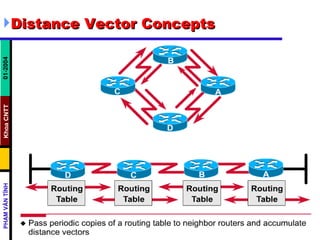
Distance Vector Concepts
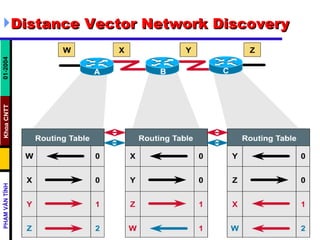
Distance Vector Network Discovery
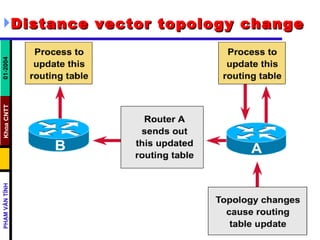
Distance vector topology change
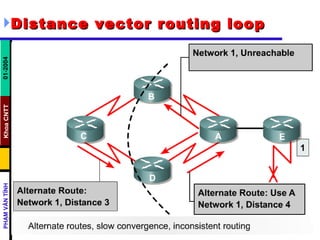
Distance vector routing loop
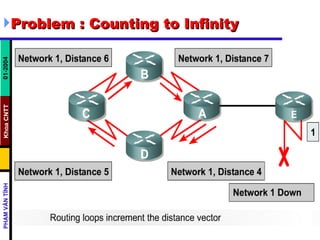
Problem : Counting to Infinity
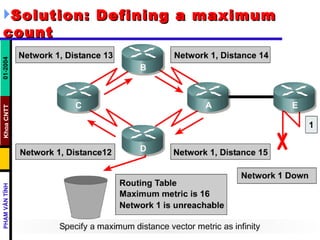
Solution: Defining a maximum count
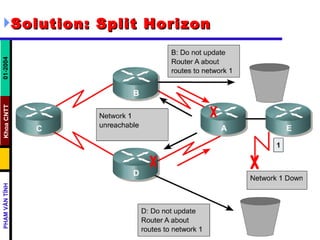
Solution: Split Horizon
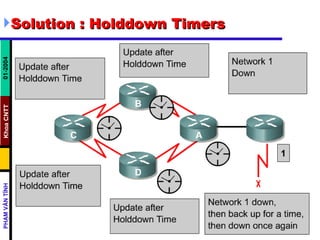
Solution : Holddown Timers
R outing  I nformation  P rotocol
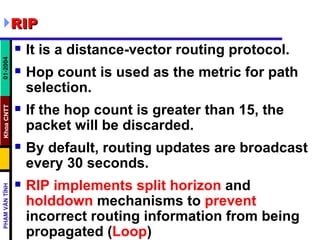
RIP It is a distance-vector routing protocol.  Hop count is used as the metric for path selection.  If the hop count is greater than 15, the packet will be discarded.  By default, routing updates are broadcast every 30 seconds.  RIP implements split horizon  and  holddown  mechanisms to  prevent  incorrect routing information from being propagated ( Loop )
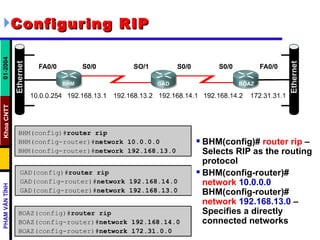
Configuring RIP   BHM(config)#  router rip  – Selects RIP as the routing protocol  BHM(config-router)#  network   10.0.0.0 BHM(config-router)#  network   192.168.13.0  – Specifies a directly connected networks
Common RIP configuration issues   To reduce routing loops and counting to infinity, RIP uses the following techniques: Count-to-infinity  Split horizon  Holddown counters  Triggered updates   GAD(config-if)# no ip split-horizon Router(config-router)# timers basic   update invalid  holddown  flush GAD(config-router)# update-timer   seconds GAD(config-router)# passive-interface   s0/0
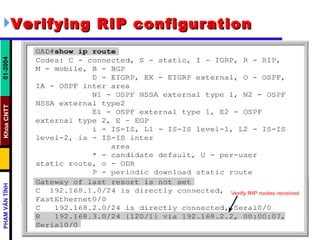
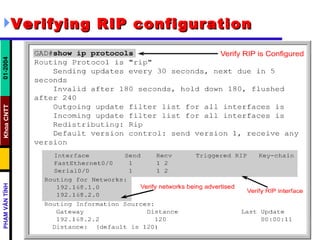
Verifying RIP configuration
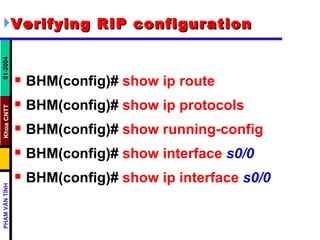
Verifying RIP configuration   BHM(config)#   show ip route BHM(config)#   show ip protocols BHM(config)#   show running-config   BHM(config)#   show interface   s0/0   BHM(config)#   show ip interface   s0/0
Troubleshooting RIP update issues   BHM(config)#  debug ip rip   Other commands to troubleshoot RIP: show ip rip database  show ip protocols {summary}  show ip route  debug ip rip {events}  show ip interface brief
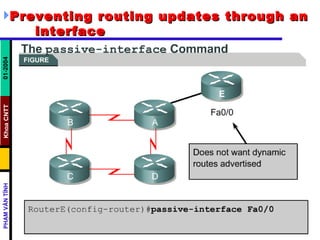
Preventing routing updates through an  interface
Integrating static routes with RIP   GAD(config-router)#   redistribute   static
I nterior  G ateway  R outing  P rotocol
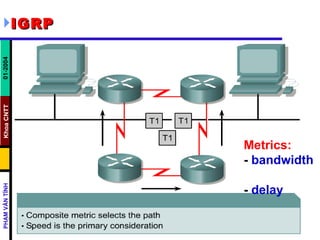
IGRP   Metrics:  -  bandwidth   -  delay
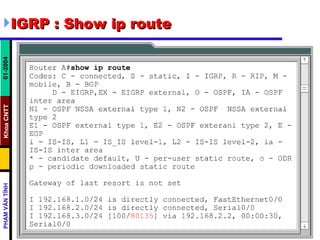
IGRP : Show ip route
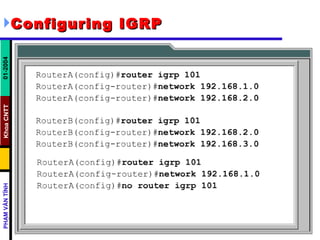
Configuring IGRP
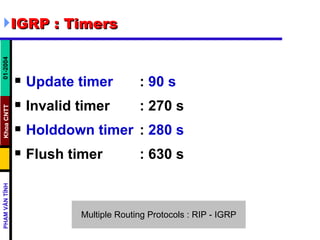
IGRP : Timers Update timer   :  90   s Invalid timer : 270 s  Holddown timer :  280 s   Flush timer  : 630 s
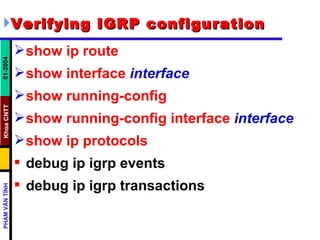
Verifying IGRP configuration   show ip route   show interface   interface   show running-config   show running-config interface   interface   show ip protocols   debug ip igrp events  debug ip igrp transactions

Chapter 07 - Dvr

  • 1.
    DISTANCE VECTOR ROUTING TS, PHẠM VĂN TÍNH PART11
  • 2.
    Objective Describe howrouting loops can occur in distance vector routing Describe several methods used by distance vector routing protocols to ensure that routing information is accurate Configure RIP Use the ip classless command Troubleshoot RIP Configure RIP for load balancing Configure static routes for RIP Verify RIP Configure IGRP Verify IGRP operation Troubleshoot IGRP
  • 3.
  • 4.
  • 5.
  • 6.
  • 7.
    Problem : Countingto Infinity
  • 8.
    Solution: Defining amaximum count
  • 9.
  • 10.
  • 11.
    R outing I nformation P rotocol
  • 12.
    RIP It isa distance-vector routing protocol. Hop count is used as the metric for path selection. If the hop count is greater than 15, the packet will be discarded. By default, routing updates are broadcast every 30 seconds. RIP implements split horizon and holddown mechanisms to prevent incorrect routing information from being propagated ( Loop )
  • 13.
    Configuring RIP BHM(config)# router rip – Selects RIP as the routing protocol BHM(config-router)# network 10.0.0.0 BHM(config-router)# network 192.168.13.0 – Specifies a directly connected networks
  • 14.
    Common RIP configurationissues To reduce routing loops and counting to infinity, RIP uses the following techniques: Count-to-infinity Split horizon Holddown counters Triggered updates GAD(config-if)# no ip split-horizon Router(config-router)# timers basic update invalid holddown flush GAD(config-router)# update-timer seconds GAD(config-router)# passive-interface s0/0
  • 15.
  • 16.
  • 17.
    Verifying RIP configuration BHM(config)# show ip route BHM(config)# show ip protocols BHM(config)# show running-config BHM(config)# show interface s0/0 BHM(config)# show ip interface s0/0
  • 18.
    Troubleshooting RIP updateissues BHM(config)# debug ip rip Other commands to troubleshoot RIP: show ip rip database show ip protocols {summary} show ip route debug ip rip {events} show ip interface brief
  • 19.
    Preventing routing updatesthrough an interface
  • 20.
    Integrating static routeswith RIP GAD(config-router)# redistribute static
  • 21.
    I nterior G ateway R outing P rotocol
  • 22.
    IGRP Metrics: - bandwidth - delay
  • 23.
    IGRP : Showip route
  • 24.
  • 25.
    IGRP : TimersUpdate timer : 90 s Invalid timer : 270 s Holddown timer : 280 s Flush timer : 630 s
  • 26.
    Verifying IGRP configuration show ip route show interface interface show running-config show running-config interface interface show ip protocols debug ip igrp events debug ip igrp transactions