Rapid IPv6 Deployment for ISP Networks
by Skeeve Stevens of eintellego Pty Ltd
Apricot 2010 – Kuala Lumpur, Malaysia v1.3.4
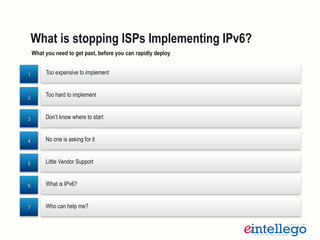
Too expensive to implement
Who can help me?
Little Vendor Support
Too hard to implement
No one is asking for it
What is IPv6?
What is stopping ISPs Implementing IPv6?
1
2
3
4
5
6
7
Don’t know where to start
What you need to get past, before you can rapidly deploy
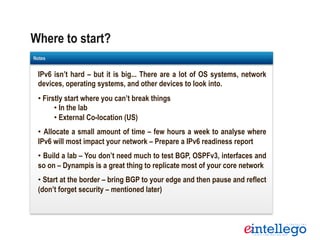
Where to start?
Templates
IPv6 isn’t hard – but it is big... There are a lot of OS systems, network
devices, operating systems, and other devices to look into.
• Firstly start where you can’t break things
• In the lab
• External Co-location (US)
•  Allocate a small amount of time – few hours a week to analyse where
IPv6 will most impact your network – Prepare a IPv6 readiness report
• Build a lab – You don’t need much to test BGP, OSPFv3, interfaces and
so on – Dynampis is a great thing to replicate most of your core network
• Start at the border – bring BGP to your edge and then pause and reflect
(don’t forget security – mentioned later)
Notes
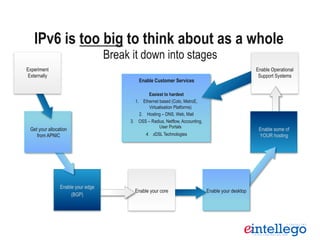
Break it down into stages
IPv6 is too big to think about as a whole
Enable your core
Enable Customer Services
Easiest to hardest
1.  Ethernet based (Colo, MetroE,
Virtualisation Platforms)
2.  Hosting – DNS, Web, Mail
3.  OSS – Radius, Netflow, Accounting,
User Portals
4.  xDSL Technologies
Enable Operational
Support Systems
Enable some of
YOUR hosting
Enable your desktop	
  	
  Enable your core
Enable your edge
(BGP)
Get your allocation
from APNIC
Experiment
Externally
Start issuing
IPv6 addresses
to end
customers
VLAN’s are used to
bypass legacy
equipment which
doesnt support IPv6
– i.e. Cisco 3550’s
Cisco switches need
rebooting to enable IPv6.
Outages need to be
planned and executed
For existing members,
IPv6 is easy.
For new members, plan
for $4000ex in setup
Initially, bringing up
IPv6 BGP on Pipe
Peering was safest –
with no DNS using it
yet
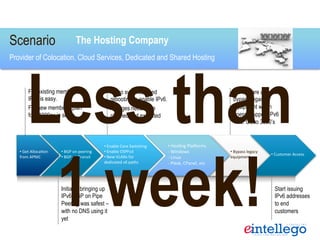
Scenario
Provider of Colocation, Cloud Services, Dedicated and Shared Hosting
• 	
  BGP	
  on	
  peering	
  
• 	
  BGP	
  on	
  Transit	
  
• 	
  Get	
  Alloca3on	
  
from	
  APNIC	
  
• 	
  Enable	
  Core	
  Switching	
  
• 	
  Enable	
  OSPFv3	
  
• 	
  New	
  VLANs	
  for	
  
dedicated	
  v6	
  paths	
  
• 	
  Bypass	
  legacy	
  
equipment.	
  
• 	
  Customer	
  Access	
  
The Hosting Company
Less than
1 week!
• 	
  Hos3ng	
  PlaKorms	
  
-­‐	
  Windows	
  
-­‐ 	
  Linux	
  
-­‐	
  Plesk,	
  CPanel,	
  etc	
  
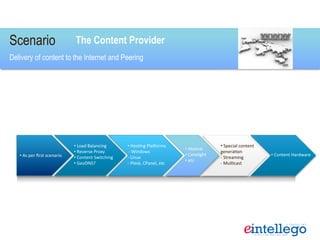
Scenario
Delivery of content to the Internet and Peering
• 	
  Load	
  Balancing	
  
• 	
  Reverse	
  Proxy	
  
• 	
  Content	
  Switching	
  
• 	
  GeoDNS?	
  
• 	
  Hos3ng	
  PlaKorms	
  
	
  -­‐	
  Windows	
  
-­‐ 	
  Linux	
  
-­‐	
  Plesk,	
  CPanel,	
  etc	
  
• 	
  Akamai	
  
• 	
  Limelight	
  
• 	
  etc	
  
• 	
  Special	
  content	
  
genera3on	
  
-­‐ 	
  Streaming	
  
-­‐ 	
  Mul3cast	
  
• 	
  Content	
  Hardware	
  
The Content Provider
• 	
  As	
  per	
  first	
  scenario	
  
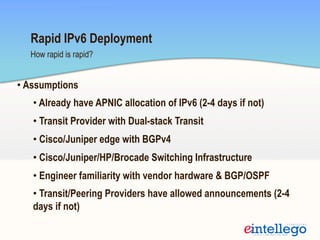
How rapid is rapid?
Rapid IPv6 Deployment
• Assumptions
• Already have APNIC allocation of IPv6 (2-4 days if not)
• Transit Provider with Dual-stack Transit
• Cisco/Juniper edge with BGPv4
• Cisco/Juniper/HP/Brocade Switching Infrastructure
• Engineer familiarity with vendor hardware & BGP/OSPF
• Transit/Peering Providers have allowed announcements (2-4
days if not)
Rapid IPv6 Deployment continued…..
• IPv6 Addressing Overview – half day
• IPv6 assignment to loopbacks and interconnects – half day
• IPv6 BGP – 2 hours
• OSPFv3 from Edge to Core – 2 hours
• Debugging and testing routing – 2 hours – it is just fun!
• VLANs to bypass legacy equipment – few hours at most
• Direct from IPv6 compatble layer 3 aggregation to VM’s on
Vmware Heads
* ISP Sizes – 1-4 Edge routers, 1-30 switches
Rapid IPv6 Deployment continued…..
• Linux box build and test – 4 hours
• Most ISPs use Linux of some kind – good to test Apache,
Bind, Postfix, SSH, FTP, etc
• Ethernet based end-user IPv6 assignments – 4 hours
• Colocation, VMs, MetroE, Wireless, Hosting
• Access Technology – xDSL (L2TP) Design Discussion -
• Depends on size of network, LNS’s involved, wholesalers
involved – much more complex than the core – we treat this
generally as a separate project once the rest is done
Rapid IPv6 Deployment continued…..
Conduct an IPv6 readiness assessment:
• Network Infrastructure – Routers and Switches
• Servers & PCs (i.e. operating systems)
• Network Devices – Appliances, KVM, OoB and so on
• Network management tools (HP, Cisco, etc)
• Security – everywhere you have it now – needs to be replicated
• Applications – dealing with IPv6 addresses
• OSS systems – Billing, Accounting, Radius, etc
• In-house skills
2406:9800::F:127:0:0:1
Simplified Addressing
We have developed a strategy which helps network and server administrators be able to
understand & deploy IPv6 rapidly while not requiring a huge time investment in
training.
This strategy uses the network’s existing IPv4 topology so that the address can be
instantly recognised and built upon over time.
This strategy is all about the rapid deployment of IPv6, getting it into the network and
being used day to day.
eintellego believes that this is the quickest and most rapid method of building and
educating resource and time poor organisations with the fast approaching IPv4
exhaustion.
Simplified Addressing is a short to medium term strategy – and is not for long term use.
Simplified Addressing continued…
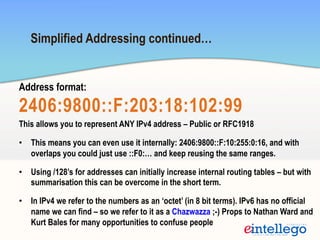
Address format:
2406:9800::F:203:18:102:99
This allows you to represent ANY IPv4 address – Public or RFC1918
•  This means you can even use it internally: 2406:9800::F:10:255:0:16, and with
overlaps you could just use ::F0:… and keep reusing the same ranges.
•  Using /128’s for addresses can initially increase internal routing tables – but with
summarisation this can be overcome in the short term.
•  In IPv4 we refer to the numbers as an ‘octet’ (in 8 bit terms). IPv6 has no official
name we can find – so we refer to it as a Chazwazza ;-) Props to Nathan Ward and
Kurt Bales for many opportunities to confuse people
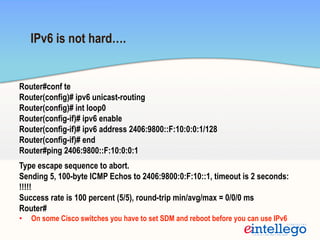
IPv6 is not hard….
Router#conf te
Router(config)# ipv6 unicast-routing
Router(config)# int loop0
Router(config-if)# ipv6 enable
Router(config-if)# ipv6 address 2406:9800::F:10:0:0:1/128
Router(config-if)# end
Router#ping 2406:9800::F:10:0:0:1
Type escape sequence to abort.
Sending 5, 100-byte ICMP Echos to 2406:9800:0:F:10::1, timeout is 2 seconds:
!!!!!
Success rate is 100 percent (5/5), round-trip min/avg/max = 0/0/0 ms
Router#
•  On some Cisco switches you have to set SDM and reboot before you can use IPv6
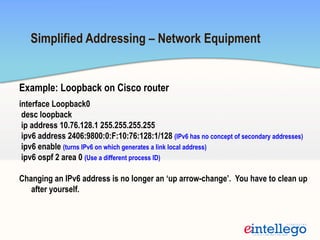
Example: Loopback on Cisco router
interface Loopback0
desc loopback
ip address 10.76.128.1 255.255.255.255
ipv6 address 2406:9800:0:F:10:76:128:1/128 (IPv6 has no concept of secondary addresses)
ipv6 enable (turns IPv6 on which generates a link local address)
ipv6 ospf 2 area 0 (Use a different process ID)
Changing an IPv6 address is no longer an ‘up arrow-change’. You have to clean up
after yourself.
Simplified Addressing – Network Equipment
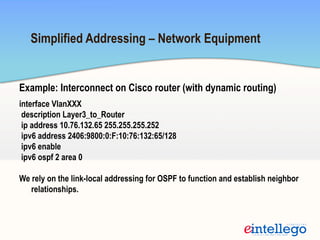
Example: Interconnect on Cisco router (with dynamic routing)
interface VlanXXX
description Layer3_to_Router
ip address 10.76.132.65 255.255.255.252
ipv6 address 2406:9800:0:F:10:76:132:65/128
ipv6 enable
ipv6 ospf 2 area 0
We rely on the link-local addressing for OSPF to function and establish neighbor
relationships.
Simplified Addressing – Network Equipment
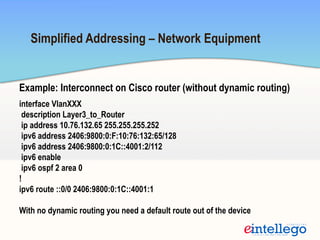
Example: Interconnect on Cisco router (without dynamic routing)
interface VlanXXX
description Layer3_to_Router
ip address 10.76.132.65 255.255.255.252
ipv6 address 2406:9800:0:F:10:76:132:65/128
ipv6 address 2406:9800:0:1C::4001:2/112
ipv6 enable
ipv6 ospf 2 area 0
!
ipv6 route ::0/0 2406:9800:0:1C::4001:1
With no dynamic routing you need a default route out of the device
Simplified Addressing – Network Equipment
Simplified Addressing – End User Connections
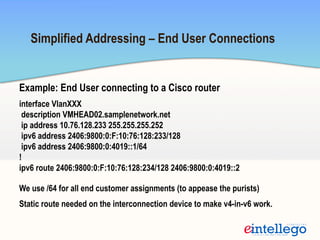
Example: End User connecting to a Cisco router
interface VlanXXX
description VMHEAD02.samplenetwork.net
ip address 10.76.128.233 255.255.255.252
ipv6 address 2406:9800:0:F:10:76:128:233/128
ipv6 address 2406:9800:0:4019::1/64
!
ipv6 route 2406:9800:0:F:10:76:128:234/128 2406:9800:0:4019::2
We use /64 for all end customer assignments (to appease the purists)
Static route needed on the interconnection device to make v4-in-v6 work.
Carrier Grade NAT (CGN)/Large Scale NAT (LSN)
Templates
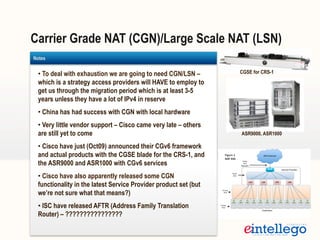
• To deal with exhaustion we are going to need CGN/LSN –
which is a strategy access providers will HAVE to employ to
get us through the migration period which is at least 3-5
years unless they have a lot of IPv4 in reserve
• China has had success with CGN with local hardware
• Very little vendor support – Cisco came very late – others
are still yet to come
• Cisco have just (Oct09) announced their CGv6 framework
and actual products with the CGSE blade for the CRS-1, and
the ASR9000 and ASR1000 with CGv6 services
• Cisco have also apparently released some CGN
functionality in the latest Service Provider product set (but
we’re not sure what that means?)
• ISC have released AFTR (Address Family Translation
Router) – ????????????????
Notes
CGSE for CRS-1
ASR9000, ASR1000
•  Enabling IPv6 leaves you wide open
•  Every aspect of security needs to be replicated to IPv6
•  SSH, Telnet, Access Lists, SNMP, CoPP – All are immediately open
and accessible when you turn on IPv6.
•  It isn’t hard to do the security – you just HAVE to do it – or else
•  Nothing has changed with the basic tenants of security – just all
new commands for some platforms – and in strange places
•  The only consideration is that IPv6 requires ICMP for PMTU (Path
MTU Discovery) – disabling it WILL break things (in ways that you
can’t easily troubleshoot)
Oh oh.
Security
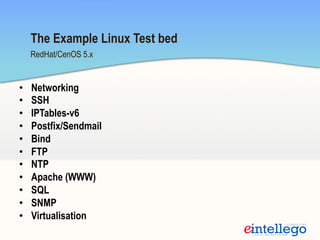
•  Networking
•  SSH
•  IPTables-v6
•  Postfix/Sendmail
•  Bind
•  FTP
•  NTP
•  Apache (WWW)
•  SQL
•  SNMP
•  Virtualisation
RedHat/CenOS 5.x
The Example Linux Test bed
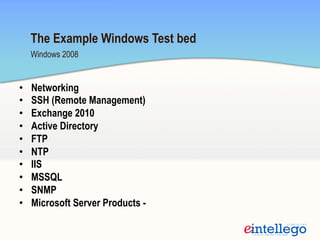
•  Networking
•  SSH (Remote Management)
•  Exchange 2010
•  Active Directory
•  FTP
•  NTP
•  IIS
•  MSSQL
•  SNMP
•  Microsoft Server Products -
Windows 2008
The Example Windows Test bed
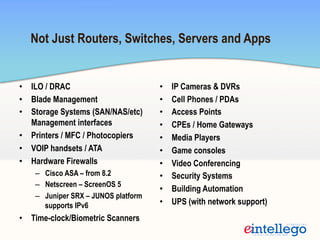
•  ILO / DRAC
•  Blade Management
•  Storage Systems (SAN/NAS/etc)
Management interfaces
•  Printers / MFC / Photocopiers
•  VOIP handsets / ATA
•  Hardware Firewalls
–  Cisco ASA – from 8.2
–  Netscreen – ScreenOS 5
–  Juniper SRX – JUNOS platform
supports IPv6
•  Time-clock/Biometric Scanners
•  IP Cameras & DVRs
•  Cell Phones / PDAs
•  Access Points
•  CPEs / Home Gateways
•  Media Players
•  Game consoles
•  Video Conferencing
•  Security Systems
•  Building Automation
•  UPS (with network support)
Not Just Routers, Switches, Servers and Apps
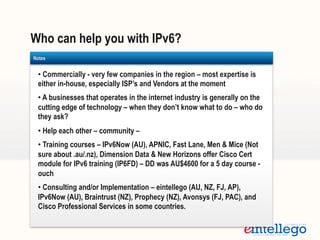
Who can help you with IPv6?
Templates
• Commercially - very few companies in the region – most expertise is
either in-house, especially ISP’s and Vendors at the moment
• A businesses that operates in the internet industry is generally on the
cutting edge of technology – when they don’t know what to do – who do
they ask?
• Help each other – community –
• Training courses – IPv6Now (AU), APNIC, Fast Lane, Men & Mice (Not
sure about .au/.nz), Dimension Data & New Horizons offer Cisco Cert
module for IPv6 training (IP6FD) – DD was AU$4600 for a 5 day course -
ouch
• Consulting and/or Implementation – eintellego (AU, NZ, FJ, AP),
IPv6Now (AU), Braintrust (NZ), Prophecy (NZ), Avonsys (FJ, PAC), and
Cisco Professional Services in some countries.
Notes
•  If you have no access to IPv6 transit you may need to tunnel (talk to HE)
•  If your carrier doesn’t do IPv6 today – start turning up the pressure
•  Same applies to your vendors (hardware, software, etc) – start demanding or
consider a vendor which does support it
•  Within 6 months after all our implementations, most staff were fully conversant
with IPv6 and had started to deploy other services – they were using it every day!
•  Convincing management isn’t that hard – Explain how much it will cost them later
as opposed to now
•  Some parts won’t happen overnight – it takes time to migrate some services such
as IPv6 DNS Servers to clueful registrars which support nameserver records for
IPv6. But just because they don’t advertise it – they might be able to do it. Most
can’t yet though.
Advice
•  The resource gold rush will happen – we’re seeing it now. IPv4 resource requests
for no reason other than they can. We believe that once this starts – the hype and
outrage will accelerate it even faster. APNIC will have a massive surge in
membership of people not wanting to be left behind – and also from those hoping
to capitalise on the resource shortage. There is nothing APNIC can do to prevent
this happening
•  This may bring forward exhaustion by 6-9 months – but we will see it coming
•  A secondary market will appear for IPv4 – APNIC will lose control of who has what
Predictions
Thanks for listening – Questions?
?www.eintellego.net

Rapid IPv6 Deployment for ISP Networks

  • 1.
    Rapid IPv6 Deploymentfor ISP Networks by Skeeve Stevens of eintellego Pty Ltd Apricot 2010 – Kuala Lumpur, Malaysia v1.3.4
  • 2.
    Too expensive toimplement Who can help me? Little Vendor Support Too hard to implement No one is asking for it What is IPv6? What is stopping ISPs Implementing IPv6? 1 2 3 4 5 6 7 Don’t know where to start What you need to get past, before you can rapidly deploy
  • 3.
    Where to start? Templates IPv6isn’t hard – but it is big... There are a lot of OS systems, network devices, operating systems, and other devices to look into. • Firstly start where you can’t break things • In the lab • External Co-location (US) •  Allocate a small amount of time – few hours a week to analyse where IPv6 will most impact your network – Prepare a IPv6 readiness report • Build a lab – You don’t need much to test BGP, OSPFv3, interfaces and so on – Dynampis is a great thing to replicate most of your core network • Start at the border – bring BGP to your edge and then pause and reflect (don’t forget security – mentioned later) Notes
  • 4.
    Break it downinto stages IPv6 is too big to think about as a whole Enable your core Enable Customer Services Easiest to hardest 1.  Ethernet based (Colo, MetroE, Virtualisation Platforms) 2.  Hosting – DNS, Web, Mail 3.  OSS – Radius, Netflow, Accounting, User Portals 4.  xDSL Technologies Enable Operational Support Systems Enable some of YOUR hosting Enable your desktop    Enable your core Enable your edge (BGP) Get your allocation from APNIC Experiment Externally
  • 5.
    Start issuing IPv6 addresses toend customers VLAN’s are used to bypass legacy equipment which doesnt support IPv6 – i.e. Cisco 3550’s Cisco switches need rebooting to enable IPv6. Outages need to be planned and executed For existing members, IPv6 is easy. For new members, plan for $4000ex in setup Initially, bringing up IPv6 BGP on Pipe Peering was safest – with no DNS using it yet Scenario Provider of Colocation, Cloud Services, Dedicated and Shared Hosting •   BGP  on  peering   •   BGP  on  Transit   •   Get  Alloca3on   from  APNIC   •   Enable  Core  Switching   •   Enable  OSPFv3   •   New  VLANs  for   dedicated  v6  paths   •   Bypass  legacy   equipment.   •   Customer  Access   The Hosting Company Less than 1 week! •   Hos3ng  PlaKorms   -­‐  Windows   -­‐   Linux   -­‐  Plesk,  CPanel,  etc  
  • 6.
    Scenario Delivery of contentto the Internet and Peering •   Load  Balancing   •   Reverse  Proxy   •   Content  Switching   •   GeoDNS?   •   Hos3ng  PlaKorms    -­‐  Windows   -­‐   Linux   -­‐  Plesk,  CPanel,  etc   •   Akamai   •   Limelight   •   etc   •   Special  content   genera3on   -­‐   Streaming   -­‐   Mul3cast   •   Content  Hardware   The Content Provider •   As  per  first  scenario  
  • 7.
    How rapid israpid? Rapid IPv6 Deployment • Assumptions • Already have APNIC allocation of IPv6 (2-4 days if not) • Transit Provider with Dual-stack Transit • Cisco/Juniper edge with BGPv4 • Cisco/Juniper/HP/Brocade Switching Infrastructure • Engineer familiarity with vendor hardware & BGP/OSPF • Transit/Peering Providers have allowed announcements (2-4 days if not)
  • 8.
    Rapid IPv6 Deploymentcontinued….. • IPv6 Addressing Overview – half day • IPv6 assignment to loopbacks and interconnects – half day • IPv6 BGP – 2 hours • OSPFv3 from Edge to Core – 2 hours • Debugging and testing routing – 2 hours – it is just fun! • VLANs to bypass legacy equipment – few hours at most • Direct from IPv6 compatble layer 3 aggregation to VM’s on Vmware Heads * ISP Sizes – 1-4 Edge routers, 1-30 switches
  • 9.
    Rapid IPv6 Deploymentcontinued….. • Linux box build and test – 4 hours • Most ISPs use Linux of some kind – good to test Apache, Bind, Postfix, SSH, FTP, etc • Ethernet based end-user IPv6 assignments – 4 hours • Colocation, VMs, MetroE, Wireless, Hosting • Access Technology – xDSL (L2TP) Design Discussion - • Depends on size of network, LNS’s involved, wholesalers involved – much more complex than the core – we treat this generally as a separate project once the rest is done
  • 10.
    Rapid IPv6 Deploymentcontinued….. Conduct an IPv6 readiness assessment: • Network Infrastructure – Routers and Switches • Servers & PCs (i.e. operating systems) • Network Devices – Appliances, KVM, OoB and so on • Network management tools (HP, Cisco, etc) • Security – everywhere you have it now – needs to be replicated • Applications – dealing with IPv6 addresses • OSS systems – Billing, Accounting, Radius, etc • In-house skills
  • 11.
    2406:9800::F:127:0:0:1 Simplified Addressing We havedeveloped a strategy which helps network and server administrators be able to understand & deploy IPv6 rapidly while not requiring a huge time investment in training. This strategy uses the network’s existing IPv4 topology so that the address can be instantly recognised and built upon over time. This strategy is all about the rapid deployment of IPv6, getting it into the network and being used day to day. eintellego believes that this is the quickest and most rapid method of building and educating resource and time poor organisations with the fast approaching IPv4 exhaustion. Simplified Addressing is a short to medium term strategy – and is not for long term use.
  • 12.
    Simplified Addressing continued… Addressformat: 2406:9800::F:203:18:102:99 This allows you to represent ANY IPv4 address – Public or RFC1918 •  This means you can even use it internally: 2406:9800::F:10:255:0:16, and with overlaps you could just use ::F0:… and keep reusing the same ranges. •  Using /128’s for addresses can initially increase internal routing tables – but with summarisation this can be overcome in the short term. •  In IPv4 we refer to the numbers as an ‘octet’ (in 8 bit terms). IPv6 has no official name we can find – so we refer to it as a Chazwazza ;-) Props to Nathan Ward and Kurt Bales for many opportunities to confuse people
  • 13.
    IPv6 is nothard…. Router#conf te Router(config)# ipv6 unicast-routing Router(config)# int loop0 Router(config-if)# ipv6 enable Router(config-if)# ipv6 address 2406:9800::F:10:0:0:1/128 Router(config-if)# end Router#ping 2406:9800::F:10:0:0:1 Type escape sequence to abort. Sending 5, 100-byte ICMP Echos to 2406:9800:0:F:10::1, timeout is 2 seconds: !!!!! Success rate is 100 percent (5/5), round-trip min/avg/max = 0/0/0 ms Router# •  On some Cisco switches you have to set SDM and reboot before you can use IPv6
  • 14.
    Example: Loopback onCisco router interface Loopback0 desc loopback ip address 10.76.128.1 255.255.255.255 ipv6 address 2406:9800:0:F:10:76:128:1/128 (IPv6 has no concept of secondary addresses) ipv6 enable (turns IPv6 on which generates a link local address) ipv6 ospf 2 area 0 (Use a different process ID) Changing an IPv6 address is no longer an ‘up arrow-change’. You have to clean up after yourself. Simplified Addressing – Network Equipment
  • 15.
    Example: Interconnect onCisco router (with dynamic routing) interface VlanXXX description Layer3_to_Router ip address 10.76.132.65 255.255.255.252 ipv6 address 2406:9800:0:F:10:76:132:65/128 ipv6 enable ipv6 ospf 2 area 0 We rely on the link-local addressing for OSPF to function and establish neighbor relationships. Simplified Addressing – Network Equipment
  • 16.
    Example: Interconnect onCisco router (without dynamic routing) interface VlanXXX description Layer3_to_Router ip address 10.76.132.65 255.255.255.252 ipv6 address 2406:9800:0:F:10:76:132:65/128 ipv6 address 2406:9800:0:1C::4001:2/112 ipv6 enable ipv6 ospf 2 area 0 ! ipv6 route ::0/0 2406:9800:0:1C::4001:1 With no dynamic routing you need a default route out of the device Simplified Addressing – Network Equipment
  • 17.
    Simplified Addressing –End User Connections Example: End User connecting to a Cisco router interface VlanXXX description VMHEAD02.samplenetwork.net ip address 10.76.128.233 255.255.255.252 ipv6 address 2406:9800:0:F:10:76:128:233/128 ipv6 address 2406:9800:0:4019::1/64 ! ipv6 route 2406:9800:0:F:10:76:128:234/128 2406:9800:0:4019::2 We use /64 for all end customer assignments (to appease the purists) Static route needed on the interconnection device to make v4-in-v6 work.
  • 18.
    Carrier Grade NAT(CGN)/Large Scale NAT (LSN) Templates • To deal with exhaustion we are going to need CGN/LSN – which is a strategy access providers will HAVE to employ to get us through the migration period which is at least 3-5 years unless they have a lot of IPv4 in reserve • China has had success with CGN with local hardware • Very little vendor support – Cisco came very late – others are still yet to come • Cisco have just (Oct09) announced their CGv6 framework and actual products with the CGSE blade for the CRS-1, and the ASR9000 and ASR1000 with CGv6 services • Cisco have also apparently released some CGN functionality in the latest Service Provider product set (but we’re not sure what that means?) • ISC have released AFTR (Address Family Translation Router) – ???????????????? Notes CGSE for CRS-1 ASR9000, ASR1000
  • 19.
    •  Enabling IPv6leaves you wide open •  Every aspect of security needs to be replicated to IPv6 •  SSH, Telnet, Access Lists, SNMP, CoPP – All are immediately open and accessible when you turn on IPv6. •  It isn’t hard to do the security – you just HAVE to do it – or else •  Nothing has changed with the basic tenants of security – just all new commands for some platforms – and in strange places •  The only consideration is that IPv6 requires ICMP for PMTU (Path MTU Discovery) – disabling it WILL break things (in ways that you can’t easily troubleshoot) Oh oh. Security
  • 20.
    •  Networking •  SSH • IPTables-v6 •  Postfix/Sendmail •  Bind •  FTP •  NTP •  Apache (WWW) •  SQL •  SNMP •  Virtualisation RedHat/CenOS 5.x The Example Linux Test bed
  • 21.
    •  Networking •  SSH(Remote Management) •  Exchange 2010 •  Active Directory •  FTP •  NTP •  IIS •  MSSQL •  SNMP •  Microsoft Server Products - Windows 2008 The Example Windows Test bed
  • 22.
    •  ILO /DRAC •  Blade Management •  Storage Systems (SAN/NAS/etc) Management interfaces •  Printers / MFC / Photocopiers •  VOIP handsets / ATA •  Hardware Firewalls –  Cisco ASA – from 8.2 –  Netscreen – ScreenOS 5 –  Juniper SRX – JUNOS platform supports IPv6 •  Time-clock/Biometric Scanners •  IP Cameras & DVRs •  Cell Phones / PDAs •  Access Points •  CPEs / Home Gateways •  Media Players •  Game consoles •  Video Conferencing •  Security Systems •  Building Automation •  UPS (with network support) Not Just Routers, Switches, Servers and Apps
  • 23.
    Who can helpyou with IPv6? Templates • Commercially - very few companies in the region – most expertise is either in-house, especially ISP’s and Vendors at the moment • A businesses that operates in the internet industry is generally on the cutting edge of technology – when they don’t know what to do – who do they ask? • Help each other – community – • Training courses – IPv6Now (AU), APNIC, Fast Lane, Men & Mice (Not sure about .au/.nz), Dimension Data & New Horizons offer Cisco Cert module for IPv6 training (IP6FD) – DD was AU$4600 for a 5 day course - ouch • Consulting and/or Implementation – eintellego (AU, NZ, FJ, AP), IPv6Now (AU), Braintrust (NZ), Prophecy (NZ), Avonsys (FJ, PAC), and Cisco Professional Services in some countries. Notes
  • 24.
    •  If youhave no access to IPv6 transit you may need to tunnel (talk to HE) •  If your carrier doesn’t do IPv6 today – start turning up the pressure •  Same applies to your vendors (hardware, software, etc) – start demanding or consider a vendor which does support it •  Within 6 months after all our implementations, most staff were fully conversant with IPv6 and had started to deploy other services – they were using it every day! •  Convincing management isn’t that hard – Explain how much it will cost them later as opposed to now •  Some parts won’t happen overnight – it takes time to migrate some services such as IPv6 DNS Servers to clueful registrars which support nameserver records for IPv6. But just because they don’t advertise it – they might be able to do it. Most can’t yet though. Advice
  • 25.
    •  The resourcegold rush will happen – we’re seeing it now. IPv4 resource requests for no reason other than they can. We believe that once this starts – the hype and outrage will accelerate it even faster. APNIC will have a massive surge in membership of people not wanting to be left behind – and also from those hoping to capitalise on the resource shortage. There is nothing APNIC can do to prevent this happening •  This may bring forward exhaustion by 6-9 months – but we will see it coming •  A secondary market will appear for IPv4 – APNIC will lose control of who has what Predictions
  • 26.
    Thanks for listening– Questions? ?www.eintellego.net