IoT Gateway
Outline
Introudction
IoT Gateway System Architecture
Hardware & Software specification
Demo
Q&A
Introduction
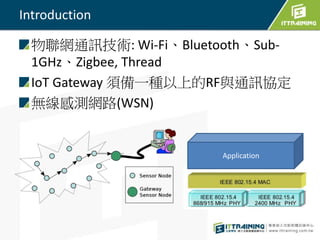
物聯網通訊技術: Wi-Fi、Bluetooth、Sub-
1GHz、Zigbee, Thread
IoT Gateway 須備一種以上的RF與通訊協定
無線感測網路(WSN)
Application
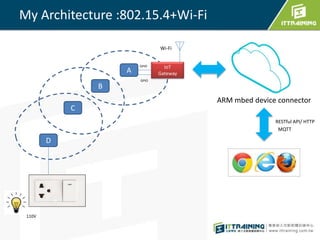
My Architecture :802.15.4+Wi-Fi
A
D
C
B
IoT
Gateway
GPIO
ARM mbed device connector
110V
Wi-Fi
RESTful API/ HTTP
MQTT
GPIO
Hardware & Software specification
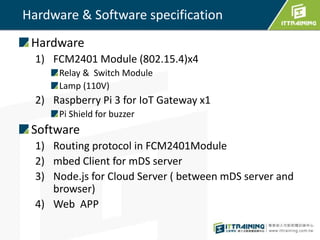
Hardware
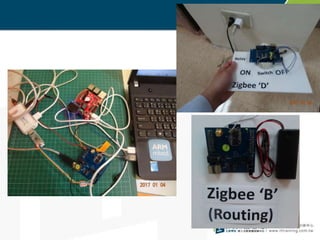
1) FCM2401 Module (802.15.4)x4
Relay & Switch Module
Lamp (110V)
2) Raspberry Pi 3 for IoT Gateway x1
Pi Shield for buzzer
Software
1) Routing protocol in FCM2401Module
2) mbed Client for mDS server
3) Node.js for Cloud Server ( between mDS server and
browser)
4) Web APP
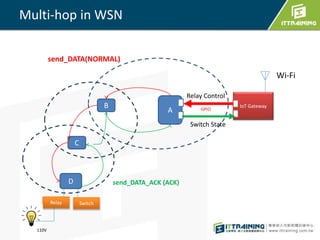
Multi-hop in WSN
A
D
C
B IoT Gateway
Switch State
Relay
110V
Wi-Fi
Switch
Relay Control
send_DATA(NORMAL)
send_DATA_ACK (ACK)
GPIO
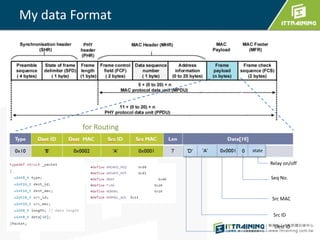
My data Format
Dest ID
Seq No.
Relay on/off
Src MAC
Src ID
for Routing
send_DATA()
Type Dest ID Dest MAC Src ID Src MAC Len Data[10]
0x10 'B' 0x0002 'A' 0x0001 7
for Routing
'D' 0 state
Dest ID
'A' 0x0001
Seq No.
Relay on/off
Src MAC
Src ID
Example: 'A'-->'D'
send_DATA_ACK()
Type Dest ID Dest MAC Src ID Src MAC Len Data[10]
0x11 'C' 0x0003 'D' 0x0004 3
for Routing
'A' 0 state
Seq No.
Switch on/off
Example: 'D'-->'A'
Dest ID
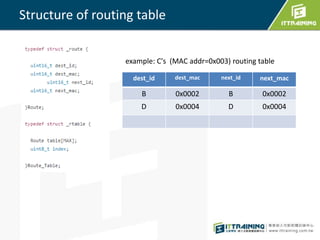
Structure of routing table
dest_id dest_mac next_id next_mac
B 0x0002 B 0x0002
D 0x0004 D 0x0004
example: C's (MAC addr=0x003) routing table
dest_id dest_mac next_id next_mac
B 0x0002 B 0x0002
D 0x0004 D 0x0004
find_next_hop()
r=find_next_hop('B',tbl);
r
Type Dest ID Dest MAC Src ID Src MAC Len Data[10]
0x11 'B' 0x0002 'C' 0x0003
'C'-->'B'
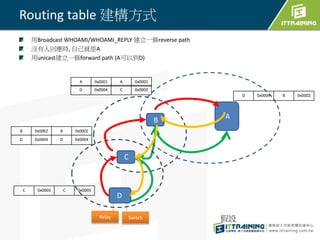
Routing table 建構方式
用Broadcast WHOAMI/WHOAMI_REPLY 建立一條reverse path
沒有人回應時, 自己就是A
用unicast建立一條forward path (A可以到D)
D 0x0004 D 0x0004
Relay Switch
C 0x0003 C 0x0003
AB
C
D
A 0x0001 A 0x0001
B 0x0002 B 0x0002
D 0x0004 C 0x0003
D 0x0004 B 0x0002
假設
PART 2 ARM MBED
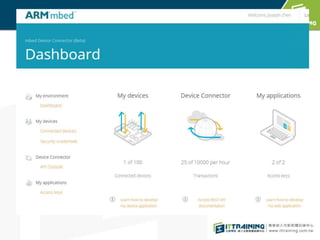
進行遠端家電控制與能源監測使用
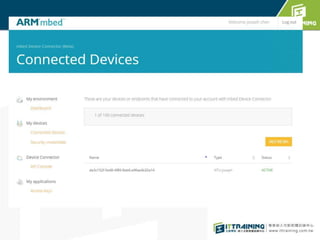
mbed Device Connector
Free to IoT developers
Free tier is limited to 100 devices, 10,000 events
per hours and two API keys.
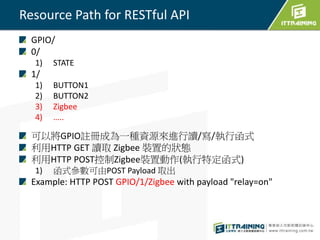
Resource Path for RESTful API
GPIO/
0/
1) STATE
1/
1) BUTTON1
2) BUTTON2
3) Zigbee
4) …..
可以將GPIO註冊成為一種資源來進行讀/寫/執行函式
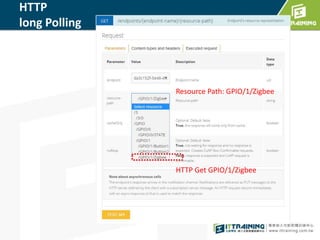
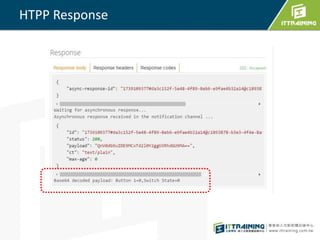
利用HTTP GET 讀取 Zigbee 裝置的狀態
利用HTTP POST控制Zigbee裝置動作(執行特定函式)
1) 函式參數可由POST Payload 取出
Example: HTTP POST GPIO/1/Zigbee with payload "relay=on"
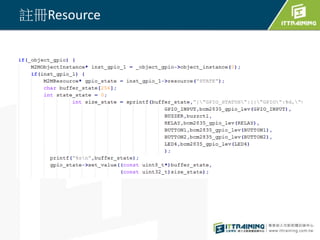
註冊Resource
HTTP
long Polling
HTTP Get GPIO/1/Zigbee
Resource Path: GPIO/1/Zigbee
HTPP Response
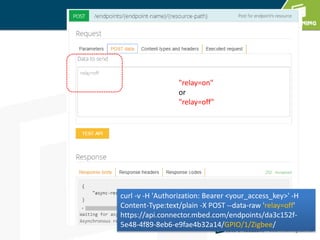
HTTP POST
"relay=on"
or
"relay=off"
curl -v -H 'Authorization: Bearer <your_access_key>' -H
Content-Type:text/plain -X POST --data-raw 'relay=off'
https://api.connector.mbed.com/endpoints/da3c152f-
5e48-4f89-8eb6-e9fae4b32a14/GPIO/1/Zigbee/
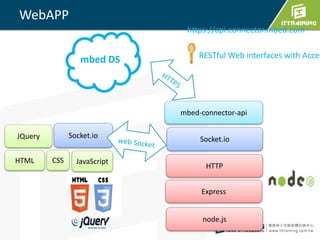
WebAPP
Socket.io
Express
node.js
HTTP
mbed-connector-api
mbed DS
HTML
JQuery Socket.io
JavaScriptCSS
https://api.connector.mbed.com
RESTful Web interfaces with Acces
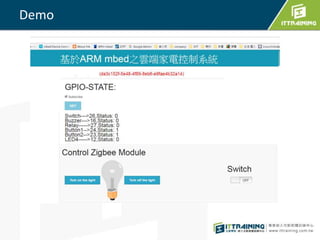
Demo
問題
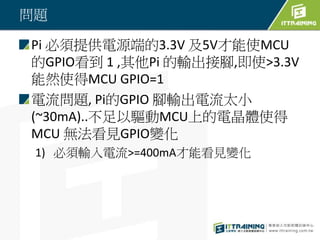
Pi 必須提供電源端的3.3V 及5V才能使MCU
的GPIO看到 1 ,其他Pi 的輸出接腳,即使>3.3V
能然使得MCU GPIO=1
電流問題, Pi的GPIO 腳輸出電流太小
(~30mA)..不足以驅動MCU上的電晶體使得
MCU 無法看見GPIO變化
1) 必須輸入電流>=400mA才能看見變化
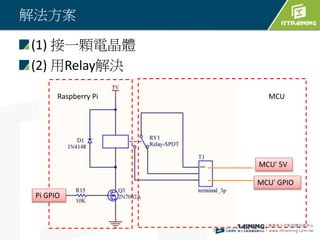
解法方案
(1) 接一顆電晶體
(2) 用Relay解決
Raspberry Pi MCU
MCU' 5V
MCU' GPIO
Pi GPIO
https://goo.gl/fmskZK

IoT Gateway實現專題