linux + sensor + device-tree
+ shell = IoT ?
Dobrica Pavlinušić
https://blog.rot13.org/
@dpavlin
linux+sensor+device-tree+shell=IoT ?
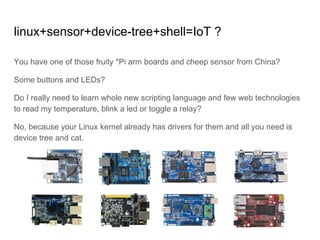
You have one of those fruity *Pi arm boards and cheep sensor from China?
Some buttons and LEDs?
Do I really need to learn whole new scripting language and few web technologies
to read my temperature, blink a led or toggle a relay?
No, because your Linux kernel already has drivers for them and all you need is
device tree and cat.
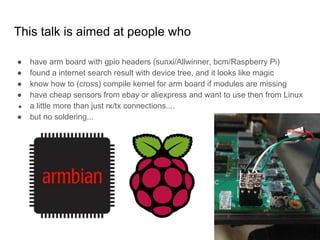
This talk is aimed at people who
● have arm board with gpio headers (sunxi/Allwinner, bcm/Raspberry Pi)
● found a internet search result with device tree, and it looks like magic
● know how to (cross) compile kernel for arm board if modules are missing
● have cheap sensors from ebay or aliexpress and want to use then from Linux
● a little more than just rx/tx connections....
● but no soldering...
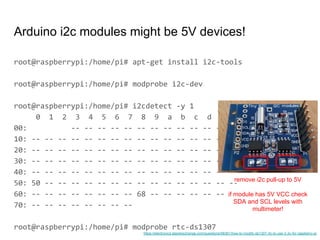
root@raspberrypi:/home/pi# apt-get install i2c-tools
root@raspberrypi:/home/pi# modprobe i2c-dev
root@raspberrypi:/home/pi# i2cdetect -y 1
0 1 2 3 4 5 6 7 8 9 a b c d e f
00: -- -- -- -- -- -- -- -- -- -- -- -- --
10: -- -- -- -- -- -- -- -- -- -- -- -- -- -- -- --
20: -- -- -- -- -- -- -- -- -- -- -- -- -- -- -- --
30: -- -- -- -- -- -- -- -- -- -- -- -- -- -- -- --
40: -- -- -- -- -- -- -- -- -- -- -- -- -- -- -- --
50: 50 -- -- -- -- -- -- -- -- -- -- -- -- -- -- --
60: -- -- -- -- -- -- -- -- 68 -- -- -- -- -- -- --
70: -- -- -- -- -- -- -- --
root@raspberrypi:/home/pi# modprobe rtc-ds1307
Arduino i2c modules might be 5V devices!
remove i2c pull-up to 5V
if module has 5V VCC check
SDA and SCL levels with
multimeter!
https://electronics.stackexchange.com/questions/98361/how-to-modify-ds1307-rtc-to-use-3-3v-for-raspberry-pi
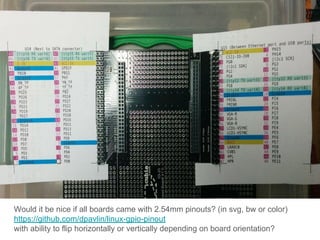
Would it be nice if all boards came with 2.54mm pinouts? (in svg, bw or color)
https://github.com/dpavlin/linux-gpio-pinout
with ability to flip horizontally or vertically depending on board orientation?
dpavlin@cubieboard:~/linux-gpio-pinout$ sudo ./gpio.pl 2>/dev/null | egrep '(^#|[)'
## U14 (Next to SATA connector)
### SPI0
48 PI13 2 0 1 [spi0 MISO] 47 PI11 2 0 1 [spi0 CLK]
46 PI12 2 0 1 [spi0 MOSI] 45 PI10 2 0 1 [spi0 CS]
### LCD
32 PD25 0 0 1 0 31 PB2 2 0 1 [pwm pwm]
## U15 (Between Ethernet port and USB ports)
### CSI1/TS
5 PG0 0 0 1 0 6 PB18 2 0 1 [i2c1 SCK]
7 PB19 2 0 1 [i2c1 SDA] 8 PG3 0 1 1 1 "E-mail" in hi [gpio-3-buttons gpio_in]
9 PG2 0 0 1 0 10 PG1 0 1 1 1 "Connect" in hi [gpio-3-buttons gpio_in]
11 PG4 0 0 1 0 12 PG5 0 1 1 1 "Print" in hi [gpio-3-buttons gpio_in]
13 PG6 4 0 1 [ttyS3 TX uart3] 14 PG7 4 0 1 [ttyS3 RX uart3]
17 PG10 4 0 1 [ttyS4 TX uart4] 18 PG11 4 0 1 [ttyS4 RX uart4]
### Analog SDIO3
### CSI0/TS
## DEBUG serial (middle of board)
4 PB22 2 0 1 [ttyS0 TX uart0]
3 PB23 2 1 1 [ttyS0 RX uart0]
and again with horizontal or vertical flip depending on board orientation (top,
bottom, rotation...)
output friendly to grep in terminal with [kernel info]
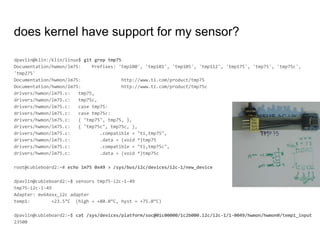
dpavlin@klin:/klin/linux$ git grep tmp75
Documentation/hwmon/lm75: Prefixes: 'tmp100', 'tmp101', 'tmp105', 'tmp112', 'tmp175', 'tmp75', 'tmp75c',
'tmp275'
Documentation/hwmon/lm75: http://www.ti.com/product/tmp75
Documentation/hwmon/lm75: http://www.ti.com/product/tmp75c
drivers/hwmon/lm75.c: tmp75,
drivers/hwmon/lm75.c: tmp75c,
drivers/hwmon/lm75.c: case tmp75:
drivers/hwmon/lm75.c: case tmp75c:
drivers/hwmon/lm75.c: { "tmp75", tmp75, },
drivers/hwmon/lm75.c: { "tmp75c", tmp75c, },
drivers/hwmon/lm75.c: .compatible = "ti,tmp75",
drivers/hwmon/lm75.c: .data = (void *)tmp75
drivers/hwmon/lm75.c: .compatible = "ti,tmp75c",
drivers/hwmon/lm75.c: .data = (void *)tmp75c
root@cubieboard2:~# echo lm75 0x49 > /sys/bus/i2c/devices/i2c-1/new_device
dpavlin@cubieboard2:~$ sensors tmp75-i2c-1-49
tmp75-i2c-1-49
Adapter: mv64xxx_i2c adapter
temp1: +23.5°C (high = +80.0°C, hyst = +75.0°C)
dpavlin@cubieboard2:~$ cat /sys/devices/platform/soc@01c00000/1c2b000.i2c/i2c-1/1-0049/hwmon/hwmon0/temp1_input
23500
does kernel have support for my sensor?
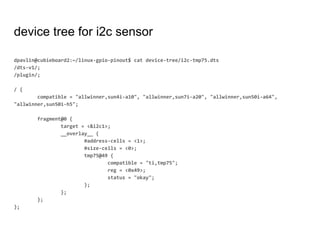
device tree for i2c sensor
dpavlin@cubieboard2:~/linux-gpio-pinout$ cat device-tree/i2c-tmp75.dts
/dts-v1/;
/plugin/;
/ {
compatible = "allwinner,sun4i-a10", "allwinner,sun7i-a20", "allwinner,sun50i-a64",
"allwinner,sun50i-h5";
fragment@0 {
target = <&i2c1>;
__overlay__ {
#address-cells = <1>;
#size-cells = <0>;
tmp75@49 {
compatible = "ti,tmp75";
reg = <0x49>;
status = "okay";
};
};
};
};
device tree overlay debugging - configfs
You don't need to reboot your board to test device tree! (on sunxi at least)
dpavlin@cubieboard2:~/linux-gpio-pinout$ cat overlay-load.sh
#!/bin/sh -xe
dtb=$1
test -f "$dtb" || ( echo "Usage: $0 overlay.dtb" ; exit 1 )
config=`mount -t configfs | awk '{ print $3 }'`
name=`basename $1`
dir=$config/device-tree/overlays/$name
test -d $dir && rmdir $dir
mkdir $dir
cat $dtb > $dir/dtbo
cat $dir/status
i2c debugging - alternative to logic analyzer
dpavlin@cubieboard2:~/linux-gpio-pinout$ cat i2c-tracing.sh
#!/bin/sh
if [ -z "$1" ] ; then
echo "Usage: $0 0|1 - disable/enable i2c tracking"
exit 1
fi
echo $1 > /sys/kernel/debug/tracing/events/i2c/enable
# echo adapter_nr==1 >/sys/kernel/debug/tracing/events/i2c/filter
cat /sys/kernel/debug/tracing/trace
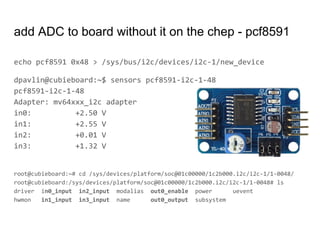
add ADC to board without it on the chep - pcf8591
echo pcf8591 0x48 > /sys/bus/i2c/devices/i2c-1/new_device
dpavlin@cubieboard:~$ sensors pcf8591-i2c-1-48
pcf8591-i2c-1-48
Adapter: mv64xxx_i2c adapter
in0: +2.50 V
in1: +2.55 V
in2: +0.01 V
in3: +1.32 V
root@cubieboard:~# cd /sys/devices/platform/soc@01c00000/1c2b000.i2c/i2c-1/1-0048/
root@cubieboard:/sys/devices/platform/soc@01c00000/1c2b000.i2c/i2c-1/1-0048# ls
driver in0_input in2_input modalias out0_enable power uevent
hwmon in1_input in3_input name out0_output subsystem
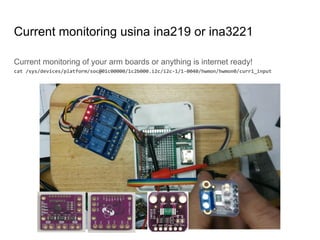
Current monitoring of your arm boards or anything is internet ready!
cat /sys/devices/platform/soc@01c00000/1c2b000.i2c/i2c-1/1-0040/hwmon/hwmon0/curr1_input
Current monitoring usina ina219 or ina3221
But, you
promised IoT!
OK, let's make
MQTT button
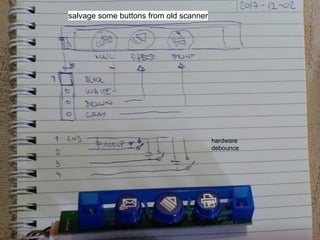
hardware
debounce
salvage some buttons from old scanner
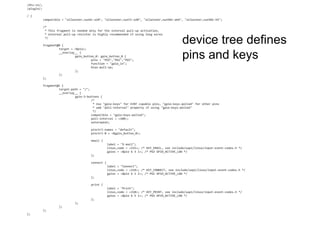
/dts-v1/;
/plugin/;
/ {
compatible = "allwinner,sun4i-a10", "allwinner,sun7i-a20", "allwinner,sun50i-a64", "allwinner,sun50i-h5";
/*
* This fragment is needed only for the internal pull-up activation,
* external pull-up resistor is highly recommended if using long wires
*/
fragment@0 {
target = <&pio>;
__overlay__ {
gpio_button_0: gpio_button_0 {
pins = "PG3","PG1","PG5";
function = "gpio_in";
bias-pull-up;
};
};
};
fragment@1 {
target-path = "/";
__overlay__ {
gpio-3-buttons {
/*
* Use "gpio-keys" for EINT capable pins, "gpio-keys-polled" for other pins
* add "poll-interval" property if using "gpio-keys-polled"
*/
compatible = "gpio-keys-polled";
poll-interval = <100>;
autorepeat;
pinctrl-names = "default";
pinctrl-0 = <&gpio_button_0>;
email {
label = "E-mail";
linux,code = <215>; /* KEY_EMAIL, see include/uapi/linux/input-event-codes.h */
gpios = <&pio 6 3 1>; /* PG3 GPIO_ACTIVE_LOW */
};
connect {
label = "Connect";
linux,code = <218>; /* KEY_CONNECT, see include/uapi/linux/input-event-codes.h */
gpios = <&pio 6 1 1>; /* PG1 GPIO_ACTIVE_LOW */
};
print {
label = "Print";
linux,code = <210>; /* KEY_PRINT, see include/uapi/linux/input-event-codes.h */
gpios = <&pio 6 5 1>; /* PG5 GPIO_ACTIVE_LOW */
};
};
};
};
};
device tree defines
pins and keys
Does my pin has irq support? /sys/kernel/debug/
root@rpi:~# grep Hardware /proc/cpuinfo
Hardware : BCM2835
root@rpi:~# grep -r irq /sys/kernel/debug/pinctrl/ | head
/sys/kernel/debug/pinctrl/20200000.gpio/pins:pin 0 (gpio0) function alt0 in hi; irq 160 (none)
/sys/kernel/debug/pinctrl/20200000.gpio/pins:pin 1 (gpio1) function alt0 in hi; irq 161 (none)
/sys/kernel/debug/pinctrl/20200000.gpio/pins:pin 2 (gpio2) function alt0 in hi; irq 162 (none)
/sys/kernel/debug/pinctrl/20200000.gpio/pins:pin 3 (gpio3) function alt0 in hi; irq 163 (none)
/sys/kernel/debug/pinctrl/20200000.gpio/pins:pin 4 (gpio4) function gpio_in in hi; irq 164 (none)
/sys/kernel/debug/pinctrl/20200000.gpio/pins:pin 5 (gpio5) function gpio_out in lo; irq 165 (none)
/sys/kernel/debug/pinctrl/20200000.gpio/pins:pin 6 (gpio6) function gpio_out in hi; irq 166 (none)
/sys/kernel/debug/pinctrl/20200000.gpio/pins:pin 7 (gpio7) function gpio_in in hi; irq 167 (none)
/sys/kernel/debug/pinctrl/20200000.gpio/pins:pin 8 (gpio8) function gpio_in in hi; irq 168 (none)
/sys/kernel/debug/pinctrl/20200000.gpio/pins:pin 9 (gpio9) function gpio_in in lo; irq 169 (none)
root@cubieboard:~# grep Hardware /proc/cpuinfo
Hardware : Allwinner sun4i/sun5i Families
root@cubieboard:~# grep -r irq /sys/kernel/debug/pinctrl/
/sys/kernel/debug/pinctrl/1c20800.pinctrl/pinmux-functions:function: irq, groups = [ PH0 PH1 PH2 PH3 PH4 PH5 PH6 PH7
PH8 PH9 PH10 PH11 PH12 PH13 PH14 PH15 PH16 PH17 PH18 PH19 PH20 PH21 PI10 PI11 PI12 PI13 PI14 PI15 PI16 PI17 PI18 PI19 ]
Different on different hardware, but still kernel knows!
Test new input events using evtest
root@cubieboard:~# evtest
No device specified, trying to scan all of /dev/input/event*
Available devices:
/dev/input/event0: axp20x-pek
/dev/input/event1: gpio-3-buttons
/dev/input/event2: sunxi-ir
Select the device event number [0-2]: 1
Input driver version is 1.0.1
Input device ID: bus 0x19 vendor 0x1 product 0x1 version 0x100
Input device name: "gpio-3-buttons"
Supported events:
Event type 0 (EV_SYN)
Event type 1 (EV_KEY)
Event code 210 (KEY_PRINT)
Event code 215 (KEY_EMAIL)
Event code 218 (KEY_CONNECT)
Key repeat handling:
Repeat type 20 (EV_REP)
Repeat code 0 (REP_DELAY)
Value 250
Repeat code 1 (REP_PERIOD)
Value 33
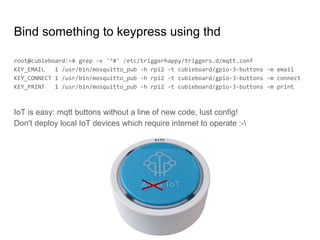
Bind something to keypress using thd
root@cubieboard:~# grep -v '^#' /etc/triggerhappy/triggers.d/mqtt.conf
KEY_EMAIL 1 /usr/bin/mosquitto_pub -h rpi2 -t cubieboard/gpio-3-buttons -m email
KEY_CONNECT 1 /usr/bin/mosquitto_pub -h rpi2 -t cubieboard/gpio-3-buttons -m connect
KEY_PRINT 1 /usr/bin/mosquitto_pub -h rpi2 -t cubieboard/gpio-3-buttons -m print
IoT is easy: mqtt buttons without a line of new code, lust config!
Don't deploy local IoT devices which require internet to operate :-
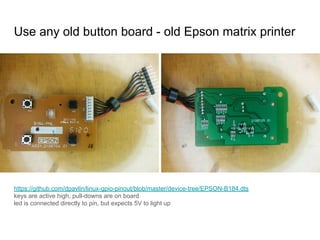
https://github.com/dpavlin/linux-gpio-pinout/blob/master/device-tree/EPSON-B184.dts
keys are active high, pull-downs are on board
led is connected directly to pin, but expects 5V to light up
Use any old button board - old Epson matrix printer
LEDs? Can leds show cpu and mmc activity?
/dts-v1/;
/plugin/;
/ {
compatible = "allwinner,sun4i-a10", "allwinner,sun7i-a20", "allwinner,sun50i-a64", "allwinner,sun50i-h5";
/* Documentation/devicetree/bindings/leds/leds-gpio.txt */
fragment@0 {
target-path = "/";
__overlay__ {
user-leds {
compatible = "gpio-leds";
leds@0 {
label = "gpio:red-top";
gpios = <&pio 8 20 0>; /* PI20 GPIO_ACTIVE_HIGH */
linux,default-trigger = "mmc0";
};
leds@1 {
label = "gpio:green-bottom";
gpios = <&pio 8 21 0>; /* PI21 GPIO_ACTIVE_HIGH */
linux,default-trigger = "cpu";
};
};
};
};
};
this board from old thinkpad dock adds leds with
cpu and mmc activity and buttons to arm sbc
first step is to test all pins with transistor tester
and figure out connections from board layout
good reason to horde old parts :-)
[and number pins, compare with notes]
root@ntpi:~# dmesg | grep rotary
[ 10.370238] rotary-encoder rotary@0: gray
[ 10.393505] input: rotary@0 as /devices/platform/rotary@0/input/input0
root@ntpi:~# grep rotary /boot/config.txt
dtoverlay=rotary-encoder,rollover,steps=20
root@ntpi:~# evtest /dev/input/event0
Input device name: "rotary@0"
Supported events:
Event type 0 (EV_SYN)
Event type 3 (EV_ABS)
Event code 0 (ABS_X)
Value 0
Min 0
Max 20
Flat 1
Properties:
Testing ... (interrupt to exit)
Event: time 1523107078.786053, type 3 (EV_ABS), code 0 (ABS_X), value 1
Event: time 1523107078.786053, -------------- SYN_REPORT ------------
Event: time 1523107080.280269, type 3 (EV_ABS), code 0 (ABS_X), value 2
Event: time 1523107080.280269, -------------- SYN_REPORT ------------
rotary encoder from /boot/overlays/README
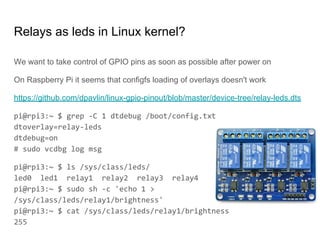
Relays as leds in Linux kernel?
We want to take control of GPIO pins as soon as possible after power on
On Raspberry Pi it seems that configfs loading of overlays doesn't work
https://github.com/dpavlin/linux-gpio-pinout/blob/master/device-tree/relay-leds.dts
pi@rpi3:~ $ grep -C 1 dtdebug /boot/config.txt
dtoverlay=relay-leds
dtdebug=on
# sudo vcdbg log msg
pi@rpi3:~ $ ls /sys/class/leds/
led0 led1 relay1 relay2 relay3 relay4
pi@rpi3:~ $ sudo sh -c 'echo 1 >
/sys/class/leds/relay1/brightness'
pi@rpi3:~ $ cat /sys/class/leds/relay1/brightness
255
Raspberry Pi pull-up/down ?!
you specified active low/high in your device tree and default-state it doesn't work
pi@rpi3:~ $ raspi-gpio funcs 21
GPIO, DEFAULT PULL, ALT0, ALT1, ALT2, ALT3, ALT4, ALT5
21, DOWN, PCM_DOUT, SD13, DPI_D17, I2CSL_CE_N, SPI1_SCLK, GPCLK1
does this but pins have hardware pull-up if one of alternative functions is spi
clock? See forum post GPIO Port Behaviour @ Power-up/Reboot
Please use device tree configuration
instead of user-land (python) code...
...or Arduino over serial port
...or WiringPi
You will eventually need to put device
tree overlay in i2c eeprom on rpi!
● Linux kernel has device tree as configuration mechanism
○ different on different architectures, sill in state of flux, especially overlays
● integrating your sensors, buttons or leds into linux kernel
○ easy way to create input devices for Linux kernel
● debugging i2c messages using tracing
Useful links
● more about device trees
○ https://github.com/dpavlin/linux-gpio-pinout
○ https://github.com/armbian/sunxi-DT-overlays
○ https://www.raspberrypi.org/documentation/configuration/device-tree.md
● kernel building
○ https://www.raspberrypi.org/documentation/linux/kernel/building.md
○ https://docs.armbian.com/Developer-Guide_Build-Preparation/
Question? Comments?
What did we learn?
Videos about device tree
OpenTechLab[002] Testing the Linux Kernel driver for the Lattice iCE40 FPGA
https://opentechlab.org.uk/videos:002:notes good device-tree introduction
LCA2018 Device Tree: Past, Present, and Future
https://www.youtube.com/watch?v=PgQezmlst0w
BoF: Devicetree - Frank Rowand, Sony
https://youtu.be/HYdb5uimPtE what's comming up, overlays, new dtc warnings

Linux+sensor+device-tree+shell=IoT !

  • 1.
    linux + sensor+ device-tree + shell = IoT ? Dobrica Pavlinušić https://blog.rot13.org/ @dpavlin
  • 2.
    linux+sensor+device-tree+shell=IoT ? You haveone of those fruity *Pi arm boards and cheep sensor from China? Some buttons and LEDs? Do I really need to learn whole new scripting language and few web technologies to read my temperature, blink a led or toggle a relay? No, because your Linux kernel already has drivers for them and all you need is device tree and cat.
  • 3.
    This talk isaimed at people who ● have arm board with gpio headers (sunxi/Allwinner, bcm/Raspberry Pi) ● found a internet search result with device tree, and it looks like magic ● know how to (cross) compile kernel for arm board if modules are missing ● have cheap sensors from ebay or aliexpress and want to use then from Linux ● a little more than just rx/tx connections.... ● but no soldering...
  • 4.
    root@raspberrypi:/home/pi# apt-get installi2c-tools root@raspberrypi:/home/pi# modprobe i2c-dev root@raspberrypi:/home/pi# i2cdetect -y 1 0 1 2 3 4 5 6 7 8 9 a b c d e f 00: -- -- -- -- -- -- -- -- -- -- -- -- -- 10: -- -- -- -- -- -- -- -- -- -- -- -- -- -- -- -- 20: -- -- -- -- -- -- -- -- -- -- -- -- -- -- -- -- 30: -- -- -- -- -- -- -- -- -- -- -- -- -- -- -- -- 40: -- -- -- -- -- -- -- -- -- -- -- -- -- -- -- -- 50: 50 -- -- -- -- -- -- -- -- -- -- -- -- -- -- -- 60: -- -- -- -- -- -- -- -- 68 -- -- -- -- -- -- -- 70: -- -- -- -- -- -- -- -- root@raspberrypi:/home/pi# modprobe rtc-ds1307 Arduino i2c modules might be 5V devices! remove i2c pull-up to 5V if module has 5V VCC check SDA and SCL levels with multimeter! https://electronics.stackexchange.com/questions/98361/how-to-modify-ds1307-rtc-to-use-3-3v-for-raspberry-pi
  • 5.
    Would it benice if all boards came with 2.54mm pinouts? (in svg, bw or color) https://github.com/dpavlin/linux-gpio-pinout with ability to flip horizontally or vertically depending on board orientation?
  • 6.
    dpavlin@cubieboard:~/linux-gpio-pinout$ sudo ./gpio.pl2>/dev/null | egrep '(^#|[)' ## U14 (Next to SATA connector) ### SPI0 48 PI13 2 0 1 [spi0 MISO] 47 PI11 2 0 1 [spi0 CLK] 46 PI12 2 0 1 [spi0 MOSI] 45 PI10 2 0 1 [spi0 CS] ### LCD 32 PD25 0 0 1 0 31 PB2 2 0 1 [pwm pwm] ## U15 (Between Ethernet port and USB ports) ### CSI1/TS 5 PG0 0 0 1 0 6 PB18 2 0 1 [i2c1 SCK] 7 PB19 2 0 1 [i2c1 SDA] 8 PG3 0 1 1 1 "E-mail" in hi [gpio-3-buttons gpio_in] 9 PG2 0 0 1 0 10 PG1 0 1 1 1 "Connect" in hi [gpio-3-buttons gpio_in] 11 PG4 0 0 1 0 12 PG5 0 1 1 1 "Print" in hi [gpio-3-buttons gpio_in] 13 PG6 4 0 1 [ttyS3 TX uart3] 14 PG7 4 0 1 [ttyS3 RX uart3] 17 PG10 4 0 1 [ttyS4 TX uart4] 18 PG11 4 0 1 [ttyS4 RX uart4] ### Analog SDIO3 ### CSI0/TS ## DEBUG serial (middle of board) 4 PB22 2 0 1 [ttyS0 TX uart0] 3 PB23 2 1 1 [ttyS0 RX uart0] and again with horizontal or vertical flip depending on board orientation (top, bottom, rotation...) output friendly to grep in terminal with [kernel info]
  • 7.
    dpavlin@klin:/klin/linux$ git greptmp75 Documentation/hwmon/lm75: Prefixes: 'tmp100', 'tmp101', 'tmp105', 'tmp112', 'tmp175', 'tmp75', 'tmp75c', 'tmp275' Documentation/hwmon/lm75: http://www.ti.com/product/tmp75 Documentation/hwmon/lm75: http://www.ti.com/product/tmp75c drivers/hwmon/lm75.c: tmp75, drivers/hwmon/lm75.c: tmp75c, drivers/hwmon/lm75.c: case tmp75: drivers/hwmon/lm75.c: case tmp75c: drivers/hwmon/lm75.c: { "tmp75", tmp75, }, drivers/hwmon/lm75.c: { "tmp75c", tmp75c, }, drivers/hwmon/lm75.c: .compatible = "ti,tmp75", drivers/hwmon/lm75.c: .data = (void *)tmp75 drivers/hwmon/lm75.c: .compatible = "ti,tmp75c", drivers/hwmon/lm75.c: .data = (void *)tmp75c root@cubieboard2:~# echo lm75 0x49 > /sys/bus/i2c/devices/i2c-1/new_device dpavlin@cubieboard2:~$ sensors tmp75-i2c-1-49 tmp75-i2c-1-49 Adapter: mv64xxx_i2c adapter temp1: +23.5°C (high = +80.0°C, hyst = +75.0°C) dpavlin@cubieboard2:~$ cat /sys/devices/platform/soc@01c00000/1c2b000.i2c/i2c-1/1-0049/hwmon/hwmon0/temp1_input 23500 does kernel have support for my sensor?
  • 8.
    device tree fori2c sensor dpavlin@cubieboard2:~/linux-gpio-pinout$ cat device-tree/i2c-tmp75.dts /dts-v1/; /plugin/; / { compatible = "allwinner,sun4i-a10", "allwinner,sun7i-a20", "allwinner,sun50i-a64", "allwinner,sun50i-h5"; fragment@0 { target = <&i2c1>; __overlay__ { #address-cells = <1>; #size-cells = <0>; tmp75@49 { compatible = "ti,tmp75"; reg = <0x49>; status = "okay"; }; }; }; };
  • 9.
    device tree overlaydebugging - configfs You don't need to reboot your board to test device tree! (on sunxi at least) dpavlin@cubieboard2:~/linux-gpio-pinout$ cat overlay-load.sh #!/bin/sh -xe dtb=$1 test -f "$dtb" || ( echo "Usage: $0 overlay.dtb" ; exit 1 ) config=`mount -t configfs | awk '{ print $3 }'` name=`basename $1` dir=$config/device-tree/overlays/$name test -d $dir && rmdir $dir mkdir $dir cat $dtb > $dir/dtbo cat $dir/status
  • 10.
    i2c debugging -alternative to logic analyzer dpavlin@cubieboard2:~/linux-gpio-pinout$ cat i2c-tracing.sh #!/bin/sh if [ -z "$1" ] ; then echo "Usage: $0 0|1 - disable/enable i2c tracking" exit 1 fi echo $1 > /sys/kernel/debug/tracing/events/i2c/enable # echo adapter_nr==1 >/sys/kernel/debug/tracing/events/i2c/filter cat /sys/kernel/debug/tracing/trace
  • 11.
    add ADC toboard without it on the chep - pcf8591 echo pcf8591 0x48 > /sys/bus/i2c/devices/i2c-1/new_device dpavlin@cubieboard:~$ sensors pcf8591-i2c-1-48 pcf8591-i2c-1-48 Adapter: mv64xxx_i2c adapter in0: +2.50 V in1: +2.55 V in2: +0.01 V in3: +1.32 V root@cubieboard:~# cd /sys/devices/platform/soc@01c00000/1c2b000.i2c/i2c-1/1-0048/ root@cubieboard:/sys/devices/platform/soc@01c00000/1c2b000.i2c/i2c-1/1-0048# ls driver in0_input in2_input modalias out0_enable power uevent hwmon in1_input in3_input name out0_output subsystem
  • 12.
    Current monitoring ofyour arm boards or anything is internet ready! cat /sys/devices/platform/soc@01c00000/1c2b000.i2c/i2c-1/1-0040/hwmon/hwmon0/curr1_input Current monitoring usina ina219 or ina3221
  • 13.
    But, you promised IoT! OK,let's make MQTT button
  • 14.
  • 15.
    /dts-v1/; /plugin/; / { compatible ="allwinner,sun4i-a10", "allwinner,sun7i-a20", "allwinner,sun50i-a64", "allwinner,sun50i-h5"; /* * This fragment is needed only for the internal pull-up activation, * external pull-up resistor is highly recommended if using long wires */ fragment@0 { target = <&pio>; __overlay__ { gpio_button_0: gpio_button_0 { pins = "PG3","PG1","PG5"; function = "gpio_in"; bias-pull-up; }; }; }; fragment@1 { target-path = "/"; __overlay__ { gpio-3-buttons { /* * Use "gpio-keys" for EINT capable pins, "gpio-keys-polled" for other pins * add "poll-interval" property if using "gpio-keys-polled" */ compatible = "gpio-keys-polled"; poll-interval = <100>; autorepeat; pinctrl-names = "default"; pinctrl-0 = <&gpio_button_0>; email { label = "E-mail"; linux,code = <215>; /* KEY_EMAIL, see include/uapi/linux/input-event-codes.h */ gpios = <&pio 6 3 1>; /* PG3 GPIO_ACTIVE_LOW */ }; connect { label = "Connect"; linux,code = <218>; /* KEY_CONNECT, see include/uapi/linux/input-event-codes.h */ gpios = <&pio 6 1 1>; /* PG1 GPIO_ACTIVE_LOW */ }; print { label = "Print"; linux,code = <210>; /* KEY_PRINT, see include/uapi/linux/input-event-codes.h */ gpios = <&pio 6 5 1>; /* PG5 GPIO_ACTIVE_LOW */ }; }; }; }; }; device tree defines pins and keys
  • 16.
    Does my pinhas irq support? /sys/kernel/debug/ root@rpi:~# grep Hardware /proc/cpuinfo Hardware : BCM2835 root@rpi:~# grep -r irq /sys/kernel/debug/pinctrl/ | head /sys/kernel/debug/pinctrl/20200000.gpio/pins:pin 0 (gpio0) function alt0 in hi; irq 160 (none) /sys/kernel/debug/pinctrl/20200000.gpio/pins:pin 1 (gpio1) function alt0 in hi; irq 161 (none) /sys/kernel/debug/pinctrl/20200000.gpio/pins:pin 2 (gpio2) function alt0 in hi; irq 162 (none) /sys/kernel/debug/pinctrl/20200000.gpio/pins:pin 3 (gpio3) function alt0 in hi; irq 163 (none) /sys/kernel/debug/pinctrl/20200000.gpio/pins:pin 4 (gpio4) function gpio_in in hi; irq 164 (none) /sys/kernel/debug/pinctrl/20200000.gpio/pins:pin 5 (gpio5) function gpio_out in lo; irq 165 (none) /sys/kernel/debug/pinctrl/20200000.gpio/pins:pin 6 (gpio6) function gpio_out in hi; irq 166 (none) /sys/kernel/debug/pinctrl/20200000.gpio/pins:pin 7 (gpio7) function gpio_in in hi; irq 167 (none) /sys/kernel/debug/pinctrl/20200000.gpio/pins:pin 8 (gpio8) function gpio_in in hi; irq 168 (none) /sys/kernel/debug/pinctrl/20200000.gpio/pins:pin 9 (gpio9) function gpio_in in lo; irq 169 (none) root@cubieboard:~# grep Hardware /proc/cpuinfo Hardware : Allwinner sun4i/sun5i Families root@cubieboard:~# grep -r irq /sys/kernel/debug/pinctrl/ /sys/kernel/debug/pinctrl/1c20800.pinctrl/pinmux-functions:function: irq, groups = [ PH0 PH1 PH2 PH3 PH4 PH5 PH6 PH7 PH8 PH9 PH10 PH11 PH12 PH13 PH14 PH15 PH16 PH17 PH18 PH19 PH20 PH21 PI10 PI11 PI12 PI13 PI14 PI15 PI16 PI17 PI18 PI19 ] Different on different hardware, but still kernel knows!
  • 17.
    Test new inputevents using evtest root@cubieboard:~# evtest No device specified, trying to scan all of /dev/input/event* Available devices: /dev/input/event0: axp20x-pek /dev/input/event1: gpio-3-buttons /dev/input/event2: sunxi-ir Select the device event number [0-2]: 1 Input driver version is 1.0.1 Input device ID: bus 0x19 vendor 0x1 product 0x1 version 0x100 Input device name: "gpio-3-buttons" Supported events: Event type 0 (EV_SYN) Event type 1 (EV_KEY) Event code 210 (KEY_PRINT) Event code 215 (KEY_EMAIL) Event code 218 (KEY_CONNECT) Key repeat handling: Repeat type 20 (EV_REP) Repeat code 0 (REP_DELAY) Value 250 Repeat code 1 (REP_PERIOD) Value 33
  • 18.
    Bind something tokeypress using thd root@cubieboard:~# grep -v '^#' /etc/triggerhappy/triggers.d/mqtt.conf KEY_EMAIL 1 /usr/bin/mosquitto_pub -h rpi2 -t cubieboard/gpio-3-buttons -m email KEY_CONNECT 1 /usr/bin/mosquitto_pub -h rpi2 -t cubieboard/gpio-3-buttons -m connect KEY_PRINT 1 /usr/bin/mosquitto_pub -h rpi2 -t cubieboard/gpio-3-buttons -m print IoT is easy: mqtt buttons without a line of new code, lust config! Don't deploy local IoT devices which require internet to operate :-
  • 19.
    https://github.com/dpavlin/linux-gpio-pinout/blob/master/device-tree/EPSON-B184.dts keys are activehigh, pull-downs are on board led is connected directly to pin, but expects 5V to light up Use any old button board - old Epson matrix printer
  • 20.
    LEDs? Can ledsshow cpu and mmc activity? /dts-v1/; /plugin/; / { compatible = "allwinner,sun4i-a10", "allwinner,sun7i-a20", "allwinner,sun50i-a64", "allwinner,sun50i-h5"; /* Documentation/devicetree/bindings/leds/leds-gpio.txt */ fragment@0 { target-path = "/"; __overlay__ { user-leds { compatible = "gpio-leds"; leds@0 { label = "gpio:red-top"; gpios = <&pio 8 20 0>; /* PI20 GPIO_ACTIVE_HIGH */ linux,default-trigger = "mmc0"; }; leds@1 { label = "gpio:green-bottom"; gpios = <&pio 8 21 0>; /* PI21 GPIO_ACTIVE_HIGH */ linux,default-trigger = "cpu"; }; }; }; }; };
  • 21.
    this board fromold thinkpad dock adds leds with cpu and mmc activity and buttons to arm sbc first step is to test all pins with transistor tester and figure out connections from board layout good reason to horde old parts :-) [and number pins, compare with notes]
  • 22.
    root@ntpi:~# dmesg |grep rotary [ 10.370238] rotary-encoder rotary@0: gray [ 10.393505] input: rotary@0 as /devices/platform/rotary@0/input/input0 root@ntpi:~# grep rotary /boot/config.txt dtoverlay=rotary-encoder,rollover,steps=20 root@ntpi:~# evtest /dev/input/event0 Input device name: "rotary@0" Supported events: Event type 0 (EV_SYN) Event type 3 (EV_ABS) Event code 0 (ABS_X) Value 0 Min 0 Max 20 Flat 1 Properties: Testing ... (interrupt to exit) Event: time 1523107078.786053, type 3 (EV_ABS), code 0 (ABS_X), value 1 Event: time 1523107078.786053, -------------- SYN_REPORT ------------ Event: time 1523107080.280269, type 3 (EV_ABS), code 0 (ABS_X), value 2 Event: time 1523107080.280269, -------------- SYN_REPORT ------------ rotary encoder from /boot/overlays/README
  • 23.
    Relays as ledsin Linux kernel? We want to take control of GPIO pins as soon as possible after power on On Raspberry Pi it seems that configfs loading of overlays doesn't work https://github.com/dpavlin/linux-gpio-pinout/blob/master/device-tree/relay-leds.dts pi@rpi3:~ $ grep -C 1 dtdebug /boot/config.txt dtoverlay=relay-leds dtdebug=on # sudo vcdbg log msg pi@rpi3:~ $ ls /sys/class/leds/ led0 led1 relay1 relay2 relay3 relay4 pi@rpi3:~ $ sudo sh -c 'echo 1 > /sys/class/leds/relay1/brightness' pi@rpi3:~ $ cat /sys/class/leds/relay1/brightness 255
  • 24.
    Raspberry Pi pull-up/down?! you specified active low/high in your device tree and default-state it doesn't work pi@rpi3:~ $ raspi-gpio funcs 21 GPIO, DEFAULT PULL, ALT0, ALT1, ALT2, ALT3, ALT4, ALT5 21, DOWN, PCM_DOUT, SD13, DPI_D17, I2CSL_CE_N, SPI1_SCLK, GPCLK1 does this but pins have hardware pull-up if one of alternative functions is spi clock? See forum post GPIO Port Behaviour @ Power-up/Reboot
  • 25.
    Please use devicetree configuration instead of user-land (python) code... ...or Arduino over serial port ...or WiringPi You will eventually need to put device tree overlay in i2c eeprom on rpi!
  • 26.
    ● Linux kernelhas device tree as configuration mechanism ○ different on different architectures, sill in state of flux, especially overlays ● integrating your sensors, buttons or leds into linux kernel ○ easy way to create input devices for Linux kernel ● debugging i2c messages using tracing Useful links ● more about device trees ○ https://github.com/dpavlin/linux-gpio-pinout ○ https://github.com/armbian/sunxi-DT-overlays ○ https://www.raspberrypi.org/documentation/configuration/device-tree.md ● kernel building ○ https://www.raspberrypi.org/documentation/linux/kernel/building.md ○ https://docs.armbian.com/Developer-Guide_Build-Preparation/ Question? Comments? What did we learn?
  • 27.
  • 28.
    OpenTechLab[002] Testing theLinux Kernel driver for the Lattice iCE40 FPGA https://opentechlab.org.uk/videos:002:notes good device-tree introduction
  • 29.
    LCA2018 Device Tree:Past, Present, and Future https://www.youtube.com/watch?v=PgQezmlst0w
  • 30.
    BoF: Devicetree -Frank Rowand, Sony https://youtu.be/HYdb5uimPtE what's comming up, overlays, new dtc warnings