Graphical
Representation of
DATA
By: Mohammad Basit Ali
17301514-108
To Ma’am Khadija Fatima
Group Members:
• Mohammad Basit Ali -
108
• Waqas Ahmad-096
• Hasnain Raza-120
• Hamza Iqbal-058
• Hafiz Amir (IR)
Contents:
• Graphical
Representation of DATA
• History
• Applications
• Importance
• Basic principals
Meaning Of Graphical Representation Of Data
• A picture is said to be more effective than words for describing a
particular thing.
• A graphic representation is the geometrical image of a set of data .
• It is a mathematical picture.
• It enables us to think about a statistical problem in visual terms.
• It is an effective and economic device for the presentation ,
understanding and interpretation of the collected data.
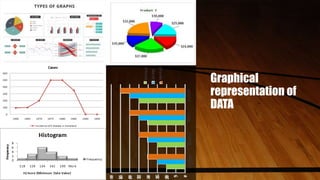
Graphical
representation of
DATA
IMPOTANCE OF GRAPHICAL REPRESENTATION
• It is used to make the data understandable to common man.
• It helps in easy and quick understanding of data.
• Data displayed by graphical representation can be memorized for a long
time.
• Can be compared at a glance.
History
• The concept of plotting a point in coordinate space dates back to at least
the ancient Greeks,
• but we had to wait until the work of Descartes, René for mathematicians
to investigate this concept.
• According to Royston, E. (1970), a German mathematician named Crome,
A.W. was among the first to use graphical representation in statistics.
• He initially used it as a teaching tool.
Types of graphic representation of DATA
• Ungrouped DATA
• Line Graph
• Bar Graph
• Pie Diagram Or
• Circle Graph
• Grouped DATA
• Histogram
• Frequency Polygon
• Frequency Curve
THANKS 
Next…
GRAPHICAL
REPRESENTATION
OF DATA
By waqas ahmed
Roll no 17301514-096
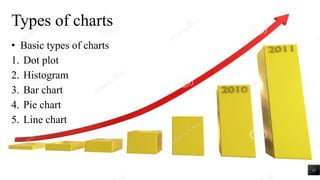
Types of charts
• Basic types of charts
1. Dot plot
2. Histogram
3. Bar chart
4. Pie chart
5. Line chart
11
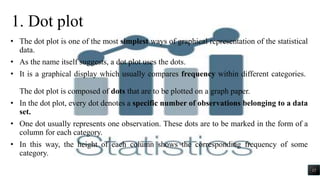
• The dot plot is one of the most simplest ways of graphical representation of the statistical
data.
• As the name itself suggests, a dot plot uses the dots.
• It is a graphical display which usually compares frequency within different categories.
The dot plot is composed of dots that are to be plotted on a graph paper.
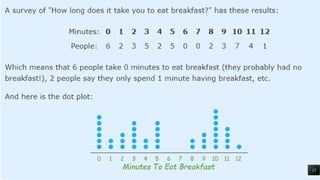
• In the dot plot, every dot denotes a specific number of observations belonging to a data
set.
• One dot usually represents one observation. These dots are to be marked in the form of a
column for each category.
• In this way, the height of each column shows the corresponding frequency of some
category.
1. Dot plot
12
13
Application/Importance of dot plot
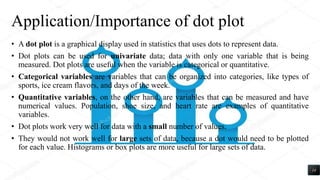
• A dot plot is a graphical display used in statistics that uses dots to represent data.
• Dot plots can be used for univariate data; data with only one variable that is being
measured. Dot plots are useful when the variable is categorical or quantitative.
• Categorical variables are variables that can be organized into categories, like types of
sports, ice cream flavors, and days of the week.
• Quantitative variables, on the other hand, are variables that can be measured and have
numerical values. Population, shoe size, and heart rate are examples of quantitative
variables.
• Dot plots work very well for data with a small number of values.
• They would not work well for large sets of data, because a dot would need to be plotted
for each value. Histograms or box plots are more useful for large sets of data.
14
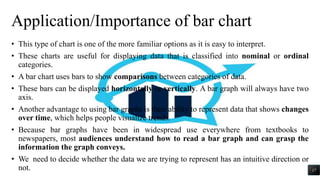
2. Bar chart/graph
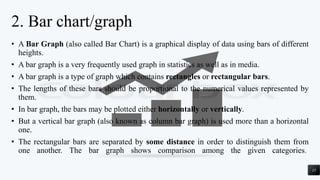
• A Bar Graph (also called Bar Chart) is a graphical display of data using bars of different
heights.
• A bar graph is a very frequently used graph in statistics as well as in media.
• A bar graph is a type of graph which contains rectangles or rectangular bars.
• The lengths of these bars should be proportional to the numerical values represented by
them.
• In bar graph, the bars may be plotted either horizontally or vertically.
• But a vertical bar graph (also known as column bar graph) is used more than a horizontal
one.
• The rectangular bars are separated by some distance in order to distinguish them from
one another. The bar graph shows comparison among the given categories.
15
A vertical bar graph is shown below:
Number of students went to different states for study:
16
Application/Importance of bar chart
• This type of chart is one of the more familiar options as it is easy to interpret.
• These charts are useful for displaying data that is classified into nominal or ordinal
categories.
• A bar chart uses bars to show comparisons between categories of data.
• These bars can be displayed horizontally or vertically. A bar graph will always have two
axis.
• Another advantage to using bar graphs is their ability to represent data that shows changes
over time, which helps people visualize trends.
• Because bar graphs have been in widespread use everywhere from textbooks to
newspapers, most audiences understand how to read a bar graph and can grasp the
information the graph conveys.
• We need to decide whether the data we are trying to represent has an intuitive direction or
not. 17
3. Histogram
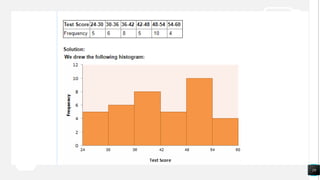
• Histogram: a graphical display of data using bars of different heights.
• It is similar to a Bar Chart, but a histogram groups numbers into ranges .
• (The range of each bar is also called the Class Interval)
• The height of each bar shows how many fall into each range.
• A histogram is defined as a graphical representation of the mutually exclusive
events.
• Both are made up of rectangular bars. The difference is that there is no gap
between any two bars in the histogram.
• The histogram is used to represent the continuous(weight, height, how much time
etc.)data.
18
19
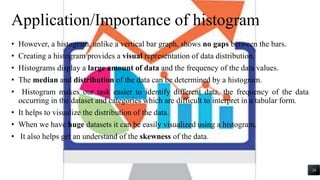
Application/Importance of histogram
• However, a histogram, unlike a vertical bar graph, shows no gaps between the bars.
• Creating a histogram provides a visual representation of data distribution.
• Histograms display a large amount of data and the frequency of the data values.
• The median and distribution of the data can be determined by a histogram.
• Histogram makes our task easier to identify different data, the frequency of the data
occurring in the dataset and categories which are difficult to interpret in a tabular form.
• It helps to visualize the distribution of the data.
• When we have huge datasets it can be easily visualized using a histogram.
• It also helps get an understand of the skewness of the data.
20
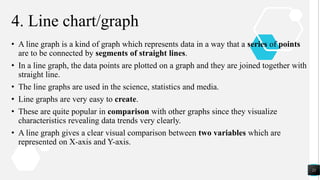
4. Line chart/graph
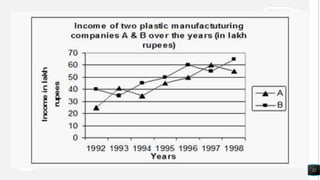
• A line graph is a kind of graph which represents data in a way that a series of points
are to be connected by segments of straight lines.
• In a line graph, the data points are plotted on a graph and they are joined together with
straight line.
• The line graphs are used in the science, statistics and media.
• Line graphs are very easy to create.
• These are quite popular in comparison with other graphs since they visualize
characteristics revealing data trends very clearly.
• A line graph gives a clear visual comparison between two variables which are
represented on X-axis and Y-axis.
21
22
Application/Importance of line chart/graph
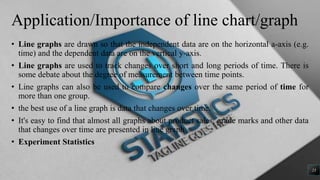
• Line graphs are drawn so that the independent data are on the horizontal a-axis (e.g.
time) and the dependent data are on the vertical y-axis.
• Line graphs are used to track changes over short and long periods of time. There is
some debate about the degree of measurement between time points.
• Line graphs can also be used to compare changes over the same period of time for
more than one group.
• the best use of a line graph is data that changes over time.
• It's easy to find that almost all graphs about product sales, grade marks and other data
that changes over time are presented in line graph
• Experiment Statistics
23
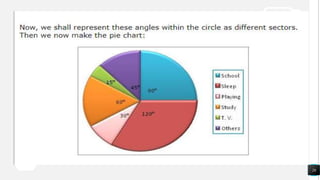
5. Pie
chart/
diagram
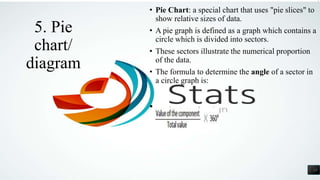
• Pie Chart: a special chart that uses "pie slices" to
show relative sizes of data.
• A pie graph is defined as a graph which contains a
circle which is divided into sectors.
• These sectors illustrate the numerical proportion
of the data.
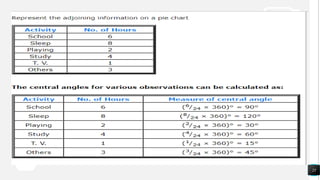
• The formula to determine the angle of a sector in
a circle graph is:
•
24
25
26
Application/Importance of pie chart/diagram
• Pie charts are generally used to show percentage or proportional data and usually the
percentage represented by each category is provided next to the corresponding slice
of pie.
• Pie charts are good for displaying data for around 6 categories or fewer.
• Pie charts are best to use when we are trying to compare parts of a whole.
• They do not show changes over time. Bar graphs are used to compare things between
different groups or to track changes over time. However, when trying to measure change
over time, bar graphs are best when the changes are larger.
• pie charts are easily understood due to its widespread use in business and media.
• pie charts permit a visual check of the reasonableness or accuracy of calculation.
• pie charts are visually simpler than other types of graphs. size of the circle can be made
proportional to the quantity it represents
27
28
29
GRAPHICAL
REPRESENTATION OF
COMMON CHARTS
By Hasnain Raza
Roll No. : 17301514-120
Common Charts
Following are the common charts:
1. Time line chart
2. Frequency Polygon
3. Tree chart
4. Flow chart
5. Pedigree chart
30
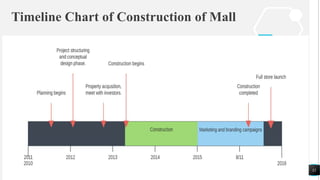
1. Timeline Chart
• A timeline chart is an effective way to visualize a process
using chronological order. Since details are displayed
graphically, important points in time can be easy seen and
understood.
• Often used for managing a project’s schedule, timeline
charts function as a sort of calendar of events within a
specific period of time.
31
Timeline Chart of Construction of Mall
32
2.Frequency Polygon
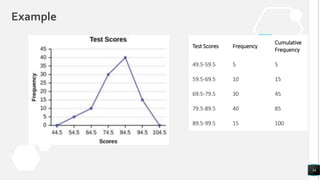
• A frequency polygon is a graphical form of representation
of data. It is used to depict the shape of the data and to
depict trends.
• It is usually drawn with the help of a histogram but can be
drawn without it as well.
• A histogram is a series of rectangular bars with no space
between them and is used to represent frequency
distributions.
33
Example
Test Scores Frequency
Cumulative
Frequency
49.5-59.5 5 5
59.5-69.5 10 15
69.5-79.5 30 45
79.5-89.5 40 85
89.5-99.5 15 100
34
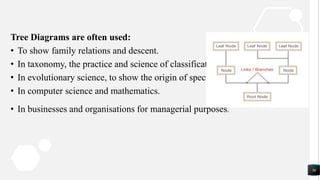
3. Tree Chart
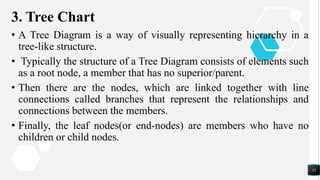
• A Tree Diagram is a way of visually representing hierarchy in a
tree-like structure.
• Typically the structure of a Tree Diagram consists of elements such
as a root node, a member that has no superior/parent.
• Then there are the nodes, which are linked together with line
connections called branches that represent the relationships and
connections between the members.
• Finally, the leaf nodes(or end-nodes) are members who have no
children or child nodes.
35
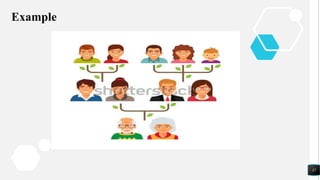
Tree Diagrams are often used:
• To show family relations and descent.
• In taxonomy, the practice and science of classification.
• In evolutionary science, to show the origin of species.
• In computer science and mathematics.
• In businesses and organisations for managerial purposes.
36
Example
37
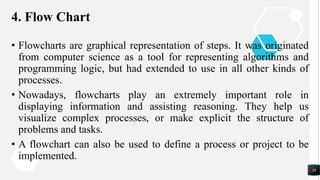
4. Flow Chart
• Flowcharts are graphical representation of steps. It was originated
from computer science as a tool for representing algorithms and
programming logic, but had extended to use in all other kinds of
processes.
• Nowadays, flowcharts play an extremely important role in
displaying information and assisting reasoning. They help us
visualize complex processes, or make explicit the structure of
problems and tasks.
• A flowchart can also be used to define a process or project to be
implemented.
38
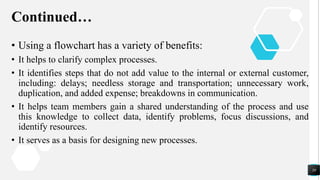
Continued…
• Using a flowchart has a variety of benefits:
• It helps to clarify complex processes.
• It identifies steps that do not add value to the internal or external customer,
including: delays; needless storage and transportation; unnecessary work,
duplication, and added expense; breakdowns in communication.
• It helps team members gain a shared understanding of the process and use
this knowledge to collect data, identify problems, focus discussions, and
identify resources.
• It serves as a basis for designing new processes.
39
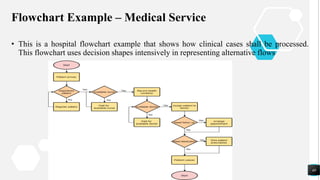
Flowchart Example – Medical Service
• This is a hospital flowchart example that shows how clinical cases shall be processed.
This flowchart uses decision shapes intensively in representing alternative flows
40
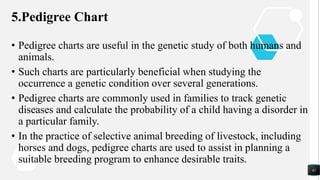
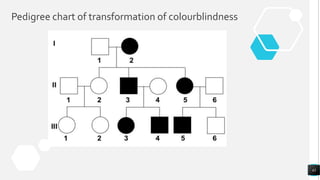
5.Pedigree Chart
• Pedigree charts are useful in the genetic study of both humans and
animals.
• Such charts are particularly beneficial when studying the
occurrence a genetic condition over several generations.
• Pedigree charts are commonly used in families to track genetic
diseases and calculate the probability of a child having a disorder in
a particular family.
• In the practice of selective animal breeding of livestock, including
horses and dogs, pedigree charts are used to assist in planning a
suitable breeding program to enhance desirable traits.
41
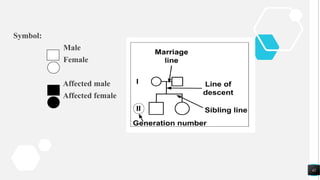
Symbol:
Male
Female
Affected male
Affected female
42
Pedigree chart of transformation of colourblindness
43
THANK YOU
44
GRAPHICAL
REPRESENTATION
OF DATA
By hamza Iqbal
Roll no 17301514-058
Types of
charts
• Field specific charts
• Control chart
• Bullet chart
• Bubble chart
• sparkline
• Open –high –low close chart
• Gnatt chart
Control chart
• Definition:
- A statistical tool to determine if a process is in control.
• Developed in 1920’s
• By Dr. Walter A. Shewhart
• Shewhart worked for Bell Telephone Labs
• Types:
• 1)Variable Control Charts
• Deal with items that can be measured .
• Examples; Weight, Height Speed, Volume
• Types of variable control chart
X-Bar chart, R chart, MA chart
47
Continue..
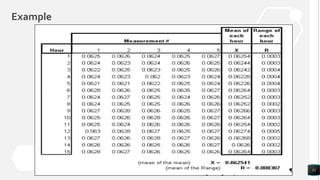
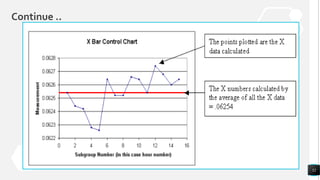
• X chart: deals with a average value in a process
• R chart: takes into count the range of the values
• MA chart: take into count the moving average of a process
2) Attribute control chart
Control charts that factor in the quality attributes of a process to determine if the process is
performing in or out of control.
• Types; P chart,C Chart, U Chart
• P Chart: a chart of the percent defective in each sample set.
• C chart: a chart of the number of defects per unit in each sample set.
• U chart: a chart of the average number of defects in each sample set.
48
Reasons for use of control chart
• Improve productivity
• Make defects visible
• Determine what process adjustments need to be made
• Determine if process is “in” or “out of control
Applications
• Example from “Managing Quality” by Foster.
• The Sampson company develops special equipment for the United States Armed Forces.
They need to use control charts to insure that they are producing a product that
conforms to the proper specifications. Sampson needs to produce high tech and top of
the line products, daily so they must have a process that is capable to reduce the risks of
defects.
49
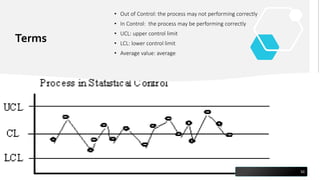
Terms
• Out of Control: the process may not performing correctly
• In Control: the process may be performing correctly
• UCL: upper control limit
• LCL: lower control limit
• Average value: average
50
Example
51
Continue ..
52
Bullet chart
• A bullet graph is a variation of a bar graph developed by Stephen Few.
Seemingly inspired by the traditional thermometer charts and progress bars
found in many dashboards, the bullet graph serves as a replacement for
dashboard gauges and meters.
• Bullet graphs were developed to overcome the fundamental issues of gauges
and meters: they typically display too little information, require too much
space, and are cluttered with useless and distracting decoration.
• .
53
Continue …
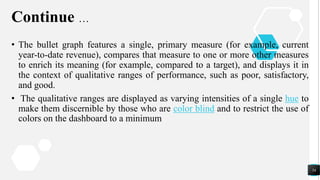
• The bullet graph features a single, primary measure (for example, current
year-to-date revenue), compares that measure to one or more other measures
to enrich its meaning (for example, compared to a target), and displays it in
the context of qualitative ranges of performance, such as poor, satisfactory,
and good.
• The qualitative ranges are displayed as varying intensities of a single hue to
make them discernible by those who are color blind and to restrict the use of
colors on the dashboard to a minimum
54
Example
55
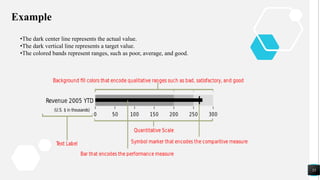
•The dark center line represents the actual value.
•The dark vertical line represents a target value.
•The colored bands represent ranges, such as poor, average, and good.
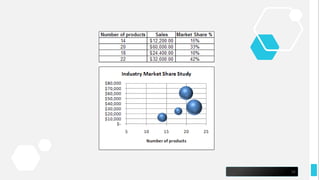
Bubble chart
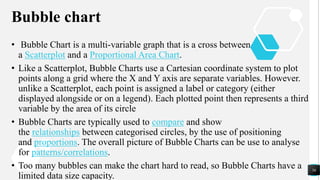
• Bubble Chart is a multi-variable graph that is a cross between
a Scatterplot and a Proportional Area Chart.
• Like a Scatterplot, Bubble Charts use a Cartesian coordinate system to plot
points along a grid where the X and Y axis are separate variables. However.
unlike a Scatterplot, each point is assigned a label or category (either
displayed alongside or on a legend). Each plotted point then represents a third
variable by the area of its circle
• Bubble Charts are typically used to compare and show
the relationships between categorised circles, by the use of positioning
and proportions. The overall picture of Bubble Charts can be use to analyse
for patterns/correlations.
• Too many bubbles can make the chart hard to read, so Bubble Charts have a
limited data size capacity.
56
Continue ..
• Like with Proportional Area Charts, the sizes of the circles need to be drawn
based on the circle’s area, not its radius or diameter. Not only will the size of
the circles change exponentially, but this will lead to misinterpretations by
the human visual system
57
58
Applications
• Bubble diagrams are a used in several industries mainly to represent the
relationship among variables, their proximity and common usage. There is
no doubt that it is very easy to visualize at infer from Bubble graph. It is also
extensively used in designing and as an analysis tool. They help us
understand space adjacency, layouts, and relationships, traffic flows, and
relative space sizes among other things. They are a visual tool for
representation. We can use them to help us understand aspects of the design
problem. They can also be useful for ideation.
59
Open high low close chart
• An open-high-low-close chart (also OHLC) is a type of chart typically used
to illustrate movements in the price of a financial instrument over time. Each
vertical line on the chart shows the price range (the highest and lowest prices)
over one unit of time, e.g., one day or one hour.
• Tick marks project from each side of the line indicating the opening price
(e.g., for a daily bar chart this would be the starting price for that day) on the
left, and the closing price for that time period on the right. The bars may be
shown in different hues depending on whether prices rose or fell in that
period.
60
Continue …..
• A simple variant on the OHLC chart is the HLC high-low-close chart that
identifies the range of the time unit's price action (high - low) and the end
result of the time unit's price action (the close).
61
Example
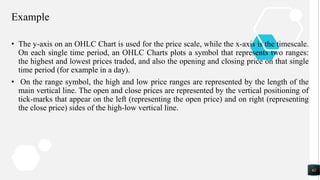
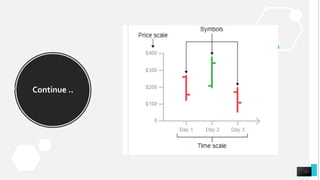
• The y-axis on an OHLC Chart is used for the price scale, while the x-axis is the timescale.
On each single time period, an OHLC Charts plots a symbol that represents two ranges:
the highest and lowest prices traded, and also the opening and closing price on that single
time period (for example in a day).
• On the range symbol, the high and low price ranges are represented by the length of the
main vertical line. The open and close prices are represented by the vertical positioning of
tick-marks that appear on the left (representing the open price) and on right (representing
the close price) sides of the high-low vertical line.
62
Continue ..
63
Gnatt chart
• A gantt chart is a horizontal bar chart that visually represents a project
plan over time. Modern gantt charts typically show you the status of—as
well as who’s responsible for—each task in the project.
• Gantt charts contain the following features:
• Start and end dates for tasks
• Project milestones
• Dependencies between tasks
• Person assigned to each task
64
Continue ..
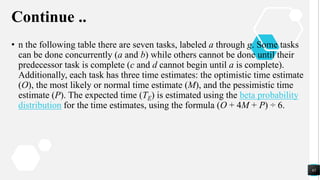
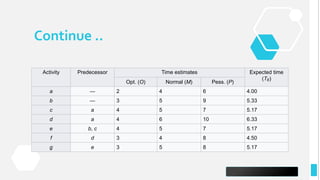
• n the following table there are seven tasks, labeled a through g. Some tasks
can be done concurrently (a and b) while others cannot be done until their
predecessor task is complete (c and d cannot begin until a is complete).
Additionally, each task has three time estimates: the optimistic time estimate
(O), the most likely or normal time estimate (M), and the pessimistic time
estimate (P). The expected time (TE) is estimated using the beta probability
distribution for the time estimates, using the formula (O + 4M + P) ÷ 6.
65
Continue ..
66
Activity Predecessor Time estimates Expected time
(TE)
Opt. (O) Normal (M) Pess. (P)
a — 2 4 6 4.00
b — 3 5 9 5.33
c a 4 5 7 5.17
d a 4 6 10 6.33
e b, c 4 5 7 5.17
f d 3 4 8 4.50
g e 3 5 8 5.17
Continue …
67
Continue
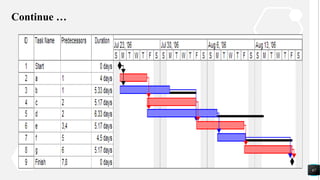
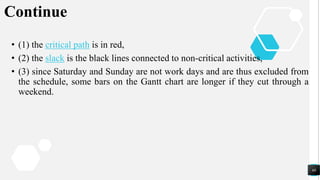
• (1) the critical path is in red,
• (2) the slack is the black lines connected to non-critical activities,
• (3) since Saturday and Sunday are not work days and are thus excluded from
the schedule, some bars on the Gantt chart are longer if they cut through a
weekend.
68
69

introduction to statistics

  • 1.
    Graphical Representation of DATA By: MohammadBasit Ali 17301514-108 To Ma’am Khadija Fatima
  • 2.
    Group Members: • MohammadBasit Ali - 108 • Waqas Ahmad-096 • Hasnain Raza-120 • Hamza Iqbal-058 • Hafiz Amir (IR)
  • 3.
    Contents: • Graphical Representation ofDATA • History • Applications • Importance • Basic principals
  • 4.
    Meaning Of GraphicalRepresentation Of Data • A picture is said to be more effective than words for describing a particular thing. • A graphic representation is the geometrical image of a set of data . • It is a mathematical picture. • It enables us to think about a statistical problem in visual terms. • It is an effective and economic device for the presentation , understanding and interpretation of the collected data.
  • 5.
  • 6.
    IMPOTANCE OF GRAPHICALREPRESENTATION • It is used to make the data understandable to common man. • It helps in easy and quick understanding of data. • Data displayed by graphical representation can be memorized for a long time. • Can be compared at a glance.
  • 7.
    History • The conceptof plotting a point in coordinate space dates back to at least the ancient Greeks, • but we had to wait until the work of Descartes, René for mathematicians to investigate this concept. • According to Royston, E. (1970), a German mathematician named Crome, A.W. was among the first to use graphical representation in statistics. • He initially used it as a teaching tool.
  • 8.
    Types of graphicrepresentation of DATA • Ungrouped DATA • Line Graph • Bar Graph • Pie Diagram Or • Circle Graph • Grouped DATA • Histogram • Frequency Polygon • Frequency Curve
  • 9.
  • 10.
  • 11.
    Types of charts •Basic types of charts 1. Dot plot 2. Histogram 3. Bar chart 4. Pie chart 5. Line chart 11
  • 12.
    • The dotplot is one of the most simplest ways of graphical representation of the statistical data. • As the name itself suggests, a dot plot uses the dots. • It is a graphical display which usually compares frequency within different categories. The dot plot is composed of dots that are to be plotted on a graph paper. • In the dot plot, every dot denotes a specific number of observations belonging to a data set. • One dot usually represents one observation. These dots are to be marked in the form of a column for each category. • In this way, the height of each column shows the corresponding frequency of some category. 1. Dot plot 12
  • 13.
  • 14.
    Application/Importance of dotplot • A dot plot is a graphical display used in statistics that uses dots to represent data. • Dot plots can be used for univariate data; data with only one variable that is being measured. Dot plots are useful when the variable is categorical or quantitative. • Categorical variables are variables that can be organized into categories, like types of sports, ice cream flavors, and days of the week. • Quantitative variables, on the other hand, are variables that can be measured and have numerical values. Population, shoe size, and heart rate are examples of quantitative variables. • Dot plots work very well for data with a small number of values. • They would not work well for large sets of data, because a dot would need to be plotted for each value. Histograms or box plots are more useful for large sets of data. 14
  • 15.
    2. Bar chart/graph •A Bar Graph (also called Bar Chart) is a graphical display of data using bars of different heights. • A bar graph is a very frequently used graph in statistics as well as in media. • A bar graph is a type of graph which contains rectangles or rectangular bars. • The lengths of these bars should be proportional to the numerical values represented by them. • In bar graph, the bars may be plotted either horizontally or vertically. • But a vertical bar graph (also known as column bar graph) is used more than a horizontal one. • The rectangular bars are separated by some distance in order to distinguish them from one another. The bar graph shows comparison among the given categories. 15
  • 16.
    A vertical bargraph is shown below: Number of students went to different states for study: 16
  • 17.
    Application/Importance of barchart • This type of chart is one of the more familiar options as it is easy to interpret. • These charts are useful for displaying data that is classified into nominal or ordinal categories. • A bar chart uses bars to show comparisons between categories of data. • These bars can be displayed horizontally or vertically. A bar graph will always have two axis. • Another advantage to using bar graphs is their ability to represent data that shows changes over time, which helps people visualize trends. • Because bar graphs have been in widespread use everywhere from textbooks to newspapers, most audiences understand how to read a bar graph and can grasp the information the graph conveys. • We need to decide whether the data we are trying to represent has an intuitive direction or not. 17
  • 18.
    3. Histogram • Histogram:a graphical display of data using bars of different heights. • It is similar to a Bar Chart, but a histogram groups numbers into ranges . • (The range of each bar is also called the Class Interval) • The height of each bar shows how many fall into each range. • A histogram is defined as a graphical representation of the mutually exclusive events. • Both are made up of rectangular bars. The difference is that there is no gap between any two bars in the histogram. • The histogram is used to represent the continuous(weight, height, how much time etc.)data. 18
  • 19.
  • 20.
    Application/Importance of histogram •However, a histogram, unlike a vertical bar graph, shows no gaps between the bars. • Creating a histogram provides a visual representation of data distribution. • Histograms display a large amount of data and the frequency of the data values. • The median and distribution of the data can be determined by a histogram. • Histogram makes our task easier to identify different data, the frequency of the data occurring in the dataset and categories which are difficult to interpret in a tabular form. • It helps to visualize the distribution of the data. • When we have huge datasets it can be easily visualized using a histogram. • It also helps get an understand of the skewness of the data. 20
  • 21.
    4. Line chart/graph •A line graph is a kind of graph which represents data in a way that a series of points are to be connected by segments of straight lines. • In a line graph, the data points are plotted on a graph and they are joined together with straight line. • The line graphs are used in the science, statistics and media. • Line graphs are very easy to create. • These are quite popular in comparison with other graphs since they visualize characteristics revealing data trends very clearly. • A line graph gives a clear visual comparison between two variables which are represented on X-axis and Y-axis. 21
  • 22.
  • 23.
    Application/Importance of linechart/graph • Line graphs are drawn so that the independent data are on the horizontal a-axis (e.g. time) and the dependent data are on the vertical y-axis. • Line graphs are used to track changes over short and long periods of time. There is some debate about the degree of measurement between time points. • Line graphs can also be used to compare changes over the same period of time for more than one group. • the best use of a line graph is data that changes over time. • It's easy to find that almost all graphs about product sales, grade marks and other data that changes over time are presented in line graph • Experiment Statistics 23
  • 24.
    5. Pie chart/ diagram • PieChart: a special chart that uses "pie slices" to show relative sizes of data. • A pie graph is defined as a graph which contains a circle which is divided into sectors. • These sectors illustrate the numerical proportion of the data. • The formula to determine the angle of a sector in a circle graph is: • 24
  • 25.
  • 26.
  • 27.
    Application/Importance of piechart/diagram • Pie charts are generally used to show percentage or proportional data and usually the percentage represented by each category is provided next to the corresponding slice of pie. • Pie charts are good for displaying data for around 6 categories or fewer. • Pie charts are best to use when we are trying to compare parts of a whole. • They do not show changes over time. Bar graphs are used to compare things between different groups or to track changes over time. However, when trying to measure change over time, bar graphs are best when the changes are larger. • pie charts are easily understood due to its widespread use in business and media. • pie charts permit a visual check of the reasonableness or accuracy of calculation. • pie charts are visually simpler than other types of graphs. size of the circle can be made proportional to the quantity it represents 27
  • 28.
  • 29.
    29 GRAPHICAL REPRESENTATION OF COMMON CHARTS ByHasnain Raza Roll No. : 17301514-120
  • 30.
    Common Charts Following arethe common charts: 1. Time line chart 2. Frequency Polygon 3. Tree chart 4. Flow chart 5. Pedigree chart 30
  • 31.
    1. Timeline Chart •A timeline chart is an effective way to visualize a process using chronological order. Since details are displayed graphically, important points in time can be easy seen and understood. • Often used for managing a project’s schedule, timeline charts function as a sort of calendar of events within a specific period of time. 31
  • 32.
    Timeline Chart ofConstruction of Mall 32
  • 33.
    2.Frequency Polygon • Afrequency polygon is a graphical form of representation of data. It is used to depict the shape of the data and to depict trends. • It is usually drawn with the help of a histogram but can be drawn without it as well. • A histogram is a series of rectangular bars with no space between them and is used to represent frequency distributions. 33
  • 34.
    Example Test Scores Frequency Cumulative Frequency 49.5-59.55 5 59.5-69.5 10 15 69.5-79.5 30 45 79.5-89.5 40 85 89.5-99.5 15 100 34
  • 35.
    3. Tree Chart •A Tree Diagram is a way of visually representing hierarchy in a tree-like structure. • Typically the structure of a Tree Diagram consists of elements such as a root node, a member that has no superior/parent. • Then there are the nodes, which are linked together with line connections called branches that represent the relationships and connections between the members. • Finally, the leaf nodes(or end-nodes) are members who have no children or child nodes. 35
  • 36.
    Tree Diagrams areoften used: • To show family relations and descent. • In taxonomy, the practice and science of classification. • In evolutionary science, to show the origin of species. • In computer science and mathematics. • In businesses and organisations for managerial purposes. 36
  • 37.
  • 38.
    4. Flow Chart •Flowcharts are graphical representation of steps. It was originated from computer science as a tool for representing algorithms and programming logic, but had extended to use in all other kinds of processes. • Nowadays, flowcharts play an extremely important role in displaying information and assisting reasoning. They help us visualize complex processes, or make explicit the structure of problems and tasks. • A flowchart can also be used to define a process or project to be implemented. 38
  • 39.
    Continued… • Using aflowchart has a variety of benefits: • It helps to clarify complex processes. • It identifies steps that do not add value to the internal or external customer, including: delays; needless storage and transportation; unnecessary work, duplication, and added expense; breakdowns in communication. • It helps team members gain a shared understanding of the process and use this knowledge to collect data, identify problems, focus discussions, and identify resources. • It serves as a basis for designing new processes. 39
  • 40.
    Flowchart Example –Medical Service • This is a hospital flowchart example that shows how clinical cases shall be processed. This flowchart uses decision shapes intensively in representing alternative flows 40
  • 41.
    5.Pedigree Chart • Pedigreecharts are useful in the genetic study of both humans and animals. • Such charts are particularly beneficial when studying the occurrence a genetic condition over several generations. • Pedigree charts are commonly used in families to track genetic diseases and calculate the probability of a child having a disorder in a particular family. • In the practice of selective animal breeding of livestock, including horses and dogs, pedigree charts are used to assist in planning a suitable breeding program to enhance desirable traits. 41
  • 42.
  • 43.
    Pedigree chart oftransformation of colourblindness 43
  • 44.
  • 45.
  • 46.
    Types of charts • Fieldspecific charts • Control chart • Bullet chart • Bubble chart • sparkline • Open –high –low close chart • Gnatt chart
  • 47.
    Control chart • Definition: -A statistical tool to determine if a process is in control. • Developed in 1920’s • By Dr. Walter A. Shewhart • Shewhart worked for Bell Telephone Labs • Types: • 1)Variable Control Charts • Deal with items that can be measured . • Examples; Weight, Height Speed, Volume • Types of variable control chart X-Bar chart, R chart, MA chart 47
  • 48.
    Continue.. • X chart:deals with a average value in a process • R chart: takes into count the range of the values • MA chart: take into count the moving average of a process 2) Attribute control chart Control charts that factor in the quality attributes of a process to determine if the process is performing in or out of control. • Types; P chart,C Chart, U Chart • P Chart: a chart of the percent defective in each sample set. • C chart: a chart of the number of defects per unit in each sample set. • U chart: a chart of the average number of defects in each sample set. 48
  • 49.
    Reasons for useof control chart • Improve productivity • Make defects visible • Determine what process adjustments need to be made • Determine if process is “in” or “out of control Applications • Example from “Managing Quality” by Foster. • The Sampson company develops special equipment for the United States Armed Forces. They need to use control charts to insure that they are producing a product that conforms to the proper specifications. Sampson needs to produce high tech and top of the line products, daily so they must have a process that is capable to reduce the risks of defects. 49
  • 50.
    Terms • Out ofControl: the process may not performing correctly • In Control: the process may be performing correctly • UCL: upper control limit • LCL: lower control limit • Average value: average 50
  • 51.
  • 52.
  • 53.
    Bullet chart • Abullet graph is a variation of a bar graph developed by Stephen Few. Seemingly inspired by the traditional thermometer charts and progress bars found in many dashboards, the bullet graph serves as a replacement for dashboard gauges and meters. • Bullet graphs were developed to overcome the fundamental issues of gauges and meters: they typically display too little information, require too much space, and are cluttered with useless and distracting decoration. • . 53
  • 54.
    Continue … • Thebullet graph features a single, primary measure (for example, current year-to-date revenue), compares that measure to one or more other measures to enrich its meaning (for example, compared to a target), and displays it in the context of qualitative ranges of performance, such as poor, satisfactory, and good. • The qualitative ranges are displayed as varying intensities of a single hue to make them discernible by those who are color blind and to restrict the use of colors on the dashboard to a minimum 54
  • 55.
    Example 55 •The dark centerline represents the actual value. •The dark vertical line represents a target value. •The colored bands represent ranges, such as poor, average, and good.
  • 56.
    Bubble chart • BubbleChart is a multi-variable graph that is a cross between a Scatterplot and a Proportional Area Chart. • Like a Scatterplot, Bubble Charts use a Cartesian coordinate system to plot points along a grid where the X and Y axis are separate variables. However. unlike a Scatterplot, each point is assigned a label or category (either displayed alongside or on a legend). Each plotted point then represents a third variable by the area of its circle • Bubble Charts are typically used to compare and show the relationships between categorised circles, by the use of positioning and proportions. The overall picture of Bubble Charts can be use to analyse for patterns/correlations. • Too many bubbles can make the chart hard to read, so Bubble Charts have a limited data size capacity. 56
  • 57.
    Continue .. • Likewith Proportional Area Charts, the sizes of the circles need to be drawn based on the circle’s area, not its radius or diameter. Not only will the size of the circles change exponentially, but this will lead to misinterpretations by the human visual system 57
  • 58.
  • 59.
    Applications • Bubble diagramsare a used in several industries mainly to represent the relationship among variables, their proximity and common usage. There is no doubt that it is very easy to visualize at infer from Bubble graph. It is also extensively used in designing and as an analysis tool. They help us understand space adjacency, layouts, and relationships, traffic flows, and relative space sizes among other things. They are a visual tool for representation. We can use them to help us understand aspects of the design problem. They can also be useful for ideation. 59
  • 60.
    Open high lowclose chart • An open-high-low-close chart (also OHLC) is a type of chart typically used to illustrate movements in the price of a financial instrument over time. Each vertical line on the chart shows the price range (the highest and lowest prices) over one unit of time, e.g., one day or one hour. • Tick marks project from each side of the line indicating the opening price (e.g., for a daily bar chart this would be the starting price for that day) on the left, and the closing price for that time period on the right. The bars may be shown in different hues depending on whether prices rose or fell in that period. 60
  • 61.
    Continue ….. • Asimple variant on the OHLC chart is the HLC high-low-close chart that identifies the range of the time unit's price action (high - low) and the end result of the time unit's price action (the close). 61
  • 62.
    Example • The y-axison an OHLC Chart is used for the price scale, while the x-axis is the timescale. On each single time period, an OHLC Charts plots a symbol that represents two ranges: the highest and lowest prices traded, and also the opening and closing price on that single time period (for example in a day). • On the range symbol, the high and low price ranges are represented by the length of the main vertical line. The open and close prices are represented by the vertical positioning of tick-marks that appear on the left (representing the open price) and on right (representing the close price) sides of the high-low vertical line. 62
  • 63.
  • 64.
    Gnatt chart • Agantt chart is a horizontal bar chart that visually represents a project plan over time. Modern gantt charts typically show you the status of—as well as who’s responsible for—each task in the project. • Gantt charts contain the following features: • Start and end dates for tasks • Project milestones • Dependencies between tasks • Person assigned to each task 64
  • 65.
    Continue .. • nthe following table there are seven tasks, labeled a through g. Some tasks can be done concurrently (a and b) while others cannot be done until their predecessor task is complete (c and d cannot begin until a is complete). Additionally, each task has three time estimates: the optimistic time estimate (O), the most likely or normal time estimate (M), and the pessimistic time estimate (P). The expected time (TE) is estimated using the beta probability distribution for the time estimates, using the formula (O + 4M + P) ÷ 6. 65
  • 66.
    Continue .. 66 Activity PredecessorTime estimates Expected time (TE) Opt. (O) Normal (M) Pess. (P) a — 2 4 6 4.00 b — 3 5 9 5.33 c a 4 5 7 5.17 d a 4 6 10 6.33 e b, c 4 5 7 5.17 f d 3 4 8 4.50 g e 3 5 8 5.17
  • 67.
  • 68.
    Continue • (1) thecritical path is in red, • (2) the slack is the black lines connected to non-critical activities, • (3) since Saturday and Sunday are not work days and are thus excluded from the schedule, some bars on the Gantt chart are longer if they cut through a weekend. 68
  • 69.