 Introduction
 Installations
 Security Enhancement
 Manageability Enhancements
 Performance and Scalability
 New Features
 Platform Improvements
 Summary
 Microsoft Internet Information Server (IIS) is
integrated with the Microsoft Windows NT Server
Operating System to provide a Web server for
organizations.
 Minimum
computer/Processor
 Recommended
Computer/Processor
 Minimum Memory
Supported
 Recommended Memory
 Maximum Memory
 Hard Disk
 CPU Support
 133 MHz or higher
Pentium-compatible CPU
 550 MHz or higher
Pentium-compatible CPU
 128 MB RAM
 256 MB RAM
 2 GB
 2 GB hard disk with a
minimum of 1.5 GB free
spaces.
 Up to two CPUs on one
machined
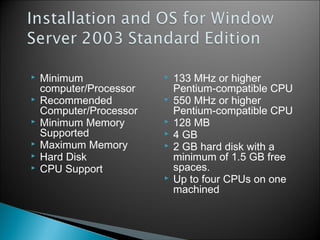
 Minimum
computer/Processor
 Recommended
Computer/Processor
 Minimum Memory
Supported
 Maximum Memory
 Hard Disk
 CPU Support
 133 MHz or higher
Pentium-compatible CPU
 550 MHz or higher
Pentium-compatible CPU
 128 MB
 4 GB
 2 GB hard disk with a
minimum of 1.5 GB free
spaces.
 Up to four CPUs on one
machined
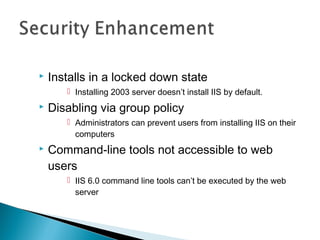
 Installs in a locked down state
 Installing 2003 server doesn’t install IIS by default.
 Disabling via group policy
 Administrators can prevent users from installing IIS on their
computers
 Command-line tools not accessible to web
users
 IIS 6.0 command line tools can’t be executed by the web
server
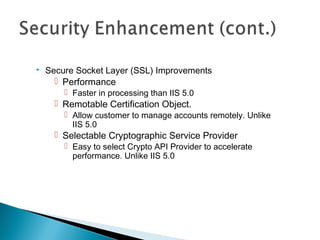
 Secure Socket Layer (SSL) Improvements
 Performance
 Faster in processing than IIS 5.0
 Remotable Certification Object.
 Allow customer to manage accounts remotely. Unlike
IIS 5.0
 Selectable Cryptographic Service Provider
 Easy to select Crypto API Provider to accelerate
performance. Unlike IIS 5.0
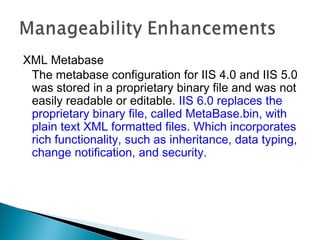
XML Metabase
The metabase configuration for IIS 4.0 and IIS 5.0
was stored in a proprietary binary file and was not
easily readable or editable. IIS 6.0 replaces the
proprietary binary file, called MetaBase.bin, with
plain text XML formatted files. Which incorporates
rich functionality, such as inheritance, data typing,
change notification, and security.
 Automatic configuration versioning
◦ The Metabase feature automatically keeps track of changes.
 Edit-While-Running Feature
◦ IIS 6.0 gives the administrators to change the server
configuration while the server is running, through direct
editing to the Metabase.xml file.
 Server Independent backup and restore
◦ With a user supplied password, administrators and
developers are able to create server-independent backups.
XML Metabase
 New Web-based Administration
Console
 IIS 6.0 includes a new Web-based
administration console called the
Remote Administration Tool. Using the
Remote Administration Tool,
administrators are able to remotely
administer IIS 6.0 across the Internet or
the intranet through a Web browser.
 HTTP. Sys- New Kernel-Mode Driver
 Caching Policy & Thread Management
 Web Gardens
 Persisted ASP Template Cache
 Large Memory Support for x86.0
 Site Scalability
 A single point of contact for all incoming HTTP
requests.
 High performance connectivity for HTTP server
application
 Driver sits atop TCP/IP and
 Receive all requests from the IP/port
 Responsible for overall connection
management, bandwidth, throttling, and web
server logging.
 IIS 6.0 has heuristics built in that use to:
◦ Determine the cacheable hot-set of an
application or set of sites
◦ Determine which items should be cached
on the basis of the distribution of requests
that a particular application receives.
◦ Makes better use of resources on the
server
◦ Makes decisions to increase/reduce
concurrency on the basis-efficient in using
concurrency.
 Web Gardens:
◦ An application pool has multiple processes serving the
requests routed to the pool.
◦ Possible to configure the worker processes in a web
garden.
◦ Increase scalability
 Large Memory Support for x86.0
◦ For workload have a great deal of cached data.
◦ Can configure to cache up to 64 gigabytes (BG).
 Persisted ASP Template Cache
◦ Templates are store on disk that work more efficiency and
faster response.
 Improved the way internal resources are used
 Many more sites can be hosted on a single
IIS6.0 server
 Larger number of worker processes that can be
concurrently active
 Quicker startup/shutdown of the server when
hosting sites.
 Capable of having thousands of isolated
applications configured – each run with its own
application pool worker process.
 ASP.Net and ISS6.0 integration
 Buffer and handle send
 Internal redirection
 Caching dynamic content
 Worker process recycling
 ISAPI support for custom errors
 Improves ISAPI Unicode support
 New COM+ services in ASP
 ASP.Net and IIS 6.0 Integration
◦ Developer have high levels of functionality
 Rapid application development
 Wide variety of languages to choose from
◦ Is a result of enhanced process model integration
in IIS 6.0 that support XML, SOAP, and IPv6.
 Buffer and Handle Send (VectorSend)
◦ Server support function for ISAPIs
◦ Put together a list of buffers and file handles to
send in order
◦ This frees the ISAPI from doing any of buffer
construction or multiple write clients.
 Execute URL
◦ Allow an ISAPI extension to easily redirect a request to
another URL.
◦ Replace almost all read raw data filters
◦ Allow ISAPI extension to process the request entity body
and pass it to a child request.
 Global Interceptors
◦ Implement ISAPI request interceptors: intercept, change,
redirect, or deny incoming HTTP request from specific
URL space.
New Features:
 Caching of Dynamic Content
◦ Implementation of Kernel-mode for dynamic content
◦ Benefit many customers have programmatically created
content that doesn’t change.
 Worker process recycling
◦ IIS 6.0 support function called
HSE_REQ_REPORT_UNHEALTHY that allow ISAPI
extension call into ISS 6.0 worker process to request that
worker process be recycled.
◦ Allow developer to pass in a string representing the
reason.
 ISAPI Support for Custom Errors
◦ Developer no longer need to generate their own error.
◦ Instead, they can plug into the custom error support built
into IIS 6.0 through a new server support function called
HSE_REQ_SEND_CUSTOM_ERROR.
 Improved ISAPI Unicode Support
◦ Important in a global economy
◦ Be able to get variables in Unicode and adds two new
server support functions
 New COM+ Services in ASP -Separated the COM+
services from component and allow ASP application
to use a set of COM+ services in IIS 6.0
 Fusion Support -allow an ASP application to use
specified version of a system runtime DLL or classic
COM component.
 Partition Support – define a different
configuration of a single COM+ application for
different users. (security and version)
 Tracker Support – allow administrators to monitor
what code is running within the ASP.
 Apartment Model Selection – allow developer
to determine which threading model to use when
executing the pages in an application.
 64-bit Support-The complete Windows Server 2003 family
code base is compiled for 32-bit and 64-bit platforms.
 IPv6.0 Support-is the next generation IP protocol for the
Internet.
 Logging Improvements
◦ UTF-8 Logging Support-support IIS 6.0 writing log files
◦ Binary Logging-allows multiple sites to write to a single
log file in a binary, non-formatted manner
◦ Logging of HTTP Substatus Codes-helpful in
debugging or troubleshooting
 File Transfer Protocol (FTP)
◦ FTP User Isolation-easy availability and wide
adoption for customers to upload the Web content
◦ Configurable PASV Port Range-can reduce the
attack surface of IIS 6.0 FTP servers by allowing
administrators to have more granular control over the
port ranges that are exposed over the Internet.
 Improved Patch Management
◦ No service interruption while installing patches-
which means an administrator can easily install most IIS
6.0 hot fixes and most new worker process DLLs
without any interruption of service.
 IIS 6.0 and Windows Server 2003 introduce many
new features for Web application server reliability,
manageability, scalability, and security
 For More Information : www.Microsoft.com

INTRODUCTION TO IIS

  • 2.
     Introduction  Installations Security Enhancement  Manageability Enhancements  Performance and Scalability  New Features  Platform Improvements  Summary
  • 3.
     Microsoft InternetInformation Server (IIS) is integrated with the Microsoft Windows NT Server Operating System to provide a Web server for organizations.
  • 4.
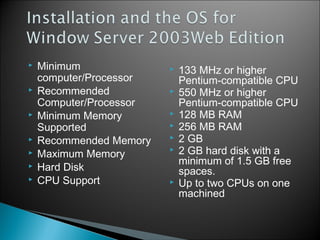
     Minimum computer/Processor  Recommended Computer/Processor Minimum Memory Supported  Recommended Memory  Maximum Memory  Hard Disk  CPU Support  133 MHz or higher Pentium-compatible CPU  550 MHz or higher Pentium-compatible CPU  128 MB RAM  256 MB RAM  2 GB  2 GB hard disk with a minimum of 1.5 GB free spaces.  Up to two CPUs on one machined
  • 5.
     Minimum computer/Processor  Recommended Computer/Processor Minimum Memory Supported  Maximum Memory  Hard Disk  CPU Support  133 MHz or higher Pentium-compatible CPU  550 MHz or higher Pentium-compatible CPU  128 MB  4 GB  2 GB hard disk with a minimum of 1.5 GB free spaces.  Up to four CPUs on one machined
  • 6.
     Installs ina locked down state  Installing 2003 server doesn’t install IIS by default.  Disabling via group policy  Administrators can prevent users from installing IIS on their computers  Command-line tools not accessible to web users  IIS 6.0 command line tools can’t be executed by the web server
  • 7.
     Secure SocketLayer (SSL) Improvements  Performance  Faster in processing than IIS 5.0  Remotable Certification Object.  Allow customer to manage accounts remotely. Unlike IIS 5.0  Selectable Cryptographic Service Provider  Easy to select Crypto API Provider to accelerate performance. Unlike IIS 5.0
  • 8.
    XML Metabase The metabaseconfiguration for IIS 4.0 and IIS 5.0 was stored in a proprietary binary file and was not easily readable or editable. IIS 6.0 replaces the proprietary binary file, called MetaBase.bin, with plain text XML formatted files. Which incorporates rich functionality, such as inheritance, data typing, change notification, and security.
  • 9.
     Automatic configurationversioning ◦ The Metabase feature automatically keeps track of changes.  Edit-While-Running Feature ◦ IIS 6.0 gives the administrators to change the server configuration while the server is running, through direct editing to the Metabase.xml file.  Server Independent backup and restore ◦ With a user supplied password, administrators and developers are able to create server-independent backups. XML Metabase
  • 10.
     New Web-basedAdministration Console  IIS 6.0 includes a new Web-based administration console called the Remote Administration Tool. Using the Remote Administration Tool, administrators are able to remotely administer IIS 6.0 across the Internet or the intranet through a Web browser.
  • 11.
     HTTP. Sys-New Kernel-Mode Driver  Caching Policy & Thread Management  Web Gardens  Persisted ASP Template Cache  Large Memory Support for x86.0  Site Scalability
  • 12.
     A singlepoint of contact for all incoming HTTP requests.  High performance connectivity for HTTP server application  Driver sits atop TCP/IP and  Receive all requests from the IP/port  Responsible for overall connection management, bandwidth, throttling, and web server logging.
  • 13.
     IIS 6.0has heuristics built in that use to: ◦ Determine the cacheable hot-set of an application or set of sites ◦ Determine which items should be cached on the basis of the distribution of requests that a particular application receives. ◦ Makes better use of resources on the server ◦ Makes decisions to increase/reduce concurrency on the basis-efficient in using concurrency.
  • 14.
     Web Gardens: ◦An application pool has multiple processes serving the requests routed to the pool. ◦ Possible to configure the worker processes in a web garden. ◦ Increase scalability  Large Memory Support for x86.0 ◦ For workload have a great deal of cached data. ◦ Can configure to cache up to 64 gigabytes (BG).  Persisted ASP Template Cache ◦ Templates are store on disk that work more efficiency and faster response.
  • 15.
     Improved theway internal resources are used  Many more sites can be hosted on a single IIS6.0 server  Larger number of worker processes that can be concurrently active  Quicker startup/shutdown of the server when hosting sites.  Capable of having thousands of isolated applications configured – each run with its own application pool worker process.
  • 16.
     ASP.Net andISS6.0 integration  Buffer and handle send  Internal redirection  Caching dynamic content  Worker process recycling  ISAPI support for custom errors  Improves ISAPI Unicode support  New COM+ services in ASP
  • 17.
     ASP.Net andIIS 6.0 Integration ◦ Developer have high levels of functionality  Rapid application development  Wide variety of languages to choose from ◦ Is a result of enhanced process model integration in IIS 6.0 that support XML, SOAP, and IPv6.  Buffer and Handle Send (VectorSend) ◦ Server support function for ISAPIs ◦ Put together a list of buffers and file handles to send in order ◦ This frees the ISAPI from doing any of buffer construction or multiple write clients.
  • 18.
     Execute URL ◦Allow an ISAPI extension to easily redirect a request to another URL. ◦ Replace almost all read raw data filters ◦ Allow ISAPI extension to process the request entity body and pass it to a child request.  Global Interceptors ◦ Implement ISAPI request interceptors: intercept, change, redirect, or deny incoming HTTP request from specific URL space. New Features:
  • 19.
     Caching ofDynamic Content ◦ Implementation of Kernel-mode for dynamic content ◦ Benefit many customers have programmatically created content that doesn’t change.  Worker process recycling ◦ IIS 6.0 support function called HSE_REQ_REPORT_UNHEALTHY that allow ISAPI extension call into ISS 6.0 worker process to request that worker process be recycled. ◦ Allow developer to pass in a string representing the reason.
  • 20.
     ISAPI Supportfor Custom Errors ◦ Developer no longer need to generate their own error. ◦ Instead, they can plug into the custom error support built into IIS 6.0 through a new server support function called HSE_REQ_SEND_CUSTOM_ERROR.  Improved ISAPI Unicode Support ◦ Important in a global economy ◦ Be able to get variables in Unicode and adds two new server support functions
  • 21.
     New COM+Services in ASP -Separated the COM+ services from component and allow ASP application to use a set of COM+ services in IIS 6.0  Fusion Support -allow an ASP application to use specified version of a system runtime DLL or classic COM component.  Partition Support – define a different configuration of a single COM+ application for different users. (security and version)  Tracker Support – allow administrators to monitor what code is running within the ASP.  Apartment Model Selection – allow developer to determine which threading model to use when executing the pages in an application.
  • 22.
     64-bit Support-Thecomplete Windows Server 2003 family code base is compiled for 32-bit and 64-bit platforms.  IPv6.0 Support-is the next generation IP protocol for the Internet.  Logging Improvements ◦ UTF-8 Logging Support-support IIS 6.0 writing log files ◦ Binary Logging-allows multiple sites to write to a single log file in a binary, non-formatted manner ◦ Logging of HTTP Substatus Codes-helpful in debugging or troubleshooting
  • 23.
     File TransferProtocol (FTP) ◦ FTP User Isolation-easy availability and wide adoption for customers to upload the Web content ◦ Configurable PASV Port Range-can reduce the attack surface of IIS 6.0 FTP servers by allowing administrators to have more granular control over the port ranges that are exposed over the Internet.  Improved Patch Management ◦ No service interruption while installing patches- which means an administrator can easily install most IIS 6.0 hot fixes and most new worker process DLLs without any interruption of service.
  • 24.
     IIS 6.0and Windows Server 2003 introduce many new features for Web application server reliability, manageability, scalability, and security  For More Information : www.Microsoft.com