Windows

      Drupal
       Alessandro Pilotti
          @alexpilotti
      MVP ASP.NET / IIS
     Windows Azure Insider


MCSD, MCAD, MCSE, MCDBA, MCT
   Red Hat Certified Engineer
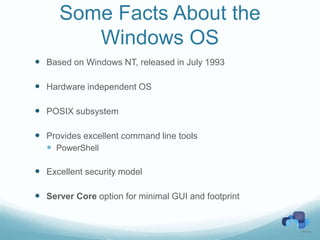
Some Facts About the
         Windows OS
 Based on Windows NT, released in July 1993

 Hardware independent OS

 POSIX subsystem

 Provides excellent command line tools
   PowerShell

 Excellent security model

 Server Core option for minimal GUI and footprint
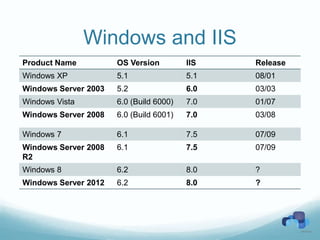
Windows and IIS
Product Name          OS Version         IIS   Release
Windows XP            5.1                5.1   08/01
Windows Server 2003   5.2                6.0   03/03
Windows Vista         6.0 (Build 6000)   7.0   01/07
Windows Server 2008   6.0 (Build 6001)   7.0   03/08

Windows 7             6.1                7.5   07/09
Windows Server 2008   6.1                7.5   07/09
R2
Windows 8             6.2                8.0   ?
Windows Server 2012   6.2                8.0   ?
IIS 6
 Kernel level component (http.sys) listens to HTTP requests
   HUGE performance improvement over IIS 5

 All user code runs in separate processes
   Worker Process (w3wp.exe)
   Crashes in worker processes don’t affect the stability of the service

 Web gardens
   Multiple WP per single web applications

 Configuration stored in a XML metabase
   MetaBase.Xml
   MBSchema.Xml
IIS 7.x / 8.0
 Complete redesign over IIS 6.0
 Modular design
 http.sys is still part of the architecture
 Improved remote administration and delegation
 Enhanced command line and scripting tools
   Including PowerShell cmdlets
 Flexible model not limited to HTTP
 Tight integration with WCF
Security
 Windows is a very secure OS!
   Running Internet Explorer as administrator and getting malware
    does not mean that the system is flawed
   RunAs permits to execute processes as different users

 Windows Server 2008 introduced some unique security
  features

 Windows Firewall
 Since Windows Server 2008:
   Address space layout randomization (ASLR)
   Network Access Protection (NAP)
Comparing PHP Stacks

 Linux + Apache + MySQL + PHP
 Windows + Apache + MySQL + PHP
 Windows + IIS + MySQL + PHP
 Windows + IIS + MS SQL Server + PHP
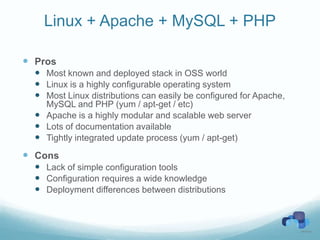
Linux + Apache + MySQL + PHP

 Pros
   Most known and deployed stack in OSS world
   Linux is a highly configurable operating system
   Most Linux distributions can easily be configured for Apache,
    MySQL and PHP (yum / apt-get / etc)
   Apache is a highly modular and scalable web server
   Lots of documentation available
   Tightly integrated update process (yum / apt-get)
 Cons
   Lack of simple configuration tools
   Configuration requires a wide knowledge
   Deployment differences between distributions
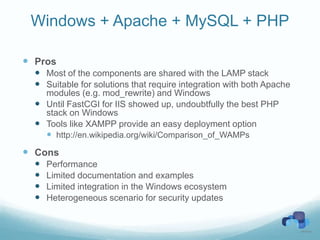
Windows + Apache + MySQL + PHP

 Pros
   Most of the components are shared with the LAMP stack
   Suitable for solutions that require integration with both Apache
    modules (e.g. mod_rewrite) and Windows
   Until FastCGI for IIS showed up, undoubtfully the best PHP
    stack on Windows
   Tools like XAMPP provide an easy deployment option
     http://en.wikipedia.org/wiki/Comparison_of_WAMPs
 Cons
     Performance
     Limited documentation and examples
     Limited integration in the Windows ecosystem
     Heterogeneous scenario for security updates
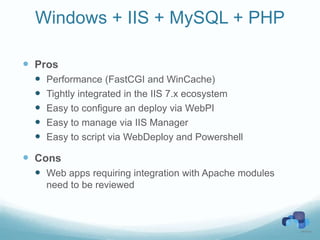
Windows + IIS + MySQL + PHP

 Pros
     Performance (FastCGI and WinCache)
     Tightly integrated in the IIS 7.x ecosystem
     Easy to configure an deploy via WebPI
     Easy to manage via IIS Manager
     Easy to script via WebDeploy and Powershell

 Cons
   Web apps requiring integration with Apache modules
      need to be reviewed
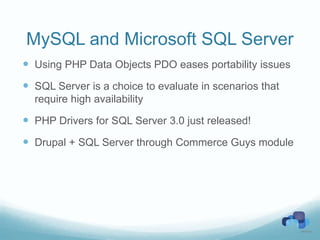
MySQL and Microsoft SQL Server
 Using PHP Data Objects PDO eases portability issues
 SQL Server is a choice to evaluate in scenarios that
  require high availability

 PHP Drivers for SQL Server 3.0 just released!
 Drupal + SQL Server through Commerce Guys module
PHP on Windows
 COM integration
   Simplest way to access OS native 3rd party features
   Marshaling performance is not brilliant (IDispatch / late
     binding)
 .NET integration (experimental)
 W32Api (experimental)
   Register / Invoke API functions
   Be careful with the parameters on the stack
 win32service
   start/stop/register/unregister services
 Note: flock() has a slightly different behavior on Windows
IIS 7 Modules
 Individual features used to process a request
 Executed in a pipeline
 Native
   OS specific binaries (e.g. written in C++)
   More performant
 Managed
   .NET assemblies, executed by the .NET CLR
   More secure and manageable
Windows Server 2012 - SNI
 Windows Server 2012 introduces some important
  features
   Huge performance improvements for multi-tenant!


 Server Name Indication (SNI)
   Assign different X509 certificates to different host headers
   Requires IE >= 7.0, Chrome >= 6.0, FF >= 2.0,
    SafariMobile >= 5.0
   Non supported in IE on Windows XP (even on IE 9)!
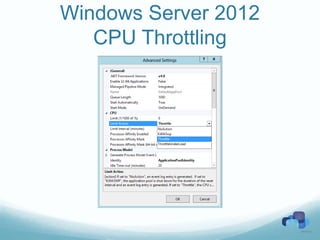
CPU Throttling
 CPU resource pooling is a problem in IIS 7.x
   Processes exceeding their quota get killed, not throttled
   Lots of errors in user applications
   Not suitable for multitenant scenarios
 This feature required specific kernel support
Windows Server 2012
   CPU Throttling
WebPI
 Microsoft Web Platform Installer (WebPI) is a free tool
  that simplifies deployment of web solutions
   IIS features and extensions
       WinCache, PHP Drivers for SQL Server, PHP Manager
     Frameworks
       PHP 5.2 / 5.3, .Net, etc
     Web applications
       Drupal, Joomla, Wordpress, DotNetNuke, Orchard, etc
     Database
       MS SQL Server Express, MySQL, etc
     WebMatrix
       WebMatrix 2 RC available!
Drupal via WebPI
 Fastest way to setup Drupal on IIS
 Takes care of all the steps
   Deploy of Drupal (6.x or 7.x)
   Dependencies
     PHP, IIS: CGI, URL Rewrite, VC9, WinCache, etc
   File permissions
   Database creation
Windows Cache Extension for
          PHP
 Open source project developed by Microsoft
 IIS Specific accelerator
 Requires PHP 5.2 or 5.3 x86
   Non thread safe version
 Provides features not available in APC and
  other accelerators
 Current version: 1.1
Drush 5.x
 A command line shell and scripting interface
 Written in PHP
 MS SQL Server is supported
 Windows setup available on
  http://drush.ws/drush_windows_installer
   Takes care of all required dependencies
   Requires elevation
Drush aliases
 Create a file aliases.drushrc.php in %UserProfile%.drush


$aliases[’drupal7'] = array(

        'root' => '/path/to/drupal',

        'uri' => 'dev.mydrupalsite.com',

        'os' => 'Windows',

        'remote-user' => 'Administrator',

        'winrs-password' => 'Passw0rd',

        'remote-host' => 'DrupalWeb1'

);
Server Farm
 IIS extensions:
   Application request Routing (ARR)
   Web Farm Framework (WFF)


 You can enable independently
   Load balancing and caching
   Server farm provisioning
     Platform / applications
WebDeploy
 Web Application Packaging
     Application or site, including DBs
     Sources and destinations can be
       Live servers
       Zip files

 Deployment
     Administrative rights not required
     Integration with VMSVC for remote deployment

 IIS server synchronization
     Entire server / site / application
     Differential
     Detects missing dependencies
   http://www.microsoft.com/web/websitespark/

   Software
     Production licenses for self hosting: Windows Web Server 2008 R2; SQL Server 2008 Web
        Edition and development tools

   Azure
     WebsiteSpark members get up to $1400* in annual Windows Azure resources

   Training
     Free online training and access to the MSDN developer community and resources

   Support
     2 professional support incidents

   Criteria
     An individual or a company with < than 10 employees engaged in website design &
        development

   Check out also BizSpark for startups
     http://www.microsoft.com/bizspark/
Resources
http://groups.drupal.org/drupal-windows

http://channel9.msdn.com/Series/PHP-at-Scale-on-the-Microsoft-Platform

Free Webcasts!
    Deploying Drupal on IIS with Web Platform Installer (WebPI)
    Deploying Drupal on IIS without Web Platform Installer (WebPI)
    Building a Drupal Web Farm with IIS and Application Request Routing (ARR) -
       Part 1
      Building a Drupal Web Farm with IIS - Part 2
      IIS URL Rewrite for PHP and Drupal
      Web Deployment Tool (WebDeploy) for Drupal sites
      Optimizing Drupal and PHP sites on IIS, including Profile Guided Optimization
       (PGO)
    Optimizing Drupal in IIS with Memcache and Solr
    Configuring and managing Drupal with SQL Server
    Managing Drupal on the Windows Platform with Drush

Windows Loves drupal

  • 1.
    Windows Drupal Alessandro Pilotti @alexpilotti MVP ASP.NET / IIS Windows Azure Insider MCSD, MCAD, MCSE, MCDBA, MCT Red Hat Certified Engineer
  • 2.
    Some Facts Aboutthe Windows OS  Based on Windows NT, released in July 1993  Hardware independent OS  POSIX subsystem  Provides excellent command line tools  PowerShell  Excellent security model  Server Core option for minimal GUI and footprint
  • 3.
    Windows and IIS ProductName OS Version IIS Release Windows XP 5.1 5.1 08/01 Windows Server 2003 5.2 6.0 03/03 Windows Vista 6.0 (Build 6000) 7.0 01/07 Windows Server 2008 6.0 (Build 6001) 7.0 03/08 Windows 7 6.1 7.5 07/09 Windows Server 2008 6.1 7.5 07/09 R2 Windows 8 6.2 8.0 ? Windows Server 2012 6.2 8.0 ?
  • 4.
    IIS 6  Kernellevel component (http.sys) listens to HTTP requests  HUGE performance improvement over IIS 5  All user code runs in separate processes  Worker Process (w3wp.exe)  Crashes in worker processes don’t affect the stability of the service  Web gardens  Multiple WP per single web applications  Configuration stored in a XML metabase  MetaBase.Xml  MBSchema.Xml
  • 5.
    IIS 7.x /8.0  Complete redesign over IIS 6.0  Modular design  http.sys is still part of the architecture  Improved remote administration and delegation  Enhanced command line and scripting tools  Including PowerShell cmdlets  Flexible model not limited to HTTP  Tight integration with WCF
  • 6.
    Security  Windows isa very secure OS!  Running Internet Explorer as administrator and getting malware does not mean that the system is flawed  RunAs permits to execute processes as different users  Windows Server 2008 introduced some unique security features  Windows Firewall  Since Windows Server 2008:  Address space layout randomization (ASLR)  Network Access Protection (NAP)
  • 7.
    Comparing PHP Stacks Linux + Apache + MySQL + PHP  Windows + Apache + MySQL + PHP  Windows + IIS + MySQL + PHP  Windows + IIS + MS SQL Server + PHP
  • 8.
    Linux + Apache+ MySQL + PHP  Pros  Most known and deployed stack in OSS world  Linux is a highly configurable operating system  Most Linux distributions can easily be configured for Apache, MySQL and PHP (yum / apt-get / etc)  Apache is a highly modular and scalable web server  Lots of documentation available  Tightly integrated update process (yum / apt-get)  Cons  Lack of simple configuration tools  Configuration requires a wide knowledge  Deployment differences between distributions
  • 9.
    Windows + Apache+ MySQL + PHP  Pros  Most of the components are shared with the LAMP stack  Suitable for solutions that require integration with both Apache modules (e.g. mod_rewrite) and Windows  Until FastCGI for IIS showed up, undoubtfully the best PHP stack on Windows  Tools like XAMPP provide an easy deployment option  http://en.wikipedia.org/wiki/Comparison_of_WAMPs  Cons  Performance  Limited documentation and examples  Limited integration in the Windows ecosystem  Heterogeneous scenario for security updates
  • 10.
    Windows + IIS+ MySQL + PHP  Pros  Performance (FastCGI and WinCache)  Tightly integrated in the IIS 7.x ecosystem  Easy to configure an deploy via WebPI  Easy to manage via IIS Manager  Easy to script via WebDeploy and Powershell  Cons  Web apps requiring integration with Apache modules need to be reviewed
  • 11.
    MySQL and MicrosoftSQL Server  Using PHP Data Objects PDO eases portability issues  SQL Server is a choice to evaluate in scenarios that require high availability  PHP Drivers for SQL Server 3.0 just released!  Drupal + SQL Server through Commerce Guys module
  • 12.
    PHP on Windows COM integration  Simplest way to access OS native 3rd party features  Marshaling performance is not brilliant (IDispatch / late binding)  .NET integration (experimental)  W32Api (experimental)  Register / Invoke API functions  Be careful with the parameters on the stack  win32service  start/stop/register/unregister services  Note: flock() has a slightly different behavior on Windows
  • 13.
    IIS 7 Modules Individual features used to process a request  Executed in a pipeline  Native  OS specific binaries (e.g. written in C++)  More performant  Managed  .NET assemblies, executed by the .NET CLR  More secure and manageable
  • 14.
    Windows Server 2012- SNI  Windows Server 2012 introduces some important features  Huge performance improvements for multi-tenant!  Server Name Indication (SNI)  Assign different X509 certificates to different host headers  Requires IE >= 7.0, Chrome >= 6.0, FF >= 2.0, SafariMobile >= 5.0  Non supported in IE on Windows XP (even on IE 9)!
  • 15.
    CPU Throttling  CPUresource pooling is a problem in IIS 7.x  Processes exceeding their quota get killed, not throttled  Lots of errors in user applications  Not suitable for multitenant scenarios  This feature required specific kernel support
  • 16.
    Windows Server 2012 CPU Throttling
  • 17.
    WebPI  Microsoft WebPlatform Installer (WebPI) is a free tool that simplifies deployment of web solutions  IIS features and extensions  WinCache, PHP Drivers for SQL Server, PHP Manager  Frameworks  PHP 5.2 / 5.3, .Net, etc  Web applications  Drupal, Joomla, Wordpress, DotNetNuke, Orchard, etc  Database  MS SQL Server Express, MySQL, etc  WebMatrix  WebMatrix 2 RC available!
  • 18.
    Drupal via WebPI Fastest way to setup Drupal on IIS  Takes care of all the steps  Deploy of Drupal (6.x or 7.x)  Dependencies  PHP, IIS: CGI, URL Rewrite, VC9, WinCache, etc  File permissions  Database creation
  • 19.
    Windows Cache Extensionfor PHP  Open source project developed by Microsoft  IIS Specific accelerator  Requires PHP 5.2 or 5.3 x86  Non thread safe version  Provides features not available in APC and other accelerators  Current version: 1.1
  • 20.
    Drush 5.x  Acommand line shell and scripting interface  Written in PHP  MS SQL Server is supported  Windows setup available on http://drush.ws/drush_windows_installer  Takes care of all required dependencies  Requires elevation
  • 21.
    Drush aliases  Createa file aliases.drushrc.php in %UserProfile%.drush $aliases[’drupal7'] = array( 'root' => '/path/to/drupal', 'uri' => 'dev.mydrupalsite.com', 'os' => 'Windows', 'remote-user' => 'Administrator', 'winrs-password' => 'Passw0rd', 'remote-host' => 'DrupalWeb1' );
  • 22.
    Server Farm  IISextensions:  Application request Routing (ARR)  Web Farm Framework (WFF)  You can enable independently  Load balancing and caching  Server farm provisioning  Platform / applications
  • 23.
    WebDeploy  Web ApplicationPackaging  Application or site, including DBs  Sources and destinations can be  Live servers  Zip files  Deployment  Administrative rights not required  Integration with VMSVC for remote deployment  IIS server synchronization  Entire server / site / application  Differential  Detects missing dependencies
  • 24.
    http://www.microsoft.com/web/websitespark/  Software  Production licenses for self hosting: Windows Web Server 2008 R2; SQL Server 2008 Web Edition and development tools  Azure  WebsiteSpark members get up to $1400* in annual Windows Azure resources  Training  Free online training and access to the MSDN developer community and resources  Support  2 professional support incidents  Criteria  An individual or a company with < than 10 employees engaged in website design & development  Check out also BizSpark for startups  http://www.microsoft.com/bizspark/
  • 25.
    Resources http://groups.drupal.org/drupal-windows http://channel9.msdn.com/Series/PHP-at-Scale-on-the-Microsoft-Platform Free Webcasts!  Deploying Drupal on IIS with Web Platform Installer (WebPI)  Deploying Drupal on IIS without Web Platform Installer (WebPI)  Building a Drupal Web Farm with IIS and Application Request Routing (ARR) - Part 1  Building a Drupal Web Farm with IIS - Part 2  IIS URL Rewrite for PHP and Drupal  Web Deployment Tool (WebDeploy) for Drupal sites  Optimizing Drupal and PHP sites on IIS, including Profile Guided Optimization (PGO)  Optimizing Drupal in IIS with Memcache and Solr  Configuring and managing Drupal with SQL Server  Managing Drupal on the Windows Platform with Drush