Introduction to AWS VPC 
Gary Silverman 
Certified AWS Solution Architect 
AWS Chicago Meetup
Agenda 
1. VPC Intro & Benefits 
2. VPC Building Blocks 
3. Reference Architecture 
4. VPC Considerations & Best Practices 
5. Wrap-up & Questions 
2 
But first a quick poll …
1 
VPC Intro & Benefits
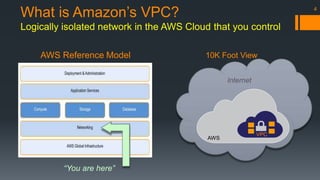
What is Amazon’s VPC? 
Logically isolated network in the AWS Cloud that you control 
AWS Reference Model 10K Foot View 
“You are here” 
4 
Internet 
AWS 
VPC
5 
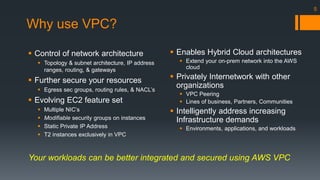
Why use VPC? 
 Control of network architecture 
 Topology & subnet architecture, IP address 
ranges, routing, & gateways 
 Further secure your resources 
 Egress sec groups, routing rules, & NACL’s 
 Evolving EC2 feature set 
 Multiple NIC’s 
 Modifiable security groups on instances 
 Static Private IP Address 
 T2 instances exclusively in VPC 
 Enables Hybrid Cloud architectures 
 Extend your on-prem network into the AWS 
cloud 
 Privately Internetwork with other 
organizations 
 VPC Peering 
 Lines of business, Partners, Communities 
 Intelligently address increasing 
Infrastructure demands 
 Environments, applications, and workloads 
Your workloads can be better integrated and secured using AWS VPC
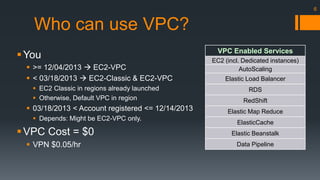
Who can use VPC? 
You 
 >= 12/04/2013  EC2-VPC 
 < 03/18/2013  EC2-Classic & EC2-VPC 
 EC2 Classic in regions already launched 
 Otherwise, Default VPC in region 
 03/18/2013 < Account registered <= 12/14/2013 
 Depends: Might be EC2-VPC only. 
VPC Cost = $0 
 VPN $0.05/hr 
VPC Enabled Services 
EC2 (incl. Dedicated instances) 
AutoScaling 
Elastic Load Balancer 
RDS 
RedShift 
Elastic Map Reduce 
ElasticCache 
Elastic Beanstalk 
Data Pipeline 
6
2 
VPC Building Blocks
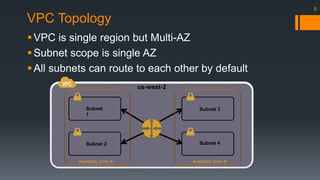
VPC Topology 
 
 
 
Subnet 
1 
Subnet 2 
Subnet 3 
Subnet 4 
Availability Zone ‘A’ Availability Zone ‘B’ 
8 
us-west-2
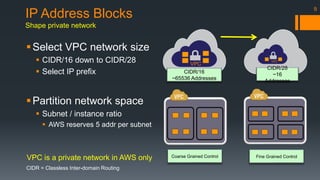
9 IP Address Blocks 
Shape private network 
Select VPC network size 
 CIDR/16 down to CIDR/28 
 Select IP prefix 
Partition network space 
 Subnet / instance ratio 
 AWS reserves 5 addr per subnet 
VPC VPC 
CIDR/16 
~65536 Addresses 
CIDR/28 
~16 
Addresses 
VPC is a private network in AWS only 
CIDR = Classless Inter-domain Routing 
Coarse Grained Control Fine Grained Control
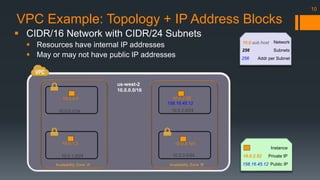
VPC Example: Topology + IP Address Blocks 
158.16.45.12 
Availability Zone ‘A’ Availability Zone ‘B’ 
 
 
 
10.0.0.0/24 
10.0.1.0/24 
us-west-2 
10.0.0.0/16 
10.0.2.0/24 
10.0.3.0/24 
10.0.0.5 
10.0.1.2 
10.0.2.52 
10.0.3.101 
10.0.sub.host 
10.0.2.52 
158.16.45.12 
Instance 
Private IP 
Public IP 
256 
256 
Network 
Subnets 
Addr per Subnet 
10
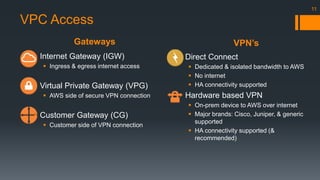
Gateways VPN’s 
11 
VPC Access 
 Internet Gateway (IGW) 
 Ingress & egress internet access 
 Virtual Private Gateway (VPG) 
 AWS side of secure VPN connection 
 Customer Gateway (CG) 
 Customer side of VPN connection 
 Direct Connect 
 Dedicated & isolated bandwidth to AWS 
 No internet 
 HA connectivity supported 
 Hardware based VPN 
 On-prem device to AWS over internet 
 Major brands: Cisco, Juniper, & generic 
supported 
 HA connectivity supported (& 
recommended)
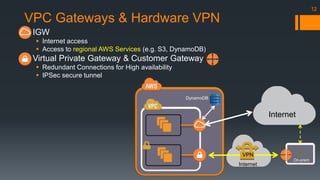
VPC Gateways & Hardware VPN 
 IGW 
 Internet access 
 Access to regional AWS Services (e.g. S3, DynamoDB) 
 Virtual Private Gateway & Customer Gateway 
 Redundant Connections for High availability 
 IPSec secure tunnel 
12 
Internet 
On-prem 
VPN 
Internet 
DynamoDB
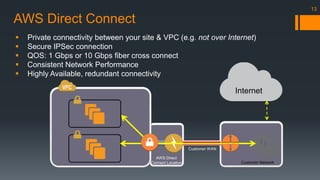
AWS Direct Connect 
 Private connectivity between your site & VPC (e.g. not over Internet) 
 Secure IPSec connection 
 QOS: 1 Gbps or 10 Gbps fiber cross connect 
 Consistent Network Performance 
 Highly Available, redundant connectivity 
Customer Network 
AWS Direct 
Connect Location 
Customer WAN 
13 
Internet
Routing Traffic 
Determines where network traffic is directed 
 Route tables 
 Main 
 Custom 
 Optionally contain Gateways targets 
 Route table association 
 Main the default 
 1 to N relationship 
 Subnet associations 
 Public Subnet 
 Routes through IGW 
 Private Subnet 
 Does not route through IGW 
 NATs may be used 
14 
NAT 
Public Subnet 
Private Subnet 2 
Customer 
10.0.0.0/16 
Private Subnet 1 
Custom Route Table
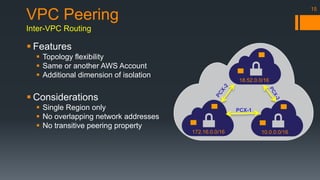
15 VPC Peering 
Inter-VPC Routing 
18.52.0.0/16 
PCX-1 
172.16.0.0/16 10.0.0.0/16 
 Features 
 Topology flexibility 
 Same or another AWS Account 
 Additional dimension of isolation 
 Considerations 
 Single Region only 
 No overlapping network addresses 
 No transitive peering property
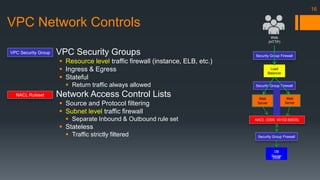
VPC Network Controls 
 VPC Security Groups 
 Resource level traffic firewall (instance, ELB, etc.) 
 Ingress & Egress 
 Stateful 
 Return traffic always allowed 
 Network Access Control Lists 
 Source and Protocol filtering 
 Subnet level traffic firewall 
 Separate Inbound & Outbound rule set 
 Stateless 
 Traffic strictly filtered 
16 
Web 
(HTTP) 
Security Group Firewall 
Load 
Balancer 
Security Group Firewall 
DB 
Server 
3306 
Web 
Server 
Web 
Server 
NACL (3306, 49152-65535) 
VPC Security Group 
NACL Ruleset
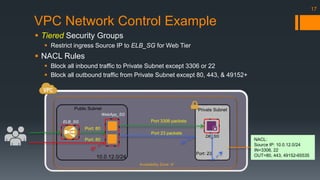
VPC Network Control Example 
 Tiered Security Groups 
 Restrict ingress Source IP to ELB_SG for Web Tier 
 NACL Rules 
 Block all inbound traffic to Private Subnet except 3306 or 22 
 Block all outbound traffic from Private Subnet except 80, 443, & 49152+ 
17 
Public Subnet Private Subnet 
Port 3306 packets 
Availability Zone ‘A’ 
Port: 80 
Port: 80 
Port 23 packets 
NACL: 
Source IP: 10.0.12.0/24 
IN=3306, 22 
OUT=80, 443, 49152-65535 
ELB_SG 
Port: 23 
WebApp_SG 
10.0.12.0/24 
DB_SG
3 
Reference Architecture
Reference Architecture: HA Web App with VPN 
19 
Availability Zone ‘B’ 
DB Tier 
NACL: 
Source IP: 10.0.[2|12].0/24 
IN=3306, 22 
OUT=80, 443, 3306, 49152-65535 
us-west-2 10.0.0.0/16 
10.0.12.0/24 
Web/App Tier 
10.0.13.0/24 
NAT 
ELB Tier 
10.0.11.0/24 
Availability Zone ‘A’ 
DB Tier 
10.0.2.0/24 
Web/App Tier 
10.0.3.0/24 
NAT 
ELB Tier 
10.0.1.0/24 
On-prem
4 
Considerations & Best Practices
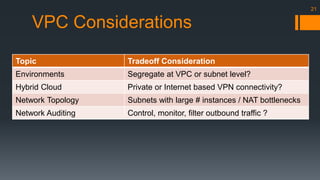
VPC Considerations 
Topic Tradeoff Consideration 
Environments Segregate at VPC or subnet level? 
Hybrid Cloud Private or Internet based VPN connectivity? 
Network Topology Subnets with large # instances / NAT bottlenecks 
Network Auditing Control, monitor, filter outbound traffic ? 
21
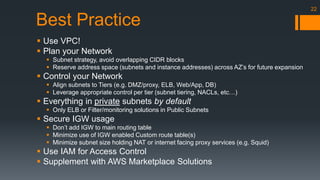
Best Practice 
 Use VPC! 
 Plan your Network 
 Subnet strategy, avoid overlapping CIDR blocks 
 Reserve address space (subnets and instance addresses) across AZ’s for future expansion 
 Control your Network 
 Align subnets to Tiers (e.g. DMZ/proxy, ELB, Web/App, DB) 
 Leverage appropriate control per tier (subnet tiering, NACLs, etc…) 
 Everything in private subnets by default 
 Only ELB or Filter/monitoring solutions in Public Subnets 
 Secure IGW usage 
 Don’t add IGW to main routing table 
 Minimize use of IGW enabled Custom route table(s) 
 Minimize subnet size holding NAT or internet facing proxy services (e.g. Squid) 
 Use IAM for Access Control 
 Supplement with AWS Marketplace Solutions 
22
5 
Wrap-up & Questions
Gary Silverman 
Gary.Mail.Mba@gmail.com 
@Tdream 
linkedIn.com/in/garysilvermanmba 
Thank You! 
24

Introduction to AWS VPC, Guidelines, and Best Practices

  • 1.
    Introduction to AWSVPC Gary Silverman Certified AWS Solution Architect AWS Chicago Meetup
  • 2.
    Agenda 1. VPCIntro & Benefits 2. VPC Building Blocks 3. Reference Architecture 4. VPC Considerations & Best Practices 5. Wrap-up & Questions 2 But first a quick poll …
  • 3.
    1 VPC Intro& Benefits
  • 4.
    What is Amazon’sVPC? Logically isolated network in the AWS Cloud that you control AWS Reference Model 10K Foot View “You are here” 4 Internet AWS VPC
  • 5.
    5 Why useVPC?  Control of network architecture  Topology & subnet architecture, IP address ranges, routing, & gateways  Further secure your resources  Egress sec groups, routing rules, & NACL’s  Evolving EC2 feature set  Multiple NIC’s  Modifiable security groups on instances  Static Private IP Address  T2 instances exclusively in VPC  Enables Hybrid Cloud architectures  Extend your on-prem network into the AWS cloud  Privately Internetwork with other organizations  VPC Peering  Lines of business, Partners, Communities  Intelligently address increasing Infrastructure demands  Environments, applications, and workloads Your workloads can be better integrated and secured using AWS VPC
  • 6.
    Who can useVPC? You  >= 12/04/2013  EC2-VPC  < 03/18/2013  EC2-Classic & EC2-VPC  EC2 Classic in regions already launched  Otherwise, Default VPC in region  03/18/2013 < Account registered <= 12/14/2013  Depends: Might be EC2-VPC only. VPC Cost = $0  VPN $0.05/hr VPC Enabled Services EC2 (incl. Dedicated instances) AutoScaling Elastic Load Balancer RDS RedShift Elastic Map Reduce ElasticCache Elastic Beanstalk Data Pipeline 6
  • 7.
  • 8.
    VPC Topology    Subnet 1 Subnet 2 Subnet 3 Subnet 4 Availability Zone ‘A’ Availability Zone ‘B’ 8 us-west-2
  • 9.
    9 IP AddressBlocks Shape private network Select VPC network size  CIDR/16 down to CIDR/28  Select IP prefix Partition network space  Subnet / instance ratio  AWS reserves 5 addr per subnet VPC VPC CIDR/16 ~65536 Addresses CIDR/28 ~16 Addresses VPC is a private network in AWS only CIDR = Classless Inter-domain Routing Coarse Grained Control Fine Grained Control
  • 10.
    VPC Example: Topology+ IP Address Blocks 158.16.45.12 Availability Zone ‘A’ Availability Zone ‘B’    10.0.0.0/24 10.0.1.0/24 us-west-2 10.0.0.0/16 10.0.2.0/24 10.0.3.0/24 10.0.0.5 10.0.1.2 10.0.2.52 10.0.3.101 10.0.sub.host 10.0.2.52 158.16.45.12 Instance Private IP Public IP 256 256 Network Subnets Addr per Subnet 10
  • 11.
    Gateways VPN’s 11 VPC Access  Internet Gateway (IGW)  Ingress & egress internet access  Virtual Private Gateway (VPG)  AWS side of secure VPN connection  Customer Gateway (CG)  Customer side of VPN connection  Direct Connect  Dedicated & isolated bandwidth to AWS  No internet  HA connectivity supported  Hardware based VPN  On-prem device to AWS over internet  Major brands: Cisco, Juniper, & generic supported  HA connectivity supported (& recommended)
  • 12.
    VPC Gateways &Hardware VPN  IGW  Internet access  Access to regional AWS Services (e.g. S3, DynamoDB)  Virtual Private Gateway & Customer Gateway  Redundant Connections for High availability  IPSec secure tunnel 12 Internet On-prem VPN Internet DynamoDB
  • 13.
    AWS Direct Connect  Private connectivity between your site & VPC (e.g. not over Internet)  Secure IPSec connection  QOS: 1 Gbps or 10 Gbps fiber cross connect  Consistent Network Performance  Highly Available, redundant connectivity Customer Network AWS Direct Connect Location Customer WAN 13 Internet
  • 14.
    Routing Traffic Determineswhere network traffic is directed  Route tables  Main  Custom  Optionally contain Gateways targets  Route table association  Main the default  1 to N relationship  Subnet associations  Public Subnet  Routes through IGW  Private Subnet  Does not route through IGW  NATs may be used 14 NAT Public Subnet Private Subnet 2 Customer 10.0.0.0/16 Private Subnet 1 Custom Route Table
  • 15.
    15 VPC Peering Inter-VPC Routing 18.52.0.0/16 PCX-1 172.16.0.0/16 10.0.0.0/16  Features  Topology flexibility  Same or another AWS Account  Additional dimension of isolation  Considerations  Single Region only  No overlapping network addresses  No transitive peering property
  • 16.
    VPC Network Controls  VPC Security Groups  Resource level traffic firewall (instance, ELB, etc.)  Ingress & Egress  Stateful  Return traffic always allowed  Network Access Control Lists  Source and Protocol filtering  Subnet level traffic firewall  Separate Inbound & Outbound rule set  Stateless  Traffic strictly filtered 16 Web (HTTP) Security Group Firewall Load Balancer Security Group Firewall Security Group Firewall DB Server 3306 Web Server Web Server NACL (3306, 49152-65535) VPC Security Group NACL Ruleset
  • 17.
    VPC Network ControlExample  Tiered Security Groups  Restrict ingress Source IP to ELB_SG for Web Tier  NACL Rules  Block all inbound traffic to Private Subnet except 3306 or 22  Block all outbound traffic from Private Subnet except 80, 443, & 49152+ 17 Public Subnet Private Subnet Port 3306 packets Availability Zone ‘A’ Port: 80 Port: 80 Port 23 packets NACL: Source IP: 10.0.12.0/24 IN=3306, 22 OUT=80, 443, 49152-65535 ELB_SG Port: 23 WebApp_SG 10.0.12.0/24 DB_SG
  • 18.
  • 19.
    Reference Architecture: HAWeb App with VPN 19 Availability Zone ‘B’ DB Tier NACL: Source IP: 10.0.[2|12].0/24 IN=3306, 22 OUT=80, 443, 3306, 49152-65535 us-west-2 10.0.0.0/16 10.0.12.0/24 Web/App Tier 10.0.13.0/24 NAT ELB Tier 10.0.11.0/24 Availability Zone ‘A’ DB Tier 10.0.2.0/24 Web/App Tier 10.0.3.0/24 NAT ELB Tier 10.0.1.0/24 On-prem
  • 20.
    4 Considerations &Best Practices
  • 21.
    VPC Considerations TopicTradeoff Consideration Environments Segregate at VPC or subnet level? Hybrid Cloud Private or Internet based VPN connectivity? Network Topology Subnets with large # instances / NAT bottlenecks Network Auditing Control, monitor, filter outbound traffic ? 21
  • 22.
    Best Practice Use VPC!  Plan your Network  Subnet strategy, avoid overlapping CIDR blocks  Reserve address space (subnets and instance addresses) across AZ’s for future expansion  Control your Network  Align subnets to Tiers (e.g. DMZ/proxy, ELB, Web/App, DB)  Leverage appropriate control per tier (subnet tiering, NACLs, etc…)  Everything in private subnets by default  Only ELB or Filter/monitoring solutions in Public Subnets  Secure IGW usage  Don’t add IGW to main routing table  Minimize use of IGW enabled Custom route table(s)  Minimize subnet size holding NAT or internet facing proxy services (e.g. Squid)  Use IAM for Access Control  Supplement with AWS Marketplace Solutions 22
  • 23.
    5 Wrap-up &Questions
  • 24.
    Gary Silverman Gary.Mail.Mba@gmail.com @Tdream linkedIn.com/in/garysilvermanmba Thank You! 24

Editor's Notes

  • #2  Long time AWS Chicago community member, Certified AWS SA, and am excited to provide you an Introduction to Amazon VPC