
What's New in IIS and the Microsoft Web PlatformJAMES MCCUTCHEONLONELY EMPLOYEEFOUNDRY 38Raúl E. GonzálezSr. Product ManagerWindows Server MarketingMicrosoft Corporation
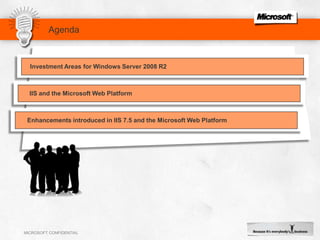
AgendaInvestment Areas for Windows Server 2008 R2IIS and the Microsoft Web PlatformEnhancements introduced in IIS 7.5 and the Microsoft Web Platform
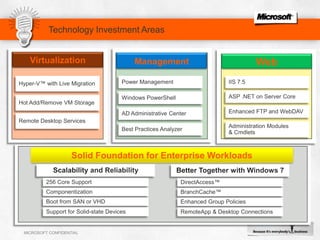
Technology Investment AreasVirtualizationManagementWebHyper-V™ with Live MigrationPower ManagementIIS 7.5ASP .NET on Server CoreWindows PowerShellHot Add/Remove VM StorageEnhanced FTP and WebDAVAD Administrative CenterRemote Desktop ServicesAdministration Modules & CmdletsBest Practices AnalyzerSolid Foundation for Enterprise WorkloadsScalability and ReliabilityBetter Together with Windows 7256 Core SupportDirectAccess™ComponentizationBranchCache™Boot from SAN or VHDEnhanced Group Policies Support for Solid-state DevicesRemoteApp & Desktop Connections
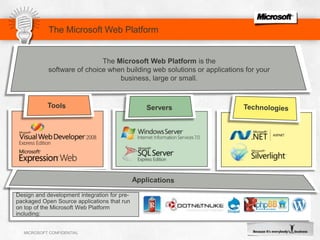
The Microsoft Web Platform is a powerful set of tools, servers, and technologies optimized for building and hosting next generation web applications and solutions. Use the Web Platform Installer to get everything up and running with a single tool.ApplicationsThe Microsoft Web Platform is the software of choice when building web solutions or applications for your business, large or small. The Microsoft Web PlatformToolsTechnologiesServersDesign and development integration for pre- packaged Open Source applications that run on top of the Microsoft Web Platform including:
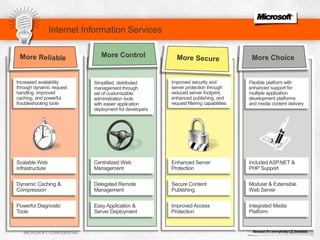
Internet Information ServicesMore ReliableIncreased availability through dynamic request handling, improved caching, and powerful troubleshooting toolsSimplified, distributed management through set of customizable administration tools with easier application deployment for developers Improved security and server protection through reduced server footprint, enhanced publishing, and request filtering capabilities Flexible platform with enhanced support for multiple application development platforms and media content delivery More SecureScalable Web InfrastructureCentralized Web ManagementEnhanced Server ProtectionIncluded ASP.NET & PHP SupportDynamic Caching & CompressionDelegated Remote ManagementSecure Content PublishingModular & Extensible Web ServerMore ControlMore ChoicePowerful Diagnostic ToolsEasy Application & Server DeploymentImproved Access ProtectionIntegrated Media Platform
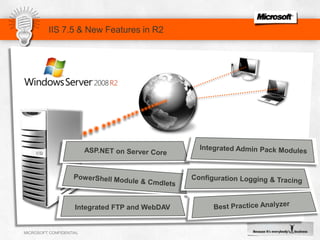
IIS 7.5 & New Features in R2ASP.NET on Server CoreConfiguration Logging & TracingIntegrated Admin Pack ModulesPowerShell Module & CmdletsBest Practice AnalyzerIntegrated FTP and WebDAV
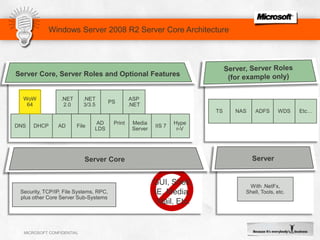
Windows Server 2008 R2 Server Core ArchitectureASP.NETPS.NET3/3.5.NET2.0WoW64TSNASADFSWDSEtc…DNSDHCPFileADADLDSMediaServerIIS 7Hyper-VPrint	Server, Server Roles (for example only)With .NetFx, Shell, Tools, etc.ServerServer Core, Server Roles and Optional FeaturesServer CoreSecurity, TCP/IP, File Systems, RPC,plus other Core Server Sub-SystemsGUI, Shell, IE, Media, Mail, Etc.
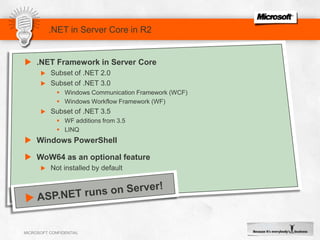
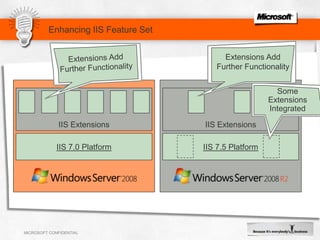
.NET in Server Core in R2.NET Framework in Server CoreSubset of .NET 2.0Subset of .NET 3.0Windows Communication Framework (WCF)Windows Workflow Framework (WF)Subset of .NET 3.5WF additions from 3.5LINQWindows PowerShellWoW64 as an optional featureNot installed by defaultASP.NET runs on Server!Enhancing IIS Feature SetExtensions Add Further FunctionalityExtensions Add Further FunctionalitySome ExtensionsIntegrated IIS ExtensionsIIS ExtensionsIIS 7.0 PlatformIIS 7.5 Platform
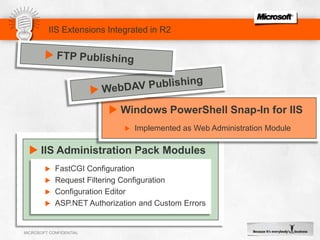
Windows PowerShell Snap-In for IIS
Implemented as Web Administration ModuleIIS Extensions Integrated in R2IIS Administration Pack ModulesFastCGI ConfigurationRequest Filtering ConfigurationConfiguration EditorASP.NET Authorization and Custom ErrorsFTP Publishing
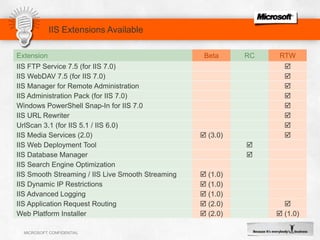
WebDAV PublishingIIS Extensions Available
Configuration Logging TracingIIS 7.0 does not include any built-in tracing mechanism for configuration changesIIS in Windows Server 2008 R2 provides:Read / write auditing of configuration system Writes to configuration:Logging of Write failuresLogging of Write successesRead from configuration:Logging of Read failuresLogging of Read successes	Logging of events unrelated to Reads / Writes
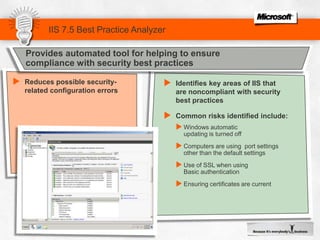
Provides automated tool for helping to ensure compliance with security best practicesIIS 7.5 Best Practice AnalyzerReduces possible security-related configuration errors
Identifies key areas of IIS that are noncompliant with security best practices
Common risks identified include:
Windows automatic updating is turned off

The New Efficiency

  • 1.
    What's New inIIS and the Microsoft Web PlatformJAMES MCCUTCHEONLONELY EMPLOYEEFOUNDRY 38Raúl E. GonzálezSr. Product ManagerWindows Server MarketingMicrosoft Corporation
  • 2.
    AgendaInvestment Areas forWindows Server 2008 R2IIS and the Microsoft Web PlatformEnhancements introduced in IIS 7.5 and the Microsoft Web Platform
  • 3.
    Technology Investment AreasVirtualizationManagementWebHyper-V™with Live MigrationPower ManagementIIS 7.5ASP .NET on Server CoreWindows PowerShellHot Add/Remove VM StorageEnhanced FTP and WebDAVAD Administrative CenterRemote Desktop ServicesAdministration Modules & CmdletsBest Practices AnalyzerSolid Foundation for Enterprise WorkloadsScalability and ReliabilityBetter Together with Windows 7256 Core SupportDirectAccess™ComponentizationBranchCache™Boot from SAN or VHDEnhanced Group Policies Support for Solid-state DevicesRemoteApp & Desktop Connections
  • 4.
    The Microsoft WebPlatform is a powerful set of tools, servers, and technologies optimized for building and hosting next generation web applications and solutions. Use the Web Platform Installer to get everything up and running with a single tool.ApplicationsThe Microsoft Web Platform is the software of choice when building web solutions or applications for your business, large or small. The Microsoft Web PlatformToolsTechnologiesServersDesign and development integration for pre- packaged Open Source applications that run on top of the Microsoft Web Platform including:
  • 5.
    Internet Information ServicesMoreReliableIncreased availability through dynamic request handling, improved caching, and powerful troubleshooting toolsSimplified, distributed management through set of customizable administration tools with easier application deployment for developers Improved security and server protection through reduced server footprint, enhanced publishing, and request filtering capabilities Flexible platform with enhanced support for multiple application development platforms and media content delivery More SecureScalable Web InfrastructureCentralized Web ManagementEnhanced Server ProtectionIncluded ASP.NET & PHP SupportDynamic Caching & CompressionDelegated Remote ManagementSecure Content PublishingModular & Extensible Web ServerMore ControlMore ChoicePowerful Diagnostic ToolsEasy Application & Server DeploymentImproved Access ProtectionIntegrated Media Platform
  • 6.
    IIS 7.5 &New Features in R2ASP.NET on Server CoreConfiguration Logging & TracingIntegrated Admin Pack ModulesPowerShell Module & CmdletsBest Practice AnalyzerIntegrated FTP and WebDAV
  • 7.
    Windows Server 2008R2 Server Core ArchitectureASP.NETPS.NET3/3.5.NET2.0WoW64TSNASADFSWDSEtc…DNSDHCPFileADADLDSMediaServerIIS 7Hyper-VPrint Server, Server Roles (for example only)With .NetFx, Shell, Tools, etc.ServerServer Core, Server Roles and Optional FeaturesServer CoreSecurity, TCP/IP, File Systems, RPC,plus other Core Server Sub-SystemsGUI, Shell, IE, Media, Mail, Etc.
  • 8.
    .NET in ServerCore in R2.NET Framework in Server CoreSubset of .NET 2.0Subset of .NET 3.0Windows Communication Framework (WCF)Windows Workflow Framework (WF)Subset of .NET 3.5WF additions from 3.5LINQWindows PowerShellWoW64 as an optional featureNot installed by defaultASP.NET runs on Server!Enhancing IIS Feature SetExtensions Add Further FunctionalityExtensions Add Further FunctionalitySome ExtensionsIntegrated IIS ExtensionsIIS ExtensionsIIS 7.0 PlatformIIS 7.5 Platform
  • 9.
  • 10.
    Implemented as WebAdministration ModuleIIS Extensions Integrated in R2IIS Administration Pack ModulesFastCGI ConfigurationRequest Filtering ConfigurationConfiguration EditorASP.NET Authorization and Custom ErrorsFTP Publishing
  • 11.
  • 12.
    Configuration Logging TracingIIS7.0 does not include any built-in tracing mechanism for configuration changesIIS in Windows Server 2008 R2 provides:Read / write auditing of configuration system Writes to configuration:Logging of Write failuresLogging of Write successesRead from configuration:Logging of Read failuresLogging of Read successes Logging of events unrelated to Reads / Writes
  • 13.
    Provides automated toolfor helping to ensure compliance with security best practicesIIS 7.5 Best Practice AnalyzerReduces possible security-related configuration errors
  • 14.
    Identifies key areasof IIS that are noncompliant with security best practices
  • 15.
  • 16.

Editor's Notes

  • #4 Windows® Server® 2008 R2 is a release that builds on the Windows Server 2008 foundation.It is an incremental release to Windows Server 2008 – and only the second timethatWindows Client and Server releases are shippedsimultaneously (Windows 2000 Server® was first). And while Windows 7 is available in both 32- and 64-bit versions, R2 is the first 64-bit only Server release.Along with the focus and simultaneous client and server development, Microsoft concentrated on four key technology investment areas while building Windows Server 2008 R2. These include:Virtualization and Consolidation – With the introduction of Live Migration, Windows Server 2008 R2 moves into a leadership position in the virtualization market. With the same feature portfolio as the competition available in Windows Server 2008 R2 out-of-box, the TCO argument for R2 over an additional third-party software purchase becomes a no-brainer. Live Migration allows administrators to migrate running virtual machines from one physical host to another in milliseconds, without connection loss or service interruption for connected users. This not only facilitates hardware maintenance and upgrades, manual failover, and the consolidation of workloads on fewer servers, but also (and more exciting) is the combination of Live Migration, Hyper-V and the rest of Windows Server 2008 R2. These technologies combine to allow administrators to monitor and manage their servers independent of hardware considerations for the most part. Only the integration of a virtualization and operating system environment allows this first step into cohesive utility computing, and Windows Server 2008 R2 is in the lead in this area.With a new Hyper-V on Windows Server 2008 R2, administrators will find updates to features like hardware assisted virtualization (EPT/NPT) and reduced virtualization overhead, you can achieve up to 50% higher consolidation ratios running virtual machines on equivalent hardware, as compared to Windows Server 2008.While not a requirement for Live Migration, Windows Server 2008 R2’s introduction of Cluster Shared Volumes is definitely the way to go for shops with regular Live Migration operations on the horizon. Cluster Shared Volumes (CSV) enables access to files on a shared storage device from all nodes in a Failover Cluster at the same time. This implementation provides several key advantages for managing Virtual Machines with Hyper-V, including consistent namespace, no need for drive letters and no additional hardware requirements.Last, Terminal Services gets a name change to Remote Desktop Services (more on that later). But RDS combined with the new Virtual Desktop Infrastructure (VDI) and RemoteApp and Desktop (RAD) Connections feature, lets Windows XP, Vista®, and Windows 7 desktop operating systems as well as individual apps or portfolios of applications all be virtualized on R2 and managed via group policies. This makes it possible for end-users to run multiple operating systems simultaneously on client hardware, and facilitates desktop management as a whole and hosted desktop deployments in particular.Streamlined Management - R2’s most profound management enhancement is no doubt the new PowerShell 2.0. This updated version has several important enhancements, including hundreds of new cmdlets available out-of-box with R2 and designed with IT administration in mind. There are also enhancements to PowerShell’s dev console and much broader support for the technology across all of Windows Server 2008 R2’s components. Many of R2’s new management interface, like the new Active Directory Administrative Center (ADAC), are built entirely upon PowerShell. The new ADAC combines all the management console administrators used to hit to manage AD end-to-end into a single accessible console, built on PowerShell and extensible via the same technology.Power management is another important benefit of R2, including advanced CPU technologies that allow logical processor loads to be turned on and off in response to workload—a feature called Core Parking as we’ll see below. Active Directory has also been outfitted with even more granular power management policy controls across both server and Windows 7 clients.Last, Microsoft has responded to the immensely popular customer feedback surrounding its Best Practice Analyzers (BPAs). These originated on other MS platform products (Exchange and SQL Server, for instance) and had early support in Windows Server 2008. We’ve since expanded that to include all core Server 2008 R2 roles and added tighter integration with Server Manager as well.Web - Windows Server 2008 R2 includes many improvements that strengthen its position as an industry-leading Web and application serving platform. IIS 7.0 has new management consoles and more integration with Server Manager. It’s also more fully deployable on Server Core with the addition of the .NET platform on SC, which also means IIS-on-Server-Core can be managed via PowerShell. IIS’ feature set has been beefed up with the inclusion of several popular extensions from the previous version (like the Administration Pack, which has also been updated) and new management features have been deployed, like Configuration Tracing, which provides enhanced auditing of changes to IIS and application configuration. That lets track any configuration changes made to your test and production environments.Solid Foundation for Enterprise Workloads: This area covers two disparate categories. One the one hand, Windows Server 2008 R2 was designed to give Microsoft enterprise customers an unprecedented set of tools for protecting, monitoring and maintaining their enterprise server infrastructure. That includes new scalability and reliability updates to features, like support for up to 256 logical cores for single instances of Windows Server 2008 R2 and up to 32 logical cores for a single VM instance. We’ve also increased our focus on OS componentization supply more core roles, so IT administrators need only install those components they need for a particular server, thus decreasing both server and management overhead. And we’ve added specific reliability features like DHCP failover as well as DNSSEC, which uses public-key technologies to insure the integrity of DNS name queries and verify that zone transfers are from trusted sources.Better Together With Windows 7. Windows Server 2008 R2 includes technology improvements aimed at giving client computers running Windows 7, the most reliable and flexible network productivity feature set in Microsoft’s history. This includes more than just client OS features, but also several dedicated features aimed specifically at the synergy between Server 2008 R2 and Windows 7 clients. One of the most exciting is DirectAccess, which as you’ll see later on in the presentation, has the potential to revolutionize remote access computing from both the client and server perspectives. We’ve also included BranchCache, a powerful new file access solution for remote and branch offices. We’ve also added enhancement to AD’s group policies allowing managers deeper granularity when managing Windows 7 clients, including the ability to manage new features like BitLocker to Go (the ability to encrypt removable drives with the BitLocker technology). AD policies also integrate with Terminal Services’ new RAD and VDI desktop and application virtualization features allowing administrators to deploy virtualized apps and desktops based on policy, while those resources are integrated so tightly with Windows 7 that in most cases users won’t be able to tell the difference between a locally installed app and a virtualized one.
  • #5 A complete web development stack that combines a rich and powerful web application framework with a supporting cast of tools, servers, and technologies for creating, designing, developing and delivering compelling web solutions.
  • #6 Although the central engine of IIS in Windows Server 2008 R2 is little changed from IIS 7.0 in Windows Server 2008, there are some key enhancements to the platform that make it even better.ASP.NET on Server Core:With the inclusion of the .NET Framework and CLR on the Server Core installation option, IIS can now take advantage of full support for ASP.NET Web applications in addition to PHP and traditional ASP. Furthermore, .NET enables other compelling scenarios, such as the ability to remotely manage IIS running on Server Core from a Windows XP, Windows Vista or Windows Server 2003/2008 machine using IIS Manager for Remote Administration.Integrated PowerShell Provider:The integrated Windows PowerShell provider for IIS means that administrative tasks can now be automated more easily by implementing the over 50 new cmdlets available for IIS. Plus, these cmdlets can now be run directly on Server Core installations, making IIS even easier to manage, whether locally or remotely.Integrated FTP and WebDAV:After the release of Windows Server 2008, the IIS team released the first two Extensions for IIS 7.0 – FTP and WebDAV. These provide standards-based protocols to offer more secure and reliable publishing of Web site content, with support for FTP over SSL and custom authentication.New IIS Manager Modules:The integration of many Extensions for IIS means that the IIS Manager interface now has new modules built right in to help you manage FTP, WebDAV, Request Filtering, and ASP.NET application settings.Configuration Logging and Tracing:The Feature Delegation functionality in IIS 7.0 allows server administrators to delegate site and application management to non-administrators with granular control over each site feature. In Windows Server 2008 R2, that has been further enhanced to allow administrators to log and audit exactly what changes are made or attempted by site managers and Web developers from a central location.Extended Protection and Security:There are many new security features in IIS in Windows Server 2008 R2, including the availability of channel binding tokens, which help prevent “Man-in-the-Middle” attacks. In addition, services and the accounts under which they run, have been hardened even more, to ensure that cross-application spoofing cannot occur, and that custom service accounts can be easier to manage.
  • #10 With the release of IIS 7.0 in Windows Server 2008, IIS adopted a more modular architecture and a new extensibility model.This architecture means that you can choose which modules are installed to customize and streamline your Web server. In addition, new and custom modules can be added on top of those already available with IIS 7.0. The extensibility APIs are published on www.iis.net to allow developers to add or replace modules on the server with those they write themselves, and these same APIs are used by the IIS team in Microsoft to release Extensions for IIS that deliver further functionality and features.There have been many Extensions made available for IIS since the release of Windows Server 2008, and many of these are integrated right out of the box in Windows Server 2008 R2. These Extensions are in addition to further enhancements made to the underlying IIS technology. The IIS team will continue to release Extensions that can be installed on top of IIS in Windows Server 2008 R2 to ensure new innovation are made available on an ongoing basis.
  • #13 [include]
  • #15 [include]This slide provides additional info not mentioned in the 6-block slide
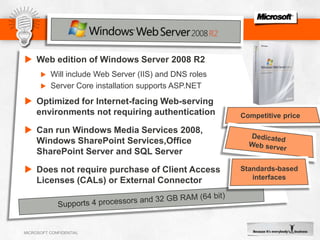
  • #16 Title: Windows Web Server 2008 Talking Points: Windows Web Server 2008 is designed to be used specifically as a single-purpose Web server. Integrated with the newly re-architected IIS 7.0, ASP.NET, and the Microsoft .NET Framework, Windows Web Server 2008 enables any organization to rapidly deploy Web pages, Web sites, Web applications, and Web services. Windows Web Server 2008 is designed to support unauthenticated connections from the Internet and does not require client access licenses. In addition, Windows Web Server 2008 includes new support for Microsoft® SQL Server®, Microsoft® SharePoint® Portal Services, and more robust hardware configurations. Windows Web Server gives your customers:Greater technical capacity than Windows Server 2003 Web Edition, with no restrictions on Microsoft SQL Server, SharePoint Services and Microsoft Office SharePoint Server installation on the same machine.The ability to host sites for anonymous users without requiring the purchase of Client Access Licenses or an External Connector licenseDedicated Web-serving functionalityEconomical next-generation Web server that is competitively priced for organizations needing to rapidly deploy Web pages, Web sites, Web applications, and Web servicesWindows Web Server 2008 supports four-way symmetric multiprocessing (SMP) and four gigabytes (GB) of RAM in the 32-bit version or 32 gigabytes (GB) of RAM in the 64-bit version.Windows Web Server 2008 does not include Hyper-V virtualization.