“Understanding our IIS - Part1”
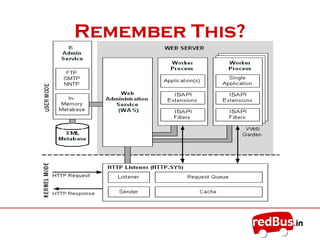
Remember This?
Web Server
• The primary function of a web server is to
deliver web pages on requests from clients using
HTTP.
• It can be referred as hardware(computer) or the
software (computer application)
• Hosts websites/web application to serve www.
• Found embedded in devices like printers,
routers, web-cams to serve local network
• Able to map URL to a local file system resource
(static requests) as well as internal or external
program name (dynamic requests)
IIS
• IIS fulfills the role of Web Server, responding to
request for files and logging activity.
• IIS maintain the info about
– The location of the content files
– What security identities have access
– How content files are separated in apps
– Provides what URLs are mapped to those
apps
• IIS Administrative Tools helps you to make web
content creation fast and easy
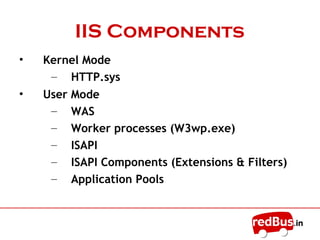
IIS Components
• Kernel Mode
– HTTP.sys
• User Mode
– WWW Service
– Worker processes (W3wp.exe)
– ISAPI
– ISAPI Components (Extensions & Filters)
– Application Pools
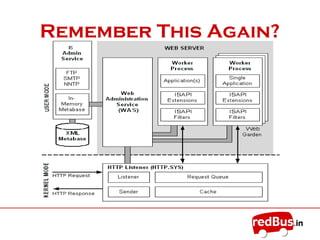
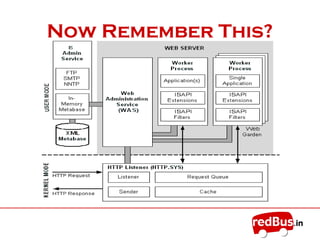
Remember This Again?
HTTP.sys
• Also known as “HTTP Protocol Stack” or “Http
Listener Process”
• Implemented as a kernel-mode device driver
• Core component to receive and serve HTTP
requests and passing them off to the worker
processes
• When you create a Web site, IIS registers the site
with HTTP.sys
• Other than retrieving a stored response from its
internal cache, HTTP.sys does not process the
requests that it receives.
WWW Service
• Also known as “W3Svc”or“Svchost.exe”
• It manages the IIS metabase
(Metabase.bin) + monitors W3p.exe
• Metabase is a config file for IIS (like a
registry) available for other apps
• Manages application pools and starting,
stopping and recycling w3c process
• WWW Service also collect the counters
for Web sites
W3wp.exe
• A worker process is user-mode code whose role is
to process requests, such as processing requests
to return a static page
• A worker process runs as an executable file
named W3wp.exe
• Worker processes also run application code, such
as ASP.NET applications and XML Web services.
• Multiple W3wp.exe can run for a single website
• Each worker process internally use ISAPI
Extensions and Filters
ISAPI
• Internet Server Application Programming
Interface, is an API developed to provide the
application developers with a powerful way to
extend the functionality of IIS
• Extensions and Filters are the two types of
applications that can be developed using ISAPI
• ISAPI extensions are true applications that run on
IIS and have access to all of the functionality
provided by IIS while filters are local to IIS used
to put checkpoints for incoming/outgoing data
ISAPI Extensions
• ISAPI extensions are implemented as DLLs that
are loaded into a process that is controlled by IIS
• Like ASP and HTML pages, IIS uses the virtual
location of the DLL file in the file system to map
the ISAPI extension
• ASP.Net functionality is contained in an ISAPI
extension called aspnet_isapi.dll
• Any file that is requested from the IIS server that
ends in “.aspx” is mapped to aspnet_isapi.dll
which is assigned to process the file before
displaying its output in the client’s window
ISAPI Filters
• ISAPI filters are DLL files that can be used to
modify and enhance the functionality provided
by IIS
• ISAPI filters always run on an IIS server, filtering
every request until they find one they need to
process
• Mostly used for Authentication and Encryption of
the i/p or o/p data for a site locally or all the
apps globally
Application Pools
• Group of Web Applications and Web Sites are
called Application Pools
• Every application within an application pool
shares the same worker process
• The worker process(w3wp.exe) that services one
application pool is separated from the worker
process that services another
• Each separate worker process provides a process
boundary so each application pool is separated
by these process boundaries
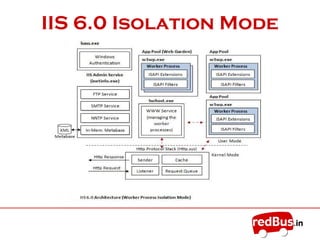
IIS 6.0 Isolation Mode
Request Processing
• A request arrives at HTTP.sys.
• HTTP.sys determines if the request is valid. If the request is not
valid, it sends a code for an invalid request back to the client.
• If the request is valid, HTTP.sys checks to see if the request is
for static content (HTML) because static content can be served
immediately.
• If the request is for dynamic content, HTTP.sys checks to see if
the response is located in its “kernel-mode cache”.
• If the response is in the cache, HTTP.sys returns the response
immediately.
• If the response is not cached, HTTP.sys determines the correct
“request queue”, and places the request in that queue.
Request Processing
• If the queue has no worker processes assigned to it, HTTP.sys
signals the WWW service to start one.
• The worker process pulls the request from the queue and
processes the request, evaluating the URL to determine the
type of request (ASP, ISAPI, or CGI).
• The worker process sends the response back to HTTP.sys.
• HTTP.sys sends the response back to the client and logs the
request, if configured to do so.
And thus we welcome

Understanding iis part1

  • 1.
  • 2.
  • 3.
    Web Server • Theprimary function of a web server is to deliver web pages on requests from clients using HTTP. • It can be referred as hardware(computer) or the software (computer application) • Hosts websites/web application to serve www. • Found embedded in devices like printers, routers, web-cams to serve local network • Able to map URL to a local file system resource (static requests) as well as internal or external program name (dynamic requests)
  • 4.
    IIS • IIS fulfillsthe role of Web Server, responding to request for files and logging activity. • IIS maintain the info about – The location of the content files – What security identities have access – How content files are separated in apps – Provides what URLs are mapped to those apps • IIS Administrative Tools helps you to make web content creation fast and easy
  • 5.
    IIS Components • KernelMode – HTTP.sys • User Mode – WWW Service – Worker processes (W3wp.exe) – ISAPI – ISAPI Components (Extensions & Filters) – Application Pools
  • 6.
  • 7.
    HTTP.sys • Also knownas “HTTP Protocol Stack” or “Http Listener Process” • Implemented as a kernel-mode device driver • Core component to receive and serve HTTP requests and passing them off to the worker processes • When you create a Web site, IIS registers the site with HTTP.sys • Other than retrieving a stored response from its internal cache, HTTP.sys does not process the requests that it receives.
  • 8.
    WWW Service • Alsoknown as “W3Svc”or“Svchost.exe” • It manages the IIS metabase (Metabase.bin) + monitors W3p.exe • Metabase is a config file for IIS (like a registry) available for other apps • Manages application pools and starting, stopping and recycling w3c process • WWW Service also collect the counters for Web sites
  • 9.
    W3wp.exe • A workerprocess is user-mode code whose role is to process requests, such as processing requests to return a static page • A worker process runs as an executable file named W3wp.exe • Worker processes also run application code, such as ASP.NET applications and XML Web services. • Multiple W3wp.exe can run for a single website • Each worker process internally use ISAPI Extensions and Filters
  • 10.
    ISAPI • Internet ServerApplication Programming Interface, is an API developed to provide the application developers with a powerful way to extend the functionality of IIS • Extensions and Filters are the two types of applications that can be developed using ISAPI • ISAPI extensions are true applications that run on IIS and have access to all of the functionality provided by IIS while filters are local to IIS used to put checkpoints for incoming/outgoing data
  • 11.
    ISAPI Extensions • ISAPIextensions are implemented as DLLs that are loaded into a process that is controlled by IIS • Like ASP and HTML pages, IIS uses the virtual location of the DLL file in the file system to map the ISAPI extension • ASP.Net functionality is contained in an ISAPI extension called aspnet_isapi.dll • Any file that is requested from the IIS server that ends in “.aspx” is mapped to aspnet_isapi.dll which is assigned to process the file before displaying its output in the client’s window
  • 12.
    ISAPI Filters • ISAPIfilters are DLL files that can be used to modify and enhance the functionality provided by IIS • ISAPI filters always run on an IIS server, filtering every request until they find one they need to process • Mostly used for Authentication and Encryption of the i/p or o/p data for a site locally or all the apps globally
  • 13.
    Application Pools • Groupof Web Applications and Web Sites are called Application Pools • Every application within an application pool shares the same worker process • The worker process(w3wp.exe) that services one application pool is separated from the worker process that services another • Each separate worker process provides a process boundary so each application pool is separated by these process boundaries
  • 14.
  • 15.
    Request Processing • Arequest arrives at HTTP.sys. • HTTP.sys determines if the request is valid. If the request is not valid, it sends a code for an invalid request back to the client. • If the request is valid, HTTP.sys checks to see if the request is for static content (HTML) because static content can be served immediately. • If the request is for dynamic content, HTTP.sys checks to see if the response is located in its “kernel-mode cache”. • If the response is in the cache, HTTP.sys returns the response immediately. • If the response is not cached, HTTP.sys determines the correct “request queue”, and places the request in that queue.
  • 16.
    Request Processing • Ifthe queue has no worker processes assigned to it, HTTP.sys signals the WWW service to start one. • The worker process pulls the request from the queue and processes the request, evaluating the URL to determine the type of request (ASP, ISAPI, or CGI). • The worker process sends the response back to HTTP.sys. • HTTP.sys sends the response back to the client and logs the request, if configured to do so.
  • 17.
    And thus wewelcome