OFFICE OF CYBER INFRASTRUCTURE AND COMPUTATIONAL BIOLOGY
NATIONAL INSTITUTE OF ALLERGY AND INFECTIOUS DISEASES
MICHAEL A. DOLAN, PH.D.
CREATING SCIENTIFIC FIGURES USING GIMP
1
OCICB Bioinformatics and Computational Biosciences
Branch
2
• “BCBB”
• Group of 30
• Free services for NIAID
• Bioinformatics software
developers
• Computational biologists
• Project management &
analysis professionals
OCICB Bioinformatics and Computational Biosciences
Branch
3
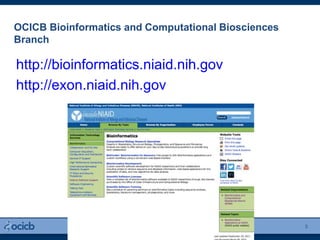
http://bioinformatics.niaid.nih.gov
http://exon.niaid.nih.gov
What is GIMP?
4
 GIMP = GNU Image Manipulation Program (v.2.8)
 Free alternative to Adobe Photoshop
 Open source
 Supported platforms: GNU/Linux (i386, PPC) included
Microsoft Windows (XP, Vista, 7)
Mac OS X
Sun OpenSolaris
FreeBSD
 http://www.gimp.org
GIMP uses
5
• simple paint program
• expert quality photo retouching
• online batch processing system
• mass production image renderer
• image format converter
• expandable and extensible
• designed to be augmented with plug-ins and extensions
• advanced scripting interface
Features and capabilities
6
A full suite of painting tools including brushes, a pencil, an airbrush, cloning, etc.
Tile-based memory management, so image size is limited only by available disk space
Sub-pixel sampling for all paint tools for high-quality anti-aliasing
Full Alpha channel support for working with transparency
Layers and channels
Procedural database for calling internal GIMP functions from external programs, such as Script-Fu
Advanced scripting capabilities
Multiple undo/redo (limited only by disk space)
Transformation tools including rotate, scale, shear and flip
Support for a wide range of file formats, including GIF, JPEG, PNG, XPM, TIFF, TGA, MPEG, PS, PDF,
PCX, BMP and many others
Selection tools, including rectangle, ellipse, free, fuzzy, bezier and intelligent scissors
Plug-ins that allow for the easy addition of new file formats and new effect filters.
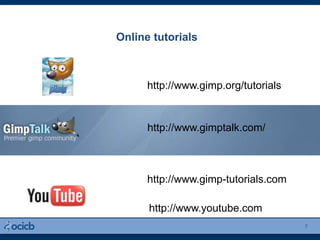
Online tutorials
7
http://www.gimp.org/tutorials
http://www.gimp-tutorials.com
http://www.youtube.com
http://www.gimptalk.com/
Outline of today’s hand-on tutoriuals
8
Introduction, basic tools, layers
Selecting, coloring
Paths and gradients
Manipulating images: Changing contrast and brightness
Other stuff
Layers/Channels/Paths
Accessed via tabs
Shows layer structure of currently active image
Allows manipulation of layers
Brushes/Patterns/Gradients
Image window
Holds the Menu of the main commands of GIMP (File,
Edit, Select...)
Each image open in GIMP is displayed in a separate
window.
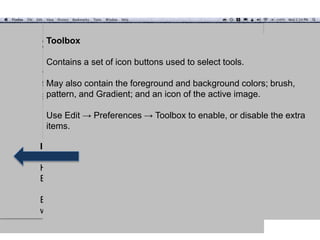
Toolbox
Contains a set of icon buttons used to select tools.
May also contain the foreground and background colors; brush,
pattern, and Gradient; and an icon of the active image.
Use Edit → Preferences → Toolbox to enable, or disable the extra
items.
Thank You
For questions or comments please contact:
ScienceApps@niaid.nih.gov
301.496.4455
10
Scripting
$GIMP_HOME/share/gimp/2.0/scripts/*.scm
Restart GIMP
Filters >> Script-Fu >> Refresh Scripts

Introduction to GIMP

  • 1.
    OFFICE OF CYBERINFRASTRUCTURE AND COMPUTATIONAL BIOLOGY NATIONAL INSTITUTE OF ALLERGY AND INFECTIOUS DISEASES MICHAEL A. DOLAN, PH.D. CREATING SCIENTIFIC FIGURES USING GIMP 1
  • 2.
    OCICB Bioinformatics andComputational Biosciences Branch 2 • “BCBB” • Group of 30 • Free services for NIAID • Bioinformatics software developers • Computational biologists • Project management & analysis professionals
  • 3.
    OCICB Bioinformatics andComputational Biosciences Branch 3 http://bioinformatics.niaid.nih.gov http://exon.niaid.nih.gov
  • 4.
    What is GIMP? 4 GIMP = GNU Image Manipulation Program (v.2.8)  Free alternative to Adobe Photoshop  Open source  Supported platforms: GNU/Linux (i386, PPC) included Microsoft Windows (XP, Vista, 7) Mac OS X Sun OpenSolaris FreeBSD  http://www.gimp.org
  • 5.
    GIMP uses 5 • simplepaint program • expert quality photo retouching • online batch processing system • mass production image renderer • image format converter • expandable and extensible • designed to be augmented with plug-ins and extensions • advanced scripting interface
  • 6.
    Features and capabilities 6 Afull suite of painting tools including brushes, a pencil, an airbrush, cloning, etc. Tile-based memory management, so image size is limited only by available disk space Sub-pixel sampling for all paint tools for high-quality anti-aliasing Full Alpha channel support for working with transparency Layers and channels Procedural database for calling internal GIMP functions from external programs, such as Script-Fu Advanced scripting capabilities Multiple undo/redo (limited only by disk space) Transformation tools including rotate, scale, shear and flip Support for a wide range of file formats, including GIF, JPEG, PNG, XPM, TIFF, TGA, MPEG, PS, PDF, PCX, BMP and many others Selection tools, including rectangle, ellipse, free, fuzzy, bezier and intelligent scissors Plug-ins that allow for the easy addition of new file formats and new effect filters.
  • 7.
  • 8.
    Outline of today’shand-on tutoriuals 8 Introduction, basic tools, layers Selecting, coloring Paths and gradients Manipulating images: Changing contrast and brightness Other stuff
  • 9.
    Layers/Channels/Paths Accessed via tabs Showslayer structure of currently active image Allows manipulation of layers Brushes/Patterns/Gradients Image window Holds the Menu of the main commands of GIMP (File, Edit, Select...) Each image open in GIMP is displayed in a separate window. Toolbox Contains a set of icon buttons used to select tools. May also contain the foreground and background colors; brush, pattern, and Gradient; and an icon of the active image. Use Edit → Preferences → Toolbox to enable, or disable the extra items.
  • 10.
    Thank You For questionsor comments please contact: ScienceApps@niaid.nih.gov 301.496.4455 10
  • 11.