GNU Image Manipulation Program (adapted from Gruber, 2010)Marella Therese A. Tiongson 	EDUC 190
What is GIMP? (Gruber, 2010) GNUImage Manipulation Program. 100% free, both in cost and in the right to alter and use the software.Can be used as a paint program, for photo retouching, as a batch processing system, a mass production image renderer, an image format converter, and more!GIMP is designed to be augmented with plug-ins and extensions.
History (Kimball & Mathis / GIMP.Org)Originally stood for the General Image Manipulation ProgramCreated by Spencer Kimball and Peter Mathis in 1995 as a semester-long project at the University of California, BerkeleyFirst publicly released in January 1996GIMP joined the GNU Project in 1997 GIMP and changed its acronym to GNU Image Manipulation Program
History (Kimball & Mathis / GIMP.Org)GIMP is presently maintained and enhanced by a group of volunteers under the GNOME Project.It was first created for UNIX systems, but can now be presently installed in Windows and MacOSX.Ever since it was released, GIMP was rapidly adopted by a community of users who continue to create tutorials, artwork, share techniques, and contribute to the overall improvement of the program.
Where to get GIMPWindows installer: http://gimp-win.sourceforge.net/stable.htmlApple installer:http://www.gimp.org/macintosh/Unix/Linux installer:http://www.gimp.org/unix/
GIMP vs. Photoshop (Gruber, 2010)Cost:GIMP: $0Photoshop: $699 (CS5); $999 (CS5 Extended)Size:GIMP: 17.39 megabytesPhotoshop: 1 gigabyte available hard-disk space for installation; additional free space required during installation
GIMP vs. Photoshop (Gruber, 2010) Both programs provide a strong set of basic photo editing commands and tools:  1)Ability to open/import most of the basic bitmap graphic filetypes including PNG, JPG, GIF;  2)Ability to adjust those images with crop, rotate, resize and many other transformations;  3)Ability to make local retouches, sharpening and other image corrections;  4)Do color and exposure/lightness corrections with a broad range of dialogs and tools;
GIMP vs. Photoshop (Gruber, 2010) Both programs provide a strong set of basic photo editing commands and tools:  5)Mask selective areas on an image(or layer)- only there will edits/brushstrokes apply;  6)Allow creating a stack of two or dozens of layers from other images, text, vector graphics, etc;  7)Allow filters or special effects to be applied to one or more layers including the base image;  8)Produce output to several graphic filetypes, printers, and/or web pages/galleries.
GIMP vs. Photoshop“GIMP continues to grow and is quickly becoming serious competition for Adobe Photoshop…It's time to start taking this free program seriously… However, GIMP was not designed to be a Photoshop clone.” (Stonecypher, 2008)
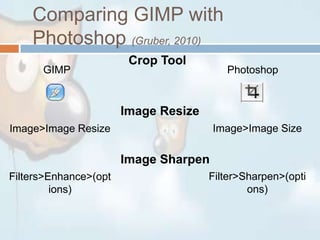
Comparing GIMP with Photoshop (Gruber, 2010)Crop ToolGIMPPhotoshopImage ResizeImage>Image SizeImage>Image ResizeImage SharpenFilter>Sharpen>(options)Filters>Enhance>(options)
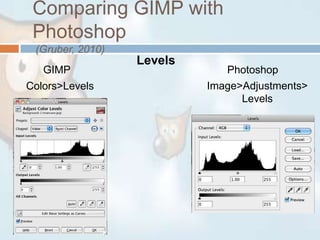
Comparing GIMP with Photoshop (Gruber, 2010)LevelsGIMPPhotoshopImage>Adjustments>LevelsColors>Levels
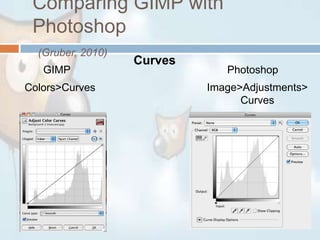
Comparing GIMP with Photoshop(Gruber, 2010)CurvesGIMPPhotoshopImage>Adjustments>CurvesColors>Curves
User Interface
Advantages (Conner, 2010)GIMP is free, because it is being developed as an open source projectIt is practically as powerful a piece of software as PhotoshopYou can open Photoshop files in GIMP, and use Photoshop brushes and patterns there as well
Advantages (Conner, 2010)GIMP is compatible with most operating systems. There are versions available for Linux, Windows, Mac OS X and Sun OpenSolarisSupport is easily available, since GIMP has a strong online community that offers tutorials and techniques. Support is fast and free!
DisadvantagesGIMP can be difficult to learn if you are a beginner. (Conner, 2010) Its user interface may be confusing. GIMP is not part of a workflow suite, whereas Photoshop allows documents to be easily transferred into Illustrator, InDesign, Acrobat … (gimphelp.org)
Educational ApplicationsEncouraging creativity and artEnhancing visuals in lessons, making them easier to understandMakes lessons fun, thus engaging students
DemonstrationMaking images transparentLayeringStitching images togetherColoring Hair
Sources:http://www.youtube.com/watch?v=u7a-V4i-UAkhttp://www.youtube.com/watch?v=J6WPkDQtsbE&feature=relatedhttp://www.youtube.com/watch?v=8aR3o7rYdx0http://www.youtube.com/watch?v=8LmW5ndnEqwhttp://www.slideshare.net/rumblestrut/getting-to-know-gimphttp://www.slideshare.net/mquest/5-advantages-that-make-gimp-worth-learning
THANK YOU 

Educ 190 Report on GIMP

  • 1.
    GNU Image ManipulationProgram (adapted from Gruber, 2010)Marella Therese A. Tiongson EDUC 190
  • 2.
    What is GIMP?(Gruber, 2010) GNUImage Manipulation Program. 100% free, both in cost and in the right to alter and use the software.Can be used as a paint program, for photo retouching, as a batch processing system, a mass production image renderer, an image format converter, and more!GIMP is designed to be augmented with plug-ins and extensions.
  • 3.
    History (Kimball &Mathis / GIMP.Org)Originally stood for the General Image Manipulation ProgramCreated by Spencer Kimball and Peter Mathis in 1995 as a semester-long project at the University of California, BerkeleyFirst publicly released in January 1996GIMP joined the GNU Project in 1997 GIMP and changed its acronym to GNU Image Manipulation Program
  • 4.
    History (Kimball &Mathis / GIMP.Org)GIMP is presently maintained and enhanced by a group of volunteers under the GNOME Project.It was first created for UNIX systems, but can now be presently installed in Windows and MacOSX.Ever since it was released, GIMP was rapidly adopted by a community of users who continue to create tutorials, artwork, share techniques, and contribute to the overall improvement of the program.
  • 5.
    Where to getGIMPWindows installer: http://gimp-win.sourceforge.net/stable.htmlApple installer:http://www.gimp.org/macintosh/Unix/Linux installer:http://www.gimp.org/unix/
  • 6.
    GIMP vs. Photoshop(Gruber, 2010)Cost:GIMP: $0Photoshop: $699 (CS5); $999 (CS5 Extended)Size:GIMP: 17.39 megabytesPhotoshop: 1 gigabyte available hard-disk space for installation; additional free space required during installation
  • 7.
    GIMP vs. Photoshop(Gruber, 2010) Both programs provide a strong set of basic photo editing commands and tools: 1)Ability to open/import most of the basic bitmap graphic filetypes including PNG, JPG, GIF; 2)Ability to adjust those images with crop, rotate, resize and many other transformations; 3)Ability to make local retouches, sharpening and other image corrections; 4)Do color and exposure/lightness corrections with a broad range of dialogs and tools;
  • 8.
    GIMP vs. Photoshop(Gruber, 2010) Both programs provide a strong set of basic photo editing commands and tools: 5)Mask selective areas on an image(or layer)- only there will edits/brushstrokes apply; 6)Allow creating a stack of two or dozens of layers from other images, text, vector graphics, etc; 7)Allow filters or special effects to be applied to one or more layers including the base image; 8)Produce output to several graphic filetypes, printers, and/or web pages/galleries.
  • 9.
    GIMP vs. Photoshop“GIMPcontinues to grow and is quickly becoming serious competition for Adobe Photoshop…It's time to start taking this free program seriously… However, GIMP was not designed to be a Photoshop clone.” (Stonecypher, 2008)
  • 10.
    Comparing GIMP withPhotoshop (Gruber, 2010)Crop ToolGIMPPhotoshopImage ResizeImage>Image SizeImage>Image ResizeImage SharpenFilter>Sharpen>(options)Filters>Enhance>(options)
  • 11.
    Comparing GIMP withPhotoshop (Gruber, 2010)LevelsGIMPPhotoshopImage>Adjustments>LevelsColors>Levels
  • 12.
    Comparing GIMP withPhotoshop(Gruber, 2010)CurvesGIMPPhotoshopImage>Adjustments>CurvesColors>Curves
  • 13.
  • 14.
    Advantages (Conner, 2010)GIMPis free, because it is being developed as an open source projectIt is practically as powerful a piece of software as PhotoshopYou can open Photoshop files in GIMP, and use Photoshop brushes and patterns there as well
  • 15.
    Advantages (Conner, 2010)GIMPis compatible with most operating systems. There are versions available for Linux, Windows, Mac OS X and Sun OpenSolarisSupport is easily available, since GIMP has a strong online community that offers tutorials and techniques. Support is fast and free!
  • 16.
    DisadvantagesGIMP can bedifficult to learn if you are a beginner. (Conner, 2010) Its user interface may be confusing. GIMP is not part of a workflow suite, whereas Photoshop allows documents to be easily transferred into Illustrator, InDesign, Acrobat … (gimphelp.org)
  • 17.
    Educational ApplicationsEncouraging creativityand artEnhancing visuals in lessons, making them easier to understandMakes lessons fun, thus engaging students
  • 18.
  • 19.
  • 20.