

Interfacing Bluetooth with 8051 Microcontrollers www.pantechsolutions.net
Bluetooth is a proprietary open wireless protocol for exchanging data over short distances (using short length radio waves) from fixed and mobile devices, creating personal area networks (PANs). It was originally conceived as a wireless alternative to RS-232 data cables. BlueTooth is a promising standard for short range wireless communication. BlueTooth uses the same frequency as WaveLan but with much less effect but anyhow some claim that a WaveLan can not co-exist with a fully equiped BlueTooth environment. Bluetooth is a wireless technology for transmission of voice and data over a short distance. RXD and TXD pin of bluetooth  Evaluation kit connected with the controller through serial port WHAT IS BLUETOOTH?
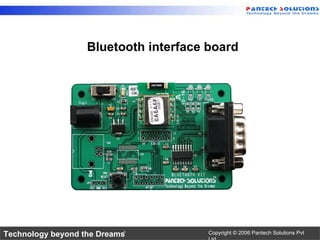
Bluetooth interface board
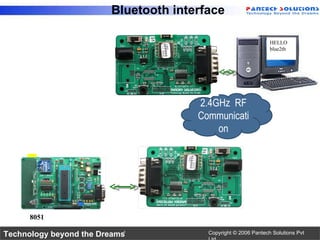
Bluetooth interface 8051 HELLO Xbee! 2.4GHz  RF Communication HELLO blue2th
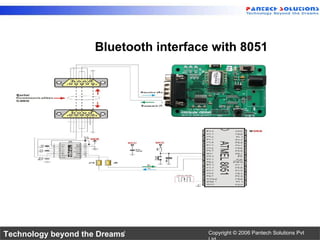
Bluetooth interface with 8051
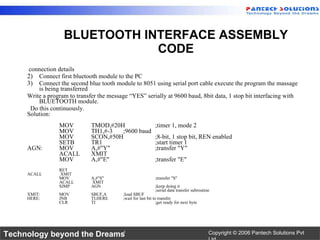
connection details Connect first bluetooth module to the PC  Connect the second blue tooth module to 8051 using serial port cable execute the program the massage is being transferred Write a program to transfer the message “YES” serially at 9600 baud, 8bit data, 1 stop bit interfacing with BLUETOOTH module.  Do this continuously.  Solution: MOV TMOD,#20H ;timer 1, mode 2 MOV TH1,#-3 ;9600 baud MOV SCON,#50H ;8-bit, 1 stop bit, REN enabled SETB TR1 ;start timer 1 AGN: MOV A,#"Y" ;transfer "Y" ACALL XMIT MOV A,#"E" ;transfer "E" RET ACALL  XMIT MOV A,#"S" ;transfer "S" ACALL  XMIT SJMP AGN ;keep doing it ;serial data transfer subroutine XMIT: MOV SBUF,A ;load SBUF HERE: JNB TI,HERE ;wait for last bit to transfer CLR TI ;get ready for next byte BLUETOOTH INTERFACE ASSEMBLY CODE
//  program to accept commands from PC via Bluetooth //  USB-Bluetooth adapter is connected to PC //  here Bluetooth module is interfaced with 89C51 #include <REG51F.H> void delay(unsigned long); void send command(unsigned char array[]); void transmit(unsigned char); unsigned code char setcon[]=&quot;set connectable on&quot;; void main() { send_command(setcon); delay(50000); while(1) { TMOD=0X20;   TH1=0XFD;   SCON=0X50;   TR1=1;   SBUF=dat;   while(TI==0)   { } } void delay(unsigned long count) { unsigned long i; for(i=0;i<count;i++); } BLUETOOTH INTERFACE C CODE
void send_command(unsigned char array[]) {   unsigned char i;   TMOD=0X20;     TH1=0XFD;  //  baud 9600Kbps @ 11.0592 Mhz   SCON=0X50;   TR1=1; for(i=0;array[i]!='\0';i++)   {   SBUF=array[i];   while(TI==0)   {   TI=0; } SBUF=0x0D;   while(TI==0)   {}   TI=0;   SBUF='\n';   while(TI==0)   {}   TI=0;     } C CODE CONTD
For More Tutorials www.pantechsolutions.net http://www.slideshare.net/pantechsolutions http://www.scribd.net/pantechsolutions http://www.youtube.net/pantechsolutions

Interfacing Bluetooth Modules with 8051 Microcontroller

  • 1.
    Interfacing Bluetooth with8051 Microcontrollers www.pantechsolutions.net
  • 2.
    Bluetooth is aproprietary open wireless protocol for exchanging data over short distances (using short length radio waves) from fixed and mobile devices, creating personal area networks (PANs). It was originally conceived as a wireless alternative to RS-232 data cables. BlueTooth is a promising standard for short range wireless communication. BlueTooth uses the same frequency as WaveLan but with much less effect but anyhow some claim that a WaveLan can not co-exist with a fully equiped BlueTooth environment. Bluetooth is a wireless technology for transmission of voice and data over a short distance. RXD and TXD pin of bluetooth Evaluation kit connected with the controller through serial port WHAT IS BLUETOOTH?
  • 3.
  • 4.
    Bluetooth interface 8051HELLO Xbee! 2.4GHz RF Communication HELLO blue2th
  • 5.
  • 6.
    connection details Connectfirst bluetooth module to the PC Connect the second blue tooth module to 8051 using serial port cable execute the program the massage is being transferred Write a program to transfer the message “YES” serially at 9600 baud, 8bit data, 1 stop bit interfacing with BLUETOOTH module. Do this continuously. Solution: MOV TMOD,#20H ;timer 1, mode 2 MOV TH1,#-3 ;9600 baud MOV SCON,#50H ;8-bit, 1 stop bit, REN enabled SETB TR1 ;start timer 1 AGN: MOV A,#&quot;Y&quot; ;transfer &quot;Y&quot; ACALL XMIT MOV A,#&quot;E&quot; ;transfer &quot;E&quot; RET ACALL XMIT MOV A,#&quot;S&quot; ;transfer &quot;S&quot; ACALL XMIT SJMP AGN ;keep doing it ;serial data transfer subroutine XMIT: MOV SBUF,A ;load SBUF HERE: JNB TI,HERE ;wait for last bit to transfer CLR TI ;get ready for next byte BLUETOOTH INTERFACE ASSEMBLY CODE
  • 7.
    // programto accept commands from PC via Bluetooth // USB-Bluetooth adapter is connected to PC // here Bluetooth module is interfaced with 89C51 #include <REG51F.H> void delay(unsigned long); void send command(unsigned char array[]); void transmit(unsigned char); unsigned code char setcon[]=&quot;set connectable on&quot;; void main() { send_command(setcon); delay(50000); while(1) { TMOD=0X20; TH1=0XFD; SCON=0X50; TR1=1; SBUF=dat; while(TI==0) { } } void delay(unsigned long count) { unsigned long i; for(i=0;i<count;i++); } BLUETOOTH INTERFACE C CODE
  • 8.
    void send_command(unsigned chararray[]) { unsigned char i; TMOD=0X20; TH1=0XFD; // baud 9600Kbps @ 11.0592 Mhz SCON=0X50; TR1=1; for(i=0;array[i]!='\0';i++) { SBUF=array[i]; while(TI==0) { TI=0; } SBUF=0x0D; while(TI==0) {} TI=0; SBUF='\n'; while(TI==0) {} TI=0; } C CODE CONTD
  • 9.
    For More Tutorialswww.pantechsolutions.net http://www.slideshare.net/pantechsolutions http://www.scribd.net/pantechsolutions http://www.youtube.net/pantechsolutions