Prepared by Prof. Anand H. D., Dept. of ECE, Dr. AIT, Bengaluru-56
Modules and Ports
Mr. Anand H. D.
1
Modules and ports
Department of Electronics & Communication Engineering
Dr. Ambedkar Institute of Technology
Bengaluru-56
Prepared by Prof. Anand H. D., Dept. of ECE, Dr. AIT, Bengaluru-56 2
Topics to be covered
Modules
Ports
Hierarchical Names.
Modules and ports
Prepared by Prof. Anand H. D., Dept. of ECE, Dr. AIT, Bengaluru-56 3
Let us discuss about
Modules and ports
Modules
Ports
Hierarchical Names.
Prepared by Prof. Anand H. D., Dept. of ECE, Dr. AIT, Bengaluru-56 4
Modules
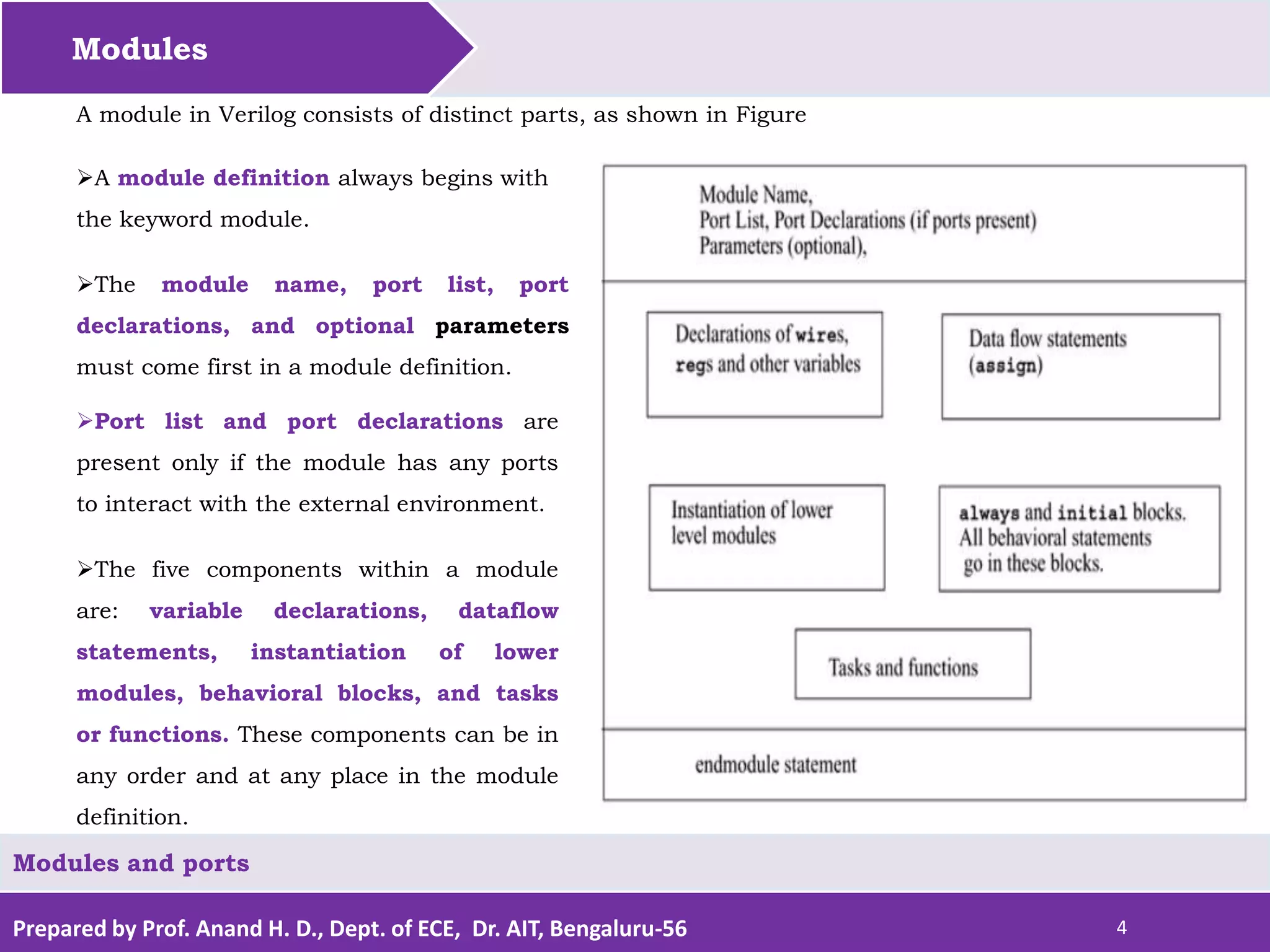
The module name, port list, port
declarations, and optional parameters
must come first in a module definition.
A module in Verilog consists of distinct parts, as shown in Figure
A module definition always begins with
the keyword module.
Port list and port declarations are
present only if the module has any ports
to interact with the external environment.
Modules and ports
The five components within a module
are: variable declarations, dataflow
statements, instantiation of lower
modules, behavioral blocks, and tasks
or functions. These components can be in
any order and at any place in the module
definition.
Prepared by Prof. Anand H. D., Dept. of ECE, Dr. AIT, Bengaluru-56 5
Modules
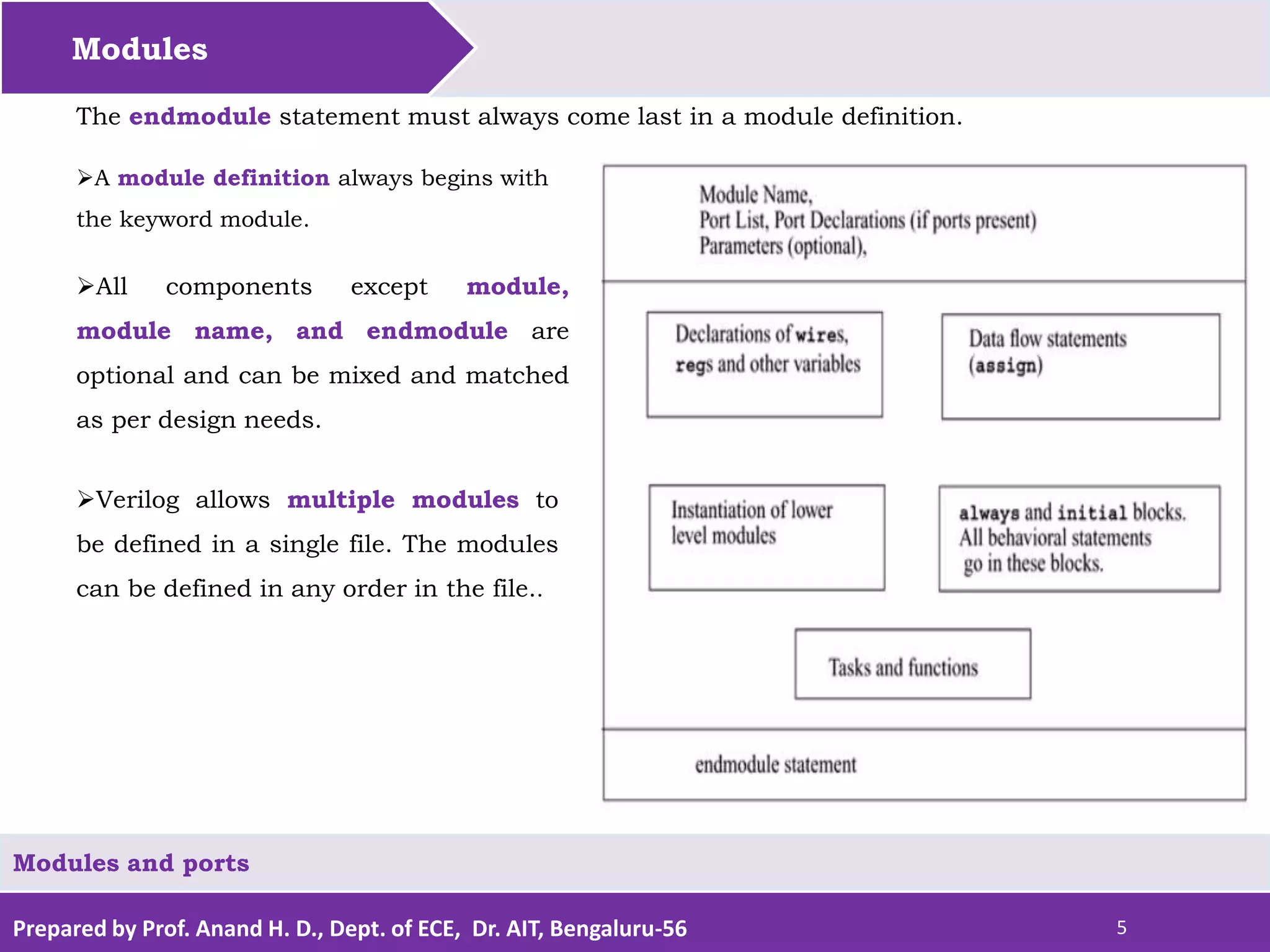
All components except module,
module name, and endmodule are
optional and can be mixed and matched
as per design needs.
The endmodule statement must always come last in a module definition.
A module definition always begins with
the keyword module.
Verilog allows multiple modules to
be defined in a single file. The modules
can be defined in any order in the file..
Modules and ports
Prepared by Prof. Anand H. D., Dept. of ECE, Dr. AIT, Bengaluru-56 6
Modules
// Module name and port list
// SR_latch module
module SR_latch(Q, Qbar, Sbar, Rbar);
//Port declarations
output Q, Qbar;
input Sbar, Rbar;
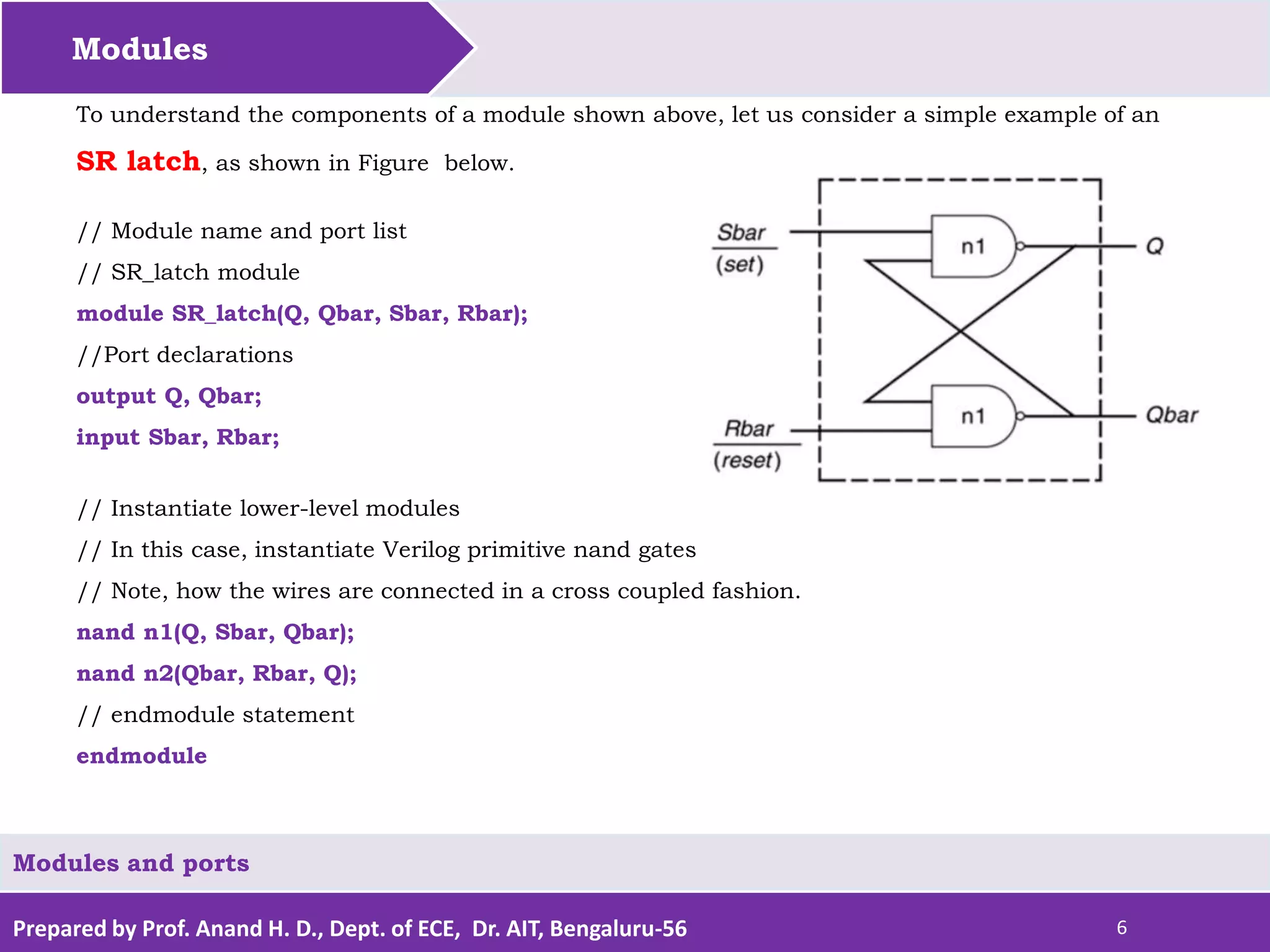
To understand the components of a module shown above, let us consider a simple example of an
SR latch, as shown in Figure below.
Modules and ports
// Instantiate lower-level modules
// In this case, instantiate Verilog primitive nand gates
// Note, how the wires are connected in a cross coupled fashion.
nand n1(Q, Sbar, Qbar);
nand n2(Qbar, Rbar, Q);
// endmodule statement
endmodule
Prepared by Prof. Anand H. D., Dept. of ECE, Dr. AIT, Bengaluru-56 7
Modules
Modules and ports
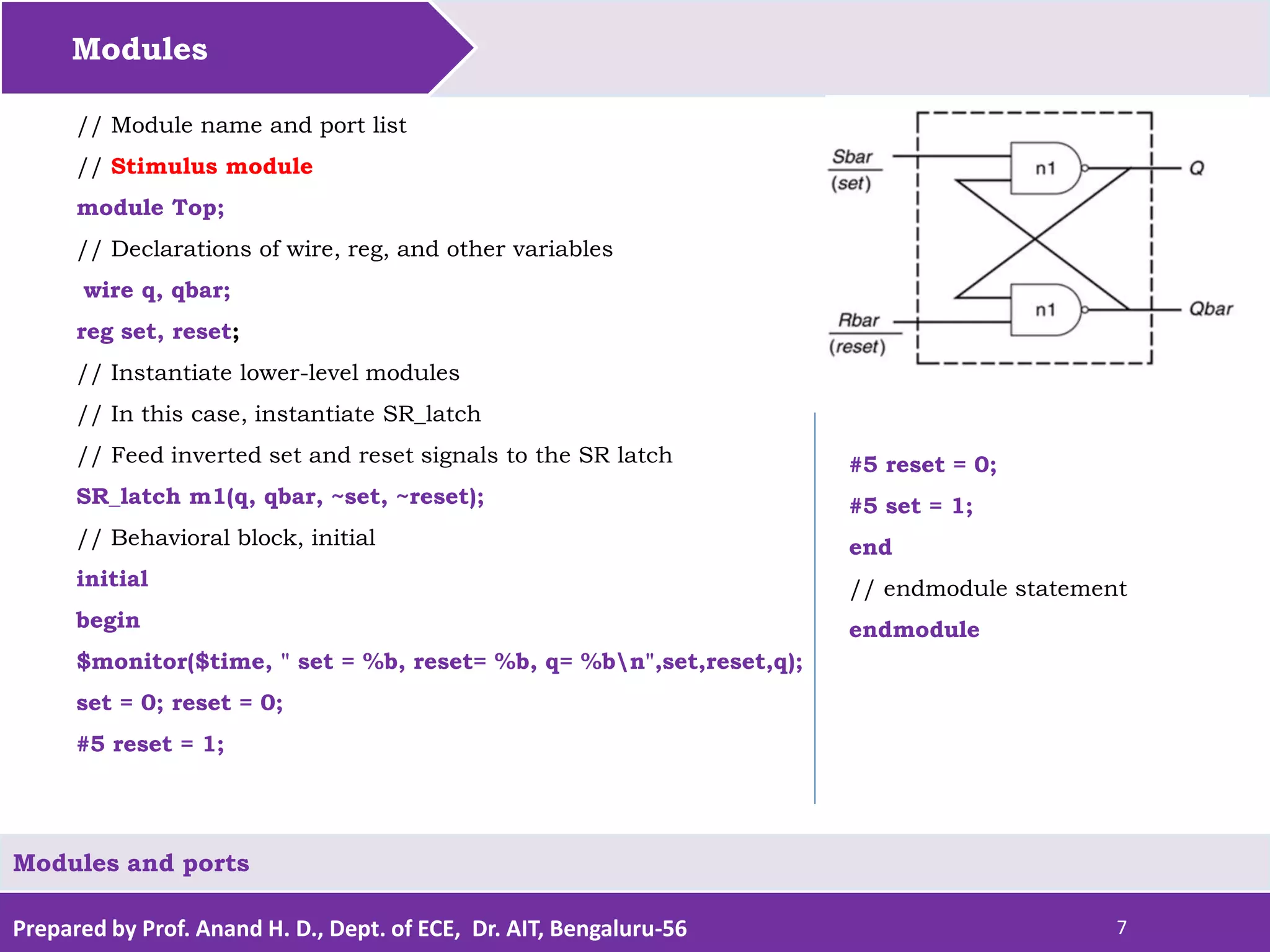
// Module name and port list
// Stimulus module
module Top;
// Declarations of wire, reg, and other variables
wire q, qbar;
reg set, reset;
// Instantiate lower-level modules
// In this case, instantiate SR_latch
// Feed inverted set and reset signals to the SR latch
SR_latch m1(q, qbar, ~set, ~reset);
// Behavioral block, initial
initial
begin
$monitor($time, " set = %b, reset= %b, q= %bn",set,reset,q);
set = 0; reset = 0;
#5 reset = 1;
#5 reset = 0;
#5 set = 1;
end
// endmodule statement
endmodule
Prepared by Prof. Anand H. D., Dept. of ECE, Dr. AIT, Bengaluru-56 8
Modules
module SR_latch(Q, Qbar, Sbar, Rbar);
output Q, Qbar;
input Sbar, Rbar;
nand n1(Q, Sbar, Qbar);
nand n2(Qbar, Rbar, Q);
endmodule
module Top;
wire q, qbar;
reg set, reset;
SR_latch m1(q, qbar, ~set, ~reset);
initial
begin
$monitor($time, " set = %b, reset= %b, q= %bn",set,reset,q);
set = 0; reset = 0;
#5 reset = 1;
#5 reset = 0;
#5 set = 1;
end
endmodule
Modules and ports
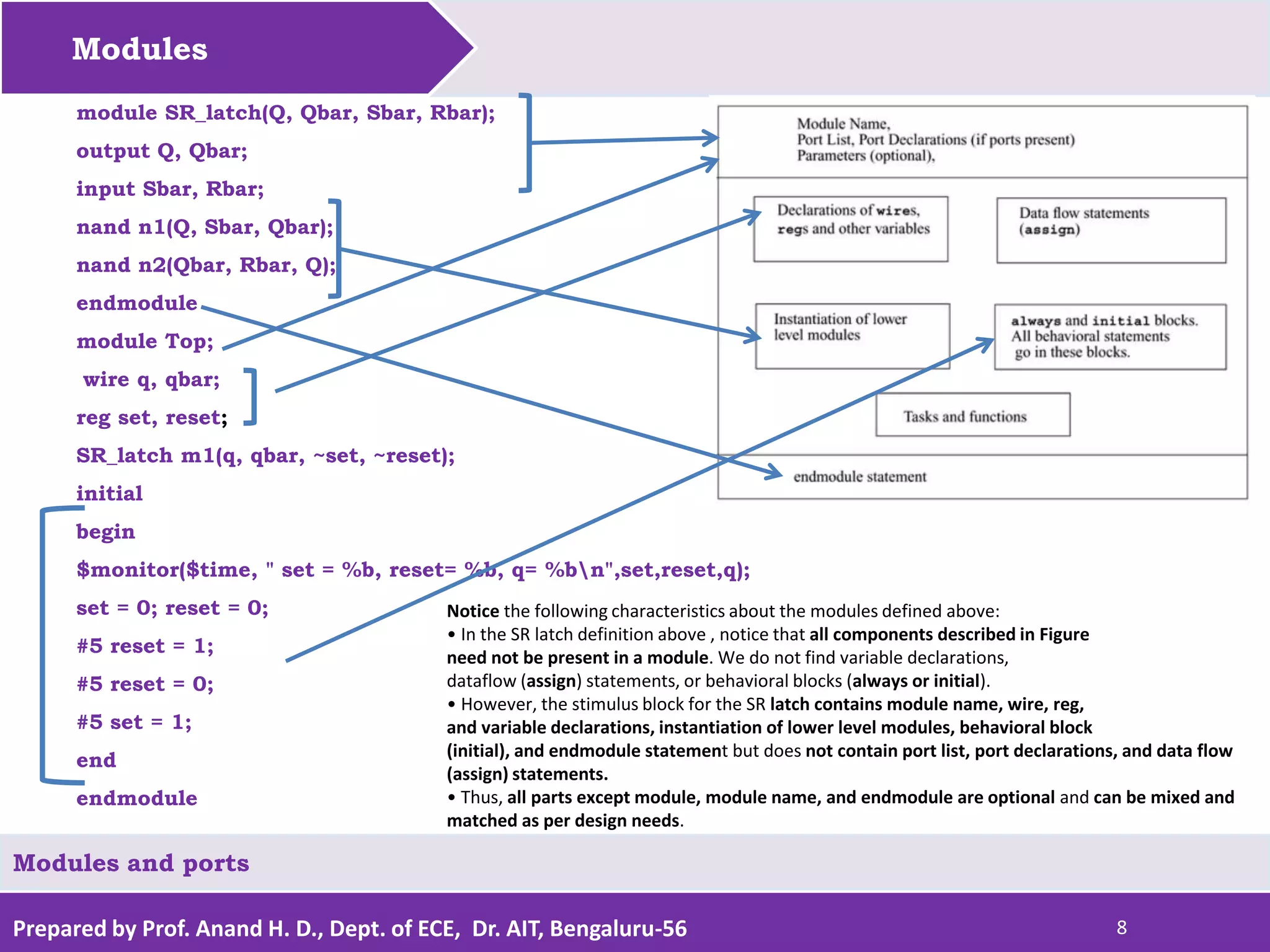
Notice the following characteristics about the modules defined above:
• In the SR latch definition above , notice that all components described in Figure
need not be present in a module. We do not find variable declarations,
dataflow (assign) statements, or behavioral blocks (always or initial).
• However, the stimulus block for the SR latch contains module name, wire, reg,
and variable declarations, instantiation of lower level modules, behavioral block
(initial), and endmodule statement but does not contain port list, port declarations, and data flow
(assign) statements.
• Thus, all parts except module, module name, and endmodule are optional and can be mixed and
matched as per design needs.
Prepared by Prof. Anand H. D., Dept. of ECE, Dr. AIT, Bengaluru-56 9
Let us discuss about
Modules and ports
Modules
Ports
Hierarchical Names.
Prepared by Prof. Anand H. D., Dept. of ECE, Dr. AIT, Bengaluru-56 10
Ports
Ports provide the interface by which a module can communicate with its environment.
For example, the input/output pins of an IC chip are its ports. The environment can interact
with the module only through its ports.
The internals of the module are not visible to the environment. This provides a very powerful
flexibility to the designer. The internals of the module can be changed without affecting the
environment as long as the interface is not modified.
Modules and ports
Ports are also referred to as terminals.
1. List of Ports
A module definition contains an optional list of ports.
If the module does not exchange any signals with the environment, there are no ports in the
list.
 Consider a 4-bit full adder that is instantiated inside a top-level module Top.
Prepared by Prof. Anand H. D., Dept. of ECE, Dr. AIT, Bengaluru-56 11
Ports
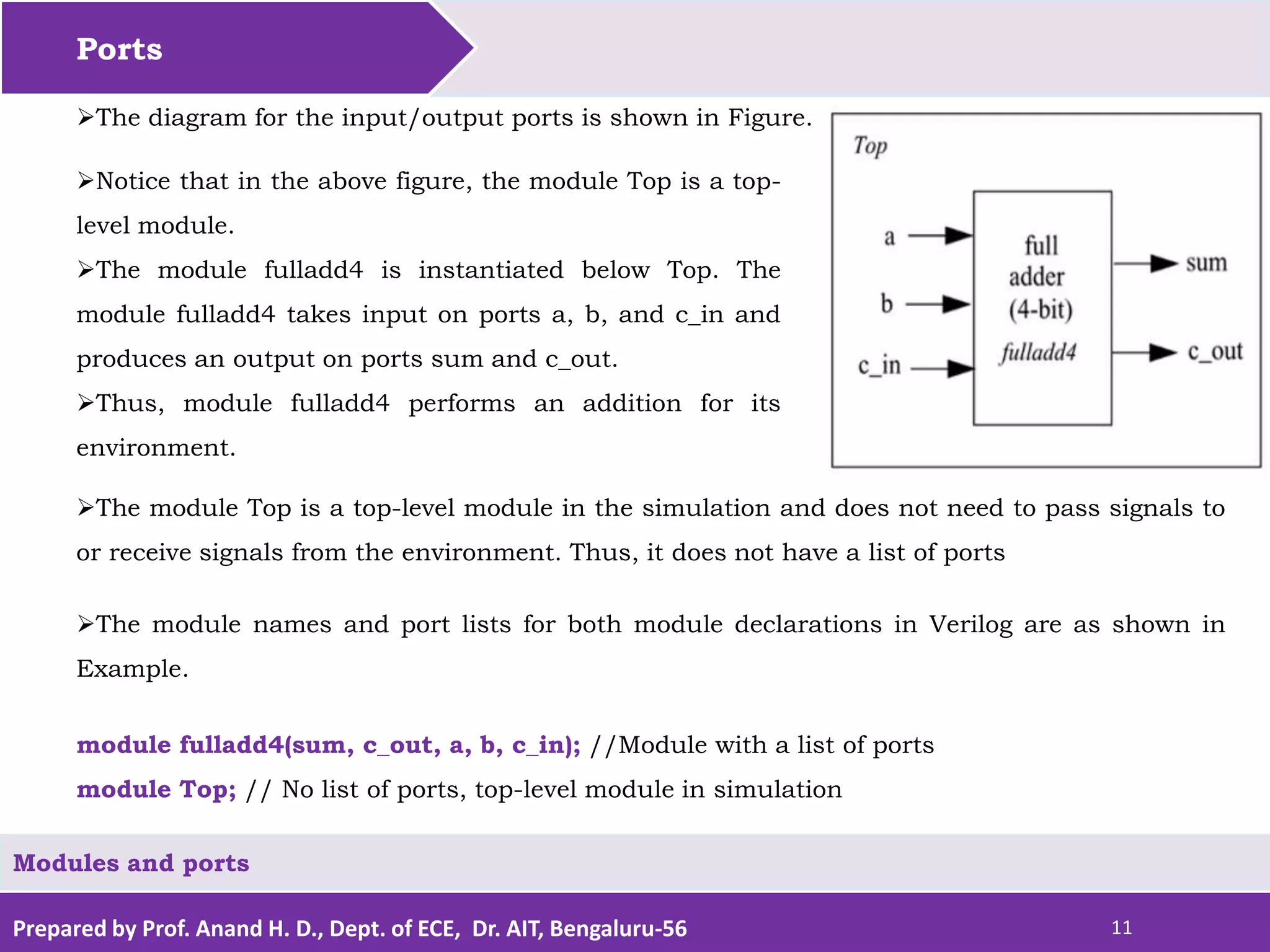
The diagram for the input/output ports is shown in Figure.
Notice that in the above figure, the module Top is a top-
level module.
The module fulladd4 is instantiated below Top. The
module fulladd4 takes input on ports a, b, and c_in and
produces an output on ports sum and c_out.
Thus, module fulladd4 performs an addition for its
environment.
Modules and ports
The module Top is a top-level module in the simulation and does not need to pass signals to
or receive signals from the environment. Thus, it does not have a list of ports
The module names and port lists for both module declarations in Verilog are as shown in
Example.
module fulladd4(sum, c_out, a, b, c_in); //Module with a list of ports
module Top; // No list of ports, top-level module in simulation
Prepared by Prof. Anand H. D., Dept. of ECE, Dr. AIT, Bengaluru-56 12
Ports
Modules and ports
2. Port Declaration
All ports in the list of ports must be declared in the module. Ports can be declared as follows:
Each port in the port list is defined as input,
output, or inout, based on the direction of the
port signal. Thus, for the example of the fulladd4
in Example, the port declarations will be as
shown
module fulladd4(sum, c_out, a, b, c_in);
//Begin port declarations section
output[3:0] sum;
output c_cout;
input [3:0] a, b;
input c_in;
//End port declarations section
...
<module internals>
...
endmodule
Note that all port declarations are implicitly declared as wire
in Verilog. Thus, if a port is intended to be a wire, it is
sufficient to declare it as output, input, or inout. Input or
inout ports are normally declared as wires.
However, if output ports hold their value, they must be
declared as reg. For example, in the definition of DFF, in
Example, we wanted the output q to retain its value until
the next clock edge. The port declarations for DFF will look
as shown in following Example
Prepared by Prof. Anand H. D., Dept. of ECE, Dr. AIT, Bengaluru-56 13
Ports
Modules and ports
Port Declarations for DFF
module DFF(q, d, clk, reset);
output q;
reg q; // Output port q holds value; therefore it is declared as reg.
input d, clk, reset;
...
...
endmodule
Ports of the type input and inout cannot be declared as reg because reg variables store
values and input ports should not store values but simply reflect the changes in the
external signals they are connected to.
Note that the module fulladd4 Example can be declared using an ANSI C style syntax to
specify the ports of that module. Each declared port provides the complete information
about the port.
Prepared by Prof. Anand H. D., Dept. of ECE, Dr. AIT, Bengaluru-56 14
Ports
Modules and ports
Following Example shows this alternate syntax.
This syntax avoids the duplication of naming the ports in both the module definition
statement and the module port list definitions.
If a port is declared but no data type is specified, then, under specific circumstances, the
signal will default to a wire data type.
Example ANSI C Style Port Declaration Syntax
module fulladd4(output reg [3:0] sum,
output reg c_out,
input [3:0] a, b, //wire by default
input c_in); //wire by default
...
<module internals>
...
endmodule
module fulladd4(sum, c_out, a, b, c_in);
//Begin port declarations section
output[3:0] sum;
output c_cout;
input [3:0] a, b;
input c_in;
//End port declarations section
...
<module internals>
...
endmodule
Prepared by Prof. Anand H. D., Dept. of ECE, Dr. AIT, Bengaluru-56 15
Ports
Modules and ports
3. Port Connection Rules
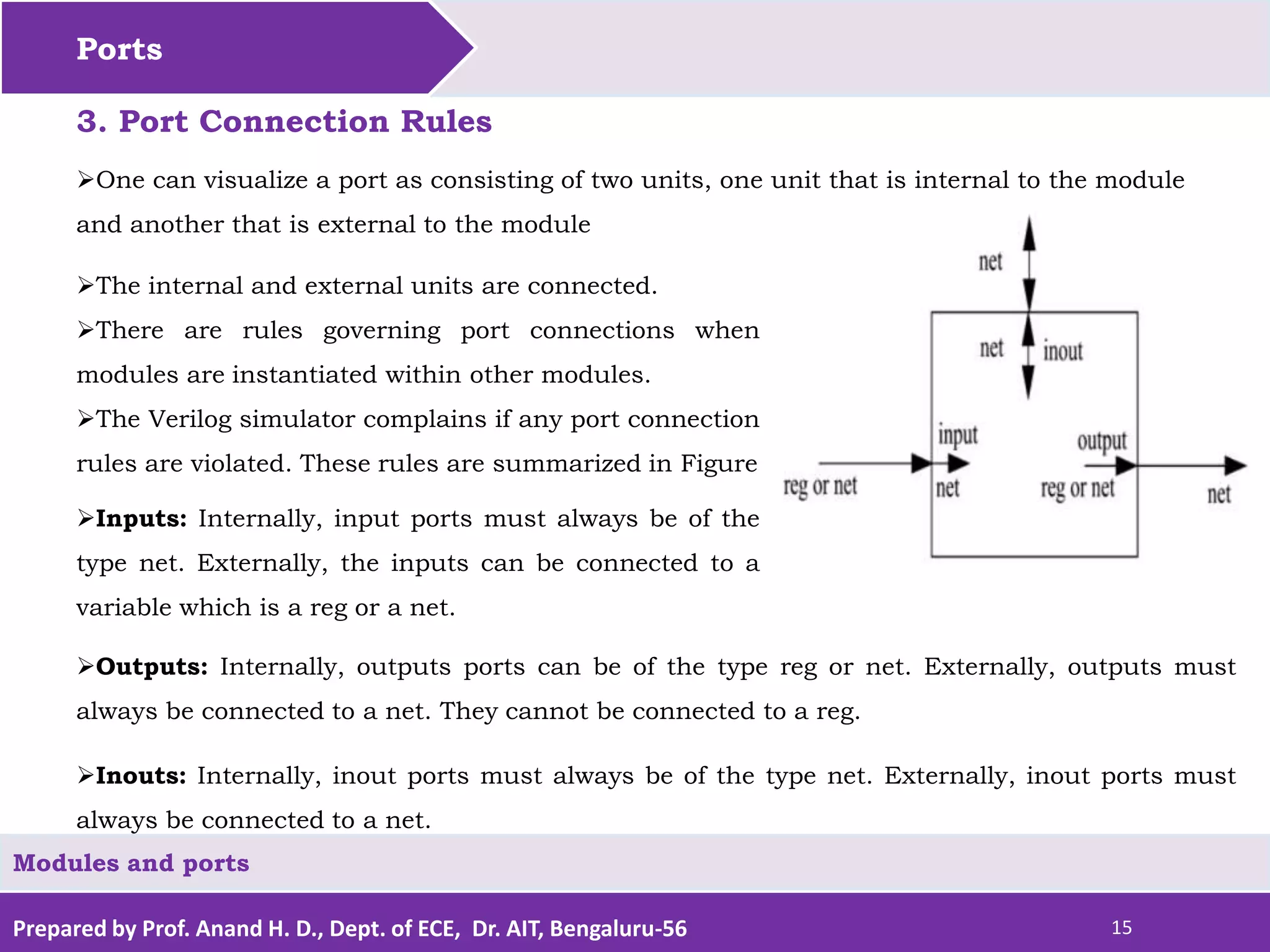
The internal and external units are connected.
There are rules governing port connections when
modules are instantiated within other modules.
The Verilog simulator complains if any port connection
rules are violated. These rules are summarized in Figure
Inputs: Internally, input ports must always be of the
type net. Externally, the inputs can be connected to a
variable which is a reg or a net.
Outputs: Internally, outputs ports can be of the type reg or net. Externally, outputs must
always be connected to a net. They cannot be connected to a reg.
One can visualize a port as consisting of two units, one unit that is internal to the module
and another that is external to the module
Inouts: Internally, inout ports must always be of the type net. Externally, inout ports must
always be connected to a net.
Prepared by Prof. Anand H. D., Dept. of ECE, Dr. AIT, Bengaluru-56 16
Ports
Modules and ports
Width matching
It is legal to connect internal and external items of different sizes when making intermodule
port connections. However, a warning is typically issued that the widths do not match.
Unconnected ports
Verilog allows ports to remain unconnected.
For example, certain output ports might be simply for debugging, and you might not be
interested in connecting them to the external signals.
You can let a port remain unconnected by instantiating a module as shown below.
fulladd4 fa0(SUM, , A, B, C_IN); // Output port c_out is unconnected
module Top;
//Declare connection variables
reg [3:0]A,B;
reg C_IN;
reg [3:0] SUM;
wire C_OUT;
//Instantiate fulladd4, call it fa0
fulladd4 fa0(SUM, C_OUT, A, B, C_IN);
.
<stimulus>
.
endmodule
/* Illegal connection because output port sum in
module fulladd4 is connected to a register variable
SUM in module Top. */
Illegal Port Connection
Prepared by Prof. Anand H. D., Dept. of ECE, Dr. AIT, Bengaluru-56 17
Ports
Modules and ports
4. Connecting Ports to External Signals
There are two methods of making connections between signals specified in the module
instantiation and the ports in a module definition.
These two methods cannot be mixed.
These methods are discussed in the following sections.
Connecting by ordered list
Connecting by ordered list is the most intuitive method for most beginners.
The signals to be connected must appear in the module instantiation in the same order as
the ports in the port list in the module definition.
Once again, consider the module fulladd4 defined. To connect signals in module Top by
ordered list, the Verilog code is shown.
Notice that the external signals SUM, C_OUT, A, B, and C_IN appear in exactly the same
order as the ports sum, c_out, a, b, and c_in in module definition of fulladd4..
Prepared by Prof. Anand H. D., Dept. of ECE, Dr. AIT, Bengaluru-56 18
Ports
Modules and ports
Connection by Ordered List
module Top;
//Declare connection variables
reg [3:0]A,B;
reg C_IN;
wire [3:0] SUM;
wire C_OUT;
//Instantiate fulladd4, call it fa_ordered.
//Signals are connected to ports in order
//(by position)
fulladd4 fa_ordered(SUM, C_OUT, A, B, C_IN);
...
<stimulus>
...
endmodule
module fulladd4(sum, c_out, a, b, c_in);
//Begin port declarations section
output[3:0] sum;
output c_cout;
input [3:0] a, b;
input c_in;
//End port declarations section
...
<module internals>
...
endmodule
Notice that the external signals SUM, C_OUT, A, B, and
C_IN appear in exactly the same order as the ports sum,
c_out, a, b, and c_in in module definition of fulladd4..
Prepared by Prof. Anand H. D., Dept. of ECE, Dr. AIT, Bengaluru-56 19
Ports
Modules and ports
Another advantage of
connecting ports by name is
that as long as the port name
is not changed, the order of
ports in the port list of a
module can be rearranged
without changing the port
connections in module
instantiations.
Connecting ports by name
For large designs where modules have, say, 50 ports, remembering the order of the ports in the
module definition is impractical and error-prone.
Verilog provides the capability to connect external signals to ports by the port names, rather than
by position.
We could connect the ports by name in Example above by instantiating the module fulladd4, as
follows. Note that you can specify the port connections in any order as long as the port name in the
module definition correctly matches the external signal
// Instantiate module fa_byname and connect signals to ports by name
fulladd4 fa_byname(.c_out(C_OUT), .sum(SUM), .b(B), .c_in(C_IN), .a(A),);
Note that only those ports that are to be connected to external signals must be specified in port
connection by name. Unconnected ports can be dropped.
For example, if the port c_out were to be kept unconnected, the instantiation of fulladd4 would look
as follows. The port c_out is simply dropped from the port list.
//Instantiate module fa_byname and connect signals to ports by name
fulladd4 fa_byname(.sum(SUM), .b(B), .c_in(C_IN), .a(A),);
Prepared by Prof. Anand H. D., Dept. of ECE, Dr. AIT, Bengaluru-56 20
Let us discuss about
Modules and ports
Modules
Ports
Hierarchical Names
Prepared by Prof. Anand H. D., Dept. of ECE, Dr. AIT, Bengaluru-56 21
Hierarchical Names
Modules and ports
Every module instance, signal, or variable is defined with an identifier. A particular
identifier has a unique place in the design hierarchy.
Hierarchical name referencing allows us to denote every identifier in the design hierarchy
with a unique name.
A hierarchical name is a list of identifiers separated by dots (".") for each level of hierarchy.
Thus, any identifier can be addressed from any place in the design by simply specifying the
complete hierarchical name of that identifier.
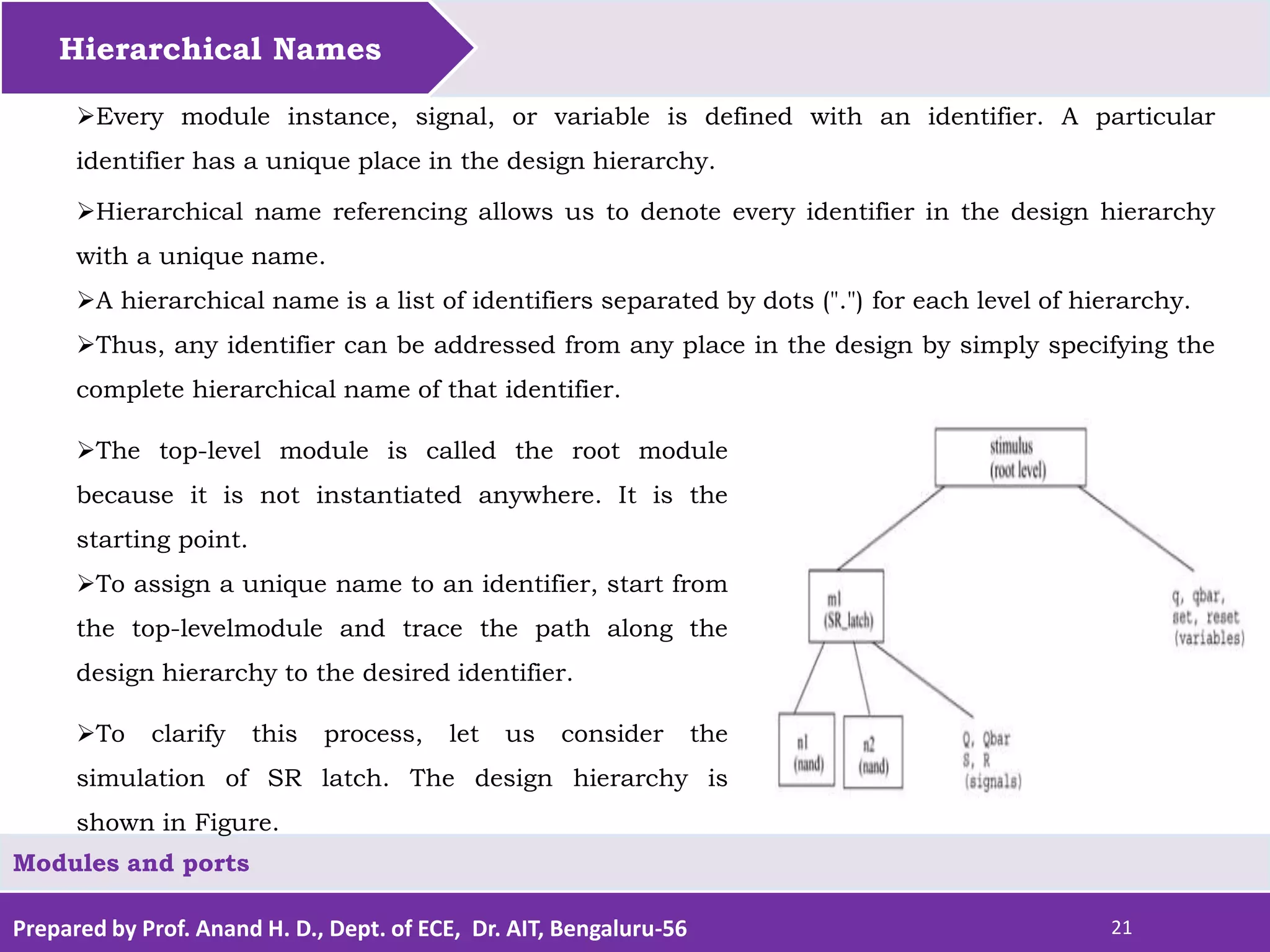
The top-level module is called the root module
because it is not instantiated anywhere. It is the
starting point.
To assign a unique name to an identifier, start from
the top-levelmodule and trace the path along the
design hierarchy to the desired identifier.
To clarify this process, let us consider the
simulation of SR latch. The design hierarchy is
shown in Figure.
Prepared by Prof. Anand H. D., Dept. of ECE, Dr. AIT, Bengaluru-56 22
Hierarchical Names
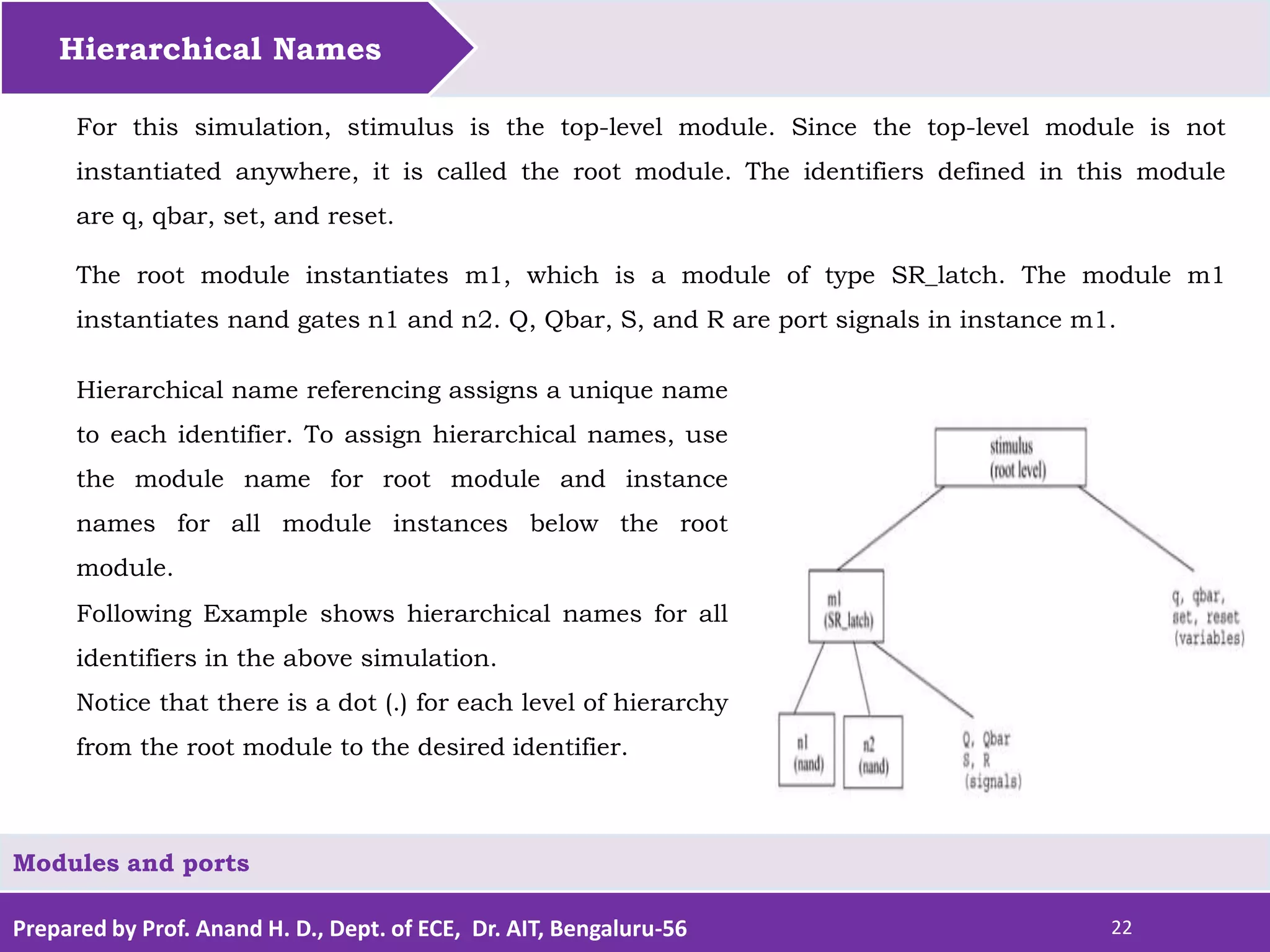
For this simulation, stimulus is the top-level module. Since the top-level module is not
instantiated anywhere, it is called the root module. The identifiers defined in this module
are q, qbar, set, and reset.
The root module instantiates m1, which is a module of type SR_latch. The module m1
instantiates nand gates n1 and n2. Q, Qbar, S, and R are port signals in instance m1.
Modules and ports
Hierarchical name referencing assigns a unique name
to each identifier. To assign hierarchical names, use
the module name for root module and instance
names for all module instances below the root
module.
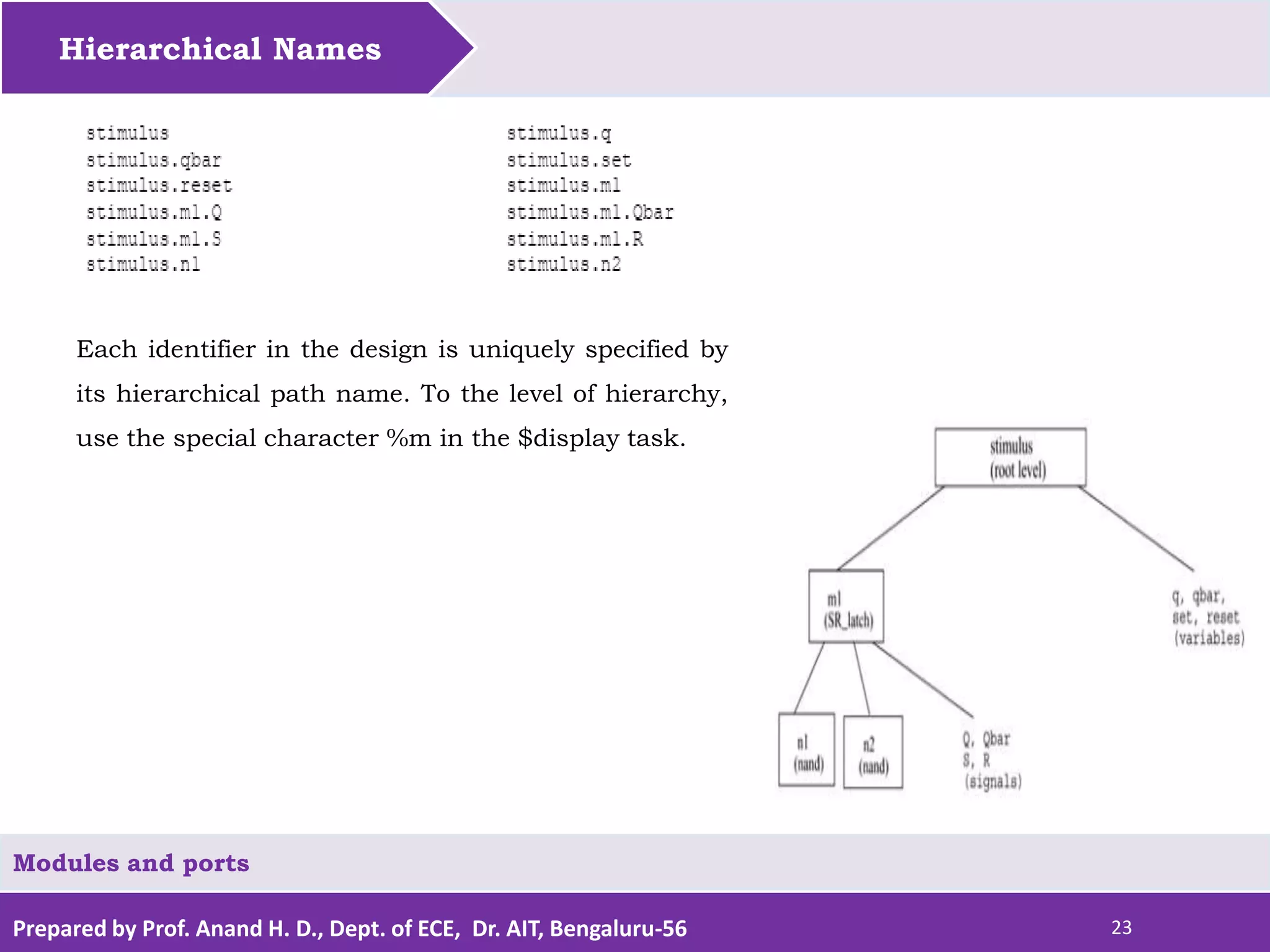
Following Example shows hierarchical names for all
identifiers in the above simulation.
Notice that there is a dot (.) for each level of hierarchy
from the root module to the desired identifier.
Prepared by Prof. Anand H. D., Dept. of ECE, Dr. AIT, Bengaluru-56 23
Hierarchical Names
Modules and ports
Each identifier in the design is uniquely specified by
its hierarchical path name. To the level of hierarchy,
use the special character %m in the $display task.
Prepared by Prof. Anand H. D., Dept. of ECE, Dr. AIT, Bengaluru-56 24
Hierarchical Names
Modules and ports
Assignment1 Questions:
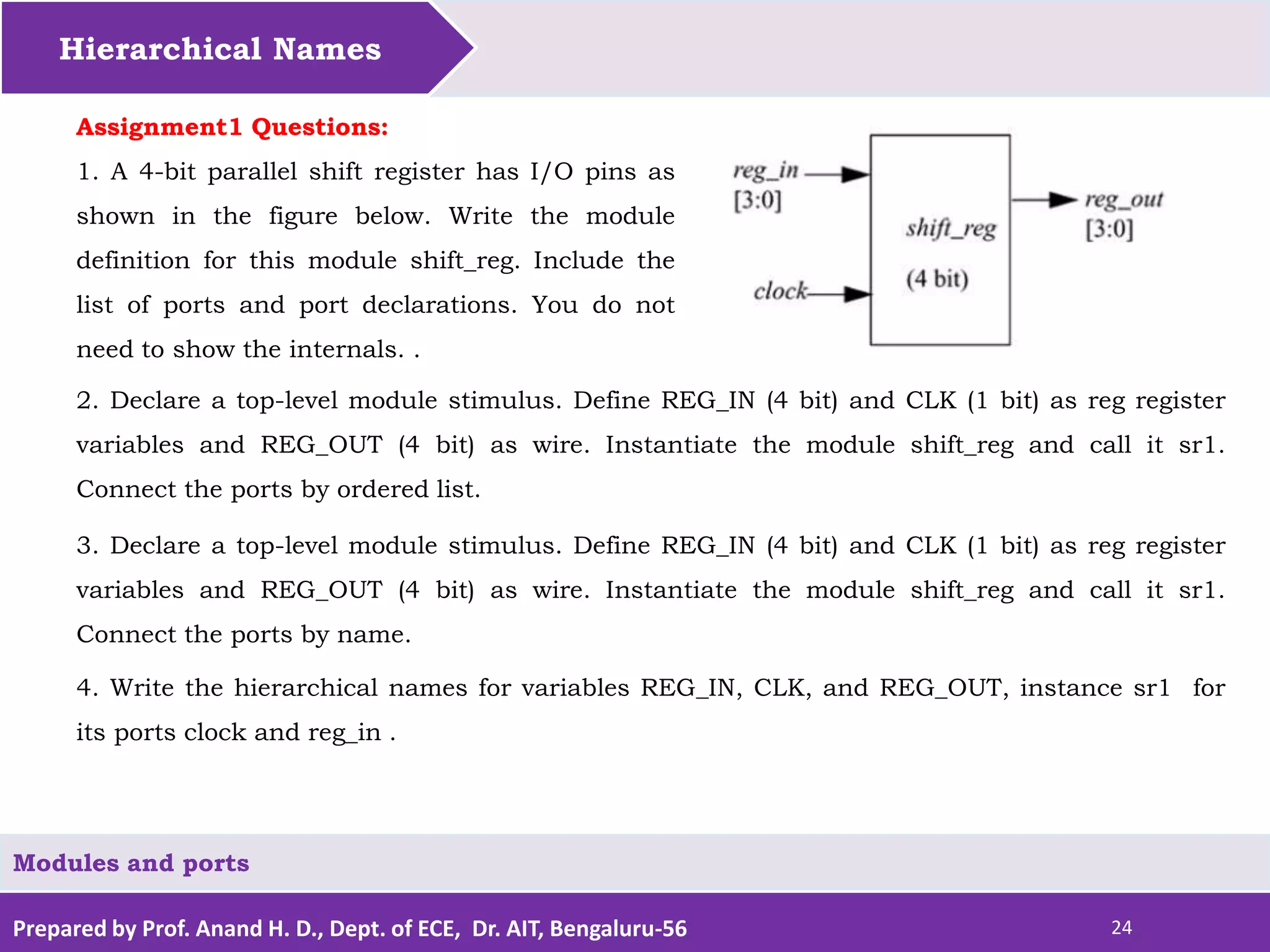
1. A 4-bit parallel shift register has I/O pins as
shown in the figure below. Write the module
definition for this module shift_reg. Include the
list of ports and port declarations. You do not
need to show the internals. .
2. Declare a top-level module stimulus. Define REG_IN (4 bit) and CLK (1 bit) as reg register
variables and REG_OUT (4 bit) as wire. Instantiate the module shift_reg and call it sr1.
Connect the ports by ordered list.
3. Declare a top-level module stimulus. Define REG_IN (4 bit) and CLK (1 bit) as reg register
variables and REG_OUT (4 bit) as wire. Instantiate the module shift_reg and call it sr1.
Connect the ports by name.
4. Write the hierarchical names for variables REG_IN, CLK, and REG_OUT, instance sr1 for
its ports clock and reg_in .
Prepared by Prof. Anand H. D., Dept. of ECE, Dr. AIT, Bengaluru-56 20
Reference
Samir Palnitkar, “Verilog HDL – A guide to Digital
Design and Synthesis”, Pearson, 2003
For Further Studies
Modules and ports
Prof. Anand H. D.
M. Tech. (PhD.)
Assistant Professor,
Department of Electronics & Communication Engineering
Dr. Ambedkar Institute of Technology, Bengaluru-56
Email: anandhd.ec@drait.edu.in
Phone: 9844518832

Modules and ports in Verilog HDL

  • 1.
    Prepared by Prof.Anand H. D., Dept. of ECE, Dr. AIT, Bengaluru-56 Modules and Ports Mr. Anand H. D. 1 Modules and ports Department of Electronics & Communication Engineering Dr. Ambedkar Institute of Technology Bengaluru-56
  • 2.
    Prepared by Prof.Anand H. D., Dept. of ECE, Dr. AIT, Bengaluru-56 2 Topics to be covered Modules Ports Hierarchical Names. Modules and ports
  • 3.
    Prepared by Prof.Anand H. D., Dept. of ECE, Dr. AIT, Bengaluru-56 3 Let us discuss about Modules and ports Modules Ports Hierarchical Names.
  • 4.
    Prepared by Prof.Anand H. D., Dept. of ECE, Dr. AIT, Bengaluru-56 4 Modules The module name, port list, port declarations, and optional parameters must come first in a module definition. A module in Verilog consists of distinct parts, as shown in Figure A module definition always begins with the keyword module. Port list and port declarations are present only if the module has any ports to interact with the external environment. Modules and ports The five components within a module are: variable declarations, dataflow statements, instantiation of lower modules, behavioral blocks, and tasks or functions. These components can be in any order and at any place in the module definition.
  • 5.
    Prepared by Prof.Anand H. D., Dept. of ECE, Dr. AIT, Bengaluru-56 5 Modules All components except module, module name, and endmodule are optional and can be mixed and matched as per design needs. The endmodule statement must always come last in a module definition. A module definition always begins with the keyword module. Verilog allows multiple modules to be defined in a single file. The modules can be defined in any order in the file.. Modules and ports
  • 6.
    Prepared by Prof.Anand H. D., Dept. of ECE, Dr. AIT, Bengaluru-56 6 Modules // Module name and port list // SR_latch module module SR_latch(Q, Qbar, Sbar, Rbar); //Port declarations output Q, Qbar; input Sbar, Rbar; To understand the components of a module shown above, let us consider a simple example of an SR latch, as shown in Figure below. Modules and ports // Instantiate lower-level modules // In this case, instantiate Verilog primitive nand gates // Note, how the wires are connected in a cross coupled fashion. nand n1(Q, Sbar, Qbar); nand n2(Qbar, Rbar, Q); // endmodule statement endmodule
  • 7.
    Prepared by Prof.Anand H. D., Dept. of ECE, Dr. AIT, Bengaluru-56 7 Modules Modules and ports // Module name and port list // Stimulus module module Top; // Declarations of wire, reg, and other variables wire q, qbar; reg set, reset; // Instantiate lower-level modules // In this case, instantiate SR_latch // Feed inverted set and reset signals to the SR latch SR_latch m1(q, qbar, ~set, ~reset); // Behavioral block, initial initial begin $monitor($time, " set = %b, reset= %b, q= %bn",set,reset,q); set = 0; reset = 0; #5 reset = 1; #5 reset = 0; #5 set = 1; end // endmodule statement endmodule
  • 8.
    Prepared by Prof.Anand H. D., Dept. of ECE, Dr. AIT, Bengaluru-56 8 Modules module SR_latch(Q, Qbar, Sbar, Rbar); output Q, Qbar; input Sbar, Rbar; nand n1(Q, Sbar, Qbar); nand n2(Qbar, Rbar, Q); endmodule module Top; wire q, qbar; reg set, reset; SR_latch m1(q, qbar, ~set, ~reset); initial begin $monitor($time, " set = %b, reset= %b, q= %bn",set,reset,q); set = 0; reset = 0; #5 reset = 1; #5 reset = 0; #5 set = 1; end endmodule Modules and ports Notice the following characteristics about the modules defined above: • In the SR latch definition above , notice that all components described in Figure need not be present in a module. We do not find variable declarations, dataflow (assign) statements, or behavioral blocks (always or initial). • However, the stimulus block for the SR latch contains module name, wire, reg, and variable declarations, instantiation of lower level modules, behavioral block (initial), and endmodule statement but does not contain port list, port declarations, and data flow (assign) statements. • Thus, all parts except module, module name, and endmodule are optional and can be mixed and matched as per design needs.
  • 9.
    Prepared by Prof.Anand H. D., Dept. of ECE, Dr. AIT, Bengaluru-56 9 Let us discuss about Modules and ports Modules Ports Hierarchical Names.
  • 10.
    Prepared by Prof.Anand H. D., Dept. of ECE, Dr. AIT, Bengaluru-56 10 Ports Ports provide the interface by which a module can communicate with its environment. For example, the input/output pins of an IC chip are its ports. The environment can interact with the module only through its ports. The internals of the module are not visible to the environment. This provides a very powerful flexibility to the designer. The internals of the module can be changed without affecting the environment as long as the interface is not modified. Modules and ports Ports are also referred to as terminals. 1. List of Ports A module definition contains an optional list of ports. If the module does not exchange any signals with the environment, there are no ports in the list.  Consider a 4-bit full adder that is instantiated inside a top-level module Top.
  • 11.
    Prepared by Prof.Anand H. D., Dept. of ECE, Dr. AIT, Bengaluru-56 11 Ports The diagram for the input/output ports is shown in Figure. Notice that in the above figure, the module Top is a top- level module. The module fulladd4 is instantiated below Top. The module fulladd4 takes input on ports a, b, and c_in and produces an output on ports sum and c_out. Thus, module fulladd4 performs an addition for its environment. Modules and ports The module Top is a top-level module in the simulation and does not need to pass signals to or receive signals from the environment. Thus, it does not have a list of ports The module names and port lists for both module declarations in Verilog are as shown in Example. module fulladd4(sum, c_out, a, b, c_in); //Module with a list of ports module Top; // No list of ports, top-level module in simulation
  • 12.
    Prepared by Prof.Anand H. D., Dept. of ECE, Dr. AIT, Bengaluru-56 12 Ports Modules and ports 2. Port Declaration All ports in the list of ports must be declared in the module. Ports can be declared as follows: Each port in the port list is defined as input, output, or inout, based on the direction of the port signal. Thus, for the example of the fulladd4 in Example, the port declarations will be as shown module fulladd4(sum, c_out, a, b, c_in); //Begin port declarations section output[3:0] sum; output c_cout; input [3:0] a, b; input c_in; //End port declarations section ... <module internals> ... endmodule Note that all port declarations are implicitly declared as wire in Verilog. Thus, if a port is intended to be a wire, it is sufficient to declare it as output, input, or inout. Input or inout ports are normally declared as wires. However, if output ports hold their value, they must be declared as reg. For example, in the definition of DFF, in Example, we wanted the output q to retain its value until the next clock edge. The port declarations for DFF will look as shown in following Example
  • 13.
    Prepared by Prof.Anand H. D., Dept. of ECE, Dr. AIT, Bengaluru-56 13 Ports Modules and ports Port Declarations for DFF module DFF(q, d, clk, reset); output q; reg q; // Output port q holds value; therefore it is declared as reg. input d, clk, reset; ... ... endmodule Ports of the type input and inout cannot be declared as reg because reg variables store values and input ports should not store values but simply reflect the changes in the external signals they are connected to. Note that the module fulladd4 Example can be declared using an ANSI C style syntax to specify the ports of that module. Each declared port provides the complete information about the port.
  • 14.
    Prepared by Prof.Anand H. D., Dept. of ECE, Dr. AIT, Bengaluru-56 14 Ports Modules and ports Following Example shows this alternate syntax. This syntax avoids the duplication of naming the ports in both the module definition statement and the module port list definitions. If a port is declared but no data type is specified, then, under specific circumstances, the signal will default to a wire data type. Example ANSI C Style Port Declaration Syntax module fulladd4(output reg [3:0] sum, output reg c_out, input [3:0] a, b, //wire by default input c_in); //wire by default ... <module internals> ... endmodule module fulladd4(sum, c_out, a, b, c_in); //Begin port declarations section output[3:0] sum; output c_cout; input [3:0] a, b; input c_in; //End port declarations section ... <module internals> ... endmodule
  • 15.
    Prepared by Prof.Anand H. D., Dept. of ECE, Dr. AIT, Bengaluru-56 15 Ports Modules and ports 3. Port Connection Rules The internal and external units are connected. There are rules governing port connections when modules are instantiated within other modules. The Verilog simulator complains if any port connection rules are violated. These rules are summarized in Figure Inputs: Internally, input ports must always be of the type net. Externally, the inputs can be connected to a variable which is a reg or a net. Outputs: Internally, outputs ports can be of the type reg or net. Externally, outputs must always be connected to a net. They cannot be connected to a reg. One can visualize a port as consisting of two units, one unit that is internal to the module and another that is external to the module Inouts: Internally, inout ports must always be of the type net. Externally, inout ports must always be connected to a net.
  • 16.
    Prepared by Prof.Anand H. D., Dept. of ECE, Dr. AIT, Bengaluru-56 16 Ports Modules and ports Width matching It is legal to connect internal and external items of different sizes when making intermodule port connections. However, a warning is typically issued that the widths do not match. Unconnected ports Verilog allows ports to remain unconnected. For example, certain output ports might be simply for debugging, and you might not be interested in connecting them to the external signals. You can let a port remain unconnected by instantiating a module as shown below. fulladd4 fa0(SUM, , A, B, C_IN); // Output port c_out is unconnected module Top; //Declare connection variables reg [3:0]A,B; reg C_IN; reg [3:0] SUM; wire C_OUT; //Instantiate fulladd4, call it fa0 fulladd4 fa0(SUM, C_OUT, A, B, C_IN); . <stimulus> . endmodule /* Illegal connection because output port sum in module fulladd4 is connected to a register variable SUM in module Top. */ Illegal Port Connection
  • 17.
    Prepared by Prof.Anand H. D., Dept. of ECE, Dr. AIT, Bengaluru-56 17 Ports Modules and ports 4. Connecting Ports to External Signals There are two methods of making connections between signals specified in the module instantiation and the ports in a module definition. These two methods cannot be mixed. These methods are discussed in the following sections. Connecting by ordered list Connecting by ordered list is the most intuitive method for most beginners. The signals to be connected must appear in the module instantiation in the same order as the ports in the port list in the module definition. Once again, consider the module fulladd4 defined. To connect signals in module Top by ordered list, the Verilog code is shown. Notice that the external signals SUM, C_OUT, A, B, and C_IN appear in exactly the same order as the ports sum, c_out, a, b, and c_in in module definition of fulladd4..
  • 18.
    Prepared by Prof.Anand H. D., Dept. of ECE, Dr. AIT, Bengaluru-56 18 Ports Modules and ports Connection by Ordered List module Top; //Declare connection variables reg [3:0]A,B; reg C_IN; wire [3:0] SUM; wire C_OUT; //Instantiate fulladd4, call it fa_ordered. //Signals are connected to ports in order //(by position) fulladd4 fa_ordered(SUM, C_OUT, A, B, C_IN); ... <stimulus> ... endmodule module fulladd4(sum, c_out, a, b, c_in); //Begin port declarations section output[3:0] sum; output c_cout; input [3:0] a, b; input c_in; //End port declarations section ... <module internals> ... endmodule Notice that the external signals SUM, C_OUT, A, B, and C_IN appear in exactly the same order as the ports sum, c_out, a, b, and c_in in module definition of fulladd4..
  • 19.
    Prepared by Prof.Anand H. D., Dept. of ECE, Dr. AIT, Bengaluru-56 19 Ports Modules and ports Another advantage of connecting ports by name is that as long as the port name is not changed, the order of ports in the port list of a module can be rearranged without changing the port connections in module instantiations. Connecting ports by name For large designs where modules have, say, 50 ports, remembering the order of the ports in the module definition is impractical and error-prone. Verilog provides the capability to connect external signals to ports by the port names, rather than by position. We could connect the ports by name in Example above by instantiating the module fulladd4, as follows. Note that you can specify the port connections in any order as long as the port name in the module definition correctly matches the external signal // Instantiate module fa_byname and connect signals to ports by name fulladd4 fa_byname(.c_out(C_OUT), .sum(SUM), .b(B), .c_in(C_IN), .a(A),); Note that only those ports that are to be connected to external signals must be specified in port connection by name. Unconnected ports can be dropped. For example, if the port c_out were to be kept unconnected, the instantiation of fulladd4 would look as follows. The port c_out is simply dropped from the port list. //Instantiate module fa_byname and connect signals to ports by name fulladd4 fa_byname(.sum(SUM), .b(B), .c_in(C_IN), .a(A),);
  • 20.
    Prepared by Prof.Anand H. D., Dept. of ECE, Dr. AIT, Bengaluru-56 20 Let us discuss about Modules and ports Modules Ports Hierarchical Names
  • 21.
    Prepared by Prof.Anand H. D., Dept. of ECE, Dr. AIT, Bengaluru-56 21 Hierarchical Names Modules and ports Every module instance, signal, or variable is defined with an identifier. A particular identifier has a unique place in the design hierarchy. Hierarchical name referencing allows us to denote every identifier in the design hierarchy with a unique name. A hierarchical name is a list of identifiers separated by dots (".") for each level of hierarchy. Thus, any identifier can be addressed from any place in the design by simply specifying the complete hierarchical name of that identifier. The top-level module is called the root module because it is not instantiated anywhere. It is the starting point. To assign a unique name to an identifier, start from the top-levelmodule and trace the path along the design hierarchy to the desired identifier. To clarify this process, let us consider the simulation of SR latch. The design hierarchy is shown in Figure.
  • 22.
    Prepared by Prof.Anand H. D., Dept. of ECE, Dr. AIT, Bengaluru-56 22 Hierarchical Names For this simulation, stimulus is the top-level module. Since the top-level module is not instantiated anywhere, it is called the root module. The identifiers defined in this module are q, qbar, set, and reset. The root module instantiates m1, which is a module of type SR_latch. The module m1 instantiates nand gates n1 and n2. Q, Qbar, S, and R are port signals in instance m1. Modules and ports Hierarchical name referencing assigns a unique name to each identifier. To assign hierarchical names, use the module name for root module and instance names for all module instances below the root module. Following Example shows hierarchical names for all identifiers in the above simulation. Notice that there is a dot (.) for each level of hierarchy from the root module to the desired identifier.
  • 23.
    Prepared by Prof.Anand H. D., Dept. of ECE, Dr. AIT, Bengaluru-56 23 Hierarchical Names Modules and ports Each identifier in the design is uniquely specified by its hierarchical path name. To the level of hierarchy, use the special character %m in the $display task.
  • 24.
    Prepared by Prof.Anand H. D., Dept. of ECE, Dr. AIT, Bengaluru-56 24 Hierarchical Names Modules and ports Assignment1 Questions: 1. A 4-bit parallel shift register has I/O pins as shown in the figure below. Write the module definition for this module shift_reg. Include the list of ports and port declarations. You do not need to show the internals. . 2. Declare a top-level module stimulus. Define REG_IN (4 bit) and CLK (1 bit) as reg register variables and REG_OUT (4 bit) as wire. Instantiate the module shift_reg and call it sr1. Connect the ports by ordered list. 3. Declare a top-level module stimulus. Define REG_IN (4 bit) and CLK (1 bit) as reg register variables and REG_OUT (4 bit) as wire. Instantiate the module shift_reg and call it sr1. Connect the ports by name. 4. Write the hierarchical names for variables REG_IN, CLK, and REG_OUT, instance sr1 for its ports clock and reg_in .
  • 25.
    Prepared by Prof.Anand H. D., Dept. of ECE, Dr. AIT, Bengaluru-56 20 Reference Samir Palnitkar, “Verilog HDL – A guide to Digital Design and Synthesis”, Pearson, 2003 For Further Studies Modules and ports
  • 26.
    Prof. Anand H.D. M. Tech. (PhD.) Assistant Professor, Department of Electronics & Communication Engineering Dr. Ambedkar Institute of Technology, Bengaluru-56 Email: anandhd.ec@drait.edu.in Phone: 9844518832